# Overview
## Electroneum Smart Chain Development Documentation
This documentation is designed to help you build with the Electroneum Smart Chain. It covers the tech stack and documents advanced topics for more complex applications and use cases.
Most of this documentation was inspired by the [official Ethereum documentation](https://ethereum.org/en/developers/docs/) as similar concepts apply to the Electroneum Smart Chain.
## Development modules
If this is your first attempt at Electroneum Smart Chain development, we recommend starting at the beginning and working your way through like a book.
### Foundational topics
* [Intro to Electroneum Smart Chain](/foundational-topics/intro-to-the-electroneum-smart-chain) *– A quick overview of the Electroneum Smart Chain*
* [Intro to ETN](/foundational-topics/intro-to-etn) *– A quick overview of ETN*
* [Intro to dapps](/foundational-topics/intro-to-dapps) *– An introduction to decentralized applications*
* [Web2 vs Web3](/foundational-topics/web2-vs-web3) *– The fundamental differences that blockchain-based applications provide*
* [Accounts](/foundational-topics/accounts) *– Entities in the network that can hold a balance and send transactions*
* [Transactions](/foundational-topics/transactions) *– Transfers and other actions that cause Electroneum's state to change*
* [Blocks](/foundational-topics/blocks) *– The way transactions are batched to ensure state is synchronised across all actors*
* [Electroneum virtual machine (EVM)](/foundational-topics/electroneum-virtual-machine-evm) *– The EVM handles all the computation on the Electroneum network*
* [Opcodes](/foundational-topics/electroneum-virtual-machine-evm/opcodes)
* [Gas and fees](/foundational-topics/gas-and-fees) *– Computational power required to process transactions, paid for in ETN by transaction senders*
* [Nodes and clients](/foundational-topics/nodes-and-clients) *– The individuals participating in the network and the software they run to verify transactions*
* [Networks](/foundational-topics/networks) *– Implementations of the Electroneum Smart Chain including test networks*
* [Consensus mechanisms](/foundational-topics/consensus-mechanisms) *– How the individual nodes of a distributed network agree on the current state of the system*
* [Istanbul Byzantine Fault Tolerance (IBFT)](/foundational-topics/consensus-mechanisms/ibft)
### Electroneum stack
* [Intro to the stack](/electroneum-stack/intro-to-the-stack) *– An overview of the Electroneum/web3 stack*
* [Smart contracts](/electroneum-stack/smart-contracts) *– Programs that reside at an Electroneum address and run functions when triggered by transactions*
* [Development networks](/electroneum-stack/development-networks) *– Local blockchain environments used to test dapps before deployment*
* [Development frameworks](/electroneum-stack/development-frameworks) *– Tools that make developing with Electroneum easier*
* Electroneum client APIs *– Convenience libraries that allow your web app to interact with Electroneum and smart contracts*
* [JavaScript APIs](/electroneum-stack/electroneum-client-apis/javascript-apis)
* [Backend APIs](broken://pages/xfMM2o6jVglvGt8cPRrC)
* [JSON-RPC](/electroneum-stack/electroneum-client-apis/json-rpc)
* [Data and analytics](broken://pages/tzR24qQzbbDOpxFHhdxB) *– How blockchain data is aggregated, organised and implemented into dapps*
* [Block explorers](broken://pages/CN5H5CqG2xxhnh8fKo9I): Mainnet: . Testnet: [https://testnet-blockexplorer.electroneum.com](https://testnet-blockexplorer.electroneum.com/)
* [Storage](/electroneum-stack/storage) *– Decentralized storage structures and mechanism*
* [Integrated Development Environments (IDEs)](/electroneum-stack/integrated-development-environments-ides) *– The best environments to write dapp code*
### Advanced
* [Bridges](/advanced/bridges) *– An overview of bridging for developers*
* [Standards](/advanced/standards) *– Agreed upon protocols for maintaining efficiency and accessibility of projects to the community*
* [Token standards](/advanced/standards/token-standards)
* [Maximal extractable value (MEV)](broken://pages/gdVFRfIDKAPxNY7GDC4E) *– How value is extracted from the Electroneum blockchain beyond the block reward*
* [Oracles](/advanced/oracles) *– How information is injected into the Electroneum blockchain*
* [Data availability](broken://pages/E7MBlv7Fp6PgKPqBRZwr) *– docs-nav-data-availability-description*
* [Networking layer](/advanced/networking-layer) *– Explanation of Electroneum's networking layer*
* [Network addresses](/advanced/networking-layer/network-addresses)
* [Data structures and encoding](/advanced/data-structures-and-encoding) *– Explanation of the data structures and encoding schema used across the Electroneum Smart Chain stack*
* [Patricia Merkle Trie](/advanced/data-structures-and-encoding/patricia-merkle-trie)
* [Recursive-length prefix (RLP)](/advanced/data-structures-and-encoding/recursive-length-prefix-rlp)
* [Web3 secret storage definition](/advanced/data-structures-and-encoding/web3-secret-storage-definition)
# Intro to the Electroneum Smart Chain
## What is a blockchain?
A blockchain is a public database that is updated and shared across many computers in a network.
"Block" refers to data and state being stored in consecutive groups known as "blocks". If you send ETN to someone, the transaction data needs to be added to a block to be successful.
"Chain" refers to the fact that each block cryptographically references its parent. In other words, blocks get chained together. The data in a block cannot change without changing all subsequent blocks, which would require the consensus of the entire network.
Every computer in the network must agree upon each new block and the chain as a whole. These computers are known as "nodes". Nodes ensure everyone interacting with the blockchain has the same data. To accomplish this distributed agreement, blockchains need a consensus mechanism.
Electroneum Smart Chain (ETN-SC) uses the Istanbul Byzantine Fault Tolerance (IBFT) consensus mechanism. Blocks produced by IBFT are strongly protected against tampering through the collection of signatures from the proposer and the voting validators. It is impossible to rewrite the block content without having access to all the private signing keys of the proposer and the validator nodes. This provides strong guarantees to the immutability of the blockchain.
If you would like to see how blockchain data is hashed and subsequently appended to the history of block references, be sure to check out [this demo↗](https://andersbrownworth.com/blockchain/blockchain) by Anders Brownworth and watch the accompanying video below.
Watch Anders explain hashes in blockchains:
{% embed url="" %}
## What is Electroneum Smart Chain?
Electroneum Smart Chain is a blockchain with a computer embedded in it, based in the Geth (Go) implementation of the Ethereum protocol. It is the foundation for building apps and organisations in a decentralized, permissionless, censorship-resistant way. The Electroneum Smart Chain supports most of the development tooling, third-party wallets and softwares made for Ethereum.
In the Electroneum universe, there is a single, canonical computer (called the Electroneum Virtual Machine, or EVM) whose state everyone on the Electroneum network agrees on. Everyone who participates in the Electroneum network (every Electroneum node) keeps a copy of the state of this computer. Additionally, any participant can broadcast a request for this computer to perform arbitrary computation. Whenever such a request is broadcast, other participants on the network verify, validate, and carry out ("execute") the computation. This execution causes a state change in the EVM, which is committed and propagated throughout the entire network.
Requests for computation are called transaction requests; the record of all transactions and the EVM's present state gets stored on the blockchain, which in turn is stored and agreed upon by all nodes.
Cryptographic mechanisms ensure that once transactions are verified as valid and added to the blockchain, they can't be tampered with later. The same mechanisms also ensure that all transactions are signed and executed with appropriate "permissions" (no one should be able to send digital assets from Alice's account, except for Alice herself).
## What is ETN?
**ETN** is the native cryptocurrency of Electroneum. The purpose of ETN is to allow for a market for computation. Such a market provides an economic incentive for participants to verify and execute transaction requests and provide computational resources to the network.
Any participant who broadcasts a transaction request must also offer an amount of ETN to the network as a bounty. The network will award this bounty to whoever eventually does the work of verifying the transaction, executing it, committing it to the blockchain, and broadcasting it to the network.
The amount of ETN paid corresponds to the resources required to do the computation. These bounties also prevent malicious participants from intentionally clogging the network by requesting the execution of infinite computation or other resource-intensive scripts, as these participants must pay for computation resources.
## What are Smart Contracts?
In practice, participants don't write new code every time they want to request a computation on the EVM. Rather, application developers upload programs (reusable snippets of code) into EVM state, and users make requests to execute these code snippets with varying parameters. We call the programs uploaded to and executed by the network smart contracts.
At a very basic level, you can think of a smart contract like a sort of vending machine: a script that, when called with certain parameters, performs some actions or computation if certain conditions are satisfied. For example, a simple vendor smart contract could create and assign ownership of a digital asset if the caller sends ETN to a specific recipient.
Any developer can create a smart contract and make it public to the network, using the blockchain as its data layer, for a fee paid to the network. Any user can then call the smart contract to execute its code, again for a fee paid to the network.
Thus, with smart contracts, developers can build and deploy arbitrarily complex user-facing apps and services such as: marketplaces, financial instruments, games, etc.
## Terminology
### Blockchain
The sequence of all blocks that have been committed to the Electroneum network in the history of the network. So named because each block contains a reference to the previous block, which helps maintain an ordering over all blocks (and thus over the precise history).
### ETN
**ETN** is the native cryptocurrency of Electroneum. Users pay ETN to other users to have their code execution requests fulfilled.
[More on ETN](/foundational-topics/intro-to-etn)
### EVM
The Electroneum Virtual Machine is the global virtual computer whose state every participant on the Electroneum network stores and agrees on. Any participant can request the execution of arbitrary code on the EVM; code execution changes the state of the EVM.
[More on the EVM](/foundational-topics/electroneum-virtual-machine-evm)
### Nodes
The real-life machines which are storing the EVM state. Nodes communicate with each other to propagate information about the EVM state and new state changes. Any user can also request the execution of code by broadcasting a code execution request from a node. The Electroneum network itself is the aggregate of all Electroneum nodes and their communications.
[More on nodes](/foundational-topics/nodes-and-clients)
### Accounts
Where ETN is stored. Users can initialise accounts, deposit ETN into the accounts, and transfer ETN from their accounts to other users. Accounts and account balances are stored in a big table in the EVM; they are a part of the overall EVM state.
[More on accounts](/foundational-topics/accounts)
### Transactions
A "transaction request" is the formal term for a request for code execution on the EVM, and a "transaction" is a fulfilled transaction request and the associated change in the EVM state. Any user can broadcast a transaction request to the network from a node. For the transaction request to affect the agreed-upon EVM state, it must be validated, executed, and "committed to the network" by another node. Execution of any code causes a state change in the EVM; upon commitment, this state change is broadcast to all nodes in the network. Some examples of transactions:
* Send 1 ETN from my account to Alice's account.
* Publish some smart contract code into the EVM state.
* Execute the code of the smart contract at address X in the EVM, with arguments Y.
[More on transactions](/foundational-topics/transactions)
### Blocks
The volume of transactions is very high, so transactions are "committed" in batches, or blocks. Blocks generally contain dozens to hundreds of transactions.
[More on blocks](/foundational-topics/blocks)
### Smart Contracts
A reusable snippet of code (a program) which a developer publishes into the EVM state. Anyone can request that the smart contract code be executed by making a transaction request. Because developers can write arbitrary executable applications into the EVM (games, marketplaces, financial instruments, etc.) by publishing smart contracts, these are often also called [dapps, or Decentralized Apps](/foundational-topics/intro-to-dapps).
[More on smart contracts](/electroneum-stack/smart-contracts)
# Intro to ETN
## Prerequisites
To help you better understand this page, we recommend you first read [Introduction to the Electroneum Smart Chain](/foundational-topics/intro-to-the-electroneum-smart-chain).
## What is a cryptocurrency?
A cryptocurrency is a medium of exchange secured by a blockchain-based ledger.
A medium of exchange is anything widely accepted as payment for goods and services, and a ledger is a data store that keeps track of transactions. Blockchain technology allows users to make transactions on the ledger without reliance upon a trusted third party to maintain the ledger.
The first cryptocurrency was Bitcoin, created by Satoshi Nakamoto. Since Bitcoin's release in 2009, thousands of cryptocurrencies have been created across many different blockchains.
## What is ETN?
**ETN** is the cryptocurrency used for many things on the Electroneum network. Fundamentally, it is the only form of payment for transaction fees. ETN is also used as a form of collateral in the [DeFi](https://ethereum.org/en/defi/) lending markets, as a unit of account in NFT marketplaces, as payment earned for performing services or selling real-world goods, and more.
Electroneum allows developers to create [**decentralized applications (dapps)**](/foundational-topics/intro-to-dapps), which all share a pool of computing power. This shared pool is finite, so Electroneum needs a mechanism to determine who gets to use it. Otherwise, a dapp could accidentally or maliciously consume all network resources, which would block others from accessing it.
ETN supports a pricing mechanism for Electroneum's computing power. When users want to make a transaction, they must pay ETN to have their transaction recognised on the blockchain. These usage costs are known as [gas fees](/foundational-topics/gas-and-fees), and the gas fee depends on the amount of computing power required to execute the transaction and the network-wide demand for computing power at the time.
Therefore, even if a malicious dapp submitted an infinite loop, the transaction would eventually run out of ETN and terminate, allowing the network to return to normal.
It is common to conflate Electroneum and ETN — when people reference the "price of Electroneum," they are describing the price of ETN.
## Minting ETN
Minting is the process in which new ETN gets created on the Electroneum ledger. The underlying Electroneum protocol creates the new ETN, and it is not possible for a user to create ETN.
ETN is minted as reward for each block confirmed by the consensus mechanism.
## Burning ETN
As well as creating ETN through block rewards, ETN can be destroyed through a process called 'burning'. When ETN gets burned, it gets removed from circulation permanently.
ETN burn occurs in every transaction on Electroneum. When users pay for their transactions, a base gas fee, set by the network according to transactional demand, gets destroyed. This, coupled with variable block sizes and a maximum gas fee, simplifies transaction fee estimation on Electroneum Smart Chain. When network demand is high, [blocks↗](/foundational-topics/blocks) can burn more ETN than they mint, effectively offsetting ETN issuance.
Burning the base fee hinders a block producers ability to manipulate transactions. For example, if block producers received the base fee, they could include their own transactions for free and raise the base fee for everyone else. Alternatively, they could refund the base fee to some users off-chain, leading to a more opaque and complex transaction fee market.
## Denominations of ETN
Since the value of transactions on Electroneum can be small, ETN has several denominations which may be referenced as smaller units of account. Of these denominations, Wei and gwei are particularly important.
Wei is the smallest possible amount of ETN, and as a result, many technical implementations will base calculations in Wei.
Gwei, short for giga-wei, is often used to describe gas costs on the Electroneum Smart Chain.
| Denomination | Value in ETN | Common Usage |
| ------------ | ------------ | ------------------------- |
| Wei | $$10^{-18}$$ | Technical implementations |
| Gwei | $$10^{-9}$$ | Human-readable gas fees |
## Transferring ETN
Each transaction on Electroneum contains a `value` field, which specifies the amount of ETN to be transferred, denominated in wei, to send from the sender's address to the recipient address.
When the recipient address is a [smart contract](/electroneum-stack/smart-contracts), this transferred ETN may be used to pay for gas when the smart contract executes its code.
[More on transactions](/foundational-topics/transactions)
## Querying ETN
Users can query the ETN balance of any [account](/foundational-topics/accounts) by inspecting the account's `balance` field, which shows ETN holdings denominated in wei.
The [Electroneum Block Explorer↗](http://blockexplorer.electroneum.com) is a tool that allows address balances to be inspected via a web-based application. Account balances can also be queried using wallets or directly by making requests to nodes.
## Further Reading
* [Gwei Calculator↗](https://www.alchemy.com/gwei-calculator): Use this gwei calculator to easily convert wei, gwei, and ETN. Simply type in any amount of wei, gwei, or ETN and automatically calculate the conversion.\
\[This calculator was created for ETH, but functionally it works exactly the same for ETN]
# Intro to dapps
A decentralized application (dapp) is an application built on a decentralized network that combines a [smart contract](/electroneum-stack/smart-contracts) and a frontend user interface. On Electroneum, smart contracts are accessible and transparent – like open APIs – so your dapp can even include a smart contract that someone else has written.
## Prerequisites
Before learning about dapps, you should cover the [blockchain basics](/foundational-topics/intro-to-the-electroneum-smart-chain) and read about the Electroneum network and how it's decentralized.
## Definition of a dapp
A dapp has its backend code running on a decentralized peer-to-peer network. Contrast this with an app where the backend code is running on centralized servers.
A dapp can have frontend code and user interfaces written in any language (just like an app) to make calls to its backend. Furthermore, its frontend can get hosted on decentralized storage such as [IPFS↗](https://ipfs.io/).
* **Decentralized** - dapps operate on the Electroneum Smart Chain, an open public decentralized platform
* **Deterministic** - dapps perform the same function irrespective of the environment in which they get executed
* **Turing complete** - dapps can perform any action given the required resources
* **Isolated** - dapps are executed in a virtual environment known as the Electroneum Virtual Machine so that if the smart contract has a bug, it won’t hamper the normal functioning of the blockchain network
### On smart contracts
To introduce dapps, we need to introduce smart contracts – a dapp's backend for lack of a better term. For a detailed overview, head to our section on [smart contracts](/electroneum-stack/smart-contracts).
A smart contract is code that lives on the Electroneum blockchain and runs exactly as programmed. Once smart contracts are deployed on the network you can't change them. Dapps can be decentralized because they are controlled by the logic written into the contract, not an individual or company. This also means you need to design your contracts very carefully and test them thoroughly.
## Benefits of dapp development
* **Distributed delivery of Dapp data in real time** – Once the smart contract is deployed on the blockchain, the network as a whole will be able to serve clients looking to interact with the contract. Malicious actors, therefore, cannot launch denial-of-service attacks targeted towards individual dapps.
* **Privacy** – You don’t need to provide real-world identity to deploy or interact with a dapp.
* **Complete data integrity** – Data stored on the blockchain is immutable and indisputable, thanks to cryptographic primitives. Malicious actors cannot forge transactions or other data that has already been made public.
* **Trustless computation/verifiable behaviour** – Smart contracts can be analyzed and are guaranteed to execute in predictable ways, without the need to trust a central authority. This is not true in traditional models; for example, in supply chains, we must trust that various intermediaries will not manipulate information, alter records, or engage in fraudulent activities.
## Drawbacks of dapp development
* **Maintenance** – Dapps can be harder to maintain because the code and data published to the blockchain are harder to modify. It’s hard for developers to make updates to their dapps (or the underlying data stored by a dapp) once they are deployed, even if bugs or security risks are identified in an old version.
* **Performance overhead** – There is a huge performance overhead, and scaling is really hard. To achieve the level of security, integrity, transparency, and reliability that Electroneum aspires to, every node runs and stores every transaction.
* **Network congestion** – When one dapp uses too many computational resources, the entire network gets backed up. Currently, the network can process about 280 transactions per second; if transactions are being sent in faster than this, the pool of unconfirmed transactions can quickly balloon.
* **User experience** – It may be harder to engineer user-friendly experiences because the average end-user might find it too difficult to set up a tool stack necessary to interact with the blockchain in a truly secure fashion.
* **Centralization** – User-friendly and developer-friendly solutions built on top of the base layer of Electroneum might end up looking like centralized services anyways. For example, such services may store keys or other sensitive information server-side, serve a frontend using a centralized server, or run important business logic on a centralized server before writing to the blockchain. Centralization eliminates many (if not all) of the advantages of blockchain over the traditional model.
## More of a visual learner?
{% embed url="" %}
## Tools for creating dapps
**Scaffold-ETH *****- Quickly experiment with Solidity using a frontend that adapts to your smart contract.***
* [GitHub↗](https://github.com/austintgriffith/scaffold-eth)
* [Example dapp↗](https://punkwallet.io/)
**One Click Dapp *****- FOSS tool for generating dapp frontends from an*** [***ABI***](https://ethereum.org/en/glossary/#abi)***.***
* [oneclickdapp.com↗](https://oneclickdapp.com/)
* [GitHub↗](https://github.com/oneclickdapp/oneclickdapp-v1)
**thirdweb *****- SDKs in every language, smart contracts, tools, and infrastructure for web3 development.***
* [Homepage↗](https://thirdweb.com/)
* [Documentation↗](https://portal.thirdweb.com/)
* [GitHub↗](https://github.com/thirdweb-dev/)
## Further reading
* [The Architecture of a Web 3.0 application↗](https://www.preethikasireddy.com/post/the-architecture-of-a-web-3-0-application) - *Preethi Kasireddy*
* [A 2021 guide to decentralized applications↗](https://limechain.tech/blog/what-are-dapps-the-2021-guide/) - *LimeChain*
* [Popular dapps↗](https://www.alchemy.com/dapps) - *Alchemy*
# Web2 vs Web3
Web2 refers to the version of the internet most of us know today. An internet dominated by companies that provide services in exchange for your personal data. Web3, in the context of Electroneum, refers to decentralized apps that run on the blockchain. These are apps that allow anyone to participate without monetising their personal data.
Looking for a more beginner-friendly resource? See Ethereum's [introduction to web3](https://ethereum.org/en/web3/).
## Web3 benefits
* Anyone who is on the network has permission to use it – or in other words, permission isn't required.
* No one can block you or deny you access to the network.
* Payments are built in via the native token, ETN. Payments being intrinsically built into the evolution of the internet is an intrinsic benefit because of reduced costs, decentralisation, transparency, security, uniformity, programmability, customisability etc. This is in contrast to web2, where payments mechanisms are extrinsic to the base layer of the internet
* Electroneum is turing-complete, meaning you can program pretty much anything.
## Practical Comparisons
| Web2 | Web3 |
| -------------------------------------------------------------------------- | ---------------------------------------------------------------------------------------------------------------------------------------- |
| Twitter can censor any account or tweet | Web3 tweets would be uncensorable because control is decentralized |
| Payment service may decide to not allow payments for certain types of work | Web3 payment apps require no personal data and can't prevent payments |
| Servers for gig-economy apps could go down and affect worker income | Electroneum, a decentralized network of 1000s of computers can serve information relating to decentralised applications at any time.most |
This doesn't mean that all services need to be turned into a dapp. These examples are illustrative of differences between web2 and web3 services.
## Web3 limitations
Web3 has some limitations right now:
* Scalability – transactions are slower on web3 because they're decentralized. Changes to state, like a payment, need to be processed by a node and propagated throughout the network.
* UX – interacting with web3 applications can require extra steps, software, and education. This can be a hurdle to adoption.
* Accessibility – the lack of integration across web browsers makes web3 less accessible to most users.
* Cost – most successful dapps put very small portions of their code on the blockchain as it can be expensive because there is a lot of information to write to the evm, and also when there is competition for making deployments on chain, costs are driven higher.
## Centralization vs decentralization
In the table below, we list some of the broad-stroke advantages and disadvantages of centralized and decentralized digital networks.
| Centralized Systems | Decentralized Systems |
| ---------------------------------------------------------------------------------------------------------------------------------------------------------------------------------------------------------------------- | -------------------------------------------------------------------------------------------------------------------------------------------------------------------------------------------------------------------------------- |
| Low network diameter (all participants are connected to a central authority); information propagates quickly, as propagation is handled by a central authority with lots of computational resources. | The furthest participants on the network may potentially be many edges away from each other. Information broadcast from one side of the network may take a long time to reach the other side. |
| Usually higher performance (higher throughput, fewer total computational resources expended) and easier to implement. | Usually lower performance (lower throughput, more total computational resources expended) and more complex to implement. |
| In the event of conflicting data, resolution is clear and easy: the ultimate source of truth is the central authority. | A protocol (often complex) is needed for dispute resolution, if peers make conflicting claims about the state of data which participants are meant to be synchronised on. |
| Single point of failure: malicious actors may be able to take down the network by targeting the central authority. | No single point of failure: network can still function even if a large proportion of participants are attacked/taken out. |
| Coordination among network participants is much easier, and is handled by a central authority. Central authority can compel network participants to adopt upgrades, protocol updates, etc., with very little friction. | Coordination is often difficult, as no single agent has the final say in network-level decisions, protocol upgrades, etc. In the worst case, network is prone to fracturing when there are disagreements about protocol changes. |
| Central authority can censor data, potentially cutting off parts of the network from interacting with the rest of the network. | Censorship is much harder, as information has many ways to propagate across the network. |
| Participation in the network is controlled by the central authority. | Anyone can participate in the network; there are no “gatekeepers.” Ideally, the cost of participation is very low. |
Note that these are general patterns that may not hold true in every network. Furthermore, in reality the degree to which a network is centralized/decentralized lies on a spectrum; no network is entirely centralized or entirely decentralized.
## Further reading
* [What is Web3?](https://ethereum.org/en/web3/) - *ethereum.org*
* [The Architecture of a Web 3.0 application↗](https://www.preethikasireddy.com/post/the-architecture-of-a-web-3-0-application) - *Preethi Kasireddy*
* [The Meaning of Decentralization↗](https://medium.com/@VitalikButerin/the-meaning-of-decentralization-a0c92b76a274) *Feb 6, 2017 - Vitalik Buterin*
* [Why Decentralization Matters↗](https://medium.com/s/story/why-decentralization-matters-5e3f79f7638e) *Feb 18, 2018 - Chris Dixon*
* [What Is Web 3.0 & Why It Matters↗](https://medium.com/fabric-ventures/what-is-web-3-0-why-it-matters-934eb07f3d2b) *Dec 31, 2019 - Max Mersch and Richard Muirhead*
* [Why We Need Web 3.0↗](https://medium.com/@gavofyork/why-we-need-web-3-0-5da4f2bf95ab) *Sep 12, 2018 - Gavin Wood*
# Accounts
An Electroneum account is an entity with an ETN balance that can send transactions on the Electroneum Smart Chain. Accounts can be user-controlled or deployed as smart contracts.
## Prerequisites
Accounts are a very beginner-friendly topic. But to help you better understand this page, we recommend you first read through our [Introduction to the Electroneum Smart Chain](/foundational-topics/intro-to-the-electroneum-smart-chain).
## Account types
Electroneum has two account types:
* Externally-owned account (EOA) – controlled by anyone with the private keys
* Contract account – a smart contract deployed to the network, controlled by code. Learn about [smart contracts](/electroneum-stack/smart-contracts)
Both account types have the ability to:
* Receive, hold and send ETN and tokens
* Interact with deployed smart contracts
### Key differences
**Externally-owned**
* Creating an account costsThe implementation of [EIP-1559](https://eips.ethereum.org/EIPS/eip-1559) nothing
* Can initiate transactions
* Transactions between externally-owned accounts can only be ETN/token transfers
* Made up of a cryptographic pair of keys: public and private keys that control account activities
**Contract**
* Creating a contract has a cost because you're using network storage
* Can only send transactions in response to receiving a transaction
* Transactions from an external account to a contract account can trigger code, which can execute many different actions, such as transferring tokens or even creating a new contract
* Contract accounts don't have private keys. Instead, they are controlled by the logic of the smart contract code
## An account examined
Electroneum accounts have four fields:
* `nonce` – A counter that indicates the number of transactions sent from an externally-owned account or the number of contracts created by a contract account. Only one transaction with a given nonce can be executed for each account, protecting against replay attacks where signed transactions are repeatedly broadcast and re-executed.
* `balance` – The number of wei owned by this address. Wei is a denomination of ETN and there are 1e+18 wei per ETN.
* `codeHash` – This hash refers to the *code* of an account on the Electroneum Virtual Machine (EVM). Contract accounts have code fragments programmed in that can perform different operations. This EVM code gets executed if the account gets a message call. It cannot be changed, unlike the other account fields. All such code fragments are contained in the state database under their corresponding hashes for later retrieval. This hash value is known as a codeHash. For externally owned accounts, the codeHash field is the hash of an empty string.
* `storageRoot` – Sometimes known as a storage hash. A 256-bit hash of the root node of a Merkle Patricia trie that encodes the storage contents of the account (a mapping between 256-bit integer values), encoded into the trie as a mapping from the Keccak 256-bit hash of the 256-bit integer keys to the RLP-encoded 256-bit integer values. This trie encodes the hash of the storage contents of this account, and is empty by default.
## Externally-owned accounts and key pairs
An account is made up of a cryptographic pair of keys: public and private. They help prove that a transaction was actually signed by the sender and prevent forgeries. Your private key is what you use to sign transactions, so it grants you custody over the funds associated with your account. You never really hold cryptocurrency, you hold private keys – the funds are always on Electroneum's ledger.
This prevents malicious actors from broadcasting fake transactions because you can always verify the sender of a transaction.
If Alice wants to send ETN from her own account to Bob’s account, Alice needs to create a transaction request and send it out to the network for verification. Electroneum's usage of public-key cryptography ensures that Alice can prove that she originally initiated the transaction request. Without cryptographic mechanisms, a malicious adversary Eve could publicly broadcast a request that looks something like “send 5 ETH from Alice’s account to Eve’s account,” and no one would be able to verify that it didn’t come from Alice.
## Account creation
When you want to create an account most libraries will generate you a random private key.
A private key is made up of 64 hex characters and can be encrypted with a password.
Example:
`fffffffffffffffffffffffffffffffebaaedce6af48a03bbfd25e8cd036415f`
The public key is generated from the private key using the [Elliptic Curve Digital Signature Algorithm↗](https://wikipedia.org/wiki/Elliptic_Curve_Digital_Signature_Algorithm). You get a public address for your account by taking the last 20 bytes of the Keccak-256 hash of the public key and adding `0x` to the beginning.
The following example shows how to use a signing tool called [Clef↗](/etn-sc-client/tools/clef) to generate a new account. Clef is an account management and signing tool that comes bundled with the Electroneum Smart Chain client, [Etn-sc↗](https://github.com/electroneum/electroneum-sc). The `clef newaccount` command creates a new key pair and saves them in an encrypted keystore.
{% code lineNumbers="true" fullWidth="false" %}
```
> clef newaccount --keystore
Please enter a password for the new account to be created:
>
------------
INFO [10-28|16:19:09.156] Your new key was generated address=0x5e97870f263700f46aa00d967821199b9bc5a120
WARN [10-28|16:19:09.306] Please backup your key file path=/home/user/electroneum-sc/data/keystore/UTC--2022-10-28T15-19-08.000825927Z--5e97870f263700f46aa00d967821199b9bc5a120
WARN [10-28|16:19:09.306] Please remember your password!
Generated account 0x5e97870f263700f46aa00d967821199b9bc5a120
```
{% endcode %}
[ETN-SC Documentation↗](/etn-sc-client/getting-started)
It is possible to derive new public keys from your private key but you cannot derive a private key from public keys. This means it's vital to keep a private key safe and, as the name suggests, **PRIVATE**.
You need a private key to sign messages and transactions which output a signature. Others can then take the signature to derive your public key, proving the author of the message. In your application, you can use a javascript library to send transactions to the network.
## Contract accounts
Contract accounts also have a 42 character hexadecimal address:
Example:
`0x06012c8cf97bead5deae237070f9587f8e7a266d`
The contract address is usually given when a contract is deployed to the Electroneum Smart Chain. The address comes from the creator's address and the number of transactions sent from that address (the “nonce”).
## A note on wallets
An account is not a wallet. An account is the keypair for a user-owned Electroneum account. A wallet is an interface or application that lets you interact with your Electroneum account.
## A visual demo
Watch Austin walk you through hash functions, and key pairs.
{% embed url="" %}
{% embed url="" %}
## Further reading
* [Understanding Ethereum Accounts↗](https://info.etherscan.com/understanding-ethereum-accounts/) - etherscan
## Related topics
* [Smart contracts](/electroneum-stack/smart-contracts)
* [Transactions](/foundational-topics/transactions)
# Transactions
Transactions are cryptographically signed instructions from accounts. An account will initiate a transaction to update the state of the Electroneum network. The simplest transaction is transferring ETN from one account to another.
## Prerequisites
To help you better understand this page, we recommend you first read [Accounts](/foundational-topics/accounts) and our [Introduction to the Electroneum Smart Chain](/foundational-topics/intro-to-the-electroneum-smart-chain).
## What's a transaction?
An Electroneum transaction refers to an action initiated by an externally-owned account, in other words an account managed by a human, not a contract. For example, if Bob sends Alice 1 ETN, Bob's account must be debited and Alice's must be credited. This state-changing action takes place within a transaction.
Transactions, which change the state of the EVM, need to be broadcast to the whole network. Any node can broadcast a request for a transaction to be executed on the EVM; after this happens, a validator will execute the transaction and propagate the resulting state change to the rest of the network.
Transactions require a fee and must be included in a validated block. To make this overview simpler we'll cover gas fees and validation elsewhere.
A submitted transaction includes the following information:
* `from` – the address of the sender, that will be signing the transaction. This will be an externally-owned account as contract accounts cannot send transactions.
* `recipient` – the receiving address (if an externally-owned account, the transaction will transfer value. If a contract account, the transaction will execute the contract code)
* `signature` – the identifier of the sender. This is generated when the sender's private key signs the transaction and confirms the sender has authorized this transaction
* `nonce` - a sequentially incrementing counter which indicates the transaction number from the account
* `value` – amount of ETN to transfer from sender to recipient (denominated in WEI, where 1ETN equals 1e+18wei)
* `input data` – optional field to include arbitrary data
* `gasLimit` – the maximum amount of gas units that can be consumed by the transaction. The [EVM](/foundational-topics/electroneum-virtual-machine-evm) specifies the units of gas required by each computational step
* `maxPriorityFeePerGas` - the maximum price of the consumed gas to be included as a tip to the validator
* `maxFeePerGas` - the maximum fee per unit of gas willing to be paid for the transaction (inclusive of `baseFeePerGas` and `maxPriorityFeePerGas`)
Gas is a reference to the computation required to process the transaction by a validator. Users have to pay a fee for this computation. The `gasLimit`, and `maxPriorityFeePerGas` determine the maximum transaction fee paid to the validator.
[More on Gas](/foundational-topics/gas-and-fees).
The transaction object will look a little like this:
{% code lineNumbers="true" %}
```json
{
from: "0xEA674fdDe714fd979de3EdF0F56AA9716B898ec8",
to: "0xac03bb73b6a9e108530aff4df5077c2b3d481e5a",
gasLimit: "21000",
maxFeePerGas: "300",
maxPriorityFeePerGas: "10",
nonce: "0",
value: "10000000000"
}
```
{% endcode %}
But a transaction object needs to be signed using the sender's private key. This proves that the transaction could only have come from the sender and was not sent fraudulently.
An Electroneum client like etn-sc will handle this signing process.
Example [JSON-RPC](https://ethereum.org/en/developers/docs/apis/json-rpc/) call:
{% code lineNumbers="true" %}
```json
{
"id": 2,
"jsonrpc": "2.0",
"method": "account_signTransaction",
"params": [
{
"from": "0x1923f626bb8dc025849e00f99c25fe2b2f7fb0db",
"gas": "0x55555",
"maxFeePerGas": "0x1234",
"maxPriorityFeePerGas": "0x1234",
"input": "0xabcd",
"nonce": "0x0",
"to": "0x07a565b7ed7d7a678680a4c162885bedbb695fe0",
"value": "0x1234"
}
]
}
```
{% endcode %}
Example response:
{% code lineNumbers="true" %}
```json
{
"jsonrpc": "2.0",
"id": 2,
"result": {
"raw": "0xf88380018203339407a565b7ed7d7a678680a4c162885bedbb695fe080a44401a6e4000000000000000000000000000000000000000000000000000000000000001226a0223a7c9bcf5531c99be5ea7082183816eb20cfe0bbc322e97cc5c7f71ab8b20ea02aadee6b34b45bb15bc42d9c09de4a6754e7000908da72d48cc7704971491663",
"tx": {
"nonce": "0x0",
"maxFeePerGas": "0x1234",
"maxPriorityFeePerGas": "0x1234",
"gas": "0x55555",
"to": "0x07a565b7ed7d7a678680a4c162885bedbb695fe0",
"value": "0x1234",
"input": "0xabcd",
"v": "0x26",
"r": "0x223a7c9bcf5531c99be5ea7082183816eb20cfe0bbc322e97cc5c7f71ab8b20e",
"s": "0x2aadee6b34b45bb15bc42d9c09de4a6754e7000908da72d48cc7704971491663",
"hash": "0xeba2df809e7a612a0a0d444ccfa5c839624bdc00dd29e3340d46df3870f8a30e"
}
}
}
```
{% endcode %}
* the `raw` is the signed transaction in [Recursive Length Prefix (RLP)](/advanced/data-structures-and-encoding/recursive-length-prefix-rlp) encoded form
* the `tx` is the signed transaction in JSON form
With the signature hash, the transaction can be cryptographically proven that it came from the sender and submitted to the network.
### The data field
The vast majority of transactions access a contract from an externally-owned account. Most contracts are written in Solidity and interpret their data field in accordance with the [application binary interface (ABI)](https://ethereum.org/en/glossary/#abi).
The first four bytes specify which function to call, using the hash of the function's name and arguments.
The rest of the calldata is the arguments, [encoded as specified in the ABI specs↗](https://docs.soliditylang.org/en/latest/abi-spec.html#formal-specification-of-the-encoding).
For example, lets look at [this transaction↗](https://etherscan.io/tx/0xd0dcbe007569fcfa1902dae0ab8b4e078efe42e231786312289b1eee5590f6a1). Use **Click to see More** to see the calldata.
The function selector is `0xa9059cbb`. There are several [known functions with this signature↗](https://www.4byte.directory/signatures/?bytes4_signature=0xa9059cbb). In this case [the contract source code↗](https://etherscan.io/address/0xa0b86991c6218b36c1d19d4a2e9eb0ce3606eb48#code) has been uploaded to Etherscan, so we know the function is `transfer(address,uint256)`.
The rest of the data is:
{% code lineNumbers="true" %}
```
0000000000000000000000004f6742badb049791cd9a37ea913f2bac38d01279
000000000000000000000000000000000000000000000000000000003b0559f4
```
{% endcode %}
According to the ABI specifications, integer values (such as addresses, which are 20-byte integers) appear in the ABI as 32-byte words, padded with zeros in the front. So we know that the `to` address is [`4f6742badb049791cd9a37ea913f2bac38d01279`↗](https://etherscan.io/address/0x4f6742badb049791cd9a37ea913f2bac38d01279). The `value` is 0x3b0559f4 = 990206452.
## Types of transactions
On Electroneum Smart Chain there are a few different types of transactions:
* Regular transactions: a transaction from one account to another.
* Contract deployment transactions: a transaction without a 'to' address, where the data field is used for the contract code.
* Execution of a contract: a transaction that interacts with a deployed smart contract. In this case, 'to' address is the smart contract address.
### On gas
As mentioned, transactions cost [gas](/foundational-topics/gas-and-fees) to execute. Simple transfer transactions require 21000 units of Gas.
So for Bob to send Alice 1 ETN at a `baseFeePerGas` of 190 gwei and `maxPriorityFeePerGas` of 10 gwei, Bob will need to pay the following fee:
{% code lineNumbers="true" %}
```
(190 + 10) * 21000 = 4,200,000 gwei
--or--
0.0042 ETH
```
{% endcode %}
Bob's account will be debited **-1.0042 ETN** (1 ETN for Alice + 0.0042 ETN in gas fees)
Alice's account will be credited **+1.0 ETN**
The base fee will be burned **-0.00399 ETN**
Validator keeps the tip **+0.000210 ETN**
Gas is required for any smart contract interaction too.
Any gas not used in a transaction is refunded to the user account.
## Transaction lifecycle
Once the transaction has been submitted the following happens:
1. A transaction hash is cryptographically generated: `0x97d99bc7729211111a21b12c933c949d4f31684f1d6954ff477d0477538ff017`
2. The transaction is then broadcasted to the network and added to a transaction pool consisting of all other pending network transactions.
3. A validator must pick your transaction and include it in a block in order to verify the transaction and consider it "successful".
4. On Electroneum, the IBFT consensus mechanism provides 1-block finality for transactions, meaning that once your transaction is added into a block it is considered "final" and can never be changed or reversed.
## TYPED TRANSACTION ENVELOPE
Ethereum originally had one format for transactions. Each transaction contained a nonce, gas price, gas limit, to address, value, data, v, r, and s. These fields are [RLP-encoded](/advanced/data-structures-and-encoding/recursive-length-prefix-rlp), to look something like this:
`RLP([nonce, gasPrice, gasLimit, to, value, data, v, r, s])`
Ethereum has evolved to support multiple types of transactions to allow for new features such as access lists and [EIP-1559↗](https://eips.ethereum.org/EIPS/eip-1559) to be implemented without affecting legacy transaction formats.
[EIP-2718↗](https://eips.ethereum.org/EIPS/eip-2718) is what allows for this behavior. Transactions are interpreted as:
`TransactionType || TransactionPayload`
Where the fields are defined as:
* `TransactionType` - a number between 0 and 0x7f, for a total of 128 possible transaction types.
* `TransactionPayload` - an arbitrary byte array defined by the transaction type.
The Electroneum Smart Chain has introduced a new typed transaction in ETNIP-1, called Priority Transactions. This new transaction type follows the [EIP-2718](https://eips.ethereum.org/EIPS/eip-2718) envelope, where:
* `TransactionType` = 0x40.
* `TransactionPayload` = `RLP([nonce, gasPrice, gasLimit, to, value, data, v, r, s, priorityV, priorityR, priorityS])`
ETNIP-1 transactions are prioritised by the validators.
## Further reading
* [EIP-2718: Typed Transaction Envelope↗](https://eips.ethereum.org/EIPS/eip-2718)
## Related topics
* [Accounts](/foundational-topics/accounts)
* [Electroneum Virtual Machine (EVM)](/foundational-topics/electroneum-virtual-machine-evm)
* [Gas and fees](/foundational-topics/gas-and-fees)
# Blocks
Blocks are batches of transactions with a hash of the previous block in the chain. This links blocks together (in a chain) because hashes are cryptographically derived from the block data. This prevents fraud, because one change in any block in history would invalidate all the following blocks as all subsequent hashes would change and everyone running the blockchain would notice.
## Prerequisites
Blocks are a very beginner-friendly topic. But to help you better understand this page, we recommend you first read [Accounts](/foundational-topics/accounts), [Transactions](/foundational-topics/transactions), and our [Introduction to the Electroneum Smart Chain](/foundational-topics/intro-to-the-electroneum-smart-chain).
## Why blocks?
To ensure that all participants on the Electroneum network maintain a synchronised state and agree on the precise history of transactions, we batch transactions into blocks. This means dozens (or hundreds) of transactions are committed, agreed on, and synchronised all at once.
By spacing out commits, we give all network participants enough time to come to consensus: even though transaction requests occur dozens of times per second, blocks are only created and committed on the Electroneum Smart Chain once every five seconds.
## How blocks work
To preserve the transaction history, blocks are strictly ordered (every new block created contains a reference to its parent block), and transactions within blocks are strictly ordered as well. Except in rare cases, at any given time, all participants on the network are in agreement on the exact number and history of blocks, and are working to batch the current live transaction requests into the next block.
Once a block is put together by a selected validator on the network, it is propagated to the rest of the network; all nodes add this block to the end of their blockchain, and a new validator is selected to create the next block. The exact block-assembly process and commitment/consensus process is currently specified by Electroneum's “IBFT” protocol.
### IBFT PROTOCOL
IBFT means the following:
* In every slot (spaced five seconds apart) a validator is selected to be the block proposer in a round-robin fashion. They bundle transactions together, execute them and determine a new 'state'. They wrap this information into a block and pass it around to other validators.
* Other validators who hear about the new block re-execute the transactions to ensure they agree with the proposed change to the global state. Assuming the block is valid, they add it to their own database and include their signature in the proposed block.
* Once the proposed block has signatures from two thirds or more of the validators, this block is canonically added to the chain and is considered final.
[More on IBFT](/foundational-topics/consensus-mechanisms/ibft)
### What's in a block?
There is a lot of information contained within a block. At the highest level a block contains the following fields:
* `timestamp` – the time when the block was validatedpriority.
* `blockNumber` – the length of the blockchain in blocks.
* `baseFeePerGas` - the minimum fee per gas required for a transaction to be included in the block.
* `difficulty` – always 1 in IBFT.
* `mixHash` – a unique identifier for that block.
* `parentHash` – the unique identifier for the block that came before (this is how blocks are linked in a chain).
* `transactions` – the transactions included in the block.
* `stateRoot` – the entire state of the system: account balances, contract storage, contract code and account nonces are inside.
* `extra` – contains the set of allowed validators public keys
### Block time
Block time refers to the time separating blocks. In Electroneum, time is divided up into five second units called 'slots'. In each slot a single validator is selected to propose a block. Assuming all validators are online and fully functional there will be a block in every slot, meaning the block time is 5s. However, occasionally validators might be offline when called to propose a block, meaning slots can sometimes go empty.
This implementation differs from proof-of-work based systems where block times are probabilistic and tuned by the protocol's target mining difficulty.
### Block size
A final important note is that blocks themselves are bounded in size. Each block has a target size of 15 million gas but the size of blocks will increase or decrease in accordance with network demands, up until the block limit of 30 million gas (2x target block size). The total amount of gas expended by all transactions in the block must be less than the block gas limit. This is important because it ensures that blocks can’t be arbitrarily large. If blocks could be arbitrarily large, then less performant full nodes would gradually stop being able to keep up with the network due to space and speed requirements. The larger the block, the greater the computing power required to process them in time for the next slot. This is a centralising force, which is resisted by capping block sizes.
### RELATED TOPICS
* [Transactions](/foundational-topics/transactions)
* [Gas and fees](/foundational-topics/gas-and-fees)
* [IBFT](/foundational-topics/consensus-mechanisms/ibft)
# Electroneum Virtual Machine (EVM)
The EVM’s physical instantiation can’t be described in the same way that one might point to a cloud or an ocean wave, but it does *exist* as one single entity maintained by thousands of connected computers running an Electroneum Smart Chain client.
The Electroneum protocol itself exists solely for the purpose of keeping the continuous, uninterrupted, and immutable operation of this special state machine. It's the environment in which all Electroneum accounts and smart contracts live. At any given block in the chain, Electroneum Smart Chain has one and only one 'canonical' state, and the EVM is what defines the rules for computing a new valid state from block to block.
## Prerequisites
Some basic familiarity with common terminology in computer science such as [bytes↗](https://wikipedia.org/wiki/Byte), [memory↗](https://wikipedia.org/wiki/Computer_memory), and a [stack↗](https://wikipedia.org/wiki/Stack_\(abstract_data_type\)) are necessary to understand the EVM. It would also be helpful to be comfortable with cryptography/blockchain concepts like [hash functions↗](https://wikipedia.org/wiki/Cryptographic_hash_function) and the [Merkle tree↗](https://wikipedia.org/wiki/Merkle_tree).
## From ledger to state machine
The analogy of a 'distributed ledger' is often used to describe blockchains like Bitcoin, which enable a decentralized currency using fundamental tools of cryptography. The ledger maintains a record of activity which must adhere to a set of rules that govern what someone can and cannot do to modify the ledger. For example, a Bitcoin address cannot spend more Bitcoin than it has previously received. These rules underpin all transactions on Bitcoin and many other blockchains.
While Electroneum has its own native cryptocurrency (ETN) that follows almost exactly the same intuitive rules, it also enables a much more powerful function: [smart contracts](/electroneum-stack/smart-contracts). For this more complex feature, a more sophisticated analogy is required. Instead of a distributed ledger, Electroneum Smart Chain is a distributed [state machine↗](https://wikipedia.org/wiki/Finite-state_machine). Electroneum Smart Chain's state is a large data structure which holds not only all accounts and balances, but a *machine state*, which can change from block to block according to a pre-defined set of rules, and which can execute arbitrary machine code. The specific rules of changing state from block to block are defined by the EVM.
## The Electroneum state transition function
The EVM behaves as a mathematical function would: Given an input, it produces a deterministic output. It therefore is quite helpful to more formally describe Electroneum as having a **state transition function**:
```
1Y(S, T)= S'2
```
Given an old valid state `(S)` and a new set of valid transactions `(T)`, the Electroneum state transition function `Y(S, T)` produces a new valid output state `S'`
### State
In the context of Electroneum, the state is an enormous data structure called a [modified Merkle Patricia Trie](/advanced/data-structures-and-encoding/patricia-merkle-trie), which keeps all [accounts](/foundational-topics/accounts) linked by hashes and reducible to a single root hash stored on the blockchain.
### Transactions
Transactions are cryptographically signed instructions from accounts. There are two types of transactions: those which result in message calls and those which result in contract creation.
Contract creation results in the creation of a new contract account containing compiled [smart contract](/electroneum-stack/smart-contracts) bytecode. Whenever another account makes a message call to that contract, it executes its bytecode.
### EVM Instructions
The EVM executes as a [stack machine↗](https://wikipedia.org/wiki/Stack_machine) with a depth of 1024 items. Each item is a 256-bit word, which was chosen for the ease of use with 256-bit cryptography (such as Keccak-256 hashes or secp256k1 signatures).
During execution, the EVM maintains a transient *memory* (as a word-addressed byte array), which does not persist between transactions.
Contracts, however, do contain a Merkle Patricia *storage* trie (as a word-addressable word array), associated with the account in question and part of the global state.
Compiled smart contract bytecode executes as a number of EVM [opcodes](/foundational-topics/electroneum-virtual-machine-evm/opcodes), which perform standard stack operations like `XOR`, `AND`, `ADD`, `SUB`, etc. The EVM also implements a number of blockchain-specific stack operations, such as `ADDRESS`, `BALANCE`, `BLOCKHASH`, etc.
Gas fees are paid in Electroneum's native cryptocurrency, ETN. Gas prices are denoted in gwei, which itself is a denomination of ETN - each gwei is equal to 0.000000001 ETN (10-9 ETN). For example, instead of saying that your gas costs 0.000000001 ETN, you can say your gas costs 1 gwei. The word 'gwei' itself means 'giga-wei', and it is equal to 1,000,000,000 wei. Wei itself (named after [Wei Dai↗](https://wikipedia.org/wiki/Wei_Dai), creator of [b-money↗](https://www.investopedia.com/terms/b/bmoney.asp)) is the smallest unit of ETN.
## Gas fees deep dive
Let's say Jordan has to pay Taylor 1 ETN. In the transaction, the gas limit is 21,000 units and the base fee is 10 gwei. Jordan includes a tip of 2 gwei.
The total fee would now be: `units of gas used * (base fee + priority fee)` where the `base fee` is a value set by the protocol and the `priority fee` is a value set by the user as a tip to the validator.
i.e `21,000 * (10 + 2) = 252,000 gwei` or 0.000252 ETN.
When Jordan sends the money, 1.000252 ETN will be deducted from Jordan's account. Taylor will be credited 1.0000 ETN. Validator receives the tip of 0.000042 ETN. Base fee of 0.00021 ETN is burned.
Additionally, Jordan can also set a max fee (`maxFeePerGas`) for the transaction. The difference between the max fee and the actual fee is refunded to Jordan, i.e. `refund = max fee - (base fee + priority fee)`. Jordan can set a maximum amount to pay for the transaction to execute and not worry about overpaying "beyond" the base fee when the transaction is executed.
### Block size
Each block has a target size of 15 million gas, but the size of blocks will increase or decrease in accordance with network demand, up until the block limit of 30 million gas (2x the target block size). The protocol achieves an equilibrium block size of 15 million on average through the process of *tâtonnement*. This means if the block size is greater than the target block size, the protocol will increase the base fee for the following block. Similarly, the protocol will decrease the base fee if the block size is less than the target block size. The amount by which the base fee is adjusted is proportional to how far the current block size is from the target.
[More on blocks](/foundational-topics/blocks).
### Base fee
Every block has a base fee which acts as a reserve price. To be eligible for inclusion in a block the offered price per gas must at least equal the base fee. The base fee is calculated independently of the current block and is instead determined by the blocks before it - making transaction fees more predictable for users. When the block is validated this base fee is "burned", removing it from circulation.
The base fee is calculated by a formula that compares the size of the previous block (the amount of gas used for all the transactions) with the target size. The base fee will increase by a maximum of 12.5% per block if the target block size is exceeded. This exponential growth makes it economically non-viable for block size to remain high indefinitely.
| Block Number | Included Gas | Fee Increase | Current Base Fee |
| ------------ | -----------: | -----------: | ---------------: |
| 1 | 15M | 0% | 100 gwei |
| 2 | 30M | 0% | 100 gwei |
| 3 | 30M | 12.5% | 112.5 gwei |
| 4 | 30M | 12.5% | 126.6 gwei |
| 5 | 30M | 12.5% | 142.4 gwei |
| 6 | 30M | 12.5% | 160.2 gwei |
| 7 | 30M | 12.5% | 180.2 gwei |
| 8 | 30M | 12.5% | 202.7 gwei |
This transaction-fee-mechanism causes fee prediction to be more reliable. Following the table above - to create a transaction on block number 9, a wallet will let the user know with certainty that the **maximum base fee** to be added to the next block is `current base fee * 112.5%` or `202.7 gwei * 112.5% = 228.1 gwei`.
It's also important to note it is unlikely we will see extended spikes of full blocks because of the speed at which the base fee increases proceeding a full block.
| Block Number | Included Gas | Fee Increase | Current Base Fee |
| ------------ | -----------: | -----------: | ---------------: |
| 30 | 30M | 12.5% | 2705.6 gwei |
| ... | ... | 12.5% | ... |
| 50 | 30M | 12.5% | 28531.3 gwei |
| ... | ... | 12.5% | ... |
| 100 | 30M | 12.5% | 10302608.6 gwei |
### Priority fee (tips)
With the base fee getting burned, priority fee (tip) incentivise validators to include a transaction in the block. Without tips, validators would find it economically viable to mine empty blocks, as they would receive the same block reward. Under normal conditions, a small tip gave miners a minimal incentive to include a transaction. For transactions that needed to get preferentially executed ahead of other transactions in the same block, a higher tip was necessary to attempt to outbid competing transactions.
### Max fee
To execute a transaction on the network, users can specify a maximum limit they are willing to pay for their transaction to be executed. This optional parameter is known as the `maxFeePerGas`. For a transaction to be executed, the max fee must exceed the sum of the base fee and the tip. The transaction sender is refunded the difference between the max fee and the sum of the base fee and tip.
### Calculating fees
Instead of explicitly stating how much you are willing to pay to get your transaction through, wallet providers will automatically set a recommended transaction fee (base fee + recommended priority fee) to reduce the amount of complexity burdened onto their users.
## EIP-1559
The implementation of [EIP-1559↗](https://eips.ethereum.org/EIPS/eip-1559) made the transaction fee mechanism more complex than the previous gas price auction, but it has the advantage of making gas fees more predictable, resulting in a more efficient transaction fee market. Users can submit transactions with a `maxFeePerGas` corresponding to how much they are willing to pay for the transaction to be executed, knowing that they will not pay more than the market price for gas (`baseFeePerGas`), and get any extra, minus their tip, refunded.
This video explains EIP-1559 and the benefits it brings:
{% embed url="" %}
If you are interested, you can read [EIP-1559↗](https://eips.ethereum.org/EIPS/eip-1559).
Continue down the rabbit hole with these [EIP-1559 Resources↗](https://hackmd.io/@timbeiko/1559-resources).
## ETNIP-1
The implementation of ETNIP-1 introduces Priority Transactions in the Electroneum Smart Chain. \
\
There is a smart contract deployed and owned and managed by Electroneum Ltd which contains a list of public keys that are associated with priority permissions.
Priority transactions are signed by priority entities with the private keys paired with those public keys.
The validators can recognise those priority signatures and prioritise transactions in blocks accordingly, regardless of the transaction fees that the transactions were sent with. Some priority transactors are allowed to completely bypass the fee system to send 0-gas fee transactions.
Only my.electroneum.com will be sending with priority at first. Third parties may/may not be afforded this permission in the future.
## Why do gas fee exists?
In short, gas fees help keep the Electroneum network secure. By requiring a fee for every computation executed on the network, we prevent bad actors from spamming the network. In order to avoid accidental or hostile infinite loops or other computational wastage in code, each transaction is required to set a limit to how many computational steps of code execution it can use. The fundamental unit of computation is "gas".
Although a transaction includes a limit, any gas not used in a transaction is returned to the user (i.e. `max fee - (base fee + tip)` is returned).
## What is gas limit?
Gas limit refers to the maximum amount of gas you are willing to consume on a transaction. More complicated transactions involving [smart contracts](/electroneum-stack/smart-contracts) require more computational work, so they require a higher gas limit than a simple payment. A standard ETN transfer requires a gas limit of 21,000 units of gas.
For example, if you put a gas limit of 50,000 for a simple ETN transfer, the EVM would consume 21,000, and you would get back the remaining 29,000. However, if you specify too little gas, for example, a gas limit of 20,000 for a simple ETN transfer, the EVM will consume your 20,000 gas units attempting to fulfill the transaction, but it will not complete. The EVM then reverts any changes, but since the validator has already done 20k gas units worth of work, that gas is consumed.
# Nodes and clients
The Electroneum Smart Chain is a distributed network of computers running software (known as nodes) that can verify blocks and transaction data. You need an application, known as a client, on your computer to "run" a node.
## Prerequisites
You should understand the concept of a peer-to-peer network and the [basics of the EVM](/foundational-topics/electroneum-virtual-machine-evm) before diving deeper and running your own instance of an Electroneum Smart Chain client. Take a look at our [Introduction to the Electroneum Smart Chain](/foundational-topics/intro-to-the-electroneum-smart-chain).
## What are nodes and clients?
"Node" refers to a running piece of client software. A client is an implementation of Electroneum Smart Chain that verifies all transactions in each block, keeping the network secure and the data accurate.
*You can see a real-time view of the Ethereum network by looking at this* [*map of nodes*](http://web.archive.org/web/20220525100127/https://etherscan.io/nodetracker)*.*
## Node types
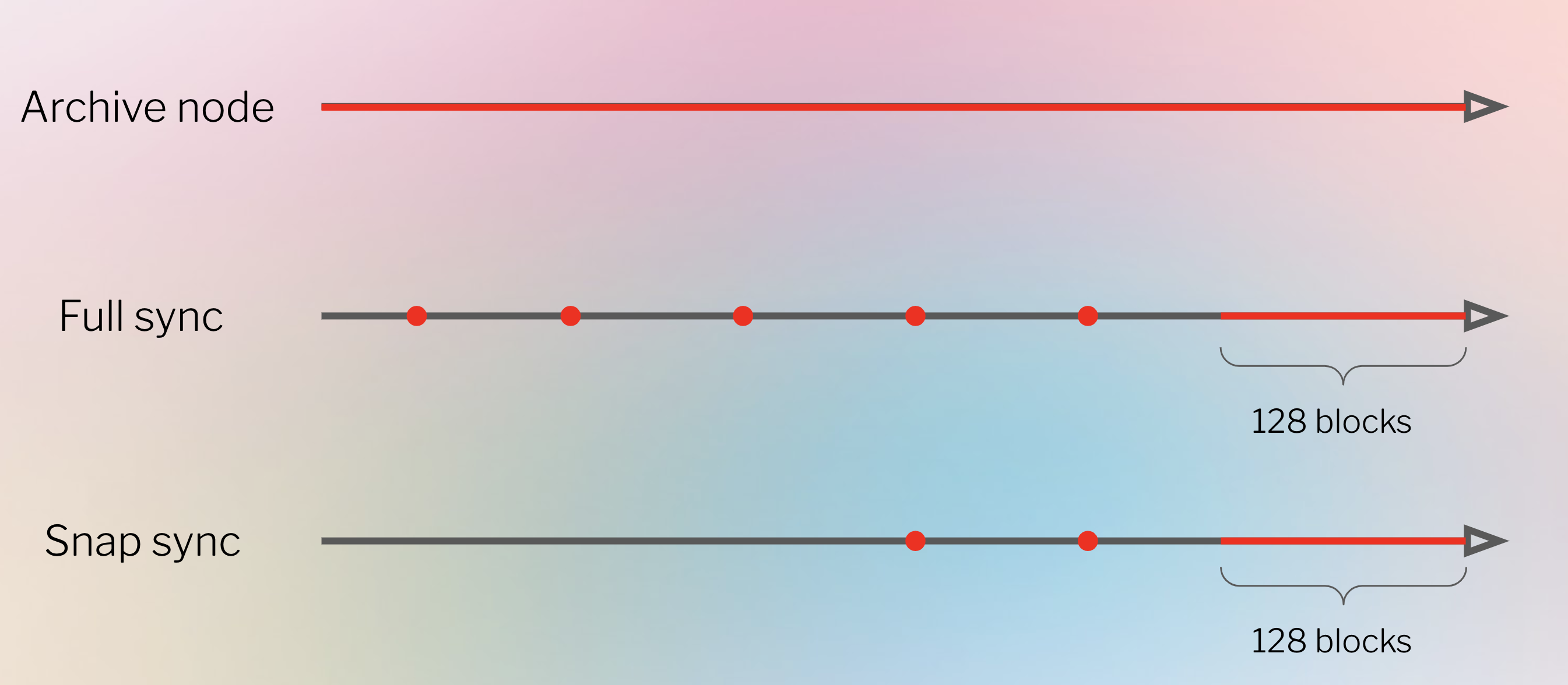
If you want to [run your own node](/etn-sc-client/getting-started), you should understand that there are different types of node that consume data differently. In fact, clients can run 3 different types of node - light, full and archive. There are also options of different sync strategies which enables faster synchronisation time. Synchronisation refers to how quickly it can get the most up-to-date information on the Electroneum Smart Chain's state.
### Full node
* Stores full blockchain data (although this is periodically pruned so a full node does not store all state data back to genesis)
* Participates in block validation, verifies all blocks and states.
* All states can be derived from a full node (although very old states are reconstructed from requests made to archive nodes).
* Serves the network and provides data on request.
### Light node
Instead of downloading every block, light nodes download block headers. These headers only contain summary information about the contents of the blocks. Any other information required by the light node gets requested from a full node. The light node can then independently verify the data they receive against the state roots in the block headers. Light nodes enable users to participate in the Electroneum network without the powerful hardware or high bandwidth required to run full nodes. Eventually, light nodes might run on mobile phones or embedded devices. The light nodes do not participate in consensus (i.e. they cannot be validators), but they can access the Electroneum blockchain with the same functionality as a full node.
The execution client Etn-sc includes a light sync option. However, a light Etn-sc node relies upon full nodes serving light node data. Few full nodes opt to serve light node data, meaning light nodes often fail to find peers.
There are also potential routes to providing light client data over the gossip network. This is advantageous because the gossip network could support a network of light nodes without requiring full nodes to serve requests.
The Electroneum Smart Chain does not support a large population of light nodes yet, but light node support is an area expected to develop rapidly in the near future.
### Archive node
* Stores everything kept in the full node and builds an archive of historical states. Needed if you want to query something like an account balance at block #4,000,000.
* Data might represent units of terabytes when the network grows, which makes archive nodes less attractive for average users but can be handy for services like block explorers, wallet vendors, and chain analytics.
Syncing clients in any mode other than archive will result in pruned blockchain data. This means, there is no archive of all historical states but the full node is able to build them on demand.
## Why should I run an Electroneum node?
Running a node allows you to trustlessly and privately use the Electroneum Smart Chain while supporting the ecosystem.
### Benefits to you
Running your own node enables you to use Electroneum in a truly private, self-sufficient and trustless manner. You don't need to trust the network because you can verify the data yourself with your client. "Don't trust, verify" is a popular blockchain mantra.
* Your node verifies all the transactions and blocks against consensus rules by itself. This means you don’t have to rely on any other nodes in the network or fully trust them.
* You won't have to leak your addresses and balances to random nodes. Everything can be checked with your own client.
* Your dapp can be more secure and private if you use your own node. [MetaMask](https://metamask.io/) and some other wallets can be easily pointed to your own local node.
* You can program your own custom RPC endpoints.
* You can connect to your node using **Inter-process Communications (IPC)** or rewrite the node to load your program as a plugin. This grants low latency, which is required to replace your transactions as fast as possible (i.e. frontrunning).
### Network benefits
A diverse set of nodes is important for Electroneum's health, security and operational resiliency.
* They provide access to blockchain data for lightweight clients that depend on it. In high peaks of usage, there need to be enough full nodes to help light nodes sync. Light nodes don't store the whole blockchain, instead they verify data via the [state roots in block headers](/foundational-topics/blocks). They can request more information from blocks if they need it.
* Full nodes enforce the [istanbul-byzantine-fault-tolerance consensus rules](/foundational-topics/consensus-mechanisms/ibft) so they can’t be tricked into accepting blocks that don't follow them. This provides extra security in the network because if all the nodes were light nodes, which don't perform full verification, validators could attack the network and, for example, create blocks with higher rewards.
If you run a full node, the whole Electroneum network benefits from it.
## Running your own node
Interested in running your own Electroneum Smart Chain client?
If you're more of a technical user, learn how to [spin up your own node](/etn-sc-client/getting-started) with the command line!
## Alternatives
If somebody runs an Electroneum node with a public API in your community, you can point your light wallets (like MetaMask) to a community node [via Custom RPC](http://web.archive.org/web/20220525100127/https://metamask.zendesk.com/hc/en-us/articles/360015290012-Using-a-Local-Node) and gain more privacy than with some random trusted third party. \
\
To clarify what we mean by privacy, there are a few ways of proxying your requests to the network in order to send transactions:\
\
A) Run your own node and send your requests through that\
B) Open up metamask and connect it to a node ran by a member of the public who does not require you to do kyc and simply leaves the node open to anonymous connection (besides ip address) to help out people who don't have their own node aka good samaritan \
C) You send your requests via some third party who has a node but requires a signup / kyc/ personal info etc\
\
Herein we are referring to option B.
This also means that if you run a client, you can share it altruistically with your friends who might need it.
## The Etn-sc client
The Etn-sc client is the official client for the Electroneum Smart Chain, inspired by Geth and maintained by the Electroneum Team.
* [GitHub](https://github.com/electroneum/electroneum-sc)
### Synchronisation modes
To follow and verify current data in the network, the Electroneum client needs to sync with the latest network state. This is done by downloading data from peers, cryptographically verifying their integrity, and building a local blockchain database.
Synchronisation modes represent different approaches to this process with various trade-offs.
#### **Overview of strategies**
General overview of synchronisation approaches used in Mainnet ready clients:
**Full sync**
Full sync downloads all blocks (including headers, transactions, and receipts) and generates the state of the blockchain incrementally by executing every block from genesis.
* Minimises trust and offers the highest security by verifying every transaction.
* With an increasing number of transactions, it can take days to weeks to process all transactions.
**Fast sync**
Fast sync downloads all blocks (including headers, transactions, and receipts), verifies all headers, downloads the state and verifies it against the headers.
* Relies on the security of the consensus mechanism.
* Synchronisation takes only a few hours.
**Light sync**
Light client mode downloads all block headers, block data, and verifies some randomly. Only syncs tip of the chain from the trusted checkpoint.
* Gets only the latest state while relying on trust in developers and consensus mechanism.
* Client ready to use with current network state in a few minutes.
[More on Light clients](#light-node)
**Snap sync**
Implemented by Etn-sc. Using dynamic snapshots served by peers retrieves all the account and storage data without downloading intermediate trie nodes and then reconstructs the Merkle trie locally.
* Fastest sync strategy developed by Etn-sc, currently its default
* Saves a lot of disk usage and network bandwidth without sacrificing security.
#### **Setup in client**
Clients offer rich configuration options to suit your needs. Apart from the synchronisation algorithm, you can also set pruning of different kinds of old data. Pruning enables deleting outdated data, e.g. removing state trie nodes that are unreachable from recent blocks.
Pay attention to the client's documentation or help page to find out which sync mode is the default. You can define the preferred type of sync when you get set up, like so:
**Setting up light sync in** [**ETN-SC**](https://github.com/electroneum/electroneum-sc)
`etn-sc --syncmode "full"`
For further details, check out the tutorial on [running Etn-sc in light mode](/etn-sc-client/fundamentals/light-client).
## Hardware
Hardware requirements generally are not that high since the node just needs to stay synced. Don't confuse it with mining, which requires much more computing power. Sync time and performance do improve with more powerful hardware however. Depending on your needs and wants, Electroneum can be run on your computer, home server, single-board computers or virtual private servers in the cloud.
### Requirements
Before installing the client, please ensure your computer has enough resources to run it. Minimum and recommended requirements can be found below, however the key part is the disk space. Syncing the Electroneum blockchain is very input/output intensive. It is best to have a solid-state drive (SSD). To run an Electroneum client on HDD, you will need at least 8GB of RAM to use as a cache.
**Minimum requirements**
* CPU with 2+ cores
* 4 GB RAM minimum with an SSD, 8 GB+ if you have an HDD
* 8 MBit/s bandwidth
**Recommended specifications**
* Fast CPU with 4+ cores
* 16 GB+ RAM
* Fast SSD with at least 500 GB free space
* 25+ MBit/s bandwidth
### Related topics
* [Blocks](/foundational-topics/blocks)
* [Networks](/foundational-topics/networks)
# Networks
# Consensus mechanisms
# IBFT
Istanbul Byzantine Fault Tolerant
Consensus algorithms are one of the core innovations of blockchain, and yet also one of the most confusing. Satoshi Nakamoto created a version of Proof of Work (PoW) that was implemented as a means for simultaneously securing and validating Bitcoin transactions. The blockchain community has built on that core vision to create an alphabet soup of Proof of Stake (PoS), Proof of Authority (PoA), PBFT (Practical Byzantine Fault Tolerant), and many others that are all designed to build consensus in a distributed system, creating the *single source of truth* that makes blockchain so valuable.
IBFT (Istanbul Byzantine Fault Tolerant) is a consensus mechanism which is an alternative to Proof of Work in a Bitcoin network. Like other algorithms, IBFT ensures a single, agreed-upon ordering for transactions in the blockchain, and provides added benefits for enterprises, including settlement finality.
Before getting into the operation of the IBFT consensus mechanism, it is worth mentioning *when* and *why* one would want to use IBFT. In a public blockchain, the short answer is likely that you would not. But when it comes to consortium or private blockchains, IBFT starts to look quite appealing.
The PoW algorithm is famously costly, in both hardware and electricity. This cost is intentional, to prevent anyone from easily taking over the network, and thus PoW is very suitable for situations with full decentralization where anyone (including attackers) can participate. Nodes in the consortium/private chains used by enterprises, however, are intrinsically more trusted than those in a public chain. As such, the PoW consensus mechanism may be overly burdensome, and other mechanisms may provide “enough” trust to run a distributed system.
[Proof of Stake](https://consensys.net/blog/blockchain-explained/what-is-proof-of-stake/), likewise, may be less relevant for enterprises, because paying for gas is less important in a permissioned network. Since nodes do not (necessarily) need to maintain currency in the network, PoS would introduce extraneous requirements.
Considering these tradeoffs, Proof of Authority (PoA) emerges as a possible best solution, utilising a system whereby nodes in the network are allocated the privilege of producing new blocks for the chain using a round-robin or other arbitrary system.
IBFT is one of the many flavours of PoA and provides the following benefits:
* **Immediate block finality.** There’s only 1 block proposed at a given chain height. The single chain thus removes forking, uncle blocks, and the risk that a transaction may be “undone” once on the chain at a later time.
* **Reduced time between blocks.** The effort needed to construct and validate blocks is significantly reduced (in particular with respect to PoW), greatly increasing the throughput of the chain.
* **High data integrity and fault tolerance.** IBFT uses a group of validators to ensure the integrity of each block being proposed. A super-majority (\~66%) of these validators are required to sign the block prior to insertion to the chain, making block forgery very difficult. The ‘leadership’ of the group also rotates over time — ensuring a faulty node cannot exert long term influence over the chain.
* **Operationally flexible.** The group of validators can be modified in time, ensuring the group contains only full-trusted nodes.
Here we provided an overview of IBFT, in mostly non-technical terms. For some of the original proposals of IBFT, you can review the EIPs on GitHub:
* **IBFT documentation:**
* **Code used in Quorum:**
For the rest of this page, we’ll explore IBFT’s more technical considerations, discussing many of the concepts found in the EIPs and that we have learned through our own research.
*Note:* IBFT code can also be found in a go-ethereum pull request #16385.
**Operation**
The IBFT consensus mechanism comprises the following components:
1. A [PBFT](https://pmg.csail.mit.edu/papers/osdi99.pdf) inspired group consensus model.
2. A process by which members can be added/removed from the validating group.
IBFT requires the Block Header to be (subtly) reworked to support all facets of the capability.
### **Group Consensus Model**
### **Overview**
IBFT uses a pool of validating nodes (*Validators*) operating on the Electronem network to determine if a proposed block is suitable for addition to the chain.
One node of the *Validators* is arbitrarily selected as the *Proposer* and is responsible for constructing a block at the block-interval and sharing said block with the group. If a super-majority of the *Validators* deem the block to be valid it is added to the blockchain.
At the completion of the consensus round, the *Validators* may select a new *Proposer* which will be responsible for providing the candidate Block at the next block interval.
The consensus mechanism is a synchronised state machine, which is responsible for ensuring all *Validators* append the same block to the chain at the same height.
If a block fails to insert, the *Proposer* is changed, and the process starts anew.
To ensure only one block can be appended to the state machine, IBFT prevents changing the proposed block once a super-majority of validators have agreed to its insertion (but not performed said work), this process is referred to as ‘Block Locking’.
The IBFT consensus mechanism offers system stability provided less than 1/3 of the validating nodes are behaving incorrectly (either due to being compromised or due to faulty code). I.e. to tolerate *F* faulty nodes the validation group must contain at least *3F + 1* nodes (more than this does not increase system integrity).
*Note:* Herein *F* implies the number of faulty nodes tolerated by the system.
### **State Machine**
#### **States**
* **Awaiting Proposal.** Validator is waiting for a new block to be supplied by the current proposer. If the validator is the proposer for this round, they prepare the proposed block and transmit it in a pre-prepare message.
* **Preparing.** Has received a (valid) proposed block and notified validator-peers; is now waiting for validator-peers to notify their acceptance of the block.
* **Ready.** Has received validator-peer’s acceptance of block, and is waiting for them to be a in a similar position. At this stage the proposed block has been ‘locked-in’, and cannot be replaced until an attempt at insertion has been conducted.
* **Round Change.** The round timed out before consensus was reached or the block failed to insert. Wait for all validators to agree on the next round number.
#### **Transitions**
1. **Awaiting Proposal → Preparing.** On reception of a new block (*Preprepare* message) from the proposer (i.e. the block is valid in its content, as is its proposed chain insertion point).
2. **Awaiting Proposal → Round Change.** The received proposal was not a valid block according to a given set of rules (e.g. invalid proposer, incorrect round numbering).
3. **Preparing → Ready.** On reception of 2F+1 notifications (*Prepare* message) from validator-peers indicating the proposed block is suitable for insertion.
4. **Ready → Awaiting Proposal.** On reception of 2F+1 notifications (*Commit* message) from validator-peers indicating they are ready to append the block to the chain. On transition, the process of appending the block to the chain is performed (success).
5. **Ready → Round Change.** As per Ready->Awaiting Proposal, however, block insertion has failed.
6. **Round Change → Awaiting Proposal.** 2F+1 of validators agree on the next round number to be used.
*Note:* All transitions into “RoundChange” result in the *Validator* transmitting a “RoundChange” message to its validator-peers.
### **Block Locking**
IBFT mandates that forks shall not be created. To this end, once a block has been agreed upon by a majority (i.e. on entry to the *Ready* state) it becomes “locked in”.
This means no other blocks will be considered for insertion until an attempt to add this block to the chain has been attempted. Thus either the block is inserted successfully (once sufficient commit messages are received, either in this or subsequent rounds), or the block fails insertion, is discarded, and a new block is proposed at the current chain height.
### **Validation Group Membership**
The members of the validation group may change over time through a voting mechanism. Members can be added or removed through a majority (*Floor(N/2) + 1*) vote; each vote is captured in the Block Header.
Each node in the network (including non-validating nodes) is responsible for tracking the vote tally for each validator to determine the current *Validators* and ensure signatures on mined blocks fall within the expected group.
Given each vote is contained in the Block Header, only the *Proposer* for a given round is able to cast a vote. Thus it is important, if nodes are to be added/removed in a timely fashion, that the *Proposer* role be updated on a regular basis.
Once a node reaches majority votes, they immediately join/leave the validator group.
IBFT recognises a *Voting Epoch*, which defines a point at which all votes which have not yet reached a majority are removed, forcing the voting tally to be restarted. This implies when tallying votes, Validators need only start at the most recent epoch. By default, the *Voting Epoch* occurs every 17,280 blocks.
Votes define a change of state (i.e. candidates get voted in, validators get voted out), not voting for a given node implies the *Validator* does not wish the node to change state (an explicit vote is not required to maintain the status quo).
### **Block Header Refactor**
To support IBFT in Electroneum Smart Chain a number of changes must be made to the block headers in comparison to Ethereum's block header. These changes include:
* *beneficiary:* identifies the node for which a vote is being cast.
* *nonce: s*pecifies the vote “direction” — AUTH or DROP.
* *mixHash: a*fixed magic number, identifying this block as being IBFT validated.
* *ommersHash:* must be the hash of an empty set, as there are no ommer blocks when operating under IBFT.
* *timestamp:* must be at least the parent block’s timestamp + block interval.
* *difficulty:* must be filled with 0x0000000000000001.
* *extraData:* contains IBFT specific data including *List of Validator Addresses, ProposerSeal* (identifies the proposer), *CommittingSeals* (list of the validators which reported ‘commit’ on this block).
As the list of CommittingSeals for each validator is (potentially) different, it is important that the block hash not include this information — i.e. even though two blocks have different CommittingSeals fields, they represent the same information (i.e. transactions etc. are identical).
### **Conclusion**
In closing, IBFT is a Byzantine fault tolerant solution offering immediate transaction finality which reduces the required infrastructure that PoW demands.
While unlikely to be ever used on the Ethereum mainnet (with the much wider, unknown set of participating actors), it offers substantial benefit when used on a private chain where the validator pool is trusted and held accountable; it provides an ideal solution for a chain with a fixed cadence and a predictable transaction processing rate.
The processes explored in this article give confidence that the Electroneum Smart Chain employing IBFT will be tolerant of Byzantine nodes and can be recovered should those nodes be seen to be exerting over control on the network.
# Intro to the stack
# Smart contracts
A "smart contract" is simply a program that runs on the Electroneum Smart Chain. It's a collection of code (its functions) and data (its state) that resides at a specific address on the Electroneum Smart Chain.
Smart contracts are a type of [Electroneum account](/foundational-topics/accounts). This means they have a balance and can be the target of transactions. However, they're not controlled by a user, instead they are deployed to the network and run as programmed. User accounts can then interact with a smart contract by submitting transactions that execute a function defined on the smart contract. Smart contracts can define rules, like a regular contract, and automatically enforce them via the code. Smart contracts cannot be deleted by default, and interactions with them are irreversible.
## Prerequisites
If you're just getting started or looking for a less technical introduction, we recommend Ethereum's [introduction to smart contracts](https://ethereum.org/en/smart-contracts/).
Make sure you've read up on [accounts](/foundational-topics/accounts), [transactions](/foundational-topics/transactions) and the [Electroneum virtual machine](/foundational-topics/electroneum-virtual-machine-evm) before jumping into the world of smart contracts.
## A digital vending machine
Perhaps the best metaphor for a smart contract is a vending machine, as described by Nick Szabo. With the right inputs, a certain output is guaranteed.
To get a snack from a vending machine:
{% code lineNumbers="true" %}
```
money + snack selection = snack dispensed
```
{% endcode %}
This logic is programmed into the vending machine.
A smart contract, like a vending machine, has logic programmed into it. Here's a simple example of how this vending machine would look if it were a smart contract written in Solidity:
{% code lineNumbers="true" %}
```solidity
pragma solidity 0.8.7;
contract VendingMachine {
// Declare state variables of the contract
address public owner;
mapping (address => uint) public cupcakeBalances;
// When 'VendingMachine' contract is deployed:
// 1. set the deploying address as the owner of the contract
// 2. set the deployed smart contract's cupcake balance to 100
constructor() {
owner = msg.sender;
cupcakeBalances[address(this)] = 100;
}
// Allow the owner to increase the smart contract's cupcake balance
function refill(uint amount) public {
require(msg.sender == owner, "Only the owner can refill.");
cupcakeBalances[address(this)] += amount;
}
// Allow anyone to purchase cupcakes
function purchase(uint amount) public payable {
require(msg.value >= amount * 1 ether, "You must pay at least 1 ETH per cupcake");
require(cupcakeBalances[address(this)] >= amount, "Not enough cupcakes in stock to complete this purchase");
cupcakeBalances[address(this)] -= amount;
cupcakeBalances[msg.sender] += amount;
}
}
```
{% endcode %}
Like how a vending machine removes the need for a vendor employee, smart contracts can replace intermediaries in many industries.
## Permissionless
Anyone can write a smart contract and deploy it to the network. You just need to learn how to code in a [smart contract language](https://ethereum.org/en/developers/docs/smart-contracts/languages/), and have enough ETN to deploy your contract. Deploying a smart contract is technically a transaction, so you need to pay [gas](/foundational-topics/gas-and-fees) in the same way you need to pay gas for a simple ETN transfer. However, gas costs for contract deployment are far higher.
Electroneum Smart Chain has developer-friendly languages for writing smart contracts:
* Solidity
* Vyper
[More on languages](https://ethereum.org/en/developers/docs/smart-contracts/languages/)
However, they must be compiled before they can be deployed so that EVM can interpret and store the contract.
[More on compilation](https://ethereum.org/en/developers/docs/smart-contracts/compiling/)
## Composability
Smart contracts are public on the Electroneum Smart Chain and can be thought of as open APIs. This means you can call other smart contracts in your own smart contract to greatly extend what's possible. Contracts can even deploy other contracts.
Learn more about [smart contract composability](https://ethereum.org/en/developers/docs/smart-contracts/composability/).
## Limitations
Smart contracts alone cannot get information about "real-world" events because they can't retrieve data from off-chain sources. This means they can't respond to events in the real world. This is by design. Relying on external information could jeopardise consensus, which is important for security and decentralization.
However, it is important for blockchain applications to be able to use off-chain data. The solution is [oracles](/advanced/oracles), which are tools that ingest off-chain data and make it available to smart contracts.
Another limitation of smart contracts is the maximum contract size. A smart contract can be a maximum of 24KB or it will run out of gas. This can be circumnavigated by using [The Diamond Pattern↗](https://eips.ethereum.org/EIPS/eip-2535).
## Multisig contracts
Multisig (multiple-signature) contracts are smart contract accounts that require multiple valid signatures to execute a transaction. This is very useful for avoiding single points of failure for contracts holding substantial amounts of ETN or other tokens. Multisigs also divide responsibility for contract execution and key management between multiple parties and prevent the loss of a single private key leading to irreversible loss of funds. For these reasons, multisig contracts can be used for simple DAO governance. Multisigs require N signatures out of M possible acceptable signatures (where N ≤ M, and M > 1) in order to execute. `N = 3, M = 5` and `N = 4, M = 7` are commonly used. A 4/7 multisig requires four out of seven possible valid signatures. This means the funds are still retrievable even if three signatures are lost. In this case, it also means that the majority of key-holders must agree and sign in order for the contract to execute.
## Supported EVM versions
The Electroneum Smart Chain is currently running on the **Paris EVM**, and has support for all EVM versions up to **Paris**. This ensures broad compatibility with most modern Ethereum tooling and frameworks.
For users deploying **Solidity** or **Vyper** contracts, it’s important to compile them using a version compatible with the **Paris** upgrade — using **Paris** as the target version is recommended to ensure consistent behavior and full compatibility with the Electroneum Smart Chain.
For smart contracts written in Solidity, you can specify the the EVM version in the compiler options.
You can set the target EVM version for Vyper smart contracts by including the line below to the source code.
```python
#pragma evm-version paris
```
## Smart contract resources
**OpenZeppelin Contracts -** ***Library for secure smart contract development.***
* [openzeppelin.com/contracts/↗](https://openzeppelin.com/contracts/)
* [GitHub↗](https://github.com/OpenZeppelin/openzeppelin-contracts)
* [Community Forum↗](https://forum.openzeppelin.com/c/general/16)
## Further reading
* [Coinbase: What is a smart contract?↗](https://www.coinbase.com/learn/crypto-basics/what-is-a-smart-contract)
* [Chainlink: What is a smart contract?↗](https://chain.link/education/smart-contracts)
* [Video: Simply Explained - Smart Contracts↗](https://youtu.be/ZE2HxTmxfrI)
# Development networks
When building an Electroneum Smart Chain application with smart contracts, you'll want to run it on a local network to see how it works before deploying it.
Similar to how you might run a local server on your computer for web development, you can use a development network to create a local blockchain instance to test your dapp. These Electroneum Smart Chain development networks provide features that allow for much faster iteration than a public testnet (for instance you don’t need to deal with acquiring ETN from a testnet faucet).
## Prerequisites
You should understand the [basics of the Electroneum Smart Chain stack](/electroneum-stack/intro-to-the-stack) and [Electroneum networks](/etn-sc-client/fundamentals/private-networks) before diving into development networks.
## What is a development network?
Development networks are essentially Electroneum Smart Chain clients designed specifically for local development.
#### **Why not just run a standard Electroneum Smart Chain node locally?**
You *could* [run a node](/etn-sc-client/getting-started) but since development networks are purpose-built for development, they often come packed with convenient features like:
* Deterministically seeding your local blockchain with data (e.g. accounts with ETN balances)
* Instantly producing blocks with each transaction it receives, in order and with no delay
* Enhanced debugging and logging functionality
## Available tools
As the Electroneum Smart Chain is based on the Ethereum Virtual Machine and RPC, much of the Ethereum tooling can also be used with our smart chain.
**Note**: Most [development frameworks](/electroneum-stack/development-frameworks) include a built-in development network. We recommend starting with a framework to set up your local development environment.
### Ganache
Quickly fire up a personal Ethereum blockchain which you can use to run tests, execute commands, and inspect state while controlling how the chain operates.
Ganache provides both a desktop application (Ganache UI), as well as a command-line tool (`ganache-cli`). It is part of the Truffle suite of tools.
* [Website↗](https://www.trufflesuite.com/ganache)
* [GitHub↗](https://github.com/trufflesuite/ganache)
* [Documentation↗](https://www.trufflesuite.com/docs/ganache/overview)
### Hardhat Network
A local Ethereum network designed for development. It allows you to deploy your contracts, run your tests and debug your code.
Hardhat Network comes built-in with Hardhat, an Ethereum development environment for professionals.
* [Website↗](https://hardhat.org/)
* [GitHub↗](https://github.com/nomiclabs/hardhat)
### Related Topics
* [Development frameworks](/electroneum-stack/development-frameworks)
# Development frameworks
## Introduction to Frameworks
Building a full-fledged dapp requires different pieces of technology. Software frameworks include many of the needed features or provide easy plugin systems to pick the tools you desire.
Frameworks come with a lot of out-of-the-box functionality, like:
* Features to spin up a local blockchain instance.
* Utilities to compile and test your smart contracts.
* Client development add-ons to build your user-facing application within the same project/repository.
* Configuration to connect to Electroneum Smart Chain networks and deploy contracts, whether to a locally running instance, or one of Electroneum's public networks.
* Decentralized app distribution - integrations with storage options like IPFS.
## Prerequisites
Before diving into frameworks, we recommend you first read through our introduction to [dapps](/foundational-topics/intro-to-dapps) and the [Electroneum Smart Chain stack](/electroneum-stack/intro-to-the-stack).
## Available frameworks
**Truffle -** ***A development environment, testing framework, build pipeline, and other tools.***
* [trufflesuite.com↗](https://www.trufflesuite.com/)
* [GitHub↗](https://github.com/trufflesuite/truffle)
**Hardhat -** ***Ethereum development environment for professionals.***
* [hardhat.org↗](https://hardhat.org/)
* [GitHub↗](https://github.com/nomiclabs/hardhat)
**Ape -** ***The smart contract development tool for Pythonistas, Data Scientists, and Security Professionals.***
* [Documentation↗](https://docs.apeworx.io/ape/stable/)
* [GitHub↗](https://github.com/ApeWorX/ape)
**Brownie -** ***Python-based development environment and testing framework.***
* [Documentation↗](https://eth-brownie.readthedocs.io/en/latest/)
* [GitHub↗](https://github.com/eth-brownie/brownie)
**Web3j -** ***A platform for developing blockchain applications on the JVM.***
* [Homepage↗](https://www.web3labs.com/web3j-sdk)
* [Documentation↗](https://docs.web3j.io/)
* [GitHub↗](https://github.com/web3j/web3j)
**OpenZeppelin SDK -** ***The Ultimate Smart Contract Toolkit: A suite of tools to help you develop, compile, upgrade, deploy and interact with smart contracts.***
* [OpenZeppelin SDK↗](https://openzeppelin.com/sdk/)
* [GitHub↗](https://github.com/OpenZeppelin/openzeppelin-sdk)
* [Community Forum↗](https://forum.openzeppelin.com/c/support/17)
**Create Eth App -** ***Create Ethereum-powered apps with one command. Comes with a wide offering of UI frameworks and DeFi templates to choose from.***
* [GitHub↗](https://github.com/paulrberg/create-eth-app)
* [Templates↗](https://github.com/PaulRBerg/create-eth-app/tree/develop/templates)
**Scaffold-Eth -** ***Ethers.js + Hardhat + React components and hooks for web3: everything you need to get started building decentralized applications powered by smart contracts.***
* [GitHub↗](https://github.com/austintgriffith/scaffold-eth)
**Tenderly -** ***Web3 development platform that enables blockchain developers to build, test, debug, monitor, and operate smart contracts and improve dapp UX.***
* [Website↗](https://tenderly.co/)
* [Documentation↗](https://docs.tenderly.co/ethereum-development-practices)
**The Graph -** ***The Graph for querying blockchain data efficiently.***
* [Website↗](https://thegraph.com/)
* [Tutorial](https://ethereum.org/en/developers/tutorials/the-graph-fixing-web3-data-querying/)
**Alchemy -** ***Ethereum Development Platform.***
* [alchemy.com↗](https://www.alchemy.com/)
* [GitHub↗](https://github.com/alchemyplatform)
* [Discord↗](https://discord.com/invite/A39JVCM)
**Foundry -** ***A blazing fast, portable and modular toolkit for Ethereum application development written in Rust.***
* [Documentation↗](https://book.getfoundry.sh/)
* [GitHub↗](https://github.com/gakonst/foundry/)
* [Tools for Foundry↗](https://github.com/crisgarner/awesome-foundry)
**NodeReal -** ***Ethereum Development Platform.***
* [Nodereal.io↗](https://nodereal.io/)
* [GitHub↗](https://github.com/node-real)
* [Discord↗](https://discord.gg/V5k5gsuE)
**thirdweb SDK -** ***Build web3 applications that can interact with your smart contracts using our powerful SDKs and CLI.***
* [Documentation↗](https://portal.thirdweb.com/sdk/)
* [GitHub↗](https://github.com/thirdweb-dev/)
**Chainstack -** ***Web3 (Ethereum and otherwise) Development Platform.***
* [chainstack.com↗](https://www.chainstack.com/)
* [GitHub↗](https://github.com/chainstack)
* [Discord↗](https://discord.gg/BSb5zfp9AT)
### Related topics
* [Set up a local development environment](/etn-sc-client/getting-started/instaling-etn-sc)
# Electroneum client APIs
# JavaScript APIs
In order for a web app to interact with the Electroneum Smart Chain (i.e. read blockchain data and/or send transactions to the network), it must connect to an Electroneum node.
For this purpose, every Electroneum Smart Chain client implements the [JSON-RPC](/electroneum-stack/electroneum-client-apis/json-rpc) specification, so there are a uniform set of [methods](https://ethereum.org/en/developers/docs/apis/json-rpc/#json-rpc-methods) that applications can rely on.
If you want to use JavaScript to connect with an Electroneum node, it's possible to use vanilla JavaScript but several convenience libraries exist within the ecosystem that make this much easier. With these libraries, developers can write intuitive, one-line methods to initialise JSON RPC requests (under the hood) that interact with the Electroneum Smart Chain.
## Prerequisites
As well as understanding JavaScript, it might be helpful to understand the [Electroneum stack](/electroneum-stack/intro-to-the-stack) and [Electroneum Smart Chain clients](/foundational-topics/nodes-and-clients).
## Why use a library?
These libraries abstract away much of the complexity of interacting directly with an Electroneum Smart Chain node. They also provide utility functions (e.g. converting ETN to Gwei) so as a developer you can spend less time dealing with the intricacies of Electroneum Smart Chain clients and more time focused on the unique functionality of your application.
## Library features
### Connect to Electroneum Smart Chain nodes
Using providers, these libraries allow you to connect to the Electroneum Smart Chain and read its data, whether that's over JSON-RPC or MetaMask.
#### **Ethers example**
{% code lineNumbers="true" %}
```javascript
// A Web3Provider wraps a standard Web3 provider, which is
// what MetaMask injects as window.ethereum into each page
const provider = new ethers.providers.Web3Provider(window.ethereum)
// The MetaMask plugin also allows signing transactions to
// send ether and pay to change state within the blockchain.
// For this, we need the account signer...
const signer = provider.getSigner()
```
{% endcode %}
#### **Web3js example**
{% code lineNumbers="true" %}
```javascript
var web3 = new Web3("http://localhost:8545")
// or
var web3 = new Web3(new Web3.providers.HttpProvider("http://localhost:8545"))
// change provider
web3.setProvider("ws://localhost:8546")
// or
web3.setProvider(new Web3.providers.WebsocketProvider("ws://localhost:8546"))
// Using the IPC provider in node.js
var net = require("net")
var web3 = new Web3("/Users/myuser/Library/Electroneum-sc/etn-sc.ipc", net) // mac os path
// or
var web3 = new Web3(
new Web3.providers.IpcProvider("/Users/myuser/Library/Electroneum-sc/etn-sc.ipc", net)
) // mac os path
// on windows the path is: "\\\\.\\pipe\\etn-sc.ipc"
// on linux the path is: "/users/myuser/.electroneum-sc/etn-sc.ipc"
```
{% endcode %}
Once set up you'll be able to query the blockchain for:
* block numbers
* gas estimates
* smart contract events
* network id
* and more...
### Wallet functionality
These libraries give you functionality to create wallets, manage keys and sign transactions.
Here's an example from Ethers
{% code lineNumbers="true" %}
```javascript
// Create a wallet instance from a mnemonic...
mnemonic =
"announce room limb pattern dry unit scale effort smooth jazz weasel alcohol"
walletMnemonic = Wallet.fromMnemonic(mnemonic)
// ...or from a private key
walletPrivateKey = new Wallet(walletMnemonic.privateKey)
walletMnemonic.address === walletPrivateKey.address
// true
// The address as a Promise per the Signer API
walletMnemonic.getAddress()
// { Promise: '0x71CB05EE1b1F506fF321Da3dac38f25c0c9ce6E1' }
// A Wallet address is also available synchronously
walletMnemonic.address
// '0x71CB05EE1b1F506fF321Da3dac38f25c0c9ce6E1'
// The internal cryptographic components
walletMnemonic.privateKey
// '0x1da6847600b0ee25e9ad9a52abbd786dd2502fa4005dd5af9310b7cc7a3b25db'
walletMnemonic.publicKey
// '0x04b9e72dfd423bcf95b3801ac93f4392be5ff22143f9980eb78b3a860c4843bfd04829ae61cdba4b3b1978ac5fc64f5cc2f4350e35a108a9c9a92a81200a60cd64'
// The wallet mnemonic
walletMnemonic.mnemonic
// {
// locale: 'en',
// path: 'm/44\'/60\'/0\'/0/0',
// phrase: 'announce room limb pattern dry unit scale effort smooth jazz weasel alcohol'
// }
// Note: A wallet created with a private key does not
// have a mnemonic (the derivation prevents it)
walletPrivateKey.mnemonic
// null
// Signing a message
walletMnemonic.signMessage("Hello World")
// { Promise: '0x14280e5885a19f60e536de50097e96e3738c7acae4e9e62d67272d794b8127d31c03d9cd59781d4ee31fb4e1b893bd9b020ec67dfa65cfb51e2bdadbb1de26d91c' }
tx = {
to: "0x8ba1f109551bD432803012645Ac136ddd64DBA72",
value: utils.parseEther("1.0"),
}
// Signing a transaction
walletMnemonic.signTransaction(tx)
// { Promise: '0xf865808080948ba1f109551bd432803012645ac136ddd64dba72880de0b6b3a7640000801ca0918e294306d177ab7bd664f5e141436563854ebe0a3e523b9690b4922bbb52b8a01181612cec9c431c4257a79b8c9f0c980a2c49bb5a0e6ac52949163eeb565dfc' }
// The connect method returns a new instance of the
// Wallet connected to a provider
wallet = walletMnemonic.connect(provider)
// Querying the network
wallet.getBalance()
// { Promise: { BigNumber: "42" } }
wallet.getTransactionCount()
// { Promise: 0 }
// Sending etn
wallet.sendTransaction(tx)
```
{% endcode %}
[Read the full docs↗](https://docs.ethers.io/v5/api/signer/#Wallet)
Once set up you'll be able to:
* create accounts
* send transactions
* sign transactions
* and more...
### Interact with smart contract functions
JavaScript client libraries allow your application to call smart contract functions by reading the Application Binary Interface (ABI) of a compiled contract.
The ABI essentially explains the contract's functions in a JSON format and allows you to use it like a normal JavaScript object.
So the following Solidity contract:
{% code lineNumbers="true" %}
```solidity
contract Test {
uint a;
address d = 0x12345678901234567890123456789012;
function Test(uint testInt) { a = testInt;}
event Event(uint indexed b, bytes32 c);
event Event2(uint indexed b, bytes32 c);
function foo(uint b, bytes32 c) returns(address) {
Event(b, c);
return d;
}
}
```
{% endcode %}
Would result in the following JSON:
{% code lineNumbers="true" %}
```json
[{
"type":"constructor",
"payable":false,
"stateMutability":"nonpayable"
"inputs":[{"name":"testInt","type":"uint256"}],
},{
"type":"function",
"name":"foo",
"constant":false,
"payable":false,
"stateMutability":"nonpayable",
"inputs":[{"name":"b","type":"uint256"}, {"name":"c","type":"bytes32"}],
"outputs":[{"name":"","type":"address"}]
},{
"type":"event",
"name":"Event",
"inputs":[{"indexed":true,"name":"b","type":"uint256"}, {"indexed":false,"name":"c","type":"bytes32"}],
"anonymous":false
},{
"type":"event",
"name":"Event2",
"inputs":[{"indexed":true,"name":"b","type":"uint256"},{"indexed":false,"name":"c","type":"bytes32"}],
"anonymous":false
}]
```
{% endcode %}
This means you can:
* Send a transaction to the smart contract and execute its method
* Call to estimate the gas a method execution will take when executed in the EVM
* Deploy a contract
* And more...
### Utility functions
Utility functions give you handy shortcuts that make building with the Electroneum Smart Chain a little easier.
ETN values are in Wei by default. 1 ETN = 1,000,000,000,000,000,000 WEI – this means you're dealing with a lot of numbers! `web3.utils.toWei` converts ETN to Wei for you.
And in ethers it looks like this:
{% code lineNumbers="true" %}
```javascript
// Get the balance of an account (by address or ENS name)
balance = await provider.getBalance("ethers.eth")
// { BigNumber: "2337132817842795605" }
// Often you will need to format the output for the user
// which prefer to see values in ether (instead of wei)
ethers.utils.formatEther(balance)
// '2.337132817842795605'
```
{% endcode %}
* [Web3js utility functions↗](https://docs.web3js.org/api/web3-utils)
* [Ethers utility functions↗](https://docs.ethers.io/v5/api/utils/)
## Available libraries
### **Web3.js -** ***Ethereum JavaScript API.***
* [Documentation↗](https://docs.web3js.org/)
* [GitHub↗](https://github.com/ethereum/web3.js/)
### **Ethers.js -** ***Complete Ethereum wallet implementation and utilities in JavaScript and TypeScript.***
* [Documentation↗](https://docs.ethers.io/)
* [GitHub↗](https://github.com/ethers-io/ethers.js/)
### **The Graph -** ***A protocol for indexing Ethereum and IPFS data and querying it using GraphQL.***
* [The Graph↗](https://thegraph.com/)
* [Graph Explorer↗](https://thegraph.com/explorer/)
* [Documentation↗](https://thegraph.com/docs/)
* [GitHub↗](https://github.com/graphprotocol/)
* [Discord↗](https://thegraph.com/discord)
### **light.js -** ***A high-level reactive JS library optimized for light clients.***
* [GitHub↗](https://github.com/openethereum/js-libs/tree/master/packages/light.js)
### **Web3-wrapper -** ***Typescript alternative to Web3.js.***
* [Documentation↗](https://0x.org/docs/web3-wrapper#introduction)
* [GitHub↗](https://github.com/0xProject/0x-monorepo/tree/development/packages/web3-wrapper)
### **Alchemyweb3 -** ***Wrapper around Web3.js with automatic retries and enhanced apis.***
* [Documentation↗](https://docs.alchemy.com/reference/api-overview)
* [GitHub↗](https://github.com/alchemyplatform/alchemy-web3)
### **Alchemy NFT API -** ***API for fetching NFT data, including ownership, metadata attributes and more.***
* [Documentation↗](https://docs.alchemy.com/alchemy/enhanced-apis/nft-api)
* [GitHub↗](https://github.com/alchemyplatform/alchemy-web3)
### **viem -** ***TypeScript Interface for Ethereum.***
* [Documentation↗](https://viem.sh/)
* [GitHub↗](https://github.com/wagmi-dev/viem)
## Related topics
* [Nodes and clients](/foundational-topics/nodes-and-clients)
* [Development frameworks](/electroneum-stack/development-frameworks)
# JSON-RPC
In order for a software application to interact with the Electroneum Smart Chain - either by reading blockchain data or sending transactions to the network - it must connect to an Electroneum Smart Chain node.
For this purpose, every [Electroneum Smart Chain client](/foundational-topics/nodes-and-clients) implements a [JSON-RPC specification↗](https://github.com/ethereum/execution-apis), so there is a uniform set of methods that applications can rely on regardless of the specific node or client implementation.
[JSON-RPC↗](https://www.jsonrpc.org/specification) is a stateless, light-weight remote procedure call (RPC) protocol. It defines several data structures and the rules around their processing. It is transport agnostic in that the concepts can be used within the same process, over sockets, over HTTP, or in many various message passing environments. It uses JSON (RFC 4627) as data format.
## Convenience libraries
While you may choose to interact directly with Electroneum Smart Chain clients via the JSON-RPC API, there are often easier options for dapp developers. Many [JavaScript](/electroneum-stack/electroneum-client-apis/javascript-apis) libraries exist to provide wrappers on top of the JSON-RPC API. With these libraries, developers can write intuitive, one-line methods in the programming language of their choice to initialize JSON-RPC requests (under the hood) that interact with the Electroneum Smart Chain.
## Conventions
### Hex value encoding
Two key data types get passed over JSON: unformatted byte arrays and quantities. Both are passed with a hex encoding but with different requirements for formatting.
#### **Quantities**
When encoding quantities (integers, numbers): encode as hex, prefix with "0x", the most compact representation (slight exception: zero should be represented as "0x0").
Here are some examples:
* 0x41 (65 in decimal)
* 0x400 (1024 in decimal)
* WRONG: 0x (should always have at least one digit - zero is "0x0")
* WRONG: 0x0400 (no leading zeroes allowed)
* WRONG: ff (must be prefixed 0x)
#### Unformatted data
When encoding unformatted data (byte arrays, account addresses, hashes, bytecode arrays): encode as hex, prefix with "0x", two hex digits per byte.
Here are some examples:
* 0x41 (size 1, "A")
* 0x004200 (size 3, "\0B\0")
* 0x (size 0, "")
* WRONG: 0xf0f0f (must be even number of digits)
* WRONG: 004200 (must be prefixed 0x)
#### The default block parameter
The following methods have an extra default block parameter:
* [eth\_getBalance](/electroneum-stack/electroneum-client-apis/json-rpc#eth_getbalance)
* [eth\_getCode](/electroneum-stack/electroneum-client-apis/json-rpc#eth_getcode)
* [eth\_getTransactionCount](/electroneum-stack/electroneum-client-apis/json-rpc#eth_gettransactioncount)
* [eth\_getStorageAt](/electroneum-stack/electroneum-client-apis/json-rpc#eth_getstorageat)
* [eth\_call](/electroneum-stack/electroneum-client-apis/json-rpc#eth_call)
When requests are made that act on the state of Electroneum Smart Chain, the last default block parameter determines the height of the block.
The following options are possible for the `defaultBlock` parameter:
* `HEX String` - an integer block number
* `String "earliest"` for the earliest/genesis block
* `String "latest"` - for the latest mined block
* `String "safe"` - for the latest safe head block
* `String "finalized"` - for the latest finalized block
* `String "pending"` - for the pending state/transactions
## Examples
On this page we provide examples of how to use individual JSON\_RPC API endpoints using the command line tool, [curl↗](https://curl.se/). These individual endpoint examples are found below in the [Curl examples](/electroneum-stack/electroneum-client-apis/json-rpc#curl-examples) section. Further down the page, we also provide an [end-to-end example](/electroneum-stack/electroneum-client-apis/json-rpc#usage-example) for compiling and deploying a smart contract using a ETN-SC node, the JSON\_RPC API and curl.
## Curl examples
Examples of using the JSON\_RPC API by making [curl↗](https://curl.se/) requests to an Electroneum Smart Chain node are provided below. Each example includes a description of the specific endpoint, its parameters, return type, and a worked example of how it should be used.
The curl requests might return an error message relating to the content type. This is because the `--data` option sets the content type to `application/x-www-form-urlencoded`. If your node does complain about this, manually set the header by placing `-H "Content-Type: application/json"` at the start of the call. The examples also do not include the URL/IP & port combination which must be the last argument given to curl (e.g. `127.0.0.1:8545`). A complete curl request including these additional data takes the following form:
{% code lineNumbers="true" %}
```bash
curl -H "Content-Type: application/json" -X POST --data '{"jsonrpc":"2.0","method":"web3_clientVersion","params":[],"id":67}' 127.0.0.1:8545
```
{% endcode %}
### Gossip, State, History
A handful of core JSON-RPC methods require data from the Electroneum Smart Chain network, and fall neatly into three main categories: *Gossip, State, and History*. Use the links in these sections to jump to each method, or use the table of contents to explore the whole list of methods.
### Gossip Methods
> These methods track the head of the chain. This is how transactions make their way around the network, find their way into blocks, and how clients find out about new blocks.
* [eth\_blockNumber](/electroneum-stack/electroneum-client-apis/json-rpc#eth_blocknumber)
* [eth\_sendRawTransaction](/electroneum-stack/electroneum-client-apis/json-rpc#eth_sendrawtransaction)
### State Methods
> Methods that report the current state of all the data stored. The "state" is like one big shared piece of RAM, and includes account balances, contract data, and gas estimations.
* [eth\_getBalance](/electroneum-stack/electroneum-client-apis/json-rpc#eth_getbalance)
* [eth\_getStorageAt](/electroneum-stack/electroneum-client-apis/json-rpc#eth_getstorageat)
* [eth\_getTransactionCount](/electroneum-stack/electroneum-client-apis/json-rpc#eth_gettransactioncount)
* [eth\_getCode](/electroneum-stack/electroneum-client-apis/json-rpc#eth_getcode)
* [eth\_call](/electroneum-stack/electroneum-client-apis/json-rpc#eth_call)
* [eth\_estimateGas](/electroneum-stack/electroneum-client-apis/json-rpc#eth_estimategas)
### History Methods
> Fetches historical records of every block back to genesis. This is like one large append-only file, and includes all block headers, block bodies, uncle blocks, and transaction receipts.
* [eth\_getBlockTransactionCountByHash](/electroneum-stack/electroneum-client-apis/json-rpc#eth_getblocktransactioncountbyhash)
* [eth\_getBlockTransactionCountByNumber](/electroneum-stack/electroneum-client-apis/json-rpc#eth_getblocktransactioncountbynumber)
* [eth\_getUncleCountByBlockHash](/electroneum-stack/electroneum-client-apis/json-rpc#eth_getunclecountbyblockhash)
* [eth\_getUncleCountByBlockNumber](/electroneum-stack/electroneum-client-apis/json-rpc#eth_getunclecountbyblocknumber)
* [eth\_getBlockByHash](/electroneum-stack/electroneum-client-apis/json-rpc#eth_getblockbyhash)
* [eth\_getBlockByNumber](/electroneum-stack/electroneum-client-apis/json-rpc#eth_getblockbynumber)
* [eth\_getTransactionByHash](/electroneum-stack/electroneum-client-apis/json-rpc#eth_gettransactionbyhash)
* [eth\_getTransactionByBlockHashAndIndex](/electroneum-stack/electroneum-client-apis/json-rpc#eth_gettransactionbyblockhashandindex)
* [eth\_getTransactionByBlockNumberAndIndex](/electroneum-stack/electroneum-client-apis/json-rpc#eth_gettransactionbyblocknumberandindex)
* [eth\_getTransactionReceipt](/electroneum-stack/electroneum-client-apis/json-rpc#eth_gettransactionreceipt)
* [eth\_getUncleByBlockHashAndIndex](/electroneum-stack/electroneum-client-apis/json-rpc#eth_getunclebyblockhashandindex)
* [eth\_getUncleByBlockNumberAndIndex](/electroneum-stack/electroneum-client-apis/json-rpc#eth_getunclebyblocknumberandindex)
## JSON-RPC API Methods
### web3\_clientVersion
Returns the current client version.
**Parameters**
None
**Returns**
`String` - The current client version
**Example**
{% code lineNumbers="true" %}
```bash
// Request
curl -X POST --data '{"jsonrpc":"2.0","method":"web3_clientVersion","params":[],"id":67}'
// Result
{
"id":67,
"jsonrpc":"2.0",
"result": "Mist/v0.9.3/darwin/go1.4.1"
}
```
{% endcode %}
### web3\_sha3
Returns Keccak-256 (*not* the standardized SHA3-256) of the given data.
**Parameters**
1. `DATA` - the data to convert into a SHA3 hash
{% code lineNumbers="true" %}
```javascript
params: ["0x68656c6c6f20776f726c64"]
```
{% endcode %}
**Returns**
`DATA` - The SHA3 result of the given string.
**Example**
{% code lineNumbers="true" %}
```bash
// Request
curl -X POST --data '{"jsonrpc":"2.0","method":"web3_sha3","params":["0x68656c6c6f20776f726c64"],"id":64}'
// Result
{
"id":64,
"jsonrpc": "2.0",
"result": "0x47173285a8d7341e5e972fc677286384f802f8ef42a5ec5f03bbfa254cb01fad"
}
```
{% endcode %}
### net\_version
Returns the current network id.
**Parameters**
None
**Returns**
`String` - The current network id.
The full list of current network IDs is available at [chainlist.org↗](https://chainlist.org/). Some common ones are:
* `52014`: Electroneum Smart Chain Mainnet
* `5201420`: Electroneum Smart Chain Testnet
* `5201419`: Electroneum Smart Chain Stagenet
**Example**
{% code lineNumbers="true" %}
```bash
// Request
curl -X POST --data '{"jsonrpc":"2.0","method":"net_version","params":[],"id":67}'
// Result
{
"id":67,
"jsonrpc": "2.0",
"result": "3"
}
```
{% endcode %}
### net\_listening
Returns `true` if client is actively listening for network connections.
**Parameters**
None
**Returns**
`Boolean` - `true` when listening, otherwise `false`.
**Example**
{% code lineNumbers="true" %}
```bash
// Request
curl -X POST --data '{"jsonrpc":"2.0","method":"net_listening","params":[],"id":67}'
// Result
{
"id":67,
"jsonrpc":"2.0",
"result":true
}
```
{% endcode %}
### net\_peerCount
Returns number of peers currently connected to the client.
**Parameters**
None
**Returns**
`QUANTITY` - integer of the number of connected peers.
**Example**
{% code lineNumbers="true" %}
```bash
// Request
curl -X POST --data '{"jsonrpc":"2.0","method":"net_peerCount","params":[],"id":74}'
// Result
{
"id":74,
"jsonrpc": "2.0",
"result": "0x2" // 2
}
```
{% endcode %}
### eth\_syncing
Returns an object with data about the sync status or `false`.
**Parameters**
None
**Returns**
`Object|Boolean`, An object with sync status data or `FALSE`, when not syncing:
* `startingBlock`: `QUANTITY` - The block at which the import started (will only be reset, after the sync reached his head)
* `currentBlock`: `QUANTITY` - The current block, same as eth\_blockNumber
* `highestBlock`: `QUANTITY` - The estimated highest block
**Example**
{% code lineNumbers="true" %}
```bash
// Request
curl -X POST --data '{"jsonrpc":"2.0","method":"eth_syncing","params":[],"id":1}'
// Result
{
"id":1,
"jsonrpc": "2.0",
"result": {
startingBlock: '0x384',
currentBlock: '0x386',
highestBlock: '0x454'
}
}
// Or when not syncing
{
"id":1,
"jsonrpc": "2.0",
"result": false
}
```
{% endcode %}
### eth\_coinbase
Returns the client coinbase address.
**Parameters**
None
**Returns**
`DATA`, 20 bytes - the current coinbase address.
**Example**
{% code lineNumbers="true" %}
```bash
// Request
curl -X POST --data '{"jsonrpc":"2.0","method":"eth_coinbase","params":[],"id":64}'
// Result
{
"id":64,
"jsonrpc": "2.0",
"result": "0x407d73d8a49eeb85d32cf465507dd71d507100c1"
}
```
{% endcode %}
### eth\_chainId
Returns the chain ID used for signing replay-protected transactions.
**Parameters**
None
**Returns**
`chainId`, hexadecimal value as a string representing the integer of the current chain id.
**Example**
{% code lineNumbers="true" %}
```bash
// Request
curl -X POST --data '{"jsonrpc":"2.0","method":"eth_chainId","params":[],"id":67}'
// Result
{
"id":67,
"jsonrpc": "2.0",
"result": "0x1"
}
```
{% endcode %}
### eth\_mining
Returns `true` if client is actively mining new blocks.
**Parameters**
None
**Returns**
`Boolean` - returns `true` of the client is mining, otherwise `false`.
**Example**
{% code lineNumbers="true" %}
```bash
// Request
curl -X POST --data '{"jsonrpc":"2.0","method":"eth_mining","params":[],"id":71}'
//
{
"id":71,
"jsonrpc": "2.0",
"result": true
}
```
{% endcode %}
### eth\_hashrate
Returns the number of hashes per second that the node is mining with. Not applicable to IBFT.
**Parameters**
None
**Returns**
`QUANTITY` - number of hashes per second.
**Example**
{% code lineNumbers="true" %}
```bash
// Request
curl -X POST --data '{"jsonrpc":"2.0","method":"eth_hashrate","params":[],"id":71}'
// Result
{
"id":71,
"jsonrpc": "2.0",
"result": "0x38a"
}
```
{% endcode %}
### eth\_gasPrice
Returns the current price per gas in wei.
**Parameters**
None
**Returns**
`QUANTITY` - integer of the current gas price in wei.
**Example**
{% code lineNumbers="true" %}
```bash
// Request
curl -X POST --data '{"jsonrpc":"2.0","method":"eth_gasPrice","params":[],"id":73}'
// Result
{
"id":73,
"jsonrpc": "2.0",
"result": "0x1dfd14000" // 8049999872 Wei
}
```
{% endcode %}
### eth\_accounts
Returns a list of addresses owned by client.
**Parameters**
None
**Returns**
`Array of DATA`, 20 Bytes - addresses owned by the client.
**Example**
{% code lineNumbers="true" %}
```bash
// Request
curl -X POST --data '{"jsonrpc":"2.0","method":"eth_accounts","params":[],"id":1}'
// Result
{
"id":1,
"jsonrpc": "2.0",
"result": ["0x407d73d8a49eeb85d32cf465507dd71d507100c1"]
}
```
{% endcode %}
### eth\_blockNumber
Returns the number of most recent block.
**Parameters**
None
**Returns**
`QUANTITY` - integer of the current block number the client is on.
**Example**
{% code lineNumbers="true" %}
```bash
// Request
curl -X POST --data '{"jsonrpc":"2.0","method":"eth_blockNumber","params":[],"id":83}'
// Result
{
"id":83,
"jsonrpc": "2.0",
"result": "0x4b7" // 1207
}
```
{% endcode %}
### eth\_getBalance
Returns the balance of the account of given address.
**Parameters**
1. `DATA`, 20 Bytes - address to check for balance.
2. `QUANTITY|TAG` - integer block number, or the string `"latest"`, `"earliest"` or `"pending"`, see the [default block parameter](/electroneum-stack/electroneum-client-apis/json-rpc#default-block)
```javascript
params: ["0x407d73d8a49eeb85d32cf465507dd71d507100c1", "latest"]
```
**Returns**
`QUANTITY` - integer of the current balance in wei.
**Example**
{% code lineNumbers="true" %}
```bash
// Request
curl -X POST --data '{"jsonrpc":"2.0","method":"eth_getBalance","params":["0x407d73d8a49eeb85d32cf465507dd71d507100c1", "latest"],"id":1}'
// Result
{
"id":1,
"jsonrpc": "2.0",
"result": "0x0234c8a3397aab58" // 158972490234375000
}
```
{% endcode %}
### eth\_getStorageAt
Returns the value from a storage position at a given address.
**Parameters**
1. `DATA`, 20 Bytes - address of the storage.
2. `QUANTITY` - integer of the position in the storage.
3. `QUANTITY|TAG` - integer block number, or the string `"latest"`, `"earliest"` or `"pending"`, see the [default block parameter](/electroneum-stack/electroneum-client-apis/json-rpc#default-block)
**Returns**
`DATA` - the value at this storage position.
**Example** Calculating the correct position depends on the storage to retrieve. Consider the following contract deployed at `0x295a70b2de5e3953354a6a8344e616ed314d7251` by address `0x391694e7e0b0cce554cb130d723a9d27458f9298`.
{% code lineNumbers="true" %}
```solidity
contract Storage {
uint pos0;
mapping(address => uint) pos1;
function Storage() {
pos0 = 1234;
pos1[msg.sender] = 5678;
}
}
```
{% endcode %}
Retrieving the value of pos0 is straight forward:
{% code lineNumbers="true" %}
```bash
curl -X POST --data '{"jsonrpc":"2.0", "method": "eth_getStorageAt", "params": ["0x295a70b2de5e3953354a6a8344e616ed314d7251", "0x0", "latest"], "id": 1}' localhost:8545
{"jsonrpc":"2.0","id":1,"result":"0x00000000000000000000000000000000000000000000000000000000000004d2"}
```
{% endcode %}
Retrieving an element of the map is harder. The position of an element in the map is calculated with:
{% code lineNumbers="true" %}
```
keccack(LeftPad32(key, 0), LeftPad32(map position, 0))
```
{% endcode %}
This means to retrieve the storage on pos1\["0x391694e7e0b0cce554cb130d723a9d27458f9298"] we need to calculate the position with:
```
keccak(
decodeHex(
"000000000000000000000000391694e7e0b0cce554cb130d723a9d27458f9298" +
"0000000000000000000000000000000000000000000000000000000000000001"
)
)
```
The etn-sc console which comes with the web3 library can be used to make the calculation:
{% code lineNumbers="true" %}
```javascript
> var key = "000000000000000000000000391694e7e0b0cce554cb130d723a9d27458f9298" + "0000000000000000000000000000000000000000000000000000000000000001"
undefined
> web3.sha3(key, {"encoding": "hex"})
"0x6661e9d6d8b923d5bbaab1b96e1dd51ff6ea2a93520fdc9eb75d059238b8c5e9"
```
{% endcode %}
Now to fetch the storage:
{% code lineNumbers="true" %}
```bash
curl -X POST --data '{"jsonrpc":"2.0", "method": "eth_getStorageAt", "params": ["0x295a70b2de5e3953354a6a8344e616ed314d7251", "0x6661e9d6d8b923d5bbaab1b96e1dd51ff6ea2a93520fdc9eb75d059238b8c5e9", "latest"], "id": 1}' localhost:8545
{"jsonrpc":"2.0","id":1,"result":"0x000000000000000000000000000000000000000000000000000000000000162e"}
```
{% endcode %}
### eth\_getTransactionCount
Returns the number of transactions *sent* from an address.
**Parameters**
1. `DATA`, 20 Bytes - address.
2. `QUANTITY|TAG` - integer block number, or the string `"latest"`, `"earliest"` or `"pending"`, see the [default block parameter](/electroneum-stack/electroneum-client-apis/json-rpc#default-block)
{% code lineNumbers="true" %}
```javascript
params: [
"0x407d73d8a49eeb85d32cf465507dd71d507100c1",
"latest", // state at the latest block
]
```
{% endcode %}
**Returns**
`QUANTITY` - integer of the number of transactions send from this address.
**Example**
{% code lineNumbers="true" %}
```bash
// Request
curl -X POST --data '{"jsonrpc":"2.0","method":"eth_getTransactionCount","params":["0x407d73d8a49eeb85d32cf465507dd71d507100c1","latest"],"id":1}'
// Result
{
"id":1,
"jsonrpc": "2.0",
"result": "0x1" // 1
}
```
{% endcode %}
### eth\_getBlockTransactionCountByHash
Returns the number of transactions in a block from a block matching the given block hash.
**Parameters**
1. `DATA`, 32 Bytes - hash of a block
{% code lineNumbers="true" %}
```javascript
params: ["0xb903239f8543d04b5dc1ba6579132b143087c68db1b2168786408fcbce568238"]
```
{% endcode %}
**Returns**
`QUANTITY` - integer of the number of transactions in this block.
**Example**
{% code lineNumbers="true" %}
```bash
// Request
curl -X POST --data '{"jsonrpc":"2.0","method":"eth_getBlockTransactionCountByHash","params":["0xb903239f8543d04b5dc1ba6579132b143087c68db1b2168786408fcbce568238"],"id":1}'
// Result
{
"id":1,
"jsonrpc": "2.0",
"result": "0xb" // 11
}
```
{% endcode %}
### eth\_getBlockTransactionCountByNumber
Returns the number of transactions in a block matching the given block number.
**Parameters**
1. `QUANTITY|TAG` - integer of a block number, or the string `"earliest"`, `"latest"` or `"pending"`, as in the [default block parameter](/electroneum-stack/electroneum-client-apis/json-rpc#default-block).
{% code lineNumbers="true" %}
```javascript
params: [
"0xe8", // 232
]
```
{% endcode %}
**Returns**
`QUANTITY` - integer of the number of transactions in this block.
**Example**
{% code lineNumbers="true" %}
```bash
// Request
curl -X POST --data '{"jsonrpc":"2.0","method":"eth_getBlockTransactionCountByNumber","params":["0xe8"],"id":1}'
// Result
{
"id":1,
"jsonrpc": "2.0",
"result": "0xa" // 10
}
```
{% endcode %}
### eth\_getUncleCountByBlockHash
Returns the number of uncles in a block from a block matching the given block hash.
**Parameters**
1. `DATA`, 32 Bytes - hash of a block
{% code lineNumbers="true" %}
```javascript
params: ["0xb903239f8543d04b5dc1ba6579132b143087c68db1b2168786408fcbce568238"]
```
{% endcode %}
**Returns**
`QUANTITY` - integer of the number of uncles in this block.
**Example**
{% code lineNumbers="true" %}
```bash
// Request
curl -X POST --data '{"jsonrpc":"2.0","method":"eth_getUncleCountByBlockHash","params":["0xb903239f8543d04b5dc1ba6579132b143087c68db1b2168786408fcbce568238"],"id":1}'
// Result
{
"id":1,
"jsonrpc": "2.0",
"result": "0x1" // 1
}
```
{% endcode %}
### eth\_getUncleCountByBlockNumber
Returns the number of uncles in a block from a block matching the given block number.
**Parameters**
1. `QUANTITY|TAG` - integer of a block number, or the string "latest", "earliest" or "pending", see the [default block parameter](/electroneum-stack/electroneum-client-apis/json-rpc#default-block)
{% code lineNumbers="true" %}
```javascript
params: [
"0xe8", // 232
]
```
{% endcode %}
**Returns**
`QUANTITY` - integer of the number of uncles in this block.
**Example**
{% code lineNumbers="true" %}
```bash
// Request
curl -X POST --data '{"jsonrpc":"2.0","method":"eth_getUncleCountByBlockNumber","params":["0xe8"],"id":1}'
// Result
{
"id":1,
"jsonrpc": "2.0",
"result": "0x1" // 1
}
```
{% endcode %}
### eth\_getCode
Returns code at a given address.
**Parameters**
1. `DATA`, 20 Bytes - address
2. `QUANTITY|TAG` - integer block number, or the string `"latest"`, `"earliest"` or `"pending"`, see the [default block parameter](/electroneum-stack/electroneum-client-apis/json-rpc#default-block)
{% code lineNumbers="true" %}
```javascript
params: [
"0xa94f5374fce5edbc8e2a8697c15331677e6ebf0b",
"0x2", // 2
]
```
{% endcode %}
**Returns**
`DATA` - the code from the given address.
**Example**
{% code lineNumbers="true" %}
```bash
// Request
curl -X POST --data '{"jsonrpc":"2.0","method":"eth_getCode","params":["0xa94f5374fce5edbc8e2a8697c15331677e6ebf0b", "0x2"],"id":1}'
// Result
{
"id":1,
"jsonrpc": "2.0",
"result": "0x600160008035811a818181146012578301005b601b6001356025565b8060005260206000f25b600060078202905091905056"
}
```
{% endcode %}
### eth\_sign
The sign method calculates an Ethereum specific signature with: `sign(keccak256("\x19Electroneum Signed Message:\n" + len(message) + message)))`.
By adding a prefix to the message makes the calculated signature recognizable as an Electroneum specific signature. This prevents misuse where a malicious dapp can sign arbitrary data (e.g. transaction) and use the signature to impersonate the victim.
Note: the address to sign with must be unlocked.
**Parameters**
1. `DATA`, 20 Bytes - address
2. `DATA`, N Bytes - message to sign
**Returns**
`DATA`: Signature
**Example**
{% code lineNumbers="true" %}
```bash
// Request
curl -X POST --data '{"jsonrpc":"2.0","method":"eth_sign","params":["0x9b2055d370f73ec7d8a03e965129118dc8f5bf83", "0xdeadbeaf"],"id":1}'
// Result
{
"id":1,
"jsonrpc": "2.0",
"result": "0xa3f20717a250c2b0b729b7e5becbff67fdaef7e0699da4de7ca5895b02a170a12d887fd3b17bfdce3481f10bea41f45ba9f709d39ce8325427b57afcfc994cee1b"
}
```
{% endcode %}
### eth\_signTransaction
Signs a transaction that can be submitted to the network at a later time using with [eth\_sendRawTransaction](/electroneum-stack/electroneum-client-apis/json-rpc#eth_sendrawtransaction).
**Parameters**
1. `Object` - The transaction object
* `from`: `DATA`, 20 Bytes - The address the transaction is sent from.
* `to`: `DATA`, 20 Bytes - (optional when creating new contract) The address the transaction is directed to.
* `gas`: `QUANTITY` - (optional, default: 90000) Integer of the gas provided for the transaction execution. It will return unused gas.
* `gasPrice`: `QUANTITY` - (optional, default: To-Be-Determined) Integer of the gasPrice used for each paid gas, in Wei.
* `value`: `QUANTITY` - (optional) Integer of the value sent with this transaction, in Wei.
* `data`: `DATA` - The compiled code of a contract OR the hash of the invoked method signature and encoded parameters.
* `nonce`: `QUANTITY` - (optional) Integer of a nonce. This allows to overwrite your own pending transactions that use the same nonce.
**Returns**
`DATA`, The signed transaction object.
**Example**
{% code lineNumbers="true" %}
```bash
// Request
curl -X POST --data '{"id": 1,"jsonrpc": "2.0","method": "eth_signTransaction","params": [{"data":"0xd46e8dd67c5d32be8d46e8dd67c5d32be8058bb8eb970870f072445675058bb8eb970870f072445675","from": "0xb60e8dd61c5d32be8058bb8eb970870f07233155","gas": "0x76c0","gasPrice": "0x9184e72a000","to": "0xd46e8dd67c5d32be8058bb8eb970870f07244567","value": "0x9184e72a"}]}'
// Result
{
"id": 1,
"jsonrpc": "2.0",
"result": "0xa3f20717a250c2b0b729b7e5becbff67fdaef7e0699da4de7ca5895b02a170a12d887fd3b17bfdce3481f10bea41f45ba9f709d39ce8325427b57afcfc994cee1b"
}
```
{% endcode %}
### eth\_sendTransaction
Creates new message call transaction or a contract creation, if the data field contains code.
**Parameters**
1. `Object` - The transaction object
* `from`: `DATA`, 20 Bytes - The address the transaction is sent from.
* `to`: `DATA`, 20 Bytes - (optional when creating new contract) The address the transaction is directed to.
* `gas`: `QUANTITY` - (optional, default: 90000) Integer of the gas provided for the transaction execution. It will return unused gas.
* `gasPrice`: `QUANTITY` - (optional, default: To-Be-Determined) Integer of the gasPrice used for each paid gas.
* `value`: `QUANTITY` - (optional) Integer of the value sent with this transaction.
* `data`: `DATA` - The compiled code of a contract OR the hash of the invoked method signature and encoded parameters.
* `nonce`: `QUANTITY` - (optional) Integer of a nonce. This allows to overwrite your own pending transactions that use the same nonce.
{% code lineNumbers="true" %}
```javascript
params: [
{
from: "0xb60e8dd61c5d32be8058bb8eb970870f07233155",
to: "0xd46e8dd67c5d32be8058bb8eb970870f07244567",
gas: "0x76c0", // 30400
gasPrice: "0x9184e72a000", // 10000000000000
value: "0x9184e72a", // 2441406250
data: "0xd46e8dd67c5d32be8d46e8dd67c5d32be8058bb8eb970870f072445675058bb8eb970870f072445675",
},
]
```
{% endcode %}
**Returns**
`DATA`, 32 Bytes - the transaction hash, or the zero hash if the transaction is not yet available.
Use [eth\_getTransactionReceipt](/electroneum-stack/electroneum-client-apis/json-rpc#eth_gettransactionreceipt) to get the contract address, after the transaction was mined, when you created a contract.
**Example**
{% code lineNumbers="true" %}
```bash
// Request
curl -X POST --data '{"jsonrpc":"2.0","method":"eth_sendTransaction","params":[{see above}],"id":1}'
// Result
{
"id":1,
"jsonrpc": "2.0",
"result": "0xe670ec64341771606e55d6b4ca35a1a6b75ee3d5145a99d05921026d1527331"
}
```
{% endcode %}
### eth\_sendRawTransaction
Creates new message call transaction or a contract creation for signed transactions.
**Parameters**
1. `DATA`, The signed transaction data.
{% code lineNumbers="true" %}
```javascript
params: [
"0xd46e8dd67c5d32be8d46e8dd67c5d32be8058bb8eb970870f072445675058bb8eb970870f072445675",
]
```
{% endcode %}
**Returns**
`DATA`, 32 Bytes - the transaction hash, or the zero hash if the transaction is not yet available.
Use [eth\_getTransactionReceipt](/electroneum-stack/electroneum-client-apis/json-rpc#eth_gettransactionreceipt) to get the contract address, after the transaction was mined, when you created a contract.
**Example**
{% code lineNumbers="true" %}
```bash
// Request
curl -X POST --data '{"jsonrpc":"2.0","method":"eth_sendRawTransaction","params":[{see above}],"id":1}'
// Result
{
"id":1,
"jsonrpc": "2.0",
"result": "0xe670ec64341771606e55d6b4ca35a1a6b75ee3d5145a99d05921026d1527331"
}
```
{% endcode %}
### eth\_call
Executes a new message call immediately without creating a transaction on the block chain.
**Parameters**
1. `Object` - The transaction call object
* `from`: `DATA`, 20 Bytes - (optional) The address the transaction is sent from.
* `to`: `DATA`, 20 Bytes - The address the transaction is directed to.
* `gas`: `QUANTITY` - (optional) Integer of the gas provided for the transaction execution. eth\_call consumes zero gas, but this parameter may be needed by some executions.
* `gasPrice`: `QUANTITY` - (optional) Integer of the gasPrice used for each paid gas
* `value`: `QUANTITY` - (optional) Integer of the value sent with this transaction
* `data`: `DATA` - (optional) Hash of the method signature and encoded parameters. For details see [Ethereum Contract ABI in the Solidity documentation↗](https://docs.soliditylang.org/en/latest/abi-spec.html)
2. `QUANTITY|TAG` - integer block number, or the string `"latest"`, `"earliest"` or `"pending"`, see the [default block parameter](/electroneum-stack/electroneum-client-apis/json-rpc#default-block)
**Returns**
`DATA` - the return value of executed contract.
**Example**
{% code lineNumbers="true" %}
```bash
// Request
curl -X POST --data '{"jsonrpc":"2.0","method":"eth_call","params":[{see above}],"id":1}'
// Result
{
"id":1,
"jsonrpc": "2.0",
"result": "0x"
}
```
{% endcode %}
### eth\_estimateGas
Generates and returns an estimate of how much gas is necessary to allow the transaction to complete. The transaction will not be added to the blockchain. Note that the estimate may be significantly more than the amount of gas actually used by the transaction, for a variety of reasons including EVM mechanics and node performance.
**Parameters**
See [eth\_call](/electroneum-stack/electroneum-client-apis/json-rpc#eth_call) parameters, except that all properties are optional. If no gas limit is specified etn-sc uses the block gas limit from the pending block as an upper bound. As a result the returned estimate might not be enough to executed the call/transaction when the amount of gas is higher than the pending block gas limit.
**Returns**
`QUANTITY` - the amount of gas used.
**Example**
{% code lineNumbers="true" %}
```bash
// Request
curl -X POST --data '{"jsonrpc":"2.0","method":"eth_estimateGas","params":[{see above}],"id":1}'
// Result
{
"id":1,
"jsonrpc": "2.0",
"result": "0x5208" // 21000
}
```
{% endcode %}
### eth\_getBlockByHash
Returns information about a block by hash.
**Parameters**
1. `DATA`, 32 Bytes - Hash of a block.
2. `Boolean` - If `true` it returns the full transaction objects, if `false` only the hashes of the transactions.
```javascript
params: [
"0xdc0818cf78f21a8e70579cb46a43643f78291264dda342ae31049421c82d21ae",
false,
]
```
**Returns**
`Object` - A block object, or `null` when no block was found:
* `number`: `QUANTITY` - the block number. `null` when its pending block.
* `hash`: `DATA`, 32 Bytes - hash of the block. `null` when its pending block.
* `parentHash`: `DATA`, 32 Bytes - hash of the parent block.
* `nonce`: `DATA`, 8 Bytes - hash of the generated proof-of-work. `null` when its pending block.
* `sha3Uncles`: `DATA`, 32 Bytes - SHA3 of the uncles data in the block.
* `logsBloom`: `DATA`, 256 Bytes - the bloom filter for the logs of the block. `null` when its pending block.
* `transactionsRoot`: `DATA`, 32 Bytes - the root of the transaction trie of the block.
* `stateRoot`: `DATA`, 32 Bytes - the root of the final state trie of the block.
* `receiptsRoot`: `DATA`, 32 Bytes - the root of the receipts trie of the block.
* `miner`: `DATA`, 20 Bytes - the address of the beneficiary to whom the mining rewards were given.
* `difficulty`: `QUANTITY` - integer of the difficulty for this block.
* `totalDifficulty`: `QUANTITY` - integer of the total difficulty of the chain until this block.
* `extraData`: `DATA` - the "extra data" field of this block.
* `size`: `QUANTITY` - integer the size of this block in bytes.
* `gasLimit`: `QUANTITY` - the maximum gas allowed in this block.
* `gasUsed`: `QUANTITY` - the total used gas by all transactions in this block.
* `timestamp`: `QUANTITY` - the unix timestamp for when the block was collated.
* `transactions`: `Array` - Array of transaction objects, or 32 Bytes transaction hashes depending on the last given parameter.
* `uncles`: `Array` - Array of uncle hashes.
**Example**
{% code lineNumbers="true" %}
```bash
// Request
curl -X POST --data '{"jsonrpc":"2.0","method":"eth_getBlockByHash","params":["0xdc0818cf78f21a8e70579cb46a43643f78291264dda342ae31049421c82d21ae", false],"id":1}'
// Result
{
{
"jsonrpc": "2.0",
"id": 1,
"result": {
"difficulty": "0x4ea3f27bc",
"extraData": "0x476574682f4c5649562f76312e302e302f6c696e75782f676f312e342e32",
"gasLimit": "0x1388",
"gasUsed": "0x0",
"hash": "0xdc0818cf78f21a8e70579cb46a43643f78291264dda342ae31049421c82d21ae",
"logsBloom": "0x00000000000000000000000000000000000000000000000000000000000000000000000000000000000000000000000000000000000000000000000000000000000000000000000000000000000000000000000000000000000000000000000000000000000000000000000000000000000000000000000000000000000000000000000000000000000000000000000000000000000000000000000000000000000000000000000000000000000000000000000000000000000000000000000000000000000000000000000000000000000000000000000000000000000000000000000000000000000000000000000000000000000000000000000000000000",
"miner": "0xbb7b8287f3f0a933474a79eae42cbca977791171",
"mixHash": "0x4fffe9ae21f1c9e15207b1f472d5bbdd68c9595d461666602f2be20daf5e7843",
"nonce": "0x689056015818adbe",
"number": "0x1b4",
"parentHash": "0xe99e022112df268087ea7eafaf4790497fd21dbeeb6bd7a1721df161a6657a54",
"receiptsRoot": "0x56e81f171bcc55a6ff8345e692c0f86e5b48e01b996cadc001622fb5e363b421",
"sha3Uncles": "0x1dcc4de8dec75d7aab85b567b6ccd41ad312451b948a7413f0a142fd40d49347",
"size": "0x220",
"stateRoot": "0xddc8b0234c2e0cad087c8b389aa7ef01f7d79b2570bccb77ce48648aa61c904d",
"timestamp": "0x55ba467c",
"totalDifficulty": "0x78ed983323d",
"transactions": [
],
"transactionsRoot": "0x56e81f171bcc55a6ff8345e692c0f86e5b48e01b996cadc001622fb5e363b421",
"uncles": [
]
}
}
```
{% endcode %}
### eth\_getBlockByNumber
Returns information about a block by block number.
**Parameters**
1. `QUANTITY|TAG` - integer of a block number, or the string `"earliest"`, `"latest"` or `"pending"`, as in the [default block parameter](/electroneum-stack/electroneum-client-apis/json-rpc#default-block).
2. `Boolean` - If `true` it returns the full transaction objects, if `false` only the hashes of the transactions.
{% code lineNumbers="true" %}
```javascript
params: [
"0x1b4", // 436
true,
]
```
{% endcode %}
**Returns** See [eth\_getBlockByHash](/electroneum-stack/electroneum-client-apis/json-rpc#eth_getblockbyhash)
**Example**
{% code lineNumbers="true" %}
```bash
// Request
curl -X POST --data '{"jsonrpc":"2.0","method":"eth_getBlockByNumber","params":["0x1b4", true],"id":1}'
```
{% endcode %}
Result see [eth\_getBlockByHash](/electroneum-stack/electroneum-client-apis/json-rpc#eth_getblockbyhash)
### eth\_getTransactionByHash
Returns the information about a transaction requested by transaction hash.
**Parameters**
1. `DATA`, 32 Bytes - hash of a transaction
{% code lineNumbers="true" %}
```javascript
params: ["0x88df016429689c079f3b2f6ad39fa052532c56795b733da78a91ebe6a713944b"]
```
{% endcode %}
**Returns**
`Object` - A transaction object, or `null` when no transaction was found:
* `blockHash`: `DATA`, 32 Bytes - hash of the block where this transaction was in. `null` when its pending.
* `blockNumber`: `QUANTITY` - block number where this transaction was in. `null` when its pending.
* `from`: `DATA`, 20 Bytes - address of the sender.
* `gas`: `QUANTITY` - gas provided by the sender.
* `gasPrice`: `QUANTITY` - gas price provided by the sender in Wei.
* `hash`: `DATA`, 32 Bytes - hash of the transaction.
* `input`: `DATA` - the data send along with the transaction.
* `nonce`: `QUANTITY` - the number of transactions made by the sender prior to this one.
* `to`: `DATA`, 20 Bytes - address of the receiver. `null` when its a contract creation transaction.
* `transactionIndex`: `QUANTITY` - integer of the transactions index position in the block. `null` when its pending.
* `value`: `QUANTITY` - value transferred in Wei.
* `v`: `QUANTITY` - ECDSA recovery id
* `r`: `QUANTITY` - ECDSA signature r
* `s`: `QUANTITY` - ECDSA signature s
**Example**
{% code lineNumbers="true" %}
```bash
// Request
curl -X POST --data '{"jsonrpc":"2.0","method":"eth_getTransactionByHash","params":["0x88df016429689c079f3b2f6ad39fa052532c56795b733da78a91ebe6a713944b"],"id":1}'
// Result
{
"jsonrpc":"2.0",
"id":1,
"result":{
"blockHash":"0x1d59ff54b1eb26b013ce3cb5fc9dab3705b415a67127a003c3e61eb445bb8df2",
"blockNumber":"0x5daf3b", // 6139707
"from":"0xa7d9ddbe1f17865597fbd27ec712455208b6b76d",
"gas":"0xc350", // 50000
"gasPrice":"0x4a817c800", // 20000000000
"hash":"0x88df016429689c079f3b2f6ad39fa052532c56795b733da78a91ebe6a713944b",
"input":"0x68656c6c6f21",
"nonce":"0x15", // 21
"to":"0xf02c1c8e6114b1dbe8937a39260b5b0a374432bb",
"transactionIndex":"0x41", // 65
"value":"0xf3dbb76162000", // 4290000000000000
"v":"0x25", // 37
"r":"0x1b5e176d927f8e9ab405058b2d2457392da3e20f328b16ddabcebc33eaac5fea",
"s":"0x4ba69724e8f69de52f0125ad8b3c5c2cef33019bac3249e2c0a2192766d1721c"
}
}
```
{% endcode %}
### eth\_getTransactionByBlockHashAndIndex
Returns information about a transaction by block hash and transaction index position.
**Parameters**
1. `DATA`, 32 Bytes - hash of a block.
2. `QUANTITY` - integer of the transaction index position.
{% code lineNumbers="true" %}
```javascript
params: [
"0xe670ec64341771606e55d6b4ca35a1a6b75ee3d5145a99d05921026d1527331",
"0x0", // 0
]
```
{% endcode %}
**Returns** See [eth\_getTransactionByHash](/electroneum-stack/electroneum-client-apis/json-rpc#eth_gettransactionbyhash)
**Example**
{% code lineNumbers="true" %}
```bash
// Request
curl -X POST --data '{"jsonrpc":"2.0","method":"eth_getTransactionByBlockHashAndIndex","params":["0xc6ef2fc5426d6ad6fd9e2a26abeab0aa2411b7ab17f30a99d3cb96aed1d1055b", "0x0"],"id":1}'
```
{% endcode %}
Result see [eth\_getTransactionByHash](/electroneum-stack/electroneum-client-apis/json-rpc#eth_gettransactionbyhash)
### eth\_getTransactionByBlockNumberAndIndex
Returns information about a transaction by block number and transaction index position.
**Parameters**
1. `QUANTITY|TAG` - a block number, or the string `"earliest"`, `"latest"` or `"pending"`, as in the [default block parameter](/electroneum-stack/electroneum-client-apis/json-rpc#default-block).
2. `QUANTITY` - the transaction index position.
{% code lineNumbers="true" %}
```javascript
params: [
"0x29c", // 668
"0x0", // 0
]
```
{% endcode %}
**Returns** See [eth\_getTransactionByHash](/electroneum-stack/electroneum-client-apis/json-rpc#eth_gettransactionbyhash)
**Example**
{% code lineNumbers="true" %}
```bash
// Request
curl -X POST --data '{"jsonrpc":"2.0","method":"eth_getTransactionByBlockNumberAndIndex","params":["0x29c", "0x0"],"id":1}'
```
{% endcode %}
Result see [eth\_getTransactionByHash](/electroneum-stack/electroneum-client-apis/json-rpc#eth_gettransactionbyhash)
### eth\_getTransactionReceipt
Returns the receipt of a transaction by transaction hash.
**Note** That the receipt is not available for pending transactions.
**Parameters**
1. `DATA`, 32 Bytes - hash of a transaction
{% code lineNumbers="true" %}
```javascript
params: ["0x85d995eba9763907fdf35cd2034144dd9d53ce32cbec21349d4b12823c6860c5"]
```
{% endcode %}
**Returns** `Object` - A transaction receipt object, or `null` when no receipt was found:
* `transactionHash` : `DATA`, 32 Bytes - hash of the transaction.
* `transactionIndex`: `QUANTITY` - integer of the transactions index position in the block.
* `blockHash`: `DATA`, 32 Bytes - hash of the block where this transaction was in.
* `blockNumber`: `QUANTITY` - block number where this transaction was in.
* `from`: `DATA`, 20 Bytes - address of the sender.
* `to`: `DATA`, 20 Bytes - address of the receiver. null when its a contract creation transaction.
* `cumulativeGasUsed` : `QUANTITY` - The total amount of gas used when this transaction was executed in the block.
* `effectiveGasPrice` : `QUANTITY` - The sum of the base fee and tip paid per unit of gas.
* `gasUsed` : `QUANTITY` - The amount of gas used by this specific transaction alone.
* `contractAddress` : `DATA`, 20 Bytes - The contract address created, if the transaction was a contract creation, otherwise `null`.
* `logs`: `Array` - Array of log objects, which this transaction generated.
* `logsBloom`: `DATA`, 256 Bytes - Bloom filter for light clients to quickly retrieve related logs.
* `type`: `QUANTITY` - integer of the transaction type, `0x0` for legacy transactions, `0x1` for access list types, `0x2` for dynamic fees.
It also returns *either* :
* `root` : `DATA` 32 bytes of post-transaction stateroot (pre Byzantium)
* `status`: `QUANTITY` either `1` (success) or `0` (failure)
**Example**
{% code lineNumbers="true" %}
```bash
// Request
curl -X POST --data '{"jsonrpc":"2.0","method":"eth_getTransactionReceipt","params":["0x85d995eba9763907fdf35cd2034144dd9d53ce32cbec21349d4b12823c6860c5"],"id":1}'
// Result
{
"jsonrpc": "2.0",
"id": 1,
"result": {
"blockHash":
"0xa957d47df264a31badc3ae823e10ac1d444b098d9b73d204c40426e57f47e8c3",
"blockNumber": "0xeff35f",
"contractAddress": null, // string of the address if it was created
"cumulativeGasUsed": "0xa12515",
"effectiveGasPrice": "0x5a9c688d4",
"from": "0x6221a9c005f6e47eb398fd867784cacfdcfff4e7",
"gasUsed": "0xb4c8",
"logs": [{
// logs as returned by getFilterLogs, etc.
}],
"logsBloom": "0x00...0", // 256 byte bloom filter
"status": "0x1",
"to": "0xc02aaa39b223fe8d0a0e5c4f27ead9083c756cc2",
"transactionHash":
"0x85d995eba9763907fdf35cd2034144dd9d53ce32cbec21349d4b12823c6860c5",
"transactionIndex": "0x66",
"type": "0x2"
}
}
```
{% endcode %}
### eth\_getUncleByBlockHashAndIndex
Returns information about a uncle of a block by hash and uncle index position.
**Parameters**
1. `DATA`, 32 Bytes - The hash of a block.
2. `QUANTITY` - The uncle's index position.
{% code lineNumbers="true" %}
```javascript
params: [
"0xc6ef2fc5426d6ad6fd9e2a26abeab0aa2411b7ab17f30a99d3cb96aed1d1055b",
"0x0", // 0
]
```
{% endcode %}
**Returns** See [eth\_getBlockByHash](/electroneum-stack/electroneum-client-apis/json-rpc#eth_getblockbyhash)
**Example**
{% code lineNumbers="true" %}
```bash
// Request
curl -X POST --data '{"jsonrpc":"2.0","method":"eth_getUncleByBlockHashAndIndex","params":["0xc6ef2fc5426d6ad6fd9e2a26abeab0aa2411b7ab17f30a99d3cb96aed1d1055b", "0x0"],"id":1}'
```
{% endcode %}
Result see [eth\_getBlockByHash](/electroneum-stack/electroneum-client-apis/json-rpc#eth_getblockbyhash)
**Note**: An uncle doesn't contain individual transactions.
#### eth\_getUncleByBlockNumberAndIndex
Returns information about a uncle of a block by number and uncle index position.
**Parameters**
1. `QUANTITY|TAG` - a block number, or the string `"earliest"`, `"latest"` or `"pending"`, as in the [default block parameter](/electroneum-stack/electroneum-client-apis/json-rpc#default-block).
2. `QUANTITY` - the uncle's index position.
{% code lineNumbers="true" %}
```javascript
params: [
"0x29c", // 668
"0x0", // 0
]
```
{% endcode %}
**Returns** See [eth\_getBlockByHash](#eth_getblockbyhash)
**Note**: An uncle doesn't contain individual transactions.
**Example**
{% code lineNumbers="true" %}
```bash
// Request
curl -X POST --data '{"jsonrpc":"2.0","method":"eth_getUncleByBlockNumberAndIndex","params":["0x29c", "0x0"],"id":1}'
```
{% endcode %}
Result see [eth\_getBlockByHash](#eth_getblockbyhash)
### eth\_getCompilers
Returns a list of available compilers in the client.
**Parameters** None
**Returns** `Array` - Array of available compilers.
**Example**
{% code lineNumbers="true" %}
```bash
// Request
curl -X POST --data '{"jsonrpc":"2.0","method":"eth_getCompilers","params":[],"id":1}'
// Result
{
"id":1,
"jsonrpc": "2.0",
"result": ["solidity", "lll", "serpent"]
}
```
{% endcode %}
### eth\_compileSolidity
Returns compiled solidity code.
**Parameters**
1. `String` - The source code.
{% code lineNumbers="true" %}
```javascript
params: [
"contract test { function multiply(uint a) returns(uint d) { return a * 7; } }",
]
```
{% endcode %}
**Returns** `DATA` - The compiled source code.
**Example**
{% code lineNumbers="true" %}
```bash
// Request
curl -X POST --data '{"jsonrpc":"2.0","method":"eth_compileSolidity","params":["contract test { function multiply(uint a) returns(uint d) { return a * 7; } }"],"id":1}'
// Result
{
"id":1,
"jsonrpc": "2.0",
"result": {
"code": "0x605880600c6000396000f3006000357c010000000000000000000000000000000000000000000000000000000090048063c6888fa114602e57005b603d6004803590602001506047565b8060005260206000f35b60006007820290506053565b91905056",
"info": {
"source": "contract test {\n function multiply(uint a) constant returns(uint d) {\n return a * 7;\n }\n}\n",
"language": "Solidity",
"languageVersion": "0",
"compilerVersion": "0.9.19",
"abiDefinition": [
{
"constant": true,
"inputs": [
{
"name": "a",
"type": "uint256"
}
],
"name": "multiply",
"outputs": [
{
"name": "d",
"type": "uint256"
}
],
"type": "function"
}
],
"userDoc": {
"methods": {}
},
"developerDoc": {
"methods": {}
}
}
}
```
{% endcode %}
### eth\_compileLLL
Returns compiled LLL code.
**Parameters**
1. `String` - The source code.
{% code lineNumbers="true" %}
```javascript
params: ["(returnlll (suicide (caller)))"]
```
{% endcode %}
**Returns** `DATA` - The compiled source code.
**Example**
{% code lineNumbers="true" %}
```bash
// Request
curl -X POST --data '{"jsonrpc":"2.0","method":"eth_compileLLL","params":["(returnlll (suicide (caller)))"],"id":1}'
// Result
{
"id":1,
"jsonrpc": "2.0",
"result": "0x603880600c6000396000f3006001600060e060020a600035048063c6888fa114601857005b6021600435602b565b8060005260206000f35b600081600702905091905056" // the compiled source code
}
```
{% endcode %}
### eth\_compileSerpent
Returns compiled serpent code.
**Parameters**
1. `String` - The source code.
{% code lineNumbers="true" %}
```javascript
params: ["/* some serpent */"]
```
{% endcode %}
**Returns** `DATA` - The compiled source code.
**Example**
{% code lineNumbers="true" %}
```bash
// Request
curl -X POST --data '{"jsonrpc":"2.0","method":"eth_compileSerpent","params":["/* some serpent */"],"id":1}'
// Result
{
"id":1,
"jsonrpc": "2.0",
"result": "0x603880600c6000396000f3006001600060e060020a600035048063c6888fa114601857005b6021600435602b565b8060005260206000f35b600081600702905091905056" // the compiled source code
}
```
{% endcode %}
### eth\_newFilter
Creates a filter object, based on filter options, to notify when the state changes (logs). To check if the state has changed, call [eth\_getFilterChanges](#eth_getfilterchanges).
**A note on specifying topic filters:** Topics are order-dependent. A transaction with a log with topics \[A, B] will be matched by the following topic filters:
* `[]` "anything"
* `[A]` "A in first position (and anything after)"
* `[null, B]` "anything in first position AND B in second position (and anything after)"
* `[A, B]` "A in first position AND B in second position (and anything after)"
* `[[A, B], [A, B]]` "(A OR B) in first position AND (A OR B) in second position (and anything after)"
* **Parameters**
1. `Object` - The filter options:
* `fromBlock`: `QUANTITY|TAG` - (optional, default: `"latest"`) Integer block number, or `"latest"` for the last mined block or `"pending"`, `"earliest"` for not yet mined transactions.
* `toBlock`: `QUANTITY|TAG` - (optional, default: `"latest"`) Integer block number, or `"latest"` for the last mined block or `"pending"`, `"earliest"` for not yet mined transactions.
* `address`: `DATA|Array`, 20 Bytes - (optional) Contract address or a list of addresses from which logs should originate.
* `topics`: `Array of DATA`, - (optional) Array of 32 Bytes `DATA` topics. Topics are order-dependent. Each topic can also be an array of DATA with "or" options.
{% code lineNumbers="true" %}
```javascript
params: [
{
fromBlock: "0x1",
toBlock: "0x2",
address: "0x8888f1f195afa192cfee860698584c030f4c9db1",
topics: [
"0x000000000000000000000000a94f5374fce5edbc8e2a8697c15331677e6ebf0b",
null,
[
"0x000000000000000000000000a94f5374fce5edbc8e2a8697c15331677e6ebf0b",
"0x0000000000000000000000000aff3454fce5edbc8cca8697c15331677e6ebccc",
],
],
},
]
```
{% endcode %}
**Returns** `QUANTITY` - A filter id.
**Example**
{% code lineNumbers="true" %}
```bash
// Request
curl -X POST --data '{"jsonrpc":"2.0","method":"eth_newFilter","params":[{"topics":["0x12341234"]}],"id":73}'
// Result
{
"id":1,
"jsonrpc": "2.0",
"result": "0x1" // 1
}
```
{% endcode %}
### eth\_newBlockFilter
Creates a filter in the node, to notify when a new block arrives. To check if the state has changed, call [eth\_getFilterChanges](#eth_getfilterchanges).
**Parameters** None
**Returns** `QUANTITY` - A filter id.
**Example**
{% code lineNumbers="true" %}
```bash
// Request
curl -X POST --data '{"jsonrpc":"2.0","method":"eth_newBlockFilter","params":[],"id":73}'
// Result
{
"id":1,
"jsonrpc": "2.0",
"result": "0x1" // 1
}
```
{% endcode %}
### eth\_newPendingTransactionFilter
Creates a filter in the node, to notify when new pending transactions arrive. To check if the state has changed, call [eth\_getFilterChanges](#eth_getfilterchanges).
**Parameters** None
**Returns** `QUANTITY` - A filter id.
**Example**
{% code lineNumbers="true" %}
```bash
// Request
curl -X POST --data '{"jsonrpc":"2.0","method":"eth_newPendingTransactionFilter","params":[],"id":73}'
// Result
{
"id":1,
"jsonrpc": "2.0",
"result": "0x1" // 1
}
```
{% endcode %}
### eth\_uninstallFilter
Uninstalls a filter with given id. Should always be called when watch is no longer needed. Additionally Filters timeout when they aren't requested with [eth\_getFilterChanges](#eth_getfilterchanges) for a period of time.
**Parameters**
1. `QUANTITY` - The filter id.
{% code lineNumbers="true" %}
```javascript
params: [
"0xb", // 11
]
```
{% endcode %}
**Returns** `Boolean` - `true` if the filter was successfully uninstalled, otherwise `false`.
**Example**
{% code lineNumbers="true" %}
```bash
// Request
curl -X POST --data '{"jsonrpc":"2.0","method":"eth_uninstallFilter","params":["0xb"],"id":73}'
// Result
{
"id":1,
"jsonrpc": "2.0",
"result": true
}
```
{% endcode %}
#### eth\_getFilterChanges
Polling method for a filter, which returns an array of logs which occurred since last poll.
**Parameters**
1. `QUANTITY` - the filter id.
{% code lineNumbers="true" %}
```javascript
params: [
"0x16", // 22
]
```
{% endcode %}
**Returns** `Array` - Array of log objects, or an empty array if nothing has changed since last poll.
* For filters created with `eth_newBlockFilter` the return are block hashes (`DATA`, 32 Bytes), e.g. `["0x3454645634534..."]`.
* For filters created with `eth_newPendingTransactionFilter` the return are transaction hashes (`DATA`, 32 Bytes), e.g. `["0x6345343454645..."]`.
* For filters created with `eth_newFilter` logs are objects with following params:
* `removed`: `TAG` - `true` when the log was removed, due to a chain reorganization. `false` if its a valid log.
* `logIndex`: `QUANTITY` - integer of the log index position in the block. `null` when its pending log.
* `transactionIndex`: `QUANTITY` - integer of the transactions index position log was created from. `null` when its pending log.
* `transactionHash`: `DATA`, 32 Bytes - hash of the transactions this log was created from. `null` when its pending log.
* `blockHash`: `DATA`, 32 Bytes - hash of the block where this log was in. `null` when its pending. `null` when its pending log.
* `blockNumber`: `QUANTITY` - the block number where this log was in. `null` when its pending. `null` when its pending log.
* `address`: `DATA`, 20 Bytes - address from which this log originated.
* `data`: `DATA` - contains one or more 32 Bytes non-indexed arguments of the log.
* `topics`: `Array of DATA` - Array of 0 to 4 32 Bytes `DATA` of indexed log arguments. (In *solidity*: The first topic is the *hash* of the signature of the event (e.g. `Deposit(address,bytes32,uint256)`), except you declared the event with the `anonymous` specifier.)
* **Example**
{% code lineNumbers="true" %}
```bash
// Request
curl -X POST --data '{"jsonrpc":"2.0","method":"eth_getFilterChanges","params":["0x16"],"id":73}'
// Result
{
"id":1,
"jsonrpc":"2.0",
"result": [{
"logIndex": "0x1", // 1
"blockNumber":"0x1b4", // 436
"blockHash": "0x8216c5785ac562ff41e2dcfdf5785ac562ff41e2dcfdf829c5a142f1fccd7d",
"transactionHash": "0xdf829c5a142f1fccd7d8216c5785ac562ff41e2dcfdf5785ac562ff41e2dcf",
"transactionIndex": "0x0", // 0
"address": "0x16c5785ac562ff41e2dcfdf829c5a142f1fccd7d",
"data":"0x0000000000000000000000000000000000000000000000000000000000000000",
"topics": ["0x59ebeb90bc63057b6515673c3ecf9438e5058bca0f92585014eced636878c9a5"]
},{
...
}]
}
```
{% endcode %}
### eth\_getFilterLogs
Returns an array of all logs matching filter with given id.
**Parameters**
1. `QUANTITY` - The filter id.
{% code lineNumbers="true" %}
```javascript
params: [
"0x16", // 22
]
```
{% endcode %}
**Returns** See [eth\_getFilterChanges](#eth_getfilterchanges)
**Example**
{% code lineNumbers="true" %}
```bash
// Request
curl -X POST --data '{"jsonrpc":"2.0","method":"eth_getFilterLogs","params":["0x16"],"id":74}'
```
{% endcode %}
Result see [eth\_getFilterChanges](#eth_getfilterchanges)
### eth\_getLogs
Returns an array of all logs matching a given filter object.
**Parameters**
1. `Object` - The filter options:
* `fromBlock`: `QUANTITY|TAG` - (optional, default: `"latest"`) Integer block number, or `"latest"` for the last mined block or `"pending"`, `"earliest"` for not yet mined transactions.
* `toBlock`: `QUANTITY|TAG` - (optional, default: `"latest"`) Integer block number, or `"latest"` for the last mined block or `"pending"`, `"earliest"` for not yet mined transactions.
* `address`: `DATA|Array`, 20 Bytes - (optional) Contract address or a list of addresses from which logs should originate.
* `topics`: `Array of DATA`, - (optional) Array of 32 Bytes `DATA` topics. Topics are order-dependent. Each topic can also be an array of DATA with "or" options.
* `blockhash`: `DATA`, 32 Bytes - (optional, **future**) With the addition of EIP-234, `blockHash` will be a new filter option which restricts the logs returned to the single block with the 32-byte hash `blockHash`. Using `blockHash` is equivalent to `fromBlock` = `toBlock` = the block number with hash `blockHash`. If `blockHash` is present in the filter criteria, then neither `fromBlock` nor `toBlock` are allowed.
{% code lineNumbers="true" %}
```javascript
params: [
{
topics: [
"0x000000000000000000000000a94f5374fce5edbc8e2a8697c15331677e6ebf0b",
],
},
]
```
{% endcode %}
**Returns** See [eth\_getFilterChanges](#eth_getfilterchanges)
**Example**
{% code lineNumbers="true" %}
```bash
// Request
curl -X POST --data '{"jsonrpc":"2.0","method":"eth_getLogs","params":[{"topics":["0x000000000000000000000000a94f5374fce5edbc8e2a8697c15331677e6ebf0b"]}],"id":74}'
```
{% endcode %}
Result see [eth\_getFilterChanges](#eth_getfilterchanges)
### eth\_getWork
Returns the hash of the current block, the seedHash, and the boundary condition to be met ("target").
**Parameters** None
**Returns** `Array` - Array with the following properties:
1. `DATA`, 32 Bytes - current block header pow-hash
2. `DATA`, 32 Bytes - the seed hash used for the DAG.
3. `DATA`, 32 Bytes - the boundary condition ("target"), 2^256 / difficulty.
**Example**
{% code lineNumbers="true" %}
```bash
// Request
curl -X POST --data '{"jsonrpc":"2.0","method":"eth_getWork","params":[],"id":73}'
// Result
{
"id":1,
"jsonrpc":"2.0",
"result": [
"0x1234567890abcdef1234567890abcdef1234567890abcdef1234567890abcdef",
"0x5EED00000000000000000000000000005EED0000000000000000000000000000",
"0xd1ff1c01710000000000000000000000d1ff1c01710000000000000000000000"
]
}
```
{% endcode %}
### eth\_submitWork
Used for submitting a proof-of-work solution.
**Parameters**
1. `DATA`, 8 Bytes - The nonce found (64 bits)
2. `DATA`, 32 Bytes - The header's pow-hash (256 bits)
3. `DATA`, 32 Bytes - The mix digest (256 bits)
{% code lineNumbers="true" %}
```javascript
params: [
"0x0000000000000001",
"0x1234567890abcdef1234567890abcdef1234567890abcdef1234567890abcdef",
"0xD1FE5700000000000000000000000000D1FE5700000000000000000000000000",
]
```
{% endcode %}
**Returns** `Boolean` - returns `true` if the provided solution is valid, otherwise `false`.
**Example**
{% code lineNumbers="true" %}
```bash
// Request
curl -X POST --data '{"jsonrpc":"2.0", "method":"eth_submitWork", "params":["0x0000000000000001", "0x1234567890abcdef1234567890abcdef1234567890abcdef1234567890abcdef", "0xD1GE5700000000000000000000000000D1GE5700000000000000000000000000"],"id":73}'
// Result
{
"id":73,
"jsonrpc":"2.0",
"result": true
}
```
{% endcode %}
### eth\_submitHashrate
Used for submitting mining hashrate.
**Parameters**
1. `Hashrate`, a hexadecimal string representation (32 bytes) of the hashrate
2. `ID`, String - A random hexadecimal(32 bytes) ID identifying the client
{% code lineNumbers="true" %}
```javascript
params: [
"0x0000000000000000000000000000000000000000000000000000000000500000",
"0x59daa26581d0acd1fce254fb7e85952f4c09d0915afd33d3886cd914bc7d283c",
]
```
{% endcode %}
**Returns** `Boolean` - returns `true` if submitting went through successfully and `false` otherwise.
**Example**
{% code lineNumbers="true" %}
```bash
// Request
curl -X POST --data '{"jsonrpc":"2.0", "method":"eth_submitHashrate", "params":["0x0000000000000000000000000000000000000000000000000000000000500000", "0x59daa26581d0acd1fce254fb7e85952f4c09d0915afd33d3886cd914bc7d283c"],"id":73}'
// Result
{
"id":73,
"jsonrpc":"2.0",
"result": true
}
```
{% endcode %}
## Usage example
### Deploying a contract using JSON\_RPC
This section includes a demonstration of how to deploy a contract using only the RPC interface. There are alternative routes to deploying contracts where this complexity is abstracted away—for example, using libraries built on top of the RPC interface such as [web3.js↗](https://web3js.readthedocs.io/) and [web3.py↗](https://github.com/ethereum/web3.py). These abstractions are generally easier to understand and less error-prone, but it is still helpful to understand what is happening under the hood.
The following is a straightforward smart contract called `Multiply7` that will be deployed using the JSON-RPC interface to an Electroneum Smart Chain node. This tutorial assumes the reader is already running a ETN-SC node. More information on nodes and clients is available [here](/foundational-topics/nodes-and-clients). Please refer to individual [client](/etn-sc-client/getting-started) documentation to see how to start the HTTP JSON-RPC. Most clients default to serving on `localhost:8545`.
{% code lineNumbers="true" %}
```solidity
contract Multiply7 {
event Print(uint);
function multiply(uint input) returns (uint) {
Print(input * 7);
return input * 7;
}
}
```
{% endcode %}
The first thing to do is make sure the HTTP RPC interface is enabled. This means we supply Etn-sc with the `--http` flag on startup. In this example we use the Etn-sc node on a private development chain. Using this approach we don't need ether on the real network.
{% code lineNumbers="true" %}
```
etn-sc --http --dev console 2>>etn-sc.log
```
{% endcode %}
This will start the HTTP RPC interface on `http://localhost:8545`.
We can verify that the interface is running by retrieving the Coinbase address and balance using [curl↗](https://curl.se/). Please note that data in these examples will differ on your local node. If you want to try these commands, replace the request params in the second curl request with the result returned from the first.
{% code lineNumbers="true" %}
```bash
curl --data '{"jsonrpc":"2.0","method":"eth_coinbase", "id":1}' -H "Content-Type: application/json" localhost:8545
{"id":1,"jsonrpc":"2.0","result":["0x9b1d35635cc34752ca54713bb99d38614f63c955"]}
curl --data '{"jsonrpc":"2.0","method":"eth_getBalance", "params": ["0x9b1d35635cc34752ca54713bb99d38614f63c955", "latest"], "id":2}' -H "Content-Type: application/json" localhost:8545
{"id":2,"jsonrpc":"2.0","result":"0x1639e49bba16280000"}
```
{% endcode %}
Because numbers are hex encoded, the balance is returned in wei as a hex string. If we want to have the balance in ETN as a number we can use web3 from the Etn-sc console.
{% code lineNumbers="true" %}
```javascript
web3.fromWei("0x1639e49bba16280000", "ether")
// "410"
```
{% endcode %}
Now that there is some ETN on our private development chain, we can deploy the contract. The first step is to compile the Multiply7 contract to byte code that can be sent to the EVM. To install solc, the Solidity compiler, follow the [Solidity documentation↗](https://docs.soliditylang.org/en/latest/installing-solidity.html). (You might want to use an older `solc` release to match [the version of compiler used for our example](https://github.com/ethereum/solidity/releases/tag/v0.4.20).)
The next step is to compile the Multiply7 contract to byte code that can be send to the EVM.
{% code lineNumbers="true" %}
```bash
echo 'pragma solidity ^0.4.16; contract Multiply7 { event Print(uint); function multiply(uint input) public returns (uint) { Print(input * 7); return input * 7; } }' | solc --bin
======= :Multiply7 =======
Binary:
6060604052341561000f57600080fd5b60eb8061001d6000396000f300606060405260043610603f576000357c0100000000000000000000000000000000000000000000000000000000900463ffffffff168063c6888fa1146044575b600080fd5b3415604e57600080fd5b606260048080359060200190919050506078565b6040518082815260200191505060405180910390f35b60007f24abdb5865df5079dcc5ac590ff6f01d5c16edbc5fab4e195d9febd1114503da600783026040518082815260200191505060405180910390a16007820290509190505600a165627a7a7230582040383f19d9f65246752244189b02f56e8d0980ed44e7a56c0b200458caad20bb0029
```
{% endcode %}
Now that we have the compiled code we need to determine how much gas it costs to deploy it. The RPC interface has an `eth_estimateGas` method that will give us an estimate.
{% code lineNumbers="true" %}
```bash
curl --data '{"jsonrpc":"2.0","method": "eth_estimateGas", "params": [{"from": "0x9b1d35635cc34752ca54713bb99d38614f63c955", "data": "0x6060604052341561000f57600080fd5b60eb8061001d6000396000f300606060405260043610603f576000357c0100000000000000000000000000000000000000000000000000000000900463ffffffff168063c6888fa1146044575b600080fd5b3415604e57600080fd5b606260048080359060200190919050506078565b6040518082815260200191505060405180910390f35b60007f24abdb5865df5079dcc5ac590ff6f01d5c16edbc5fab4e195d9febd1114503da600783026040518082815260200191505060405180910390a16007820290509190505600a165627a7a7230582040383f19d9f65246752244189b02f56e8d0980ed44e7a56c0b200458caad20bb0029"}], "id": 5}' -H "Content-Type: application/json" localhost:8545
{"jsonrpc":"2.0","id":5,"result":"0x1c31e"}
```
{% endcode %}
And finally deploy the contract.
{% code lineNumbers="true" %}
```bash
curl --data '{"jsonrpc":"2.0","method": "eth_sendTransaction", "params": [{"from": "0x9b1d35635cc34752ca54713bb99d38614f63c955", "gas": "0x1c31e", "data": "0x6060604052341561000f57600080fd5b60eb8061001d6000396000f300606060405260043610603f576000357c0100000000000000000000000000000000000000000000000000000000900463ffffffff168063c6888fa1146044575b600080fd5b3415604e57600080fd5b606260048080359060200190919050506078565b6040518082815260200191505060405180910390f35b60007f24abdb5865df5079dcc5ac590ff6f01d5c16edbc5fab4e195d9febd1114503da600783026040518082815260200191505060405180910390a16007820290509190505600a165627a7a7230582040383f19d9f65246752244189b02f56e8d0980ed44e7a56c0b200458caad20bb0029"}], "id": 6}' -H "Content-Type: application/json" localhost:8545
{"id":6,"jsonrpc":"2.0","result":"0xe1f3095770633ab2b18081658bad475439f6a08c902d0915903bafff06e6febf"}
```
{% endcode %}
The transaction is accepted by the node and a transaction hash is returned. This hash can be used to track the transaction. The next step is to determine the address where our contract is deployed. Each executed transaction will create a receipt. This receipt contains various information about the transaction such as in which block the transaction was included and how much gas was used by the EVM. If a transaction creates a contract it will also contain the contract address. We can retrieve the receipt with the `eth_getTransactionReceipt` RPC method.
{% code lineNumbers="true" %}
```bash
curl --data '{"jsonrpc":"2.0","method": "eth_getTransactionReceipt", "params": ["0xe1f3095770633ab2b18081658bad475439f6a08c902d0915903bafff06e6febf"], "id": 7}' -H "Content-Type: application/json" localhost:8545
{"jsonrpc":"2.0","id":7,"result":{"blockHash":"0x77b1a4f6872b9066312de3744f60020cbd8102af68b1f6512a05b7619d527a4f","blockNumber":"0x1","contractAddress":"0x4d03d617d700cf81935d7f797f4e2ae719648262","cumulativeGasUsed":"0x1c31e","from":"0x9b1d35635cc34752ca54713bb99d38614f63c955","gasUsed":"0x1c31e","logs":[],"logsBloom":"0x00000000000000000000000000000000000000000000000000000000000000000000000000000000000000000000000000000000000000000000000000000000000000000000000000000000000000000000000000000000000000000000000000000000000000000000000000000000000000000000000000000000000000000000000000000000000000000000000000000000000000000000000000000000000000000000000000000000000000000000000000000000000000000000000000000000000000000000000000000000000000000000000000000000000000000000000000000000000000000000000000000000000000000000000000000000","status":"0x1","to":null,"transactionHash":"0xe1f3095770633ab2b18081658bad475439f6a08c902d0915903bafff06e6febf","transactionIndex":"0x0"}}
```
{% endcode %}
Our contract was created on `0x4d03d617d700cf81935d7f797f4e2ae719648262`. A null result instead of a receipt means the transaction has not been included in a block yet. Wait for a moment and check if your miner is running and retry it.
### **Interacting with smart contracts**
In this example we will be sending a transaction using `eth_sendTransaction` to the `multiply` method of the contract.
`eth_sendTransaction` requires several arguments, specifically `from`, `to` and `data`. `From` is the public address of our account, and `to` is the contract address. The `data` argument contains a payload that defines which method must be called and with which arguments. This is where the [ABI (application binary interface)↗](https://docs.soliditylang.org/en/latest/abi-spec.html) comes into play. The ABI is a JSON file that defines how to define and encode data for the EVM.
The bytes of the payload defines which method in the contract is called. This is the first 4 bytes from the Keccak hash over the function name and its argument types, hex encoded. The multiply function accepts an uint which is an alias for uint256. This leaves us with:
{% code lineNumbers="true" %}
```javascript
web3.sha3("multiply(uint256)").substring(0, 10)
// "0xc6888fa1"
```
{% endcode %}
The next step is to encode the arguments. There is only one uint256, say, the value 6. The ABI has a section which specifies how to encode uint256 types.
`int: enc(X)` is the big-endian two’s complement encoding of X, padded on the higher-order (left) side with 0xff for negative X and with zero > bytes for positive X such that the length is a multiple of 32 bytes.
This encodes to `0000000000000000000000000000000000000000000000000000000000000006`.
Combining the function selector and the encoded argument our data will be `0xc6888fa10000000000000000000000000000000000000000000000000000000000000006`.
This can now be sent to the node:
{% code lineNumbers="true" %}
```bash
curl --data '{"jsonrpc":"2.0","method": "eth_sendTransaction", "params": [{"from": "0xeb85a5557e5bdc18ee1934a89d8bb402398ee26a", "to": "0x6ff93b4b46b41c0c3c9baee01c255d3b4675963d", "data": "0xc6888fa10000000000000000000000000000000000000000000000000000000000000006"}], "id": 8}' -H "Content-Type: application/json" localhost:8545
{"id":8,"jsonrpc":"2.0","result":"0x759cf065cbc22e9d779748dc53763854e5376eea07409e590c990eafc0869d74"}
```
{% endcode %}
Since a transaction was sent, a transaction hash was returned. Retrieving the receipt gives:
{% code lineNumbers="true" %}
```json
{
blockHash: "0xbf0a347307b8c63dd8c1d3d7cbdc0b463e6e7c9bf0a35be40393588242f01d55",
blockNumber: 268,
contractAddress: null,
cumulativeGasUsed: 22631,
gasUsed: 22631,
logs: [{
address: "0x6ff93b4b46b41c0c3c9baee01c255d3b4675963d",
blockHash: "0xbf0a347307b8c63dd8c1d3d7cbdc0b463e6e7c9bf0a35be40393588242f01d55",
blockNumber: 268,
data: "0x000000000000000000000000000000000000000000000000000000000000002a",
logIndex: 0,
topics: ["0x24abdb5865df5079dcc5ac590ff6f01d5c16edbc5fab4e195d9febd1114503da"],
transactionHash: "0x759cf065cbc22e9d779748dc53763854e5376eea07409e590c990eafc0869d74",
transactionIndex: 0
}],
transactionHash: "0x759cf065cbc22e9d779748dc53763854e5376eea07409e590c990eafc0869d74",
transactionIndex: 0
}
```
{% endcode %}
The receipt contains a log. This log was generated by the EVM on transaction execution and included in the receipt. The `multiply` function shows that the `Print` event was raised with the input times 7. Since the argument for the `Print` event was a uint256 we can decode it according to the ABI rules which will leave us with the expected decimal 42. Apart from the data it is worth noting that topics can be used to determine which event created the log:
{% code lineNumbers="true" %}
```javascript
web3.sha3("Print(uint256)")
// "24abdb5865df5079dcc5ac590ff6f01d5c16edbc5fab4e195d9febd1114503da"
```
{% endcode %}
This was just a brief introduction into some of the most common tasks, demonstrating direct usage of the JSON-RPC.
### RELATED TOPICS
* [JSON-RPC specification↗](http://www.jsonrpc.org/specification)
* [Nodes and clients](/foundational-topics/nodes-and-clients)
* [JavaScript APIs](/electroneum-stack/electroneum-client-apis/javascript-apis)
# Storage
Unlike a centralized server operated by a single company or organisation, decentralized storage systems consist of a peer-to-peer network of user-operators who hold a portion of the overall data, creating a resilient file storage sharing system. These can be in a blockchain-based application or any peer-to-peer-based network.
The Electroneum Smart Chain itself can be used as a decentralized storage system, and it is when it comes to code storage in all the smart contracts. However, when it comes to large amounts of data, that isn't what the Electroneum Smart Chain was designed for. The chain is steadily growing and every node on the network needs to be able to store all of the data. If the chain were to expand to large amounts of data (say 5TBs) it wouldn't be feasible for all nodes to continue to run.
Due to these constraints, we need a different chain or methodology to store large amounts of data in a decentralized way.
When looking at decentralized storage (dStorage) options, there are a few things a user must keep in mind.
* Persistence mechanism / incentive structure
* Data retention enforcement
* Decentrality
* Consensus
## Persistence Mechanism / Incentive Structure
### Blockchain-based
For a piece of data to persist forever, we need to use a persistence mechanism. For example, on the Electroneum Smart Chain, the persistence mechanism is that the whole chain needs to be accounted for when running a node. New pieces of data get tacked onto the end of the chain, and it continues to grow - requiring every node to replicate all the embedded data.
This is known as **blockchain-based** persistence.
The issue with blockchain-based persistence is that the chain could get far too big to upkeep and store all the data feasibly (e.g. [many sources↗](https://healthit.com.au/how-big-is-the-internet-and-how-do-we-measure-it/) estimate the Internet to require over 40 Zetabytes of storage capacity).
The blockchain must also have some type of incentive structure. For blockchain-based persistence, there is a payment made to the validator. When the data is added to the chain, the validators are paid to add the data on.
### Contract-based
**Contract-based** persistence has the intuition that data cannot be replicated by every node and stored forever, and instead must be upkept with contract agreements. These are agreements made with multiple nodes that have promised to hold a piece of data for a period of time. They must be refunded or renewed whenever they run out to keep the data persisted.
In most cases, instead of storing all data on-chain, the hash of where the data is located on a chain gets stored. This way, the entire chain doesn't need to scale to keep all of the data.
### Additional considerations
[IPFS↗](https://docs.ipfs.io/concepts/what-is-ipfs/)is a distributed system for storing and accessing files, websites, applications, and data. It doesn't have a built-in incentive scheme, but can instead be used with any of the contract-based incentive solutions above for longer-term persistence. Another way to persist data on IPFS is to work with a pinning service, which will "pin" your data for you. You can even run your own IPFS node and contribute to the network to persist your and/or other's data for free!
## Data Retention
In order to retain data, systems must have some sort of mechanism to make sure data is retained.
### Challenge mechanism
One of the most popular ways to make sure data is retained, is to use some type of cryptographic challenge that is issued to the nodes to make sure they still have the data. A simple one is looking at Arweave's proof-of-access. They issue a challenge to the nodes to see if they have the data at both the most recent block and a random block in the past. If the node can't come up with the answer, they are penalized.
### Consensus
Most of these tools have their own version of a [consensus mechanism](/foundational-topics/consensus-mechanisms) but generally they are based on either [**proof-of-work (PoW)**](https://ethereum.org/en/developers/docs/consensus-mechanisms/pow/) or [**proof-of-stake (PoS)**](https://ethereum.org/en/developers/docs/consensus-mechanisms/pos/).
### Related Tools
**IPFS - *****InterPlanetary File System is a decentralized storage and file referencing system for Ethereum.***
* [Ipfs.io↗](https://ipfs.io/)
* [Documentation↗](https://docs.ipfs.io/)
* [GitHub↗](https://github.com/ipfs/ipfs)
Further Reading
* [What Is Decentralized Storage?↗](https://coinmarketcap.com/alexandria/article/what-is-decentralized-storage-a-deep-dive-by-filecoin) - *CoinMarketCap*
* [Busting Five Common Myths about Decentralized Storage↗](https://www.storj.io/blog/busting-five-common-myths-about-decentralized-storage) - *Storj*
# Integrated Development Environments (IDEs)
When it comes to setting up an [integrated development environment (IDE)↗](https://wikipedia.org/wiki/Integrated_development_environment), programming applications on the Electroneum Smart Chain is similar to programming any other software project. There are many options to choose from, so at the end of the day, pick the IDE or code editor that best suits your preferences. Most likely the best IDE choice for your Electroneum Smart Chain development is the IDE you already use for traditional software development.
## Web-based IDEs
If you're looking to fiddle with code before you [set up a local development environment](/etn-sc-client/getting-started), these web apps are custom-built for Ethereum smart contract development and works with the Electroneum Smart Chain.
[**Remix↗**](https://remix.ethereum.org/) - ***Web-based IDE with built in static analysis, and a test blockchain virtual machine***
* [Docs↗](https://remix-ide.readthedocs.io/en/latest/#)
* [Gitter↗](https://gitter.im/ethereum/remix)
[**ChainIDE↗**](https://chainide.com/) - ***A cloud-based multi-chain IDE***
* [Docs↗](https://chainide.gitbook.io/chainide-english-1/)
* [Help forum↗](https://forum.chainide.com/)
[**Tenderly Sandbox↗**](https://sandbox.tenderly.co/) - ***A fast prototyping environment where you can write, execute, and debug smart contracts in the browser using Solidity and JavaScript***
[**EthFiddle↗**](https://ethfiddle.com/) - ***Web-based IDE that lets you write, compile, and debug your smart contract***
* [Gitter↗](https://gitter.im/loomnetwork/ethfiddle)
## Desktop IDEs
Most established IDEs have built plugins to enhance the Electroneum Smart Chain development experience. At a minimum, they provide syntax highlighting for [smart contract languages](broken://pages/TgtDIqYEwmuzRLPkNMn2).
**Visual Studio Code -** ***Professional cross-platform IDE with official Ethereum support***
* [Visual Studio Code↗](https://code.visualstudio.com/)
* [Azure Blockchain Workbench↗](https://azuremarketplace.microsoft.com/en-us/marketplace/apps/microsoft-azure-blockchain.azure-blockchain-workbench?tab=Overview)
* [Code samples↗](https://github.com/Azure-Samples/blockchain/blob/master/blockchain-workbench/application-and-smart-contract-samples/readme.md)
* [GitHub↗](https://github.com/microsoft/vscode)
**Atom -** ***A hackable text editor for the 21st Century***
* [Atom↗](https://atom.io/)
* [GitHub↗](https://github.com/atom)
* [Ethereum packages↗](https://atom.io/packages/search?utf8=%E2%9C%93\&q=keyword%3Aethereum\&commit=Search)
**JetBrains IDEs (IntelliJ IDEA, etc.) -** ***Essential tools for software developers and teams***
* [JetBrains↗](https://www.jetbrains.com/)
* [GitHub↗](https://github.com/JetBrains)
* [IntelliJ Solidity↗](https://github.com/intellij-solidity/intellij-solidity/)
**Remix Desktop -** ***Experience Remix IDE on your local machine***
* [Download↗](https://github.com/ethereum/remix-desktop/releases)
* [GitHub↗](https://github.com/ethereum/remix-desktop)
## Plugins and Extensions
* [solidity↗](https://marketplace.visualstudio.com/items?itemName=JuanBlanco.solidity) - Ethereum Solidity Language for Visual Studio Code
* [Solidity + Hardhat for VS Code↗](https://marketplace.visualstudio.com/items?itemName=NomicFoundation.hardhat-solidity) - Solidity and Hardhat support by the Hardhat team
* [Prettier Solidity↗](https://github.com/prettier-solidity/prettier-plugin-solidity) - Code formatter using prettier
## Further Reading
* [Ethereum IDEs↗](https://www.alchemy.com/list-of/web3-ides-on-ethereum) *- Alchemy's list of Ethereunm IDEs*
# Zypto Wallet
### Using Zypto with the Electroneum Smart Chain
Welcome to the guide on using [Zypto App](https://zypto.com/) with the Electroneum Smart Chain (ETN). Zypto is a non-custodial, multichain wallet. Unlike a general-purpose wallet such as MetaMask, **Zypto ships with the Electroneum network built in,** there are no RPC URLs, chain IDs, or custom networks to configure. You simply install the app, add your wallet, and ETN is ready to use.
This guide walks you through moving an existing Electroneum wallet into Zypto using your private key, as well as creating a fresh wallet from scratch.
***
#### Getting Started
1. **Install Zypto**
* Download Zypto App from the [App Store](https://apps.apple.com/) or [Google Play](https://play.google.com/). It is free and supports 25+ languages.
2. **Open the app**
* Launch Zypto and choose to either **create a new wallet** or **import an existing wallet**.
3. **Secure your wallet**
* If you create a new wallet, write down your recovery phrase and store it offline. Set up your app PIN and, optionally, biometric login. Zypto is non-custodial, so only you ever control your keys.
> **Note:** Because Electroneum is native to Zypto, you do **not** need to add a custom network, RPC endpoint, or chain ID. ETN works out of the box.
***
#### Exporting Your Private Key from the Electroneum App
> The legacy Electroneum App and `my.electroneum.com` wallets are scheduled to close on **12 July 2026**. To keep control of your funds, export your private key before that date and import it into a Web3-compatible wallet such as Zypto. You can retrieve your private key from the Electroneum App or at [my.electroneum.com/private-keys/process](https://my.electroneum.com/private-keys/process).
If your ETN is held in the Electroneum App or at `my.electroneum.com`, first export your private key:
1. **Start the export**
* Log in to the Electroneum App and select the **Download Private Key** option, then press **Begin Export**.
2. **Confirm ownership**
* Choose **Send Confirmation Email**. Open the email, copy the 6-digit confirmation code, return to the app, and enter it.
3. **Set the PDF password**
* Your private key is delivered as a password-protected PDF. The password is your **PIN immediately followed by your account password**, with no spaces.
| Your PIN | Your password | Resulting PDF password |
| -------- | ------------- | ---------------------- |
| 12345 | Password123! | 12345Password123! |
4. **Download the PDF**
* Enter your PIN and password, then press **Download** to generate and save the PDF to your device.
5. **Verify and copy the key**
* Open the PDF in a browser or PDF viewer and unlock it with the password above. You will see your **public wallet address** and your **private key**. Carefully copy the private key.
> **Security:** Your private key grants full access to your funds. Never share it, and store the PDF somewhere secure (ideally offline).
***
#### Importing Your Wallet into Zypto
With your private key copied, import the wallet into Zypto:
1. **Choose import**
* Open Zypto and select the option to **import an existing wallet**, then choose **Import with Private Key**.
2. **Name the wallet**
* Give the wallet a recognizable name, for example `ETN Wallet`.
3. **Select the network**
* Choose **ETN** as the network. Electroneum is an EVM-compatible chain, so the same private key controls your ETN address.
4. **Paste and import**
* Paste the private key into the field and press **Import**.
5. **Confirm**
* Once the import completes, your ETN balance appears in Zypto. Your wallet is now fully under your control.
***
#### Receiving and Managing ETN
**Generating your ETN address**
* Select **Receive** from the menu and search for **ETN**. Choose Electroneum to display your unique receiving address and QR code. Use this address to receive ETN and ETN-based tokens from another wallet, an exchange, or one of Zypto's fiat onramps.
**Sending ETN**
* Select **Send**, enter the recipient address and amount, review the network fee, and confirm. Electroneum's near-zero network fees make ETN inexpensive to transact.
**Checking transactions**
* View your transaction history inside the app. For detailed on-chain insight, look up your address or transaction hash on the [Electroneum Block Explorer](https://blockexplorer.electroneum.com).
***
#### Tips and Best Practices
* **Guard your keys:** Your private key and recovery phrase are the only way to access your funds. Anyone with them can take your ETN. Never enter them into untrusted sites or share them with "support" staff.
* **Migrate before the deadline:** If you still hold ETN in the legacy Electroneum App or `my.electroneum.com`, export your private key before **12 July 2026**.
* **Consider cold storage:** For significant balances, pair Zypto with a hardware wallet for added protection.
* **Smart contracts:** When using ETN with dApps, interact only with audited, reputable contracts.
***
Zypto provides the fastest path to using Electroneum across a full Web3 ecosystem, wallets, swaps, crypto cards, and bill pay, without any manual network setup. For further assistance, refer to Zypto's support resources and the Electroneum community.
# Metamask
Using the Metamask Plugin for your wallet
## Using MetaMask with the Electroneum Smart Chain
Welcome to the comprehensive guide on integrating MetaMask with the Electroneum Smart Chain (ETN), an EVM-compatible blockchain. This guide will walk you through each step to ensure a smooth and secure experience.
***
### Getting Started
Before diving in, ensure you have MetaMask installed. If not, download it from the [official MetaMask website](https://metamask.io/). Also, make sure that you understand [how gas fees work](/foundational-topics/gas-and-fees).
***
### Adding the Electroneum Smart Chain
You can navigate to [Chainlist](https://chainlist.wtf), search for ETN, and pull in the information for the Electroneum Smart Chain (mainnet or testnet) that way, or if you prefer, you can add our network manually you can:
1. **Open MetaMask**
* Launch the MetaMask extension or app and unlock it.
2. **Network Selection**
* Navigate to the network dropdown at the top and select "Custom RPC" or "Add Network".
3. **Network Details**
* Fill in the Electroneum Smart Chain details as follows:
| Field | Value |
| --------------- | -------------------------------------------------------------------------------- |
| Network Name | Electroneum Mainnet |
| New RPC URL | [*https://rpc.electroneum.com*](https://rpc.electroneum.com) |
| Chain ID | 52014 |
| Currency Symbol | ETN |
| Block Explorer | [*https://blockexplorer.electroneum.com*](https://blockexplorer.electroneum.com) |
* Click "Save". The network should now be selected.
4. If you are interested in the Electroneum Smart Chain Testnet, add the testnet network to Metamask:
| Field | Value |
| --------------- | ----------------------------------------------------------------------------------------------- |
| Network Name | Electroneum Testnet |
| New RPC URL | |
| Chain ID | 5201420 |
| Currency Symbol | ETN |
| Block Explorer | [https://testnet-blockexplorer.electroneum.com](https://testnet-blockexplorer.electroneum.com/) |
***
### Importing Your Wallet
1. **Import Access**
* Click your profile icon and select "Import Account".
2. **Private Key or JSON**
* Use your private key or JSON file for importing. Ensure your environment is secure.
3. **Finalize Import**
* Complete the process to see the account in MetaMask.
***
### Managing Transactions
#### Checking Transactions
* Select the account and view the "Activity" tab for a history of transactions. Use the Electroneum Smart Chain block explorer for detailed insights.
#### Sending Transactions
* Use the "Send" button, enter recipient details, amount, and adjust the gas fee. Confirm to send and track under "Activity".
***
### Tips and Best Practices
* **Security**: Prioritize the security of your MetaMask wallet. Consider hardware wallets for significant assets.
* **Gas Fees**: Understand the dynamics of gas fees on the Electroneum Smart Chain to manage costs effectively.
* **Smart Contracts**: Engage with audited and reputable smart contracts to mitigate risks.
***
This guide aims to equip you with the knowledge to navigate the Electroneum Smart Chain using MetaMask effectively. For further assistance, refer to the MetaMask Support and Electroneum community resources.
***
Incorporating this structure into your GitBook will help users navigate the content easily and make the learning process more engaging. Adding screenshots, diagrams, or even short video tutorials for each step can significantly enhance the user experience.
# Rabby Wallet
Add Electroneum Smart Chain as a custom network in Rabby Wallet
Here's a **comprehensive step-by-step guide** on how to add **Electroneum Smart Chain** to **Rabby Wallet** using its built-in Chainlist browser:
***
### 🧭 Prerequisites
* Rabby Wallet installed in your browser (e.g., Chrome or Brave)
* The latest version of Rabby Wallet (Chainlist integration was added in 2023+)
* Basic familiarity with using MetaMask-style wallets
***
### 🔗 What You'll Need: Electroneum Smart Chain Network Details
You'll need the Electroneum Smart Chain custom network parameters. These are:
```yaml
Network Name: Electroneum Mainnet
RPC URL: https://rpc.ankr.com/electroneum
Chain ID: 52014
Currency Symbol: ETN
Block Explorer URL: https://explorer.electroneum.com
```
### 🧩 Step-by-Step: Adding Electroneum Smart Chain via Rabby Chainlist
#### 1. **Open Rabby Wallet**
Click the Rabby Wallet extension icon in your browser toolbar.
#### 2. **Open the Chain Management Interface**
* In Rabby Wallet, click the **More** menu and then **Add Custom Network**.
* Click on the **Add Custom Network** button at the bottom.
#### 3. **Open the Chainlist Browser**
* You should now see a button or link labeled **“Quick add from Chainlist”**.
* Click it to open Rabby’s built-in Chainlist interface.
#### 4. **Search for Electroneum Smart Chain**
* In the Chainlist search bar, type: `Electroneum`.
* Select either `Electroneum Mainnet` or `Electroneum Testnet` depending on your needs.
* Confirm the Chainlist details to the one mentioned above.
* After clicking **Confirm** the Electroneum Smart Chain should be added as a custom network to your Rabby wallet!
### Switch to the Electroneum Smart Chain Network
Once added, Rabby will show the Electroneum Smart Chain in your network list.
* Select it from the dropdown to switch to it.
* You can now interact with dApps or tokens on Electroneum Smart Chain.
# Trust Wallet
### 🧭 Prerequisites
* Trust Wallet installed in your browser (e.g., Chrome or Brave)
* Basic familiarity with using MetaMask-style wallets
***
### 🔗 What You'll Need: Electroneum Smart Chain Network Details
You'll need the Electroneum Smart Chain custom network parameters. These are:
```yaml
Network Name: Electroneum Mainnet
RPC URL: https://rpc.ankr.com/electroneum
Chain ID: 52014
Currency Symbol: ETN
Block Explorer URL: https://explorer.electroneum.com
```
### 🧩 Step-by-Step: Adding Electroneum Smart Chain as a custom network
#### 1. **Open Trust Wallet**
Click the Trust Wallet extension icon in your browser toolbar.
#### 2. **Open the Chain Management Interface**
* In Trust Wallet, click the **Settings** menu at the bottom menu bar.
* Click on the **Network** button.
* Click on the **Add Custom Network** button at the bottom.
#### 3. **Fill in the Electroneum Smart Chain details**
* Fill in the network details mentioned above.
* Once that's filled in, click **Add Custom Network**
### Switch to the Electroneum Smart Chain Network
Once added, Trust Wallet will show the Electroneum Smart Chain in your network list.
* Select it from the dropdown to switch to it.
* You can now interact with dApps or tokens on Electroneum Smart Chain.
# Bridges
With the proliferation of L1 blockchains and L2 scaling solutions, alongside an ever-growing number of decentralized applications going cross-chain, the need for communication and asset movement across chains has become an essential part of network infrastructure. Different types of bridges exist to help make this possible.
## Need for Bridges
Bridges exist to connect blockchain networks. They enable connectivity and interoperability between blockchains.
Blockchains exist in siloed environments, meaning there is no way for blockchains to trade and communicate with other blockchains naturally. As a result, while there could be significant activity and innovation within an ecosystem, it is limited by the lack of connectivity and interoperability with other ecosystems.
Bridges offer a way for isolated blockchain environments to connect with each other. They establish a transportation route between blockchains where tokens, messages, arbitrary data, and even [smart contract](/electroneum-stack/smart-contracts) calls can be transferred from one chain to another.
## Benefits of Bridges
Put simply, bridges unlock numerous use cases by allowing blockchain networks to exchange data and move assets between them.
Blockchains have unique strengths, weaknesses, and approaches to building applications (such as speed, throughput, costliness, etc.). Bridges help the development of ecosystems by enabling blockchains to leverage the innovations of each other.
For developers, bridges enable the following:
* the transfer of any data, information, and assets across chains.
* unlocking new features and use cases for protocols as bridges expand the design space for what protocols can offer. For example, a protocol for yield farming originally deployed on the Electroneum Smart Chain can offer liquidity pools across all EVM-compatible chains.
* the opportunity to leverage the strengths of different blockchains. For example, developers can benefit from the lower fees offered by the different L2 solutions by deploying their dapps across rollups and sidechains, and users can bridge across them.
* collaboration among developers from various blockchain ecosystems to build new products.
* attracting users and communities from various ecosystems to their dapps.
## How do Bridges work?
While there are many [types of bridge designs↗](https://blog.li.fi/what-are-blockchain-bridges-and-how-can-we-classify-them-560dc6ec05fa), three ways to facilitate the cross-chain transfer of assets stand out:
* **Lock and mint –** Lock assets on the source chain and mint assets on the destination chain.
* **Burn and mint –** Burn assets on the source chain and mint assets on the destination chain.
* **Atomic swaps –** Swap assets on the source chain for assets on the destination chain with another party.
### Bridge Types
Bridges can usually be classified into one of the following buckets:
* **Native bridges –** These bridges are typically built to bootstrap liquidity on a particular blockchain, making it easier for users to move funds to the ecosystem.
* **Validator or oracle based bridges –** These bridges rely on an external validator set or oracles to validate cross-chain transfers.
* **Generalised message passing bridges –** These bridges can transfer assets, along with messages and arbitrary data across chains.
* **Liquidity networks –** These bridges primarily focus on transferring assets from one chain to another via atomic swaps. Generally, they don’t support cross-chain message passing.
## Trade-offs to consider
With bridges, there are no perfect solutions. Rather, there are only trade-offs made to fulfil a purpose. Developers and users can evaluate bridges based on the following factors:
* **Security –** Who verifies the system? Bridges secured by external validators are typically less secure than bridges that are locally or natively secured by the blockchain’s validators.
* **Convenience –** How long does it take to complete a transaction, and how many transactions did a user need to sign? For a developer, how long does it take to integrate a bridge, and how complex is the process?
* **Connectivity –** What are the different destination chains a bridge can connect (i.e., rollups, sidechains, other layer 1 blockchains, etc.), and how hard is it to integrate a new blockchain?
* **Ability to pass more complex data –** Can a bridge enable the transfer of messages and more complex arbitrary data across chains, or does it only support cross-chain asset transfers?
* **Cost-effectiveness –** How much does it cost to transfer assets across chains via a bridge? Typically, bridges charge a fixed or variable fee depending on gas costs and the liquidity of specific routes. It is also critical to evaluate the cost-effectiveness of a bridge based on the capital required to ensure its security.
At a high level, bridges can be categorised as trusted and trustless.
* **Trusted –** Trusted bridges are externally verified. They use an external set of verifiers (Federations with multi-sig, multi-party computation systems, oracle network) to send data across chains. As a result, they can offer great connectivity and enable fully generalised message passing across chains. They also tend to perform well with speed and cost-effectiveness. This comes at the cost of security, as users have to rely on the security of the bridge.
* **Trustless –** These bridges rely on the blockchains they are connecting and their validators to transfer messages and tokens. They are 'trustless' because they do not add new trust assumptions (in addition to the blockchains). As a result, trustless bridges are considered to be more secure than trusted bridges.
To evaluate trustless bridges based on other factors, we must break them down into generalised message passing bridges and liquidity networks.
* **Generalised message passing bridges –** These bridges excel with security and the ability to transfer more complex data across chains. Typically, they are also good with cost-effectiveness. However, these strengths generally come at the cost of connectivity for light client bridges (ex: IBC) and speed drawbacks for optimistic bridges (ex: Nomad) that use fraud proofs.
* **Liquidity networks –** These bridges use atomic swaps for transferring assets and are locally verified systems (i.e., they use the underlying blockchains’ validators to verify transactions). As a result, they excel with security and speed. Moreover, they are considered comparatively cost-effective and offer good connectivity. However, the major tradeoff is their inability to pass more complex data – as they don’t support cross-chain message passing.
## Risk with Bridges
Bridges account for the top three [biggest hacks in DeFi↗](https://rekt.news/leaderboard/) and are still in the early stages of development. Using any bridge carries the following risks:
* **Smart contract risk –** While many bridges have successfully passed audits, all it takes is one flaw in a smart contract for assets to be exposed to hacks (example: [Solana’s Wormhole Bridge↗](https://rekt.news/wormhole-rekt/)).
* **Systemic financial risks** – Many bridges use wrapped assets to mint canonical versions of the original asset on a new chain. This exposes the ecosystem to systemic risk, as we have seen wrapped versions of tokens exploited.
* **Counterparty risk –** Some bridges utilise a trusted design that requires users to rely on the assumption that validators will not collude to steal user funds. The need for users to trust these third-party actors exposes them to risks such as rug pulls, censorship, and other malicious activities.
* **Open issues –** Given that bridges are in the nascent stages of development, there are many unanswered questions related to how bridges will perform in different market conditions, like times of network congestion and during unforeseen events such as network-level attacks or state rollbacks. This uncertainty poses certain risks, the degree of which is still unknown.
## How can Dapps use Bridges
Here are some practical applications that developers can consider about bridges and taking their dapp cross-chain:
### Integrating bridges
For developers, there are many ways to add support for bridges:
1. **Building your own bridge –** Building a secure and reliable bridge is not easy, especially if you take a more trust-minimised route. Moreover, it requires years of experience and technical expertise related to scalability and interoperability studies. Additionally, it would require a hands-on team to maintain a bridge and attract sufficient liquidity to make it feasible.
2. **Showing users multiple bridge options –** Many [dapps](/foundational-topics/intro-to-dapps) require users to have their native token to interact with them. To enable users to access their tokens, they offer different bridge options on their website. However, this method is a quick fix to the problem as it takes the user away from the dapp interface and still requires them to interact with other dapps and bridges. This is a cumbersome onboarding experience with the increased scope of making mistakes.
3. **Integrating a bridge –** This solution doesn’t require the dapp to send users to the external bridge and DEX interfaces. It allows dapps to improve the user onboarding experience. However, this approach has its limitations:
* Assessment and maintenance of bridges are hard and time-consuming.
* Selecting one bridge creates a single point of failure and dependency.
* The dapp is limited by the bridge’s capabilities.
* Bridges alone might not be enough. dapps might need DEXs to offer more functionality such as cross-chain swaps.
4. **Integrating multiple bridges –** This solution solves many problems associated with integrating a single bridge. However, it also has limitations, as integrating multiple bridges is resource-consuming and creates technical and communication overheads for developers—the scarcest resource in crypto.
5. **Integrating a bridge aggregator –** Another option for dapps is integrating a bridge aggregation solution that gives them access to multiple bridges. Bridge aggregators inherit the strengths of all the bridges and thus are not limited by any single bridge’s capabilities. Notably, the bridge aggregators typically maintain the bridge integrations, which saves the dapp from the hassle of staying on top of the technical and operational aspects of a bridge integration.
That being said, bridge aggregators also have their limitations. For instance, while they can offer more bridge options, many more bridges are typically available in the market other than those offered on the aggregator's platform. Moreover, just like bridges, bridge aggregators are also exposed to smart contract and technology risks (more smart contracts = more risks).
If a dapp goes down the route of integrating a bridge or an aggregator, there are different options based on how deep the integration is meant to be. For instance, if it’s only a front-end integration to improve the user onboarding experience, a dapp would integrate the widget. However, if the integration is to explore deeper cross-chain strategies like staking, yield farming, etc., the dapp integrates the SDK or API.
### Deploying a dapp on multiple chains
To deploy a dapp on multiple chains, developers can use development platforms like [Alchemy↗](https://www.alchemy.com/), [Hardhat↗](https://hardhat.org/), [Truffle↗](https://trufflesuite.com/), [Moralis↗](https://moralis.io/), etc. Typically, these platforms come with composable plugins that can enable dapps to go cross-chain. For instance, developers can use a deterministic deployment proxy offered by the [hardhat-deploy plugin↗](https://github.com/wighawag/hardhat-deploy).
**Examples:**
* [How to build cross-chain dapps↗](https://moralis.io/how-to-build-cross-chain-dapps/)
* [Building a Cross-Chain NFT Marketplace↗](https://youtu.be/WZWCzsB1xUE)
* [Moralis: Building cross-chain NFT dapps↗](https://www.youtube.com/watch?v=ehv70kE1QYo)
### Monitoring contract activity across chains
To monitor contract activity across chains, developers can use subgraphs and developer platforms like Tenderly to observe smart contracts in real-time. Such platforms also have tools that offer greater data monitoring functionality for cross-chain activities, such as checking for [events emitted by contracts↗](https://docs.soliditylang.org/en/v0.8.14/contracts.html?highlight=events#events), etc.
**Tools**
* [The Graph↗](https://thegraph.com/en/)
* [Tenderly↗](https://tenderly.co/)
## Further Reading
* [Blockchain Bridges](https://ethereum.org/en/bridges/) – ethereum.org
* [Blockchain Bridges: Building Networks of Cryptonetworks↗](https://medium.com/1kxnetwork/blockchain-bridges-5db6afac44f8) Sep 8, 2021 – Dmitriy Berenzon
* [The Interoperability Trilemma↗](https://blog.connext.network/the-interoperability-trilemma-657c2cf69f17) Oct 1, 2021 – Arjun Bhuptani
* [Clusters: How Trusted & Trust-Minimized Bridges Shape the Multi-Chain Landscape↗](https://blog.celestia.org/clusters/) Oct 4, 2021 – Mustafa Al-Bassam
* [LI.FI: With Bridges, Trust is a Spectrum↗](https://blog.li.fi/li-fi-with-bridges-trust-is-a-spectrum-354cd5a1a6d8) Apr 28, 2022 – Arjun Chand
Additionally, here are some insightful presentations by [James Prestwich↗](https://twitter.com/_prestwich) that can help develop a deeper understanding of bridges:
* [Building Bridges, Not Walled Gardens↗](https://youtu.be/ZQJWMiX4hT0)
* [Breaking Down Bridges↗](https://youtu.be/b0mC-ZqN8Oo)
* [Why are the Bridges Burning↗](https://youtu.be/c7cm2kd20j8)
# Standards
# Token standards
## Introduction
Many Electroneum Smart Chain development standards focus on token interfaces. These standards help ensure smart contracts remain composable, so for instance when a new project issues a token, that it remains compatible with existing decentralized exchanges.
## Prerequisites
* [Electroneum development standards](/advanced/standards)
* [Smart contracts](/electroneum-stack/smart-contracts)
## Token Standards
Here are some of the most popular token standards on the Electroneum Smart Chain:
* [ERC-20](/advanced/standards/token-standards/erc-20-fungible-tokens) - A standard interface for fungible (interchangeable) tokens, like voting tokens, staking tokens or virtual currencies.
* [ERC-721](/advanced/standards/token-standards/erc-721-nfts) - A standard interface for non-fungible tokens, like a deed for artwork or a song.
# ERC-20 Fungible Tokens
## Introduction
### **What is a Token?**
Tokens can represent virtually anything on the Electroneum Smart Chain:
* reputation points in an online platform
* skills of a character in a game
* lottery tickets
* financial assets like a share in a company
* a fiat currency like USD
* an ounce of gold
* and more...
Such a powerful feature of the Electroneum Smart Chain must be handled by a robust standard, right? That's exactly where the ERC-20 plays its role! This standard allows developers to build token applications that are interoperable with other products and services.
### **What is ERC-20?**
The ERC-20 introduces a standard for Fungible Tokens, in other words, they have a property that makes each Token be exactly the same (in type and value) as another Token. For example, an ERC-20 Token acts just like ETN, meaning that 1 Token is and will always be equal to all the other Tokens.
## Prerequisites
* [Accounts](/foundational-topics/accounts)
* [Smart Contracts](/electroneum-stack/smart-contracts)
* [Token standards](/advanced/standards/token-standards)
## Body
The ERC-20 (Ethereum Request for Comments 20), proposed by Fabian Vogelsteller in November 2015, is a Token Standard that implements an API for tokens within Smart Contracts.
Example functionalities ERC-20 provides:
* transfer tokens from one account to another
* get the current token balance of an account
* get the total supply of the token available on the network
* approve whether an amount of token from an account can be spent by a third-party account
If a Smart Contract implements the following methods and events it can be called an ERC-20 Token Contract and, once deployed, it will be responsible to keep track of the created tokens on Ethereum.
From [EIP-20↗](https://eips.ethereum.org/EIPS/eip-20):
### **Methods**
{% code lineNumbers="true" %}
```solidity
function name() public view returns (string)
function symbol() public view returns (string)
function decimals() public view returns (uint8)
function totalSupply() public view returns (uint256)
function balanceOf(address _owner) public view returns (uint256 balance)
function transfer(address _to, uint256 _value) public returns (bool success)
function transferFrom(address _from, address _to, uint256 _value) public returns (bool success)
function approve(address _spender, uint256 _value) public returns (bool success)
function allowance(address _owner, address _spender) public view returns (uint256 remaining)
```
{% endcode %}
### **Events**
{% code lineNumbers="true" %}
```solidity
event Transfer(address indexed _from, address indexed _to, uint256 _value)
event Approval(address indexed _owner, address indexed _spender, uint256 _value)
```
{% endcode %}
## Examples
Let's see how a Standard is so important to make things simple for us to inspect any ERC-20 Token Contract on the Electroneum Smart Chain. We just need the Contract Application Binary Interface (ABI) to create an interface to any ERC-20 Token. As you can see below we will use a simplified ABI, to make it a low friction example.
### **Web3.py Example**
First, make sure you have installed [Web3.py↗](https://web3py.readthedocs.io/en/stable/quickstart.html#installation) Python library:
{% code lineNumbers="true" %}
```bash
pip install web3
```
{% endcode %}
{% code lineNumbers="true" %}
```python
from web3 import Web3
w3 = Web3(Web3.HTTPProvider("https://cloudflare-eth.com"))
dai_token_addr = "0x6B175474E89094C44Da98b954EedeAC495271d0F" # DAI
weth_token_addr = "0xC02aaA39b223FE8D0A0e5C4F27eAD9083C756Cc2" # Wrapped ether (WETH)
acc_address = "0xA478c2975Ab1Ea89e8196811F51A7B7Ade33eB11" # Uniswap V2: DAI 2
# This is a simplified Contract Application Binary Interface (ABI) of an ERC-20 Token Contract.
# It will expose only the methods: balanceOf(address), decimals(), symbol() and totalSupply()
simplified_abi = [
{
'inputs': [{'internalType': 'address', 'name': 'account', 'type': 'address'}],
'name': 'balanceOf',
'outputs': [{'internalType': 'uint256', 'name': '', 'type': 'uint256'}],
'stateMutability': 'view', 'type': 'function', 'constant': True
},
{
'inputs': [],
'name': 'decimals',
'outputs': [{'internalType': 'uint8', 'name': '', 'type': 'uint8'}],
'stateMutability': 'view', 'type': 'function', 'constant': True
},
{
'inputs': [],
'name': 'symbol',
'outputs': [{'internalType': 'string', 'name': '', 'type': 'string'}],
'stateMutability': 'view', 'type': 'function', 'constant': True
},
{
'inputs': [],
'name': 'totalSupply',
'outputs': [{'internalType': 'uint256', 'name': '', 'type': 'uint256'}],
'stateMutability': 'view', 'type': 'function', 'constant': True
}
]
dai_contract = w3.eth.contract(address=w3.to_checksum_address(dai_token_addr), abi=simplified_abi)
symbol = dai_contract.functions.symbol().call()
decimals = dai_contract.functions.decimals().call()
totalSupply = dai_contract.functions.totalSupply().call() / 10**decimals
addr_balance = dai_contract.functions.balanceOf(acc_address).call() / 10**decimals
# DAI
print("===== %s =====" % symbol)
print("Total Supply:", totalSupply)
print("Addr Balance:", addr_balance)
weth_contract = w3.eth.contract(address=w3.to_checksum_address(weth_token_addr), abi=simplified_abi)
symbol = weth_contract.functions.symbol().call()
decimals = weth_contract.functions.decimals().call()
totalSupply = weth_contract.functions.totalSupply().call() / 10**decimals
addr_balance = weth_contract.functions.balanceOf(acc_address).call() / 10**decimals
# WETH
print("===== %s =====" % symbol)
print("Total Supply:", totalSupply)
print("Addr Balance:", addr_balance)
```
{% endcode %}
## Further Reading
* [EIP-20: ERC-20 Token Standard↗](https://eips.ethereum.org/EIPS/eip-20)
* [OpenZeppelin - Tokens↗](https://docs.openzeppelin.com/contracts/3.x/tokens#ERC20)
* [OpenZeppelin - ERC-20 Implementation↗](https://github.com/OpenZeppelin/openzeppelin-contracts/blob/master/contracts/token/ERC20/ERC20.sol)
* [Alchemy - Guide to Solidity ERC20 Tokens↗](https://www.alchemy.com/overviews/erc20-solidity)
# ERC-721 NFTs
## Introduction
### **What is a Non-Fungible Token?**
A Non-Fungible Token (NFT) is used to identify something or someone in a unique way. This type of Token can be used on platforms that offer collectible items, access keys, lottery tickets, numbered seats for concerts and sports matches, etc. This special type of Token has amazing possibilities so it deserves a proper Standard, the ERC-721 came to solve that!
### **What is ERC-721?**
The ERC-721 introduces a standard for NFT, in other words, this type of Token is unique and can have different value than another Token from the same Smart Contract, maybe due to its age, rarity or even something else like its visual. Wait, visual?
Yes! All NFTs have a `uint256` variable called `tokenId`, so for any ERC-721 Contract, the pair `contract address, uint256 tokenId` must be globally unique. That said, a dapp can have a "converter" that uses the `tokenId` as input and outputs an image of something cool, like zombies, weapons, skills or amazing kitties!
## Prerequisites
* [Accounts](/foundational-topics/accounts)
* [Smart Contracts](/electroneum-stack/smart-contracts)
* [Token standards](/advanced/standards/token-standards)
## Body
The ERC-721 (Ethereum Request for Comments 721), proposed by William Entriken, Dieter Shirley, Jacob Evans, Nastassia Sachs in January 2018, is a Non-Fungible Token Standard that implements an API for tokens within Smart Contracts.
It provides functionalities like to transfer tokens from one account to another, to get the current token balance of an account, to get the owner of a specific token and also the total supply of the token available on the network. Besides these it also has some other functionalities like to approve that an amount of token from an account can be moved by a third party account.
If a Smart Contract implements the following methods and events it can be called an ERC-721 Non-Fungible Token Contract and, once deployed, it will be responsible to keep track of the created tokens on Ethereum.
From [EIP-721↗](https://eips.ethereum.org/EIPS/eip-721):
### **Methods**
{% code lineNumbers="true" %}
```solidity
function balanceOf(address _owner) external view returns (uint256);
function ownerOf(uint256 _tokenId) external view returns (address);
function safeTransferFrom(address _from, address _to, uint256 _tokenId, bytes data) external payable;
function safeTransferFrom(address _from, address _to, uint256 _tokenId) external payable;
function transferFrom(address _from, address _to, uint256 _tokenId) external payable;
function approve(address _approved, uint256 _tokenId) external payable;
function setApprovalForAll(address _operator, bool _approved) external;
function getApproved(uint256 _tokenId) external view returns (address);
function isApprovedForAll(address _owner, address _operator) external view returns (bool);
```
{% endcode %}
### **Events**
{% code lineNumbers="true" %}
```solidity
event Transfer(address indexed _from, address indexed _to, uint256 indexed _tokenId);
event Approval(address indexed _owner, address indexed _approved, uint256 indexed _tokenId);
event ApprovalForAll(address indexed _owner, address indexed _operator, bool _approved);
```
{% endcode %}
### Examples
Let's see how a Standard is so important to make things simple for us to inspect any ERC-721 Token Contract on Electroneum Smart Chain. We just need the Contract Application Binary Interface (ABI) to create an interface to any ERC-721 Token. As you can see below we will use a simplified ABI, to make it a low friction example.
#### **Web3.py Example**
First, make sure you have installed [Web3.py↗](https://web3py.readthedocs.io/en/stable/quickstart.html#installation) Python library:
{% code lineNumbers="true" %}
```bash
pip install web32
```
{% endcode %}
{% code lineNumbers="true" %}
```python
from web3 import Web3
from web3._utils.events import get_event_data
w3 = Web3(Web3.HTTPProvider("https://cloudflare-eth.com"))
ck_token_addr = "0x06012c8cf97BEaD5deAe237070F9587f8E7A266d" # CryptoKitties Contract
acc_address = "0xb1690C08E213a35Ed9bAb7B318DE14420FB57d8C" # CryptoKitties Sales Auction
# This is a simplified Contract Application Binary Interface (ABI) of an ERC-721 NFT Contract.
# It will expose only the methods: balanceOf(address), name(), ownerOf(tokenId), symbol(), totalSupply()
simplified_abi = [
{
'inputs': [{'internalType': 'address', 'name': 'owner', 'type': 'address'}],
'name': 'balanceOf',
'outputs': [{'internalType': 'uint256', 'name': '', 'type': 'uint256'}],
'payable': False, 'stateMutability': 'view', 'type': 'function', 'constant': True
},
{
'inputs': [],
'name': 'name',
'outputs': [{'internalType': 'string', 'name': '', 'type': 'string'}],
'stateMutability': 'view', 'type': 'function', 'constant': True
},
{
'inputs': [{'internalType': 'uint256', 'name': 'tokenId', 'type': 'uint256'}],
'name': 'ownerOf',
'outputs': [{'internalType': 'address', 'name': '', 'type': 'address'}],
'payable': False, 'stateMutability': 'view', 'type': 'function', 'constant': True
},
{
'inputs': [],
'name': 'symbol',
'outputs': [{'internalType': 'string', 'name': '', 'type': 'string'}],
'stateMutability': 'view', 'type': 'function', 'constant': True
},
{
'inputs': [],
'name': 'totalSupply',
'outputs': [{'internalType': 'uint256', 'name': '', 'type': 'uint256'}],
'stateMutability': 'view', 'type': 'function', 'constant': True
},
]
ck_extra_abi = [
{
'inputs': [],
'name': 'pregnantKitties',
'outputs': [{'name': '', 'type': 'uint256'}],
'payable': False, 'stateMutability': 'view', 'type': 'function', 'constant': True
},
{
'inputs': [{'name': '_kittyId', 'type': 'uint256'}],
'name': 'isPregnant',
'outputs': [{'name': '', 'type': 'bool'}],
'payable': False, 'stateMutability': 'view', 'type': 'function', 'constant': True
}
]
ck_contract = w3.eth.contract(address=w3.to_checksum_address(ck_token_addr), abi=simplified_abi+ck_extra_abi)
name = ck_contract.functions.name().call()
symbol = ck_contract.functions.symbol().call()
kitties_auctions = ck_contract.functions.balanceOf(acc_address).call()
print(f"{name} [{symbol}] NFTs in Auctions: {kitties_auctions}")
pregnant_kitties = ck_contract.functions.pregnantKitties().call()
print(f"{name} [{symbol}] NFTs Pregnants: {pregnant_kitties}")
# Using the Transfer Event ABI to get info about transferred Kitties.
tx_event_abi = {
'anonymous': False,
'inputs': [
{'indexed': False, 'name': 'from', 'type': 'address'},
{'indexed': False, 'name': 'to', 'type': 'address'},
{'indexed': False, 'name': 'tokenId', 'type': 'uint256'}],
'name': 'Transfer',
'type': 'event'
}
# We need the event's signature to filter the logs
event_signature = w3.keccak(text="Transfer(address,address,uint256)").hex()
logs = w3.eth.get_logs({
"fromBlock": w3.eth.block_number - 120,
"address": w3.to_checksum_address(ck_token_addr),
"topics": [event_signature]
})
# Notes:
# - Increase the number of blocks up from 120 if no Transfer event is returned.
# - If you didn't find any Transfer event you can also try to get a tokenId at:
# https://etherscan.io/address/0x06012c8cf97BEaD5deAe237070F9587f8E7A266d#events
# Click to expand the event's logs and copy its "tokenId" argument
recent_tx = [get_event_data(w3.codec, tx_event_abi, log)["args"] for log in logs]
if recent_tx:
kitty_id = recent_tx[0]['tokenId'] # Paste the "tokenId" here from the link above
is_pregnant = ck_contract.functions.isPregnant(kitty_id).call()
print(f"{name} [{symbol}] NFTs {kitty_id} is pregnant: {is_pregnant}")
```
{% endcode %}
CryptoKitties Contract has some interesting Events other than the Standard ones.
Let's check two of them, `Pregnant` and `Birth`.
{% code lineNumbers="true" %}
```python
# Using the Pregnant and Birth Events ABI to get info about new Kitties.
ck_extra_events_abi = [
{
'anonymous': False,
'inputs': [
{'indexed': False, 'name': 'owner', 'type': 'address'},
{'indexed': False, 'name': 'matronId', 'type': 'uint256'},
{'indexed': False, 'name': 'sireId', 'type': 'uint256'},
{'indexed': False, 'name': 'cooldownEndBlock', 'type': 'uint256'}],
'name': 'Pregnant',
'type': 'event'
},
{
'anonymous': False,
'inputs': [
{'indexed': False, 'name': 'owner', 'type': 'address'},
{'indexed': False, 'name': 'kittyId', 'type': 'uint256'},
{'indexed': False, 'name': 'matronId', 'type': 'uint256'},
{'indexed': False, 'name': 'sireId', 'type': 'uint256'},
{'indexed': False, 'name': 'genes', 'type': 'uint256'}],
'name': 'Birth',
'type': 'event'
}]
# We need the event's signature to filter the logs
ck_event_signatures = [
w3.keccak(text="Pregnant(address,uint256,uint256,uint256)").hex(),
w3.keccak(text="Birth(address,uint256,uint256,uint256,uint256)").hex(),
]
# Here is a Pregnant Event:
# - https://etherscan.io/tx/0xc97eb514a41004acc447ac9d0d6a27ea6da305ac8b877dff37e49db42e1f8cef#eventlog
pregnant_logs = w3.eth.get_logs({
"fromBlock": w3.eth.block_number - 120,
"address": w3.to_checksum_address(ck_token_addr),
"topics": [ck_event_signatures[0]]
})
recent_pregnants = [get_event_data(w3.codec, ck_extra_events_abi[0], log)["args"] for log in pregnant_logs]
# Here is a Birth Event:
# - https://etherscan.io/tx/0x3978028e08a25bb4c44f7877eb3573b9644309c044bf087e335397f16356340a
birth_logs = w3.eth.get_logs({
"fromBlock": w3.eth.block_number - 120,
"address": w3.to_checksum_address(ck_token_addr),
"topics": [ck_event_signatures[1]]
})
recent_births = [get_event_data(w3.codec, ck_extra_events_abi[1], log)["args"] for log in birth_logs]
```
{% endcode %}
## Popular NFTs on Ethereum
* [Etherscan NFT Tracker↗](https://etherscan.io/tokens-nft) list the top NFT on Ethereum by transfers volume.
* [CryptoKitties↗](https://www.cryptokitties.co/) is a game centered around breedable, collectible, and oh-so-adorable creatures we call CryptoKitties.
* [Sorare↗](https://sorare.com/) is a global fantasy football game where you can collect limited editions collectibles, manage your teams and compete to earn prizes.
* [The Ethereum Name Service (ENS)↗](https://ens.domains/) offers a secure & decentralized way to address resources both on and off the blockchain using simple, human-readable names.
* [POAP↗](https://poap.xyz/) delivers free NFTs to people who attend events or complete specific actions. POAPs are free to create and distribute.
* [Unstoppable Domains↗](https://unstoppabledomains.com/) is a San Francisco-based company building domains on blockchains. Blockchain domains replace cryptocurrency addresses with human-readable names and can be used to enable censorship-resistant websites.
* [Gods Unchained Cards↗](https://godsunchained.com/) is a TCG on the Ethereum blockchain that uses NFT's to bring real ownership to in-game assets.
* [Bored Ape Yacht Club↗](https://boredapeyachtclub.com/) is a collection of 10,000 unique NFTs, which, as well as being a provably-rare piece of art, acts as a membership token to the club, providing member perks and benefits that increase over time as a result of community efforts.
## Further Reading
* [EIP-721: ERC-721 Non-Fungible Token Standard↗](https://eips.ethereum.org/EIPS/eip-721)
* [OpenZeppelin - ERC-721 Docs↗](https://docs.openzeppelin.com/contracts/3.x/erc721)
* [OpenZeppelin - ERC-721 Implementation↗](https://github.com/OpenZeppelin/openzeppelin-contracts/blob/master/contracts/token/ERC721/ERC721.sol)
* [Alchemy NFT API↗](https://docs.alchemy.com/alchemy/enhanced-apis/nft-api)
# Oracles
Oracles are data feeds that bring data from off the blockchain (off-chain) data sources and puts it on the blockchain (on-chain) for smart contracts to use. This is necessary because smart contracts running on the Electroneum Smart Chain cannot access information stored outside the blockchain network.
Giving smart contracts the ability to execute using off-chain data inputs extends decentralized applications' value. For instance, decentralized supply chain tracking systems rely on oracles to provide information about the origin and authenticity of products, with which they can validate the accuracy of the data. Suppose Alice wants to verify the source of a rare gemstone. In that case, the supply chain tracking dapp needs an oracle to confirm the gemstone's origin and determine its authenticity for Alice's purchase.
## Prerequisites
This page assumes the reader is familiar with Electroneum fundamentals, including [nodes](/foundational-topics/nodes-and-clients), [consensus mechanisms](/foundational-topics/consensus-mechanisms), and the [EVM](/foundational-topics/electroneum-virtual-machine-evm). You should also have a good grasp of [smart contracts](/electroneum-stack/smart-contracts) and [smart contract anatomy](https://ethereum.org/en/developers/docs/smart-contracts/anatomy/), especially events.
## What is a blockchain oracle?
Oracles are applications that source, verify, and transmit external information (i.e. information stored off-chain) to smart contracts running on the blockchain. Besides “pulling” off-chain data and broadcasting it on the Electroneum Smart Chain, oracles can also “push” information from the blockchain to external systems. An example of the latter could be an oracle that unlocks a smart lock once the user sends the fee via an Electroneum transaction.
Oracles act as a “bridge” connecting smart contracts on blockchains to off-chain data providers. Without oracles, smart contract applications would only be able to access on-chain data. An oracle provides a mechanism for triggering smart contract functions using off-chain data.
Oracles differ based on the source of data (one or multiple sources), trust models (centralized or decentralized), and system architecture (immediate-read, publish-subscribe, and request-response). We can also distinguish between oracles based on whether they retrieve external data for use by on-chain contracts (input oracles), send information from the blockchain to the off-chain applications (output oracles), or perform computational tasks off-chain (computational oracles).
## Why do smart contracts need oracles?
Most developers see smart contracts as simply pieces of code running at specific addresses on the blockchain. However, a more [general view of smart contracts](https://ethereum.org/en/smart-contracts/) is that they are self-executing software programs capable of enforcing agreements between parties once specific conditions are met—which explains the term, “smart contracts.”
But using smart contracts to enforce agreements between people isn't straightforward, given that Electroneum is deterministic. A [deterministic system↗](https://en.wikipedia.org/wiki/Deterministic_algorithm) is one that always produces the same results given an initial state and a particular input—there is no randomness or variation in the process of computing outputs from inputs.
To achieve deterministic execution, blockchains limit nodes to reaching consensus on simple binary (true/false) questions using *only* data stored on the blockchain itself. Examples of such questions include:
* “Did the account owner (identified by a public key) sign this transaction with the paired private key?”
* “Does this account have enough funds to cover the transaction?”
* “Is this transaction valid in the context of this smart contract?”
* Etc.
If blockchains received information from external sources (i.e., from the real world), determinism would be impossible to achieve, preventing nodes from agreeing on the validity of changes to the blockchain’s state. Take for example a smart contract that executes a transaction based on the current ETN-USD exchange rate obtained from a traditional price API. This figure would likely change frequently (not to mention that the API could get deprecated or hacked), meaning nodes executing the same contract code would arrive at different results.
For a public blockchain, like the Electroneum Smart Chain, with thousands of nodes around the world processing transactions, determinism is critical. With no central authority serving as a source of truth, it is expected that nodes should arrive at the same state after applying the same transactions. A case whereby node A executes a smart contract’s code and gets "3" as a result, while node B gets "7" after running the same transaction would cause consensus to break down and eliminate Electroneum's value as a decentralized computing platform.
The scenario described earlier also highlights the problem with designing blockchains to pull information from external sources. Oracles, however, solve this problem by taking information from off-chain sources and storing it on the blockchain for smart contracts to consume. Since information stored on-chain is unalterable and publicly available, Electroneum nodes can safely use the oracle imported off-chain data to compute state changes without breaking consensus.
To do this, an oracle is typically made up of a smart contract running on-chain and some off-chain components. The on-chain contract receives requests for data from other smart contracts, which it passes to the off-chain component (called an oracle node). This oracle node can query data sources—using application programming interfaces (APIs), for example—and send transactions to store the requested data in the smart contract's storage.
Essentially, a blockchain oracle bridges the information gap between the blockchain and the external environment, creating “hybrid smart contracts”. A hybrid smart contract is one that functions based on a combination of on-chain contract code and off-chain infrastructure. Decentralized prediction markets, described in the introduction, are an excellent example of hybrid smart contracts. Other examples might include crop insurance smart contracts that pay out when a set of oracles determine that certain weather phenomena have taken place.
## What is the oracle problem?
It is easy to give smart contracts access to off-chain data by relying on an entity (or multiple entities) to introduce extrinsic information to the blockchain by storing it in the data payload of a transaction. But this offers new problems:
* How do we verify that the injected information was extracted from the correct source or hasn’t been tampered with?
* How do we ensure that this data is always available and updated regularly?
The so-called “oracle problem” demonstrates the issues that come with using blockchain oracles to send inputs to smart contracts. It is critical to make sure that data from an oracle is correct or smart contract execution will produce erroneous results. Also important is the need for trustlessness—having to ‘trust’ oracle operators to reliably provide accurate information robs smart contracts of their most defining qualities.
Oracles differ in their approach to solving the oracle problem, and we explore these approaches later. While no oracle is perfect, an oracle’s merits should be measured based on how it handles the following challenges:
1. **Correctness**: An oracle should not cause smart contracts to trigger state changes based on invalid off-chain data. For this reason, an oracle must guarantee *authenticity* and *integrity* of data—authenticity means the data was gotten from the correct source, while integrity means the data remained intact (i.e., it wasn’t altered) before being sent on-chain.
2. **Availability**: An oracle should not delay or prevent smart contracts from executing actions and triggering state changes. This quality requires that data from an oracle be *available on request* without interruption.
3. **Incentive compatibility**: An oracle should incentivise off-chain data providers to submit correct information to smart contracts. Incentive compatibility involves *attributability* and *accountability*. Attributability allows for correlating a piece of external information to its provider, while accountability bonds data providers to the information they give, such that they can be rewarded or penalised based on the quality of information provided.
## How does a blockchain oracle service work?
### Users
Users are entities (i.e., smart contracts) that need information external to the blockchain to complete specific actions. The basic workflow of an oracle service starts with the user sending a data request to the oracle contract. Data requests will usually answer some or all of the following questions:
1. What sources can off-chain nodes consult for the requested information?
2. How do reporters process information from data sources and extract useful data points?
3. How many oracle nodes can participate in retrieving the data?
4. How should discrepancies in oracle reports be managed?
5. What method should be implemented in filtering submissions and aggregating reports into a single value?
### Oracle contract
The oracle contract is the on-chain component for the oracle service: it listens for data requests from other contracts, relays data queries to oracle nodes, and broadcasts returned data to client contracts. This contract may also perform some computation on the returned data points to produce an aggregate value that it sends to the requesting contract.
The oracle contract exposes some functions which client contracts call when making a data request. Upon receiving a new query, the smart contract will emit a [log event](broken://pages/3TEnR523jyPlDsCJevxi#events-and-logs) with details of the data request. This notifies off-chain nodes subscribed to the log (usually using something like the JSON-RPC `eth_subscribe` command), who proceed to retrieve data defined in the log event.
Below is an [example oracle contract↗](https://medium.com/@pedrodc/implementing-a-blockchain-oracle-on-ethereum-cedc7e26b49e) by Pedro Costa. This is a simple oracle service that can query off-chain APIs upon request by other smart contracts and store the requested information on the blockchain:
{% code lineNumbers="true" %}
```solidity
pragma solidity >=0.4.21 <0.6.0;
contract Oracle {
Request[] requests; //list of requests made to the contract
uint currentId = 0; //increasing request id
uint minQuorum = 2; //minimum number of responses to receive before declaring final result
uint totalOracleCount = 3; // Hardcoded oracle count
// defines a general api request
struct Request {
uint id; //request id
string urlToQuery; //API url
string attributeToFetch; //json attribute (key) to retrieve in the response
string agreedValue; //value from key
mapping(uint => string) answers; //answers provided by the oracles
mapping(address => uint) quorum; //oracles which will query the answer (1=oracle hasn't voted, 2=oracle has voted)
}
//event that triggers oracle outside of the blockchain
event NewRequest (
uint id,
string urlToQuery,
string attributeToFetch
);
//triggered when there's a consensus on the final result
event UpdatedRequest (
uint id,
string urlToQuery,
string attributeToFetch,
string agreedValue
);
function createRequest (
string memory _urlToQuery,
string memory _attributeToFetch
)
public
{
uint length = requests.push(Request(currentId, _urlToQuery, _attributeToFetch, ""));
Request storage r = requests[length-1];
// Hardcoded oracles address
r.quorum[address(0x6c2339b46F41a06f09CA0051ddAD54D1e582bA77)] = 1;
r.quorum[address(0xb5346CF224c02186606e5f89EACC21eC25398077)] = 1;
r.quorum[address(0xa2997F1CA363D11a0a35bB1Ac0Ff7849bc13e914)] = 1;
// launch an event to be detected by oracle outside of blockchain
emit NewRequest (
currentId,
_urlToQuery,
_attributeToFetch
);
// increase request id
currentId++;
}
//called by the oracle to record its answer
function updateRequest (
uint _id,
string memory _valueRetrieved
) public {
Request storage currRequest = requests[_id];
//check if oracle is in the list of trusted oracles
//and if the oracle hasn't voted yet
if(currRequest.quorum[address(msg.sender)] == 1){
//marking that this address has voted
currRequest.quorum[msg.sender] = 2;
//iterate through "array" of answers until a position if free and save the retrieved value
uint tmpI = 0;
bool found = false;
while(!found) {
//find first empty slot
if(bytes(currRequest.answers[tmpI]).length == 0){
found = true;
currRequest.answers[tmpI] = _valueRetrieved;
}
tmpI++;
}
uint currentQuorum = 0;
//iterate through oracle list and check if enough oracles(minimum quorum)
//have voted the same answer has the current one
for(uint i = 0; i < totalOracleCount; i++){
bytes memory a = bytes(currRequest.answers[i]);
bytes memory b = bytes(_valueRetrieved);
if(keccak256(a) == keccak256(b)){
currentQuorum++;
if(currentQuorum >= minQuorum){
currRequest.agreedValue = _valueRetrieved;
emit UpdatedRequest (
currRequest.id,
currRequest.urlToQuery,
currRequest.attributeToFetch,
currRequest.agreedValue
);
}
}
}
}
}
}
```
{% endcode %}
### Oracle nodes
The oracle node is the off-chain component of the oracle service: it extracts information from external sources, such as APIs hosted on third-party servers, and puts it on-chain for consumption by smart contracts. Oracle nodes listen for events from the on-chain oracle contract and proceed to complete the task described in the log.
A common task for oracle nodes is sending a [HTTP GET↗](https://www.w3schools.com/tags/ref_httpmethods.asp) request to an API service, parsing the response to extract relevant data, formatting into a blockchain-readable output, and sending it on-chain by including it in a transaction to the oracle contract. The oracle node may also be required to attest to the validity and integrity of submitted information using “authenticity proofs”, which we explore later.
Computational oracles also rely on off-chain nodes to perform intensive computational tasks, which would be impractical to execute on-chain, given gas costs and block size limits. For example, the oracle node may be tasked with generating a verifiably random figure (e.g., for blockchain-based games).
## Oracle design patterns
Oracles come in different types, including *immediate-read*, *publish-subscribe*, and *request-response*, with the latter two being the most popular among Electroneum smart contracts. Below is a brief description of the two types of oracle services:
### Publish-subscribe oracles
An oracle service based on a publish-subscribe mechanism exposes a “data feed” which other contracts can regularly read for information. The data in this case is expected to change frequently, so client contracts must listen for updates to the data in the oracle’s storage. An excellent example is an oracle that provides information on the latest ETN-USD price to users.
### Request-response oracles
A request-response setup allows the client contract to request arbitrary data other than that provided by a publish-subscribe oracle. Request-response oracles are ideal in the following conditions:
* The dataset is too large to be stored in a smart contract’s storage
* Users will only need a small part of the data at any point in time
Although more complex than publish-subscribe models, request-response oracles are basically what we described in the previous section. The oracle will have an on-chain component that receives a data request and passes it to an off-chain node for processing.
Users initiating data queries must cover the cost of retrieving information from the off-chain source. The client contract must also provide funds to cover gas costs incurred by the oracle contract in returning the response via the callback function specified in the request.
## Types of oracles
### Centralized oracles
A centralized oracle is controlled by a single entity responsible for aggregating off-chain information and updating the oracle contract's data as requested. Centralized oracles are efficient since they rely on a single source of truth. They might even be preferable in cases where proprietary datasets are published directly by the owner with a widely accepted signature. However, using a centralized oracle comes with various problems.
#### **Low correctness guarantees**
With centralized oracles, there's no way to confirm if the information provided is correct or not. The oracle provider may be "reputable", but that doesn't eliminate the possibility of someone going rogue or a hacker tampering with the system. If the oracle becomes corrupt, smart contracts will execute based on bad data.
#### **Poor availability**
Centralized oracles aren't guaranteed to always make off-chain data available to other smart contracts. If the provider decides to turn off the service or a hacker hijacks the oracle's off-chain component, your smart contract is at risk of a denial of service (DoS) attack.
#### **Poor incentive compatibility**
Centralized oracles often have poorly designed or non-existent incentives for the data provider to send accurate/unaltered information. Paying the oracle for their services may encourage honest behaviour, but this may not be enough. With smart contracts controlling enormous amounts of value, the payoff from manipulating oracle data is greater than ever.
### Decentralized oracles
Decentralized oracles are designed to overcome the limitations of centralized oracles by eliminating single points of failure. A decentralized oracle service comprises multiple participants in a peer-to-peer network that form consensus on off-chain data before sending it to a smart contract.
A decentralized oracle should (ideally) be permissionless, trustless, and free from administration by a central party; in reality, decentralization among oracles is on a spectrum. There are semi-decentralized oracle networks where anyone can participate, but with an “owner” that approves and removes nodes based on historical performance. Fully decentralized oracle networks also exist: these usually run as standalone blockchains and have defined consensus mechanisms for coordinating nodes and punishing misbehaviour.
Using decentralized oracles comes with the following benefits:
#### High correctness guarantees
Decentralized oracles attempt to achieve correctness of data using different approaches. This includes using proofs attesting to the authenticity and integrity of the returned information and requiring multiple entities to collectively agree on the validity of off-chain data.
**Authenticity proofs**
Authenticity proofs are cryptographic mechanisms that enable independent verification of information retrieved from external sources. These proofs can validate the source of the information and detect possible alterations to the data after retrieval.
Examples of authenticity proofs include:
**Transport Layer Security (TLS) proofs**: Oracle nodes often retrieve data from external sources using a secure HTTP connection based on the Transport Layer Security (TLS) protocol. Some decentralized oracles use authenticity proofs to verify TLS sessions (i.e., confirm the exchange of information between a node and a specific server) and confirm that the contents of the session were not altered.
**Trusted Execution Environment (TEE) attestations**: A [trusted execution environment↗](https://en.wikipedia.org/wiki/Trusted_execution_environment) (TEE) is a sandboxed computational environment that is isolated from the operational processes of its host system. TEEs ensure that whatever application code or data stored/used in the computation environment retains integrity, confidentiality, and immutability. Users can also generate an attestation to prove an application instance is running within the trusted execution environment.
Certain classes of decentralized oracles require oracle node operators to provide TEE attestations. This confirms to a user that the node operator is running an instance of oracle client in a trusted execution environment. TEEs prevent external processes from altering or reading an application’s code and data, hence, those attestations prove that the oracle node has kept the information intact and confidential.
**Consensus-based validation of information**
Centralized oracles rely on a single source of truth when providing data to smart contracts, which introduces the possibility of publishing inaccurate information. Decentralized oracles solve this problem by relying on multiple oracle nodes to query off-chain information. By comparing data from multiple sources, decentralized oracles reduce the risk of passing invalid information to on-chain contracts.
Decentralized oracles, however, must deal with discrepancies in information retrieved from multiple off-chain sources. To minimise differences in information and ensure the data passed to the oracle contract reflects the collective opinion of oracle nodes, decentralized oracles use the following mechanisms:
**Voting/staking on accuracy of data**
Some decentralized oracle networks require participants to vote or stake on the accuracy of answers to data queries (e.g., "Who won the 2020 US election?") using the network’s native token. An aggregation protocol then aggregates the votes and stakes and takes the answer supported by the majority as the valid one.
Nodes whose answers deviate from the majority answer are penalised by having their tokens distributed to others who provide more correct values. Forcing nodes to provide a bond before providing data incentivises honest responses since they are assumed to be rational economic actors intent on maximising returns.
Staking/voting also protects decentralized oracles from “Sybil attacks” where malicious actors create multiple identities to game the consensus system. However, staking cannot prevent “freeloading” (oracle nodes copying information from others) and “lazy validation” (oracle nodes following the majority without verifying the information themselves).
**Schelling point mechanisms**
[Schelling point↗](https://en.wikipedia.org/wiki/Focal_point_\(game_theory\)) is a game-theory concept that assumes multiple entities will always default to a common solution to a problem in absence of any communication. Schelling-point mechanisms are often used in decentralized oracle networks to enable nodes to reach consensus on answers to data requests.
An early example is [SchellingCoin↗](https://blog.ethereum.org/2014/03/28/schellingcoin-a-minimal-trust-universal-data-feed/), a proposed data feed where participants submit responses to "scalar" questions (questions whose answers are described by magnitude, e.g., "what is the price of ETH?"), along with a deposit. Users who provide values between the 25th and 75th [percentile↗](https://en.wikipedia.org/wiki/Percentile) are rewarded, while those whose values deviate largely from the median value are penalised.
While SchellingCoin doesn’t exist today, a number of decentralized oracles—notably [Maker Protocol’s Oracles↗](https://docs.makerdao.com/smart-contract-modules/oracle-module)—use the schelling-point mechanism to improve accuracy of oracle data. Each Maker Oracle consists of an off-chain P2P network of nodes ("relayers" and "feeds") who submit market prices for collateral assets and an on-chain “Medianizer” contract that calculates the median of all provided values. Once the specified delay period is over, this median value becomes the new reference price for the associated asset.
Other examples of oracles that use Schelling point mechanisms include [Chainlink Off-Chain Reporting↗](https://docs.chain.link/docs/off-chain-reporting/) and Witnet. In both systems, responses from oracle nodes in the peer-to-peer network are aggregated into a single aggregate value, such as a mean or median. Nodes are rewarded or punished according to the extent to which their responses align with or deviate from the aggregate value.
Schelling point mechanisms are attractive because they minimise on-chain footprint (only one transaction needs to be sent) while guaranteeing decentralization. The latter is possible because nodes must sign off on the list of submitted responses before it is fed into the algorithm that produces the mean/median value.
### Availability
Decentralized oracle services ensure high availability of off-chain data to smart contracts. This is achieved by decentralizing both the source of off-chain information and nodes responsible for transferring the information on-chain.
This ensures fault-tolerance since the oracle contract can rely on multiple nodes (who also rely on multiple data sources) to execute queries from other contracts. Decentralization at the source *and* node-operator level is crucial—a network of oracle nodes serving information retrieved from the same source will run into the same problem as a centralized oracle.
It is also possible for stake-based oracles to slash node operators who fail to respond quickly to data requests. This significantly incentivises oracle nodes to invest in a fault-tolerant infrastructure and provide data in a timely fashion.
### Good incentive compatibility
Decentralized oracles implement various incentive designs to prevent [Byzantine↗](https://en.wikipedia.org/wiki/Byzantine_fault) behaviour among oracle nodes. Specifically, they achieve *attributability* and *accountability*:
1. Decentralized oracle nodes are often required to sign the data they provide in response to data requests. This information helps with evaluating the historical performance of oracle nodes, such that users can filter out unreliable oracle nodes when making data requests. An example is Witnet’s [Algorithmic Reputation System↗](https://docs.witnet.io/intro/about/architecture#algorithmic-reputation-system).
2. Decentralized oracles—as explained earlier—may require nodes to place a stake on their confidence in the truth of data they submit. If the claim checks out, this stake can be returned along with rewards for honest service. But it can also be slashed in case the information is incorrect, which provides some measure of accountability.
## Applications of oracles in smart contracts
The following are common use-cases for oracles in the Electroneum Smart Chain:
### Retrieving financial data
[Decentralized finance](https://ethereum.org/en/defi/) (DeFi) applications allow for peer-to-peer lending, borrowing, and trading of assets. This often requires getting different financial-related information, including exchange rate data (for calculating the fiat value of cryptocurrencies or comparing prices of two tokens) and capital markets data (for calculating the value of tokenized assets, such as gold or the US dollar).
If you plan to build a DeFi lending protocol, for example, you’ll need to query current market prices for assets (e.g., ETN) deposited as collateral. This is so your smart contract can determine the value of collateral assets and determine how much they can borrow from the system.
It is advisable to understand the caveats that come with these price oracles before integrating them into your project. This [article↗](https://blog.openzeppelin.com/secure-smart-contract-guidelines-the-dangers-of-price-oracles/) provides a detailed analysis of what to consider when planning to use price oracles.
### Generating verifiable randomness
Certain blockchain applications, such as blockchain-based games or lottery schemes, require a high level of unpredictability and randomness to work effectively. However, the deterministic execution of blockchains eliminates any source of randomness.
The usual approach is to use pseudorandom cryptographic functions, such as `blockhash`, but this is amenable to [manipulation by other actors↗](https://ethereum.stackexchange.com/questions/3140/risk-of-using-blockhash-other-miners-preventing-attack#:~:text=So%20while%20the%20miners%20can,to%20one%20of%20the%20players.), namely miners solving the proof-of-work algorithm.
It is possible to generate the random value off-chain and send it on-chain, but doing so imposes high trust requirements on users. They must believe the value was truly generated via unpredictable mechanisms and wasn’t altered in transit.
Oracles designed for off-chain computation solve this problem by securely generating random outcomes off-chain that they broadcast on-chain along with cryptographic proofs attesting to the unpredictability of the process. An example is [Chainlink VRF↗](https://docs.chain.link/docs/chainlink-vrf/) (Verifiable Random Function), which is a provably fair and tamper-proof random number generator (RNG) useful for building reliable smart contracts for applications that rely on unpredictable outcomes. Another example is [API3 QRNG↗](https://docs.api3.org/explore/qrng/) that serves Quantum random number generation (QRNG) is a public method of Web3 RNG based on quantum phenomena, served with the courtesy of the Australian National University (ANU).
### Getting outcomes for events
With oracles, creating smart contracts that respond to real-world events is easy. Oracle services make this possible by allowing contracts to connect to external APIs through off-chain components and consume information from those data sources. For example, the prediction dapp mentioned earlier may request an oracle to return election results from a trusted off-chain source (e.g., the Associated Press).
Using oracles to retrieve data based on real-world outcomes enables other novel use-cases, including decentralized insurance applications. A insurance smart contract that pays users will need accurate information (e.g., weather data, disaster reports, etc.) to work effectively.
### Automating smart contracts
Contrary to popular descriptions, smart contracts don’t run automatically—an externally owned account (EOA), or another contract account, must trigger the right functions to execute the contract’s code. In most cases, the bulk of the contract’s functions are public and can be invoked by EOAs and other contracts.
But there are also *private functions* within a contract that are inaccessible to others; these are usually critical to the overall functionality of the dapp. Potential examples include a `mintERC721Token()` function that periodically mints new NFTs for users, a function for awarding payouts in a prediction market, or a function for unlocking staked tokens in a DEX.
Developers will need to trigger such functions at intervals to keep the application running smoothly. However, this might lead to more hours lost on mundane tasks for developers, which is why automating execution of smart contracts is attractive.
Some decentralized oracle networks offer automation services, which allow off-chain oracle nodes to trigger smart contract functions according to parameters defined by the user. Typically, this requires “registering” the target contract with the oracle service, providing funds to pay the oracle operator, and specifying the conditions or times to trigger the contract.
An example is Chainlink’s [Keeper Network↗](https://chain.link/keepers), which provides options for smart contracts to outsource regular maintenance tasks in a trust minimised and decentralized manner. Read the official [Keeper's documentation↗](https://docs.chain.link/docs/chainlink-keepers/introduction/) for information on making your contract Keeper-compatible and using the Upkeep service.
## Further reading
**Articles**
* [What Is a Blockchain Oracle?↗](https://chain.link/education/blockchain-oracles) — *Chainlink*
* [What is a Blockchain Oracle?↗](https://betterprogramming.pub/what-is-a-blockchain-oracle-f5ccab8dbd72) — *Patrick Collins*
* [Decentralised Oracles: a comprehensive overview↗](https://medium.com/fabric-ventures/decentralised-oracles-a-comprehensive-overview-d3168b9a8841) — *Julien Thevenard*
* [Implementing a Blockchain Oracle on Ethereum↗](https://medium.com/@pedrodc/implementing-a-blockchain-oracle-on-ethereum-cedc7e26b49e) – *Pedro Costa*
* [Why can't smart contracts make API calls?↗](https://ethereum.stackexchange.com/questions/301/why-cant-contracts-make-api-calls) — *StackExchange*
* [Why we need decentralized oracles↗](https://newsletter.banklesshq.com/p/why-we-need-decentralized-oracles) — *Bankless*
* [So you want to use a price oracle↗](https://samczsun.com/so-you-want-to-use-a-price-oracle/) — *samczsun*
**Videos**
* [Oracles and the Expansion of Blockchain Utility↗](https://youtu.be/BVUZpWa8vpw) — *Real Vision Finance*
* [The differences between first party and third party oracles↗](https://blockchainoraclesummit.io/first-party-vs-third-party-oracles/) - *Blockchain Oracle Summit*
**Tutorials**
* [How to Fetch the Current Price of Ethereum in Solidity↗](https://blog.chain.link/fetch-current-crypto-price-data-solidity/) — *Chainlink*
**Example projects**
* [Full Chainlink starter project for Ethereum in Solidity↗](https://github.com/hackbg/chainlink-fullstack) — *HackBG*
# Networking layer
The Electroneum Smart Chain is a peer-to-peer network with thousands of nodes that must be able to communicate with one another using standardised protocols. The "networking layer" is the stack of protocols that allow those nodes to find each other and exchange information. This includes "gossiping" information (one-to-many communication) over the network as well as swapping requests and responses between specific nodes (one-to-one communication). Each node must adhere to specific networking rules to ensure they are sending and receiving the correct information.
## Prerequisites
Some knowledge of Electroneum [nodes and clients](/foundational-topics/nodes-and-clients) will be helpful for understanding this page.
## Electroneum Smart Chain
The Electroneum Smart Chain's networking protocols is divided into two stacks:
* the discovery stack: built on top of UDP and allows a new node to find peers to connect to
* the DevP2P stack: sits on top of TCP and enables nodes to exchange information
Both stacks work in parallel. The discovery stack feeds new network participants into the network, and the DevP2P stack enables their interactions.
## Discovery
Discovery is the process of finding other nodes in network. This is bootstrapped using a small set of bootnodes (nodes whose addresses are [hardcoded](https://github.com/electroneum/electroneum-sc/blob/master/params/bootnodes.go) into the client so they can be found immediately and connect the client to peers). These bootnodes only exist to introduce a new node to a set of peers - this is their sole purpose, they do not participate in normal client tasks like syncing the chain, and they are only used the very first time a client is spun up.
The protocol used for the node-bootnode interactions is a modified form of [Kademlia](https://medium.com/coinmonks/a-brief-overview-of-kademlia-and-its-use-in-various-decentralized-platforms-da08a7f72b8f) which uses a [distributed hash table](https://en.wikipedia.org/wiki/Distributed_hash_table) to share lists of nodes. Each node has a version of this table containing the information required to connect to its closest peers. This 'closeness' is not geographical - distance is defined by the similarity of the node's ID. Each node's table is regularly refreshed as a security feature. For example, in the [Discv5](https://github.com/ethereum/devp2p/tree/master/discv5), discovery protocol nodes are also able to send 'ads' that display the subprotocols that the client supports, allowing peers to negotiate about the protocols they can both use to communicate over.
Discovery starts with a game of PING-PONG. A successful PING-PONG "bonds" the new node to a bootnode. The initial message that alerts a bootnode to the existence of a new node entering the network is a `PING`. This `PING` includes hashed information about the new node, the bootnode and an expiry time-stamp. The bootnode receives the PING and returns a `PONG` containing the `PING` hash. If the `PING` and `PONG` hashes match then the connection between the new node and bootnode is verified and they are said to have "bonded".
Once bonded, the new node can send a `FIND-NEIGHBOURS` request to the bootnode. The data returned by the bootnode includes a list of peers that the new node can connect to. If the nodes are not bonded, the `FIND-NEIGHBOURS` request will fail, so the new node will not be able to enter the network.
Once the new node receives a list of neighbours from the bootnode, it begins a PING-PONG exchange with each of them. Successful PING-PONGs bond the new node with its neighbours, enabling message exchange.
{% code overflow="wrap" lineNumbers="true" %}
```
start client --> connect to bootnode --> bond to bootnode --> find neighbours --> bond to neighbours
```
{% endcode %}
### **ENR: Electroneum Node Records**
The [Electroneum Node Record](/advanced/networking-layer/network-addresses) is an object that contains three basic elements: a signature (hash of record contents made according to some agreed identity scheme), a sequence number that tracks changes to the record, and an arbitrary list of key:value pairs. This is a future-proof format that allows easier exchange of identifying information between new peers and is the preferred [network address](/advanced/networking-layer/network-addresses) format for Electroneum Smart Chain nodes.
### **Why is discovery built on UDP?**
UDP does not support any error checking, resending of failed packets, or dynamically opening and closing connections - instead it just fires a continuous stream of information at a target, regardless of whether it is successfully received. This minimal functionality also translates into minimal overhead, making this kind of connection very fast. For discovery, where a node simply wants to make its presence known in order to then establish a formal connection with a peer, UDP is sufficient. However, for the rest of the networking stack, UDP is not fit for purpose. The informational exchange between nodes is quite complex and therefore needs a more fully featured protocol that can support resending, error checking etc. The additional overhead associated with TCP is worth the additional functionality. Therefore, the majority of the P2P stack operates over TCP.
## DevP2P
DevP2P is itself a whole stack of protocols that the Electroneum Smart Chain implements to establish and maintain the peer-to-peer network. After new nodes enter the network, their interactions are governed by protocols in the [DevP2P](https://github.com/ethereum/devp2p) stack. These all sit on top of TCP and include the RLPx transport protocol, wire protocol and several sub-protocols. [RLPx](https://github.com/ethereum/devp2p/blob/master/rlpx.md) is the protocol governing initiating, authenticating and maintaining sessions between nodes. RLPx encodes messages using [RLP (Recursive Length Prefix)](/advanced/data-structures-and-encoding/recursive-length-prefix-rlp) which is a very space-efficient method of encoding data into a minimal structure for sending between nodes.
A RLPx session between two nodes begins with an initial cryptographic handshake. This involves the node sending an auth message which is then verified by the peer. On successful verification, the peer generates an auth-acknowledgement message to return to the initiator node. This is a key-exchange process that enables the nodes to communicate privately and securely. A successful cryptographic handshake then triggers both nodes to to send a "hello" message to one another "on the wire". The wire protocol is initiated by a successful exchange of hello messages.
The hello messages contain:
* protocol version
* client ID
* port
* node ID
* list of supported sub-protocols
This is the information required for a successful interaction because it defines what capabilities are shared between both nodes and configures the communication. There is a process of sub-protocol negotiation where the lists of sub-protocols supported by each node are compared and those that are common to both nodes can be used in the session.
Along with the hello messages, the wire protocol can also send a "disconnect" message that gives warning to a peer that the connection will be closed. The wire protocol also includes PING and PONG messages that are sent periodically to keep a session open. The RLPx and wire protocol exchanges therefore establish the foundations of communication between the nodes, providing the scaffolding for useful information to be exchanged according to a specific sub-protocol.
## Sub-protocols
### **Wire protocol**
Once peers are connected and an RLPx session has been started, the wire protocol defines how peers communicate. There are three main tasks defined by the wire protocol: chain synchronisation, block propagation and transaction exchange. Chain synchronisation is the process of validating blocks near head of the chain, checking their data and re-executing their transactions to ensure their root hashes are correct, then cascading back in history via those blocks' parents, grandparents, etc. until the whole chain has been downloaded and validated. State sync is a faster alternative that only validates block headers. Block propagation is the process of sending and receiving newly mined blocks. Transaction exchange refers to exchanging pending transactions between nodes so that miners can select some of them for inclusion in the next block. Detailed information about these tasks are available [here](https://github.com/ethereum/devp2p/blob/master/caps/eth.md). Clients that support these sub-protocols expose them via the [json-rpc](/electroneum-stack/electroneum-client-apis/json-rpc).
### **les (light electroneum subprotocol)**
This is a minimal protocol for syncing light clients. Traditionally, this protocol has rarely been used because full nodes are required to serve data to light clients without being incentivised. The default behaviour of execution clients is not to serve light client data over les. More information is available in the les [spec](https://github.com/ethereum/devp2p/blob/master/caps/les.md).
### **Snap**
The [snap protocol](https://github.com/ethereum/devp2p/blob/master/caps/snap.md#ethereum-snapshot-protocol-snap) is an optional extension that allows peers to exchange snapshots of recent states, allowing peers to verify account and storage data without having to download intermediate Merkle trie nodes.
# Network addresses
Electroneum Smart Chain nodes have to identify themselves with some basic information to connect to peers. To ensure any potential peer can interpret this information, it is relayed in one of three standardized formats that any Electroneum node can understand: enode, or Electroneum Node Records (ENRs). ENRs are the current standard for Electroneum Smart Chain network addresses.
## Prerequisites
Some understanding of the Electroneum Smart Chain's [networking layer](/advanced/networking-layer) is required to understand this page.
## Enode
An enode is a way to identify an Electroneum node using a URL address format. The hexadecimal node-ID is encoded in the username portion of the URL separated from the host using an @ sign. The hostname can only be given as an IP address; DNS names are not allowed. The port in the hostname section is the TCP listening port. If the TCP and UDP (discovery) ports differ, the UDP port is specified as a query parameter "discport"
In the following example, the node URL describes a node with IP address `10.3.58.6`, TCP port `30303` and UDP discovery port `30301`.
`enode://6f8a80d14311c39f35f516fa664deaaaa13e85b2f7493f37f6144d86991ec012937307647bd3b9a82abe2974e1407241d54947bbb39763a4cac9f77166ad92a0@10.3.58.6:30303?discport=30301`
## Electroneum Node Records (ENRs)
Electroneum Node Records (ENRs) are a standardised format for network addresses on the Electroneum Smart Chain. They supersede enodes. These are especially useful because they allow greater informational exchange between nodes. The ENR contains a signature, sequence number and fields detailing the identity scheme used to generate and validate signatures. The ENR can also be populated with arbitrary data organized as key-value pairs. These key-value pairs contain the node's IP address and information about the sub-protocols the node is able to use.
# Data structures and encoding
The Electroneum Smart Chain creates, stores and transfers large volumes of data. This data must get formatted in standardised and memory-efficient ways to allow anyone to run a node on relatively modest consumer-grade hardware. To achieve this, several specific data structures are used on the Electroneum Smart Chain stack.
## Prerequisites
You should understand the fundamentals of Electroneum and [client software](/foundational-topics/nodes-and-clients). Familiarity with the networking layer and [the Ethereum whitepaper](https://ethereum.org/en/whitepaper/) is recommended.
## Data structures
### Patricia merkle tries
Patricia Merkle Tries are structures that encode key-value pairs into a deterministic and cryptographically authenticated trie. These are used extensively across the Electroneum Smart Chain.
[More on Patricia Merkle Tries](#patricia-merkle-tries)
### Recursive Length Prefix
Recursive Length Prefix (RLP) is a serialisation method used extensively across the Electroneum Smart Chain.
[More on RLP](/advanced/data-structures-and-encoding/recursive-length-prefix-rlp)
# Patricia Merkle Trie
A Merkle Patricia Trie provides a cryptographically authenticated data structure that can be used to store all `(key, value)` bindings.
Merkle Patricia Tries are fully deterministic, meaning that tries with the same `(key, value)` bindings are guaranteed to be identical—down to the last byte. This means that they have the same root hash, providing the holy grail of `O(log(n))` efficiency for inserts, lookups and deletes. Moreover, they are simpler to understand and code than more complex comparison-based alternatives, like red-black trees.
## Prerequisites
To better understand this page, it would be helpful to have basic knowledge of [hashes↗](https://en.wikipedia.org/wiki/Hash_function), [Merkle trees↗](https://en.wikipedia.org/wiki/Merkle_tree), [tries↗](https://en.wikipedia.org/wiki/Trie) and [serialisation↗](https://en.wikipedia.org/wiki/Serialization).
## Basic radix tries
In a basic radix trie, every node looks as follows:
{% code lineNumbers="true" %}
```
[i_0, i_1 ... i_n, value]
```
{% endcode %}
Where `i_0 ... i_n` represent the symbols of the alphabet (often binary or hex), `value` is the terminal value at the node, and the values in the `i_0, i_1 ... i_n` slots are either `NULL` or pointers to (in our case, hashes of) other nodes. This forms a basic `(key, value)` store.
Say you wanted to use a radix tree data structure for persisting an order over a set of key value pairs. To find the value currently mapped to the key `dog` in the trie, you would first convert `dog` into letters of the alphabet (giving `64 6f 67`), and then descend the trie following that path until you find the value. That is, you start by looking up the root hash in a flat key/value DB to find the root node of the trie. It is represented as an array of keys pointing to other nodes. You would use the value at index `6` as a key and look it up in the flat key/value DB to get the node one level down. Then pick index `4` to look up the next value, then pick index `6`, and so on, until, once you followed the path: `root -> 6 -> 4 -> 6 -> 15 -> 6 -> 7`, you would look up the value of the node and return the result.
There is a difference between looking something up in the 'trie' and the underlying flat key/value 'DB'. They both define key/value arrangements, but the underlying DB can do a traditional 1 step lookup of a key. Looking up a key in the trie requires multiple underlying DB lookups to get to the final value described above. Let's refer to the latter as a `path` to eliminate ambiguity.
The update and delete operations for radix tries can be defined as follows:
{% code lineNumbers="true" %}
```
def update(node,path,value):
if path == '':
curnode = db.get(node) if node else [ NULL ] * 17
newnode = curnode.copy()
newnode[-1] = value
else:
curnode = db.get(node) if node else [ NULL ] * 17
newnode = curnode.copy()
newindex = update(curnode[path[0]],path[1:],value)
newnode[path[0]] = newindex
db.put(hash(newnode),newnode)
return hash(newnode)
def delete(node,path):
if node is NULL:
return NULL
else:
curnode = db.get(node)
newnode = curnode.copy()
if path == '':
newnode[-1] = NULL
else:
newindex = delete(curnode[path[0]],path[1:])
newnode[path[0]] = newindex
if all(x is NULL for x in newnode):
return NULL
else:
db.put(hash(newnode),newnode)
return hash(newnode)
```
{% endcode %}
A "Merkle" Radix tree is built by linking nodes using deterministically-generated cryptographic hash digests. This content-addressing (in the key/value DB `key == keccak256(rlp(value))`) provides a cryptographic integrity guarantee of the stored data. If the root hash of a given trie is publicly known, then anyone with access to the underlying leaf data can construct a proof that the trie includes a given value at a specific path by providing the hashes of each node joining a specific value to the tree root.
It is impossible for an attacker to provide a proof of a `(path, value)` pair that does not exist since the root hash is ultimately based on all hashes below it. Any underlying modification would change the root hash. You can think of the hash as a compressed representation of structural information about the data, secured by the pre-image protection of the hashing function.
We'll refer to an atomic unit of a radix tree (e.g. a single hex character, or 4 bit binary number) as a "nibble". While traversing a path one nibble at a time, as described above, nodes can maximally refer to 16 children but include a `value` element. We, hence, represent them as an array of length 17. We call these 17-element arrays "branch nodes".
## Merkle Patricia Trie
Radix tries have one major limitation: they are inefficient. If you want to store one `(path, value)` binding where the path, like in Electroneum, is 64 characters long (the number of nibbles in `bytes32`), we will need over a kilobyte of extra space to store one level per character, and each lookup or delete will take the full 64 steps. The Patricia trie introduced in the following solves this issue.
### Optimization
A node in a Merkle Patricia trie is one of the following:
1. `NULL` (represented as the empty string)
2. `branch` A 17-item node `[ v0 ... v15, vt ]`
3. `leaf` A 2-item node `[ encodedPath, value ]`
4. `extension` A 2-item node `[ encodedPath, key ]`
With 64 character paths it is inevitable that after traversing the first few layers of the trie, you will reach a node where no divergent path exists for at least part of the way down. To avoid having to create up to 15 sparse `NULL` nodes along the path, we shortcut the descent by setting up an `extension` node of the form `[ encodedPath, key ]`, where `encodedPath` contains the "partial path" to skip ahead (using a compact encoding described below), and the `key` is for the next DB lookup.
For a `leaf` node, which can be marked by a flag in the first nibble of the `encodedPath`, the path encodes all prior node's path fragments and we can look up the `value` directly.
This above optimization, however, introduces ambiguity.
When traversing paths in nibbles, we may end up with an odd number of nibbles to traverse, but because all data is stored in `bytes` format. It is not possible to differentiate between, for instance, the nibble `1`, and the nibbles `01` (both must be stored as `<01>`). To specify odd length, the partial path is prefixed with a flag.
### Specification: Compact encoding of hex sequence with optional terminator
The flagging of both *odd vs. even remaining partial path length* and *leaf vs. extension node* as described above reside in the first nibble of the partial path of any 2-item node. They result in the following:
{% code lineNumbers="true" %}
```
hex char bits | node type partial path length
----------------------------------------------------------
0 0000 | extension even
1 0001 | extension odd
2 0010 | terminating (leaf) even
3 0011 | terminating (leaf) odd
```
{% endcode %}
For even remaining path length (`0` or `2`), another `0` "padding" nibble will always follow.
{% code lineNumbers="true" %}
```
def compact_encode(hexarray):
term = 1 if hexarray[-1] == 16 else 0
if term: hexarray = hexarray[:-1]
oddlen = len(hexarray) % 2
flags = 2 * term + oddlen
if oddlen:
hexarray = [flags] + hexarray
else:
hexarray = [flags] + [0] + hexarray
// hexarray now has an even length whose first nibble is the flags.
o = ''
for i in range(0,len(hexarray),2):
o += chr(16 * hexarray[i] + hexarray[i+1])
return o
```
{% endcode %}
Examples:
Here is the extended code for getting a node in the Merkle Patricia trie:
{% code lineNumbers="true" %}
```
def get_helper(node,path):
if path == []: return node
if node = '': return ''
curnode = rlp.decode(node if len(node) < 32 else db.get(node))
if len(curnode) == 2:
(k2, v2) = curnode
k2 = compact_decode(k2)
if k2 == path[:len(k2)]:
return get(v2, path[len(k2):])
else:
return ''
elif len(curnode) == 17:
return get_helper(curnode[path[0]],path[1:])
def get(node,path):
path2 = []
for i in range(len(path)):
path2.push(int(ord(path[i]) / 16))
path2.push(ord(path[i]) % 16)
path2.push(16)
return get_helper(node,path2)
```
{% endcode %}
### Example Trie
Suppose we want a trie containing four path/value pairs `('do', 'verb')`, `('dog', 'puppy')`, `('doge', 'coin')`, `('horse', 'stallion')`.
First, we convert both paths and values to `bytes`. Below, actual byte representations for *paths* are denoted by `<>`, although *values* are still shown as strings, denoted by `''`, for easier comprehension (they, too, would actually be `bytes`):
{% code lineNumbers="true" %}
```
<64 6f> : 'verb'
<64 6f 67> : 'puppy'
<64 6f 67 65> : 'coin'
<68 6f 72 73 65> : 'stallion'
```
{% endcode %}
Now, we build such a trie with the following key/value pairs in the underlying DB:
{% code lineNumbers="true" %}
```
rootHash: [ <16>, hashA ]
hashA: [ <>, <>, <>, <>, hashB, <>, <>, <>, [ <20 6f 72 73 65>, 'stallion' ], <>, <>, <>, <>, <>, <>, <>, <> ]
hashB: [ <00 6f>, hashD ]
hashD: [ <>, <>, <>, <>, <>, <>, hashE, <>, <>, <>, <>, <>, <>, <>, <>, <>, 'verb' ]
hashE: [ <17>, [ <>, <>, <>, <>, <>, <>, [ <35>, 'coin' ], <>, <>, <>, <>, <>, <>, <>, <>, <>, 'puppy' ] ]
```
{% endcode %}
When one node is referenced inside another node, what is included is `H(rlp.encode(x))`, where `H(x) = keccak256(x) if len(x) >= 32 else x` and `rlp.encode` is the [RLP](/advanced/data-structures-and-encoding/recursive-length-prefix-rlp) encoding function.
Note that when updating a trie, one needs to store the key/value pair `(keccak256(x), x)` in a persistent lookup table *if* the newly-created node has length >= 32. However, if the node is shorter than that, one does not need to store anything, since the function f(x) = x is reversible.
## Tries in Electroneum Smart Chain
All of the merkle tries in Electroneum Smart Chain use a Merkle Patricia Trie.
From a block header there are 3 roots from 3 of these tries.
1. stateRoot
2. transactionsRoot
3. receiptsRoot
### State Trie
There is one global state trie, and it is updated every time a client processes a block. In it, a `path` is always: `keccak256(electroneumAddress)` and a `value` is always: `rlp(electroneumAccount)`. More specifically an electroneum `account` is a 4 item array of `[nonce,balance,storageRoot,codeHash]`. At this point, it's worth noting that this `storageRoot` is the root of another patricia trie:
### Storage Trie
Storage trie is where *all* contract data lives. There is a separate storage trie for each account. To retrieve values at specific storage positions at a given address the storage address, integer position of the stored data in the storage, and the block ID are required. These can then be passed as arguments to the `eth_getStorageAt` defined in the [JSON-RPC API](/electroneum-stack/electroneum-client-apis/json-rpc), e.g. to retrieve the data in storage slot 0 for address `0x295a70b2de5e3953354a6a8344e616ed314d7251`:
{% code lineNumbers="true" %}
```
curl -X POST --data '{"jsonrpc":"2.0", "method": "eth_getStorageAt", "params": ["0x295a70b2de5e3953354a6a8344e616ed314d7251", "0x0", "latest"], "id": 1}' localhost:8545
{"jsonrpc":"2.0","id":1,"result":"0x00000000000000000000000000000000000000000000000000000000000004d2"}
```
{% endcode %}
Retrieving other elements in storage is slightly more involved because the position in the storage trie must first be calculated. The position is calculated as the `keccak256` hash of the address and the storage position, both left-padded with zeros to a length of 32 bytes. For example, the position for the data in storage slot 1 for address `0x391694e7e0b0cce554cb130d723a9d27458f9298` is:
{% code lineNumbers="true" %}
```
keccak256(decodeHex("000000000000000000000000391694e7e0b0cce554cb130d723a9d27458f9298" + "0000000000000000000000000000000000000000000000000000000000000001"))
```
{% endcode %}
In a Etn-sc console, this can be calculated as follows:
{% code lineNumbers="true" %}
```
> var key = "000000000000000000000000391694e7e0b0cce554cb130d723a9d27458f9298" + "0000000000000000000000000000000000000000000000000000000000000001"
undefined
> web3.sha3(key, {"encoding": "hex"})
"0x6661e9d6d8b923d5bbaab1b96e1dd51ff6ea2a93520fdc9eb75d059238b8c5e9"
```
{% endcode %}
The `path` is therefore `keccak256(<6661e9d6d8b923d5bbaab1b96e1dd51ff6ea2a93520fdc9eb75d059238b8c5e9>)`. This can now be used to retrieve the data from the storage trie as before:
{% code lineNumbers="true" %}
```
curl -X POST --data '{"jsonrpc":"2.0", "method": "eth_getStorageAt", "params": ["0x295a70b2de5e3953354a6a8344e616ed314d7251", "0x6661e9d6d8b923d5bbaab1b96e1dd51ff6ea2a93520fdc9eb75d059238b8c5e9", "latest"], "id": 1}' localhost:8545
{"jsonrpc":"2.0","id":1,"result":"0x000000000000000000000000000000000000000000000000000000000000162e"}
```
{% endcode %}
Note: The `storageRoot` for an Electroneum account is empty by default if it's not a contract account.
### Transactions Trie
There is a separate transactions trie for every block, again storing `(key, value)` pairs. A path here is: `rlp(transactionIndex)` which represents the key that corresponds to a value determined by:
{% code lineNumbers="true" %}
```
if legacyTx:
value = rlp(tx)
else:
value = TxType | encode(tx)
```
{% endcode %}
More information on this can be found in the [EIP 2718↗](https://eips.ethereum.org/EIPS/eip-2718) documentation.
### Receipts Trie
Every block has its own Receipts trie. A `path` here is: `rlp(transactionIndex)`. `transactionIndex` is its index within the block it's mined. The receipts trie is never updated. Similar to the Transactions trie, there are current and legacy receipts. To query a specific receipt in the Receipts trie, the index of the transaction in its block, the receipt payload and the transaction type are required. The Returned receipt can be of type `Receipt` which is defined as the concentenation of `TransactionType` and `ReceiptPayload` or it can be of type `LegacyReceipt` which is defined as `rlp([status, cumulativeGasUsed, logsBloom, logs])`.
More information on this can be found in the [EIP 2718↗](https://eips.ethereum.org/EIPS/eip-2718) documentation.
## Further reading
* [Modified Merkle Patricia Trie — How Ethereum saves a state↗](https://medium.com/codechain/modified-merkle-patricia-trie-how-ethereum-saves-a-state-e6d7555078dd)
* [Merkling in Ethereum↗](https://blog.ethereum.org/2015/11/15/merkling-in-ethereum/)
* [Understanding the Ethereum trie↗](https://easythereentropy.wordpress.com/2014/06/04/understanding-the-ethereum-trie/)
# Recursive-length prefix (RLP)
Recursive Length Prefix (RLP) serialisation is used extensively in the Electroneum Smart Chain. RLP standardises the transfer of data between nodes in a space-efficient format. The purpose of RLP is to encode arbitrarily nested arrays of binary data, and RLP is the primary encoding method used to serialise objects in the Electroneum Smart Chain. The only purpose of RLP is to encode structure; encoding specific data types (e.g. strings, floats) is left up to higher-order protocols; but positive RLP integers must be represented in big-endian binary form with no leading zeroes (thus making the integer value zero equivalent to the empty byte array). Deserialized positive integers with leading zeroes get treated as invalid. The integer representation of string length must also be encoded this way, as well as integers in the payload.
More information in [the Ethereum yellow paper (Appendix B)↗](https://ethereum.github.io/yellowpaper/paper.pdf#page=19).
To use RLP to encode a dictionary, the two suggested canonical forms are:
* use `[[k1,v1],[k2,v2]...]` with keys in lexicographic order
* use the higher-level Patricia Tree encoding as Electroneum does
## Definition
The RLP encoding function takes in an item. An item is defined as follows:
* a string (i.e. byte array) is an item
* a list of items is an item
For example, all of the following are items:
* an empty string;
* the string containing the word "cat";
* a list containing any number of strings;
* and a more complex data structures like `["cat", ["puppy", "cow"], "horse", [[]], "pig", [""], "sheep"]`.
Note that in the context of the rest of this page, 'string' means "a certain number of bytes of binary data"; no special encodings are used, and no knowledge about the content of the strings is implied.
RLP encoding is defined as follows:
* For a single byte whose value is in the `[0x00, 0x7f]` (decimal `[0, 127]`) range, that byte is its own RLP encoding.
* Otherwise, if a string is 0-55 bytes long, the RLP encoding consists of a single byte with value **0x80** (dec. 128) plus the length of the string followed by the string. The range of the first byte is thus `[0x80, 0xb7]` (dec. `[128, 183]`).
* If a string is more than 55 bytes long, the RLP encoding consists of a single byte with value **0xb7** (dec. 183) plus the length in bytes of the length of the string in binary form, followed by the length of the string, followed by the string. For example, a 1024 byte long string would be encoded as `\xb9\x04\x00` (dec. `185, 4, 0`) followed by the string. Here, `0xb9` (183 + 2 = 185) as the first byte, followed by the 2 bytes `0x0400` (dec. 1024) that denote the length of the actual string. The range of the first byte is thus `[0xb8, 0xbf]` (dec. `[184, 191]`).
* If the total payload of a list (i.e. the combined length of all its items being RLP encoded) is 0-55 bytes long, the RLP encoding consists of a single byte with value **0xc0** plus the length of the list followed by the concatenation of the RLP encodings of the items. The range of the first byte is thus `[0xc0, 0xf7]` (dec. `[192, 247]`).
* If the total payload of a list is more than 55 bytes long, the RLP encoding consists of a single byte with value **0xf7** plus the length in bytes of the length of the payload in binary form, followed by the length of the payload, followed by the concatenation of the RLP encodings of the items. The range of the first byte is thus `[0xf8, 0xff]` (dec. `[248, 255]`).
In code, this is:
{% code lineNumbers="true" %}
```python
def rlp_encode(input):
if isinstance(input,str):
if len(input) == 1 and ord(input) < 0x80:
return input
return encode_length(len(input), 0x80) + input
elif isinstance(input, list):
output = ''
for item in input:
output += rlp_encode(item)
return encode_length(len(output), 0xc0) + output
def encode_length(L, offset):
if L < 56:
return chr(L + offset)
elif L < 256**8:
BL = to_binary(L)
return chr(len(BL) + offset + 55) + BL
raise Exception("input too long")
def to_binary(x):
if x == 0:
return ''
return to_binary(int(x / 256)) + chr(x % 256)
```
{% endcode %}
## Examples
* the string "dog" = \[ 0x83, 'd', 'o', 'g' ]
* the list \[ "cat", "dog" ] = `[ 0xc8, 0x83, 'c', 'a', 't', 0x83, 'd', 'o', 'g' ]`
* the empty string ('null') = `[ 0x80 ]`
* the empty list = `[ 0xc0 ]`
* the integer 0 = `[ 0x80 ]`
* the encoded integer 0 ('\x00') = `[ 0x00 ]`
* the encoded integer 15 ('\x0f') = `[ 0x0f ]`
* the encoded integer 1024 ('\x04\x00') = `[ 0x82, 0x04, 0x00 ]`
* the [set theoretical representation↗](http://en.wikipedia.org/wiki/Set-theoretic_definition_of_natural_numbers) of three, `[ [], [[]], [ [], [[]] ] ] = [ 0xc7, 0xc0, 0xc1, 0xc0, 0xc3, 0xc0, 0xc1, 0xc0 ]`
* the string "Lorem ipsum dolor sit amet, consectetur adipisicing elit" = `[ 0xb8, 0x38, 'L', 'o', 'r', 'e', 'm', ' ', ... , 'e', 'l', 'i', 't' ]`
## RLP decoding
According to the rules and process of RLP encoding, the input of RLP decode is regarded as an array of binary data. The RLP decoding process is as follows:
1. according to the first byte (i.e. prefix) of input data and decoding the data type, the length of the actual data and offset;
2. according to the type and offset of data, decode the data correspondingly;
3. continue to decode the rest of the input;
Among them, the rules of decoding data types and offset is as follows:
1. the data is a string if the range of the first byte (i.e. prefix) is \[0x00, 0x7f], and the string is the first byte itself exactly;
2. the data is a string if the range of the first byte is \[0x80, 0xb7], and the string whose length is equal to the first byte minus 0x80 follows the first byte;
3. the data is a string if the range of the first byte is \[0xb8, 0xbf], and the length of the string whose length in bytes is equal to the first byte minus 0xb7 follows the first byte, and the string follows the length of the string;
4. the data is a list if the range of the first byte is \[0xc0, 0xf7], and the concatenation of the RLP encodings of all items of the list which the total payload is equal to the first byte minus 0xc0 follows the first byte;
5. the data is a list if the range of the first byte is \[0xf8, 0xff], and the total payload of the list whose length is equal to the first byte minus 0xf7 follows the first byte, and the concatenation of the RLP encodings of all items of the list follows the total payload of the list;
In code, this is:
{% code lineNumbers="true" %}
```python
def rlp_decode(input):
if len(input) == 0:
return
output = ''
(offset, dataLen, type) = decode_length(input)
if type is str:
output = instantiate_str(substr(input, offset, dataLen))
elif type is list:
output = instantiate_list(substr(input, offset, dataLen))
output += rlp_decode(substr(input, offset + dataLen))
return output
def decode_length(input):
length = len(input)
if length == 0:
raise Exception("input is null")
prefix = ord(input[0])
if prefix <= 0x7f:
return (0, 1, str)
elif prefix <= 0xb7 and length > prefix - 0x80:
strLen = prefix - 0x80
return (1, strLen, str)
elif prefix <= 0xbf and length > prefix - 0xb7 and length > prefix - 0xb7 + to_integer(substr(input, 1, prefix - 0xb7)):
lenOfStrLen = prefix - 0xb7
strLen = to_integer(substr(input, 1, lenOfStrLen))
return (1 + lenOfStrLen, strLen, str)
elif prefix <= 0xf7 and length > prefix - 0xc0:
listLen = prefix - 0xc0;
return (1, listLen, list)
elif prefix <= 0xff and length > prefix - 0xf7 and length > prefix - 0xf7 + to_integer(substr(input, 1, prefix - 0xf7)):
lenOfListLen = prefix - 0xf7
listLen = to_integer(substr(input, 1, lenOfListLen))
return (1 + lenOfListLen, listLen, list)
raise Exception("input does not conform to RLP encoding form")
def to_integer(b):
length = len(b)
if length == 0:
raise Exception("input is null")
elif length == 1:
return ord(b[0])
return ord(substr(b, -1)) + to_integer(substr(b, 0, -1)) * 256
```
{% endcode %}
## Further reading
* [RLP in Ethereum↗](https://medium.com/coinmonks/data-structure-in-ethereum-episode-1-recursive-length-prefix-rlp-encoding-decoding-d1016832f919)
* [Ethereum under the hood: RLP↗](https://medium.com/coinmonks/ethereum-under-the-hood-part-3-rlp-decoding-df236dc13e58)
* [Coglio, A. (2020). Ethereum's Recursive Length Prefix in ACL2. arXiv preprint arXiv:2009.13769.↗](https://arxiv.org/abs/2009.13769)
## Related topics
* [Patricia merkle trie](/advanced/data-structures-and-encoding/patricia-merkle-trie)
# Web3 secret storage definition
To make your app work on the Electroneum Smart Chain, you can use the web3 object provided by the web3.js library. Under the hood it communicates to a local node through RPC calls. [web3↗](https://github.com/electroneum/electroneum-web3.js) works with any Electroneum Smart Chain node which exposes an RPC layer.
`web3` contains the `eth` object - web3.eth.
{% code lineNumbers="true" %}
```javascript
var fs = require("fs")
var recognizer = require("ethereum-keyfile-recognizer")
fs.readFile("keyfile.json", (err, data) => {
var json = JSON.parse(data)
var result = recognizer(json)
})
/** result
* [ 'web3', 3 ] web3 (v3) keyfile
* [ 'ethersale', undefined ] Ethersale keyfile
* null invalid keyfile
*/
```
{% endcode %}
This documents **version 3** of the Web3 Secret Storage Definition.
## Definition
The actual encoding and decoding of the file remains largely unchanged from version 1, except that the crypto algorithm is no longer fixed to AES-128-CBC (AES-128-CTR is now the minimal requirement). Most of the meanings/algorithm are similar to version 1, except `mac`, which is given as the SHA3 (keccak-256) of the concatenations of the second-leftmost 16 bytes of the derived key together with the full `ciphertext`.
Secret key files are stored directly in `~/.web3/keystore` (for Unix-like systems) and `~/AppData/Web3/keystore` (for Windows). They may be named anything, but a good convention is `.json`, where `` is the 128-bit UUID given to the secret key (a privacy-preserving proxy for the secret key's address).
All such files have an associated password. To derive a given `.json` file's secret key, first derive the file's encryption key; this is done through taking the file's password and passing it through a key derivation function as described by the `kdf` key. KDF-dependent static and dynamic parameters to the KDF function are described in `kdfparams` key.
PBKDF2 must be supported by all minimally-compliant implementations, denoted though:
* `kdf`: `pbkdf2`
For PBKDF2, the kdfparams include:
* `prf`: Must be `hmac-sha256` (may be extended in the future);
* `c`: number of iterations;
* `salt`: salt passed to PBKDF;
* `dklen`: length for the derived key. Must be >= 32.
Once the file's key has been derived, it should be verified through the derivation of the MAC. The MAC should be calculated as the SHA3 (keccak-256) hash of the byte array formed as the concatenations of the second-leftmost 16 bytes of the derived key with the `ciphertext` key's contents, i.e.:
{% code lineNumbers="true" %}
```
KECCAK(DK[16..31] ++ )
```
{% endcode %}
(where `++` is the concatenation operator)
This value should be compared to the contents of the `mac` key; if they are different, an alternative password should be requested (or the operation cancelled).
After the file's key has been verified, the cipher text (the `ciphertext` key in the file) may be decrypted using the symmetric encryption algorithm specified by the `cipher` key and parameterised through the `cipherparams` key. If the derived key size and the algorithm's key size are mismatched, the zero padded, rightmost bytes of the derived key should be used as the key to the algorithm.
All minimally-compliant implementations must support the AES-128-CTR algorithm, denoted through:
* `cipher: aes-128-ctr`
This cipher takes the following parameters, given as keys to the cipherparams key:
* `iv`: 128-bit initialisation vector for the cipher.
The key for the cipher is the leftmost 16 bytes of the derived key, i.e. `DK[0..15]`
The creation/encryption of a secret key should be essentially the reverse of these instructions. Make sure the `uuid`, `salt` and `iv` are actually random.
In addition to the `version` field, which should act as a "hard" identifier of version, implementations may also use `minorversion` to track smaller, non-breaking changes to the format.
## Test vectors
Details:
* `Address`: `008aeeda4d805471df9b2a5b0f38a0c3bcba786b`
* `ICAP`: `XE542A5PZHH8PYIZUBEJEO0MFWRAPPIL67`
* `UUID`: `3198bc9c-6672-5ab3-d9954942343ae5b6`
* `Password`: `testpassword`
* `Secret`: `7a28b5ba57c53603b0b07b56bba752f7784bf506fa95edc395f5cf6c7514fe9d`
### PBKDF2-SHA-256
Test vector using `AES-128-CTR` and `PBKDF2-SHA-256`:
File contents of `~/.web3/keystore/3198bc9c-6672-5ab3-d9954942343ae5b6.json`:
{% code lineNumbers="true" %}
```json
{
"crypto": {
"cipher": "aes-128-ctr",
"cipherparams": {
"iv": "6087dab2f9fdbbfaddc31a909735c1e6"
},
"ciphertext": "5318b4d5bcd28de64ee5559e671353e16f075ecae9f99c7a79a38af5f869aa46",
"kdf": "pbkdf2",
"kdfparams": {
"c": 262144,
"dklen": 32,
"prf": "hmac-sha256",
"salt": "ae3cd4e7013836a3df6bd7241b12db061dbe2c6785853cce422d148a624ce0bd"
},
"mac": "517ead924a9d0dc3124507e3393d175ce3ff7c1e96529c6c555ce9e51205e9b2"
},
"id": "3198bc9c-6672-5ab3-d995-4942343ae5b6",
"version": 3
}
```
{% endcode %}
**Intermediates**:
`Derived key`: `f06d69cdc7da0faffb1008270bca38f5e31891a3a773950e6d0fea48a7188551` `MAC Body`: `e31891a3a773950e6d0fea48a71885515318b4d5bcd28de64ee5559e671353e16f075ecae9f99c7a79a38af5f869aa46` `MAC`: `517ead924a9d0dc3124507e3393d175ce3ff7c1e96529c6c555ce9e51205e9b2` `Cipher key`: `f06d69cdc7da0faffb1008270bca38f5`
### Scrypt
Test vector using AES-128-CTR and Scrypt:
{% code lineNumbers="true" %}
```json
{
"crypto": {
"cipher": "aes-128-ctr",
"cipherparams": {
"iv": "83dbcc02d8ccb40e466191a123791e0e"
},
"ciphertext": "d172bf743a674da9cdad04534d56926ef8358534d458fffccd4e6ad2fbde479c",
"kdf": "scrypt",
"kdfparams": {
"dklen": 32,
"n": 262144,
"p": 8,
"r": 1,
"salt": "ab0c7876052600dd703518d6fc3fe8984592145b591fc8fb5c6d43190334ba19"
},
"mac": "2103ac29920d71da29f15d75b4a16dbe95cfd7ff8faea1056c33131d846e3097"
},
"id": "3198bc9c-6672-5ab3-d995-4942343ae5b6",
"version": 3
}
```
{% endcode %}
**Intermediates**:
`Derived key`: `fac192ceb5fd772906bea3e118a69e8bbb5cc24229e20d8766fd298291bba6bd` `MAC Body`: `bb5cc24229e20d8766fd298291bba6bdd172bf743a674da9cdad04534d56926ef8358534d458fffccd4e6ad2fbde479c` `MAC`: `2103ac29920d71da29f15d75b4a16dbe95cfd7ff8faea1056c33131d846e3097` `Cipher key`: `fac192ceb5fd772906bea3e118a69e8b`
## ALTERATIONS FROM VERSION 1
This version fixes several inconsistencies with the version 1 published [here↗](https://github.com/ethereum/homestead-guide/blob/master/old-docs-for-reference/go-ethereum-wiki.rst/Passphrase-protected-key-store-spec.rst). In brief these are:
* Capitalisation is unjustified and inconsistent (scrypt lowercase, Kdf mixed-case, MAC uppercase).
* Address unnecessary and compromises privacy.
* `Salt` is intrinsically a parameter of the key derivation function and deserves to be associated with it, not with the crypto in general.
* *SaltLen* unnecessary (just derive it from Salt).
* The key derivation function is given, yet the crypto algorithm is hard specified.
* `Version` is intrinsically numeric yet is a string (structured versioning would be possible with a string, but can be considered out of scope for a rarely changing configuration file format).
* `KDF` and `cipher` are notionally sibling concepts yet are organised differently.
* `MAC` is calculated through a whitespace agnostic piece of data(!)
Changes have been made to the format to give the following file, functionally equivalent to the example given on the previously linked page:
{% code lineNumbers="true" %}
```json
{
"crypto": {
"cipher": "aes-128-cbc",
"ciphertext": "07533e172414bfa50e99dba4a0ce603f654ebfa1ff46277c3e0c577fdc87f6bb4e4fe16c5a94ce6ce14cfa069821ef9b",
"cipherparams": {
"iv": "16d67ba0ce5a339ff2f07951253e6ba8"
},
"kdf": "scrypt",
"kdfparams": {
"dklen": 32,
"n": 262144,
"p": 1,
"r": 8,
"salt": "06870e5e6a24e183a5c807bd1c43afd86d573f7db303ff4853d135cd0fd3fe91"
},
"mac": "8ccded24da2e99a11d48cda146f9cc8213eb423e2ea0d8427f41c3be414424dd",
"version": 1
},
"id": "0498f19a-59db-4d54-ac95-33901b4f1870",
"version": 2
}
```
{% endcode %}
### ALTERATIONS FROM VERSION 2
Version 2 was an early C++ implementation with a number of bugs. All essentials remain unchanged from it.
# Intro to design and UX
Are you new to designing with Electroneum? This is the right place for you. The Electroneum & Ethereum community has written resources to introduce you to web3 design and research basics. You'll learn about core concepts that may differ from other app designs you're familiar with.
Need a more basic understanding of web3 first? Check out [Web2 vs Web3](/foundational-topics/web2-vs-web3).
## Start with user research
Effective design goes beyond creating visually appealing user interfaces. It involves gaining a deep understanding of the user's needs, objectives, and driving factors. Therefore, we highly recommend that all designers adopt a design process, such as the [**double diamond process**↗](https://en.wikipedia.org/wiki/Double_Diamond_\(design_process_model\)), to ensure that their work is deliberate and intentional.
* [Web3 needs more UX Researchers and Designers↗](https://akasha.org/blog/2022/10/11/akasha-conversation-09-web3-ux-researchers-and-designers) - An overview of current design maturity
* [A simple guide to UX Research in web3↗](https://uxplanet.org/a-complete-guide-to-ux-research-for-web-3-0-products-d6bead20ebb1) - Simple guide how to do research
* [How to Approach UX Decisions in Web3↗](https://archive.devcon.org/archive/watch/6/data-empathy-how-to-approach-ux-decisions-in-web3/) - A brief overview of quantitative and qualitative research and the differences between the two (video, 6 min)
* [Being a ux researcher in web3↗](https://medium.com/@georgia.rakusen/what-its-like-being-a-user-researcher-in-web3-6a4bcc096849) - A personal view on what it is like being a UX researcher in web3
## Research studies in Web3
This is a curated list of user research done in web3 that may help with design and product decisions or work as an inspiration to conduct own study.
* [CRADL: Crypto Research and Design Lab↗](https://project-cradl.notion.site/Crypto-Research-and-Design-Lab-50a7127f34ed4c88ad95c7cedf7fbe36)
* [CRADL: UX in Cryptocurrency↗](https://docs.google.com/presentation/d/1s2OPSH5sMJzxRYaJSSRTe8W2iIoZx0PseIV-WeZWD1s/edit?usp=sharing)
* [CRADL: Onboarding to Cryptocurrency↗](https://docs.google.com/presentation/d/1R9nFuzA-R6SxaGCKhoMbE4Vxe0JxQSTiHXind3LVq_w/edit?usp=sharing)
* [Staking survey: Key trends, takeaways, and predictions - Eth Staker↗](https://lookerstudio.google.com/u/0/reporting/cafcee00-e1af-4148-bae8-442a88ac75fa/page/p_ja2srdhh2c?s=hmbTWDh9hJo)
* [Survey: The state of Defi 2023↗](https://stateofdefi.org/)
* [Usability and user satisfaction survey - Ethereum.org↗](https://lookerstudio.google.com/reporting/0a189a7c-a890-40db-a5c6-009db52c81c9)
* [Usability study: Coverage pools↗](https://github.com/threshold-network/UX-User-Research/tree/main/Keep%20Coverage%20Pool)
* [Usability study: Multi App Staking↗](https://github.com/threshold-network/UX-User-Research/blob/main/Multi-App%20Staking%20\(MAS\)/iterative-user-study/MAS%20Iterative%20User%20Study.pdf)
* [2022 DAO Research Update: What do DAO Builders Need?↗](https://blog.aragon.org/2022-dao-research-update/)
* [ConSensys: DeFi User Research Report 2022↗](https://cdn2.hubspot.net/hubfs/4795067/ConsenSys%20Codefi-Defi%20User%20ResearchReport.pdf)
* [Bitcoin UX report↗](https://github.com/patestevao/BitcoinUX-report/blob/master/report.md)
* [Metaverse: User Research Report↗](https://www.politico.com/f/?id=00000187-7685-d820-a7e7-7e85d1420000)
* [Going on Safari: Researching Users in the Metaverse↗](https://archive.devcon.org/archive/watch/6/going-on-safari-researching-users-in-the-metaverse/?tab=YouTube) (video, 27 min)
## Design for Web3
* [Web3 Design Principles↗](https://medium.com/@lyricalpolymath/web3-design-principles-f21db2f240c1) - A framework of UX rules for blockchain based dapps
* [Blockchain Design Principles↗](https://medium.com/design-ibm/blockchain-design-principles-599c5c067b6e) - Lessons learned by the blockchain design team at IBM
* [Dimensions of web3 UX↗](https://uxdesign.cc/the-levels-of-web3-user-experience-4f2ad113e37d) - An analysis of different layers of web3 UX and its challenges
* [Web3 Design Patterns↗](https://www.web3designpatterns.io/)- A curated library of design patterns from real Web3 products
* [W3design.io↗](https://w3design.io/) - A curated library of UI flows of different projects in the ecosystem
* [Neueux.com↗](https://neueux.com/apps) - UI library of user flows with diverse filtering options
## Web3 design case studies
* [How to write better web3 error messages↗](https://medium.com/@JonCrabb/how-to-design-better-web3-error-messages-bd96e12fa582)
* [Defi design tips↗](https://medium.com/@JonCrabb/defi-design-tips-vol-12-8600f4374714)
* [Deep Work Studio↗](https://deepwork.studio/case-studies/)
* [Crypto UX Handbook↗](https://www.cryptouxhandbook.com/)
* [Selling an NFT on OpenSea↗](https://builtformars.com/case-studies/opensea)
* [Wallet UX teardown how wallets need to change↗](https://www.youtube.com/watch?v=oTpuxYj8JWI\&ab_channel=ETHDenver) (video, 20 min)
## Design bounties
* [Dework↗](https://app.dework.xyz/bounties)
* [Gitcoin↗](https://bounties.gitcoin.co/explorer)
* [Buildbox hackathons↗](https://gitcoin.co/hackathons)
* [ETHGlobal↗](https://ethglobal.com/)
## Design DAOS and communities
Get involved in professional community-driven organizations or join design groups to discuss design and research related topics and trends with other members.
* [Vectordao.com↗](https://vectordao.com/)
* [Deepwork.studio↗](https://www.deepwork.studio/)
* [Designer-dao.xyz↗](https://www.designer-dao.xyz/)
* [We3.co↗](https://we3.co/)
* [Openux.xyz↗](https://openux.xyz/about)
* [web3trends.org↗](https://web3trends.org/)
* [Open Source Web3Design↗](https://www.web3designers.org/)
### Design systems
* [Optimism Design↗](https://www.figma.com/@oplabs) (Figma)
* [Ethereum.org Design system↗](https://www.figma.com/@ethdotorg) (Figma)
* [Finity, a design system for Web3 by Polygon↗](https://finity.polygon.technology/) (Figma)
* [ENS Design system↗](https://thorin.ens.domains/)
* [Mirror Design System↗](https://degen-xyz.vercel.app/)
**Articles and projects listed on this page are not official endorsements**, and are provided for informational purposes only. If you'd like us to add a project/article, reach out the Electroneum Team.
# Getting started
# Introduction
This page explains how to set up ETN-SC and execute some basic tasks using the command line tools. In order to use ETN-SC, the software must first be installed. There are several ways ETN-SC can be installed depending on the operating system and the user's choice of installation method, for example using a package manager, container or building from source. Instructions for installing ETN-SC can be found on the ["Install and Build"](/etn-sc-client/getting-started/instaling-etn-sc) pages.
The tutorial on this page assumes ETN-SC client have been installed successfully and that a firewall has been configured to block external traffic to the JSON-RPC port 8545, see [Security](/etn-sc-client/fundamentals/sync-modes).
This page provides step-by-step instructions covering the fundamentals of using ETN-SC client. This includes generating accounts, joining the Electroneum network, syncing the blockchain and sending ETN between accounts. This tutorial uses [Clef](/etn-sc-client/tools/clef). Clef is an account management tool external to ETN-SC itself that allows users to sign transactions. It is developed by the Geth team and maintained by the Electroneum team.
## Prerequisites
In order to get the most value from the tutorials on this page, the following skills are necessary:
* Experience using the command line
* Basic knowledge about Ethereum, Electroneum Smart Chain and testnets
* Basic knowledge about HTTP and JavaScript
* Basic knowledge of node architecture
Users that need to revisit these fundamentals can find helpful resources relating to the command line [here](https://developer.mozilla.org/en-US/docs/Learn/Tools_and_testing/Understanding_client-side_tools/Command_line), Electroneum and its testnets [here](/foundational-topics/networks), http [here](https://developer.mozilla.org/en-US/docs/Web/HTTP) and Javascript [here](https://www.javascript.com/learn).
{% hint style="info" %}
If ETN-SC was installed from source on Linux, make saves the binaries for ETN-SC and the associated tools in /build/bin. To run these programs it is convenient to move them to the top level project directory (e.g. running mv ./build/bin/\* ./) from /electroneum-sc. Then ./ must be prepended to the commands in the code snippets in order to execute a particular program, e.g. ./etn-sc instead of simply etn-sc. If the executables are not moved then either navigate to the bin directory to run them (e.g. cd ./build/bin and ./etn-sc) or provide their path (e.g. ./build/bin/etn-sc). These instructions can be ignored for other installations.
{% endhint %}
## Background
ETN-SC is an Electroneum Smart Chain client written in Go. This means running ETN-SC turns a computer into an Electroneum node. Electroneum is a peer-to-peer network where information is shared directly between nodes rather than being managed by a central server. Every 5 seconds one validator node is selected to generate a new block containing a list of transactions that nodes receiving the block should execute. This "block proposer" node sends the new block to its peers. On receiving a new block, each node checks that it is valid and adds it to their database. The sequence of discrete blocks is called a "blockchain".
The information provided in each block is used by ETN-SC to update its "state" - the ETN balance of each account on Electroneum and the data stored by each smart contract. There are two types of account: externally-owned accounts (EOAs) and contract accounts. Contract accounts execute contract code when they receive transactions. EOAs are accounts that users manage locally in order to sign and submit transactions. Each EOA is a public-private key pair, where the public key is used to derive a unique address for the user and the private key is used to protect the account and securely sign messages. Therefore, in order to use Electroneum Smart Chain, it is first necessary to generate an EOA (hereafter, "account"). This tutorial will guide the user through creating an account, funding it with ETN and sending some to another address.
{% hint style="info" %}
Read more about Electroneum accounts [here](/foundational-topics/accounts).
{% endhint %}
### Step 1: Generating accounts
There are several methods for generating accounts in ETN-SC. This tutorial demonstrates how to generate accounts using Clef, as this is considered best practice, largely because it decouples the users' key management from ETN-SC, making it more modular and flexible. It can also be run from secure USB sticks or virtual machines, offering security benefits. For convenience, this tutorial will execute Clef on the same computer that will also run ETN-SC, although more secure options are available (see [here](/etn-sc-client/tools/clef/setup)).
An account is a pair of keys (public and private). Clef needs to know where to save these keys to so that they can be retrieved later. This information is passed to Clef as an argument. This is achieved using the following command:
```sh
clef newaccount --keystore etn-sc-tutorial/keystore
```
The specific function from Clef that generates new accounts is newaccount and it accepts a parameter, --keystore, that tells it where to store the newly generated keys. In this example the keystore location is a new directory that will be created automatically: etn-sc-tutorial/keystore. Clef will return the following result in the terminal:
```
WARNING!
Clef is an account management tool. It may, like any software, contain bugs.
Please take care to
- backup your keystore files,
- verify that the keystore(s) can be opened with your password.
Clef is distributed in the hope that it will be useful, but WITHOUT ANY WARRANTY
without even the implied warranty of MERCHANTABILITY or FITNESS FOR A PARTICULAR
PURPOSE. See the GNU General Public License for more details.
Enter 'ok' to proceed:
>
```
This is important information. The etn-sc-tutorial/keystore directory will soon contain a secret key that can be used to access any funds held in the new account. If it is compromised, the funds can be stolen. If it is lost, there is no way to retrieve the funds. This tutorial will only use dummy funds with no real world value, but when these steps are repeated on Electroneum mainnet is critical that the keystore is kept secure and backed up.
Typing ok into the terminal and pressing enter causes Clef to prompt for a password. Clef requires a password that is at least 10 characters long, and best practice would be to use a combination of numbers, characters and special characters. Entering a suitable password and pressing enter returns the following result to the terminal:
```
-----------------------
DEBUG[02-10|13:46:46.436] FS scan times list="92.081µs" set="12.629µs" diff="2.129µs"
INFO [02-10|13:46:46.592] Your new key was generated address=0xCe8dBA5e4157c2B284d8853afEEea259344C1653
WARN [02-10|13:46:46.595] Please backup your key file! path=keystore:///.../etn-sc-tutorial/keystore/UTC--2022-02-07T17-19-56.517538000Z--ca57f3b40b42fcce3c37b8d18adbca5260ca72ec
WARN [02-10|13:46:46.595] Please remember your password!
Generated account 0xCe8dBA5e4157c2B284d8853afEEea259344C1653
```
It is important to save the account address and the password somewhere secure. They will be used again later in this tutorial. Please note that the account address shown in the code snippets above and later in this tutorials are examples - those generated by followers of this tutorial will be different. The account generated above can be used as the main account throughout the remainder of this tutorial. However in order to demonstrate transactions between accounts it is also necessary to have a second account. A second account can be added to the same keystore by precisely repeating the previous steps, providing the same password.
### Step 2: Start Clef
The previous commands used Clef's newaccount function to add new key pairs to the keystore. Clef uses the private key(s) saved in the keystore to sign transactions. In order to do this, Clef needs to be started and left running while ETN-SC is running simultaneously, so that the two programs can communicate between one another.
To start Clef, run the Clef executable passing as arguments the keystore file location, config directory location and a chain ID. The config directory was automatically created inside the etn-sc-tutorial directory during the previous step. The [chain ID](https://chainlist.org/) is an integer that defines which EVM compatible network to connect to. Electroneum Smart Chain mainnet has **chain ID 52014**. In this tutorial Chain ID **5201420** is used which is that of the Electroneum Smart Chain testnet. It is very important that this chain ID parameter is set to 5201420 - Clef uses the chain ID to sign messages so it must be correct. The following command starts Clef on Electroneum Smart Chain testnet:
```sh
clef --keystore etn-sc-tutorial/keystore --configdir etn-sc-tutorial/clef --chainid 5201420
```
After running the command above, Clef requests the user to type “ok” to proceed. On typing "ok" and pressing enter, Clef returns the following to the terminal:
```
INFO [02-10|13:55:30.812] Using CLI as UI-channel
INFO [02-10|13:55:30.946] Loaded 4byte database embeds=146,841 locals=0 local=./4byte-custom.json
WARN [02-10|13:55:30.947] Failed to open master, rules disabled err="failed stat on etn-sc-tutorial/clef/masterseed.json: stat etn-sc-tutorial/clef/masterseed.json: no such file or directory"
INFO [02-10|13:55:30.947] Starting signer chainid=5201420 keystore=etn-sc-tutorial/keystore light-kdf=false advanced=false
DEBUG[02-10|13:55:30.948] FS scan times list="133.35µs" set="5.692µs" diff="3.262µs"
DEBUG[02-10|13:55:30.970] Ledger support enabled
DEBUG[02-10|13:55:30.973] Trezor support enabled via HID
DEBUG[02-10|13:55:30.976] Trezor support enabled via WebUSB
INFO [02-10|13:55:30.978] Audit logs configured file=audit.log
DEBUG[02-10|13:55:30.981] IPCs registered namespaces=account
INFO [02-10|13:55:30.984] IPC endpoint opened url=etn-sc-tutorial/clef/clef.ipc
------- Signer info -------
* intapi_version : 7.0.1
* extapi_version : 6.1.0
* extapi_http : n/a
* extapi_ipc : etn-sc-tutorial/clef/clef.ipc
```
This result indicates that Clef is running. This terminal should be left running for the duration of this tutorial. If the tutorial is stopped and restarted later Clef must also be restarted by running the previous command.
### Step 3: Start ETN-SC
Etn-sc is the Electroneum Smart Chain client that will connect the computer to the Electroneum network. In this tutorial the network is the Electroneum Smart Chain testnet. Testnets are used to test Electroneum client software and smart contracts in an environment where no real-world value is at risk. To start Etn-sc, run the Etn-sc executable file passing argument that define the data directory (where Etn-sc should save blockchain data), signer (points Etn-sc to Clef), the network ID and the sync mode. For this tutorial, snap sync is recommended. The final argument passed to Etn-sc is the --http flag. This enables the http-rpc server that allows external programs to interact with Etn-sc by sending it http requests. By default the http server is only exposed locally using port 8545: localhost:8545.
The following command should be run in a new terminal, separate to the one running Clef:
```sh
etn-sc --testnet --datadir etn-sc-tutorial --http --http.api eth,net --signer=etn-sc-tutorial/clef/clef.ipc --http
```
Running the above command starts Etn-sc.
By default, Etn-sc uses snap-sync which download blocks sequentially from a relatively recent block, not the genesis block. It saves the data in files in /electroneum-sc/etn-sc-tutorial/etn-sc/chaindata/. Once the sequence of headers has been verified, Etn-sc downloads the block bodies and state data before starting the "state healing" phase to update the state for newly arriving data. This is confirmed by the logs printed to the terminal. There should be a rapidly-growing sequence of logs in the terminal with the following syntax:
```
INFO [04-29][15:54:09.238] Looking for peers peercount=2 tried=0 static=0
INFO [04-29][15:54:19.393] Imported new block headers count=2 elapsed=1.127ms number=996288 hash=09f1e3..718c47 age=13h9m5s
INFO [04-29][15:54:19:656] Imported new block receipts count=698 elapsed=4.464ms number=994566 hash=56dc44..007c93 age=13h9m9s
```
This message will be displayed periodically until state healing has finished:
```
INFO [10-20|20:20:09.510] State heal in progress accounts=313,309@17.95MiB slots=363,525@28.77MiB codes=7222@50.73MiB nodes=49,616,912@12.67GiB pending=29805
```
When state healing is finished, the node is in sync and ready to use.
Sending an empty Curl request to the http server provides a quick way to confirm that this too has been started without any issues. In a third terminal, the following command can be run:
```sh
curl http://localhost:8545
```
If there is no error message reported to the terminal, everything is OK. Etn-sc must be running and synced in order for a user to interact with the Electroneum network. If the terminal running Etn-sc is closed down then Etn-sc must be restarted again in a new terminal. Etn-sc can be started and stopped easily, but it must be running for any interaction with Electroneum to take place. To shut down Etn-sc, simply press CTRL+C in the Etn-sc terminal. To start it again, run the previous command etn-sc --datadir \.
### Step 4: Get Testnet ETN
In order to make some transactions, the user must fund their account with ETN. On the Electroneum mainnet, ETN can only be obtained in three ways:
1. by receiving it as a reward for validating blocks;
2. receiving it in a transfer from another Electroneum user or contract;
3. receiving it from an exchange
On Electroneum testnets, the ETN has no real world value so it can be made freely available via faucets. Faucets allow users to request a transfer of testnet ETN to their account.
[Access the ETN Testnet faucet here.](https://faucet.electroneum.com)
### Step 5: Interact with Etn-sc
For interacting with the blockchain, Etn-sc provides JSON-RPC APIs. [JSON-RPC](/electroneum-stack/electroneum-client-apis/json-rpc) is a way to execute specific tasks by sending instructions to Etn-sc in the form of [JSON](https://www.json.org/json-en.html) objects. RPC stands for "Remote Procedure Call" and it refers to the ability to send these JSON-encoded instructions from locations outside of those managed by Etn-sc. It is possible to interact with Etn-sc by sending these JSON encoded instructions directly over Etn-sc's exposed http port using tools like Curl. However, this is somewhat user-unfriendly and error-prone, especially for more complex instructions. For this reason, there are a set of libraries built on top of JSON-RPC that provide a more user-friendly interface for interacting with Etn-sc. One of the most widely used is Web3.js.
Etn-sc provides a Javascript console that exposes the Web3.js API. This means that with Etn-sc running in one terminal, a Javascript environment can be opened in another allowing the user to interact with Etn-sc using Web3.js. There are three transport protocols that can be used to connect the Javascript environment to Etn-sc:
* IPC (Inter-Process Communication): Provides unrestricted access to all APIs, but only works when the console is run on the same host as the etn-sc node.
* HTTP: By default provides access to the eth, web3 and net method namespaces.
* Websocket: By default provides access to the eth, web3 and net method namespaces.
This tutorial will use the HTTP option. Note that the terminals running Etn-sc and Clef should both still be active. In a new (third) terminal, the following command can be run to start the console and connect it to Etn-sc using the exposed http port:
```sh
etn-sc attach http://127.0.0.1:8545
```
This command causes the terminal to hang because it is waiting for approval from Clef. Approving the request in the terminal running Clef will lead to the following welcome message being displayed in the Javascript console:
```
Welcome to the Etn-sc JavaScript console!
instance: etn-sc/v5.0.0-stable/darwin-amd64/go1.17.5
at block: 6354736 (Thu Feb 10 2022 14:01:46 GMT+0100 (WAT))
modules: eth:1.0 net:1.0 rpc:1.0 web3:1.0
To exit, press ctrl-d or type exit
```
The console is now active and connected to Etn-sc. It can now be used to interact with the Electroneum (testnet) network.
#### List of accounts
In this tutorial, the accounts are managed using Clef. This means that requesting information about the accounts requires explicit approval in Clef, which should still be running in its own terminal. Earlier in this tutorial, two accounts were created using Clef. The following command will display the addresses of those two accounts and any others that might have been added to the keystore before or since.
```javascript
eth.accounts;
```
The console will hang, because Clef is waiting for approval. The following message will be displayed in the Clef terminal:
```
-------- List Account request--------------
A request has been made to list all accounts.
You can select which accounts the caller can see
[x] 0xca57F3b40B42FCce3c37B8D18aDBca5260ca72EC
URL: keystore:///.../etn-sc-tutorial/keystore/UTC--2022-02-07T17-19-56.517538000Z--ca57f3b40b42fcce3c37b8d18adbca5260ca72ec
[x] 0xCe8dBA5e4157c2B284d8853afEEea259344C1653
URL: keystore:///.../etn-sc-tutorial/keystore/UTC--2022-02-10T12-46-45.265592000Z--ce8dba5e4157c2b284d8853afeeea259344c1653
-------------------------------------------
Request context:
NA - ipc - NA
Additional HTTP header data, provided by the external caller:
User-Agent: ""
Origin: ""
Approve? [y/N]:
```
Entering "y" approves the request from the console. In the terminal running the Javascript console, the account addresses are now displayed:
```
["0xca57f3b40b42fcce3c37b8d18adbca5260ca72ec", "0xce8dba5e4157c2b284d8853afeeea259344c1653"]
```
It is also possible for this request to time out if the Clef approval took too long - in this case simply repeat the request and approval. Accounts can also be listed directly from Clef by opening a new terminal and running clef list-accounts --keystore \.
#### Checking account balance.
Having confirmed that the two addresses created earlier are indeed in the keystore and accessible through the Javascript console, it is possible to retrieve information about how much ETN they own. The testnet faucet should have sent 10 ETN to the address provided, meaning that the balance of one of the accounts should be at least 10 ETN and the other should be 0. There are other faucets available that may dispense more ETN per request, and multiple requests can be made to accumulate more ETN. The following command displays the account balance in the console:
```javascript
web3.fromWei(eth.getBalance('0xca57F3b40B42FCce3c37B8D18aDBca5260ca72EC'), 'ether');
```
There are actually two instructions sent in the above command. The inner one is the getBalance function from the eth namespace. This takes the account address as its only argument. By default, this returns the account balance in units of Wei. There are 1e-18 Wei to one ETN. To present the result in units of ETN, getBalance is wrapped in the fromWei function from the web3 namespace. Running this command should provide the following result, assuming the account balance is 1 ETN:
```
1
```
Repeating the command for the other (empty) account should yield:
```
0
```
#### Send ETN to another account
The command eth.sendTransaction can be used to send some ETN from one address to another. This command takes three arguments: from, to and value. These define the sender and recipient addresses (as strings) and the amount of Wei to transfer. It is far less error prone to enter the transaction value in units of ETN rather than Wei, so the value field can take the return value from the toWei function. The following command, run in the Javascript console, sends 0.1 ETN from one of the accounts in the Clef keystore to the other.
{% hint style="info" %}
Note that the addresses here are examples - the user must replace the address in the from field with the address currently owning 1 ETN, and the address in the to field with the address currently holding 0 ETN.
{% endhint %}
```javascript
eth.sendTransaction({
from: '0xca57f3b40b42fcce3c37b8d18adbca5260ca72ec',
to: '0xce8dba5e4157c2b284d8853afeeea259344c1653',
value: web3.toWei(0.1, 'ether')
});
```
Note that submitting this transaction requires approval in Clef. In the Clef terminal, Clef will prompt for approval and request the account password. If the password is correctly entered, Etn-sc proceeds with the transaction. The transaction request summary is presented by Clef in the Clef terminal. This is an opportunity for the sender to review the details and ensure they are correct.
```
--------- Transaction request-------------
to: 0xCe8dBA5e4157c2B284d8853afEEea259344C1653
from: 0xca57F3b40B42FCce3c37B8D18aDBca5260ca72EC [chksum ok]
value: 10000000000000000 wei
gas: 0x5208 (21000)
maxFeePerGas: 2425000057 wei
maxPriorityFeePerGas: 2424999967 wei
nonce: 0x3 (3)
chainid: 0x4f5e0c
Accesslist
Request context:
NA - ipc - NA
Additional HTTP header data, provided by the external caller:
User-Agent: ""
Origin: ""
-------------------------------------------
Approve? [y/N]:
Please enter the password for account 0xca57F3b40B42FCce3c37B8D18aDBca5260ca72EC
```
After approving the transaction, the following confirmation screen in displayed in the Clef terminal:
```
-----------------------
Transaction signed:
{
"type": "0x2",
"nonce": "0x3",
"gasPrice": null,
"maxPriorityFeePerGas": "0x908a901f",
"maxFeePerGas": "0x908a9079",
"gas": "0x5208",
"value": "0x2386f26fc10000",
"input": "0x",
"v": "0x0",
"r": "0x66e5d23ad156e04363e68b986d3a09e879f7fe6c84993cef800bc3b7ba8af072",
"s": "0x647ff82be943ea4738600c831c4a19879f212eb77e32896c05055174045da1bc",
"to": "0xce8dba5e4157c2b284d8853afeeea259344c1653",
"chainId": "0x4f5e0c",
"accessList": [],
"hash": "0x99d489d0bd984915fd370b307c2d39320860950666aac3f261921113ae4f95bb"
}
```
In the Javascript console, the transaction hash is displayed. This will be used in the next section to retrieve the transaction details.
```
"0x99d489d0bd984915fd370b307c2d39320860950666aac3f261921113ae4f95bb"
```
It is also advised to check the account balances using Etn-sc by repeating the instructions from earlier. At this point in the tutorial, the balances of the two accounts in the Clef keystore should have changed by \~0.1 ETN (the sender's balance will have decremented by a little over 0.1 ETN because some small was amount paid in transaction gas).
#### Checking the transaction hash
The transaction hash is a unique identifier for this specific transaction that can be used later to retrieve the transaction details. The same information can also be retrieved directly from the Etn-sc node. The hash returned in the previous step can be provided as an argument to eth.getTransaction to return the transaction information:
```javascript
eth.getTransaction('0x99d489d0bd984915fd370b307c2d39320860950666aac3f261921113ae4f95bb');
```
This returns the following response (although the actual values for each field will vary because they are specific to each transaction):
```json
{
accessList: [],
blockHash: "0x1c5d3f8dd997b302935391b57dc3e4fffd1fa2088ef2836d51f844f993eb39c4",
blockNumber: 6355150,
chainId: "0x4f5e0c",
from: "0xca57f3b40b42fcce3c37b8d18adbca5260ca72ec",
gas: 21000,
gasPrice: 2425000023,
hash: "0x99d489d0bd984915fd370b307c2d39320860950666aac3f261921113ae4f95bb",
input: "0x",
maxFeePerGas: 2425000057,
maxPriorityFeePerGas: 2424999967,
nonce: 3,
r: "0x66e5d23ad156e04363e68b986d3a09e879f7fe6c84993cef800bc3b7ba8af072",
s: "0x647ff82be943ea4738600c831c4a19879f212eb77e32896c05055174045da1bc",
to: "0xce8dba5e4157c2b284d8853afeeea259344c1653",
transactionIndex: 630,
type: "0x2",
v: "0x0",
value: 10000000000000000
}
```
### Using Curl
Up to this point this tutorial has interacted with Etn-sc using the convenience library Web3.js. This library enables the user to send instructions to Etn-sc using a more user-friendly interface compared to sending raw JSON objects. However, it is also possible for the user to send these JSON objects directly to Etn-sc's exposed HTTP port. Curl is a command line tool that sends HTTP requests. This part of the tutorial demonstrates how to check account balances and send a transaction using Curl.
#### Checking account balance
The command below returns the balance of the given account. This is a HTTP POST request to the local port 8545. The `-H` flag is for header information. It is used here to define the format of the incoming payload, which is JSON. The `--data` flag defines the content of the payload, which is a JSON object. That JSON object contains four fields: `jsonrpc` defines the spec version for the JSON-RPC API, `method` is the specific function being invoked, `params` are the function arguments, and `id` is used for ordering transactions. The two arguments passed to `eth_getBalance` are the account address whose balance to check and the block to query (here latest is used to check the balance in the most recently mined block).
```sh
curl -X POST http://127.0.0.1:8545 \
-H "Content-Type: application/json" \
--data '{"jsonrpc":"2.0", "method":"eth_getBalance", "params":["0xca57f3b40b42fcce3c37b8d18adbca5260ca72ec","latest"], "id":1}'
```
A successful call will return a response like the one below:
```json
{"jsonrpc":"2.0","id":1,"result":"0xc7d54951f87f7c0"}
```
The balance is in the result field in the returned JSON object. However, it is denominated in Wei and presented as a hexadecimal string. There are many options for converting this value to a decimal in units of ETN, for example by opening a Python console and running:
```python
0xc7d54951f87f7c0 / 1e18
```
This returns the balance in ETN:
```
0.8999684999998321
```
#### Checking the account list
The curl command below returns the list of all accounts.
```sh
curl -X POST http://127.0.0.1:8545 \
-H "Content-Type: application/json" \
--data '{"jsonrpc":"2.0", "method":"eth_accounts","params":[], "id":1}'
```
This requires approval in Clef. Once approved, the following information is returned to the terminal:
```json
{"jsonrpc":"2.0","id":1,"result":["0xca57f3b40b42fcce3c37b8d18adbca5260ca72ec"]}
```
#### Sending Transactions
Sending a transaction between accounts can also be achieved using Curl. Notice that the value of the transaction is a hexadecimal string in units of Wei. To transfer 0.1 ETN, it is first necessary to convert this to Wei by multiplying by 10^18 then converting to hex. 0.1 ETN is "0x16345785d8a0000" in hex. As before, update the to and from fields with the addresses in the Clef keystore.
```sh
curl -X POST http://127.0.0.1:8545 \
-H "Content-Type: application/json" \
--data '{"jsonrpc":"2.0", "method":"eth_sendTransaction", "params":[{"from": "0xca57f3b40b42fcce3c37b8d18adbca5260ca72ec","to": "0xce8dba5e4157c2b284d8853afeeea259344c1653","value": "0x16345785d8a0000"}], "id":1}'
```
This requires approval in Clef. Once the password for the sender account has been provided, Clef will return a summary of the transaction details and the terminal that made the Curl request will display a response containing the transaction hash.
```json
{"jsonrpc":"2.0","id":5,"result":"0xac8b347d70a82805edb85fc136fc2c4e77d31677c2f9e4e7950e0342f0dc7e7c"}
```
### Summary
This tutorial has demonstrated how to generate accounts using Clef, fund them with testnet ETN and use those accounts to interact with the Electroneum Smart Chain (testnet) through the Etn-sc node. Checking account balances, sending transactions and retrieving transaction details were explained using the web3.js library via the Etn-sc console and using the JSON-RPC directly using Curl. For more detailed information about Clef, please see [the Clef docs](/etn-sc-client/tools/clef).
# Hardware requirements
The hardware requirements for running an ETN-SC node depend upon the node configuration and can change over time as upgrades to the network are implemented. Electroneum nodes can be run on low power, resource-constrained devices such as Raspberry Pi's. However, many users will choose to run nodes on laptop or desktop computers.
## Processor
It is preferable to use a quad-core (or dual-core hyperthreaded) CPU. Etn-sc supports a wide range of architectures.
## Memory
It is recommended to use at least 16GB RAM.
## Disk space
Disk space is usually the primary bottleneck for node operators. At the time of writing (March 2024), Electroneum Smartchain is in its infancy, a 200GB SSD is recommended for a full node running ETN-SC. Archive nodes require additional space. We recommend at least 500GB SSD for a "full" archive node that keeps all state back to genesis. Partial archive nodes can also be created by turning off the garbage collector after some initial sync - the storage requirement depends how much state is saved.
As well as storage capacity, ETN-SC nodes rely on fast read and write operations. This means HDDs and cheaper SSDs can sometimes struggle to sync the blockchain. A list of SSD models that users report being able and unable to sync ETN-SC is available in this [GitHub Gist](https://gist.github.com/yorickdowne/f3a3e79a573bf35767cd002cc977b038). Please note that the list has *not* been verified by the Electroneum team.
## Bandwidth
It is important to have a stable and reliable internet connection, especially for running a validator, because downtime can result in missed rewards or penalties. It is recommended to have at least 25Mbps download speed to run a node. Running a node also requires a lot of data to be uploaded and downloaded so it is better to use an ISP that does not have a capped data allowance.
# Instaling ETN-SC
There are several ways to install Etn-sc, including via a package manager, downloading a pre-built bundle, running as a docker container or building from downloaded source code. On this page the various installation options are explained for several major operating systems. Users prioritising ease of installation should choose to use a package manager or prebuilt bundle. Users prioritising customisation should build from source. It is important to run the latest version of Etn-sc because each release includes bug fixes and improvements over the previous versions. The stable releases are recommended for most users because they have been fully tested. A list of stable releases can be found [here](https://github.com/electroneum/electroneum-sc/releases). Instructions for updating existing Etn-sc installations are also provided in each section.
## Package managers
Not yet available in package managers.
## Standalone bundle
Stable releases and development builds are provided as standalone bundles. These are useful for users who: a) wish to install a specific version of Etn-sc (e.g., for reproducible environments); b) wish to install on machines without internet access (e.g. air-gapped computers); or c) wish to avoid automatic updates and instead prefer to manually install software.
The following standalone bundles are available:
* 32bit, 64bit, ARMv5, ARMv6, ARMv7 and ARM64 archives (.tar.gz) on Linux
* 64bit archives (.tar.gz) on macOS
* 32bit and 64bit archives (.zip) and installers (.exe) on Windows
Some archives contain only Etn-sc, while other archives containing Etn-sc and the various developer tools (clef, devp2p, abigen, bootnode, evm and rlpdump). More information about these executables is available at the [README](https://github.com/electroneum/electroneum-sc#executables).
The standalone bundles can be downloaded from the [Etn-sc Releases](https://github.com/electroneum/electroneum-sc/releases) page. To update an existing installation, download and manually install the latest version.
## Docker container
Not yet available in Docker Hub.
## Build from source code
### Linux and Mac
The [electroneum-sc repository](https://github.com/electroneum/electroneum-sc) should be cloned locally. Then, the command `make etn-sc` configures everything for a temporary build and cleans up afterwards. This method of building only works on UNIX-like operating systems, and a Go installation is still required.
```sh
git clone https://github.com/electroneum/electroneum-sc.git
cd electroneum-sc
make etn-sc
```
These commands create a Etn-sc executable file in the `electroneum-sc/build/bin` folder that can be moved and run from another directory if required. The binary is standalone and doesn't require any additional files.
To update an existing Etn-sc installation simply stop the node, navigate to the project root directory and pull the latest version from the Etn-sc GitHub repository. Then rebuild and restart the node.
```sh
cd electroneum-sc
git pull
make etn-sc
```
### Windows
The Chocolatey package manager provides an easy way to install the required build tools. Chocolatey can be installed by following these [instructions](https://chocolatey.org/). Then, to install the build tool the following commands can be run in an Administrator command prompt:
```sh
C:\Windows\system32> choco install git
C:\Windows\system32> choco install golang
C:\Windows\system32> choco install mingw
```
Installing these packages sets up the path environment variables. To get the new path a new command prompt must be opened. To install Etn-sc, a Go workspace directory must first be created, then the Etn-sc source code can be created and built.
```sh
C:\Users\xxx> mkdir src\github.com\electroneum
C:\Users\xxx> git clone https://github.com/electroneum/electroneum-sc src\github.com\electroneum\electroneum-sc
C:\Users\xxx> cd src\github.com\electroneum\electroneum-sc
C:\Users\xxx\src\github.com\electroneum\electroneum-sc> go get -u -v golang.org/x/net/context
C:\Users\xxx\src\github.com\electroneum\electroneum-sc> go install -v ./cmd/...
```
### FreeBSD
To build Etn-sc from source code on FreeBSD, the Etn-sc GitHub repository can be cloned into a local directory.
```sh
git clone https://github.com/electroneum/electroneum-sc
```
Then, the Go compiler can be used to build Etn-sc:
```sh
pkg install go
```
If the Go version currently installed is >= 1.5, Etn-sc can be built using the following command:
```sh
cd electroneum-sc
make etn-sc
```
If the installed Go version is < 1.5 (quarterly packages, for example), the following command can be used instead:
```sh
cd electroneum-sc
CC=clang make etn-sc
```
To start the node, the following command can be run:
```sh
build/bin/etn-sc
```
Additionally all the developer tools provided with Etn-sc (clef, devp2p, abigen, bootnode, evm and rlpdump) can be compiled by running `make all`. More information about these tools can be found [here](https://github.com/electroneum/electroneum-sc#executables).
To build a stable release, e.g. v5.0.0, the command `git checkout v5.0.0` retrieves that specific version. Executing that command before running `make etn-sc` switches Etn-sc to a stable branch.
# Fundamentals
# Command-line options
Etn-sc is primarily controlled using the command line. Etn-sc is started using the etn-sc command. It is stopped by pressing ctrl-c.
You can configure Etn-sc using command-line options (a.k.a. flags). Etn-sc also has sub-commands, which can be used to invoke functionality such as the console or blockchain import/export.
The command-line help listing is reproduced below for your convenience. The same information can be obtained at any time from your own Etn-sc instance by running:
```sh
etn-sc --help
```
## Commands
```
NAME:
etn-sc - the etn-sc command line interface
Copyright 2013-2022 The go-ethereum Authors and ETN-Network
USAGE:
etn-sc [options] [command] [command options] [arguments...]
VERSION:
Aurelius-5.0.0-stable-1101b2c0
COMMANDS:
account Manage accounts
attach Start an interactive JavaScript environment (connect to node)
console Start an interactive JavaScript environment
db Low level database operations
dump Dump a specific block from storage
dumpconfig Show configuration values
dumpgenesis Dumps genesis block JSON configuration to stdout
export Export blockchain into file
export-preimages Export the preimage database into an RLP stream
import Import a blockchain file
import-preimages Import the preimage database from an RLP stream
init Bootstrap and initialize a new genesis block
js Execute the specified JavaScript files
license Display license information
makecache Generate ethash verification cache (for testing)
makedag Generate ethash mining DAG (for testing)
removedb Remove blockchain and state databases
show-deprecated-flags Show flags that have been deprecated
snapshot A set of commands based on the snapshot
version Print version numbers
version-check Checks (online) whether the current version suffers from any known security vulnerabilities
wallet Manage Ethereum presale wallets
help, h Shows a list of commands or help for one command
ETHEREUM OPTIONS:
--config value TOML configuration file
--datadir.minfreedisk value Minimum free disk space in MB, once reached triggers auto shut down (default = --cache.gc converted to MB, 0 = disabled)
--keystore value Directory for the keystore (default = inside the datadir)
--usb Enable monitoring and management of USB hardware wallets
--pcscdpath value Path to the smartcard daemon (pcscd) socket file
--networkid value Explicitly set network id (integer)(For the test and stagenets: use --testnet and --stagenet instead) (default: 52014)
--syncmode value Blockchain sync mode ("snap", "full" or "light") (default: snap)
--exitwhensynced Exits after block synchronisation completes
--gcmode value Blockchain garbage collection mode ("full", "archive") (default: "full")
--txlookuplimit value Number of recent blocks to maintain transactions index for (default = about one year, 0 = entire chain) (default: 6307200)
--ethstats value Reporting URL of a ethstats service (nodename:secret@host:port)
--identity value Custom node name
--lightkdf Reduce key-derivation RAM & CPU usage at some expense of KDF strength
--eth.requiredblocks value Comma separated block number-to-hash mappings to require for peering (=)
--mainnet Electroneum mainnet
--stagenet Electroneum Staging network: pre-configured IBFT staging network
--testnet Electroneum Test network: pre-configured IBFT test network
--datadir value Data directory for the databases and keystore (default: "/Users/andrepatta/Library/Electroneum-sc")
--datadir.ancient value Data directory for ancient chain segments (default = inside chaindata)
--remotedb value URL for remote database
LIGHT CLIENT OPTIONS:
--light.serve value Maximum percentage of time allowed for serving LES requests (multi-threaded processing allows values over 100) (default: 0)
--light.ingress value Incoming bandwidth limit for serving light clients (kilobytes/sec, 0 = unlimited) (default: 0)
--light.egress value Outgoing bandwidth limit for serving light clients (kilobytes/sec, 0 = unlimited) (default: 0)
--light.maxpeers value Maximum number of light clients to serve, or light servers to attach to (default: 100)
--ulc.servers value List of trusted ultra-light servers
--ulc.fraction value Minimum % of trusted ultra-light servers required to announce a new head (default: 75)
--ulc.onlyannounce Ultra light server sends announcements only
--light.nopruning Disable ancient light chain data pruning
--light.nosyncserve Enables serving light clients before syncing
DEVELOPER CHAIN OPTIONS:
--dev Ephemeral proof-of-authority network with a pre-funded developer account, mining enabled
--dev.period value Block period to use in developer mode (0 = mine only if transaction pending) (default: 0)
--dev.gaslimit value Initial block gas limit (default: 11500000)
ETHASH OPTIONS:
--ethash.cachedir value Directory to store the ethash verification caches (default = inside the datadir)
--ethash.cachesinmem value Number of recent ethash caches to keep in memory (16MB each) (default: 2)
--ethash.cachesondisk value Number of recent ethash caches to keep on disk (16MB each) (default: 3)
--ethash.cacheslockmmap Lock memory maps of recent ethash caches
--ethash.dagdir value Directory to store the ethash mining DAGs (default: "/Users/andrepatta/Library/Ethash")
--ethash.dagsinmem value Number of recent ethash mining DAGs to keep in memory (1+GB each) (default: 1)
--ethash.dagsondisk value Number of recent ethash mining DAGs to keep on disk (1+GB each) (default: 2)
--ethash.dagslockmmap Lock memory maps for recent ethash mining DAGs
TRANSACTION POOL OPTIONS:
--txpool.locals value Comma separated accounts to treat as locals (no flush, priority inclusion)
--txpool.nolocals Disables price exemptions for locally submitted transactions
--txpool.journal value Disk journal for local transaction to survive node restarts (default: "transactions.rlp")
--txpool.rejournal value Time interval to regenerate the local transaction journal (default: 1h0m0s)
--txpool.pricelimit value Minimum gas price limit to enforce for acceptance into the pool (default: 1)
--txpool.pricebump value Price bump percentage to replace an already existing transaction (default: 10)
--txpool.accountslots value Minimum number of executable transaction slots guaranteed per account (default: 16)
--txpool.globalslots value Maximum number of executable transaction slots for all accounts (default: 5120)
--txpool.priorityslots value Minimum number of executable priority transaction slots guaranteed per account (default: 5120)
--txpool.accountqueue value Maximum number of non-executable transaction slots permitted per account (default: 64)
--txpool.globalqueue value Maximum number of non-executable transaction slots for all accounts (default: 1024)
--txpool.priorityqueue value Maximum number of non-executable priority transaction slots for all accounts (default: 1024)
--txpool.lifetime value Maximum amount of time non-executable transaction are queued (default: 3h0m0s)
PERFORMANCE TUNING OPTIONS:
--cache value Megabytes of memory allocated to internal caching (default = 4096 mainnet full node, 128 light mode) (default: 1024)
--cache.database value Percentage of cache memory allowance to use for database io (default: 50)
--cache.trie value Percentage of cache memory allowance to use for trie caching (default = 15% full mode, 30% archive mode) (default: 15)
--cache.trie.journal value Disk journal directory for trie cache to survive node restarts (default: "triecache")
--cache.trie.rejournal value Time interval to regenerate the trie cache journal (default: 1h0m0s)
--cache.gc value Percentage of cache memory allowance to use for trie pruning (default = 25% full mode, 0% archive mode) (default: 25)
--cache.snapshot value Percentage of cache memory allowance to use for snapshot caching (default = 10% full mode, 20% archive mode) (default: 10)
--cache.noprefetch Disable heuristic state prefetch during block import (less CPU and disk IO, more time waiting for data)
--cache.preimages Enable recording the SHA3/keccak preimages of trie keys
--fdlimit value Raise the open file descriptor resource limit (default = system fd limit) (default: 0)
ACCOUNT OPTIONS:
--unlock value Comma separated list of accounts to unlock
--password value Password file to use for non-interactive password input
--signer value External signer (url or path to ipc file)
--allow-insecure-unlock Allow insecure account unlocking when account-related RPCs are exposed by http
API AND CONSOLE OPTIONS:
--ipcdisable Disable the IPC-RPC server
--ipcpath value Filename for IPC socket/pipe within the datadir (explicit paths escape it)
--http Enable the HTTP-RPC server
--http.addr value HTTP-RPC server listening interface (default: "localhost")
--http.port value HTTP-RPC server listening port (default: 8545)
--http.api value Comma separated list of APIs offered over the HTTP-RPC interface (default: eth,net,web3). Proceed with caution when exposing other APIs (admin,clique,debug,les,miner,personal,txpool,istanbul)
--http.rpcprefix value HTTP path path prefix on which JSON-RPC is served. Use '/' to serve on all paths.
--http.corsdomain value Comma separated list of domains from which to accept cross origin requests (browser enforced)
--http.vhosts value Comma separated list of virtual hostnames from which to accept requests (server enforced). Accepts '*' wildcard. (default: "localhost")
--ws Enable the WS-RPC server
--ws.addr value WS-RPC server listening interface (default: "localhost")
--ws.port value WS-RPC server listening port (default: 8546)
--ws.api value Comma separated list of API's offered over the HTTP-RPC interface (default: eth,net,web3). Proceed with caution when exposing other APIs (admin,clique,debug,les,miner,personal,txpool,istanbul)
--ws.rpcprefix value HTTP path prefix on which JSON-RPC is served. Use '/' to serve on all paths.
--ws.origins value Origins from which to accept websockets requests
--authrpc.jwtsecret value Path to a JWT secret to use for authenticated RPC endpoints
--authrpc.addr value Listening address for authenticated APIs (default: "localhost")
--authrpc.port value Listening port for authenticated APIs (default: 8551)
--authrpc.vhosts value Comma separated list of virtual hostnames from which to accept requests (server enforced). Accepts '*' wildcard. (default: "localhost")
--graphql Enable GraphQL on the HTTP-RPC server. Note that GraphQL can only be started if an HTTP server is started as well.
--graphql.corsdomain value Comma separated list of domains from which to accept cross origin requests (browser enforced)
--graphql.vhosts value Comma separated list of virtual hostnames from which to accept requests (server enforced). Accepts '*' wildcard. (default: "localhost")
--rpc.gascap value Sets a cap on gas that can be used in eth_call/estimateGas (0=infinite) (default: 50000000)
--rpc.evmtimeout value Sets a timeout used for eth_call (0=infinite) (default: 5s)
--rpc.txfeecap value Sets a cap on transaction fee (in ether) that can be sent via the RPC APIs (0 = no cap) (default: 100000)
--rpc.allow-unprotected-txs Allow for unprotected (non EIP155 signed) transactions to be submitted via RPC
--jspath loadScript JavaScript root path for loadScript (default: ".")
--exec value Execute JavaScript statement
--preload value Comma separated list of JavaScript files to preload into the console
NETWORKING OPTIONS:
--bootnodes value Comma separated enode URLs for P2P discovery bootstrap
--discovery.dns value Sets DNS discovery entry points (use "" to disable DNS)
--port value Network listening port (default: 30303)
--maxpeers value Maximum number of network peers (network disabled if set to 0) (default: 50)
--maxpendpeers value Maximum number of pending connection attempts (defaults used if set to 0) (default: 0)
--nat value NAT port mapping mechanism (any|none|upnp|pmp|extip:) (default: "any")
--nodiscover Disables the peer discovery mechanism (manual peer addition)
--v5disc Enables the experimental RLPx V5 (Topic Discovery) mechanism
--netrestrict value Restricts network communication to the given IP networks (CIDR masks)
--nodekey value P2P node key file
--nodekeyhex value P2P node key as hex (for testing)
MINER OPTIONS:
--mine Enable mining
--miner.threads value Number of CPU threads to use for mining (default: 0)
--miner.notify value Comma separated HTTP URL list to notify of new work packages
--miner.notify.full Notify with pending block headers instead of work packages
--miner.gasprice value Minimum gas price for mining a transaction (default: 1000000000)
--miner.gaslimit value Target gas ceiling for mined blocks (default: 30000000)
--miner.etherbase value Public address for block mining rewards (default = first account) (default: "0")
--miner.extradata value Block extra data set by the miner (default = client version)
--miner.recommit value Time interval to recreate the block being mined (default: 3s)
--miner.noverify Disable remote sealing verification
--miner.PrioritiseElectroneum Prioritise Electroneum Ltd Transactions when filling blocks
GAS PRICE ORACLE OPTIONS:
--gpo.blocks value Number of recent blocks to check for gas prices (default: 20)
--gpo.percentile value Suggested gas price is the given percentile of a set of recent transaction gas prices (default: 60)
--gpo.maxprice value Maximum transaction priority fee (or gasprice before London fork) to be recommended by gpo (default: 500000000000)
--gpo.ignoreprice value Gas price below which gpo will ignore transactions (default: 2)
VIRTUAL MACHINE OPTIONS:
--vmdebug Record information useful for VM and contract debugging
LOGGING AND DEBUGGING OPTIONS:
--fakepow Disables proof-of-work verification
--nocompaction Disables db compaction after import
--verbosity value Logging verbosity: 0=silent, 1=error, 2=warn, 3=info, 4=debug, 5=detail (default: 3)
--vmodule value Per-module verbosity: comma-separated list of = (e.g. eth/*=5,p2p=4)
--log.json Format logs with JSON
--log.backtrace value Request a stack trace at a specific logging statement (e.g. "block.go:271")
--log.debug Prepends log messages with call-site location (file and line number)
--pprof Enable the pprof HTTP server
--pprof.addr value pprof HTTP server listening interface (default: "127.0.0.1")
--pprof.port value pprof HTTP server listening port (default: 6060)
--pprof.memprofilerate value Turn on memory profiling with the given rate (default: 524288)
--pprof.blockprofilerate value Turn on block profiling with the given rate (default: 0)
--pprof.cpuprofile value Write CPU profile to the given file
--trace value Write execution trace to the given file
METRICS AND STATS OPTIONS:
--metrics Enable metrics collection and reporting
--metrics.expensive Enable expensive metrics collection and reporting
--metrics.addr value Enable stand-alone metrics HTTP server listening interface (default: "127.0.0.1")
--metrics.port value Metrics HTTP server listening port (default: 6060)
--metrics.influxdb Enable metrics export/push to an external InfluxDB database
--metrics.influxdb.endpoint value InfluxDB API endpoint to report metrics to (default: "http://localhost:8086")
--metrics.influxdb.database value InfluxDB database name to push reported metrics to (default: "etn-sc")
--metrics.influxdb.username value Username to authorize access to the database (default: "test")
--metrics.influxdb.password value Password to authorize access to the database (default: "test")
--metrics.influxdb.tags value Comma-separated InfluxDB tags (key/values) attached to all measurements (default: "host=localhost")
--metrics.influxdbv2 Enable metrics export/push to an external InfluxDB v2 database
--metrics.influxdb.token value Token to authorize access to the database (v2 only) (default: "test")
--metrics.influxdb.bucket value InfluxDB bucket name to push reported metrics to (v2 only) (default: "etn-sc")
--metrics.influxdb.organization value InfluxDB organization name (v2 only) (default: "etn-sc")
ALIASED (deprecated) OPTIONS:
--nousb Disables monitoring for and managing USB hardware wallets (deprecated)
--whitelist value Comma separated block number-to-hash mappings to enforce (=) (deprecated in favor of --eth.requiredblocks)
MISC OPTIONS:
--snapshot Enables snapshot-database mode (default = enable)
--bloomfilter.size value Megabytes of memory allocated to bloom-filter for pruning (default: 2048)
--help, -h show help
--override.arrowglacier value Manually specify Arrow Glacier fork-block, overriding the bundled setting (default: 0)
--override.terminaltotaldifficulty value Manually specify TerminalTotalDifficulty, overriding the bundled setting (default: )
COPYRIGHT:
Copyright 2013-2022 The go-ethereum Authors and ETN-Network
```
# Security
## Downloading Etn-sc
Download Etn-sc using the links on the [Downloads](https://github.com/electroneum/electroneum-sc/releases) page. The SHA256 hashes of the downloaded files can be used to confirm precise consistency with our releases. This protects against malicious code being inadvertently downloaded from an adversarial source. The same measures should also be taken to download trusted consensus client software.
## Networking security
The local machine's firewall settings should:
* Block all traffic to 8545, or whatever custom port has been defined for JSON-RPC requests to the node, except for traffic from explicitly defined trusted machines.
* Allow traffic on TCP 30303 or whichever custom port has been defined for peer-to-peer communications. This allows the node to connect to peers.
* Allow traffic on UDP 30303 or whichever custom port has been defined for peer-to-peer communications. This allows node discovery.
## Account security
Account security comes down to keeping private keys and account passwords backed up and inaccessible to adversaries. This is something that users take responsibility for. Etn-sc provides an encrypted store for keys that are unlocked using an account password. If the key files or the passwords are lost, the account is impossible to access and the funds are effectively lost forever. If access to the unencrypted keys is obtained by an adversary they gain control of any funds associated with the account.
Etn-sc has built-in account management tools. However, Clef is recommended as an external account management and signing tool. It can be run decoupled from Etn-sc and can even be run on dedicated secure external hardware such as a VM or a secure USB drive. This is considered best practice because the user is required to manually review all actions that touch sensitive data, except where specific predefined rules are implemented. Signing is done locally to Clef rather than giving key access to a node.
**Back up your keystore and passwords safely and securely!**
## Other security considerations
Even with a perfectly secure node, users can still be manipulated by attackers into exposing security weaknesses or inadvertently interact with insecure smart contracts. For an overview, please see the Ethereum's [security best practice webpage](https://ethereum.org/en/security) and this introduction to [smart contract security](https://ethereum.org/en/developers/docs/smart-contracts/security/).
# Sync-modes
Syncing is the process by which Etn-sc catches up to the latest Electroneum block and current global state. There are several ways to sync a Etn-sc node that differ in their speed, storage requirements and trust assumptions.
## Full nodes
There are two types of full node that use different mechanisms to sync up to the head of the chain:
### Snap (default)
Snap sync starts from a relatively recent block and syncs from there to the head of the chain, keeping only the most recent 128 block states in memory. Between the initial sync block and the 128 most recent blocks, the node stores occasional snapshots that can be used to rebuild any intermediate state "on-the-fly". The difference between the snap-synced node and a full block-by-block synced node is that a snap synced node started from an initial checkpoint that was more recent than the genesis block. Snap sync is much faster than a full block-by-block sync from genesis. To start a node with snap sync pass `--syncmode snap` at startup.
Snap sync works by first downloading the headers for a chunk of blocks. Once the headers have been verified, the block bodies and receipts for those blocks are downloaded. In parallel, Etn-sc also begins state-sync. In state-sync, Etn-sc first downloads the leaves of the state trie for each block without the intermediate nodes along with a range proof. The state trie is then regenerated locally.
The state download is the part of the snap-sync that takes the most time to complete and the progress can be monitored using the ETA values in the log messages. However, the blockchain is also progressing at the same time and invalidating some of the regenerated state data. This means it is also necessary to have a 'healing' phase where errors in the state are fixed. It is not possible to monitor the progress of the state heal because the extent of the errors cannot be known until the current state has already been regenerated. Etn-sc regularly reports Syncing, state heal in progress during state healing - this informs the user that state heal has not finished. It is also possible to confirm this using `eth.syncing` - if this command returns `false` then the node is in sync. If it returns anything other than false then syncing is still in progress.
The healing has to outpace the growth of the blockchain, otherwise the node will never catch up to the current state. There are some hardware factors that determine the speed of the state healing (speed of disk read/write and internet connection) and also the total gas used in each block (more gas means more changes to the state that have to be handled).
To summarize, snap sync progresses in the following sequence:
* download and verify headers
* download block bodies and receipts. In parallel, download raw state data and build state trie
* heal state trie to account for newly arriving data
{% hint style="info" %}
Snap sync is the default behaviour, so if the `--syncmode` value is not passed to Etn-sc at startup, Etn-sc will use snap sync. A node that is started using snap will switch to block-by-block sync once it has caught up to the head of the chain.
{% endhint %}
### Full
A full block-by-block sync generates the current state by executing every block starting from the genesis block. A full sync independently verifies block provenance as well as all state transitions by re-executing the transactions in the entire historical sequence of blocks. Only the most recent 128 block states are stored in a full node - older block states are pruned periodically and represented as a series of checkpoints from which any previous state can be regenerated on request. 128 blocks is about 10.7 minutes of history with a block time of 5 seconds.
To create a full node pass `--syncmode full` at startup.
## Archive nodes
An archive node is a node that retains all historical data right back to genesis. There is no need to regenerate any data from checkpoints because all data is directly available in the node's own storage. Archive nodes are therefore ideal for making fast queries about historical states. Archive nodes are created by configuring Etn-sc's garbage collection so that old data is never deleted: `etn-sc --syncmode full --gcmode archive`.
It is also possible to create a partial/recent archive node where the node was synced using snap but the state is never pruned. This creates an archive node that saves all state data from the point that the node first syncs. This is configured by starting Etn-sc with `--syncmode snap --gcmode archive`.
## Light nodes
A light node syncs very quickly and stores the bare minimum of blockchain data. Light nodes only process block headers, not entire blocks. This greatly reduces the computation time, storage and bandwidth required relative to a full node. This means light nodes are suitable for resource-constrained devices and can catch up to the head of the chain much faster when they are new or have been offline for a while. The trade-off is that light nodes rely heavily on data served by altruistic full nodes. A light client can be used to query data from Electroneum and submit transactions, acting as a locally-hosted Electroneum wallet. However, because they don't keep local copies of the Electroneum state, light nodes can't validate blocks in the same way as full nodes - they receive a proof from the full node and verify it against their local header chain. To start a node in light mode, pass `--syncmode light`. Be aware that full nodes serving light data are relatively scarce so light nodes can struggle to find peers.
{% hint style="info" %}
Read more about light nodes on our [LES page](/etn-sc-client/fundamentals/light-client).
{% endhint %}
## Summary
There are several ways to sync an Etn-sc node. The default is to use snap sync to create a full node. Full nodes can be created by syncing block-by-block from genesis (full-sync) or by starting at an intermediate checkpoint block (snap-sync). By default, these modes prune state data older than 128 blocks, keeping only checkpoints that enable on-request regeneration of historical states. For rapid queries of historical data an archive node is required. Archive nodes keep local copies of all historical data right back to genesis. Partial archive nodes can be created by snap-syncing a node and turning off state-pruning to create a node that keeps all states since the initial sync block.
# Account management
Etn-sc uses an external signer called [Clef](/etn-sc-client/tools/clef) to manage accounts. This is a standalone piece of software that runs independently of - but connects to - a Etn-sc instance. Clef handles account creation, key management and signing transactions/data. This page explains how to use Clef to create and manage accounts for use with Etn-sc. More information about Clef, including advanced setup options, are available in our dedicated [Clef docs](/etn-sc-client/tools/clef).
## Initialise Clef
The first time Clef is used it needs to be initialised with a master seed that unlocks Clef's secure vault and a path where the vault should be located. Clef will use the vault to store passwords for keystores, javascript auto-signing rules and hashes of rule files. To initialise Clef, pass a vault path to `clef init`, for example to store it in a new directory inside `/home/user/eletroneum-sc`:
```sh
clef init /home/user/electroneum-sc/clefdata
```
It is extremely important to remember the master seed and keep it secure. It allows access to the accounts under Clef's management.
## Connecting Etn-sc and Clef
Clef and Etn-sc should be started separately but with complementary configurations so that they can communicate. This requires Clef to know the `chain_id` of the network Etn-sc will connect to so that this information can be included in any signatures. Clef also needs to know the location of the keystore where accounts are (or will be) stored. This is usually in a subdirectory inside Etn-sc's data directory. Clef is also given a data directory which is also often placed conveniently inside Etn-sc's data directory. To enable communication with Clef using Curl, `--http` can be passed which will start an HTTP server on `localhost:8550` by default. To start Clef configured for a Etn-sc node connecting to the testnet:
```sh
clef --chainid 5201420 --keystore ~/.electroneum-sc/testnet/keystore --configdir ~/electroneum-sc/testnet/clef --http
```
Clef will start running in the terminal, beginning with a disclaimer and a prompt to click "ok":
```
WARNING!
Clef is an account management tool. It may, like any software, contain bugs.
Please take care to
- backup your keystore files,
- verify that the keystore(s) can be opened with your password.
Clef is distributed in the hope that it will be useful, but WITHOUT ANY WARRANTY
without even the implied warranty of MERCHANTABILITY or FITNESS FOR A PARTICULAR
PURPOSE. See the GNU General Public License for more details.
Enter 'ok' to proceed:
>
```
Etn-sc can be started in a separate terminal. To connect to Clef, ensure the data directory is consistent with the path provided to Clef and pass the location of the the Clef IPC file - which Clef saves to the path provided to its `--configdir` flag - in this case we set it to `~/electroneum-sc/testnet/clef`:
```sh
etn-sc --testnet --datadir testnet --signer=testnet/clef/clef.ipc
```
## Interacting with Clef
There are two modes of interaction with Clef. One is direct interaction, which is achieved by passing requests by HTTP or IPC with JSON-RPC data as defined in Clef's external API. This is the way to do things in Clef that don't require Etn-sc, such as creating and listing accounts, or signing data offline. The other way is via Etn-sc. With Etn-sc started with Clef as an external signer, requests made to Etn-sc that touch account data will route via Clef for approval. By default, the user approves or denies interactions manually by typing `y` or `n` into the Clef console when prompted, but custom rules can also be created to automate common tasks.
### Creating accounts
New accounts can be created using Clef's `account new` method. This generates a new key pair and adds them to the given `keystore` directory:
```sh
clef newaccount --keystore testnet/keystore
```
Clef will request the new password in the terminal.
The same can be achieved using raw JSON requests (this example send the request to Clef's exposed HTTP port using curl):
```sh
curl -X POST --data '{"id": 0, "jsonrpc": "2.0", "method": "account_new", "params": []}' http://localhost:8550 -H "Content-Type: application/json"
```
The console will hang because Clef is waiting for manual approval. Switch to the Clef terminal and approve the action. Clef will prompt for an account password and then confirm the account creation in the terminal logs. A new keyfile has been added to the keystore in `electroneum-sc/testnet`. A JSON response is returned to the terminal the request originated from, containing the new account address in the result field.
```json
{"jsonrpc": "2.0", "id": 0, "result": "0x168bc315a2ee09042d83d7c5811b533620531f67"}
```
It is critical to backup the account password safely and securely as it cannot be retrieved or reset.
{% hint style="info" %}
If the password provided on account creation is lost or forgotten, there is no way to retrive it and the account will simply stay locked forever. The password MUST be backed up safely and securely! **IT IS CRITICAL TO BACKUP THE KEYSTORE AND REMEMBER PASSWORDS!**
{% endhint %}
The newly generated key files can be viewed in `/keystore/`. The file naming format is `UTC----` where `date` is the date and time of key creation formatted according to [UTC 8601](https://www.iso.org/iso-8601-date-and-time-format.html) with zero time offset and seconds precise to eight decimal places; `address` is the 40 hexadecimal characters that make up the account address without a leading `0x`, for example:
`UTC--2022-05-19T12-34-36.47413510Z--0b85e5a13e118466159b1e1b6a4234e5f9f784bb`
An account can also be created by importing a raw private key (hex string) using clef importraw as follows:
```sh
clef importraw
```
The terminal will respond with the following message, indicating the account has been created successfully:
```
## Info
Key imported:
Address 0x9160DC9105f7De5dC5E7f3d97ef11DA47269BdA6
Keystore file: /home/user/.electroneum-sc/keystore/UTC--2022-10-28T12-03-13.976383602Z--9160dc9105f7de5dc5e7f3d97ef11da47269bda6
The key is now encrypted; losing the password will result in permanently losing
access to the key and all associated funds!
Make sure to backup keystore and passwords in a safe location.
```
### Listing accounts
The accounts in the keystore can be listed to the terminal using a simple CLI command as follows:
```sh
clef list-accounts --keystore
```
or using `account_list` in a POST request as follows:
```sh
curl -X POST --data '{"id": 0, "jsonrpc": "2.0", "method": "account_list", "params": []}' http://localhost:8550 -H "Content-Type: application/json"
```
This returns a JSON object with the account addresses in an array in the `result` field.
```json
{"jsonrpc": "2.0", "id": 0, "result": ["0x168bc315a2ee09042d83d7c5811b533620531f67", "0x0b85e5a13e118466159b1e1b6a4234e5f9f784bb"]}
```
The ordering of accounts when they are listed is lexicographic, but is effectively chronological based on time of creation due to the timestamp in the file name. It is safe to transfer the entire `keystore` directory or individual key files between Electroneum nodes. This is important because when accounts are added from other nodes the order of accounts in the keystore may change. It is therefore important not to rely on account indexes in scripts or code snippets.
Accounts can also be listed in the Javascript console using `eth.accounts`, which will defer to Clef for approval.
As well as individual accounts, any wallets managed by Clef can be listed (which will also print the wallet status and the address and URl of any accounts they contain. This uses the `list-wallets` CLI command.
```sh
clef list-wallets --keystore
```
which returns:
```
- Wallet 0 at keystore:///home/user/Code/electroneum-sc/testnet/keystore/UTC--2022-11-01T17-05-01.517877299Z--4f4094babd1a8c433e0f52a6ee3b6ff32dee6a9c (Locked )
- Account 0: 0x4f4094BaBd1A8c433e0f52A6ee3B6ff32dEe6a9c (keystore:///home/user/electroneum-sc/testnet/keystore/UTC--2022-11-01T17-05-01.517877299Z--4f4094babd1a8c433e0f52a6ee3b6ff32dee6a9c)
- Wallet 1 at keystore:///home/user/electroneum-sc/testnet/keystore/UTC--2022-11-01T17-05-11.100536003Z--8ef15919f852a8034688a71d8b57ab0187364009 (Locked )
- Account 0: 0x8Ef15919F852A8034688a71d8b57Ab0187364009 (keystore:///home/user/electroneum-sc/testnet/keystore/UTC--2022-11-01T17-05-11.100536003Z--8ef15919f852a8034688a71d8b57ab0187364009)
```
### Import a keyfile
It is also possible to create an account by importing an existing private key. For example, a user might already have some ETN at an address they created using a browser wallet and now wish to use a new Etn-sc node to interact with their funds. In this case, the private key can be exported from the browser wallet and imported into Etn-sc. It is possible to do this using Clef, but currently the method is not externally exposed and requires implementing a UI. There is a Python UI on the Etn-sc GitHub that could be used as an example or it can be done using the default console UI. However, for now, the most straightforward way to import an account from a private key is to use Etn-sc's `account import`.
Etn-sc requires the private key to be stored as a file which contains the private key as unencrypted canonical elliptic curve bytes encoded into hex (i.e. plain text key without leading 0x). The new account is then saved in encrypted format, protected by a passphrase the user provides on request. As always, this passphrase must be securely and safely backed up - there is no way to retrieve or reset it if it is forgotten!
```sh
$ etn-sc account import --datadir /some-dir ./keyfile
```
The following information will be displayed in the terminal, indicating a successful import:
```
Please enter a passphrase now.
Passphrase:
Repeat Passphrase:
Address: {7f444580bfef4b9bc7e14eb7fb2a029336b07c9d}
```
This import/export process is **not necessary** for users transferring accounts between Etn-sc instances because the key files can simply be copied directly from one keystore to another.
It is also possible to import an account in non-interactive mode by saving the account password as plaintext in a `.txt` file and passing its path with the `--password` flag on startup.
```sh
etn-sc account import --password path/password.txt path/keyfile
```
In this case, it is important to ensure the password file is not readable by anyone but the intended user. This can be achieved by changing the file permissions. On Linux, the following commands update the file permissions so only the current user has access:
```sh
chmod 700 /path/to/password
cat > /path/to/password
```
## Updating accounts
Clef can be used to set and remove passwords for an existing keystore file. To set a new password, pass the account address to setpw:
```sh
clef setpw a94f5374fce5edbc8e2a8697c15331677e6ebf0b
```
This will cause Clef to prompt for a new password, twice, and then the Clef master password to decrypt the keyfile.
Etn-sc's `account update` subcommand can also be used to update the account password:
```sh
etn-sc account update a94f5374fce5edbc8e2a8697c15331677e6ebf0b
```
Alternatively, in non-interactive mode the path to a password file containing the account password in unencrypted plaintext can be passed with the `--password` flag:
```sh
etn-sc account update a94f5374fce5edbc8e2a8697c15331677e6ebf0b --password path/password.txt
```
Updating the account using `etn-sc account update` replaces the original file with a new one - this means the original file is no longer available after it has been updated. This can be used to update a key file to the latest format.
## Unlocking accounts
With Clef, indiscriminate account unlocking is no longer a feature. Instead, Clef unlocks are locked until actions are explicitly approved manually by a user, unless they conform to some specific scenario that has been encoded in a ruleset. Please refer to our Clef docs for instructions for how to create rulesets.
### Transactions
Transactions can be sent using raw JSON requests to Etn-sc or using web3js in the Javascript console. Either way, with Clef acting as the signer the transactions will not get sent until approval is given in Clef. The following code snippet shows how a transaction could be sent between two accounts in the keystore using the Javascript console.
```sh
var tx = {from: eth.accounts[1], to: eth.accounts[2], value: web3.toWei(5, "ether")}
# this will hang until approval is given in the Clef console
eth.sendTransaction(tx)
```
## Summary
This page has demonstrated how to manage accounts using Clef and Etn-sc's account management tools. Accounts are stored encrypted by a password. It is critical that the account passwords and the keystore directory are safely and securely backed up.
# Databases
Etn-sc divides its database into two parts. Recent blocks and state data are kept in quick-access storage, but older blocks and receipts ("ancients") are stored in a "freezer" database. The point of this separation is to minimise the dependency on expensive, sensitive SSDs, and instead push the less frequently-accessed data into a database that can be supported by cheaper and more durable drives. Storing less data in the faster LevelDB database also enables faster compactions and improves the database performance by allowing more state trie nodes to be held in active memory for a given cache-size.
## Recent blocks
Etn-sc stores recent blocks in a LevelDB database. This is a persistent key-value store that can be queried very quickly. The LevelDB database is supposed to be run on top of a fast SSD hard disk so that the disk IO is not bottlenecked by the underlying hardware. In addition to basic storage, the LevelDB database supports batch writes and iterations over the keyspace in binary-alphabetical order. The database is periodically compacted to reduce the operational cost of accessing individual items. This is achieved by flattening the underlying data store for a given range of keys. Any deleted or overwritten items in that key range are removed and the surviving data is reorganised for efficiency.
Etn-sc also tracks several performance metrics for the LevelDB database that can be monitored via the metrics subsystem. These are:
| METER | FUNCTION |
| -------------------- | ----------------------------------------------------------------------- |
| `compTimeMeter` | Meter for measuring the total time spent in database compaction |
| `compReadMeter` | Meter for measuring the data read during compaction |
| `compWriteMeter` | Meter for measuring the data written during compaction |
| `writeDelayNMeter` | Meter for measuring the write delay number due to database compaction |
| `writeDelayMeter` | Meter for measuring the write delay duration due to database compaction |
| `diskSizeGauge` | Gauge for tracking the size of all the levels in the database |
| `diskReadMeter` | Meter for measuring the effective amount of data read |
| `diskWriteMeter` | Meter for measuring the effective amount of data written |
| `memCompGauge` | Gauge for tracking the number of memory compaction |
| `level0CompGauge` | Gauge for tracking the number of table compaction in level0 |
| `nonlevel0CompGauge` | Gauge for tracking the number of table compaction in non0 level |
| `seekCompGauge` | Gauge for tracking the number of table compaction caused by read opt |
## Freezer/ancients
Older segments of the chain are moved out of the LevelDB database and into a freezer database. Nodes rarely need to access these files so IO speed is less important and the bulk of the chain data can be stored on a cheaper HDD. Once blocks pass some threshold age (90,000 blocks behind the head by default) the block and receipt data is flattened and saved as a raw binary blob of data along with an index entry file used for identification.
Etn-sc also tracks some basic metrics relating to the ancients database that can be monitored:
| METRIC | FUNCTION |
| ------------ | ---------------------------------------------------------- |
| `readMeter` | Meter for measuring the effective amount of data read |
| `writeMeter` | Meter for measuring the effective amount of data written |
| `sizeGauge` | Gauge for tracking the combined size of all freezer tables |
The ancients data is saved entirely separately from the fast-access recent data, meaning it can be stored in a different location. The default location for the ancient chain segments is inside the `chaindata` directory, which is inside `datadir`, but it can be defined by passing `--datadir.ancient ` to Etn-sc on startup. The freezer is designed to have a read operation complexity of O(1), involving only a read for index items (6 bytes) and a read for the data. This design makes the freezer performant enough to run on a slow HDD disk, permitting people to run Electroneum nodes without requiring a huge SSD. The ancient data can also be moved later by manually copying the directory to a new location and then starting Etn-sc passing the new path to `--datadir.ancient`.
## Using the freezer
If Etn-sc cannot find the freezer, either because the database was deleted or because Etn-sc received an incorrect path, then the node becomes unstable. It is explicitly forbidden to start Etn-sc with an invalid path to the freezer. However, if the state database goes missing Etn-sc can rebuild all its indices based upon data from the freezer and then do a snap-sync on top of it to fill in the missing state data.
This can be used to deliberately clean up a node. Passing `--datadir --removedb` starts the process. Etn-sc will ask whether it should delete the state database, the ancient database and the LES database. Choosing to delete the state database only leaves the block bodies, receipts, headers etc intact in the freezer, meaning rebuilding the state will not include re-downloading data from the network. Etn-sc will then rebuild the state from the freezer reusing that existing block and receipt data. In doing so, unused data and accumulated junk data will be pruned from the state database. This process can take an hour or more.
## Unclean shutdowns
If Etn-sc stops unexpectedly the database can be corrupted. This is known as an "unclean shutdown" and it can lead to a variety of problems for the node when it is restarted. It is always best to shut down Etn-sc gracefully, i.e. using a shutdown command such as `ctrl-c`, `docker stop -t 300 ` or `systemctl stop` (although please note that `systemctl stop` has a default timeout of 90s - if Etn-sc takes longer than this to gracefully shut down it will quit forcefully. Update the `TimeoutSecs` variable in `systemd.service` to override this value to something larger, at least 300s). This way, Etn-sc knows to write all relevant information into the database to allow the node to restart properly later. This can involve >1GB of information being written to the LevelDB database which can take several minutes.
If an unexpected shutdown does occur, the `removedb` subcommand can be used to delete the state database and resync it from the ancient database. This should get the database back up and running.
# Backup & restore
**Keep secure backups of your keystore and password!**
## Data Directory
All data relating to a specific Etn-sc instance gets written inside a data directory. The default data directory locations are platform specific:
* Mac: \~/Library/Electroneum-sc
* Linux: \~/.electroneum-sc
* Windows: %LOCALAPPDATA%\Electroneum-sc
Accounts are stored in the keystore subdirectory. The contents of this directories should be transportable between nodes, platforms, and client implementations.
To configure the location of the data directory, the `--datadir` parameter can be specified. See [CLI Options](/etn-sc-client/fundamentals/command-line-options) for more details. There may exist multiple data directories for multiple networks (e.g. a separate directory for Electroneum Mainnet and testnet). Each would have subdirectories for their blockchain data and keystore.
It is important to backup the files in the keystore securely. These files are encrypted using an account password. This needs to be securely backed up too. There is no way to decrypt the keys without the password!
## Cleanup
Etn-sc's blockchain and state databases can be removed with:
```sh
etn-sc removedb
```
This is useful for deleting an old chain and sync'ing to a new one. It only affects data directories that can be re-created on synchronisation and does not touch the keystore. Specifically, passing the `removedb` command with no arguments removes the full node state database, ancient database and light node database.
## Blockchain Import/Export
Export the blockchain in binary format with:
```sh
etn-sc export
```
Or if you want to back up portions of the chain over time, a first and last block can be specified. For example, to back up the first epoch:
```sh
etn-sc export 0 29999
```
Note that when backing up a partial chain, the file will be appended rather than truncated.
Import binary-format blockchain exports with:
```sh
etn-sc import
```
And finally: **REMEMBER YOUR PASSWORD** and **BACKUP YOUR KEYSTORE**!
# Logs
A Etn-sc node continually reports messages to the console allowing users to monitor Etn-sc's current status in real-time. The logs indicate when Etn-sc is running normally and indicates when some attention is required. However, reading these logs can be difficult for new users. This page will help to interpret the log messages to better understand what Etn-sc is doing.
Note that there are a large number of log messages covering a wide range of possible scenarios for a Etn-sc node. This page will only address a subset of commonly seen messages. For more, see the [Etn-sc GitHub](https://github.com/electroneum/electroneum-sc/). Log messages are usually sufficiently self-describing that they do not require additional explanation.
## Configuring log messages
Log messages are displayed to the console by default. The messages can be tuned to be more or less detailed by passing `--verbosity` and a value between `0` and `5` to Etn-sc at startup:
```
0 = silent (no log messages)
1 = error (error messages only)
2 = warn (error messages and warnings only)
3 = info (error messages, warnings and normal activity logs)
4 = debug (all info plus additional messages for debugging)
5 = detail (all info plus detailed debugging messages)
```
The default is `--verbosity 3`.
Log messages can also be redirected so they are saved to a text file instead of being displayed in the console. In Linux the syntax `>> 2>&1` redirects both `stdout` and `stderr` messages to ``. For example:
```sh
# saves detailed logs to path/etn-sc.log
etn-sc --verbosity 5 >> /path/etn-sc.log 2>&1
```
### Startup
When Etn-sc starts up it immediately reports a fairly long page of configuration details and status reports that allow the user to confirm Etn-sc is on the right network and operating in its intended modes. The basic structure of a log message is as follows:
```sh
MESSAGE_TYPE [MONTH-DAY][TIME] MESSAGE VALUE
```
Where `MESSAGE_TYPE` can be `INFO`, `WARN`, `ERROR` or `DEBUG`. These tags categorize log messages according to their purpose. `INFO` messages inform the user about Etn-sc's current configuration and status. `WARN` messages are for alerting the user to details that affect the way Etn-sc is running. `ERROR` messages are for alerting the user to problems. `DEBUG` is for messages that are relevant to troubleshooting or for developers working on Etn-sc.
The messages displayed on startup break down as follows:
```
INFO [07-25|15:50:01.128] Starting etn-sc on Electroneum testnet...
INFO [07-25|15:50:01.129] Maximum peer count ETH=50 LES=0 total=50
INFO [07-25|15:50:01.131] Set global gas cap cap=50,000,000
INFO [07-25|15:50:01.131] Allocated trie memory caches clean=154.00MiB dirty=256.00MiB
INFO [07-25|15:50:01.131] Allocated cache and file handles database=/Users/andrepatta/Library/Electroneum-sc/testnet/etn-sc/chaindata cache=512.00MiB handles=5120
INFO [07-25|15:50:01.309] Opened ancient database database=/Users/andrepatta/Library/Electroneum-sc/testnet/etn-sc/chaindata/ancient readonly=false
INFO [07-25|15:50:01.313] Persisted trie from memory database nodes=3 size=415.00B time="17.084µs" gcnodes=0 gcsize=0.00B gctime=0s livenodes=1 livesize=0.00B
INFO [07-25|15:50:01.314] Initialised chain configuration config="{ChainID: 5201420 Homestead: 0 DAO: DAOSupport: true EIP150: 0 EIP155: 0 EIP158: 0 Byzantium: 0 Constantinople: 0 Petersburg: 0 Istanbul: 0, Muir Glacier: , Berlin: 0, London: 0, Arrow Glacier: , MergeFork: , Terminal TD: , Engine: IBFT}"
INFO [07-25|15:50:01.319] Initialising Electroneum Protocol name=etn-istanbul versions=[100] network=5,201,420 dbversion=8
INFO [07-25|15:50:01.613] Loaded most recent local header number=2,669,522 hash=6b1a52..7fadf7 td=2,669,523 age=5d3h58m
INFO [07-25|15:50:01.613] Loaded most recent local full block number=2,669,522 hash=6b1a52..7fadf7 td=2,669,523 age=5d3h58m
INFO [07-25|15:50:01.613] Loaded most recent local fast block number=2,669,522 hash=6b1a52..7fadf7 td=2,669,523 age=5d3h58m
INFO [07-25|15:50:01.613] Loaded last fast-sync pivot marker number=2,645,471
INFO [07-25|15:50:01.643] Loaded local transaction journal transactions=0 dropped=0
INFO [07-25|15:50:01.646] Regenerated local transaction journal transactions=0 accounts=0
```
The logs above show the user that the node is connecting to Electroneum Smart Chain Testnet and some low level configuration details. The cache size is bumped to the Testnet default (4096). The maximum peer count is the highest number of peers this node is allowed to connect to and can be used to control the bandwidth requirements of the node.
```
INFO [07-25|15:50:01.650] Starting peer-to-peer node instance=etn-sc/v1.0.0-stable-5be45479/darwin-arm64/go1.20.6
INFO [07-25|15:50:01.701] New local node record seq=1,689,703,084,530 id=695cfb779e4be582 ip=127.0.0.1 udp=41300 tcp=41300
INFO [07-25|15:50:01.701] Started P2P networking self=enode://666e25ebd14912ab79dd9bdf547bdb17981ab328f79517b0f8191109daaeef7c54f4dead8fb7777726dd7a599cedc16cf006961716be181ee37efddb47ef0383@127.0.0.1:41300
INFO [07-25|15:50:01.701] IPC endpoint opened url=/Users/andrepatta/Library/Electroneum-sc/testnet/etn-sc.ipc
INFO [07-25|15:50:01.702] HTTP server started endpoint=127.0.0.1:8545 auth=false prefix= cors= vhosts=localhost
INFO [07-25|15:50:01.702] WebSocket enabled url=ws://127.0.0.1:8546
```
### Syncing
The default for Etn-sc is to sync in snap mode. Etn-sc requests block headers from its peers that are parents of the target until there is a continuous chain of sequential headers of sufficient length. Then, Etn-sc requests block bodies and receipts for each header and simultaneously starts downloading state data. This state data is stored in the form of a [Patricia Merkle Trie](/advanced/data-structures-and-encoding/patricia-merkle-trie). Only the leaves of the trie are downloaded, the full trie structure is then locally regenerated from the leaves up. Meanwhile, the blockchain continues to progress and the target header is updated. This means some of the regenerated state data need to be updated. This is known as *healing*.
Assuming Etn-sc has some peers it will start importing headers, block bodies and receipts. The log messages for data downloading look as follows:
```
INFO [07-28|10:29:49.681] Block synchronisation started
INFO [07-28|10:29:50.427] Imported new block headers count=1 elapsed=253.434ms number=12,914,945 hash=ee1a08..9ce38a
INFO [07-28|10:30:00.224] Imported new block receipts count=64 elapsed=13.703s number=12,914,881 hash=fef964..d789fc age=18m5s size=7.69MiB
INFO [07-28|10:30:18.658] Imported new block headers count=1 elapsed=46.715ms number=12,914,946 hash=7b24c8..2d8006
INFO [07-28|10:30:21.665] Imported new state entries
```
For state sync, Etn-sc reports when the state heal is in progress. This can take a long time. The log message includes values for the number of `accounts`, `slots`, `codes` and `nodes` that were downloaded in the current healing phase, and the pending field is the number of state entires waiting to be downloaded. The `pending` value is not necessarily the number of state entries remaining until the healing is finished. As the blockchain progresses the state trie is updated and therefore the data that need to be downloaded to heal the trie can increase as well as decrease over time. Ultimately, the state should heal faster than the blockchain progresses so the node can get in sync. When the state healing is finished there is a post-sync snapshot generation phase. The node is not in sync until the state healing phase is over. If the node is still regularly reporting `State heal in progress` it is not yet in sync - the state healing is still ongoing.
```
INFO [07-28|10:30:21.965] State heal in progress accounts=169,633@7.48MiB slots=57314@4.17MiB codes=4895@38.14MiB nodes=43,293,196@11.70GiB pending=112,626
INFO [09-06|01:31:59.885] Rebuilding state snapshot
INFO [09-06|01:31:59.910] Resuming state snapshot generation root=bc64d4..fc1edd accounts=0 slots=0 storage=0.00B dangling=0 elapsed=18.838ms
```
The sync can be confirmed using [eth.syncing](/electroneum-stack/electroneum-client-apis/json-rpc) - it will return `false` if the node is in sync. If `eth.syncing` returns anything other than `false` it has not finished syncing. Generally, if syncing is still ongoing, `eth.syncing` will return block info that looks as follows:
```json
> eth.syncing
{
currentBlock: 15285946,
healedBytecodeBytes: 991164713,
healedBytecodes: 130880,
healedTrienodeBytes: 489298493475,
healedTrienodes: 1752917331,
healingBytecode: 0,
healingTrienodes: 1745,
highestBlock: 16345003,
startingBlock: 12218525,
syncedAccountBytes: 391561544809,
syncedAccounts: 136498212,
syncedBytecodeBytes: 2414143936,
syncedBytecodes: 420599,
syncedStorage: 496503178,
syncedStorageBytes: 103368240246
}
```
There are other log messages that are commonly seen during syncing. For example:
```sh
WARN [09-28|11:06:01.363] Snapshot extension registration failed
```
This warning is nothing to worry about - it is reporting a configuration mismatch between the node and a peer. It does not mean syncing is stalling or failing, it simply results in the peer being dropped and replaced.
## Transaction logs
Transactions submitted over local IPC, Websockets or HTTP connections are reported in the console logs. For example, a simple ETN transaction appears in the console logs as follows:
```sh
INFO [09-06|01:31:59.910] Submitted transaction hash=0x2893b70483bf1791b550e5a93763058b0abf7c6d9e6201e07212dbc64d4764532 from: 0xFB48587362536C606d6e89f717Fsd229673246e6 nonce: 43 recipient: 0x7C60662d63536e89f717F9673sd22246F6eB4858 value: 100,000,000,000,000,000
```
Other user actions have similar log messages that are displayed to the console.
## Common warnings
There are many warnings that can be emitted by Etn-sc as part of its normal operation.
```sh
WARN [10-03|18:00:40.413] Unexpected trienode heal packet peer=9f0e8fbf reqid=6,915,308,639,612,522,441
```
The above is often seen and misinterpreted as a problem with snap sync. In reality, it indicates a request timeout that may be because I/O speed is low. It is usually not an issue, but if this message is seen very often over prolonged periods of time it might be rooted in a local connectivity or hardware issue.
```sh
WARN [10-03 | 13:15:56.543] Dropping unsynced node during sync id = e2fdc0d92d70953 conn = ...
```
This message indicates that a peer is being dropped because it is not fully synced. This is normal - the necessary data will be requested from an alternative peer instead.
## Summary
There are a wide range of log messages that are emitted while Etn-sc is running. The level of detail in the logs can be configured using the `verbosity` flag at startup. This page has outlined some of the common messages users can expect to see when Etn-sc is run with default verbosity, without attempting to be comprehensive.
# Connecting to peers
The default behaviour for Etn-sc is to connect to Electroneum Mainnet. However, Etn-sc can also connect to public testnets, [private networks](/etn-sc-client/fundamentals/private-networks) and [local testnets](/etn-sc-client/developers/dapp-developers/dev-mode). For convenience, the the public testnet with long term support have their own command line flag. Etn-sc can connect to the testnet simply by passing:
* `--testnet`
**Note:** Network selection is not persisted from a config file. To connect to a pre-defined network you must always enable it explicitly, even when using the `--config` flag to load other configuration values. For example:
```sh
# Generate desired config file. You must specify testnet here.
etn-sc --testnet --syncmode "full" ... dumpconfig > testnet.toml
# Start etn-sc with given config file. Here too the testnet must be specified.
etn-sc --testnet --config testnet.toml
```
## Finding peers
Etn-sc continuously attempts to connect to other nodes on the network until it has enough peers. If UPnP (Universal Plug and Play) is enabled at the router or Electroneum is run on an Internet-facing server, it will also accept connections from other nodes. Etn-sc finds peers using the [discovery protocol](/advanced/networking-layer#discovery). In the discovery protocol, nodes exchange connectivity details and then establish sessions ([RLPx](https://github.com/ethereum/devp2p/blob/master/rlpx.md)). If the nodes support compatible sub-protocols they can start exchanging Electroneum data [on the wire](/advanced/networking-layer#wire-protocol).
A new node entering the network for the first time gets introduced to a set of peers by a bootstrap node ("bootnode") whose sole purpose is to connect new nodes to peers. The endpoints for these bootnodes are hardcoded into Etn-sc, but they can also be specified by providing the `--bootnode` flag along with comma-separated bootnode addresses in the form of [enodes](/advanced/networking-layer/network-addresses#enode) on startup. For example:
```sh
etn-sc --bootnodes enode://pubkey1@ip1:port1,enode://pubkey2@ip2:port2,enode://pubkey3@ip3:port3
```
There are scenarios where disabling the discovery process is useful, for example for running a local test node or an experimental test network with known, fixed nodes. This can be achieved by passing the `--nodiscover` flag to Etn-sc at startup.
## Connectivity problems
There are occasions when Etn-sc simply fails to connect to peers. The common reasons for this are:
* Local time might be incorrect. An accurate clock is required to participate in the Electroneum network. The local clock can be resynchronized using commands such as `sudo ntpdate -s time.nist.gov` (this will vary depending on operating system).
* Some firewall configurations can prohibit UDP traffic. The static nodes feature or `admin.addPeer()` on the console can be used to configure connections manually.
* Running Etn-sc in [light mode](/etn-sc-client/fundamentals/light-client) often leads to connectivity issues because there are few nodes running light servers. There is no easy fix for this except to switch Etn-sc out of light mode.
* The public test network Etn-sc is connecting to might be deprecated or have a low number of active nodes that are hard to find. In this case, the best action is to switch to an alternative test network.
## Checking Connectivity
The `net` module has two attributes that enable checking node connectivity from the [interactive Javascript console](/etn-sc-client/interacting-with-etn-sc/js-console). These are `net.listening` which reports whether the Etn-sc node is listening for inbound requests, and `peerCount` which returns the number of active peers the node is connected to.
```javascript
> net.listening
true
> net.peerCount
4
```
Functions in the `admin` module provide more information about the connected peers, including their IP address, port number, supported protocols etc. Calling `admin.peers` returns this information for all connected peers.
```
> admin.peers
[{
caps: ["etn/66", "etn-istanbul/100", "etn-snap/1"],
enode: "enode://619bf86ec25c3193b44f4ba2653f2d14edfef95157d4ab460e2896be2a43656236c7bf9b16b9d9c09d73400da487c3dd819a7a4a2629fc3bf634dddd2450f335@13.215.184.67:30303",
id: "200f0c20d2b1d6ce11a6f7a74aa8ae5a37a4c52b345b82b816d380740992b10e",
name: "etn-sc/v0.1.0-unstable-3bc1d078-20230105/linux-amd64/go1.20.4",
network: {
inbound: false,
localAddress: "192.168.3.4:56831",
remoteAddress: "13.215.184.67:30303",
static: false,
trusted: false
},
protocols: {
etn: {
difficulty: 2741015,
head: "0xe22ca92c0724e9fa86f9d3b8d0aa07651d8dc24f194dc708271e965295d9b5cf",
version: 66
},
etn-istanbul: "handshake",
etn-snap: {
version: 1
}
}
}, {
caps: ["etn/66", "etn-istanbul/100", "etn-snap/1"],
enode: "enode://50b9f7d46e4c84a1b76be778eadd69f7d969ce45772fcbaaf264be8f7f986d030fc26e113b138980727b8c134b5e08321917e07fa6245ae357e23d51db0678bf@13.250.53.55:30303",
id: "2682531c8401443ad9ffe472c21ee98b5a90a6a45aba37fa5eddf90f5e8e1816",
name: "etn-sc/v0.1.0-unstable-7af82b5d-20221209/linux-amd64/go1.19.2",
network: {
inbound: false,
localAddress: "192.168.3.4:56843",
remoteAddress: "13.250.53.55:30303",
static: false,
trusted: false
},
protocols: {
etn: {
difficulty: 2741016,
head: "0xe1b396807e2d72dc605961c4e5da3d415fe67b301d652249784b487b8d9fa09c",
version: 66
},
etn-istanbul: "handshake",
etn-snap: {
version: 1
}
}
}]
```
The `admin` module also includes functions for gathering information about the local node rather than its peers. For example, `admin.nodeInfo` returns the name and connectivity details for the local node.
```sh
> admin.nodeInfo
{
enode: "enode://666e25ebd14912ab79dd9bdf547bdb17981ab328f79517b0f8191109daaeef7c54f4dead8fb7777726dd7a599cedc16cf006961716be181ee37efddb47ef0383@127.0.0.1:41300",
enr: "enr:-Ke4QCFtS45WhyN1pDaOEevnapt1-vwQxMY41VFxe4CCJw_wdHZtQeNJTv4QicyHF2UkmVxtCHucKFQslwqn-VPRiDyGAYlqJvHyg2V0bsfGhDA3d5GAiGV0bi1zbmFwwIJpZIJ2NIJpcIR_AAABiXNlY3AyNTZrMaEDZm4l69FJEqt53ZvfVHvbF5gasyj3lRew-BkRCdqu73yDdGNwgqFUg3VkcIKhVA",
id: "695cfb779e4be5821660f37aa71299ee4c91bf07d84a51620f54379de83a5ba5",
ip: "127.0.0.1",
listenAddr: "[::]:41300",
name: "etn-sc/v1.0.0-stable-5be45479/darwin-arm64/go1.20.6",
ports: {
discovery: 41300,
listener: 41300
},
protocols: {
etn: {
config: {
berlinBlock: 0,
byzantiumBlock: 0,
chainId: 5201420,
constantinopleBlock: 0,
daoForkSupport: true,
eip150Block: 0,
eip150Hash: "0x0000000000000000000000000000000000000000000000000000000000000000",
eip155Block: 0,
eip158Block: 0,
genesisETN: 2e+27,
homesteadBlock: 0,
ibft: {...},
istanbulBlock: 0,
londonBlock: 0,
petersburgBlock: 0
},
difficulty: 2741028,
genesis: "0xcf1b6615aa11a133442a21cc1bf9fbe935fd146f74123ba4f3f0e107362c3eb4",
head: "0x8702ef01b6bb8ada23f193822246ba1f4f3a89c1e87027fda4df272e0f26452b",
network: 5201420
},
etn-istanbul: {
config: {
berlinBlock: 0,
byzantiumBlock: 0,
chainId: 5201420,
constantinopleBlock: 0,
daoForkSupport: true,
eip150Block: 0,
eip150Hash: "0x0000000000000000000000000000000000000000000000000000000000000000",
eip155Block: 0,
eip158Block: 0,
genesisETN: 2e+27,
homesteadBlock: 0,
ibft: {...},
istanbulBlock: 0,
londonBlock: 0,
petersburgBlock: 0
},
consensus: "IBFT",
difficulty: 2741028,
genesis: "0xcf1b6615aa11a133442a21cc1bf9fbe935fd146f74123ba4f3f0e107362c3eb4",
head: "0x8702ef01b6bb8ada23f193822246ba1f4f3a89c1e87027fda4df272e0f26452b",
network: 5201420
},
etn-snap: {}
}
}
```
## Custom Networks
It is often useful for developers to connect to private test networks rather than public testnets or Electroneum mainnet. These sandbox environments allow block creation without competing against other miners, easy minting of test ether and give freedom to break things without real-world consequences. A private network is started by providing a value to `--networkid` that is not used by any other existing public network ([Chainlist](https://chainlist.org/)) and creating a custom `genesis.json` file. Detailed instructions for this are available on the [Private Networks page](/etn-sc-client/fundamentals/private-networks).
## Static nodes
Etn-sc also supports static nodes. Static nodes are specific peers that are always connected to. Etn-sc reconnects to these peers automatically when it is restarted. Specific nodes are defined to be static nodes by adding their enode addresses to a config file. The easiest way to create this config file is to run:
```sh
etn-sc --datadir dumpconfig > config.toml
```
This will create `config.toml` in the current directory. The enode addresses for static nodes can then be added as a list to the `StaticNodes` field of the `Node.P2P` section in `config.toml`. When Etn-sc is started, pass `--config config.toml`. The relevant line in `config.toml` looks as follows:
```toml
StaticNodes = ["enode://f4642fa65af50cfdea8fa7414a5def7bb7991478b768e296f5e4a54e8b995de102e0ceae2e826f293c481b5325f89be6d207b003382e18a8ecba66fbaf6416c0@33.4.2.1:30303"]
```
Ensure the other lines in `config.toml` are also set correctly before starting Etn-sc, as passing `--config` instructs Etn-sc to get its configuration values from this file. An example of a complete `config.toml` file can be found [here](https://gist.github.com/jmcook1186/16db2f0feddb4bd0581ebb9ba867a47a).
Static nodes can also be added at runtime in the Javascript console by passing an enode address to `admin.addPeer()`:
```javascript
admin.addPeer(
'enode://f4642fa65af50cfdea8fa7414a5def7bb7991478b768e296f5e4a54e8b995de102e0ceae2e826f293c481b5325f89be6d207b003382e18a8ecba66fbaf6416c0@33.4.2.1:30303'
);
```
## Peer limit
It is sometimes desirable to cap the number of peers Etn-sc will connect to in order to limit on the computational and bandwidth cost associated with running a node. By default, the limit is 50 peers, however, this can be updated by passing a value to `--maxpeers`:
```sh
etn-sc --maxpeers 15
```
## Trusted nodes
Trusted nodes can be added to `config.toml` in the same way as for static nodes. Add the trusted node's enode address to the `TrustedNodes` field in `config.toml` before starting Etn-sc with `--config config.toml`.
Nodes can be added using the `admin.addTrustedPeer()` call in the Javascript console and removed using `admin.removeTrustedPeer()` call.
```javascript
admin.addTrustedPeer(
'enode://f4642fa65af50cfdea8fa7414a5def7bb7991478b768e296f5e4a54e8b995de102e0ceae2e826f293c481b5325f89be6d207b003382e18a8ecba66fbaf6416c0@33.4.2.1:30303'
);
```
## Summary
Etn-sc connects to Electroneum Mainnet by default. However, this behaviour can be changed using combinations of command line flags and files. This page has described the various options available for connecting a Etn-sc node to the Electroneum Smart Chain, public testnet and private networks.
# Pruning
To prune a Etn-sc node at least 40 GB of free disk space is recommended. This means pruning cannot be used to save a hard drive that has been completely filled. A good rule of thumb is to prune before the node fills \~80% of the available disk space.
## Pruning rules
1. Do not try to prune an archive node. Archive nodes need to maintain ALL historic data by definition.
2. Ensure there is at least 40 GB of storage space still available on the disk that will be pruned. Failures have been reported with \~25GB of free space.
3. Etn-sc is fully sync'd
4. Etn-sc has finished creating a snapshot that is at least 128 blocks old. This is true when "state snapshot generation" is no longer reported in the logs.
With these rules satisfied, Etn-sc's database can be pruned.
## How pruning works
Pruning uses snapshots of the state database as an indicator to determine which nodes in the state trie can be kept and which ones are stale and can be discarded. Etn-sc identifies the target state trie based on a stored snapshot layer which has at least 128 block confirmations on top (for surviving reorgs) data that isn't part of the target state trie or genesis state.
Etn-sc prunes the database in three stages:
1. Iterating state snapshot: Etn-sc iterates the bottom-most snapshot layer and constructs a bloom filter set for identifying the target trie nodes.
2. Pruning state data: Etn-sc deletes stale trie nodes from the database which are not in the bloom filter set.
3. Compacting database: Etn-sc tidies up the new database to reclaim free space.
There may be a period of >1 hour during the Compacting Database stage with no log messages at all. This is normal, and the pruning should be left to run until finally a log message containing the phrase `State pruning successful` appears (i.e. do not restart Etn-sc yet!). That message indicates that the pruning is complete and Etn-sc can be started.
## Pruning command
For a normal Etn-sc node, Etn-sc should be stopped and the following command executed to start a offline state prune:
```sh
etn-sc snapshot prune-state
```
For a Etn-sc node run using systemd:
```sh
sudo systemctl stop etn-sc # stop etn-sc, wait >3mins to ensure clean shutdown
tmux # tmux enables pruning to keep running even if you disconnect
sudo -u etn-sc --datadir snapshot prune-state # wait for pruning to finish
sudo systemctl start etn-sc # restart etn-sc
```
The pruning could take 4-5 hours to complete. Once finished, restart Etn-sc.
## Troubleshooting
Messages about "state snapshot generation" indicate that a snapshot is not fully generated. This suggests either the `--datadir` is not correct or Etn-sc ran out of time to complete the snapshot generation and the pruning began before the snapshot was completed. In either case, the best course of action is to stop Etn-sc, run it normally again (no pruning) until the snapshot is definitely complete and at least 128 blocks exist on top of it, then try pruning again.
# Private networks
This guide explains how to set up a private network of multiple ETN-SC nodes. An Electroneum network is private if the nodes are not connected to the main network. In this context private only means reserved or isolated, rather than protected or secure. A fully controlled, private Electroneum network is useful as a backend for core developers working on issues relating to networking/blockchain syncing etc. Private networks are also useful for Dapp developers testing multi-block and multi-user scenarios.
## Prerequisites
To follow the tutorial on this page it is necessary to have a working ETN-SC installation (instructions [here](/etn-sc-client/getting-started/instaling-etn-sc)). It is also helpful to understand ETN-SC fundamentals (see [Getting Started](/etn-sc-client/getting-started)).
## Private Networks
A private network is composed of multiple Electroneum nodes that can only connect to each other. In order to run multiple nodes locally, each one requires a separate data directory (`--datadir`). The nodes must also know about each other and be able to exchange information, share an initial state and a common consensus algorithm. The remainder of this page will explain how to configure ETN-SC so that these basic requirements are met, enabling a private network to be started.
### Choosing A Network ID
Electroneum Mainnet has Network ID = 51420. There are also many other networks that ETN-SC can connect to by providing alternative Chain IDs, some are testnets and others are alternative networks built from forks of the ETN-SC source code. Providing a network ID that is not already being used by an existing network or testnet means the nodes using that network ID can only connect to each other, creating a private network. A list of current network IDs is available at [Chainlist.org](https://chainlist.org/). The network ID is controlled using the `networkid` flag, e.g.
```sh
etn-sc --networkid 12345
```
### Choosing A Consensus Algorithm
While the main network uses Istanbul Byzantine Fault Tolerant (IBFT) to secure the blockchain, ETN-SC also supports the the 'Clique' proof-of-authority (PoA) consensus algorithm and the Ethash proof-of-work algorithm as alternatives for private networks. Clique is strongly recommended for private testnets because PoA is far less resource-intensive than PoW. The key differences between the consensus algorithms available in ETN-SC are:
#### **Ethash**
ETN-SC's PoW algorithm, Ethash, is a system that allows open participation by anyone willing to dedicate resources to mining. While this is a critical property for a public network, the overall security of the blockchain strictly depends on the total amount of resources used to secure it. As such, PoW is a poor choice for private networks with few miners. The Ethash mining 'difficulty' is adjusted automatically so that new blocks are created approximately 12 seconds apart. As more mining resources are deployed on the network, creating a new block becomes harder so that the average block time matches the target block time.
#### **Clique**
Clique consensus is a PoA system where new blocks can be created by authorized 'signers' only. The clique consensus protocol is specified in [EIP-225](https://eips.ethereum.org/EIPS/eip-225). The initial set of authorized signers is configured in the genesis block. Signers can be authorized and de-authorized using a voting mechanism, thus allowing the set of signers to change while the blockchain operates. Clique can be configured to target any block time (within reasonable limits) since it isn't tied to the difficulty adjustment.
### Creating The Genesis Block
Every blockchain starts with a genesis block. When ETN-SC is run with default settings for the first time, it commits the Mainnet genesis to the database. For a private network, it is generally preferable to use a different genesis block. The genesis block is configured using a *`genesis.json`* file whose path must be provided to ETN-SC on start-up. When creating a genesis block, a few initial parameters for the private blockchain must be defined:
* Electroneum platform features enabled at launch (config). Enabling and disabling features once the blockchain is running requires scheduling a [hard fork](https://ethereum.org/en/glossary/#hard-fork).
* Initial block gas limit (gasLimit). This impacts how much EVM computation can happen within a single block. Mirroring the main Electroneum network is generally a good choice. The block gas limit can be adjusted after launch using the `--miner.gastarget` command-line flag.
* Initial allocation of ETN (alloc). This determines how much ETN is available to the addresses listed in the genesis block. Additional ETN can be created through mining as the chain progresses.
#### **Clique Example**
Below is an example of a `genesis.json` file for a PoA network. The config section ensures that all known protocol changes are available and configures the 'clique' engine to be used for consensus. Note that the initial signer set must be configured through the `extradata` field. This field is required for Clique to work.
The signer account keys can be generated using the [ETN-SC account ](/etn-sc-client/fundamentals/account-management)command (this command can be run multiple times to create more than one signer key).
```sh
etn-sc account new --datadir data
```
The Electroneum address printed by this command should be recorded. To encode the signer addresses in `extradata`, concatenate 32 zero bytes, all signer addresses and 65 further zero bytes. The result of this concatenation is then used as the value accompanying the `extradata` key in `genesis.json`. In the example below, `extradata` contains a single initial signer address, `0x7df9a875a174b3bc565e6424a0050ebc1b2d1d82`.
The `period` configuration option sets the target block time of the chain.
```json
{
"config": {
"chainId": 12345,
"homesteadBlock": 0,
"eip150Block": 0,
"eip155Block": 0,
"eip158Block": 0,
"byzantiumBlock": 0,
"constantinopleBlock": 0,
"petersburgBlock": 0,
"istanbulBlock": 0,
"berlinBlock": 0,
"clique": {
"period": 5,
"epoch": 30000
}
},
"difficulty": "1",
"gasLimit": "8000000",
"extradata": "0x00000000000000000000000000000000000000000000000000000000000000007df9a875a174b3bc565e6424a0050ebc1b2d1d820000000000000000000000000000000000000000000000000000000000000000000000000000000000000000000000000000000000000000000000000000000000",
"alloc": {
"7df9a875a174b3bc565e6424a0050ebc1b2d1d82": { "balance": "300000" },
"f41c74c9ae680c1aa78f42e5647a62f353b7bdde": { "balance": "400000" }
}
}
```
#### **Ethash Example**
Since Ethash is the default consensus algorithm, no additional parameters need to be configured in order to use it. The initial mining difficulty is influenced using the difficulty parameter, but note that the difficulty adjustment algorithm will quickly adapt to the amount of mining resources deployed on the chain.
```json
{
"config": {
"chainId": 12345,
"homesteadBlock": 0,
"eip150Block": 0,
"eip155Block": 0,
"eip158Block": 0,
"byzantiumBlock": 0,
"constantinopleBlock": 0,
"petersburgBlock": 0,
"istanbulBlock": 0,
"berlinBlock": 0,
"ethash": {}
},
"difficulty": "1",
"gasLimit": "8000000",
"alloc": {
"7df9a875a174b3bc565e6424a0050ebc1b2d1d82": { "balance": "300000" },
"f41c74c9ae680c1aa78f42e5647a62f353b7bdde": { "balance": "400000" }
}
}
```
### Initialising the ETN-SC Database
To create a blockchain node that uses this genesis block, first use `etn-sc init` to import and sets the canonical genesis block for the new chain. This requires the path to `genesis.json` to be passed as an argument.
```sh
etn-sc init --datadir data genesis.json
```
When ETN-SC is started using `--datadir` data the genesis block defined in `genesis.json` will be used. For example:
```sh
etn-sc --datadir data --networkid 12345
```
### Scheduling Hard Forks
As Electroneum protocol development progresses, new features become available. To enable these features on an existing private network, a hard fork must be scheduled. To do this, a future block number must be chosen which determines precisely when the hard fork will activate. Continuing the `genesis.json` example above and assuming the current block number is 35421, a hard fork might be scheduled for block 40000. This hard fork might upgrade the network to conform to the 'London' specs. First, all the ETN-SC instances on the private network must be recent enough to support the specific hard fork. If so, `genesis.json` can be updated so that the `londonBlock` key gets the value 40000. The ETN-SC instances are then shut down and `etn-sc init` is run to update their configuration. When the nodes are restarted they will pick up where they left off and run normally until block 40000, at which point they will automatically upgrade.
The modification to `genesis.json` is as follows:
```json
{
"config": {
"londonBlock": 40000
}
}
```
The upgrade command is:
```sh
etn-sc init --datadir data genesis.json
```
### Setting Up Networking
With the node configured and initialised, the next step is to set up a peer-to-peer network. This requires a bootstrap node. The bootstrap node is a normal node that is designated to be the entry point that other nodes use to join the network. Any node can be chosen to be the bootstrap node.
To configure a bootstrap node, the IP address of the machine the bootstrap node will run on must be known. The bootstrap node needs to know its own IP address so that it can broadcast it to other nodes. On a local machine this can be found using tools such as `ifconfig` and on cloud instances such as Amazon EC2 the IP address of the virtual machine can be found in the management console. Any firewalls must allow UDP and TCP traffic on port `30303`.
The bootstrap node IP is set using the `--nat` flag (the command below contains an example address - replace it with the correct one).
```sh
etn-sc --datadir data --networkid 15 --nat extip:172.16.254.4
```
The 'node record' of the bootnode can be extracted using the JS console:
```sh
etn-sc attach --exec admin.nodeInfo.enr data/etn-sc.ipc
```
This command should print a base64 string such as the following example. Other nodes will use the information contained in the bootstrap node record to connect to the peer-to-peer network.
```
"enr:-Je4QEiMeOxy_h0aweL2DtZmxnUMy-XPQcZllrMt_2V1lzynOwSx7GnjCf1k8BAsZD5dvHOBLuldzLYxpoD5UcqISiwDg2V0aMfGhGlQhqmAgmlkgnY0gmlwhKwQ_gSJc2VjcDI1NmsxoQKX_WLWgDKONsGvxtp9OeSIv2fRoGwu5vMtxfNGdut4cIN0Y3CCdl-DdWRwgnZf"
```
If the nodes are intended to connect across the Internet, the bootnode and all other nodes must have public IP addresses assigned, and both TCP and UDP traffic can pass their firewalls. If Internet connectivity is not required or all member nodes connect using well-known IPs, ETN-SC should be set up to restrict peer-to-peer connectivity to an IP subnet. Doing so will further isolate the network and prevents cross-connecting with other blockchain networks in case the nodes are reachable from the Internet. Use the `--netrestrict` flag to configure a whitelist of IP networks:
```sh
etn-sc --netrestrict 172.16.254.0/24
```
With the above setting, ETN-SC will only allow connections from the 172.16.254.0/24 subnet, and will not attempt to connect to other nodes outside of the set IP range.
### Running Member Nodes
Before running a member node, it must be initialized with the same genesis file as used for the bootstrap node. With the bootnode operational and externally reachable (`telnet ` will confirm that it is indeed reachable), more ETN-SC nodes can be started and connected to them via the bootstrap node using the `--bootnodes` flag. The process is to start ETN-SC on the same machine as the bootnode, with a separate data directory and listening port and the bootnode node record provided as an argument:
For example, using data directory (example: data2) and listening port (example: 30305):
```sh
etn-sc --datadir data2 --networkid 12345 --port 30305 --bootnodes
```
With the member node running, it is possible to check that it is connected to the bootstrap node or any other node in the network by attaching a console and running `admin.peers`. It may take up to a few seconds for the nodes to get connected.
```sh
etn-sc attach data2/etn-sc.ipc --exec admin.peers
```
### Running A Signer (Clique)
To set up ETN-SC for signing blocks in Clique, a signer account must be available. The account must already be available as a keyfile in the keystore. To use it for signing blocks, it must be unlocked. The following command, for address `0x7df9a875a174b3bc565e6424a0050ebc1b2d1d82` will prompt for the account password, then start signing blocks:
```sh
etn-sc --unlock 0x7df9a875a174b3bc565e6424a0050ebc1b2d1d82 --mine
```
Mining can be further configured by changing the default gas limit blocks converge to (with `--miner.gastarget`) and the price transactions are accepted at (with `--miner.gasprice`).
### Running A Miner (Ethash)
For PoW in a simple private network, a single CPU miner instance is enough to create a stable stream of blocks at regular intervals. To start a ETN-SC instance for mining, it can be run with all the usual flags plus the following to configure mining:
```sh
etn-sc --mine --miner.threads=1 --miner.etherbase=0xf41c74c9ae680c1aa78f42e5647a62f353b7bdde
```
This will start mining bocks and transactions on a single CPU thread, crediting all block rewards to the account specified by `--miner.etherbase`.
## End-to-end example
This section will run through the commands for setting up a simple private network of two nodes. Both nodes will run on the local machine using the same genesis block and network ID. The data directories for each node will be named node1 and node2.
```sh
`mkdir node1 node2`
```
Each node will have an associated account that will receive some ether at launch. The following command creates an account for Node 1:
```sh
etn-sc --datadir node1 account new
```
This command returns a request for a password. Once a password has been provided the following information is returned to the terminal:
```
Your new account is locked with a password. Please give a password. Do not forget this password.
Password:
Repeat password:
Your new key was generated
Public address of the key: 0xC1B2c0dFD381e6aC08f34816172d6343Decbb12b
Path of the secret key file: node1/keystore/UTC--2022-05-13T14-25-49.229126160Z--c1b2c0dfd381e6ac08f34816172d6343decbb12b
- You can share your public address with anyone. Others need it to interact with you.
- You must NEVER share the secret key with anyone! The key controls access to your funds!
- You must BACKUP your key file! Without the key, it's impossible to access account funds!
- You must remember your password! Without the password, it's impossible to decrypt the key!
```
The keyfile and account password should be backed up securely. These steps can then be repeated for Node 2. These commands create keyfiles that are stored in the `keystore` directory in `node1` and `node2` data directories. In order to unlock the accounts later the passwords for each account should be saved to a text file in each node's data directory.
In each data directory save a copy of the following `genesis.json` to the top level project directory. The account addresses in the `alloc` field should be replaced with those created for each node in the previous step (without the leading 0x).
```json
{
"config": {
"chainId": 12345,
"homesteadBlock": 0,
"eip150Block": 0,
"eip155Block": 0,
"eip158Block": 0,
"byzantiumBlock": 0,
"constantinopleBlock": 0,
"petersburgBlock": 0,
"istanbulBlock": 0,
"muirGlacierBlock": 0,
"berlinBlock": 0,
"londonBlock": 0,
"arrowGlacierBlock": 0,
"grayGlacierBlock": 0,
"clique": {
"period": 5,
"epoch": 30000
}
},
"difficulty": "1",
"gasLimit": "800000000",
"extradata": "0x00000000000000000000000000000000000000000000000000000000000000007df9a875a174b3bc565e6424a0050ebc1b2d1d820000000000000000000000000000000000000000000000000000000000000000000000000000000000000000000000000000000000000000000000000000000000",
"alloc": {
"C1B2c0dFD381e6aC08f34816172d6343Decbb12b": { "balance": "500000" },
"c94d95a5106270775351eecfe43f97e8e75e59e8": { "balance": "500000" }
}
}
```
The nodes can now be set up using `etn-sc init` as follows:
```sh
etn-sc init --datadir node1 genesis.json
```
This should be repeated for both nodes. The following will be returned to the terminal:
```
INFO [05-13|15:41:47.520] Maximum peer count ETH=50 LES=0 total=50
INFO [05-13|15:41:47.520] Smartcard socket not found, disabling err="stat /run/pcscd/pcscd.comm: no such file or directory"
INFO [05-13|15:41:47.520] Set global gas cap cap=50,000,000
INFO [05-13|15:41:47.520] Allocated cache and file handles database=/home/go-ethereum/node2/geth/chaindata cache=16.00MiB handles=16
INFO [05-13|15:41:47.542] Writing custom genesis block
INFO [05-13|15:41:47.542] Persisted trie from memory database nodes=3 size=397.00B time="41.246µs" gcnodes=0 gcsize=0.00B gctime=0s livenodes=1 livesize=0.00B
INFO [05-13|15:41:47.543] Successfully wrote genesis state database=chaindata hash=c9a158..d415a0
INFO [05-13|15:41:47.543] Allocated cache and file handles database=/home/go-ethereum/node2/geth/chaindata cache=16.00MiB handles=16
INFO [05-13|15:41:47.556] Writing custom genesis block
INFO [05-13|15:41:47.557] Persisted trie from memory database nodes=3 size=397.00B time="81.801µs" gcnodes=0 gcsize=0.00B gctime=0s livenodes=1 livesize=0.00B
INFO [05-13|15:41:47.558] Successfully wrote genesis state database=chaindata hash=c9a158..d415a0
```
The next step is to configure a bootnode. This can be any node, but for this tutorial the developer tool `bootnode` will be used to quickly and easily configure a dedicated bootnode. First the bootnode requires a key, which can be created with the following command, which will save a key to boot.key:
```sh
bootnode -genkey boot.key
```
This key can then be used to generate a bootnode as follows:
```sh
bootnode -nodekey boot.key -addr :30305
```
The choice of port passed to `-addr` is arbitrary, but public Electroneum networks use 30303, so this is best avoided. The bootnode command returns the following logs to the terminal, confirming that it is running:
```
enode://f7aba85ba369923bffd3438b4c8fde6b1f02b1c23ea0aac825ed7eac38e6230e5cadcf868e73b0e28710f4c9f685ca71a86a4911461637ae9ab2bd852939b77f@127.0.0.1:0?discport=30305
Note: you're using cmd/bootnode, a developer tool.
We recommend using a regular node as bootstrap node for production deployments.
INFO [05-13|15:50:03.645] New local node record seq=1,652,453,403,645 id=a2d37f4a7d515b3a ip=nil udp=0 tcp=0
```
The two nodes can now be started. Open separate terminals for each node, leaving the bootnode running in the original terminal. In each terminal, run the following command (replacing `node1` with `node2` where appropriate, and giving each node different `--port` and `authrpc.port` IDs). The account address and password file for `node` 1 must also be provided:
```sh
./etn-sc --datadir node1 --port 30306 --bootnodes enode://f7aba85ba369923bffd3438b4c8fde6b1f02b1c23ea0aac825ed7eac38e6230e5cadcf868e73b0e28710f4c9f685ca71a86a4911461637ae9ab2bd852939b77f@127.0.0.1:0?discport=30305 --networkid 123454321 --unlock 0xC1B2c0dFD381e6aC08f34816172d6343Decbb12b --password node1/password.txt --authrpc.port 8551
```
This will start the node using the bootnode as an entry point. Repeat the same command with the information appropriate to node 2. In each terminal, the following logs indicate success:
```
INFO [05-13|16:17:40.061] Maximum peer count ETH=50 LES=0 total=50
INFO [05-13|16:17:40.061] Smartcard socket not found, disabling err="stat /run/pcscd/pcscd.comm: no such file or directory"
INFO [05-13|16:17:40.061] Set global gas cap cap=50,000,000
INFO [05-13|16:17:40.061] Allocated trie memory caches clean=154.00MiB dirty=256.00MiB
INFO [05-13|16:17:40.061] Allocated cache and file handles database=/home/go-ethereum/node1/geth/chaindata cache=512.00MiB handles=524,288
INFO [05-13|16:17:40.094] Opened ancient database database=/home/go-ethereum/node1/geth/chaindata/ancient readonly=false
INFO [05-13|16:17:40.095] Initialised chain configuration config="{ChainID: 123454321 Homestead: 0 DAO: nil DAOSupport: false EIP150: 0 EIP155: 0 EIP158: 0 Byzantium: 0 Constantinople: 0 Petersburg: 0 Istanbul: nil, Muir Glacier: nil, Berlin: nil, London: nil, Arrow Glacier: nil, MergeFork: nil, Terminal TD: nil, Engine: clique}"
INFO [05-13|16:17:40.096] Initialising Ethereum protocol network=123,454,321 dbversion=8
INFO [05-13|16:17:40.098] Loaded most recent local header number=0 hash=c9a158..d415a0 td=1 age=53y1mo2w
INFO [05-13|16:17:40.098] Loaded most recent local full block number=0 hash=c9a158..d415a0 td=1 age=53y1mo2w
INFO [05-13|16:17:40.098] Loaded most recent local fast block number=0 hash=c9a158..d415a0 td=1 age=53y1mo2w
INFO [05-13|16:17:40.099] Loaded local transaction journal transactions=0 dropped=0
INFO [05-13|16:17:40.100] Regenerated local transaction journal transactions=0 accounts=0
INFO [05-13|16:17:40.100] Gasprice oracle is ignoring threshold set threshold=2
WARN [05-13|16:17:40.100] Unclean shutdown detected booted=2022-05-13T16:16:46+0100 age=54s
INFO [05-13|16:17:40.100] Starting peer-to-peer node instance=Geth/v1.10.18-unstable-8d84a701-20220503/linux-amd64/go1.18.1
INFO [05-13|16:17:40.130] New local node record seq=1,652,454,949,228 id=f1364e6d060c4625 ip=127.0.0.1 udp=30306 tcp=30306
INFO [05-13|16:17:40.130] Started P2P networking self=enode://87606cd0b27c9c47ca33541d4b68cf553ae6765e22800f0df340e9788912b1e3d2759b3d1933b6f739c720701a56ce26f672823084420746d04c25fc7b8c6824@127.0.0.1:30306
INFO [05-13|16:17:40.133] IPC endpoint opened url=/home/go-ethereum/node1/geth.ipc
INFO [05-13|16:17:40.785] Unlocked account address=0xC1B2c0dFD381e6aC08f34816172d6343Decbb12b
INFO [05-13|16:17:42.636] New local node record seq=1,652,454,949,229 id=f1364e6d060c4625 ip=82.11.59.221 udp=30306 tcp=30306
INFO [05-13|16:17:43.309] Mapped network port proto=tcp extport=30306 intport=30306 interface="UPNP IGDv1-IP1"
INFO [05-13|16:17:43.822] Mapped network port proto=udp extport=30306 intport=30306 interface="UPNP IGDv1-IP1"
[05-13|16:17:50.150] Looking for peers peercount=0 tried=0 static=0
INFO [05-13|16:18:00.164] Looking for peers peercount=0 tried=0 static=0
```
In the first terminal that is currently running the logs resembling the following will be displayed, showing the discovery process in action:
```
INFO [05-13|15:50:03.645] New local node record seq=1,652,453,403,645 id=a2d37f4a7d515b3a ip=nil udp=0 tcp=0
TRACE[05-13|16:15:49.228] PING/v4 id=f1364e6d060c4625 addr=127.0.0.1:30306 err=nil
TRACE[05-13|16:15:49.229] PONG/v4 id=f1364e6d060c4625 addr=127.0.0.1:30306 err=nil
TRACE[05-13|16:15:49.229] PING/v4 id=f1364e6d060c4625 addr=127.0.0.1:30306 err=nil
TRACE[05-13|16:15:49.230] PONG/v4 id=f1364e6d060c4625 addr=127.0.0.1:30306 err=nil
TRACE[05-13|16:15:49.730] FINDNODE/v4 id=f1364e6d060c4625 addr=127.0.0.1:30306 err=nil
TRACE[05-13|16:15:49.731] NEIGHBORS/v4 id=f1364e6d060c4625 addr=127.0.0.1:30306 err=nil
TRACE[05-13|16:15:50.231] FINDNODE/v4 id=f1364e6d060c4625 addr=127.0.0.1:30306 err=nil
TRACE[05-13|16:15:50.231] NEIGHBORS/v4 id=f1364e6d060c4625 addr=127.0.0.1:30306 err=nil
TRACE[05-13|16:15:50.561] FINDNODE/v4 id=f1364e6d060c4625 addr=127.0.0.1:30306 err=nil
TRACE[05-13|16:15:50.561] NEIGHBORS/v4 id=f1364e6d060c4625 addr=127.0.0.1:30306 err=nil
TRACE[05-13|16:15:50.731] FINDNODE/v4 id=f1364e6d060c4625 addr=127.0.0.1:30306 err=nil
TRACE[05-13|16:15:50.731] NEIGHBORS/v4 id=f1364e6d060c4625 addr=127.0.0.1:30306 err=nil
TRACE[05-13|16:15:51.231] FINDNODE/v4 id=f1364e6d060c4625 addr=127.0.0.1:30306 err=nil
TRACE[05-13|16:15:51.232] NEIGHBORS/v4 id=f1364e6d060c4625 addr=127.0.0.1:30306 err=nil
TRACE[05-13|16:15:52.591] FINDNODE/v4 id=f1364e6d060c4625 addr=127.0.0.1:30306 err=nil
TRACE[05-13|16:15:52.591] NEIGHBORS/v4 id=f1364e6d060c4625 addr=127.0.0.1:30306 err=nil
TRACE[05-13|16:15:57.767] PING/v4 id=f1364e6d060c4625 addr=127.0.0.1:30306 err=nil
```
It is now possible to attach a Javascript console to either node to query the network properties:
```sh
etn-sc attach node1/etn-sc.ipc
```
Once the Javascript console is running, check that the node is connected to one other peer (node 2):
```sh
net.peerCount
```
The details of this peer can also be queried and used to check that the peer really is Node 2:
```sh
admin.peers
```
This should return the following:
```json
[{
caps: ["eth/66", "snap/1"],
enode: "enode://6a4576fb12004aa13949dbf25de978102483a6521e6d5d87c5b7ccb1944bbf8995dc730303ae891732410b1dd2e684277e9292fc0a17372a789bb4e87bdf366b@127.0.0.1:30307",
id: "d300c59ba301abcb5f4a3866aab6f833857c3ddf2f0febb583410b1dc466f175",
name: "Geth/v1.10.18-unstable-8d84a701-20220503/linux-amd64/go1.18.1",
network: {
inbound: false,
localAddress: "127.0.0.1:56620",
remoteAddress: "127.0.0.1:30307",
static: false,
trusted: false
},
protocols: {
eth: {
difficulty: 1,
head: "0xc9a158a687eff8a46128bd5b9aaf6b2f04f10f0683acbd7f031514db9ad415a0",
version: 66
},
snap: {
version: 1
}
}
}]
```
The account associated with Node 1 was supposed to be funded with some ETN at the chain genesis. This can be checked easily using `eth.getBalance()`:
```sh
eth.getBalance(eth.accounts[0])
```
This account can then be unlocked and some ETN sent to Node 2, using the following commands:
```javascript
// send some Wei
eth.sendTransaction({
to: '0xc94d95a5106270775351eecfe43f97e8e75e59e8',
from: eth.accounts[0],
value: 25000
});
//check the transaction was successful by querying Node 2's account balance
eth.getBalance('0xc94d95a5106270775351eecfe43f97e8e75e59e8');
```
The same steps can then be repeated to attach a console to Node 2.
## Summary
This page explored the various options for configuring a local private network. A step by step guide showed how to set up and launch a private network, unlock the associated accounts, attach a console to check the network status and make some basic interactions.
# Config files
There are many flags and commands that can be provided to Etn-sc on startup to influence how your node will behave. It is often convenient to configure these options in a file rather than typing them out on the command line every time you start your node. This can be done using a simple shell script to start Etn-sc.
There are also other configuration options that are not accessible from the command line but can be adjusted by providing Etn-sc with a config file. This gives access to lower level configuration that influences how some of Etn-sc's internal components behave.
## Shell scripts
The benefit of writing a shell script for starting a Etn-sc node is that it is more easily repeatable and you don't have to remember lots of syntax for making a node behave in a certain way. This is especially useful for running multiple nodes with their own specific configurations.
To create a shell script, save the Etn-sc startup commands in a shell file, prepended with `#!/bin/bash`. The contents of the file might look like this:
```sh
#! /bin/bash
./etn-sc --testnet --datadir testnet --http --http.api eth,net --metrics.expensive --metric.addr 127.0.0.1 --metrics.port 6060
```
Save the file as (e.g.) start-etn-sc.sh. Then make the file executable using
```sh
chmod +x start-etn-sc.sh
```
Now you can start Etn-sc using this shell script instead of having to create the startup configuration from scratch each time:
```sh
./start-etn-sc.sh
```
## Config files
It is also possible to tweak the deeper configuration via a config file. The config file is more complex than a shell script but it can touch parts of the internal configuration structure of Etn-sc that are not accessible through the command line interface.
The config file should be a `.toml` file. A convenient way to create a config file is to get Etn-sc to create one for you and use it as a template. To do this, use the `dumpconfig` command, saving the result to a `.toml` file. Note that you also need to explicitly provide the `network_id` on the command line for the public testnet:
```sh
./etn-sc --testnet dumpconfig > etn-sc-config.toml
```
You can change the values in this file and then pass it to Etn-sc on startup so that the node is configured exactly as you want it. To override an option specified in the configuration file, specify the same option on the command line.
To run Etn-sc with the configuration defined in `etn-sc-config.toml`, pass the config file path to `--config`. The `network_id` is not persisted from the config file; it has to be explicitly defined on the command line on startup, for example:
./etn-sc --testnet --config etn-sc-config.toml
### Config file example
The config file created using `dumpconfig` contains the following information (this example is for the testnet - Mainnet and other network configurations will be slightly different):
```toml
[Eth]
NetworkId = 5201420
SyncMode = "snap"
EthDiscoveryURLs = []
SnapDiscoveryURLs = []
NoPruning = false
NoPrefetch = false
TxLookupLimit = 6307200
LightPeers = 100
UltraLightFraction = 75
DatabaseCache = 512
DatabaseFreezer = ""
TrieCleanCache = 154
TrieCleanCacheJournal = "triecache"
TrieCleanCacheRejournal = 3600000000000
TrieDirtyCache = 256
TrieTimeout = 3600000000000
SnapshotCache = 102
Preimages = false
EnablePreimageRecording = false
RPCGasCap = 50000000
RPCEVMTimeout = 5000000000
RPCTxFeeCap = 1e+05
[Eth.Miner]
GasFloor = 0
GasCeil = 30000000
GasPrice = 1000000000
Recommit = 3000000000
Noverify = false
[Eth.Ethash]
CacheDir = "ethash"
CachesInMem = 2
CachesOnDisk = 3
CachesLockMmap = false
DatasetDir = "/Users/andrepatta/Library/Ethash"
DatasetsInMem = 1
DatasetsOnDisk = 2
DatasetsLockMmap = false
PowMode = 0
NotifyFull = false
[Eth.TxPool]
Locals = []
NoLocals = false
Journal = "transactions.rlp"
Rejournal = 3600000000000
PriceLimit = 1
PriceBump = 10
AccountSlots = 16
GlobalSlots = 5120
AccountQueue = 64
GlobalQueue = 1024
Lifetime = 10800000000000
[Eth.GPO]
Blocks = 20
Percentile = 60
MaxHeaderHistory = 1024
MaxBlockHistory = 1024
MaxPrice = 500000000000
IgnorePrice = 2
[Eth.Istanbul]
RequestTimeout = 10000
BlockPeriod = 5
ProposerPolicy = "id = 0\n"
Epoch = 30000
AllowedFutureBlockTime = 5
[Node]
DataDir = "/Users/andrepatta/Library/Electroneum-sc/testnet"
IPCPath = "etn-sc.ipc"
HTTPHost = ""
HTTPPort = 8545
HTTPVirtualHosts = ["localhost"]
HTTPModules = ["net", "web3", "eth"]
AuthAddr = "localhost"
AuthPort = 8551
AuthVirtualHosts = ["localhost"]
WSHost = ""
WSPort = 8546
WSModules = ["net", "web3", "eth"]
GraphQLVirtualHosts = ["localhost"]
[Node.P2P]
MaxPeers = 50
NoDiscovery = false
BootstrapNodes = ["enode://973089afc9ae8141a47b211cb48979bb1fd2cbf5f24c498b4aab93a7cee5fcb996c7badac0d3b8414608b113bb12b9b997ac5bea35dd7842149a3182e42dfe18@46.137.237.72:30303"]
StaticNodes = []
TrustedNodes = []
ListenAddr = ":30303"
EnableMsgEvents = false
[Node.HTTPTimeouts]
ReadTimeout = 30000000000
WriteTimeout = 30000000000
IdleTimeout = 120000000000
[Metrics]
HTTP = "127.0.0.1"
Port = 6060
InfluxDBEndpoint = "http://localhost:8086"
InfluxDBDatabase = "etn-sc"
InfluxDBUsername = "test"
InfluxDBPassword = "test"
InfluxDBTags = "host=localhost"
InfluxDBToken = "test"
InfluxDBBucket = "etn-sc"
InfluxDBOrganization = "etn-sc"
```
# Light client
Running a full node is the most trustless, private, decentralized and censorship resistant way to interact with Electroneum. It is also the best choice for the health of the network, because a decentralized network relies on having many individual nodes that independently verify the head of the chain. In a full node a copy of the blockchain is stored locally enabling users to verify incoming data against a local source of truth. However, running a full node requires a lot of disk space and non-negligible CPU allocation and takes hours (for snap sync) or days (for full sync) to sync the blockchain from genesis. Etn-sc also offers a light mode that overcomes these issues and provides some of the benefits of running a node but requires only a fraction of the resources.
## Light node vs full node
Running Etn-sc in light mode has the following advantages for users:
* Syncing takes minutes rather than hours/days
* Light mode uses significantly less storage
* Light mode is lighter on CPU and other resources
* Light mode is suitable for resource-constrained devices
* Light mode can catch up much quicker after having been offline for a while
However, the cost of this performance increase is that a light Etn-sc node depends heavily on full-node peers that choose, for altruistic reasons, to run light servers. There is no monetary incentive for full nodes to run light servers and it is an opt-in, rather than opt-out function of a Etn-sc full node. For those reasons light servers are rather rare and can quickly become overwhelmed by data requests from light clients. The result of this is that **Etn-sc nodes run in light mode often struggle to find peers**.
A light client can be used to query data from Electroneum and submit transactions, acting as a locally-hosted Electroneum wallet. However they have different security guarantees than full nodes. Because they don't keep local copies of the Electroneum state, light nodes can't validate the blocks in the same way as the full nodes. Instead they fetch block headers by requesting them from full nodes.
### Running a light server
Full node operators that choose to enable light serving altruistically enable other users to run light clients. This is good for Electroneum because it makes it easier for a wider population of users to interact with Electroneum. However, there is naturally a limit to how much resource a node operator is able and willing to dedicate to serving light clients. Therefore, the command that enables light serving requires arguments that define the upper bound on resource allocation. The value given is in percent of a processing thread, for example `--light.serve 300` enables light-serving and dedicates three processing threads to it.
Etn-sc unindex older transactions to save disk space. Indexing is required for looking up transactions in Etn-sc's database. Therefore, unindexing limits the data that can be requested by light clients. This unindexing can be disabled by adding `--tx.txlookuplimit 0` to make the maximum data available to light clients.
The whole command for starting Etn-sc with a light server could look as follows:
```sh
./etn-sc --light.serve 50 --txlookuplimit 0
```
### Running a light client
Running a light client simply requires Etn-sc to be started in light mode. It is likely that a user would also want to interact with the light node using, for example, RPC. This can be enabled using the `--http` command.
```sh
./etn-sc --syncmode light --http --http.api "eth,debug"
```
Data can be requested from this light Etn-sc instance in the same way as for a full node (i.e. using the [JSON-RPC-API](/electroneum-stack/electroneum-client-apis/json-rpc) using tools such as [Curl](https://curl.se/) or Etn-sc's [Javascript console](/etn-sc-client/interacting-with-etn-sc/js-console)). Instead of fetching the data from a local database as in a full node, the light Etn-sc instance requests the data from full-node peers.
It's also possible to send transactions. However, light clients are not connected directly to Electroneum Mainnet but to a network of light servers that connect to Electroneum Mainnet. This means a transaction submitted by a light client is received first by a light server that then propagates it to full-node peers on the light-client's behalf. This reliance on honest light-servers is one of the trust compromises that comes along with running a light node instead of a full node.
### Summary
Running a full node is the most trustless way to interact with Electroneum. However, Etn-sc provides a low-resource "light" mode that can be run on modest computers and requires much less disk space. The trade-offs are additional trust assumptions and a small pool of light-serving peers to connect to.
# Interacting with ETN-SC
# JSON-RPC Server
Interacting with Etn-sc requires sending requests to specific JSON-RPC API methods. Etn-sc supports all standard [JSON-RPC API](/electroneum-stack/electroneum-client-apis/json-rpc) endpoints. The RPC requests must be sent to the node and the response returned to the client using some transport protocol. This page outlines the available transport protocols in Etn-sc, providing the information users require to choose a transport protocol for a specific user scenario.
## Introduction
JSON-RPC is provided on multiple transports. Etn-sc supports JSON-RPC over HTTP, WebSocket and Unix Domain Sockets. Transports must be enabled through command-line flags.
Electroneum JSON-RPC APIs use a name-space system. RPC methods are grouped into several categories depending on their purpose. All method names are composed of the namespace, an underscore, and the actual method name within the namespace. For example, the `eth_call` method resides in the `eth` namespace.
Access to RPC methods can be enabled on a per-namespace basis. Find documentation for individual namespaces in the sidebar.
## Transports
There are three transport protocols available in Etn-sc: IPC, HTTP and Websockets.
### HTTP Server
[HTTP](https://developer.mozilla.org/en-US/docs/Web/HTTP) is a unidirectional transport protocol that connects a client and server. The client sends a request to the server, and the server returns a response back to the client. An HTTP connection is closed after the response for a given request is sent.
HTTP is supported in every browser as well as almost all programming toolchains. Due to its ubiquity it has become the most widely used transport for interacting with Etn-sc. To start a HTTP server in Etn-sc, include the `--http` flag:
```sh
./etn-sc --http
```
If no other commands are provided, Etn-sc falls back to its default behaviour of accepting connections from the local loopback interface (127.0.0.1). The default listening port is 8545. The ip address and listening port can be customized using the `--http.addr` and `--http.port` flags:
```sh
./etn-sc --http --http.port 3334
```
Not all of the JSON-RPC method namespaces are enabled for HTTP requests by default. Instead, they have to be whitelisted explicitly when Etn-sc is started. Calling non-whitelisted RPC namespaces returns an RPC error with code -32602.
The default whitelist allows access to the `eth`, `net` and `web3` namespaces. To enable access to other APIs like debugging (`debug`), they must be configured using the `--http.api` flag. Enabling these APIs over HTTP is **not recommended** because access to these methods increases the attack surface.
```sh
./etn-sc --http --http.api eth,net,web3
```
Since the HTTP server is reachable from any local application, additional protection is built into the server to prevent misuse of the API from web pages. To enable access to the API from a web page (for example to use the online IDE, [Remix](https://remix.ethereum.org/)), the server needs to be configured to accept Cross-Origin requests. This is achieved using the `--http.corsdomain` flag.
```sh
./etn-sc --http --http.corsdomain https://remix.ethereum.org
```
The `--http.corsdomain` command also accepts wildcards that enable access to the RPC from any origin:
```sh
--http.corsdomain '*'
```
### WebSocket Server
Websocket is a bidirectional transport protocol. A Websocket connection is maintained by client and server until it is explicitly terminated by one. Most modern browsers support Websocket which means it has good tooling.
Because Websocket is bidirectional, servers can push events to clients. That makes Websocket a good choice for use-cases involving [event subscription](/etn-sc-client/interacting-with-etn-sc/json-rpc-server/real-time-events). Another benefit of Websocket is that after the handshake procedure, the overhead of individual messages is low, making it good for sending high number of requests.
Configuration of the WebSocket endpoint in Etn-sc follows the same pattern as the HTTP transport. WebSocket access can be enabled using the `--ws` flag. If no additional information is provided, Etn-sc falls back to its default behaviour which is to establish the Websocket on port `8546`. The `--ws.addr`, `--ws.port` and `--ws.api` flags can be used to customize settings for the WebSocket server. For example, to start Etn-sc with a Websocket connection for RPC using the custom port `3334` and whitelisting the `eth`, `net` and `web3` namespaces:
```sh
./etn-sc --ws --ws.port 3334 --ws.api eth,net,web3
```
Cross-Origin request protection also applies to the WebSocket server. The `--ws.origins` flag can be used to allow access to the server from web pages:
```sh
./etn-sc --ws --ws.origins http://myapp.example.com
```
As with `--http.corsdomain`, using the wildcard `--ws.origins '*'` allows access from any origin.
{% hint style="warning" %}
By default, **account unlocking is forbidden when HTTP or Websocket access is enabled** (i.e. by passing `--http` or `ws` flag). This is because an attacker that manages to access the node via the externally-exposed HTTP/WS port can then control the unlocked account. It is possible to force account unlock by including the `--allow-insecure-unlock` flag but this is unsafe and **not recommended** except for expert users that completely understand how it can be used safely. This is not a hypothetical risk: **there are bots that continually scan for http-enabled Electroneum nodes to attack**
{% endhint %}
### IPC Server
IPC is normally available for use in local environments where the node and the console exist on the same machine. Etn-sc creates a pipe in the computers local file system (at ipcpath) that configures a connection between node and console. The etn-sc.ipc file can also be used by other processes on the same machine to interact with Etn-sc.
On UNIX-based systems (Linux, OSX) the IPC is a UNIX domain socket. On Windows IPC is provided using named pipes. The IPC server is enabled by default and has access to all JSON-RPC namespaces.
The listening socket is placed into the data directory by default. On Linux and macOS, the default location of the etn-sc socket is
```sh
~/.electroneum-sc/etn-sc.ipc
```
On Windows, IPC is provided via named pipes. The default location of the etn-sc pipe is:
```sh
\\.\pipe\etn-sc.ipc
```
The location of the socket can be customized using the `--ipcpath` flag. IPC can be disabled using the `--ipcdisable` flag.
## Choosing a transport protocol
The following table summarizes the relative strengths and weaknesses of each transport protocol so that users can make informed decisions about which to use.
| | HTTP | WS | IPC |
| ----------------------------- | ----- | ----- | ----- |
| Event subscription | N | **Y** | **Y** |
| Remote connection | **Y** | **Y** | N |
| Per-message metadata overhead | high | low | low |
As a general rule IPC is most secure because it is limited to interactions on the local machine and cannot be exposed to external traffic. It can also be used to subscribe to events. HTTP is a familiar and idempotent transport that closes connections between requests and can therefore have lower overall overheads if the number of requests is fairly low. Websockets provides a continuous open channel that can enable event subscriptions and streaming and handle large volumes of requests with smaller per-message overheads.
### Summary
RPC requests to a Etn-sc node can be made using three different transport protocols. The protocols are enabled at startup using their respective flags. The right choice of transport protocol depends on the specific use case.
# Batch requests
The JSON-RPC [specification](https://www.jsonrpc.org/specification#batch) outlines how clients can send multiple requests at the same time by filling the request objects in an array. This feature is implemented by Etn-sc's API and can be used to cut network delays. Batching offers visible speed-ups specially when used for fetching larger amounts of mostly independent data objects.
Below is an example for fetching a list of blocks in JS:
```javascript
import fetch from 'node-fetch';
async function main() {
const endpoint = 'http://127.0.0.1:8545';
const from = parseInt(process.argv[2]);
const to = parseInt(process.argv[3]);
const reqs = [];
for (let i = from; i < to; i++) {
reqs.push({
method: 'eth_getBlockByNumber',
params: [`0x${i.toString(16)}`, false],
id: i - from,
jsonrpc: '2.0'
});
}
const res = await fetch(endpoint, {
method: 'POST',
body: JSON.stringify(reqs),
headers: { 'Content-Type': 'application/json' }
});
const data = await res.json();
}
main()
.then()
.catch(err => console.log(err));
```
In this case there's no dependency between the requests. Often the retrieved data from one request is needed to issue a second one. Let's take the example of fetching all the receipts for a range of blocks. The JSON-RPC API provides `eth_getTransactionReceipt` which takes in a transaction hash and returns the corresponding receipt object, but no method to fetch receipt objects for a whole block. We need to get the list of transactions in a block and then call `eth_getTransactionReceipt` for each of them.
We can break this into 2 batch requests:
* First to download the list of transaction hashes for all of the blocks in our desired range
* And then to download the list of receipts objects for all of the transaction hashes
For use-cases which depend on several JSON-RPC endpoints the batching approach can get easily complicated. In that case Etn-sc offers a [GraphQL API](/etn-sc-client/interacting-with-etn-sc/graphql-server) which is more suitable.
# Real-time events
Etn-sc supports publish / subscribe using JSON-RPC notifications. This allows clients to wait for events instead of polling for them.
It works by subscribing to particular events. The node will return a subscription id. For each event that matches the subscription a notification with relevant data is send together with the subscription id.
Example:
```json
// create subscription
{"id": 1, "jsonrpc": "2.0", "method": "eth_subscribe", "params": ["newHeads"]}
```
returns
```json
{"jsonrpc":"2.0","id":1,"result":"0xcd0c3e8af590364c09d0fa6a1210faf5"}
// incoming notifications
{"jsonrpc":"2.0","method":"eth_subscription","params":{"subscription":"0xcd0c3e8af590364c09d0fa6a1210faf5","result":{"difficulty":"0xd9263f42a87",<...>, "uncles":[]}}}
{"jsonrpc":"2.0","method":"eth_subscription","params":{"subscription":"0xcd0c3e8af590364c09d0fa6a1210faf5","result":{"difficulty":"0xd90b1a7ad02", <...>, "uncles":["0x80aacd1ea4c9da32efd8c2cc9ab38f8f70578fcd46a1a4ed73f82f3e0957f936"]}}}
```
to cancel the subscription:
```json
// cancel subscription
{"id": 1, "jsonrpc": "2.0", "method": "eth_unsubscribe", "params": ["0xcd0c3e8af590364c09d0fa6a1210faf5"]}
{"jsonrpc":"2.0","id":1,"result":true}
```
## Considerations
1. Notifications are sent for current events and not for past events. For use cases that cannot afford to miss any notifications, subscriptions are probably not the best option.
2. Subscriptions require a full duplex connection. Etn-sc offers such connections in the form of WebSocket and IPC (enabled by default).
3. Subscriptions are coupled to a connection. If the connection is closed all subscriptions that are created over this connection are removed.
4. Notifications are stored in an internal buffer and sent from this buffer to the client. If the client is unable to keep up and the number of buffered notifications reaches a limit (currently 10k) the connection is closed. Keep in mind that subscribing to some events can cause a flood of notifications, e.g. listening for all logs/blocks when the node starts to synchronize.
## Create subscription
Subscriptions are created with a regular RPC call with `eth_subscribe` as method and the subscription name as first parameter. If successful it returns the subscription id.
#### Parameters
1. Subscription name
2. Optional arguments
#### Example
```json
{"id": 1, "jsonrpc": "2.0", "method": "eth_subscribe", "params": ["newHeads"]}
{"id": 1, "jsonrpc": "2.0", "result": "0x9cef478923ff08bf67fde6c64013158d"}
```
## Cancel subscription
Subscriptions are cancelled with a regular RPC call with `eth_unsubscribe` as method and the subscription id as first parameter. It returns a bool indicating if the subscription was cancelled successful.
#### Parameters
1. subscription id
#### Example
```json
{"id": 1, "jsonrpc": "2.0", "method": "eth_unsubscribe", "params": ["0x9cef478923ff08bf67fde6c64013158d"]}
{"jsonrpc":"2.0","id":1,"result":true}
```
## Supported Subscriptions
### newHeads
Fires a notification each time a new header is appended to the chain, including chain reorganizations. Users can use the bloom filter to determine if the block contains logs that are interested to them. Note that if Etn-sc receives multiple blocks simultaneously, e.g. catching up after being out of sync, only the last block is emitted.
In case of a chain reorganization the subscription will emit the last header in the new chain. Therefore the subscription can emit multiple headers on the same height.
**Example**
```json
{"id": 1, "jsonrpc": "2.0", "method": "eth_subscribe", "params": ["newHeads"]}
```
returns
```json
{"jsonrpc":"2.0","id":2,"result":"0x9ce59a13059e417087c02d3236a0b1cc"}
{
"jsonrpc": "2.0",
"method": "eth_subscription",
"params": {
"result": {
"difficulty": "0x15d9223a23aa",
"extraData": "0xd983010305844765746887676f312e342e328777696e646f7773",
"gasLimit": "0x47e7c4",
"gasUsed": "0x38658",
"logsBloom": "0x00000000000000000000000000000000000000000000000000000000000000000000000000000000000000000000000000000000000000000000000000000000000000000000000000000000000000000000000000000000000000000000000000000000000000000000000000000000000000000000000000000000000000000000000000000000000000000000000000000000000000000000000000000000000000000000000000000000000000000000000000000000000000000000000000000000000000000000000000000000000000000000000000000000000000000000000000000000000000000000000000000000000000000000000000000000",
"miner": "0xf8b483dba2c3b7176a3da549ad41a48bb3121069",
"nonce": "0x084149998194cc5f",
"number": "0x1348c9",
"parentHash": "0x7736fab79e05dc611604d22470dadad26f56fe494421b5b333de816ce1f25701",
"receiptRoot": "0x2fab35823ad00c7bb388595cb46652fe7886e00660a01e867824d3dceb1c8d36",
"sha3Uncles": "0x1dcc4de8dec75d7aab85b567b6ccd41ad312451b948a7413f0a142fd40d49347",
"stateRoot": "0xb3346685172db67de536d8765c43c31009d0eb3bd9c501c9be3229203f15f378",
"timestamp": "0x56ffeff8",
"transactionsRoot": "0x0167ffa60e3ebc0b080cdb95f7c0087dd6c0e61413140e39d94d3468d7c9689f"
},
"subscription": "0x9ce59a13059e417087c02d3236a0b1cc"
}
}
```
### logs
Returns logs that are included in new imported blocks and match the given filter criteria.
In case of a chain reorganization previous sent logs that are on the old chain will be resent with the removed property set to true. Logs from transactions that ended up in the new chain are emitted. Therefore a subscription can emit logs for the same transaction multiple times.
**Parameters**
1. object with the following (optional) fields
* **address**, either an address or an array of addresses. Only logs that are created from these addresses are returned (optional)
* **topics**, only logs which match the specified topics (optional)
**Example**
```json
{
"id": 1,
"jsonrpc": "2.0",
"method": "eth_subscribe",
"params": [
"logs",
{
"address": "0x8320fe7702b96808f7bbc0d4a888ed1468216cfd",
"topics": ["0xd78a0cb8bb633d06981248b816e7bd33c2a35a6089241d099fa519e361cab902"]
}
]
}
```
returns
```json
{"jsonrpc":"2.0","id":2,"result":"0x4a8a4c0517381924f9838102c5a4dcb7"}
{"jsonrpc":"2.0","method":"eth_subscription","params": {"subscription":"0x4a8a4c0517381924f9838102c5a4dcb7","result":{"address":"0x8320fe7702b96808f7bbc0d4a888ed1468216cfd","blockHash":"0x61cdb2a09ab99abf791d474f20c2ea89bf8de2923a2d42bb49944c8c993cbf04","blockNumber":"0x29e87","data":"0x00000000000000000000000000000000000000000000000000000000000000010000000000000000000000000000000000000000000000000000000000000003","logIndex":"0x0","topics":["0xd78a0cb8bb633d06981248b816e7bd33c2a35a6089241d099fa519e361cab902"],"transactionHash":"0xe044554a0a55067caafd07f8020ab9f2af60bdfe337e395ecd84b4877a3d1ab4","transactionIndex":"0x0"}}}
```
### newPendingTransactions
Returns the hash for all transactions that are added to the pending state and are signed with a key that is available in the node.
When a transaction that was previously part of the canonical chain isn't part of the new canonical chain after a reorganization its again emitted.
**Parameters**
none
**Example**
```json
{"id": 1, "jsonrpc": "2.0", "method": "eth_subscribe", "params": ["newPendingTransactions"]}
```
returns
```json
{"jsonrpc":"2.0","id":2,"result":"0xc3b33aa549fb9a60e95d21862596617c"}
{
"jsonrpc":"2.0",
"method":"eth_subscription",
"params":{
"subscription":"0xc3b33aa549fb9a60e95d21862596617c",
"result":"0xd6fdc5cc41a9959e922f30cb772a9aef46f4daea279307bc5f7024edc4ccd7fa"
}
}
```
### syncing
Indicates when the node starts or stops synchronizing. The result can either be a boolean indicating that the synchronization has started (true), finished (false) or an object with various progress indicators.
**Parameters**
none
**Example**
```json
{"id": 1, "jsonrpc": "2.0", "method": "eth_subscribe", "params": ["syncing"]}
{"jsonrpc":"2.0","id":2,"result":"0xe2ffeb2703bcf602d42922385829ce96"}
{"subscription":"0xe2ffeb2703bcf602d42922385829ce96","result":{"syncing":true,"status":{"startingBlock":674427,"currentBlock":67400,"highestBlock":674432,"pulledStates":0,"knownStates":0}}}}
```
# JSON-RPC Namespaces
# admin
The `admin` API gives access to several non-standard RPC methods, which allows fine grained control over an Etn-sc instance, including but not limited to network peer and RPC endpoint management.
### admin\_addPeer
The addPeer administrative method requests adding a new remote node to the list of tracked static nodes. The node will try to maintain connectivity to these nodes at all times, reconnecting every once in a while if the remote connection goes down.
The method accepts a single argument, the [enode](/advanced/networking-layer/network-addresses#enode) URL of the remote peer to start tracking and returns a BOOL indicating whether the peer was accepted for tracking or some error occurred.
| CLIENT | METHOD INVOCATION |
| ------- | ---------------------------------------------- |
| Go | admin.AddPeer(url string) (bool, error) |
| Console | admin.addPeer(url) |
| RPC | {"method": "admin\_addPeer", "params": \[url]} |
#### Example
```javascript
> admin.addPeer("enode://a979fb575495b8d6db44f750317d0f4622bf4c2aa3365d6af7c284339968eef29b69ad0dce72a4d8db5ebb4968de0e3bec910127f134779fbcb0cb6d3331163c@52.16.188.185:30303")
true
```
### admin\_addTrustedPeer
Adds the given node to a reserved trusted list which allows the node to always connect, even if the slots are full. It returns a BOOL to indicate whether the peer was successfully added to the list.
| CLIENT | METHOD INVOCATION |
| ------- | ----------------------------------------------------- |
| Console | admin.addTrustedPeer(url) |
| RPC | {"method": "admin\_addTrustedPeer", "params": \[url]} |
### admin\_datadir
The datadir administrative property can be queried for the absolute path the running Etn-sc node currently uses to store all its databases.
| CLIENT | METHOD INVOCATION |
| ------- | ------------------------------- |
| Go | admin.Datadir() (string, error) |
| Console | admin.datadir |
| RPC | {"method": "admin\_datadir"} |
#### Example
```javascript
> admin.datadir
"/home/john/.ethereum"
```
### admin\_exportChain
Exports the current blockchain into a local file. It optionally takes a first and last block number, in which case it exports only that range of blocks. It returns a boolean indicating whether the operation succeeded.
| CLIENT | METHOD INVOCATION |
| ------- | --------------------------------------------------------------------- |
| Console | admin.exportChain(file, first, last) |
| RPC | {"method": "admin\_exportChain", "params": \[string, uint64, uint64]} |
### admin\_importChain
Imports an exported list of blocks from a local file. Importing involves processing the blocks and inserting them into the canonical chain. The state from the parent block of this range is required. It returns a boolean indicating whether the operation succeeded.
| CLIENT | METHOD INVOCATION |
| ------- | ----------------------------------------------------- |
| Console | admin.importChain(file) |
| RPC | {"method": "admin\_importChain", "params": \[string]} |
### admin\_nodeInfo
The nodeInfo administrative property can be queried for all the information known about the running Etn-sc node at the networking granularity. These include general information about the node itself as a participant of the [ÐΞVp2p](https://github.com/ethereum/devp2p/blob/master/caps/eth.md) P2P overlay protocol, as well as specialized information added by each of the running application protocols (e.g. eth, les, shh, bzz).
| CLIENT | METHOD INVOCATION |
| ------- | ---------------------------------------- |
| Go | admin.NodeInfo() (\*p2p.NodeInfo, error) |
| Console | admin.nodeInfo |
| RPC | {"method": "admin\_nodeInfo"} |
#### Example
```javascript
> admin.nodeInfo
{
enode: "enode://44826a5d6a55f88a18298bca4773fca5749cdc3a5c9f308aa7d810e9b31123f3e7c5fba0b1d70aac5308426f47df2a128a6747040a3815cc7dd7167d03be320d@[::]:30303",
id: "44826a5d6a55f88a18298bca4773fca5749cdc3a5c9f308aa7d810e9b31123f3e7c5fba0b1d70aac5308426f47df2a128a6747040a3815cc7dd7167d03be320d",
ip: "::",
listenAddr: "[::]:30303",
name: "etn-sc/v1.5.0-unstable/linux/go1.6",
ports: {
discovery: 30303,
listener: 30303
},
protocols: {
eth: {
difficulty: 17334254859343145000,
genesis: "0xd4e56740f876aef8c010b86a40d5f56745a118d0906a34e69aec8c0db1cb8fa3",
head: "0xb83f73fbe6220c111136aefd27b160bf4a34085c65ba89f24246b3162257c36a",
network: 1
}
}
}
```
### admin\_peerEvents
PeerEvents creates an [RPC subscription](/etn-sc-client/interacting-with-etn-sc/json-rpc-server/real-time-events) which receives peer events from the node's p2p server. The type of events emitted by the server are as follows:
* add: emitted when a peer is added
* drop: emitted when a peer is dropped
* msgsend: emitted when a message is successfully sent to a peer
* msgrecv: emitted when a message is received from a peer
### admin\_peers
The peers administrative property can be queried for all the information known about the connected remote nodes at the networking granularity. These include general information about the nodes themselves as participants of the [ÐΞVp2p](https://github.com/ethereum/devp2p/blob/master/caps/eth.md) P2P overlay protocol, as well as specialized information added by each of the running application protocols (e.g. eth, les, shh, bzz).
| CLIENT | METHOD INVOCATION |
| ------- | ---------------------------------------- |
| Go | admin.Peers() (\[]\*p2p.PeerInfo, error) |
| Console | admin.peers |
| RPC | {"method": "admin\_peers"} |
#### Example
```javascript
> admin.peers
[{
caps: ["eth/61", "eth/62", "eth/63"],
id: "08a6b39263470c78d3e4f58e3c997cd2e7af623afce64656cfc56480babcea7a9138f3d09d7b9879344c2d2e457679e3655d4b56eaff5fd4fd7f147bdb045124",
name: "etn-sc/v1.5.0-unstable/linux/go1.5.1",
network: {
localAddress: "192.168.0.104:51068",
remoteAddress: "71.62.31.72:30303"
},
protocols: {
eth: {
difficulty: 17334052235346465000,
head: "5794b768dae6c6ee5366e6ca7662bdff2882576e09609bf778633e470e0e7852",
version: 63
}
}
}, /* ... */ {
caps: ["eth/61", "eth/62", "eth/63"],
id: "fcad9f6d3faf89a0908a11ddae9d4be3a1039108263b06c96171eb3b0f3ba85a7095a03bb65198c35a04829032d198759edfca9b63a8b69dc47a205d94fce7cc",
name: "etn-sc/v1.3.5-506c9277/linux/go1.4.2",
network: {
localAddress: "192.168.0.104:55968",
remoteAddress: "121.196.232.205:30303"
},
protocols: {
eth: {
difficulty: 17335165914080772000,
head: "5794b768dae6c6ee5366e6ca7662bdff2882576e09609bf778633e470e0e7852",
version: 63
}
}
}]
```
### admin\_removePeer
Disconnects from a remote node if the connection exists. It returns a boolean indicating validations succeeded. Note a true value doesn't necessarily mean that there was a connection which was disconnected.
| CLIENT | METHOD INVOCATION |
| ------- | ---------------------------------------------------- |
| Console | admin.removePeer(url) |
| RPC | {"method": "admin\_removePeer", "params": \[string]} |
### admin\_removeTrustedPeer
Removes a remote node from the trusted peer set, but it does not disconnect it automatically. It returns a boolean indicating validations succeeded.
| CLIENT | METHOD INVOCATION |
| ------- | ----------------------------------------------------------- |
| Console | admin.removeTrustedPeer(url) |
| RPC | {"method": "admin\_removeTrustedPeer", "params": \[string]} |
### admin\_startHTTP
The startHTTP administrative method starts an HTTP based JSON-RPC [API](/etn-sc-client/interacting-with-etn-sc/json-rpc-server) webserver to handle client requests. All the parameters are optional:
* host: network interface to open the listener socket on (defaults to "localhost")
* port: network port to open the listener socket on (defaults to 8545)
* cors: [cross-origin resource sharing](https://en.wikipedia.org/wiki/Cross-origin_resource_sharing) header to use (defaults to "")
* apis: API modules to offer over this interface (defaults to "eth,net,web3")
The method returns a boolean flag specifying whether the HTTP RPC listener was opened or not. Please note, only one HTTP endpoint is allowed to be active at any time.
| CLIENT | METHOD INVOCATION |
| ------- | ------------------------------------------------------------------------------------------------ |
| Go | admin.StartHTTP(host \*string, port \*rpc.HexNumber, cors \*string, apis \*string) (bool, error) |
| Console | admin.startHTTP(host, port, cors, apis) |
| RPC | {"method": "admin\_startHTTP", "params": \[host, port, cors, apis]} |
#### Example
```javascript
> admin.startHTTP("127.0.0.1", 8545)
true
```
### admin\_startWS
The startWS administrative method starts an WebSocket based [JSON RPC](/etn-sc-client/interacting-with-etn-sc/json-rpc-server) API webserver to handle client requests. All the parameters are optional:
* host: network interface to open the listener socket on (defaults to "localhost")
* port: network port to open the listener socket on (defaults to 8546)
* cors: [cross-origin resource sharing](https://en.wikipedia.org/wiki/Cross-origin_resource_sharing) header to use (defaults to "")
* apis: API modules to offer over this interface (defaults to "eth,net,web3")
The method returns a boolean flag specifying whether the WebSocket RPC listener was opened or not. Please note, only one WebSocket endpoint is allowed to be active at any time.
| CLIENT | METHOD INVOCATION |
| ------- | ---------------------------------------------------------------------------------------------- |
| Go | admin.StartWS(host \*string, port \*rpc.HexNumber, cors \*string, apis \*string) (bool, error) |
| Console | admin.startWS(host, port, cors, apis) |
| RPC | {"method": "admin\_startWS", "params": \[host, port, cors, apis]} |
#### Example
```javascript
> admin.startWS("127.0.0.1", 8546)
true
```
### admin\_stopHTTP
The stopHTTP administrative method closes the currently open HTTP RPC endpoint. As the node can only have a single HTTP endpoint running, this method takes no parameters, returning a boolean whether the endpoint was closed or not.
| CLIENT | METHOD INVOCATION |
| ------- | ------------------------------ |
| Go | admin.StopHTTP() (bool, error) |
| Console | admin.stopHTTP() |
| RPC | {"method": "admin\_stopHTTP" |
#### Example
```javascript
> admin.stopHTTP()
true
```
### admin\_stopWS
The stopWS administrative method closes the currently open WebSocket RPC endpoint. As the node can only have a single WebSocket endpoint running, this method takes no parameters, returning a boolean whether the endpoint was closed or not.
| CLIENT | METHOD INVOCATION |
| ------- | ---------------------------- |
| Go | admin.StopWS() (bool, error) |
| Console | admin.stopWS() |
| RPC | {"method": "admin\_stopWS" |
#### Example
```javascript
> admin.stopWS()
true
```
# clique
The `clique` API provides access to the state of the clique consensus engine. This API can be used to manage signer votes and to check the health of a private network.
### clique\_getSnapshot
Retrieves a snapshot of all clique state at a given block.
| CLIENT | METHOD INVOCATION |
| ------- | ----------------------------------------------------------- |
| Console | clique.getSnapshot(blockNumber) |
| RPC | {"method": "clique\_getSnapshot", "params": \[blockNumber]} |
Example:
```javascript
> clique.getSnapshot(5463755)
{
hash: "0x018194fc50ca62d973e2f85cffef1e6811278ffd2040a4460537f8dbec3d5efc",
number: 5463755,
recents: {
5463752: "0x42eb768f2244c8811c63729a21a3569731535f06",
5463753: "0x6635f83421bf059cd8111f180f0727128685bae4",
5463754: "0x7ffc57839b00206d1ad20c69a1981b489f772031",
5463755: "0xb279182d99e65703f0076e4812653aab85fca0f0"
},
signers: {
0x42eb768f2244c8811c63729a21a3569731535f06: {},
0x6635f83421bf059cd8111f180f0727128685bae4: {},
0x7ffc57839b00206d1ad20c69a1981b489f772031: {},
0xb279182d99e65703f0076e4812653aab85fca0f0: {},
0xd6ae8250b8348c94847280928c79fb3b63ca453e: {},
0xda35dee8eddeaa556e4c26268463e26fb91ff74f: {},
0xfc18cbc391de84dbd87db83b20935d3e89f5dd91: {}
},
tally: {},
votes: []
}
```
### clique\_getSnapshotAtHash
Retrieves the state snapshot at a given block.
| CLIENT | METHOD INVOCATION |
| ------- | --------------------------------------------------------------- |
| Console | clique.getSnapshotAtHash(blockHash) |
| RPC | {"method": "clique\_getSnapshotAtHash", "params": \[blockHash]} |
### clique\_getSigner
Returns the signer for a specific clique block. Can be called with either a blocknumber, blockhash or an rlp encoded blob. The RLP encoded blob can either be a block or a header.
| CLIENT | METHOD INVOCATION |
| ------- | ---------------------------------------------------- |
| Console | clique.getSigner(blockNrOrHashOrRlp) |
| RPC | {"method": "clique\_getSigner", "params": \[string]} |
### clique\_getSigners
Retrieves the list of authorized signers at the specified block number.
| CLIENT | METHOD INVOCATION |
| ------- | ---------------------------------------------------------- |
| Console | clique.getSigners(blockNumber) |
| RPC | {"method": "clique\_getSigners", "params": \[blockNumber]} |
### clique\_getSignersAtHash
Retrieves the list of authorized signers at the specified block hash.
| CLIENT | METHOD INVOCATION |
| ------- | ----------------------------------------------------------- |
| Console | clique.getSignersAtHash(blockHash) |
| RPC | {"method": "clique\_getSignersAtHash", "params": \[string]} |
### clique\_proposals
Returns the current proposals the node is voting on.
| CLIENT | METHOD INVOCATION |
| ------- | ---------------------------------------------- |
| Console | clique.proposals() |
| RPC | {"method": "clique\_proposals", "params": \[]} |
### clique\_propose
Adds a new authorization proposal that the signer will attempt to push through. If the auth parameter is true, the local signer votes for the given address to be included in the set of authorized signers. With auth set to false, the vote is against the address.
| CLIENT | METHOD INVOCATION |
| ------- | --------------------------------------------------------- |
| Console | clique.propose(address, auth) |
| RPC | {"method": "clique\_propose", "params": \[address, auth]} |
### clique\_discard
This method drops a currently running proposal. The signer will not cast further votes (either for or against) the address.
| CLIENT | METHOD INVOCATION |
| ------- | --------------------------------------------------- |
| Console | clique.discard(address) |
| RPC | {"method": "clique\_discard", "params": \[address]} |
### clique\_status
This is a debugging method which returns statistics about signer activity for the last 64 blocks. The returned object contains the following fields:
* inturnPercent: percentage of blocks signed in-turn
* sealerActivity: object containing signer addresses and the number of blocks signed by them
* numBlocks: number of blocks analyzed
| CLIENT | METHOD INVOCATION |
| ------- | ------------------------------------------- |
| Console | clique.status() |
| RPC | {"method": "clique\_status", "params": \[]} |
Example:
```javascript
> clique.status()
{
inturnPercent: 100,
numBlocks: 64,
sealerActivity: {
0x42eb768f2244c8811c63729a21a3569731535f06: 9,
0x6635f83421bf059cd8111f180f0727128685bae4: 9,
0x7ffc57839b00206d1ad20c69a1981b489f772031: 9,
0xb279182d99e65703f0076e4812653aab85fca0f0: 10,
0xd6ae8250b8348c94847280928c79fb3b63ca453e: 9,
0xda35dee8eddeaa556e4c26268463e26fb91ff74f: 9,
0xfc18cbc391de84dbd87db83b20935d3e89f5dd91: 9
}
}
```
# debug
The `debug` API gives you access to several non-standard RPC methods, which will allow you to inspect, debug and set certain debugging flags during runtime.
### debug\_accountRange
Enumerates all accounts at a given block with paging capability. `maxResults` are returned in the page and the items have keys that come after the `start` key (hashed address).
If `incompletes` is false, then accounts for which the key preimage (i.e: the `address`) doesn't exist in db are skipped. NB: etn-sc by default does not store preimages.
| CLIENT | METHOD INVOCATION |
| ------- | ---------------------------------------------------------------------------------------------------------------- |
| Console | debug.accountRange(blockNrOrHash, start, maxResults, nocode, nostorage, incompletes) |
| RPC | {"method": "debug\_accountRange", "params": \[blockNrOrHash, start, maxResults, nocode, nostorage, incompletes]} |
### debug\_backtraceAt
Sets the logging backtrace location. When a backtrace location is set and a log message is emitted at that location, the stack of the goroutine executing the log statement will be printed to stderr.
The location is specified as `:`.
| CLIENT | METHOD INVOCATION |
| ------- | ----------------------------------------------------- |
| Console | debug.backtraceAt(string) |
| RPC | {"method": "debug\_backtraceAt", "params": \[string]} |
Example:
```javascript
> debug.backtraceAt("server.go:443")
```
### debug\_blockProfile
Turns on block profiling for the given duration and writes profile data to disk. It uses a profile rate of 1 for most accurate information. If a different rate is desired, set the rate and write the profile manually using `debug_writeBlockProfile`.
| CLIENT | METHOD INVOCATION |
| ------- | -------------------------------------------------------------- |
| Console | debug.blockProfile(file, seconds) |
| RPC | {"method": "debug\_blockProfile", "params": \[string, number]} |
### debug\_chaindbCompact
Flattens the entire key-value database into a single level, removing all unused slots and merging all keys.
| CLIENT | METHOD INVOCATION |
| ------- | -------------------------------------------------- |
| Console | debug.chaindbCompact() |
| RPC | {"method": "debug\_chaindbCompact", "params": \[]} |
### debug\_chaindbProperty
Returns leveldb properties of the key-value database.
| CLIENT | METHOD INVOCATION |
| ------- | ----------------------------------------------------------- |
| Console | debug.chaindbProperty(property string) |
| RPC | {"method": "debug\_chaindbProperty", "params": \[property]} |
### debug\_cpuProfile
Turns on CPU profiling for the given duration and writes profile data to disk.
| CLIENT | METHOD INVOCATION |
| ------- | ------------------------------------------------------------ |
| Console | debug.cpuProfile(file, seconds) |
| RPC | {"method": "debug\_cpuProfile", "params": \[string, number]} |
### debug\_dbAncient
Retrieves an ancient binary blob from the freezer. The freezer is a collection of append-only immutable files. The first argument kind specifies which table to look up data from. The list of all table kinds are as follows:
* `headers`: block headers
* `hashes`: canonical hash table (block number -> block hash)
* `bodies`: block bodies
* `receipts`: block receipts
* `diffs`: total difficulty table (block number -> td)
| CLIENT | METHOD INVOCATION |
| ------- | ----------------------------------------------------------- |
| Console | debug.dbAncient(kind string, number uint64) |
| RPC | {"method": "debug\_dbAncient", "params": \[string, number]} |
### debug\_dbAncients
Returns the number of ancient items in the ancient store.
| CLIENT | METHOD INVOCATION |
| ------- | ------------------------------- |
| Console | debug.dbAncients() |
| RPC | {"method": "debug\_dbAncients"} |
### debug\_dbGet
Returns the raw value of a key stored in the database.
| CLIENT | METHOD INVOCATION |
| ------- | -------------------------------------------- |
| Console | debug.dbGet(key string) |
| RPC | {"method": "debug\_dbGet", "params": \[key]} |
### debug\_dumpBlock
Retrieves the state that corresponds to the block number and returns a list of accounts (including storage and code).
| CLIENT | METHOD INVOCATION |
| ------- | --------------------------------------------------- |
| Go | debug.DumpBlock(number uint64) (state.World, error) |
| Console | debug.traceBlockByHash(number, \[options]) |
| RPC | {"method": "debug\_dumpBlock", "params": \[number]} |
**Example**
```javascript
> debug.dumpBlock(10)
{
fff7ac99c8e4feb60c9750054bdc14ce1857f181: {
balance: "49358640978154672",
code: "",
codeHash: "c5d2460186f7233c927e7db2dcc703c0e500b653ca82273b7bfad8045d85a470",
nonce: 2,
root: "56e81f171bcc55a6ff8345e692c0f86e5b48e01b996cadc001622fb5e363b421",
storage: {}
},
fffbca3a38c3c5fcb3adbb8e63c04c3e629aafce: {
balance: "3460945928",
code: "",
codeHash: "c5d2460186f7233c927e7db2dcc703c0e500b653ca82273b7bfad8045d85a470",
nonce: 657,
root: "56e81f171bcc55a6ff8345e692c0f86e5b48e01b996cadc001622fb5e363b421",
storage: {}
}
},
root: "19f4ed94e188dd9c7eb04226bd240fa6b449401a6c656d6d2816a87ccaf206f1"
}
```
### debug\_freeOSMemory
Forces garbage collection
| CLIENT | METHOD INVOCATION |
| ------- | ------------------------------------------------ |
| Go | debug.FreeOSMemory() |
| Console | debug.freeOSMemory() |
| RPC | {"method": "debug\_freeOSMemory", "params": \[]} |
### debug\_freezeClient
Forces a temporary client freeze, normally when the server is overloaded. Available as part of LES light server.
| CLIENT | METHOD INVOCATION |
| ------- | ---------------------------------------------------- |
| Console | debug.freezeClient(node string) |
| RPC | {"method": "debug\_freezeClient", "params": \[node]} |
### debug\_gcStats
Returns garbage collection statistics.
See for information about the fields of the returned object.
| CLIENT | METHOD INVOCATION |
| ------- | ------------------------------------------- |
| Console | debug.gcStats() |
| RPC | {"method": "debug\_gcStats", "params": \[]} |
### debug\_getAccessibleState
Returns the first number where the node has accessible state on disk. This is the post-state of that block and the pre-state of the next block. The (from, to) parameters are the sequence of blocks to search, which can go either forwards or backwards.
Note: to get the last state pass in the range of blocks in reverse, i.e. (last, first).
| CLIENT | METHOD INVOCATION |
| ------- | -------------------------------------------------------------- |
| Console | debug.getAccessibleState(from, to rpc.BlockNumber) |
| RPC | {"method": "debug\_getAccessibleState", "params": \[from, to]} |
### debug\_getBadBlocks
Returns a list of the last 'bad blocks' that the client has seen on the network and returns them as a JSON list of block-hashes.
| CLIENT | METHOD INVOCATION |
| ------- | ------------------------------------------------ |
| Console | debug.getBadBlocks() |
| RPC | {"method": "debug\_getBadBlocks", "params": \[]} |
### debug\_getRawBlock
Retrieves and returns the RLP encoded block by number.
| CLIENT | METHOD INVOCATION |
| ------- | ------------------------------------------------------------ |
| Go | debug.getRawBlock(blockNrOrHash) (string, error) |
| Console | debug.getBlockRlp(blockNrOrHash) |
| RPC | {"method": "debug\_getRawBlock", "params": \[blockNrOrHash]} |
References: [RLP](/advanced/data-structures-and-encoding/recursive-length-prefix-rlp)
### debug\_getRawHeader
Returns an RLP-encoded header.
| CLIENT | METHOD INVOCATION |
| ------- | ------------------------------------------------------------- |
| Console | debug.getRawHeader(blockNrOrHash) |
| RPC | {"method": "debug\_getRawHeader", "params": \[blockNrOrHash]} |
### debug\_getRawTransaction
Returns the bytes of the transaction.
| CLIENT | METHOD INVOCATION |
| ------- | -------------------------------------------------------------------- |
| Console | debug.getRawTransaction(blockNrOrHash) |
| RPC | {"method": "debug\_getRawTransaction", "params": \[transactionHash]} |
### debug\_getModifiedAccountsByHash
Returns all accounts that have changed between the two blocks specified. A change is defined as a difference in nonce, balance, code hash, or storage hash. With one parameter, returns the list of accounts modified in the specified block.
| CLIENT | METHOD INVOCATION |
| ------- | ------------------------------------------------------------------------------- |
| Console | debug.getModifiedAccountsByHash(startHash, endHash) |
| RPC | {"method": "debug\_getModifiedAccountsByHash", "params": \[startHash, endHash]} |
### debug\_getModifiedAccountsByNumber
Returns all accounts that have changed between the two blocks specified. A change is defined as a difference in nonce, balance, code hash or storage hash.
| CLIENT | METHOD INVOCATION |
| ------- | ------------------------------------------------------------------------------- |
| Console | debug.getModifiedAccountsByNumber(startNum uint64, endNum uint64) |
| RPC | {"method": "debug\_getModifiedAccountsByNumber", "params": \[startNum, endNum]} |
{% hint style="info" %}
Etn-sc only keeps recent trie nodes and preimages of keys in memory - for older blocks this information is deleted by Etn-sc's garbage collection. This means that calls to `debug_GetModifiedAccountsByNumber` on blocks that are old enough to be eligible for garbage collection will return an error due to the trie nodes and preimages being unavailable. To fix this, run Etn-sc with `--cache.preimages=true` to prevent the relevant data being lost to the garbage collector
{% endhint %}
### debug\_getRawReceipts
Returns the consensus-encoding of all receipts in a single block.
| CLIENT | METHOD INVOCATION |
| ------- | --------------------------------------------------------------- |
| Console | debug.getRawReceipts(blockNrOrHash) |
| RPC | {"method": "debug\_getRawReceipts", "params": \[blockNrOrHash]} |
### debug\_goTrace
Turns on Go runtime tracing for the given duration and writes trace data to disk.
| CLIENT | METHOD INVOCATION |
| ------- | --------------------------------------------------------- |
| Console | debug.goTrace(file, seconds) |
| RPC | {"method": "debug\_goTrace", "params": \[string, number]} |
### debug\_intermediateRoots
Executes a block (bad- or canon- or side-), and returns a list of intermediate roots: the stateroot after each transaction.
| CLIENT | METHOD INVOCATION |
| ------- | ------------------------------------------------------------------ |
| Console | debug.intermediateRoots(blockHash, \[options]) |
| RPC | {"method": "debug\_intermediateRoots", "params": \[blockHash, {}]} |
### debug\_memStats
Returns detailed runtime memory statistics.
See for information about the fields of the returned object.
| CLIENT | METHOD INVOCATION |
| ------- | -------------------------------------------- |
| Console | debug.memStats() |
| RPC | {"method": "debug\_memStats", "params": \[]} |
### debug\_mutexProfile
Turns on mutex profiling for nsec seconds and writes profile data to file. It uses a profile rate of 1 for most accurate information. If a different rate is desired, set the rate and write the profile manually.
| CLIENT | METHOD INVOCATION |
| ------- | ---------------------------------------------------------- |
| Console | debug.mutexProfile(file, nsec) |
| RPC | {"method": "debug\_mutexProfile", "params": \[file, nsec]} |
### debug\_preimage
Returns the preimage for a sha3 hash, if known.
| CLIENT | METHOD INVOCATION |
| ------- | ------------------------------------------------ |
| Console | debug.preimage(hash) |
| RPC | {"method": "debug\_preimage", "params": \[hash]} |
### debug\_printBlock
Retrieves a block and returns its pretty printed form.
| CLIENT | METHOD INVOCATION |
| ------- | ---------------------------------------------------- |
| Console | debug.printBlock(number uint64) |
| RPC | {"method": "debug\_printBlock", "params": \[number]} |
### debug\_seedHash
Fetches and retrieves the seed hash of the block by number
| CLIENT | METHOD INVOCATION |
| ------- | -------------------------------------------------- |
| Go | debug.SeedHash(number uint64) (string, error) |
| Console | debug.seedHash(number, \[options]) |
| RPC | {"method": "debug\_seedHash", "params": \[number]} |
### debug\_setBlockProfileRate
Sets the rate (in samples/sec) of goroutine block profile data collection. A non-zero rate enables block profiling, setting it to zero stops the profile. Collected profile data can be written using debug\_writeBlockProfile.
| CLIENT | METHOD INVOCATION |
| ------- | ------------------------------------------------------------- |
| Console | debug.setBlockProfileRate(rate) |
| RPC | {"method": "debug\_setBlockProfileRate", "params": \[number]} |
### debug\_setGCPercent
Sets the garbage collection target percentage. A negative value disables garbage collection.
| CLIENT | METHOD INVOCATION |
| ------- | ------------------------------------------------- |
| Go | debug.SetGCPercent(v int) |
| Console | debug.setGCPercent(v) |
| RPC | {"method": "debug\_setGCPercent", "params": \[v]} |
### debug\_setHead
Sets the current head of the local chain by block number. **Note**, this is a destructive action and may severely damage your chain. Use with *extreme* caution.
| CLIENT | METHOD INVOCATION |
| ------- | ------------------------------------------------- |
| Go | debug.SetHead(number uint64) |
| Console | debug.setHead(number) |
| RPC | {"method": "debug\_setHead", "params": \[number]} |
### debug\_setMutexProfileFraction
Sets the rate of mutex profiling.
| CLIENT | METHOD INVOCATION |
| ------- | --------------------------------------------------------------- |
| Console | debug.setMutexProfileFraction(rate int) |
| RPC | {"method": "debug\_setMutexProfileFraction", "params": \[rate]} |
### debug\_setTrieFlushInterval
Configures how often in-memory state tries are persisted to disk. The interval needs to be in a format parsable by a [time.Duration](https://pkg.go.dev/time#ParseDuration). Note that the interval is not wall-clock time. Rather it is accumulated block processing time after which the state should be flushed. For example the value 0s will essentially turn on archive mode. If set to 1h, it means that after one hour of effective block processing time, the trie would be flushed. If one block takes 200ms, a flush would occur every 5\*3600=18000 blocks. The default interval for mainnet is 1h.
{% hint style="info" %}
This configuration will not be presisted through restarts.
{% endhint %}
| CLIENT | METHOD INVOCATION |
| ------- | ---------------------------------------------------------------- |
| Console | debug.setTrieFlushInterval(interval string) |
| RPC | {"method": "debug\_setTrieFlushInterval", "params": \[interval]} |
### debug\_stacks
Returns a printed representation of the stacks of all goroutines. Note that the web3 wrapper for this method takes care of the printing and does not return the string.
| CLIENT | METHOD INVOCATION |
| ------- | ------------------------------------------ |
| Console | debug.stacks() |
| RPC | {"method": "debug\_stacks", "params": \[]} |
### debug\_standardTraceBlockToFile
When JS-based tracing (see below) was first implemented, the intended usecase was to enable long-running tracers that could stream results back via a subscription channel. This method works a bit differently. (For full details, see [PR](https://github.com/ethereum/go-ethereum/pull/17914))
* It streams output to disk during the execution, to not blow up the memory usage on the node
* It uses jsonl as output format (to allow streaming)
* Uses a cross-client standardized output, so called 'standard json'
* Uses op for string-representation of opcode, instead of op/opName for numeric/string, and other simlar small differences.
* has refund
* Represents memory as a contiguous chunk of data, as opposed to a list of 32-byte segments like debug\_traceTransaction
This means that this method is only 'useful' for callers who control the node -- at least sufficiently to be able to read the artefacts from the filesystem after the fact.
The method can be used to dump a certain transaction out of a given block:
```javascript
> debug.standardTraceBlockToFile("0x0bbe9f1484668a2bf159c63f0cf556ed8c8282f99e3ffdb03ad2175a863bca63", {txHash:"0x4049f61ffbb0747bb88dc1c85dd6686ebf225a3c10c282c45a8e0c644739f7e9", disableMemory:true})
["/tmp/block_0x0bbe9f14-14-0x4049f61f-099048234"]
```
Or all txs from a block:
```javascript
> debug.standardTraceBlockToFile("0x0bbe9f1484668a2bf159c63f0cf556ed8c8282f99e3ffdb03ad2175a863bca63", {disableMemory:true})
["/tmp/block_0x0bbe9f14-0-0xb4502ea7-409046657", "/tmp/block_0x0bbe9f14-1-0xe839be8f-954614764", "/tmp/block_0x0bbe9f14-2-0xc6e2052f-542255195", "/tmp/block_0x0bbe9f14-3-0x01b7f3fe-209673214", "/tmp/block_0x0bbe9f14-4-0x0f290422-320999749", "/tmp/block_0x0bbe9f14-5-0x2dc0fb80-844117472", "/tmp/block_0x0bbe9f14-6-0x35542da1-256306111", "/tmp/block_0x0bbe9f14-7-0x3e199a08-086370834", "/tmp/block_0x0bbe9f14-8-0x87778b88-194603593", "/tmp/block_0x0bbe9f14-9-0xbcb081ba-629580052", "/tmp/block_0x0bbe9f14-10-0xc254381a-578605923", "/tmp/block_0x0bbe9f14-11-0xcc434d58-405931366", "/tmp/block_0x0bbe9f14-12-0xce61967d-874423181", "/tmp/block_0x0bbe9f14-13-0x05a20b35-267153288", "/tmp/block_0x0bbe9f14-14-0x4049f61f-606653767", "/tmp/block_0x0bbe9f14-15-0x46d473d2-614457338", "/tmp/block_0x0bbe9f14-16-0x35cf5500-411906321", "/tmp/block_0x0bbe9f14-17-0x79222961-278569788", "/tmp/block_0x0bbe9f14-18-0xad84e7b1-095032683", "/tmp/block_0x0bbe9f14-19-0x4bd48260-019097038", "/tmp/block_0x0bbe9f14-20-0x1517411d-292624085", "/tmp/block_0x0bbe9f14-21-0x6857e350-971385904", "/tmp/block_0x0bbe9f14-22-0xbe3ae2ca-236639695"]
```
Files are created in a temp-location, with the naming standard `block_---`. Each opcode immediately streams to file, with no in-etn-sc buffering aside from whatever buffering the os normally does.
On the server side, it also adds some more info when regenerating historical state, namely, the reexec-number if required historical state is not avaiable is encountered, so a user can experiment with increasing that setting. It also prints out the remaining block until it reaches target:
```
INFO [10-15|13:48:25.263] Regenerating historical state block=2385959 target=2386012 remaining=53 elapsed=3m30.990537767s
INFO [10-15|13:48:33.342] Regenerating historical state block=2386012 target=2386012 remaining=0 elapsed=3m39.070073163s
INFO [10-15|13:48:33.343] Historical state regenerated block=2386012 elapsed=3m39.070454362s nodes=10.03mB preimages=652.08kB
INFO [10-15|13:48:33.352] Wrote trace file=/tmp/block_0x14490c57-0-0xfbbd6d91-715824834
INFO [10-15|13:48:33.352] Wrote trace file=/tmp/block_0x14490c57-1-0x71076194-187462969
INFO [10-15|13:48:34.421] Wrote trace file=/tmp/block_0x14490c57-2-0x3f4263fe-056924484
```
The options is as follows:
```javascript
type StdTraceConfig struct {
*vm.LogConfig
Reexec *uint64
TxHash *common.Hash
}
```
### debug\_standardTraceBadBlockToFile
This method is similar to [`debug_standardTraceBlockToFile`](#debugstandardtraceblocktofile), but can be used to obtain info about a block which has been *rejected* as invalid (for some reason).
### debug\_startCPUProfile
Turns on CPU profiling indefinitely, writing to the given file.
| CLIENT | METHOD INVOCATION |
| ------- | --------------------------------------------------------- |
| Console | debug.startCPUProfile(file) |
| RPC | {"method": "debug\_startCPUProfile", "params": \[string]} |
### debug\_startGoTrace
Starts writing a Go runtime trace to the given file.
| CLIENT | METHOD INVOCATION |
| ------- | ------------------------------------------------------ |
| Console | debug.startGoTrace(file) |
| RPC | {"method": "debug\_startGoTrace", "params": \[string]} |
### debug\_stopCPUProfile
Stops an ongoing CPU profile.
| CLIENT | METHOD INVOCATION |
| ------- | -------------------------------------------------- |
| Console | debug.stopCPUProfile() |
| RPC | {"method": "debug\_stopCPUProfile", "params": \[]} |
### debug\_stopGoTrace
Stops writing the Go runtime trace.
| CLIENT | METHOD INVOCATION |
| ------- | ----------------------------------------------- |
| Console | debug.startGoTrace(file) |
| RPC | {"method": "debug\_stopGoTrace", "params": \[]} |
### debug\_storageRangeAt
Returns the storage at the given block height and transaction index. The result can be paged by providing a maxResult to cap the number of storage slots returned as well as specifying the offset via keyStart (hash of storage key).
| CLIENT | METHOD INVOCATION |
| ------- | -------------------------------------------------------------------------------------------------------- |
| Console | debug.storageRangeAt(blockHash, txIdx, contractAddress, keyStart, maxResult) |
| RPC | {"method": "debug\_storageRangeAt", "params": \[blockHash, txIdx, contractAddress, keyStart, maxResult]} |
### debug\_traceBadBlock
Returns the structured logs created during the execution of EVM against a block pulled from the pool of bad ones and returns them as a JSON object. For the second parameter see [TraceConfig](#traceconfig) reference.
| CLIENT | METHOD INVOCATION |
| ------- | -------------------------------------------------------------- |
| Console | debug.traceBadBlock(blockHash, \[options]) |
| RPC | {"method": "debug\_traceBadBlock", "params": \[blockHash, {}]} |
### debug\_traceBlock
The traceBlock method will return a full stack trace of all invoked opcodes of all transaction that were included in this block. **Note**, the parent of this block must be present or it will fail. For the second parameter see [TraceConfig](#traceconfig) reference.
| CLIENT | METHOD INVOCATION |
| ------- | ------------------------------------------------------------------------- |
| Go | debug.TraceBlock(blockRlp \[]byte, config \*TraceConfig) BlockTraceResult |
| Console | debug.traceBlock(tblockRlp, \[options]) |
| RPC | {"method": "debug\_traceBlock", "params": \[blockRlp, {}]} |
References: [RLP](/advanced/data-structures-and-encoding/recursive-length-prefix-rlp)
**Example**
```javascript
> debug.traceBlock("0xblock_rlp")
{
gas: 85301,
returnValue: "",
structLogs: [{
depth: 1,
error: "",
gas: 162106,
gasCost: 3,
memory: null,
op: "PUSH1",
pc: 0,
stack: [],
storage: {}
},
/* snip */
{
depth: 1,
error: "",
gas: 100000,
gasCost: 0,
memory: ["0000000000000000000000000000000000000000000000000000000000000006", "0000000000000000000000000000000000000000000000000000000000000000", "0000000000000000000000000000000000000000000000000000000000000060"],
op: "STOP",
pc: 120,
stack: ["00000000000000000000000000000000000000000000000000000000d67cbec9"],
storage: {
0000000000000000000000000000000000000000000000000000000000000004: "8241fa522772837f0d05511f20caa6da1d5a3209000000000000000400000001",
0000000000000000000000000000000000000000000000000000000000000006: "0000000000000000000000000000000000000000000000000000000000000001",
f652222313e28459528d920b65115c16c04f3efc82aaedc97be59f3f377c0d3f: "00000000000000000000000002e816afc1b5c0f39852131959d946eb3b07b5ad"
}
}]
```
### debug\_traceBlockByNumber
Similar to [debug\_traceBlock](#debugtraceblock), traceBlockByNumber accepts a block number and will replay the block that is already present in the database. For the second parameter see [TraceConfig](#traceconfig) reference.
| CLIENT | METHOD INVOCATION |
| ------- | ------------------------------------------------------------------------------ |
| Go | debug.TraceBlockByNumber(number uint64, config \*TraceConfig) BlockTraceResult |
| Console | debug.traceBlockByNumber(number, \[options]) |
| RPC | {"method": "debug\_traceBlockByNumber", "params": \[number, {}]} |
References: [RLP](https://ethereum.org/en/developers/docs/data-structures-and-encoding/rlp/)
### debug\_traceBlockByHash
Similar to [debug\_traceBlock](#debugtraceblock), traceBlockByHash accepts a block hash and will replay the block that is already present in the database. For the second parameter see [TraceConfig](#traceconfig) reference.
| CLIENT | METHOD INVOCATION |
| ------- | ------------------------------------------------------------------------------- |
| Go | debug.TraceBlockByHash(hash common.Hash, config \*TraceConfig) BlockTraceResult |
| Console | debug.traceBlockByHash(hash, \[options]) |
| RPC | {"method": "debug\_traceBlockByHash", "params": \[hash {}]} |
References: [RLP](/advanced/data-structures-and-encoding/recursive-length-prefix-rlp)
### debug\_traceBlockFromFile
Similar to [debug\_traceBlock](#debugtraceblock), traceBlockFromFile accepts a file containing the RLP of the block. For the second parameter see [TraceConfig](#traceconfig) reference.
| CLIENT | METHOD INVOCATION |
| ------- | -------------------------------------------------------------------------------- |
| Go | debug.TraceBlockFromFile(fileName string, config \*TraceConfig) BlockTraceResult |
| Console | debug.traceBlockFromFile(fileName, \[options]) |
| RPC | {"method": "debug\_traceBlockFromFile", "params": \[fileName, {}]} |
References: [RLP](/advanced/data-structures-and-encoding/recursive-length-prefix-rlp)
### debug\_traceCall
The debug\_traceCall method lets you run an eth\_call within the context of the given block execution using the final state of parent block as the base. The first argument (just as in eth\_call) is a transaction object. The block can be specified either by hash or by number as the second argument. The trace can be configured similar to [debug\_traceTransaction](#debugtracetransaction), see [TraceConfig](#traceconfig). The method returns the same output as [debug\_traceTransaction](#debugtracetransaction).
| CLIENT | METHOD INVOCATION |
| ------- | --------------------------------------------------------------------------------------------------------------------------- |
| Go | debug.TraceCall(args ethapi.CallArgs, blockNrOrHash rpc.BlockNumberOrHash, config \*TraceConfig) (\*ExecutionResult, error) |
| Console | debug.traceCall(object, blockNrOrHash, \[options]) |
| RPC | {"method": "debug\_traceCall", "params": \[object, blockNrOrHash, {}]} |
**Example**
No specific call options:
```javascript
> debug.traceCall(null, "0x0")
{
failed: false,
gas: 53000,
returnValue: "",
structLogs: []
}
```
Tracing a call with a destination and specific sender, disabling the storage and memory output (less data returned over RPC)
```javascript
debug.traceCall(
{
from: '0xdeadbeef29292929192939494959594933929292',
to: '0xde929f939d939d393f939393f93939f393929023',
gas: '0x7a120',
data: '0xf00d4b5d00000000000000000000000001291230982139282304923482304912923823920000000000000000000000001293123098123928310239129839291010293810'
},
'latest',
{ disableStorage: true, disableMemory: true }
);
```
It is possible to supply 'overrides' for both state-data (accounts/storage) and block data (number, timestamp etc). In the example below, a call which executes NUMBER is performed, and the overridden number is placed on the stack:
```javascript
> debug.traceCall({
from: eth.accounts[0],
value:"0x1",
gasPrice: "0xffffffff",
gas: "0xffff",
input: "0x43"},
"latest",
{"blockoverrides":
{"number": "0x50"}
})
{
failed: false,
gas: 53018,
returnValue: "",
structLogs: [{
depth: 1,
gas: 12519,
gasCost: 2,
op: "NUMBER",
pc: 0,
stack: []
}, {
depth: 1,
gas: 12517,
gasCost: 0,
op: "STOP",
pc: 1,
stack: ["0x50"]
}]
}
```
Curl example:
```sh
> curl -H "Content-Type: application/json" -X POST localhost:8545 --data '{"jsonrpc":"2.0","method":"debug_traceCall","params":[null, "pending"],"id":1}'
{"jsonrpc":"2.0","id":1,"result":{"gas":53000,"failed":false,"returnValue":"","structLogs":[]}}
```
### debug\_traceChain
Returns the structured logs created during the execution of EVM between two blocks (excluding start) as a JSON object. This endpoint must be invoked via debug\_subscribe as follows:
```javascript
const res = provider.send('debug_subscribe', ['traceChain', '0x3f3a2a', '0x3f3a2b'])`
```
please refer to the [subscription page](/etn-sc-client/interacting-with-etn-sc/json-rpc-server/real-time-events) for more details.
### debug\_traceTransaction
**OBS** In most scenarios, [debug.standardTraceBlockToFile](#debugstandardtraceblocktofile) is better suited for tracing!
The traceTransaction debugging method will attempt to run the transaction in the exact same manner as it was executed on the network. It will replay any transaction that may have been executed prior to this one before it will finally attempt to execute the transaction that corresponds to the given hash.
| CLIENT | METHOD INVOCATION |
| ------- | ------------------------------------------------------------------------------------------- |
| Go | debug.TraceTransaction(txHash common.Hash, config \*TraceConfig) (\*ExecutionResult, error) |
| Console | debug.traceTransaction(txHash, \[options]) |
| RPC | {"method": "debug\_traceTransaction", "params": \[txHash, {}]} |
### **TraceConfig**
In addition to the hash of the transaction you may give it a secondary *optional* argument, which specifies the options for this specific call. The possible options are:
* disableStorage: BOOL. Setting this to true will disable storage capture (default = false).
* disableStack: BOOL. Setting this to true will disable stack capture (default = false).
* enableMemory: BOOL. Setting this to true will enable memory capture (default = false).
* enableReturnData: BOOL. Setting this to true will enable return data capture (default = false).
* tracer: STRING. Name for built-in tracer or Javascript expression. See below for more details.
If set, the previous four arguments will be ignored.
* timeout: STRING. Overrides the default timeout of 5 seconds for JavaScript-based tracing calls. Valid values are described [here](https://golang.org/pkg/time/#ParseDuration).
* tracerConfig: Config for the specified tracer. For example see callTracer's [config](/etn-sc-client/developers/evm-tracing/built-in-tracers#config).
Etn-sc comes with a bundle of [built-in tracers](/etn-sc-client/developers/evm-tracing/built-in-tracers), each providing various data about a transaction. This method defaults to the [struct logger](/etn-sc-client/developers/evm-tracing/built-in-tracers). The tracer field of the second parameter can be set to use any of the other tracers. Alternatively a [custom tracer](/etn-sc-client/developers/evm-tracing/custom-evm-tracer) can be implemented in either Go or Javascript.
**Example**
```javascript
> debug.traceTransaction("0x2059dd53ecac9827faad14d364f9e04b1d5fe5b506e3acc886eff7a6f88a696a")
{
gas: 85301,
returnValue: "",
structLogs: [{
depth: 1,
error: "",
gas: 162106,
gasCost: 3,
memory: null,
op: "PUSH1",
pc: 0,
stack: [],
storage: {}
},
/* snip */
{
depth: 1,
error: "",
gas: 100000,
gasCost: 0,
memory: ["0000000000000000000000000000000000000000000000000000000000000006", "0000000000000000000000000000000000000000000000000000000000000000", "0000000000000000000000000000000000000000000000000000000000000060"],
op: "STOP",
pc: 120,
stack: ["00000000000000000000000000000000000000000000000000000000d67cbec9"],
storage: {
0000000000000000000000000000000000000000000000000000000000000004: "8241fa522772837f0d05511f20caa6da1d5a3209000000000000000400000001",
0000000000000000000000000000000000000000000000000000000000000006: "0000000000000000000000000000000000000000000000000000000000000001",
f652222313e28459528d920b65115c16c04f3efc82aaedc97be59f3f377c0d3f: "00000000000000000000000002e816afc1b5c0f39852131959d946eb3b07b5ad"
}
}]
```
### debug\_verbosity
Sets the logging verbosity ceiling. Log messages with level up to and including the given level will be printed.
The verbosity of individual packages and source files can be raised using debug\_vmodule.
| CLIENT | METHOD INVOCATION |
| ------- | ------------------------------------------------- |
| Console | debug.verbosity(level) |
| RPC | {"method": "debug\_vmodule", "params": \[number]} |
### debug\_vmodule
Sets the logging verbosity pattern.
| CLIENT | METHOD INVOCATION |
| ------- | ------------------------------------------------- |
| Console | debug.vmodule(string) |
| RPC | {"method": "debug\_vmodule", "params": \[string]} |
**Examples**
If you want to see messages from a particular Go package (directory) and all subdirectories, use:
```javascript
> debug.vmodule("eth/*=6")
```
If you want to restrict messages to a particular package (e.g. p2p) but exclude subdirectories, use:
```javascript
> debug.vmodule("p2p=6")
```
If you want to see log messages from a particular source file, use
```javascript
> debug.vmodule("server.go=6")
```
You can compose these basic patterns. If you want to see all output from peer.go in a package below eth (eth/peer.go, eth/downloader/peer.go) as well as output from package p2p at level <= 5, use:
```javascript
debug.vmodule('eth/*/peer.go=6,p2p=5');
```
### debug\_writeBlockProfile
Writes a goroutine blocking profile to the given file.
| CLIENT | METHOD INVOCATION |
| ------- | ----------------------------------------------------------- |
| Console | debug.writeBlockProfile(file) |
| RPC | {"method": "debug\_writeBlockProfile", "params": \[string]} |
### debug\_writeMemProfile
Writes an allocation profile to the given file. Note that the profiling rate cannot be set through the API, it must be set on the command line using the --pprof.memprofilerate flag.
| CLIENT | METHOD INVOCATION |
| ------- | ----------------------------------------------------------- |
| Console | debug.writeMemProfile(file string) |
| RPC | {"method": "debug\_writeBlockProfile", "params": \[string]} |
### debug\_writeMutexProfile
Writes a goroutine blocking profile to the given file.
| CLIENT | METHOD INVOCATION |
| ------- | --------------------------------------------------------- |
| Console | debug.writeMutexProfile(file) |
| RPC | {"method": "debug\_writeMutexProfile", "params": \[file]} |
# eth
Documentation for the API methods in the eth namespace can be found on [here](/electroneum-stack/electroneum-client-apis/json-rpc). Etn-sc provides several extensions to the standard "eth" JSON-RPC namespace that are defined below.
### eth\_subscribe, eth\_unsubscribe
These methods are used for real-time events through subscriptions. See the [subscription documentation](/etn-sc-client/interacting-with-etn-sc/json-rpc-server/real-time-events) for more information.
### eth\_call
Executes a new message call immediately, without creating a transaction on the block chain. The [eth\_call](#eth-call) method can be used to query internal contract state, to execute validations coded into a contract or even to test what the effect of a transaction would be without running it live.
#### **Parameters**
The method takes 3 parameters: an unsigned transaction object to execute in read-only mode; the block number to execute the call against; and an optional state override-set to allow executing the call against a modified chain state.
#### **1. Object - Transaction call object**
The *transaction call object* is mandatory.
#### **2. Quantity | Tag - Block number or the string latest or pending**
The *block number* is mandatory and defines the context (state) against which the specified transaction should be executed. It is not possible to execute calls against reorged blocks; or blocks older than 128 (unless the node is an archive node).
#### **3. Object - State override set**
The *state override set* is an optional address-to-state mapping, where each entry specifies some state to be ephemerally overridden prior to executing the call. Each address maps to an object containing:
| FIELD | TYPE | BYTES | OPTIONAL | DESCRIPTION |
| --------- | -------- | ----- | -------- | --------------------------------------------------------------------------------------------------------- |
| balance | Quantity | <32 | Yes | Fake balance to set for the account before executing the call. |
| nonce | Quantity | <8 | Yes | Fake nonce to set for the account before executing the call. |
| code | Binary | any | Yes | Fake EVM bytecode to inject into the account before executing the call. |
| state | Object | any | Yes | Fake key-value mapping to override **all** slots in the account storage before executing the call. |
| stateDiff | Object | any | Yes | Fake key-value mapping to override **individual** slots in the account storage before executing the call. |
The goal of the *state override set* is manyfold:
* It can be used by DApps to reduce the amount of contract code needed to be deployed on chain. Code that simply returns internal state or does pre-defined validations can be kept off chain and fed to the node on-demand.
* It can be used for smart contract analysis by extending the code deployed on chain with custom methods and invoking them. This avoids having to download and reconstruct the entire state in a sandbox to run custom code against.
* It can be used to debug smart contracts in an already deployed large suite of contracts by selectively overriding some code or state and seeing how execution changes. Specialized tooling will probably be necessary.
Example:
```json
{
"0xd9c9cd5f6779558b6e0ed4e6acf6b1947e7fa1f3": {
"balance": "0xde0b6b3a7640000"
},
"0xebe8efa441b9302a0d7eaecc277c09d20d684540": {
"code": "0x...",
"state": {
""
}
}
}
```
**Return Values**
The method returns a single Binary consisting the return value of the executed contract call.
### eth\_createAccessList
This method creates an [EIP2930](https://eips.ethereum.org/EIPS/eip-2930) type accessList based on a given Transaction. The accessList contains all storage slots and addresses read and written by the transaction, except for the sender account and the precompiles. This method uses the same transaction call object and blockNumberOrTag object as [eth\_call](#eth-call). An accessList can be used to unstuck contracts that became inaccessible due to gas cost increases.
**Parameters**
| FIELD | TYPE | DESCRIPTION |
| ---------------- | ------ | ------------------------------------------ |
| transaction | Object | TransactionCall object |
| blockNumberOrTag | Object | Optional, blocknumber or latest or pending |
**Usage**
```
curl --data '{"method":"eth_createAccessList","params":[{"from": "0x8cd02c6cbd8375b39b06577f8d50c51d86e8d5cd", "data": "0x608060806080608155"}, "pending"],"id":1,"jsonrpc":"2.0"}' -H "Content-Type: application/json" -X POST localhost:8545
```
**Response**
The method [eth\_createAccessList](#eth-createaccesslist) returns list of addresses and storage keys used by the transaction, plus the gas consumed when the access list is added.
That is, it gives the list of addresses and storage keys that will be used by that transaction, plus the gas consumed if the access list is included. Like eth\_estimateGas, this is an estimation; the list could change when the transaction is actually mined. Adding an accessList to a transaction does not necessary result in lower gas usage compared to a transaction without an access list.
Example:
```json
{
"accessList": [
{
"address": "0xa02457e5dfd32bda5fc7e1f1b008aa5979568150",
"storageKeys": [
"0x0000000000000000000000000000000000000000000000000000000000000081",
]
}
]
"gasUsed": "0x125f8"
}
```
### eth\_getHeaderByNumber
Returns a block header.
**Parameters**
| FIELD | TYPE | DESCRIPTION |
| ----------- | -------- | ------------ |
| blockNumber | Quantity | Block number |
**Usage**
`curl localhost:8545 -X POST -H "Content-Type: application/json" -d '{"jsonrpc":"2.0","method":"eth_getHeaderByNumber","params":["0x10823a8"],"id":0}'`
**Response**
```json
{
baseFeePerGas: "0x6c3f71624",
difficulty: "0x0",
extraData: "0x496c6c756d696e61746520446d6f63726174697a6520447374726962757465",
gasLimit: "0x1c9c380",
gasUsed: "0x1312759",
hash: "0x4574b6f248bf3295f76ae797454f4ec21c8ef5b53c0f7fee8534b65623d9360a",
logsBloom: "0x04a13010898372c9ca19007ccd04eed1f707098f04123de47da9d0b67ce1a60ab8ea324cd8291c36a8ca5a520893d1552711012dba82ad817332008d90ac788047c0fcd2d1200cb82bd1690b32b6d7ab8ab28a86b1f7095a19b59104d062882093746d041b510537a4d0015518c1583de073045981792d0030aa5cd5089a0a700160f74b0b250a9e30ea90596fdf851732815da30d800ace471e2768e09bc0d45e79f97238136523021a4bd52d45a5e184c8c810a9c22afa8670b6bab0eb2636ea1981120a400040829021a3e96cbe0262d8a6ba06006b37249117230968eecc0c16a7ae4090e888673f1101a27159d5cd12a190f5aa85cb524dbc72f5d4ed14",
miner: "0xdafea492d9c6733ae3d56b7ed1adb60692c98bc5",
mixHash: "0xec33ce424110ddd8f7e7db1cbc1261a63e44dacd158b4e801566cd6d5849295b",
nonce: "0x0000000000000000",
number: "0x10823a8",
parentHash: "0x956846b5012b1df4f4c928b85db2f6456b2faed2c0ca136e89c928a87ceec69c",
receiptsRoot: "0x89b73c221ca0d721f8805edbecbf55524b0556dc5111680bac1c4dd02a286457",
sha3Uncles: "0x1dcc4de8dec75d7aab85b567b6ccd41ad312451b948a7413f0a142fd40d49347",
size: "0x25e",
stateRoot: "0xe38ef58ddfbf00b03f7bd431fca306e5fcaecc138f4208501d2588657a65a0f3",
timestamp: "0x646a982b",
totalDifficulty: "0xc70d815d562d3cfa955",
transactionsRoot: "0xe44699ea734cee851a852db4d257617c8369b8a7e68bd54b6de829377234017b",
withdrawalsRoot: "0x917f5a8e4d652233a80b0973ff20bde517ed2a6a93defe7e99c5263089453e17"
}
```
### eth\_getHeaderByHash
Returns a block header.
**Parameters**
| FIELD | TYPE | DESCRIPTION |
| --------- | ------ | ----------- |
| blockHash | string | Block hash |
**Usage**
```
curl localhost:8545 -X POST -H "Content-Type: application/json" -d '{"jsonrpc":"2.0","method":"eth_getHeaderByNumber","params":["0x10823a8"],"id":0}'
```
**Response**
```json
{
baseFeePerGas: "0x6c3f71624",
difficulty: "0x0",
extraData: "0x496c6c756d696e61746520446d6f63726174697a6520447374726962757465",
gasLimit: "0x1c9c380",
gasUsed: "0x1312759",
hash: "0x4574b6f248bf3295f76ae797454f4ec21c8ef5b53c0f7fee8534b65623d9360a",
logsBloom: "0x04a13010898372c9ca19007ccd04eed1f707098f04123de47da9d0b67ce1a60ab8ea324cd8291c36a8ca5a520893d1552711012dba82ad817332008d90ac788047c0fcd2d1200cb82bd1690b32b6d7ab8ab28a86b1f7095a19b59104d062882093746d041b510537a4d0015518c1583de073045981792d0030aa5cd5089a0a700160f74b0b250a9e30ea90596fdf851732815da30d800ace471e2768e09bc0d45e79f97238136523021a4bd52d45a5e184c8c810a9c22afa8670b6bab0eb2636ea1981120a400040829021a3e96cbe0262d8a6ba06006b37249117230968eecc0c16a7ae4090e888673f1101a27159d5cd12a190f5aa85cb524dbc72f5d4ed14",
miner: "0xdafea492d9c6733ae3d56b7ed1adb60692c98bc5",
mixHash: "0xec33ce424110ddd8f7e7db1cbc1261a63e44dacd158b4e801566cd6d5849295b",
nonce: "0x0000000000000000",
number: "0x10823a8",
parentHash: "0x956846b5012b1df4f4c928b85db2f6456b2faed2c0ca136e89c928a87ceec69c",
receiptsRoot: "0x89b73c221ca0d721f8805edbecbf55524b0556dc5111680bac1c4dd02a286457",
sha3Uncles: "0x1dcc4de8dec75d7aab85b567b6ccd41ad312451b948a7413f0a142fd40d49347",
size: "0x25e",
stateRoot: "0xe38ef58ddfbf00b03f7bd431fca306e5fcaecc138f4208501d2588657a65a0f3",
timestamp: "0x646a982b",
totalDifficulty: "0xc70d815d562d3cfa955",
transactionsRoot: "0xe44699ea734cee851a852db4d257617c8369b8a7e68bd54b6de829377234017b",
withdrawalsRoot: "0x917f5a8e4d652233a80b0973ff20bde517ed2a6a93defe7e99c5263089453e17"
}
```
# istanbul
The following API method provide access to the IBFT consensus engine.
#### `istanbul_candidates`[](https://docs.goquorum.consensys.io/reference/api-methods#istanbul_candidates)
Returns the current candidates which the node tries to vote in or out.
**Parameters**[****](https://docs.goquorum.consensys.io/reference/api-methods#parameters-7)
None
**Returns**[****](https://docs.goquorum.consensys.io/reference/api-methods#returns-7)
`result`: *map* of *strings* to *booleans* - current candidates map
* curl HTTP request
* JSON result
* geth console request
* geth console result
```
curl -X POST http://localhost:8545 --data '{"jsonrpc":"2.0","method":"istanbul_candidates","id":1}' --header "Content-Type: application/json"
```
#### `istanbul_discard`[](https://docs.goquorum.consensys.io/reference/api-methods#istanbul_discard)
Drops a currently running candidate, stopping further votes from being cast either for or against the candidate.
**Parameters**[****](https://docs.goquorum.consensys.io/reference/api-methods#parameters-8)
`address`: *string* - address of the candidate
**Returns**[****](https://docs.goquorum.consensys.io/reference/api-methods#returns-8)
`result`: `null`
* curl HTTP request
* JSON result
* geth console request
* geth console result
```
curl -X POST http://localhost:8545 --data '{"jsonrpc":"2.0","method":"istanbul_discard","params":["0xfff7ac99c8e4feb60c9750054bdc14ce1857f181"],"id":1}' --header "Content-Type: application/json"
```
#### `istanbul_getSignersFromBlock`[](https://docs.goquorum.consensys.io/reference/api-methods#istanbul_getsignersfromblock)
Retrieves the public addresses whose seals are included in the specified block number. This means that they participated in the consensus for this block and attested to its validity.
**Parameters**[****](https://docs.goquorum.consensys.io/reference/api-methods#parameters-9)
`blockNumber`: *number* - (optional) block number to retrieve; defaults to current block
**Returns**[****](https://docs.goquorum.consensys.io/reference/api-methods#returns-9)
`result`: *object* - result object with the following fields:
* `number`: *number* - retrieved block's number
* `hash`: *string* - retrieved block's hash
* `author`: *string* - address of the block proposer
* `committers`: *array* of *strings* - list of all addresses whose seal appears in this block
* curl HTTP request
* JSON result
* geth console request
* geth console result
```
curl -X POST http://localhost:8545 --data '{"jsonrpc":"2.0","method":"istanbul_getSignersFromBlock","params":[10],"id":1}' --header "Content-Type: application/json"
```
#### `istanbul_getSignersFromBlockByHash`[](https://docs.goquorum.consensys.io/reference/api-methods#istanbul_getsignersfromblockbyhash)
Retrieves the public addresses whose seals are included in the specified block number. This means that they participated in the consensus for this block and attested to its validity.
**Parameters**[****](https://docs.goquorum.consensys.io/reference/api-methods#parameters-10)
`blockHash`: *string* - hash of the block to retrieve (required)
**Returns**[****](https://docs.goquorum.consensys.io/reference/api-methods#returns-10)
`result`: *object* - result object with the following fields:
* `number`: *number* - retrieved block's number
* `hash`: *string* - retrieved block's hash
* `author`: *string* - address of the block proposer
* `committers`: *array* of *strings* - list of all addresses whose seal appears in this block
* curl HTTP request
* JSON result
* geth console request
* geth console result
```
curl -X POST http://localhost:8545 --data '{"jsonrpc":"2.0","method":"istanbul_getSignersFromBlockByHash","params":["0xfe88c94d860f01a17f961bf4bdfb6e0c6cd10d3fda5cc861e805ca1240c58553"],"id":1}' --header "Content-Type: application/json"
```
#### `istanbul_getSnapshot`[](https://docs.goquorum.consensys.io/reference/api-methods#istanbul_getsnapshot)
Retrieves the state snapshot at the specified block number.
**Parameters**[****](https://docs.goquorum.consensys.io/reference/api-methods#parameters-11)
`blockNumber`: *number* or *string* - (optional) integer representing a block number or the string tag `latest` (the last block mined); defaults to `latest`
**Returns**[****](https://docs.goquorum.consensys.io/reference/api-methods#returns-11)
`result`: *object* - snapshot object
* curl HTTP request
* JSON result
* geth console request
* geth console result
```
curl -X POST http://localhost:8545 --data '{"jsonrpc":"2.0","method":"istanbul_getSnapshot","params":[10],"id":1}' --header "Content-Type: application/json"
```
#### `istanbul_getSnapshotAtHash`[](https://docs.goquorum.consensys.io/reference/api-methods#istanbul_getsnapshotathash)
Retrieves the state snapshot at the specified block hash.
**Parameters**[****](https://docs.goquorum.consensys.io/reference/api-methods#parameters-12)
`blockHash`: *string* - block hash
**Returns**[****](https://docs.goquorum.consensys.io/reference/api-methods#returns-12)
`result`: *object* - snapshot object
* curl HTTP request
* JSON result
* geth console request
* geth console result
```
curl -X POST http://localhost:8545 --data '{"jsonrpc":"2.0","method":"istanbul_getSnapshotAtHash","params":["0xfe88c94d860f01a17f961bf4bdfb6e0c6cd10d3fda5cc861e805ca1240c58553"],"id":1}' --header "Content-Type: application/json"
```
#### `istanbul_getValidators`[](https://docs.goquorum.consensys.io/reference/api-methods#istanbul_getvalidators)
Retrieves the list of authorized validators at the specified block number.
**Parameters**[****](https://docs.goquorum.consensys.io/reference/api-methods#parameters-13)
`blockNumber`: *number* or *string* - (optional) integer representing a block number or the string tag `latest` (the last block mined); defaults to `latest`
**Returns**[****](https://docs.goquorum.consensys.io/reference/api-methods#returns-13)
`result`: *array* of *strings* - list of validator addresses
* curl HTTP request
* JSON result
* geth console request
* geth console result
```
curl -X POST http://localhost:8545 --data '{"jsonrpc":"2.0","method":"istanbul_getValidators","params":[10],"id":1}' --header "Content-Type: application/json"
```
#### `istanbul_getValidatorsAtHash`[](https://docs.goquorum.consensys.io/reference/api-methods#istanbul_getvalidatorsathash)
Retrieves the list of authorized validators at the specified block hash.
**Parameters**[****](https://docs.goquorum.consensys.io/reference/api-methods#parameters-14)
`blockHash`: *string* - block hash
**Returns**[****](https://docs.goquorum.consensys.io/reference/api-methods#returns-14)
`result`: *array* of *strings* - list of validator addresses
* curl HTTP request
* JSON result
* geth console request
* geth console result
```
curl -X POST http://localhost:8545 --data '{"jsonrpc":"2.0","method":"istanbul_getValidatorsAtHash","params":["0xfe88c94d860f01a17f961bf4bdfb6e0c6cd10d3fda5cc861e805ca1240c58553"],"id":1}' --header "Content-Type: application/json"
```
#### `istanbul_isValidator`[](https://docs.goquorum.consensys.io/reference/api-methods#istanbul_isvalidator)
Indicates if this node is the validator for the specified block number.
**Parameters**[****](https://docs.goquorum.consensys.io/reference/api-methods#parameters-15)
`blockNumber`: *number* - (optional) block number; defaults to latest block number
**Returns**[****](https://docs.goquorum.consensys.io/reference/api-methods#returns-15)
`result`: *boolean* - `true` if this node is the validator for the given `blockNumber`, otherwise `false`
* curl HTTP request
* JSON result
* geth console request
* geth console result
```
curl -X POST http://localhost:8545 --data '{"jsonrpc":"2.0","method":"istanbul_isValidator","params":[10],"id":1}' --header "Content-Type: application/json"
```
#### `istanbul_nodeAddress`[](https://docs.goquorum.consensys.io/reference/api-methods#istanbul_nodeaddress)
Retrieves the public address that is used to sign proposals, which is derived from the node's `nodekey`.
**Parameters**[****](https://docs.goquorum.consensys.io/reference/api-methods#parameters-16)
None
**Returns**[****](https://docs.goquorum.consensys.io/reference/api-methods#returns-16)
`result`: *string* - node's public signing address
* curl HTTP request
* JSON result
* geth console request
* geth console result
```
curl -X POST http://localhost:8545 --data '{"jsonrpc":"2.0","method":"istanbul_nodeAddress","id":1}' --header "Content-Type: application/json"
```
#### `istanbul_propose`[](https://docs.goquorum.consensys.io/reference/api-methods#istanbul_propose)
Injects a new authorization candidate that the validator attempts to push through. If a majority of the validators vote the candidate in/out, the candidate is added/removed in the validator set.
**Parameters**[****](https://docs.goquorum.consensys.io/reference/api-methods#parameters-17)
* `address`: *string* - address of candidate
* `auth`: *boolean* - `true` votes the candidate in and `false` votes out
**Returns**[****](https://docs.goquorum.consensys.io/reference/api-methods#returns-17)
`result`: `null`
* curl HTTP request
* JSON result
* geth console request
* geth console result
```
curl -X POST http://localhost:8545 --data '{"jsonrpc":"2.0","method":"istanbul_propose","params":["0x9811ebc35d7b06b3fa8dc5809a1f9c52751e1deb",true],"id":1}' --header "Content-Type: application/json"
```
#### `istanbul_status`[](https://docs.goquorum.consensys.io/reference/api-methods#istanbul_status)
Returns the signing status of blocks for the specified block range.
**Parameters**[****](https://docs.goquorum.consensys.io/reference/api-methods#parameters-18)
* `startBlockNumber`: *number* - start block number
* `endBlockNumber`: *number* - end block number
If the start block and end block numbers are not provided, the status of the last 64 blocks is returned.
**Returns**[****](https://docs.goquorum.consensys.io/reference/api-methods#returns-18)
`result`: *object* - result object with the following fields:
* `numBlocks`: *number* - number of blocks for which sealer activity is retrieved
* `sealerActivity`: *map* of *strings* to *numbers* - key is the validator and value is the number of blocks sealed by the validator
* curl HTTP request
* JSON result
* geth console request
* geth console result
```
curl -X POST http://localhost:8545 --data '{"jsonrpc":"2.0","method":"istanbul_status","params":[1,10],"id":1}' --header "Content-Type: application/json"
```
# les
The les API is for managing LES server settings, including client parameters and payment settings for prioritized clients. It also provides functions to query checkpoint information in both server and client mode.
### les\_serverInfo
Get information about currently connected and total/individual allowed connection capacity.
| CLIENT | METHOD INVOCATION |
| ------- | -------------------------------------------- |
| Go | les.ServerInfo() map\[string]interface{} |
| Console | les.serverInfo() |
| RPC | {"method": "les\_serverInfo", "params": \[]} |
#### Example
```javascript
> les.serverInfo
{
freeClientCapacity: 16000,
maximumCapacity: 1600000,
minimumCapacity: 16000,
priorityConnectedCapacity: 180000,
totalCapacity: 1600000,
totalConnectedCapacity: 180000
}
```
### les\_clientInfo
Get individual client information (connection, balance, pricing) on the specified list of clients or for all connected clients if the ID list is empty.
| CLIENT | METHOD INVOCATION |
| ------- | --------------------------------------------------------------------- |
| Go | les.ClientInfo(ids \[]enode.ID) map\[enode.ID]map\[string]interface{} |
| Console | les.clientInfo(\[id, ...]) |
| RPC | {"method": "les\_clientInfo", "params": \[\[id, ...]]} |
#### Example
```javascript
> les.clientInfo([])
{
37078bf8ea160a2b3d129bb4f3a930ce002356f83b820f467a07c1fe291531ea: {
capacity: 16000,
connectionTime: 11225.335901136,
isConnected: true,
pricing/balance: 998266395881,
pricing/balanceMeta: "",
pricing/negBalance: 501657912857,
priority: true
},
6a47fe7bb23fd335df52ef1690f37ab44265a537b1d18eb616a3e77f898d9e77: {
capacity: 100000,
connectionTime: 9874.839293082,
isConnected: true,
pricing/balance: 2908840710198,
pricing/balanceMeta: "qwerty",
pricing/negBalance: 206242704507,
priority: true
},
740c78f7d914e5c763731bc751b513fc2388ffa0b47db080ded3e8b305e68c75: {
capacity: 16000,
connectionTime: 3089.286712188,
isConnected: true,
pricing/balance: 998266400174,
pricing/balanceMeta: "",
pricing/negBalance: 55135348863,
priority: true
},
9985ade55b515f79f64274bf2ae440ca8c433cfb0f283fb6010bf46f796b2a3b: {
capacity: 16000,
connectionTime: 11479.335479545,
isConnected: true,
pricing/balance: 998266452203,
pricing/balanceMeta: "",
pricing/negBalance: 564116425655,
priority: true
},
ce65ada2c3e17d6da00cec0b3cc4c8ed5e74428b60f42fa287eaaec8cca62544: {
capacity: 16000,
connectionTime: 7095.794385419,
isConnected: true,
pricing/balance: 998266448492,
pricing/balanceMeta: "",
pricing/negBalance: 214617753229,
priority: true
},
e1495ceb6db842f3ee66428d4bb7f4a124b2b17111dae35d141c3d568b869ef1: {
capacity: 16000,
connectionTime: 8614.018237937,
isConnected: true,
pricing/balance: 998266391796,
pricing/balanceMeta: "",
pricing/negBalance: 185964891797,
priority: true
}
}
```
### les\_priorityClientInfo
Get individual client information on clients with a positive balance in the specified ID range, start included, stop excluded. If stop is zero then results are returned until the last existing balance entry. maxCount limits the number of returned results. If the count limit is reached but there are more IDs in the range then the first missing ID is included in the result with an empty value assigned to it.
| CLIENT | METHOD INVOCATION |
| ------- | ------------------------------------------------------------------------------------------------ |
| Go | les.PriorityClientInfo(start, stop enode.ID, maxCount int) map\[enode.ID]map\[string]interface{} |
| Console | les.priorityClientInfo(id, id, number) |
| RPC | {"method": "les\_priorityClientInfo", "params": \[id, id, number]} |
#### Example
```javascript
> les.priorityClientInfo("0x0000000000000000000000000000000000000000000000000000000000000000", "0x0000000000000000000000000000000000000000000000000000000000000000", 100)
{
37078bf8ea160a2b3d129bb4f3a930ce002356f83b820f467a07c1fe291531ea: {
capacity: 16000,
connectionTime: 11128.247204027,
isConnected: true,
pricing/balance: 999819815030,
pricing/balanceMeta: "",
pricing/negBalance: 501657912857,
priority: true
},
6a47fe7bb23fd335df52ef1690f37ab44265a537b1d18eb616a3e77f898d9e77: {
capacity: 100000,
connectionTime: 9777.750592047,
isConnected: true,
pricing/balance: 2918549830576,
pricing/balanceMeta: "qwerty",
pricing/negBalance: 206242704507,
priority: true
},
740c78f7d914e5c763731bc751b513fc2388ffa0b47db080ded3e8b305e68c75: {
capacity: 16000,
connectionTime: 2992.198001116,
isConnected: true,
pricing/balance: 999819845102,
pricing/balanceMeta: "",
pricing/negBalance: 55135348863,
priority: true
},
9985ade55b515f79f64274bf2ae440ca8c433cfb0f283fb6010bf46f796b2a3b: {
capacity: 16000,
connectionTime: 11382.246766963,
isConnected: true,
pricing/balance: 999819871598,
pricing/balanceMeta: "",
pricing/negBalance: 564116425655,
priority: true
},
ce65ada2c3e17d6da00cec0b3cc4c8ed5e74428b60f42fa287eaaec8cca62544: {
capacity: 16000,
connectionTime: 6998.705683407,
isConnected: true,
pricing/balance: 999819882177,
pricing/balanceMeta: "",
pricing/negBalance: 214617753229,
priority: true
},
e1495ceb6db842f3ee66428d4bb7f4a124b2b17111dae35d141c3d568b869ef1: {
capacity: 16000,
connectionTime: 8516.929533901,
isConnected: true,
pricing/balance: 999819891640,
pricing/balanceMeta: "",
pricing/negBalance: 185964891797,
priority: true
}
}
> les.priorityClientInfo("0x4000000000000000000000000000000000000000000000000000000000000000", "0xe000000000000000000000000000000000000000000000000000000000000000", 2)
{
6a47fe7bb23fd335df52ef1690f37ab44265a537b1d18eb616a3e77f898d9e77: {
capacity: 100000,
connectionTime: 9842.11178361,
isConnected: true,
pricing/balance: 2912113588853,
pricing/balanceMeta: "qwerty",
pricing/negBalance: 206242704507,
priority: true
},
740c78f7d914e5c763731bc751b513fc2388ffa0b47db080ded3e8b305e68c75: {
capacity: 16000,
connectionTime: 3056.559199029,
isConnected: true,
pricing/balance: 998790060237,
pricing/balanceMeta: "",
pricing/negBalance: 55135348863,
priority: true
},
9985ade55b515f79f64274bf2ae440ca8c433cfb0f283fb6010bf46f796b2a3b: {}
}
```
### les\_addBalance
Add signed value to the token balance of the specified client and update its meta tag. The balance cannot go below zero or over 2^63-1. The balance values before and after the update are returned. The meta tag can be used to store a sequence number or reference to the last processed incoming payment, token expiration info, balance in other currencies or any application-specific additional information.
| CLIENT | METHOD INVOCATION |
| ------- | -------------------------------------------------------------------------- |
| Go | les.AddBalance(id enode.ID, value int64, meta string) (\[2]uint64, error)} |
| Console | les.addBalance(id, number, string) |
| RPC | {"method": "les\_addBalance", "params": \[id, number, string]} |
#### Example
```javascript
> les.addBalance("0x6a47fe7bb23fd335df52ef1690f37ab44265a537b1d18eb616a3e77f898d9e77", 1000000000, "qwerty")
[968379616, 1968379616]
```
### les\_setClientParams
Set capacity and pricing factors for the specified list of connected clients or for all connected clients if the ID list is empty.
| CLIENT | METHOD INVOCATION |
| ------- | --------------------------------------------------------------------------------- |
| Go | les.SetClientParams(ids \[]enode.ID, params map\[string]interface{}) error |
| Console | les.setClientParams(\[id, ...], {string: value, ...}) |
| RPC | {"method": "les\_setClientParams", "params": \[\[id, ...], {string: value, ...}]} |
#### Example
```javascript
> les.setClientParams(["0x6a47fe7bb23fd335df52ef1690f37ab44265a537b1d18eb616a3e77f898d9e77"], {
"capacity": 100000,
"pricing/timeFactor": 0,
"pricing/capacityFactor": 1000000000,
"pricing/requestCostFactor": 1000000000,
"pricing/negative/timeFactor": 0,
"pricing/negative/capacityFactor": 1000000000,
"pricing/negative/requestCostFactor": 1000000000,
})
null
```
### les\_setDefaultParams
Set default pricing factors for subsequently connected clients.
| CLIENT | METHOD INVOCATION |
| ------- | ---------------------------------------------------------------------- |
| Go | les.SetDefaultParams(params map\[string]interface{}) error |
| Console | les.setDefaultParams({string: value, ...}) |
| RPC | {"method": "les\_setDefaultParams", "params": \[{string: value, ...}]} |
#### Example
```javascript
> les.setDefaultParams({
"pricing/timeFactor": 0,
"pricing/capacityFactor": 1000000000,
"pricing/requestCostFactor": 1000000000,
"pricing/negative/timeFactor": 0,
"pricing/negative/capacityFactor": 1000000000,
"pricing/negative/requestCostFactor": 1000000000,
})
null
```
### les\_latestCheckpoint
Get the index and hashes of the latest known checkpoint.
| CLIENT | METHOD INVOCATION |
| ------- | -------------------------------------------------- |
| Go | les.LatestCheckpoint() (\[4]string, error) |
| Console | les.latestCheckpoint() |
| RPC | {"method": "les\_latestCheckpoint", "params": \[]} |
#### Example
```javascript
> les.latestCheckpoint
["0x110", "0x6eedf8142d06730b391bfcbd32e9bbc369ab0b46ae226287ed5b29505a376164", "0x191bb2265a69c30201a616ae0d65a4ceb5937c2f0c94b125ff55343d707463e5", "0xf58409088a5cb2425350a59d854d546d37b1e7bef8bbf6afee7fd15f943d626a"]
```
### les\_getCheckpoint
Get checkpoint hashes by index.
| CLIENT | METHOD INVOCATION |
| ------- | ----------------------------------------------------- |
| Go | les.GetCheckpoint(index uint64) (\[3]string, error) |
| Console | les.getCheckpoint(number) |
| RPC | {"method": "les\_getCheckpoint", "params": \[number]} |
#### Example
```javascript
> les.getCheckpoint(256)
["0x93eb4af0b224b1097e09181c2e51536fe0a3bf3bb4d93e9a69cab9eb3e28c75f", "0x0eb055e384cf58bc72ca20ca5e2b37d8d4115dce80ab4a19b72b776502c4dd5b", "0xda6c02f7c51f9ecc3eca71331a7eaad724e5a0f4f906ce9251a2f59e3115dd6a"]
```
### les\_getCheckpointContractAddress
Get the address of the checkpoint oracle contract.
| CLIENT | METHOD INVOCATION |
| ------- | -------------------------------------------------------------- |
| Go | les.GetCheckpointContractAddress() (string, error) |
| Console | les.checkpointContractAddress() |
| RPC | {"method": "les\_getCheckpointContractAddress", "params": \[]} |
#### Example
```javascript
> les.checkpointContractAddress
"0x9a9070028361F7AAbeB3f2F2Dc07F82C4a98A02a"
```
# miner
The miner API is responsible to provide remote control the node's mining operation and set various mining specific settings.
### miner\_getHashrate
Get hashrate in H/s (Hash operations per second).
| CLIENT | METHOD INVOCATION |
| ------- | ----------------------------------------------- |
| Console | miner.getHashrate() |
| RPC | {"method": "miner\_getHashrate", "params": \[]} |
### miner\_setExtra
Sets the extra data a miner can include when miner blocks. This is capped at 32 bytes.
| CLIENT | METHOD INVOCATION |
| ------- | -------------------------------------------------- |
| Go | miner.setExtra(extra string) (bool, error) |
| Console | miner.setExtra(string) |
| RPC | {"method": "miner\_setExtra", "params": \[string]} |
### miner\_setGasPrice
Sets the minimal accepted gas price when mining transactions. Any transactions that are below this limit are excluded from the mining process.
| CLIENT | METHOD INVOCATION |
| ------- | ----------------------------------------------------- |
| Go | miner.setGasPrice(number \*rpc.HexNumber) bool |
| Console | miner.setGasPrice(number) |
| RPC | {"method": "miner\_setGasPrice", "params": \[number]} |
### miner\_setRecommitInterval
Updates the interval for recomitting the miner sealing work.
| CLIENT | METHOD INVOCATION |
| ------- | ------------------------------------------------------------- |
| Console | miner.setRecommitInterval(interval int) |
| RPC | {"method": "miner\_setRecommitInterval", "params": \[number]} |
### miner\_start
Start the CPU mining process.
| CLIENT | METHOD INVOCATION |
| ------- | ----------------------------------------- |
| Go | miner.Start() error |
| Console | miner.start() |
| RPC | {"method": "miner\_start", "params": \[]} |
### miner\_stop
Stop the CPU mining operation.
| CLIENT | METHOD INVOCATION |
| ------- | ---------------------------------------- |
| Go | miner.Stop() bool |
| Console | miner.stop() |
| RPC | {"method": "miner\_stop", "params": \[]} |
### miner\_setEtherbase
Sets the etherbase, where mining rewards will go.
| CLIENT | METHOD INVOCATION |
| ------- | ------------------------------------------------------- |
| Go | miner.SetEtherbase(common.Address) bool |
| Console | miner.setEtherbase(address) |
| RPC | {"method": "miner\_setEtherbase", "params": \[address]} |
### miner\_setGasLimit
Sets the gas limit the miner will target when mining. Note: on networks where EIP-1559 is activated, this should be set to twice the gas target (i.e. the effective gas used on average per block) to be.
| CLIENT | METHOD INVOCATION |
| ------- | ----------------------------------------------------- |
| Go | miner.SetGasLimit(number \*rpc.HexNumber) bool |
| Console | miner.SetGasLimit(number) |
| RPC | {"method": "miner\_setGasLimit", "params": \[number]} |
# net
The net API provides insight about the networking aspect of the client.
### net\_listening
Returns an indication if the node is listening for network connections.
| CLIENT | METHOD INVOCATION |
| ------- | ---------------------------- |
| Console | net.listening |
| RPC | {"method": "net\_listening"} |
### net\_peerCount
Returns the number of connected peers.
| CLIENT | METHOD INVOCATION |
| ------- | ---------------------------- |
| Console | net.peerCount |
| RPC | {"method": "net\_peerCount"} |
### net\_version
Returns the devp2p network ID (e.g. 1 for mainnet, 5 for goerli).
| CLIENT | METHOD INVOCATION |
| ------- | -------------------------- |
| Console | net.version |
| RPC | {"method": "net\_version"} |
# personal
The JSON-RPC API's personal namespace has historically been used to manage accounts and sign transactions and data over RPC. However, it has **now been deprecated** in favour of using [Clef](/etn-sc-client/tools/clef) as an external signer and account manager. One of the major changes is moving away from indiscriminate locking and unlocking of accounts and instead using Clef to explicitly approve or deny specific actions. The first section on this page shows the suggested replacement for each method in personal. The second section shows the deprecated methods for archival purposes.
## Method replacements
The following list shows each method from the personal namespace and the intended method in Clef that supercedes it.
### personal\_listAccounts
personal\_listAccounts displays the addresses of all accounts in the keystore. It is identical to eth.accounts. Calling eth.accounts requires manual approval in Clef (unless a rule for it has been attested). There is also Clef's list-accounts command that can be called from the terminal.
Examples:
```sh
# eth_accounts using curl
curl -X POST --data '{"jsonrpc":"2.0","method":"eth_accounts","params":[],"id":1}'
```
```javascript
// eth_accounts in Etn-sc's JS console
eth.accounts;
```
```sh
# clef list-accounts in the terminal
clef list-accounts
```
### personal\_deriveAccount
personal\_deriveAccount requests a hardware wallet to derive a new account, optionally pinning it for later use. This method is identical to clef\_deriveAccount. The Clef method is not externally exposed so it must be called via a UI.
### personal.ecRecover
personal\_ecRecover returns the address for the account that was used to create a signature. An equivalent method, account\_ecRecover is available on the Clef external API.
Example call:
```sh
curl --data '{"id": 4, "jsonrpc": "2.0", "method": "account_ecRecover","params": ["0xaabbccdd", "0x5b6693f153b48ec1c706ba4169960386dbaa6903e249cc79a8e6ddc434451d417e1e57327872c7f538beeb323c300afa9999a3d4a5de6caf3be0d5ef832b67ef1c"]}' -X POST localhost:8550
```
### personal\_importRawKey
personal.importRawKey was used to create a new account in the keystore from a raw private key. Clef has an equivalent method that can be invoked in the terminal using:
```sh
clef importraw
```
### personal\_listWallets
As opposed to listAccounts, this method lists full details, including usb path or keystore-file paths. The equivalent method is clef\_listWallets. This method can be called from the terminal using:
```sh
clef list-wallets
```
### personal\_newAccount
personal\_newAccount was used to create a new accoutn and save it in the keystore. Clef has an equivalent method, account\_new. It can be accessed on the terminal using an http request or using a Clef command:
Example call (curl):
```sh
curl --data '{"id": 1, "jsonrpc": "2.0", "method": "account_new", "params": []}' -X POST localhost:8550
```
Example call (Clef command):
```sh
clef newaccount
```
Both require manual approval in Clef unless a custom ruleset is in place.
### personal\_openWallet
personal\_OpenWallet initiates a hardware wallet opening procedure by establishing a USB connection and then attempting to authenticate via the provided passphrase. Note, the method may return an extra challenge requiring a second open (e.g. the Trezor PIN matrix challenge). personal\_openWallet is identical to clef\_openWallet. The Clef method is not externally eposed, meaning it must be called via a UI.
### personal\_sendTransaction
personal\_sendTransaction ws used to sign and submit a transaction. This can be done using eth\_sendTransaction, requiring manual approval in Clef.
Example call (Javascript console):
```javascript
// this command requires 2x approval in Clef because it loads account data via eth.accounts[0]
// and eth.accounts[1]
var tx = { from: eth.accounts[0], to: eth.accounts[1], value: web3.toWei(0.1, 'ether') };
// then send the transaction
eth.sendTransaction(tx);
```
Example call (terminal)
```sh
curl --data '{"id":1, "jsonrpc":"2.0", "method":"eth_sendTransaction", "params":[{"from": "0xE70CAD05D0D54Ae3C9Fe5442f901E0433f9bd14B", "to":"0x4FDc03d09Ffca5Bba3138149E29D85C8A9E2Ac42", "gas":"21000","gasPrice":"20000000000", "nonce":"94"}]}' -H "Content-Type: application/json" -X POST localhost:8545
```
### personal\_sign
The sign method calculates an Ethereum specific signature with sign(keccak256("\x19Ethereum Signed Message:\n" + len(message) + message)). Adding a prefix to the message makes the calculated signature recognisable as an Ethereum specific signature. This prevents misuse where a malicious DApp can sign arbitrary data (e.g. transaction) and use the signature to impersonate the victim.
personal.sign is equivalent to Clef's account\_signData. It returns the calculated signature.
Example call:
```sh
curl --data {"id": 3, "jsonrpc": "2.0", "method": "account_signData", "params": ["data/plain", "0x1923f626bb8dc025849e00f99c25fe2b2f7fb0db","0xaabbccdd"]} -X POST localhost:8550
```
Clef also has account\_signTypedData that signs data structured according to [EIP-712](https://github.com/ethereum/EIPs/blob/master/EIPS/eip-712.md) and returns the signature.
Example call (use the following as a template for \ in curl --data \ -X POST localhost:8550 -H "Content-Type: application/json")
```json
{
"id": 68,
"jsonrpc": "2.0",
"method": "account_signTypedData",
"params": [
"0xcd2a3d9f938e13cd947ec05abc7fe734df8dd826",
{
"types": {
"EIP712Domain": [
{
"name": "name",
"type": "string"
},
{
"name": "version",
"type": "string"
},
{
"name": "chainId",
"type": "uint256"
},
{
"name": "verifyingContract",
"type": "address"
}
],
"Person": [
{
"name": "name",
"type": "string"
},
{
"name": "wallet",
"type": "address"
}
],
"Mail": [
{
"name": "from",
"type": "Person"
},
{
"name": "to",
"type": "Person"
},
{
"name": "contents",
"type": "string"
}
]
},
"primaryType": "Mail",
"domain": {
"name": "Ether Mail",
"version": "1",
"chainId": 1,
"verifyingContract": "0xCcCCccccCCCCcCCCCCCcCcCccCcCCCcCcccccccC"
},
"message": {
"from": {
"name": "Cow",
"wallet": "0xCD2a3d9F938E13CD947Ec05AbC7FE734Df8DD826"
},
"to": {
"name": "Bob",
"wallet": "0xbBbBBBBbbBBBbbbBbbBbbbbBBbBbbbbBbBbbBBbB"
},
"contents": "Hello, Bob!"
}
}
]
}
```
### personal\_signTransaction
personal\_signTransaction was used to create and sign a transaction from the given arguments. The transaction was returned in RLP-form, not broadcast to other nodes. The equivalent method is Clef's account\_signTransaction from the external API. The arguments are a transaction object ({"from": , "to": , "gas": , "maxPriorityFeePerGas": , "MaxFeePerGas": , "value": , "data": , "nonce": })) and an optional method signature that enables Clef to decode the calldata and show the user the methods, arguments and values being sent.
Example call (terminal):
```sh
curl --data '{"id": 2, "jsonrpc": "2.0", "method": "account_signTransaction", "params": [{"from": "0x1923f626bb8dc025849e00f99c25fe2b2f7fb0db", "gas": "0x55555","gasPrice": "0x1234", "input": "0xabcd", "nonce": "0x0", "to": "0x07a565b7ed7d7a678680a4c162885bedbb695fe0", "value": "0x1234"}]}' -X POST -H "Content-Type: application/json" localhost:8550
```
## Methods without replacements
Thjere are a few methods that were available in the personal namepsace that have been deprecated without replacements. These are:
### personal\_unlockAccount
There is no need for a direct replacement for personal\_unlockAccount. Using Clef to manually approve actions or to attest custom rulesets is a much more secure way to interact with accounts without needing to indiscriminately unlock accounts.
### personal\_lockAccount
There is no need for a direct replacement for personal\_lockAccount because account locking/unlocking is replaced by Clef's approve/deny logic. This is a more secure way to interact with accounts.
### personal.unpair
Unpair deletes a pairing between some specific types of smartcard wallet and Etn-sc. There is not yet an equivalent method in Clef.
### personal\_initializeWallet
InitializeWallet is for initializing some specific types of smartcard wallet at a provided URL. There is not yet a corresponding method in Clef.
## Deprecated method documentation
The personal API managed private keys in the key store. It is now deprecated in favour of using [Clef](/etn-sc-client/tools/clef) for interacting with accounts. The following documentation should be treated as archive information and users should migrate to using Clef for account interactions.
### personal\_deriveAccount
Requests a HD wallet to derive a new account, optionally pinning it for later reuse.
| CLIENT | METHOD INVOCATION |
| ------- | ------------------------------------------------------------------------ |
| Console | personal.deriveAccount(url, path, pin) |
| RPC | {"method": "personal\_deriveAccount", "params": \[string, string, bool]} |
### personal\_importRawKey
Imports the given unencrypted private key (hex string) into the key store, encrypting it with the passphrase.
Returns the address of the new account.
| CLIENT | METHOD INVOCATION |
| ------- | ----------------------------------------------------------------- |
| Console | personal.importRawKey(keydata, passphrase) |
| RPC | {"method": "personal\_importRawKey", "params": \[string, string]} |
### personal\_initializeWallets
Initializes a new wallet at the provided URL by generating and returning a new private key.
| CLIENT | METHOD INVOCATION |
| ------- | ------------------------------------------------------------- |
| Console | personal.initializeWallet(url) |
| RPC | {"method": "personal\_initializeWallet", "params": \[string]} |
### personal\_listAccounts
Returns all the Ethereum account addresses of all keys in the key store.
| CLIENT | METHOD INVOCATION |
| ------- | --------------------------------------------------- |
| Console | personal.listAccounts |
| RPC | {"method": "personal\_listAccounts", "params": \[]} |
**Example**
```javascript
> personal.listAccounts
["0x5e97870f263700f46aa00d967821199b9bc5a120", "0x3d80b31a78c30fc628f20b2c89d7ddbf6e53cedc"]
```
### personal\_listWallets
Returns a list of wallets this node manages.
| CLIENT | METHOD INVOCATION |
| ------- | -------------------------------------------------- |
| Console | personal.listWallets |
| RPC | {"method": "personal\_listWallets", "params": \[]} |
**Example**
```javascript
> personal.listWallets
[{
accounts: [{
address: "0x51594065a986c58d4698c23e3d932b68a22c4d21",
url: "keystore:///var/folders/cp/k3x0xm3959qf9l0pcbbdxdt80000gn/T/go-ethereum-keystore65174700/UTC--2022-06-28T10-31-09.477982000Z--51594065a986c58d4698c23e3d932b68a22c4d21"
}],
status: "Unlocked",
url: "keystore:///var/folders/cp/k3x0xm3959qf9l0pcbbdxdt80000gn/T/go-ethereum-keystore65174700/UTC--2022-06-28T10-31-09.477982000Z--51594065a986c58d4698c23e3d932b68a22c4d21"
}]
```
### personal\_lockAccount
Removes the private key with given address from memory. The account can no longer be used to send transactions.
| CLIENT | METHOD INVOCATION |
| ------- | -------------------------------------------------------- |
| Console | personal.lockAccount(address) |
| RPC | {"method": "personal\_lockAccount", "params": \[string]} |
### personal\_newAccount
Generates a new private key and stores it in the key store directory. The key file is encrypted with the given passphrase. Returns the address of the new account. At the etn-sc console, newAccount will prompt for a passphrase when it is not supplied as the argument.
| CLIENT | METHOD INVOCATION |
| ------- | ------------------------------------------------------- |
| Console | personal.newAccount() |
| RPC | {"method": "personal\_newAccount", "params": \[string]} |
**Example**
```javascript
> personal.newAccount()
Passphrase:
Repeat passphrase:
"0x5e97870f263700f46aa00d967821199b9bc5a120"
```
The passphrase can also be supplied as a string.
```javascript
> personal.newAccount("h4ck3r")
"0x3d80b31a78c30fc628f20b2c89d7ddbf6e53cedc"
```
### personal\_openWallet
Initiates a hardware wallet opening procedure by establishing a USB connection and then attempting to authenticate via the provided passphrase. Note, the method may return an extra challenge requiring a second open (e.g. the Trezor PIN matrix challenge).
| CLIENT | METHOD INVOCATION |
| ------- | --------------------------------------------------------------- |
| Console | personal.openWallet(url, passphrase) |
| RPC | {"method": "personal\_openWallet", "params": \[string, string]} |
### personal\_unlockAccount
Decrypts the key with the given address from the key store.
Both passphrase and unlock duration are optional when using the JavaScript console. If the passphrase is not supplied as an argument, the console will prompt for the passphrase interactively. The unencrypted key will be held in memory until the unlock duration expires. If the unlock duration defaults to 300 seconds. An explicit duration of zero seconds unlocks the key until etn-sc exits.
The account can be used with eth\_sign and eth\_sendTransaction while it is unlocked.
| CLIENT | METHOD INVOCATION |
| ------- | -------------------------------------------------------------------------- |
| Console | personal.unlockAccount(address, passphrase, duration) |
| RPC | {"method": "personal\_unlockAccount", "params": \[string, string, number]} |
**Examples**
```javascript
> personal.unlockAccount("0x5e97870f263700f46aa00d967821199b9bc5a120")
Unlock account 0x5e97870f263700f46aa00d967821199b9bc5a120
Passphrase:
true
```
Supplying the passphrase and unlock duration as arguments:
```javascript
> personal.unlockAccount("0x5e97870f263700f46aa00d967821199b9bc5a120", "foo", 30)
true
```
To type in the passphrase and still override the default unlock duration, pass null as the passphrase.
```javascript
> personal.unlockAccount("0x5e97870f263700f46aa00d967821199b9bc5a120", null, 30)
Unlock account 0x5e97870f263700f46aa00d967821199b9bc5a120
Passphrase:
true
```
### personal\_unpair
Deletes a pairing between wallet and Etn-sc.
| CLIENT | METHOD INVOCATION |
| ------- | ----------------------------------------------------------- |
| Console | personal.unpair(url, pin) |
| RPC | {"method": "personal\_unpair", "params": \[string, string]} |
### personal\_sendTransaction
Validate the given passphrase and submit transaction.
The transaction is the same argument as for eth\_sendTransaction (i.e. [transaction object](https://geth.ethereum.org/docs/interacting-with-geth/rpc/objects#transaction-call-object)) and contains the from address. If the passphrase can be used to decrypt the private key belogging to tx.from the transaction is verified, signed and send onto the network. The account is not unlocked globally in the node and cannot be used in other RPC calls.
| CLIENT | METHOD INVOCATION |
| ------- | ---------------------------------------------------------------- |
| Console | personal.sendTransaction(tx, passphrase) |
| RPC | {"method": "personal\_sendTransaction", "params": \[tx, string]} |
**Examples**
```javascript
> var tx = {from: "0x391694e7e0b0cce554cb130d723a9d27458f9298", to: "0xafa3f8684e54059998bc3a7b0d2b0da075154d66", value: web3.toWei(1.23, "ether")}
undefined
> personal.sendTransaction(tx, "passphrase")
0x8474441674cdd47b35b875fd1a530b800b51a5264b9975fb21129eeb8c18582f
```
### personal\_sign
The sign method calculates an Ethereum specific signature with: sign(keccak256("\x19Ethereum Signed Message:\n" + len(message) + message)).
By adding a prefix to the message makes the calculated signature recognisable as an Ethereum specific signature. This prevents misuse where a malicious DApp can sign arbitrary data (e.g. transaction) and use the signature to impersonate the victim.
See ecRecover to verify the signature.
| CLIENT | METHOD INVOCATION |
| ------- | --------------------------------------------------------------------- |
| Console | personal.sign(message, account, \[password]) |
| RPC | {"method": "personal\_sign", "params": \[message, account, password]} |
**Examples**
```javascript
> personal.sign("0xdeadbeaf", "0x9b2055d370f73ec7d8a03e965129118dc8f5bf83", "")
"0xa3f20717a250c2b0b729b7e5becbff67fdaef7e0699da4de7ca5895b02a170a12d887fd3b17bfdce3481f10bea41f45ba9f709d39ce8325427b57afcfc994cee1b"
```
### personal\_signTransaction
SignTransaction will create a transaction from the given arguments and tries to sign it with the key associated with tx.from. If the given passwd isn't able to decrypt the key it fails. The transaction is returned in RLP-form, not broadcast to other nodes. The first argument is a [transaction object](https://geth.ethereum.org/docs/interacting-with-geth/rpc/objects) and the second argument is the password, similar to personal\_sendTransaction.
| CLIENT | METHOD INVOCATION |
| ------- | ---------------------------------------------------------------- |
| Console | personal.signTransaction(tx, passphrase) |
| RPC | {"method": "personal\_signTransaction", "params": \[tx, string]} |
### personal\_ecRecover
ecRecover returns the address associated with the private key that was used to calculate the signature in personal\_sign.
| CLIENT | METHOD INVOCATION |
| ------- | ------------------------------------------------------------------ |
| Console | personal.ecRecover(message, signature) |
| RPC | {"method": "personal\_ecRecover", "params": \[message, signature]} |
**Examples**
```javascript
> personal.sign("0xdeadbeaf", "0x9b2055d370f73ec7d8a03e965129118dc8f5bf83", "")
"0xa3f20717a250c2b0b729b7e5becbff67fdaef7e0699da4de7ca5895b02a170a12d887fd3b17bfdce3481f10bea41f45ba9f709d39ce8325427b57afcfc994cee1b"
> personal.ecRecover("0xdeadbeaf", "0xa3f20717a250c2b0b729b7e5becbff67fdaef7e0699da4de7ca5895b02a170a12d887fd3b17bfdce3481f10bea41f45ba9f709d39ce8325427b57afcfc994cee1b")
"0x9b2055d370f73ec7d8a03e965129118dc8f5bf83"
```
# txpool
The txpool API gives access to several non-standard RPC methods to inspect the contents of the transaction pool containing all the currently pending transactions as well as the ones queued for future processing.
### txpool\_content
The content inspection property can be queried to list the exact details of all the transactions currently pending for inclusion in the next block(s), as well as the ones that are being scheduled for future execution only.
The result is an object with two fields pending and queued. Each of these fields are associative arrays, in which each entry maps an origin-address to a batch of scheduled transactions. These batches themselves are maps associating nonces with actual transactions.
Please note, there may be multiple transactions associated with the same account and nonce. This can happen if the user broadcast mutliple ones with varying gas allowances (or even completely different transactions).
| CLIENT | METHOD INVOCATION |
| ------- | ----------------------------------------------------------------------- |
| Go | txpool.Content() (map\[string]map\[string]map\[string]\*RPCTransaction) |
| Console | txpool.content |
| RPC | {"method": "txpool\_content"} |
#### Example
```javascript
> txpool.content
{
pending: {
0x0216d5032f356960cd3749c31ab34eeff21b3395: {
806: {
blockHash: "0x0000000000000000000000000000000000000000000000000000000000000000",
blockNumber: null,
from: "0x0216d5032f356960cd3749c31ab34eeff21b3395",
gas: "0x5208",
gasPrice: "0xba43b7400",
hash: "0xaf953a2d01f55cfe080c0c94150a60105e8ac3d51153058a1f03dd239dd08586",
input: "0x",
nonce: "0x326",
to: "0x7f69a91a3cf4be60020fb58b893b7cbb65376db8",
transactionIndex: null,
value: "0x19a99f0cf456000"
}
},
0x24d407e5a0b506e1cb2fae163100b5de01f5193c: {
34: {
blockHash: "0x0000000000000000000000000000000000000000000000000000000000000000",
blockNumber: null,
from: "0x24d407e5a0b506e1cb2fae163100b5de01f5193c",
gas: "0x44c72",
gasPrice: "0x4a817c800",
hash: "0xb5b8b853af32226755a65ba0602f7ed0e8be2211516153b75e9ed640a7d359fe",
input: "0xb61d27f600000000000000000000000024d407e5a0b506e1cb2fae163100b5de01f5193c00000000000000000000000000000000000000000000000053444835ec580000000000000000000000000000000000000000000000000000000000000000006000000000000000000000000000000000000000000000000000000000000000000000000000000000000000000000000000000000000000000000000000000000",
nonce: "0x22",
to: "0x7320785200f74861b69c49e4ab32399a71b34f1a",
transactionIndex: null,
value: "0x0"
}
}
},
queued: {
0x976a3fc5d6f7d259ebfb4cc2ae75115475e9867c: {
3: {
blockHash: "0x0000000000000000000000000000000000000000000000000000000000000000",
blockNumber: null,
from: "0x976a3fc5d6f7d259ebfb4cc2ae75115475e9867c",
gas: "0x15f90",
gasPrice: "0x4a817c800",
hash: "0x57b30c59fc39a50e1cba90e3099286dfa5aaf60294a629240b5bbec6e2e66576",
input: "0x",
nonce: "0x3",
to: "0x346fb27de7e7370008f5da379f74dd49f5f2f80f",
transactionIndex: null,
value: "0x1f161421c8e0000"
}
},
0x9b11bf0459b0c4b2f87f8cebca4cfc26f294b63a: {
2: {
blockHash: "0x0000000000000000000000000000000000000000000000000000000000000000",
blockNumber: null,
from: "0x9b11bf0459b0c4b2f87f8cebca4cfc26f294b63a",
gas: "0x15f90",
gasPrice: "0xba43b7400",
hash: "0x3a3c0698552eec2455ed3190eac3996feccc806970a4a056106deaf6ceb1e5e3",
input: "0x",
nonce: "0x2",
to: "0x24a461f25ee6a318bdef7f33de634a67bb67ac9d",
transactionIndex: null,
value: "0xebec21ee1da40000"
},
6: {
blockHash: "0x0000000000000000000000000000000000000000000000000000000000000000",
blockNumber: null,
from: "0x9b11bf0459b0c4b2f87f8cebca4cfc26f294b63a",
gas: "0x15f90",
gasPrice: "0x4a817c800",
hash: "0xbbcd1e45eae3b859203a04be7d6e1d7b03b222ec1d66dfcc8011dd39794b147e",
input: "0x",
nonce: "0x6",
to: "0x6368f3f8c2b42435d6c136757382e4a59436a681",
transactionIndex: null,
value: "0xf9a951af55470000"
}
}
}
}
```
### txpool\_contentFrom
Retrieves the transactions contained within the txpool, returning pending as well as queued transactions of this address, grouped by nonce.
| CLIENT | METHOD INVOCATION |
| ------- | ------------------------------------------------------ |
| Console | txpool.contentFrom(address) |
| RPC | {"method": "txpool\_contentFrom, "params": \[string]"} |
### txpool\_inspect
The inspect inspection property can be queried to list a textual summary of all the transactions currently pending for inclusion in the next block(s), as well as the ones that are being scheduled for future execution only. This is a method specifically tailored to developers to quickly see the transactions in the pool and find any potential issues.
The result is an object with two fields pending and queued. Each of these fields are associative arrays, in which each entry maps an origin-address to a batch of scheduled transactions. These batches themselves are maps associating nonces with transactions summary strings.
Please note, there may be multiple transactions associated with the same account and nonce. This can happen if the user broadcast mutliple ones with varying gas allowances (or even completely different transactions).
| CLIENT | METHOD INVOCATION |
| ------- | ------------------------------------------------------------- |
| Go | txpool.Inspect() (map\[string]map\[string]map\[string]string) |
| Console | txpool.inspect |
| RPC | {"method": "txpool\_inspect"} |
#### Example
```javascript
> txpool.inspect
{
pending: {
0x26588a9301b0428d95e6fc3a5024fce8bec12d51: {
31813: "0x3375ee30428b2a71c428afa5e89e427905f95f7e: 0 wei + 500000 × 20000000000 wei"
},
0x2a65aca4d5fc5b5c859090a6c34d164135398226: {
563662: "0x958c1fa64b34db746925c6f8a3dd81128e40355e: 1051546810000000000 wei + 90000 gas × 20000000000 wei",
563663: "0x77517b1491a0299a44d668473411676f94e97e34: 1051190740000000000 wei + 90000 gas × 20000000000 wei",
563664: "0x3e2a7fe169c8f8eee251bb00d9fb6d304ce07d3a: 1050828950000000000 wei + 90000 gas × 20000000000 wei",
563665: "0xaf6c4695da477f8c663ea2d8b768ad82cb6a8522: 1050544770000000000 wei + 90000 gas × 20000000000 wei",
563666: "0x139b148094c50f4d20b01caf21b85edb711574db: 1048598530000000000 wei + 90000 gas × 20000000000 wei",
563667: "0x48b3bd66770b0d1eecefce090dafee36257538ae: 1048367260000000000 wei + 90000 gas × 20000000000 wei",
563668: "0x468569500925d53e06dd0993014ad166fd7dd381: 1048126690000000000 wei + 90000 gas × 20000000000 wei",
563669: "0x3dcb4c90477a4b8ff7190b79b524773cbe3be661: 1047965690000000000 wei + 90000 gas × 20000000000 wei",
563670: "0x6dfef5bc94b031407ffe71ae8076ca0fbf190963: 1047859050000000000 wei + 90000 gas × 20000000000 wei"
},
0x9174e688d7de157c5c0583df424eaab2676ac162: {
3: "0xbb9bc244d798123fde783fcc1c72d3bb8c189413: 30000000000000000000 wei + 85000 gas × 21000000000 wei"
},
0xb18f9d01323e150096650ab989cfecd39d757aec: {
777: "0xcd79c72690750f079ae6ab6ccd7e7aedc03c7720: 0 wei + 1000000 gas × 20000000000 wei"
},
0xb2916c870cf66967b6510b76c07e9d13a5d23514: {
2: "0x576f25199d60982a8f31a8dff4da8acb982e6aba: 26000000000000000000 wei + 90000 gas × 20000000000 wei"
},
0xbc0ca4f217e052753614d6b019948824d0d8688b: {
0: "0x2910543af39aba0cd09dbb2d50200b3e800a63d2: 1000000000000000000 wei + 50000 gas × 1171602790622 wei"
},
0xea674fdde714fd979de3edf0f56aa9716b898ec8: {
70148: "0xe39c55ead9f997f7fa20ebe40fb4649943d7db66: 1000767667434026200 wei + 90000 gas × 20000000000 wei"
}
},
queued: {
0x0f6000de1578619320aba5e392706b131fb1de6f: {
6: "0x8383534d0bcd0186d326c993031311c0ac0d9b2d: 9000000000000000000 wei + 21000 gas × 20000000000 wei"
},
0x5b30608c678e1ac464a8994c3b33e5cdf3497112: {
6: "0x9773547e27f8303c87089dc42d9288aa2b9d8f06: 50000000000000000000 wei + 90000 gas × 50000000000 wei"
},
0x976a3fc5d6f7d259ebfb4cc2ae75115475e9867c: {
3: "0x346fb27de7e7370008f5da379f74dd49f5f2f80f: 140000000000000000 wei + 90000 gas × 20000000000 wei"
},
0x9b11bf0459b0c4b2f87f8cebca4cfc26f294b63a: {
2: "0x24a461f25ee6a318bdef7f33de634a67bb67ac9d: 17000000000000000000 wei + 90000 gas × 50000000000 wei",
6: "0x6368f3f8c2b42435d6c136757382e4a59436a681: 17990000000000000000 wei + 90000 gas × 20000000000 wei",
7: "0x6368f3f8c2b42435d6c136757382e4a59436a681: 17900000000000000000 wei + 90000 gas × 20000000000 wei"
}
}
}
```
### txpool\_status
The status inspection property can be queried for the number of transactions currently pending for inclusion in the next block(s), as well as the ones that are being scheduled for future execution only.
The result is an object with two fields pending and queued, each of which is a counter representing the number of transactions in that particular state.
| CLIENT | METHOD INVOCATION |
| ------- | --------------------------------------------- |
| Go | txpool.Status() (map\[string]\*rpc.HexNumber) |
| Console | txpool.status |
| RPC | {"method": "txpool\_status"} |
#### Example
```javascript
> txpool.status
{
pending: 10,
queued: 7
}
```
# JS Console
Etn-sc responds to instructions encoded as JSON objects as defined in the [JSON-RPC-API](/etn-sc-client/interacting-with-etn-sc/json-rpc-server). An Etn-sc user can send these instructions directly, for example over HTTP using tools like [Curl](https://github.com/curl/curl). The code snippet below shows a request for an account balance sent to a local Etn-sc node with the HTTP port `8545` exposed.
```sh
curl --data '{"jsonrpc":"2.0","method":"eth_getBalance", "params": ["0x9b1d35635cc34752ca54713bb99d38614f63c955", "latest"], "id":2}' -H "Content-Type: application/json" localhost:8545
```
This returns a result which is also a JSON object, with values expressed as hexadecimal strings, for example:
```json
{"id":2,"jsonrpc":"2.0","result":"0x1639e49bba16280000"}
```
This is a low level and rather error-prone way to interact with Etn-sc. Most developers prefer to use convenience libraries that abstract away some of the more tedious and awkward tasks such as converting values from hexadecimal strings into numbers, or converting between denominations of ETN (Wei, Gwei, etc). One such library is [Web3.js](https://web3js.readthedocs.io/en/v1.7.3/). The purpose of Etn-sc's Javascript console is to provide a built-in environment to use a subset of the Web3.js libraries to interact with a Geth node.
{% hint style="info" %}
The web3.js version that comes bundled with Etn-sc is not up to date with the official Web3.js documentation. There are several Web3.js libraries that are not available in the Etn-sc Javascript Console. There are also administrative APIs included in the Etn-sc console that are not documented in the Web3.js documentation. The full list of libraries available in the Geth console is available on the [JSON-RPC API page](/etn-sc-client/interacting-with-etn-sc/json-rpc-server).
{% endhint %}
## Starting the console
There are two ways to start an interactive session using Etn-sc `console`. The first is to provide the console command when Etn-sc is started up. This starts the node and runs the console in the same terminal. It is therefore convenient to suppress the logs from the node to prevent them from obscuring the console. If the logs are not needed, they can be redirected to the `dev/null` path, effectively muting them. Alternatively, if the logs are required they can be redirected to a text file. The level of detail provided in the logs can be adjusted by providing a value between 1-6 to the `--verbosity` flag as in the example below:
```sh
# to mute logs
etn-sc console 2> /dev/null
# to save logs to file
etn-sc console --verbosity 3 2> etn-sc-logs.log
```
Alternatively, a Javascript console can be attached to an existing Etn-sc instance (i.e. one that is running in another terminal or remotely). In this case, `etn-sc attach` can be used to open a Javascript console connected to the Etn-sc node. It is also necessary to define the method used to connect the console to the node. Etn-sc supports websockets, HTTP or local IPC. To use HTTP or Websockets, these must be enabled at the node by providing the following flags at startup:
```sh
# enable websockets
etn-sc --ws
# enable http
etn-sc --http
```
The commands above use default HTTP/WS endpoints and only enables the default JSON-RPC libraries. To update the Websockets or HTTP endpoints used, or to add support for additional libraries, the `.addr` `.port` and `.api` flags can be used as follows:
```sh
# define a custom http adress, custom http port and enable libraries
etn-sc --http --http.addr 192.60.52.21 --http.port 8552 --http.api eth,web3,admin
# define a custom Websockets address and enable libraries
etn-sc --ws --ws.addr 192.60.52.21 --ws.port 8552 --ws.api eth,web3,admin
```
It is important to note that by default **some functionality, including account unlocking is forbidden when HTTP or Websockets access is enabled**. This is because an attacker that manages to access the node via the externally-exposed HTTP/WS port then control the unlocked account. This is not a hypothetical risk: **there are bots that continually scan for http-enabled Electroneum nodes to attack**"
The Javascript console can also be connected to a Etn-sc node using IPC. When Etn-sc is started, a etn-sc.ipc file is automatically generated and saved to the data directory. This file, or a custom path to a specific ipc file can be passed to `etn-sc attach` as follows:
```sh
etn-sc attach datadir/etn-sc.ipc
```
Once started, the console looks like this:
```
Welcome to the ETN-SC JavaScript console!
instance: etn-sc/v5.0.0-stable-95cf8a9f/darwin-arm64/go1.20.6
coinbase: 0xa71299ee4c91bf07d84a51620f54379de83a5ba5
at block: 2754218 (Wed Jul 26 2023 15:07:49 GMT-0300 (-03))
datadir: /home/electroneum-sc/data
modules: admin:1.0 debug:1.0 eth:1.0 istanbul:1.0 miner:1.0 net:1.0 personal:1.0 rpc:1.0 txpool:1.0 web3:1.0
To exit, press ctrl-d or type exit
```
## Interactive use
Once the console has been started, it can be used to interact with Etn-sc. The console supports Javascript and the full Etn-sc [JSON-RPC API](/etn-sc-client/interacting-with-etn-sc/json-rpc-server). For example, to check the balance of the first account already existing in the keystore:
```javascript
eth.getBalance(eth.accounts[0]);
```
To send a transaction (without global account unlocking):
```javascript
eth.sendTransaction({
to: eth.accounts[0],
to: eth.accounts[1],
value: web3.toWei(0.5, 'ether')
});
```
It is also possible to load pre-written Javascript files into the console by passing the `--preload` flag when starting the console. This is useful for setting up complex contract objects or loading frequently-used functions.
```sh
etn-sc console --preload "/my/scripts/folder/utils.js"
```
Once the interactive session is over, the console can be closed down by typing `exit` or `CTRL-D`.
Remember that interactions that touch accounts need approval in Clef - either manually or by writing a custom ruleset.
## Non-interactive Use: Script Mode
It is also possible to execute JavaScript code non-interactively by passing the `--exec` and a JSON-RPC-API endpoint to `etn-sc attach` or `etn-sc console`. The result is displayed directly in the terminal rather than in an interactive Javascript console.
For example, to display the accounts in the keystore:
```sh
etn-sc attach --exec eth.accounts
```
```sh
etn-sc attach --exec eth.blockNumber
```
The same syntax can be used to execute a local script file with more complex statements on a remote node over http, for example:
```sh
etn-sc attach http://etn-sc.example.org:8545 --exec 'loadScript("/tmp/checkbalances.js")'
etn-sc attach http://etn-sc.example.org:8545 --jspath "/tmp" --exec 'loadScript("checkbalances.js")'
```
The `--jspath` flag is used to set a library directory for the Javascript scripts. Any parameters passed to `loadScript()` that do not explicitly define an absolute path will be interpreted relative to the `jspath` directory.
## Timers
In addition to the full functionality of JS (as per ECMA5), the Electroneum Javascript Runtime Environment (JSRE) is augmented with various timers. It implements `setInterval`, `clearInterval`, `setTimeout`, `clearTimeout` which some users will be familiar with from browser windows. It also provides implementation for `admin.sleep(seconds)` and a block based timer, `admin.sleepBlocks(n)` which sleeps till the number of new blocks added is equal to or greater than `n`.
## Caveats
Etn-sc's console is built using the [GoJa JS Virtual Machine](https://github.com/dop251/goja) which is compatible with ECMAScript 5.1. This does not support promises or async functions. Web3js depends upon the bignumber.js library. This is auto-loaded into the console.
# JS Console 2: Contracts
The [Introduction to the Javascript console](/etn-sc-client/interacting-with-etn-sc/js-console) page outlined how a Javascript console can be attached to Etn-sc to provide a more user-friendly interface to Electroneum than interacting directly with the JSON-RPC API. This page will describe how to deploy contracts and interact with contracts using the attached console. This page will assume the Javascript console is attached to a running Etn-sc instance using IPC. Clef should be used to manage accounts.
## Deploying a contract
First we need a contract to deploy. We can use the well-known `Storage.sol` contract written in Solidity. The following Solidity code can be copied and pasted into a text editor and saved as `electroneum-sc/storage-contract/Storage.sol`.
```solidity
// SPDX License-Identifier: GPL 3.0
pragma solidity ^0.8.0;
contract Storage{
uint256 value = 5;
function set(uint256 number) public{
value = number;
}
function retrieve() public view returns (uint256){
return value;
}
}
```
The contract needs to be compiled before Etn-sc can understand it. Compiling the contract creates an [Application Binary Interface](/etn-sc-client/tools/abigen) and the contract bytecode. This requires a Solidity compiler (e.g. `solc`) to be installed on the local machine. Then, compile and save the ABI and bytecode to a new `build` subdirectory using the following terminal commands:
```sh
cd ~/electroneum-sc/storage-contract
solc --bin Storage.sol -o build
solc --abi Storage.sol -o build
```
The outputs look as follows:
```sh
# build/Storage.bin
608060405234801561001057600080fd5b50610150806100206000396000f3fe608060405234801561001057600080fd5b50600436106100365760003560e01c80632e64cec11461003b5780636057361d14610059575b600080fd5b610043610075565b60405161005091906100a1565b60405180910390f35b610073600480360381019061006e91906100ed565b61007e565b005b60008054905090565b8060008190555050565b6000819050919050565b61009b81610088565b82525050565b60006020820190506100b66000830184610092565b92915050565b600080fd5b6100ca81610088565b81146100d557600080fd5b50565b6000813590506100e7816100c1565b92915050565b600060208284031215610103576101026100bc565b5b6000610111848285016100d8565b9150509291505056fea264697066735822122031443f2fb748bdb27e539fdbeb0c6f575aec50508baaa7e4dbeb08577ef19b3764736f6c63430008110033
```
```json
# Storage.abi
[{"inputs":[],"name":"retrieve","outputs":[{"internalType":"uint256","name":"","type":"uint256"}],"stateMutability":"view","type":"function"},{"inputs":[{"internalType":"uint256","name":"number","type":"uint256"}],"name":"store","outputs":[],"stateMutability":"nonpayable","type":"function"}]
```
These are all the data required to deploy the contract using the Etn-sc Javascript console. Open the Javascript console using `./etn-sc attach etn-sc.ipc`.
Now, for convenice we can store the abi and bytecode in variables in the console:
```javascript
var abi = [
{
inputs: [],
name: 'retrieve',
outputs: [{ internalType: 'uint256', name: '', type: 'uint256' }],
stateMutability: 'view',
type: 'function'
},
{
inputs: [{ internalType: 'uint256', name: 'number', type: 'uint256' }],
name: 'store',
outputs: [],
stateMutability: 'nonpayable',
type: 'function'
}
];
var bytecode =
'608060405234801561001057600080fd5b50610150806100206000396000f3fe608060405234801561001057600080fd5b50600436106100365760003560e01c80632e64cec11461003b5780636057361d14610059575b600080fd5b610043610075565b60405161005091906100a1565b60405180910390f35b610073600480360381019061006e91906100ed565b61007e565b005b60008054905090565b8060008190555050565b6000819050919050565b61009b81610088565b82525050565b60006020820190506100b66000830184610092565b92915050565b600080fd5b6100ca81610088565b81146100d557600080fd5b50565b6000813590506100e7816100c1565b92915050565b600060208284031215610103576101026100bc565b5b6000610111848285016100d8565b9150509291505056fea264697066735822122031443f2fb748bdb27e539fdbeb0c6f575aec50508baaa7e4dbeb08577ef19b3764736f6c63430008110033';
```
The ABI can be used to create an instance of the contract:
```javascript
var contract = eth.contract(abi);
```
This contract instance can then be deployed to the blockchain. This is done using `eth.sendTransaction`, passing the contract bytecode in the `data` field. For convenience we can create a transaction JSON object first, then pass it to `eth.sendTransaction` later. Let's use the first account in `eth.accounts` as the sender. The amount of gas to include can be determined using `eth.estimateGas`:
```javascript
var gas = eth.estimateGas({ data: bytecode });
```
Note that each command that touches accounts will require **approval in Clef** unless a custom rule has been implemented. The bytecode, gas and address of the sender can be bundled together into an object that will be passed to the contract's `new()` method which deploys the contract.
```javascript
var tx = { from: eth.accounts[0], data: bytecode, gas: gas };
var deployed_contract = contract.new(tx);
```
The transaction hash and deployment address can now been viewed in the console by entering the variable name (in this case `deployed_contract`):
```json
{
abi:[{
inputs: [],
name: "retrieve",
outputs: [{...}],
stateMutability: "view",
type: "function"
},{
inputs: [],
name: "store",
outputs: [{...}],
stateMutability: "nonpayable",
type: "function"
}],
address: "0x2d6505f8b1130a22a5998cd31788bf6c751247f",
transactionHash: "0x5040a8916b23b76696ea9eba5b072546e1112cc481995219081fc86f5b911bf3",
allEvents: function bound(),
retrieve: function bound(),
store: function bound()
}
```
Passing the transaction hash to `eth.getTransaction()` returns the deployment transaction details including the contract bytecode in the `input` field. To interact with the contract, create an instance by passing the deployment address to `contract.at` then call the methods.
```javascript
var instance = contract.at('0x2d6505f8b1130a22a5998cd31788bf6c751247f');
// store() alters the state and therefore requires sendTransaction()
contract.set.sendTransaction(42, { from: eth.accounts[0], gas: 1000000 });
// retrieve does not alter state so it can be executed using call()
contract.retrieve().call() >> 2;
```
## Summary
This page demonstrated how to create, compile, deploy and interact with an Electroneum smart contract using Etn-sc's Javascript console.
# GraphQL Server
In addition to the [JSON-RPC APIs](/etn-sc-client/interacting-with-etn-sc/json-rpc-server), Etn-sc supports the GraphQL API as specified by [EIP-1767](https://eips.ethereum.org/EIPS/eip-1767). GraphQL lets you specify which fields of an objects you need as part of the query, eliminating the extra load on the client for filling in fields which are not needed. It also allows for combining several traditional JSON-RPC requests into one query which translates into less overhead and more performance.
The GraphQL endpoint piggybacks on the HTTP transport used by JSON-RPC. Hence the relevant `--http` flags and the `--graphql` flag should be passed to Etn-sc:
```sh
etn-sc --http --graphql
```
Now queries can be raised against `http://localhost:8545/graphql`. To change the port, provide a custom port number to `--http.port`, e.g.:
```sh
etn-sc --http --http.port 9545 --graphql
```
## GraphiQL
An easy way to try out queries is the GraphiQL interface shipped with Etn-sc. To open it visit `http://localhost:8545/graphql/ui`. To see how this works let's read the sender, recipient and value of all transactions in block number 6000000. In GraphiQL:
```graphql
query txInfo {
block(number: 6000000) {
transactions {
hash
from {
address
}
to {
address
}
value
}
}
}
```
GraphiQL also provides a way to explore the schema Etn-sc provides to help you formulate your queries, which you can see on the right sidebar. Under the title `Root Types` click on `Query` to see the high-level types and their fields.
## Query
Reading out data from Etn-sc is the biggest use-case for GraphQL. In addition to using the UI queries can also be sent programmatically. The official GraphQL [docs](https://graphql.org/code/) explain how to find bindings for many languages, or send http requests from the terminal using tools such as Curl.
For example, the code snippet below shows how to obtain the latest block number using Curl. Note the use of a JSON object for the data section:
```sh
❯ curl -X POST http://localhost:8545/graphql -H "Content-Type: application/json" --data '{ "query": "query { block { number } }" }'
{"data":{"block":{"number":"0x5b9d65"}}}
```
Alternatively store the JSON-ified query in a file (let's call it block-num.query) and do:
```sh
❯ curl -X POST http://localhost:8545/graphql -H "Content-Type: application/json" --data '@block-num.query'
```
Executing a simple query in JS looks as follows. Here the lightweight library `graphql-request` is used to perform the request. Note the use of variables instead of hardcoding the block number in the query:
```javascript
const { request, gql } = require('graphql-request');
const query = gql`
query blockInfo($number: Long) {
block(number: $number) {
hash
stateRoot
}
}
`;
request('http://localhost:8545/graphql', query, { number: '6004067' })
.then(res => {
console.log(res);
})
.catch(err => {
console.log(err);
});
```
## Accessing state
The schema allows for querying parts of state, i.e. accounts and their storage slots. E.g. it is possible to get the balance of the sender of a tx via:
```graphql
transaction(hash: "0xdad") {
from {
balance
}
}
```
It is important to note however that the balance returned here is **not** the balance at the given transaction, rather it is the latest balance of the sender account, i.e. at the head of the chain. It is possible to query the state of this account at a particular block N via:
```graphql
transaction(hash: "0xdad") {
from(block: 6004067) {
balance
}
}
```
As you can see this effect takes in a block number parameter which instructs Etn-sc to return the state of this account from an older block. The node needs to have the state for that block persisted, otherwise this query will result in an error. To see how Etn-sc persists state please see this [page](/etn-sc-client/developers/evm-tracing).
# Developers
# Introduction
Welcome to the Etn-sc Developer docs!
This section includes information for builders. If you are building decentralized apps on top of Etn-sc, head to the dapp-developer docs. If you are developing Etn-sc itself, explore the ETN-SC developer docs.
## Dapp developers
Etn-sc has many features that support dapp developers. There are many built-in tracers implemented in Go or Javascript that allow developers to monitor what is happening in Etn-sc from inside an app, and users can build their own custom tracers too. Etn-sc also includes a suite of tools for interacting with Electroneum smart contracts using Etn-sc functions using Go functions inside Go native applications.
* [Developer mode](/etn-sc-client/developers/dapp-developers/dev-mode)
* [Etn-sc in Go apps](/etn-sc-client/developers/dapp-developers/go-api)
* [Go contract bindings](/etn-sc-client/developers/dapp-developers/go-contract-bindings)
* [Account management in Go apps](/etn-sc-client/developers/dapp-developers/go-account-management)
## ETN-SC developers
Etn-sc developers add/remove features and fix bugs in Etn-sc. The ETN-SC developer section includes contribution guidelines and documentation relating to testing and disclosing vulnerabilities that will help you get started with working on Etn-sc.
* [Code review guidelines](/etn-sc-client/developers/etn-sc-developer/code-review-guidelines)
* [Contributing to Etn-sc](/etn-sc-client/developers/contributing)
* [Developer guide](/etn-sc-client/developers/etn-sc-developer/developer-guide)
* [Disclosures](/etn-sc-client/developers/etn-sc-developer/disclosures)
* [DNS discovery setup guide](/etn-sc-client/developers/etn-sc-developer/dns-discovery-setup-guide)
## EVM tracing
Tracing allows developers to analyze precisely what the EVM has done or will do given a certain set of commands. This section outlines the various ways tracing can be implemented in Etn-sc.
* [Introduction](/etn-sc-client/developers/evm-tracing/introduction)
* [Basic tracers](/etn-sc-client/developers/evm-tracing/basic-traces)
* [Built-in tracers](/etn-sc-client/developers/evm-tracing/built-in-tracers)
* [Custom tracers](/etn-sc-client/developers/evm-tracing/custom-evm-tracer)
* [Javascript tracing tutorial](/etn-sc-client/developers/evm-tracing/tutorial-for-javascript-tracing)
# Dapp developers
# Dev mode
It is often convenient for developers to work in an environment where changes to client or application software can be deployed and tested rapidly and without putting real-world users or assets at risk. For this purpose, Etn-sc has a `--dev` flag that spins up Etn-sc in "developer mode". This creates a single-node Electroneum Smart Chain test network with no connections to any external peers. It exists solely on the local machine. Starting Etn-sc in developer mode does the following:
* Initialises the data directory with a testing genesis block
* Sets max peers to 0 (meaning Etn-sc does not search for peers)
* Turns off discovery by other nodes (meaning the node is invisible to other nodes)
* Sets the gas price to 0 (no cost to send transactions)
* Uses the Clique proof-of-authority consensus engine which allows blocks to be mined as-needed without excessive CPU and memory consumption
* Uses on-demand block generation, producing blocks when transactions are waiting to be mined
This configuration enables developers to experiment with Etn-sc's source code or develop new applications without having to sync to a pre-existing public network. Blocks are only mined when there are pending transactions. Developers can break things on this network without affecting other users. This page will demonstrate how to spin up a local Etn-sc testnet and a simple smart contract will be deployed to it using the Remix online integrated development environment (IDE).
## Prerequisites
It is assumed that the user has a working Etn-sc installation (see [installation guide](/etn-sc-client/getting-started/instaling-etn-sc)). It would also be helpful to have basic knowledge of Etn-sc and the Etn-sc console. See [Getting Started](/etn-sc-client/getting-started/introduction). Some basic knowledge of [Solidity](https://docs.soliditylang.org/) and [smart contract deployment](https://ethereum.org/en/developers/tutorials/deploying-your-first-smart-contract/) would be useful.
## Start ETN-SC in Dev Mode
Starting Etn-sc in developer mode is as simple as providing the `--dev` flag. It is also possible to create a realistic block creation frequency by setting `--dev.period 5` instead of creating blocks only when transactions are pending. There are also additional configuration options required to follow this tutorial.
Remix will be used to deploy a smart contract to the node which requires information to be exchanged externally to Etn-sc's own domain. To permit this, enable `http` and the `net` namespace must be enabled and the Remix URL must be provided to `--http.corsdomain`. For this tutorial some other namespaces will also be enabled. The full command is as follows:
```sh
etn-sc --dev --http --http.api eth,web3,net --http.corsdomain "http://remix.ethereum.org"
```
The terminal will display the following logs, confirming Etn-sc has started successfully in developer mode:
```
INFO [07-27|17:33:30.439] Starting etn-sc in ephemeral dev mode...
WARN [07-27|17:33:30.439] You are running etn-sc in --dev mode. Please note the following:
1. This mode is only intended for fast, iterative development without assumptions on
security or persistence.
2. The database is created in memory unless specified otherwise. Therefore, shutting down
your computer or losing power will wipe your entire block data and chain state for
your dev environment.
3. A random, pre-allocated developer account will be available and unlocked as
eth.coinbase, which can be used for testing. The random dev account is temporary,
stored on a ramdisk, and will be lost if your machine is restarted.
4. Mining is enabled by default. However, the client will only seal blocks if transactions
are pending in the mempool. The miner's minimum accepted gas price is 1.
5. Networking is disabled; there is no listen-address, the maximum number of peers is set
to 0, and discovery is disabled.
INFO [07-27|17:33:30.439] Maximum peer count ETH=50 LES=0 total=50
INFO [07-27|17:33:30.439] Set global gas cap cap=50,000,000
INFO [07-27|17:33:30.553] Using developer account address=0xa7F18aD76a5F7e1F0d5BfB2E36CeDd7eC5324b29
INFO [07-27|17:33:30.553] Allocated trie memory caches clean=154.00MiB dirty=256.00MiB
INFO [07-27|17:33:30.553] Writing custom genesis block
INFO [07-27|17:33:30.553] Persisted trie from memory database nodes=12 size=1.82KiB time="15.958µs" gcnodes=0 gcsize=0.00B gctime=0s livenodes=1 livesize=0.00B
INFO [07-27|17:33:30.553] Initialised chain configuration config="{ChainID: 1337 Homestead: 0 DAO: DAOSupport: false EIP150: 0 EIP155: 0 EIP158: 0 Byzantium: 0 Constantinople: 0 Petersburg: 0 Istanbul: 0, Muir Glacier: 0, Berlin: 0, London: 0, Arrow Glacier: , MergeFork: , Terminal TD: , Engine: clique}"
INFO [07-27|17:33:30.553] Initialising Electroneum Protocol name= versions=[] network=1337 dbversion=
INFO [07-27|17:33:30.553] Loaded most recent local header number=0 hash=efac4a..3904e4 td=1 age=54y4mo5d
INFO [07-27|17:33:30.553] Loaded most recent local full block number=0 hash=efac4a..3904e4 td=1 age=54y4mo5d
INFO [07-27|17:33:30.553] Loaded most recent local fast block number=0 hash=efac4a..3904e4 td=1 age=54y4mo5d
WARN [07-27|17:33:30.554] Failed to load snapshot, regenerating err="missing or corrupted snapshot"
INFO [07-27|17:33:30.554] Rebuilding state snapshot
INFO [07-27|17:33:30.554] Resuming state snapshot generation root=2a9a45..bb4bda accounts=0 slots=0 storage=0.00B dangling=0 elapsed="132.083µs"
INFO [07-27|17:33:30.554] Gasprice oracle is ignoring threshold set threshold=2
WARN [07-27|17:33:30.554] Error reading unclean shutdown markers error="not found"
ERROR[07-27|17:33:30.554] Failed to check db for legacy receipts err="this operation is not supported"
INFO [07-27|17:33:30.554] Starting peer-to-peer node instance=etn-sc/vAurelius-5.0.0-stable-95cf8a9f/darwin-arm64/go1.20.6
WARN [07-27|17:33:30.554] P2P server will be useless, neither dialing nor listening
INFO [07-27|17:33:30.554] Generated state snapshot accounts=10 slots=0 storage=412.00B dangling=0 elapsed="287.166µs"
INFO [07-27|17:33:30.554] Stored checkpoint snapshot to disk number=0 hash=efac4a..3904e4
INFO [07-27|17:33:30.556] IPC endpoint opened url=/var/folders/j2/t2yw6xxs20sfnb1qlr4hc9br0000gn/T/etn-sc.ipc
INFO [07-27|17:33:30.556] New local node record seq=1,690,490,010,555 id=7d74b1101188406b ip=127.0.0.1 udp=0 tcp=0
INFO [07-27|17:33:30.556] Started P2P networking self=enode://7f6c9244dc6ffeb0824085cf67a75bc0a6fafc8fc5490690c474ea3fefb8c97478fedd9aeb7163e3dbed865d0586f7e811af596660c0d9be6a5cb6956993233e@127.0.0.1:0
INFO [07-27|17:33:30.556] HTTP server started endpoint=127.0.0.1:8545 auth=false prefix= cors=http://remix.ethereum.org vhosts=localhost
INFO [07-27|17:33:30.556] Transaction pool price threshold updated price=0
INFO [07-27|17:33:30.556] Updated mining threads threads=0
INFO [07-27|17:33:30.556] Transaction pool price threshold updated price=1
INFO [07-27|17:33:30.556] Etherbase automatically configured address=0xa7F18aD76a5F7e1F0d5BfB2E36CeDd7eC5324b29
WARN [07-27|17:33:30.556] Failed to get free disk space path= err="failed to call Statfs: no such file or directory"
INFO [07-27|17:33:30.556] Commit new sealing work number=1 sealhash=48e711..4b52d3 uncles=0 txs=0 gas=0 fees=0 elapsed="31.916µs"
WARN [07-27|17:33:30.556] Block sealing failed err="sealing paused while waiting for transactions"
INFO [07-27|17:33:30.556] Commit new sealing work number=1 sealhash=48e711..4b52d3 uncles=0 txs=0 gas=0 fees=0 elapsed="91.75µs"
```
This terminal must be left running throughout the entire tutorial. In a second terminal, attach a Javascript console. By default the ipc file is saved in the datadir:
```sh
etn-sc attach /etn-sc.ipc
```
The Javascript terminal will open with the following welcome message:
```
Welcome to the ETN-SC JavaScript console!
instance: etn-sc/v5.0.0-stable-95cf8a9f/darwin-arm64/go1.20.6
coinbase: 0xa7f18ad76a5f7e1f0d5bfb2e36cedd7ec5324b29
at block: 0 (Wed Dec 31 1969 21:00:00 GMT-0300 (-03))
datadir:
modules: admin:1.0 clique:1.0 debug:1.0 eth:1.0 miner:1.0 net:1.0 personal:1.0 rpc:1.0 txpool:1.0 web3:1.0
To exit, press ctrl-d or type exit
>
```
For simplicity this tutorial uses Etn-sc's built-in account management. First, the existing accounts can be displayed using `eth.accounts`:
```sh
eth.accounts
```
An array containing a single address will be displayed in the terminal, despite no accounts having yet been explicitly created. This is the "coinbase" account. The coinbase address is the recipient of the total amount of ETN created at the local network genesis. Querying the ETN balance of the coinbase account will return a very large number. The coinbase account can be invoked as `eth.accounts[0]` or as `eth.coinbase`:
```javascript
eth.coinbase==eth.accounts[0]
true
```
The following command can be used to query the balance. The return value is in units of Wei, which is divided by 1e18 to give units of ETN. This can be done explicitly or by calling the `web3.FromWei()` function:
```sh
eth.getBalance(eth.coinbase)/1e18
// or
web3.fromWei(eth.getBalance(eth.coinbase))
```
Using `web3.fromWei()` is less error prone because the correct multiplier is built in. These commands both return the following:
```
1.157920892373162e+59
```
A new account can be created using Clef. Some of the ETN from the coinbase can then be transferred across to it. A new account is generated using the newaccount function on the command line:
```sh
clef newaccount --keystore
```
The terminal will display a request for a password, twice. Once provided, a new account will be created and its address printed to the terminal. The account creation is also logged in the Etn-sc's terminal, including the location of the keyfile in the keystore. It is a good idea to back up the password somewhere at this point. If this were an account on a live network, intended to own assets of real-world value, it would be critical to back up the account password and the keystore in a secure manner.
To reconfirm the account creation, running `eth.accounts` in the Javascript console should display an array containing two account addresses, one being the coinbase and the other being the newly generated address. The following command transfers 50 ETN from the coinbase to the new account:
```sh
eth.sendTransaction({from: eth.coinbase, to: eth.accounts[1], value: web3.toWei(50, "ether")})
```
A transaction hash will be returned to the console. This transaction hash will also be displayed in the logs in the Etn-sc console, followed by logs confirming that a new block was mined (remember in the local development network blocks are mined when transactions are pending). The transaction details can be displayed in the Javascript console by passing the transaction hash to `eth.getTransaction()`:
```sh
eth.getTransaction("0x62044d2cab405388891ee6d53747817f34c0f00341cde548c0ce9834e9718f27")
```
The transaction details are displayed as follows:
```json
{
accessList: [],
blockHash: "0xdef68762539ebfb247e31d749acc26ab5df3163aabf9d450b6001c200d17da8a",
blockNumber: 1,
chainId: "0x539",
from: "0x540dbaeb2390f2eb005f7a6dbf3436a0959197a9",
gas: 21000,
gasPrice: 875000001,
hash: "0x2326887390dc04483d435a6303dc05bd2648086eab15f24d7dcdf8c26e8af4b8",
input: "0x",
maxFeePerGas: 2000000001,
maxPriorityFeePerGas: 1,
nonce: 0,
r: "0x3f7b54f095b837ec13480eab5ac7de082465fc79f43b813cca051394dd028d5d",
s: "0x167ef271ae8175239dccdd970db85e06a044d5039252d6232d0954d803bb4e3e",
to: "0x43e3a14fb8c68caa7eea95a02693759de4513950",
transactionIndex: 0,
type: "0x2",
v: "0x0",
value: 50000000000000000000
}
```
Now that the user account is funded with ETN, a contract can be created ready to deploy to the Etn-sc node.
## A simple smart contract
This tutorial will make use of a classic example smart contract, `Storage.sol`. This contract exposes two public functions, one to add a value to the contract storage and one to view the stored value. The contract, written in Solidity, is provided below:
```solidity
pragma solidity >=0.7.0;
contract Storage{
uint256 number;
function store(uint256 num) public{
number = num;
}
function retrieve() public view returns (uint256){
return number;
}
}
```
Solidity is a high-level language that makes code executable by the Electroneum Virtual Machine (EVM) readable to humans. This means that there is an intermediate step between writing code in Solidity and deploying it to Electroneum Smart Chain. This step is called "compilation" and it converts human-readable code into EVM-executable byte-code. This byte-code is then included in a transaction sent from the Etn-sc node during contract deployment. This can all be done directly from the Etn-sc Javascript console; however this tutorial uses an online IDE called Remix to handle the compilation and deployment of the contract to the local Etn-sc node.
## Compile and deploy using Remix
In a web browser, open [https://remix.ethereum.org](https://remix.ethereum.org/). This opens an online smart contract development environment. On the left-hand side of the screen there is a side-bar menu that toggles between several toolboxes that are displayed in a vertical panel. On the right hand side of the screen there is an editor and a terminal. This layout is similar to the default layout of many other IDEs such as [VSCode](https://code.visualstudio.com/). The contract defined in the previous section, `Storage.sol` is already available in the `Contracts` directory in Remix. It can be opened and reviewed in the editor.
The Solidity logo is present as an icon in the Remix side-bar. Clicking this icon opens the Solidity compiler wizard. This can be used to compile `Storage.sol` ready. With `Solidity.sol` open in the editor window, simply click the `Compile 1_Storage.sol` button. A green tick will appear next to the Solidity icon to confirm that the contract has compiled successfully. This means the contract bytecode is available.
Below the Solidity icon is a fourth icon that includes the Ethereum logo. Clicking this opens the Deploy menu. In this menu, Remix can be configured to connect to the local Etn-sc node. In the drop-down menu labelled `ENVIRONMENT`, select `Injected Web3`. This will open an information pop-up with instructions for configuring Etn-sc - these can be ignored as they were completed earlier in this tutorial. However, at the bottom of this pop-up is a box labelled `Web3 Provider Endpoint`. This should be set to Etn-sc's 8545 port on `localhost (127.0.0.1:8545)`. Click OK. The `ACCOUNT` field should automatically populate with the address of the account created earlier using the Etn-sc Javascript console.
To deploy `Storage.sol`, click DEPLOY.
The following logs in the Etn-sc terminal confirm that the contract was successfully deployed.
```
INFO [05-09|12:27:09.680] Setting new local account address=0x7Aa16266Ba3d309e3cb278B452b1A6307E52Fb62
INFO [05-09|12:27:09.680] Submitted contract creation hash=0xbf2d2d1c393a882ffb6c90e6d1713906fd799651ae683237223b897d4781c4f2 from=0x7Aa16266Ba3d309e3cb278B452b1A6307E52Fb62 nonce=1 contract=0x4aA11DdfD817dD70e9FF2A2bf9c0306e8EC450d3 value=0
INFO [05-09|12:27:09.681] Commit new sealing work number=2 sealhash=845a53..f22818 uncles=0 txs=1 gas=125,677 fees=0.0003141925 elapsed="335.991µs"
INFO [05-09|12:27:09.681] Successfully sealed new block number=2 sealhash=845a53..f22818 hash=e927bc..f2c8ed elapsed="703.415µs"
INFO [05-09|12:27:09.681] 🔨 mined potential block number=2 hash=e927bc..f2c8ed
```
## Interact with contract using Remix
The contract is now deployed on a local testnet version of the Electroneum Smart Chain blockchain. This means there is a contract address that contains executable bytecode that can be invoked by sending transactions with instructions, also in bytecode, to that address. Again, this can all be achieved by constructing transactions directly in the Etn-sc console or even by making external http requests using tools such as Curl. Here, Remix is used to retrieve the value, then the same action is taken using the Javascript console.
After deploying the contract in Remix, the `Deployed Contracts` tab in the sidebar automatically populates with the public functions exposed by `Storage.sol`. To send a value to the contract storage, type a number in the field adjacent to the `store` button, then click the button.
In the Etn-sc terminal, the following logs confirm that the transaction was successful (the actual values will vary from the example below):
```
INFO [05-09|13:41:58.644] Submitted transaction hash=0xfa3cd8df6841c5d3706d3bacfb881d2b985d0b55bdba440f1fdafa4ed5b5cc31 from=0x7Aa16266Ba3d309e3cb278B452b1A6307E52Fb62 nonce=2 recipient=0x4aA11DdfD817dD70e9FF2A2bf9c0306e8EC450d3 value=0
INFO [05-09|13:41:58.644] Commit new sealing work number=3 sealhash=5442e3..f49739 uncles=0 txs=1 gas=43724 fees=0.00010931 elapsed="334.446µs"
INFO [05-09|13:41:58.645] Successfully sealed new block number=3 sealhash=5442e3..f49739 hash=c076c8..eeee77 elapsed="581.374µs"
INFO [05-09|13:41:58.645] 🔨 mined potential block number=3 hash=c076c8..eeee77
```
The transaction hash can be used to retrieve the transaction details using the Etn-sc Javascript console, which will return the following information:
```json
{
accessList: [],
blockHash: "0xc076c88200618f4cbbfb4fe7c3eb8d93566724755acc6c4e9a355cc090eeee77",
blockNumber: 3,
chainId: "0x539",
from: "0x7aa16266ba3d309e3cb278b452b1a6307e52fb62",
gas: 43724,
gasPrice: 3172359839,
hash: "0xfa3cd8df6841c5d3706d3bacfb881d2b985d0b55bdba440f1fdafa4ed5b5cc31",
input: "0x6057361d0000000000000000000000000000000000000000000000000000000000000038",
maxFeePerGas: 4032048134,
maxPriorityFeePerGas: 2500000000,
nonce: 2,
r: "0x859b88062715c5d66b9a188886ad51b68a1e4938d5932ce2dac874c104d2b26",
s: "0x61ef6bc454d5e6a76c414f133aeb6321197a61e263a3e270a16bd4a65d94da55",
to: "0x4aa11ddfd817dd70e9ff2a2bf9c0306e8ec450d3",
transactionIndex: 0,
type: "0x2",
v: "0x1",
value: 0
}
```
The from address is the account that sent the transaction, the `to` address is the deployment address of the contract. The value entered into Remix is now in storage at that contract address. This can be retrieved using Remix by calling the `retrieve` function - to do this simply click the retrieve button. Alternatively, it can be retrieved using `web3.getStorageAt` using the Etn-sc Javascript console. The following command returns the value in the contract storage (replace the given address with the correct one displayed in the Etn-sc logs).
```sh
web3.eth.getStorageAt("0x407d73d8a49eeb85d32cf465507dd71d507100c1", 0)
```
This returns a value that looks like the following:
```
"0x000000000000000000000000000000000000000000000000000000000000000038"
```
The returned value is a left-padded hexadecimal value. For example, the return value `0x000000000000000000000000000000000000000000000000000000000000000038` corresponds to a value of `56` entered as a uint256 to Remix. After converting from hexadecimal string to decimal number the returned value should be equal to that provided to Remix in the previous step.
## Reusing --datadir
This tutorial used an ephemeral blockchain that is completely destroyed and started afresh during each dev-mode session. However, it is also possible to create persistent blockchain and account data that can be reused across multiple sessions. This is done by providing the `--datadir` flag and a directory name when starting Etn-sc in dev-mode.
```sh
etn-sc --datadir dev-chain --dev --http --http.api web3,eth,net --http.corsdomain "remix.ethereum.org"
```
## Re-using accounts
Etn-sc will fail to start in dev-mode if keys have been manually created or imported into the keystore in the `--datadir` directory. This is because the account cannot be automatically unlocked. To resolve this issue, the password defined when the account was created can be saved to a text file and its path passed to the `--password` flag on starting Etn-sc, for example if `password.txt` is saved in the top-level `electroneum-sc` directory:
```sh
etn-sc --datadir dev-chain --dev --http --http.api web3,eth,net --http.corsdomain "remix.ethereum.org" --password password.txt
```
{% hint style="info" %}
**Note** that this is an edge-case that applies when both the `--datadir` and `--dev` flags are used and a key has been manually created or imported into the keystore.
{% endhint %}
## Summary
This tutorial has demonstrated how to spin up a local developer network using Etn-sc. Having started this development network, a simple contract was deployed to the developer network. Then, Remix was connected to the local Etn-sc node and used to deploy and interact with a contract. Remix was used to add a value to the contract storage and then the value was retrieved using Remix and also using the lower level commands in the Javascript console.
# Go API
## Overview
ETN-SC's reusable Go libraries focus on three main usage areas:
* Simplified client side account management
* Remote node interfacing via different transports
* Contract interactions through auto-generated bindings
The libraries are updated synchronously with the ETN-SC GitHub repository. The Go libraries can be viewed in full at [Go Packages](https://pkg.go.dev/github.com/electroneum/electroneum-sc#section-directories).
## Go packages
The `electroneum-sc` library is distributed as a collection of standard Go packages straight from electroneum-sc's GitHub repository. The packages can be used directly via the official Go toolkit, without needing any third party tools.
The canonical import path for ETN-SC is `github.com/electroneum/electroneum-sc`, with all packages residing underneath. Although there are [lots of them](https://pkg.go.dev/github.com/electroneum/electroneum-sc/#section-directories) most developers will only care about a limited subset.
All the ETN-SC packages can be downloaded using:
```sh
$ go get -d github.com/electroneum/electroneum-sc/...
```
More Go API support for dapp developers can be found on the [Go Contract Bindings](/etn-sc-client/developers/dapp-developers/go-contract-bindings) and [Go Account Management](/etn-sc-client/developers/dapp-developers/go-account-management) pages.
## Tutorial
This section includes some basic usage examples for the `ethclient` and `gethclient` packages available as part of the Go API. The `ethclient` package provides a client that implements the full Electroneum JSON-RPC API, whereas `gethclient` offers the ETN-SC-specific API.
### Instantiating a client
The client is an instance of the Client struct which has associated functions that wrap requests to the Electroneum or ETN-SC RPC API endpoints.
A client is instantiated by passing a raw url or path to an ipc file to the client's Dial function. In the following code snippet the path to the ipc file for a local ETN-SC node is provided to ethclient.Dial().
```go
// create instance of ethclient and assign to cl
cl, err := ethclient.Dial("/tmp/etn-sc.ipc")
if err != nil {
panic(err)
}
_ = cl
```
### Interacting with the client
The client can now be used to handle requests to the ETN-SC node using the full JSON-RPC API. For example, the function `BlockNumber()` wraps a call to the `eth_blockNumber` endpoint. The function `SendTransaction` wraps a call to `eth_sendTransaction`. The full list of client methods can be found [here](https://pkg.go.dev/github.com/electroneum/electroneum-sc/ethclient#Client).
Frequently, the functions take an instance of the Context type as their leading argument. This defines context about requests sent from the application such as deadlines, cancellation signals etc. More information on this can be found in the [Go documentation](https://pkg.go.dev/golang.org/x/net/context). An empty context instance can be created using `Context.Background()`.
### Querying client for data
A simple starting point is to fetch the chain ID from the client. This e.g. is needed when signing a transaction as is to be seen in the next section.
```go
chainid, err := cl.ChainID(context.Background())
if err != nil {
return err
}
```
Unlike `ChainID`, many functions require arguments other than context. The Go API takes in and returns high-level types which are used in ETN-SC internals as well to simplify programming and remove the need for knowing how data needs to be formatted exactly as per the JSON-RPC API spec. For example to find out the nonce for an account at a given block the address needs to be provided as a `common.Address` type and the block number as a `*big.Int`:
```go
addr := common.HexToAddress("0xb02A2EdA1b317FBd16760128836B0Ac59B560e9D")
nonce, err := cl.NonceAt(context.Background(), addr, big.NewInt(14000000))
```
### Querying past events
Contracts emit events during execution which can be queried from the client. The parameters for the event one is interested in have to be filled out in the `ethereum.FilterQuery` object. This includes which event topics are of interest, from which contracts and during which range of blocks. The example below queries Transfer events of all ERC-20 tokens for the last 10 blocks:
```go
blockNumber, err := cl.BlockNumber(context.Background())
if err != nil {
fmt.Println("Failed to retrieve block number:", err)
return
}
blockNumberBig := big.NewInt(int64(blockNumber))
eventSignatureBytes := []byte("Transfer(address,address,uint256)")
eventSignaturehash := crypto.Keccak256Hash(eventSignatureBytes)
q := ethereum.FilterQuery{
FromBlock: new(big.Int).Sub(blockNumberBig, big.NewInt(10)),
ToBlock: blockNumberBig,
Topics: [][]common.Hash{
{eventSignaturehash},
},
}
logs, err := cl.FilterLogs(context.Background(), q)
if err != nil {
return err
}
```
### Sending a transaction
Sending a transaction is achieved using the `SendTransaction()` function. `SendTransaction` takes an instance of `context.Context` as its leading argument and a signed transaction as its second argument. The signed transaction must be generated in advance. Building the signed transaction is a multi-stage process that requires first generating a key pair if none exists already, retrieving some chain data and defining sender and recipient addresses. Then these data can be collected into a transaction object and signed. The resulting signed transaction can then be passed to `SendTransaction`.
The example below assumes the following key pair has already been generated:
```go
// SK and ADDR are the secret key and sender address
SK = "0xaf5ead4413ff4b78bc94191a2926ae9ccbec86ce099d65aaf469e9eb1a0fa87f"
ADDR = "0x6177843db3138ae69679A54b95cf345ED759450d"
```
The secret key and address can be used to send a transaction. In the example below `1 ETN` is sent from the address `ADDR` to an arbitrary recipient.
```go
import (
"context"
"math/big"
"github.com/electroneum/electroneum-sc/common"
"github.com/electroneum/electroneum-sc/core/types"
"github.com/electroneum/electroneum-sc/crypto"
"github.com/electroneum/electroneum-sc/ethclient"
"github.com/electroneum/electroneum-sc/params"
)
// sendTransaction sends a transaction with 1 ETN to a specified address.
func sendTransaction(cl *ethclient.Client) error {
var (
sk = crypto.ToECDSAUnsafe(common.FromHex(SK))
to = common.HexToAddress("0xb02A2EdA1b317FBd16760128836B0Ac59B560e9D")
value = new(big.Int).Mul(big.NewInt(1), big.NewInt(params.Ether))
sender = common.HexToAddress(ADDR)
gasLimit = uint64(21000)
)
// Retrieve the chainid (needed for signer)
chainid, err := cl.ChainID(context.Background())
if err != nil {
return err
}
// Retrieve the pending nonce
nonce, err := cl.PendingNonceAt(context.Background(), sender)
if err != nil {
return err
}
// Get suggested gas price
tipCap, _ := cl.SuggestGasTipCap(context.Background())
feeCap, _ := cl.SuggestGasPrice(context.Background())
// Create a new transaction
tx := types.NewTx(
&types.DynamicFeeTx{
ChainID: chainid,
Nonce: nonce,
GasTipCap: tipCap,
GasFeeCap: feeCap,
Gas: gasLimit,
To: &to,
Value: value,
Data: nil,
})
// Sign the transaction using our keys
signedTx, _ := types.SignTx(tx, types.NewLondonSigner(chainid), sk)
// Send the transaction to our node
return cl.SendTransaction(context.Background(), signedTx)
}
```
### gethclient
An instance of `gethclient` can be used in exactly the same way as `ethclient`. However, `gethclient` includes ETN-SC-specific API methods. These additional methods are:
```sh
CallContract()
CreateAccessList()
GCStats()
GetNodeInfo()
GetProof()
MemStats()
SetHead()
SubscribePendingTransactions()
```
*Note that both `ethclient` and `gethclient` have a `CallContract()` function - the difference is that the `gethclient` version includes an overrides argument.*
Details relating to these endpoints can be found at [pkg.go.dev](https://pkg.go.dev/github.com/electroneum/electroneum-sc/ethclient/gethclient) or the ETN-SC [GitHub](https://github.com/electroneum/electroneum-sc/tree/master/ethclient).
## Summary
There are a wide variety of Go APIs available for dapp developers that abstract away the complexity of interacting with Electroneum using a set of composable, reusable functions provided by ETN-SC.
# Go Account Management
ETN-SC provides a simple, yet thorough accounts package that includes all the tools developers need to leverage all the security of ETN-SC's crypto implementation in a Go native application. The account management is done client side with all sensitive data held inside the application. This gives the user control over access permissions without relying on any third party.
**Note: ETN-SC's built-in account management is convenient and straightforward to use, but best practice is to use the external tool *****Clef***** for key management.**
## Encrypted keystores
Access keys to Electroneum accounts should never be stored in plain-text. Instead, they should be stored encrypted so that even if the mobile device is accessed by a malicious third party the keys are still hidden under an additional layer of security. ETN-SC provides a keystore that enables developers to store keys securely. The ETN-SC keystore uses [Scrypt](https://pkg.go.dev/golang.org/x/crypto/scrypt) to store keys that are encoded using the [secp256k1](https://www.secg.org/sec2-v2.pdf) elliptic curve. Accounts are stored on disk in the [Web3 Secret Storage](https://github.com/ethereum/wiki/wiki/Web3-Secret-Storage-Definition) format. Developers should be aware of these implementation details but are not required to deeply understand the cryptographic primitives in order to use the keystore.
One thing that should be understood, though, is that the cryptographic primitives underpinning the keystore can operate in light or standard mode. Light mode is computationally cheaper, while standard mode has extra security. Light mode is appropriate for mobile devices, but developers should be aware that there is a security trade-off.
* standard needs 256MB memory and 1 second processing on a modern CPU to access a key
* light needs 4MB memory and 100 millisecond processing on a modern CPU to access a key
The encrypted keystore is implemented by the [accounts.Manager](https://godoc.org/github.com/electroneum/electroneum-sc/accounts#Manager) struct from the [accounts](https://godoc.org/github.com/electroneum/electroneum-sc/accounts) package, which also contains the configuration constants for the *standard* or *light* security modes described above. Hence client side account management simply requires importing the accounts package into the application code.
```go
import "github.com/electroneum/electroneum-sc/accounts"
import "github.com/electroneum/electroneum-sc/accounts/keystore"
import "github.com/electroneum/electroneum-sc/common"
```
Afterwards a new encrypted account manager can be created via:
```go
ks := keystore.NewKeyStore("/path/to/keystore", keystore.StandardScryptN, keystore.StandardScryptP)
am := accounts.NewManager(&accounts.Config{InsecureUnlockAllowed: false}, ks)
```
The path to the keystore folder needs to be a location that is writable by the local user but non-readable for other system users, such as inside the user's home directory.
The last two arguments of [keystore.NewKeyStore](https://godoc.org/github.com/electroneum/electroneum-sc/accounts/keystore#NewKeyStore) are the crypto parameters defining how resource-intensive the keystore encryption should be. The options are [accounts.StandardScryptN, accounts.StandardScryptP, accounts.LightScryptN, accounts.LightScryptP](https://godoc.org/github.com/electroneum/electroneum-sc/accounts#pkg-constants) or custom values (requiring understanding of the underlying cryptography). The *standard* version is recommended.
## Account lifecycle
Once an encrypted keystore for Electroneum accounts exists it, it can be used to manage accounts for the entire account lifecycle requirements of a Go native application. This includes the basic functionality of creating new accounts and deleting existing ones as well as updating access credentials, exporting existing accounts, and importing them on other devices.
Although the keystore defines the encryption strength it uses to store accounts, there is no global master password that can grant access to all of them. Rather each account is maintained individually, and stored on disk in its [encrypted format](https://github.com/ethereum/wiki/wiki/Web3-Secret-Storage-Definition) individually, ensuring a much cleaner and stricter separation of credentials.
This individuality means that any operation requiring access to an account will need to provide the necessary authentication credentials for that particular account in the form of a passphrase:
* When creating a new account, the caller must supply a passphrase to encrypt the account with. This passphrase will be required for any subsequent access, the lack of which will forever forfeit using the newly created account.
* When deleting an existing account, the caller must supply a passphrase to verify ownership of the account. This isn't cryptographically necessary, rather a protective measure against accidental loss of accounts.
* When updating an existing account, the caller must supply both current and new passphrases. After completing the operation, the account will not be accessible via the old passphrase anymore.
* When exporting an existing account, the caller must supply both the current passphrase to decrypt the account, as well as an export passphrase to re-encrypt it with before returning the key-file to the user. This is required to allow moving accounts between machines and applications without sharing original credentials.
* When importing a new account, the caller must supply both the encryption passphrase of the key-file being imported, as well as a new passphrase with which to store the account. This is required to allow storing account with different credentials than used for moving them around.
***Please note, there are no recovery mechanisms for lost passphrases. The cryptographic properties of the encrypted keystore (using the provided parameters) guarantee that account credentials cannot be brute forced in any meaningful time.***
An Electroneum account is implemented by the [accounts.Account](https://godoc.org/github.com/electroneum/electroneum-sc/accounts#Account) struct from the ETN-SC [accounts](https://pkg.go.dev/github.com/electroneum/electroneum-sc/accounts) package. Assuming an instance of an [accounts.Manager](https://godoc.org/github.com/electroneum/electroneum-sc/accounts#Manager) called am exists, all of the described lifecycle operations can be executed with a handful of function calls (error handling omitted).
```go
// Create a new account with the specified encryption passphrase.
newAcc, _ := ks.NewAccount("Creation password")
fmt.Println(newAcc)
// Export the newly created account with a different passphrase. The returned
// data from this method invocation is a JSON encoded, encrypted key-file.
jsonAcc, _ := ks.Export(newAcc, "Creation password", "Export password")
// Update the passphrase on the account created above inside the local keystore.
_ = ks.Update(newAcc, "Creation password", "Update password")
// Delete the account updated above from the local keystore.
_ = ks.Delete(newAcc, "Update password")
// Import back the account we've exported (and then deleted) above with yet
// again a fresh passphrase.
impAcc, _ := ks.Import(jsonAcc, "Export password", "Import password")
```
*Although instances of* [*accounts.Account*](https://godoc.org/github.com/electroneum/electroneum-sc/accounts#Account) *can be used to access various information about specific Electroneum accounts, they do not contain any sensitive data (such as passphrases or private keys), rather they act solely as identifiers for client code and the keystore.*
## Signing authorization
Account objects do not hold the sensitive private keys of the associated Electroneum accounts. Account objects are placeholders that identify the cryptographic keys. All operations that require authorization (e.g. transaction signing) are performed by the account manager after granting it access to the private keys.
There are a few different ways to authorize the account manager to execute signing operations, each having its advantages and drawbacks. Since the different methods have wildly different security guarantees, it is essential to be clear on how each works:
* **Single authorization**: The simplest way to sign a transaction via the account manager is to provide the passphrase of the account every time something needs to be signed, which will ephemerally decrypt the private key, execute the signing operation and immediately throw away the decrypted key. The drawbacks are that the passphrase needs to be queried from the user every time, which can become annoying if done frequently or the application needs to keep the passphrase in memory, which can have security consequences if not done properly. Depending on the keystore's configured strength, constantly decrypting keys can result in non-negligible resource requirements.
* **Multiple authorizations**: A more complex way of signing transactions via the account manager is to unlock the account via its passphrase once, and allow the account manager to cache the decrypted private key, enabling all subsequent signing requests to complete without the passphrase. The lifetime of the cached private key may be managed manually (by explicitly locking the account back up) or automatically (by providing a timeout during unlock). This mechanism is useful for scenarios where the user may need to sign many transactions or the application would need to do so without requiring user input. The crucial aspect to remember is that **anyone with access to the account manager can sign transactions while a particular account is unlocked** (e.g. application running untrusted code).
Assuming an instance of an [accounts.Manager](https://godoc.org/github.com/electroneum/electroneum-sc/accounts#Manager) called am exists, a new account can be created to sign transactions using [NewAccount](https://godoc.org/github.com/electroneum/electroneum-sc/accounts#Manager.NewAccount). Creating transactions is out of scope for this page so instead a random [common.Hash](https://godoc.org/github.com/electroneum/electroneum-sc/common#Hash) will be signed instead.
For information on creating transactions in Go native applications see the [Go API page](/etn-sc-client/developers/dapp-developers/go-api).
```go
// Create a new account to sign transactions with
signer, _ := ks.NewAccount("Signer password")
txHash := common.HexToHash("0x0123456789abcdef0123456789abcdef0123456789abcdef0123456789abcdef")
```
With the boilerplate out of the way, the transaction can be signed using the authorization mechanisms described above:
```go
// Sign a transaction with a single authorization
signature, _ := ks.SignHashWithPassphrase(signer, "Signer password", txHash.Bytes())
// Sign a transaction with multiple manually cancelled authorizations
_ = ks.Unlock(signer, "Signer password")
signature, _ = ks.SignHash(signer, txHash.Bytes())
_ = ks.Lock(signer.Address)
// Sign a transaction with multiple automatically cancelled authorizations
_ = ks.TimedUnlock(signer, "Signer password", time.Second)
signature, _ = ks.SignHash(signer, txHash.Bytes())
```
Note that [SignWithPassphrase](https://godoc.org/github.com/electroneum/electroneum-sc/accounts#Manager.SignWithPassphrase) takes an [accounts.Account](https://godoc.org/github.com/electroneum/electroneum-sc/accounts#Account) as the signer, whereas [Sign](https://godoc.org/github.com/electroneum/electroneum-sc/accounts#Manager.Sign) takes only a [common.Address](https://godoc.org/github.com/electroneum/electroneum-sc/common#Address). The reason for this is that an [accounts.Account](https://godoc.org/github.com/electroneum/electroneum-sc/accounts#Account) object may also contain a custom key-path, allowing [SignWithPassphrase](https://godoc.org/github.com/electroneum/electroneum-sc/accounts#Manager.SignWithPassphrase) to sign using accounts outside of the keystore; however [Sign](https://godoc.org/github.com/electroneum/electroneum-sc/accounts#Manager.Sign) relies on accounts already unlocked within the keystore, so it cannot specify custom paths.
## Summary
Account management is a fundamental pillar of Electroneum development. ETN-SC's Go API provides the tools required to integrate best-practice account security into Go native applications using a simple set of Go functions.
# Go Contract Bindings
This page introduces the concept of server-side native dapps. ETN-SC provides the tools required to generate [Go](https://github.com/golang/go/wiki#getting-started-with-go) language bindings to any Electroneum Smart Chain contract that is compile-time type safe, highly performant and can be generated completely automatically from a compiled contract.
Interacting with a contract on the Electroneum blockchain from Go is already possible via the RPC interfaces exposed by Electroneum clients. However, writing the boilerplate code that translates Go language constructs into RPC calls and back is time consuming and brittle - implementation bugs can only be detected during runtime and it's almost impossible to evolve a contract as even a tiny change in Solidity is awkward to port over to Go. Therefore, ETN-SC provides tools for easily converting contract code into Go code that can be used directly in Go applications.
This page provides an introduction to generating Go contract bindings and using them in a simple Go application.
## Prerequisites
This page is fairly beginner-friendly and designed for people starting out with writing Go native dapps. The core concepts will be introduced gradually as a developer would encounter them. However, some basic familiarity with [Ethereum](https://ethereum.org), [Solidity](https://docs.soliditylang.org/en/v0.8.15/) and [Go](https://go.dev/) is assumed.
## What is an ABI?
Electroneum smart contracts have a schema that defines its functions and return types in the form of a JSON file. This JSON file is known as an *Application Binary Interface*, or ABI. The ABI acts as a specification for precisely how to encode data sent to a contract and how to decode the data the contract sends back. The ABI is the only essential piece of information required to generate Go bindings. Go developers can then use the bindings to interact with the contract from their Go application without having to deal directly with data encoding and decoding. An ABI is generated when a contract is compiled.
## Abigen: Go binding generator
ETN-SC includes a source code generator called `abigen` that can convert Electroneum ABI definitions into easy to use, type-safe Go packages. With a valid Go development environment set up and the electroneum-sc repository checked out correctly, abigen can be built as follows:
```sh
$ cd $GOPATH/src/github.com/electroneum/electroneum-sc
$ go build ./cmd/abigen
```
### Generating the bindings
To demonstrate the binding generator a contract is required. The contract `Storage.sol` implements two very simple functions: `store` updates a user-defined `uint256` to the contract's storage, and `retrieve` displays the value stored in the contract to the user. The Solidity code is as follows:
{% code lineNumbers="true" %}
```solidity
// SPDX-License-Identifier: GPL-3.0
pragma solidity >0.7.0 < 0.9.0;
/**
* @title Storage
* @dev store or retrieve variable value
*/
contract Storage {
uint256 value;
function store(uint256 number) public{
value = number;
}
function retrieve() public view returns (uint256){
return value;
}
}
```
{% endcode %}
This contract can be pasted into a text file and saved as `Storage.sol`.
The following code snippet shows how an ABI can be generated for `Storage.sol` using the Solidity compiler solc.
```sh
solc --abi Storage.sol -o build
```
The ABI can also be generated in other ways such as using the compile commands in development frameworks such as [Truffle](https://trufflesuite.com/docs/truffle/), [Hardhat](https://hardhat.org/) and [Brownie](https://eth-brownie.readthedocs.io/en/stable/) or in the online IDE [Remix](https://remix.ethereum.org/).
The ABI for `Storage.sol` (`Storage.abi`) looks as follows:
{% code lineNumbers="true" %}
```json
[
{
"inputs": [],
"name": "retrieve",
"outputs": [{ "internalType": "uint256", "name": "", "type": "uint256" }],
"stateMutability": "view",
"type": "function"
},
{
"inputs": [{ "internalType": "uint256", "name": "number", "type": "uint256" }],
"name": "store",
"outputs": [],
"stateMutability": "nonpayable",
"type": "function"
}
]
```
{% endcode %}
The contract binding can then be generated by passing the ABI to abigen as follows:
```sh
$ abigen --abi Storage.abi --pkg main --type Storage --out Storage.go
```
Where the flags are:
* `--abi`: Mandatory path to the contract ABI to bind to
* `--pkg`: Mandatory Go package name to place the Go code into
* `--type`: Optional Go type name to assign to the binding struct
* `--out`: Optional output path for the generated Go source file (not set = stdout)
This will generate a type-safe Go binding for the Storage contract. The generated code will look something like the snippet below, the full version of which can be viewed [here](https://gist.github.com/jmcook1186/a78e59d203bb54b06e1b81f2cda79d93).
{% code lineNumbers="true" %}
```go
// Code generated - DO NOT EDIT.
// This file is a generated binding and any manual changes will be lost.
package main
import (
"errors"
"math/big"
"strings"
electroneum "github.com/electroneum/electroneum-sc"
"github.com/electroneum/electroneum-sc/accounts/abi"
"github.com/electroneum/electroneum-sc/accounts/abi/bind"
"github.com/electroneum/electroneum-sc/common"
"github.com/electroneum/electroneum-sc/core/types"
"github.com/electroneum/electroneum-sc/event"
)
// Reference imports to suppress errors if they are not otherwise used.
var (
_ = errors.New
_ = big.NewInt
_ = strings.NewReader
_ = ethereum.NotFound
_ = bind.Bind
_ = common.Big1
_ = types.BloomLookup
_ = event.NewSubscription
)
// StorageMetaData contains all metadata concerning the Storage contract.
var StorageMetaData = &bind.MetaData{
ABI: "[{\"inputs\":[],\"name\":\"retrieve\",\"outputs\":[{\"internalType\":\"uint256\",\"name\":\"\",\"type\":\"uint256\"}],\"stateMutability\":\"view\",\"type\":\"function\"},{\"inputs\":[{\"internalType\":\"uint256\",\"name\":\"number\",\"type\":\"uint256\"}],\"name\":\"store\",\"outputs\":[],\"stateMutability\":\"nonpayable\",\"type\":\"function\"}]",
}
// StorageABI is the input ABI used to generate the binding from.
// Deprecated: Use StorageMetaData.ABI instead.
var StorageABI = StorageMetaData.ABI
// Storage is an auto generated Go binding around an Ethereum contract.
type Storage struct {
StorageCaller // Read-only binding to the contract
StorageTransactor // Write-only binding to the contract
StorageFilterer // Log filterer for contract events
}
...
```
{% endcode %}
`Storage.go` contains all the bindings required to interact with `Storage.sol` from a Go application. However, this isn't very useful unless the contract is actually deployed on Electroneum mainnet or one of Electroneum's testnets. The following sections will demonstrate how to deploy the contract to the Electroneum testnet and interact with it using the Go bindings.
### Deploying contracts to Ethereum
In the previous section, the contract ABI was sufficient for generating the contract bindings from its ABI. However, deploying the contract requires some additional information in the form of the compiled bytecode.
The bytecode is obtained by running the compiler again but this passing the `--bin` flag, e.g.
```sh
solc --bin Storage.sol -o Storage.bin
```
Then `abigen` can be run again, this time passing `Storage.bin`:
```sh
$ abigen --abi Storage.abi --pkg main --type Storage --out Storage.go --bin Storage.bin
```
This will generate something similar to the bindings generated in the previous section. However, an additional `DeployStorage` function has been injected:
{% code lineNumbers="true" %}
```go
// DeployStorage deploys a new Ethereum contract, binding an instance of Storage to it.
func DeployStorage(auth *bind.TransactOpts, backend bind.ContractBackend) (common.Address, *types.Transaction, *Storage, error) {
parsed, err := StorageMetaData.GetAbi()
if err != nil {
return common.Address{}, nil, nil, err
}
if parsed == nil {
return common.Address{}, nil, nil, errors.New("GetABI returned nil")
}
address, tx, contract, err := bind.DeployContract(auth, *parsed, common.FromHex(StorageBin), backend)
if err != nil {
return common.Address{}, nil, nil, err
}
return address, tx, &Storage{StorageCaller: StorageCaller{contract: contract}, StorageTransactor: StorageTransactor{contract: contract}, StorageFilterer: StorageFilterer{contract: contract}}, nil
}
```
{% endcode %}
View the full file [here](https://gist.github.com/jmcook1186/91124cfcbc7f22dcd3bb4f148d2868a8).
The new `DeployStorage()` function can be used to deploy the contract to the Electroneum testnet from a Go application. To do this requires incorporating the bindings into a Go application that also handles account management, authorization and Electroneum backend to deploy the contract through. Specifically, this requires:
1. A running ETN-SC node connected to the Electroneum testnet
2. An account in the keystore prefunded with enough ETN to cover gas costs for deploying and interacting with the contract
Assuming these prerequisites exist, a new `ethclient` can be instantiated with the local ETN-SC node's ipc file, providing access to the testnet from the Go application. The key can be instantiated as a variable in the application by copying the JSON object from the keyfile in the keystore.
Putting it all together would result in:
{% code lineNumbers="true" %}
```go
package main
import (
"fmt"
"log"
"math/big"
"strings"
"time"
"github.com/electroneum/electroneum-sc/accounts/abi/bind"
"github.com/electroneum/electroneum-sc/ethclient"
)
const key = `<>`
func main() {
// Create an IPC based RPC connection to a remote node and an authorized transactor
conn, err := ethclient.Dial("/home/electroneum-sc/testnet/etn-sc.ipc")
if err != nil {
log.Fatalf("Failed to connect to the Electroneum client: %v", err)
}
auth, err := bind.NewTransactor(strings.NewReader(key), "<>")
if err != nil {
log.Fatalf("Failed to create authorized transactor: %v", err)
}
// Deploy the contract passing the newly created `auth` and `conn` vars
address, tx, instance, err := DeployStorage(auth, conn), new(big.Int), "Storage contract in Go!", 0, "Go!")
if err != nil {
log.Fatalf("Failed to deploy new storage contract: %v", err)
}
fmt.Printf("Contract pending deploy: 0x%x\n", address)
fmt.Printf("Transaction waiting to be mined: 0x%x\n\n", tx.Hash())
time.Sleep(250 * time.Millisecond) // Allow it to be processed by the local node :P
// function call on `instance`. Retrieves pending name
name, err := instance.Name(&bind.CallOpts{Pending: true})
if err != nil {
log.Fatalf("Failed to retrieve pending name: %v", err)
}
fmt.Println("Pending name:", name)
}
```
{% endcode %}
Running this code requests the creation of a brand new `Storage` contract on the Testnet blockchain. The contract functions can be called while the contract is waiting to be included in a block.
```sh
Contract pending deploy: 0x46506d900559ad005feb4645dcbb2dbbf65e19cc
Transaction waiting to be mined: 0x6a81231874edd2461879b7280ddde1a857162a744e3658ca7ec276984802183b
Pending name: Storage contract in Go!
```
Once the contract deployment has been included in a validated block, the contract exists permanently at its deployment address and can now be interacted with from other applications without ever needing to be redeployed.
Note that `DeployStorage` returns four variables:
* `address`: the deployment address of the contract
* `tx`: the transaction hash that can be queried using ETN-SC
* `instance`: an instance of the deployed contract whose functions can be called in the Go application
* `err`: a variable that handles errors in case of a deployment failure
### Accessing an Electroneum contract
To interact with a contract already deployed on the blockchain, the deployment address is required and a backend through which to access Electroneum must be defined. The binding generator provides an RPC backend out-of-the-box that can be used to attach to an existing Electroneum node via IPC, HTTP or WebSockets.
As in the previous section, a ETN-SC node running on the Electroneum testnet and an account with some test ETN to cover gas is required. The `Storage.sol` deployment address is also needed.
Again, an instance of `ethclient` can be created, passing the path to ETN-SC's ipc file. In the example below this backend is assigned to the variable conn.
```go
// Create an IPC based RPC connection to a remote node
// NOTE update the path to the ipc file!
conn, err := ethclient.Dial("/home/electroneum-sc/testnet/etn-sc.ipc")
if err != nil {
log.Fatalf("Failed to connect to the Electroneum client: %v", err)
}
```
The functions available for interacting with the `Storage` contract are defined in `Storage.go`. To create a new instance of the contract in a Go application, the `NewStorage()` function can be used. The function is defined in `Storage.go` as follows:
```go
// NewStorage creates a new instance of Storage, bound to a specific deployed contract.
func NewStorage(address common.Address, backend bind.ContractBackend) (*Storage, error) {
contract, err := bindStorage(address, backend, backend, backend)
if err != nil {
return nil, err
}
return &Storage{StorageCaller: StorageCaller{contract: contract}, StorageTransactor: StorageTransactor{contract: contract}, StorageFilterer: StorageFilterer{contract: contract}}, nil
}
```
`NewStorage()` takes two arguments: the deployment address and a backend (`conn`) and returns an instance of the deployed contract. In the example below, the instance is assigned to store.
```go
package main
import (
"fmt"
"log"
"github.com/electroneum/electroneum-sc/common"
"github.com/electroneum/electroneum-sc/ethclient"
)
func main() {
// Create an IPC based RPC connection to a remote node
// NOTE update the path to the ipc file!
conn, err := ethclient.Dial("/home/electroneum-sc/testnet/etn-sc.ipc")
if err != nil {
log.Fatalf("Failed to connect to the Electroneum client: %v", err)
}
// Instantiate the contract and display its name
// NOTE update the deployment address!
store, err := NewStorage(common.HexToAddress("0x21e6fc92f93c8a1bb41e2be64b4e1f88a54d3576"), conn)
if err != nil {
log.Fatalf("Failed to instantiate Storage contract: %v", err)
}
```
The contract instance is then available to interact with in the Go application. To read a value from the blockchain, for example the `value` stored in the contract, the contract's `Retrieve()` function can be called. Again, the function is defined in `Storage.go` as follows:
```go
// Retrieve is a free data retrieval call binding the contract method 0x2e64cec1.
//
// Solidity: function retrieve() view returns(uint256)
func (_Storage *StorageCaller) Retrieve(opts *bind.CallOpts) (*big.Int, error) {
var out []interface{}
err := _Storage.contract.Call(opts, &out, "retrieve")
if err != nil {
return *new(*big.Int), err
}
out0 := *abi.ConvertType(out[0], new(*big.Int)).(**big.Int)
return out0, err
}
```
Note that the `Retrieve()` function requires a parameter to be passed, even though the original Solidity contract didn't require any at all none. The parameter required is a `*bind.CallOpts` type, which can be used to fine tune the call. If no adjustments to the call are required, pass `nil`. Adjustments to the call include:
* `Pending`: Whether to access pending contract state or the current stable one
* `GasLimit`: Place a limit on the computing resources the call might consume
So to call the `Retrieve()` function in the Go application:
```go
value, err := store.Retrieve(nil)
if err != nil {
log.Fatalf("Failed to retrieve value: %v", err)
}
fmt.Println("Value: ", value)
}
```
The output will be something like:
`Value: 56`
### Transacting with an Electroneum contract
Invoking a method that changes contract state (i.e. transacting) is a bit more involved, as a live transaction needs to be authorized and broadcast into the network. **Go bindings require local signing of transactions and do not delegate this to a remote node.** This is to keep accounts private within dapps, and not shared (by default) between them.
Thus to allow transacting with a contract, your code needs to implement a method that given an input transaction, signs it and returns an authorized output transaction. Since most users have their keys in the [Web3 Secret Storage](https://github.com/ethereum/wiki/wiki/Web3-Secret-Storage-Definition) format, the bind package contains a small utility method (`bind.NewTransactor(keyjson, passphrase)`) that can create an authorized transactor from a key file and associated password, without the user needing to implement key signing themselves.
Changing the previous code snippet to update the value stored in the contract:
```go
package main
import (
"fmt"
"log"
"math/big"
"strings"
"github.com/electroneum/electroneum-sc/accounts/abi/bind"
"github.com/electroneum/electroneum-sc/common"
"github.com/electroneum/electroneum-sc/ethclient"
)
const key = `json object from keystore`
func main() {
// Create an IPC based RPC connection to a remote node and instantiate a contract binding
conn, err := ethclient.Dial("/home/electroneum-sc/testnet/etn-sc.ipc")
if err != nil {
log.Fatalf("Failed to connect to the Electroneum client: %v", err)
}
store, err := NewStorage(common.HexToAddress("0x21e6fc92f93c8a1bb41e2be64b4e1f88a54d3576"), conn)
if err != nil {
log.Fatalf("Failed to instantiate a Storage contract: %v", err)
}
// Create an authorized transactor and call the store function
auth, err := bind.NewStorageTransactor(strings.NewReader(key), "strong_password")
if err != nil {
log.Fatalf("Failed to create authorized transactor: %v", err)
}
// Call the store() function
tx, err := store.Store(auth, big.NewInt(420))
if err != nil {
log.Fatalf("Failed to update value: %v", err)
}
fmt.Printf("Update pending: 0x%x\n", tx.Hash())
}
```
And the output:
```
Update pending: 0x4f4aaeb29ed48e88dd653a81f0b05d4df64a86c99d4e83b5bfeb0f0006b0e55b
```
Similar to the method invocations in the previous section which only read contract state, transacting methods also require a mandatory first parameter, a `*bind.TransactOpts` type, which authorizes the transaction and potentially fine tunes it:
* `From`: Address of the account to invoke the method with (mandatory)
* `Signer`: Method to sign a transaction locally before broadcasting it (mandatory)
* `Nonce`: Account nonce to use for the transaction ordering (optional)
* `GasLimit`: Place a limit on the computing resources the call might consume (optional)
* `GasPrice`: Explicitly set the gas price to run the transaction with (optional)
* `Value`: Any funds to transfer along with the method call (optional)
The two mandatory fields are automatically set by the `bind` package if the auth options are constructed using `bind.NewTransactor`. The nonce and gas related fields are automatically derived by the binding if they are not set. Unset values are assumed to be zero.
### Pre-configured contract sessions
Reading and state modifying contract-calls require a mandatory first parameter which can authorize and fine tune some of the internal parameters. However, most of the time the same accounts and parameters will be used to issue many transactions, so constructing the call/transact options individually quickly becomes unwieldy.
To avoid this, the generator also creates specialized wrappers that can be pre-configured with tuning and authorization parameters, allowing all the Solidity defined methods to be invoked without needing an extra parameter.
These are named similarly to the original contract type name but suffixed with `Sessions`:
```go
// Wrap the Storage contract instance into a session
session := &StorageSession{
Contract: store,
CallOpts: bind.CallOpts{
Pending: true,
},
TransactOpts: bind.TransactOpts{
From: auth.From,
Signer: auth.Signer,
GasLimit: big.NewInt(3141592),
},
}
// Call the previous methods without the option parameters
session.Store(big.NewInt(69))
```
## Bind Solidity directly
The compilation and binding steps can be joined together into a pipeline, for example:
```sh
solc Storage.sol --combined-json abi,bin | abigen --pkg main --type storage --out Storage.go --combined-json -
```
### Project integration (`go generate`)
The `abigen` command was made in such a way as to integrate easily into existing Go toolchains: instead of having to remember the exact command needed to bind an Electroneum contract into a Go project, `go generate` can handle all the fine details.
Place the binding generation command into a Go source file before the package definition:
```go
//go:generate abigen --sol Storage.sol --pkg main --out Storage.go
```
After which whenever the Solidity contract is modified, instead of needing to remember and run the above command, we can simply call `go generate` on the package (or even the entire source tree via `go generate ./...`), and it will correctly generate the new bindings for us.
## Blockchain simulator
Being able to deploy and access deployed Electroneum contracts from native Go code is a powerful feature. However, using public testnets as a backend does not lend itself well to *automated unit testing*. Therefore, ETN-SC also implements a *simulated blockchain* that can be set as a backend to native contracts the same way as a live RPC backend, using the command `backends.NewSimulatedBackend(genesisAccounts)`. The code snippet below shows how this can be used as a backend in a Go application.
```go
package main
import (
"fmt"
"log"
"math/big"
"github.com/electroneum/electroneum-sc/accounts/abi/bind"
"github.com/electroneum/electroneum-sc/accounts/abi/bind/backends"
"github.com/electroneum/electroneum-sc/core"
"github.com/electroneum/electroneum-sc/crypto"
)
func main() {
// Generate a new random account and a funded simulator
key, _ := crypto.GenerateKey()
auth := bind.NewKeyedTransactor(key)
sim := backends.NewSimulatedBackend(core.GenesisAccount{Address: auth.From, Balance: big.NewInt(10000000000)})
// instantiate contract
store, err := NewStorage(common.HexToAddress("0x21e6fc92f93c8a1bb41e2be64b4e1f88a54d3576"), sim)
if err != nil {
log.Fatalf("Failed to instantiate a Storage contract: %v", err)
}
// Create an authorized transactor and call the store function
auth, err := bind.NewStorageTransactor(strings.NewReader(key), "strong_password")
if err != nil {
log.Fatalf("Failed to create authorized transactor: %v", err)
}
// Call the store() function
tx, err := store.Store(auth, big.NewInt(420))
if err != nil {
log.Fatalf("Failed to update value: %v", err)
}
fmt.Printf("Update pending: 0x%x\n", tx.Hash())
}
```
## Summary
To make interacting with Electroneum contracts easier for Go developers, ETN-SC provides tools that generate contract bindings automatically. This makes contract functions available in Go native applications.
# EVM tracing
# Introduction
Tracing allows users to examine precisely what was executed by the EVM during some specific transaction or set of transactions. There are two different types of [transactions](/foundational-topics/transactions) in Electroneum: value transfers and contract executions. A value transfer just moves ETN from one account to another. A contract interaction executes some code stored at a contract address which can include altering stored data and transacting multiple times with other contracts and externally-owned accounts. A contract execution transaction can therefore be a complicated web of interactions that can be difficult to unpick. The transaction receipt contains a status code that shows whether the transaction succeeded or failed, but more detailed information is not readily available, meaning it is very difficult to know what a contract execution actually did, what data was modified and which addresses were touched. This is the problem that EVM tracing solves. Etn-sc traces transactions by re-running them locally and collecting data about precisely what was executed by the EVM.
## State availability
In its simplest form, tracing a transaction entails requesting the Electroneum node to reexecute the desired transaction with varying degrees of data collection and have it return an aggregated summary. In order for a Etn-sc node to reexecute a transaction, all historical state accessed by the transaction must be available. This includes:
* Balance, nonce, bytecode and storage of both the recipient as well as all internally invoked contracts.
* Block metadata referenced during execution of both the outer as well as all internally created transactions.
* Intermediate state generated by all preceding transactions contained in the same block as the one being traced.
This means there are limits on the transactions that can be traced imposed by the synchronization and pruning configuration of a node:
* An **archive** node retains **all historical data** back to genesis. It can therefore trace arbitrary transactions at any point in the history of the chain. Tracing a single transaction requires reexecuting all preceding transactions in the same block.
* A **node synced from genesis** node only retains the most recent 128 block states in memory. Older states are represented by a sequence of occasional checkpoints that intermediate states can be regenerated from. This means that states within the most recent 128 blocks are immediately available, older states have to be regenerated from snapshots "on-the-fly". If the distance between the requested transaction and the most recent checkpoint is large, rebuilding the state can take a long time. Tracing a single transaction requires reexecuting all preceding transactions in the same block **and** all preceding blocks until the previous stored snapshot.
* A **snap synced** node holds the most recent 128 blocks in memory, so transactions in that range are always accessible. However, snap-sync only starts processing from a relatively recent block (as opposed to genesis for a full node). Between the initial sync block and the 128 most recent blocks, the node stores occasional checkpoints that can be used to rebuild the state on-the-fly. This means transactions can be traced back as far as the block that was used for the initial sync. Tracing a single transaction requires reexecuting all preceding transactions in the same block, **and** all preceding blocks until the previous stored snapshot.
* A **light synced** node retrieving data **on demand** can in theory trace transactions for which all required historical state is readily available in the network. This is because the data required to generate the trace is requested from an les-serving full node. In practice, data availability **cannot** be reasonably assumed.
This image shows the state stored by each sync-mode - red indicates stored state. The full width of each line represents origin to present head
{% hint style="info" %}
More detailed information about syncing is available on the [sync modes page](/etn-sc-client/fundamentals/sync-modes).
{% endhint %}
When a trace of a specific transaction is executed, the state is prepared by fetching the state of the parent block from the database. If it is not available, Etn-sc will crawl backwards in time to find the next available state but only up to a limit defined in the `reexec` parameter which defaults to 128 blocks. If no state is available within the `reexec` window then the trace fails with `Error: required historical state unavailable` and the `reexec` parameter must be increased. If a valid state *is* found in the `reexec` window, then Etn-sc sequentially re-executes the transactions in each block between the last available state and the target block. The greater the value of `reexec` the longer the tracing will take because more blocks have to be re-executed to regenerate the target state.
The `debug_getAccessibleStates` endpoint is a useful tool for estimating a suitable value for `reexec`. Passing the number of the block that contains the target transaction and a search distance to this endpoint will return the number of blocks behind the current head where the most recent available state exists. This value can be passed to the tracer as `re-exec`.
It is also possible to force Etn-sc to store the state for specific sequences of block by stopping Etn-sc, running again with `--gcmode archive` for some period - this prevents state pruning for blocks that arrive while Etn-sc is running with `--gcmode archive`.
{% hint style="info" %}
*There are exceptions to the above rules when running batch traces of entire blocks or chain segments. Those will be detailed later.*
{% endhint %}
## Types of trace
### Basic traces
The simplest type of transaction trace that Etn-sc can generate are raw EVM opcode traces. For every EVM instruction the transaction executes, a structured log entry is emitted, containing all contextual metadata deemed useful. This includes the *program counter*, *opcode name*, *opcode cost*, *remaining gas*, *execution depth* and any *occurred error*. The structured logs can optionally also contain the content of the *execution stack*, *execution memory* and *contract storage*.
{% hint style="info" %}
Read more about Etn-sc's basic traces on the [basic traces page](#basic-traces).
{% endhint %}
### Built-in tracers
The tracing API accepts an optional `tracer` parameter that defines how the data returned to the API call should be processed. If this parameter is omitted the default tracer is used. The default is the struct (or 'opcode') logger. These raw opcode traces are sometimes useful, but the returned data is very low level and can be too extensive and awkward to read for many use cases. A full opcode trace can easily go into the hundreds of megabytes, making them very resource intensive to get out of the node and process externally. For these reasons, there are a set of non-default built-in tracers that can be named in the API call to return different data from the method. Under the hood, these tracers are Go or Javascript functions that do some specific preprocessing on the trace data before it is returned.
{% hint style="info" %}
More information about Etn-sc's built-in tracers is available on the [built-in tracers](#built-in-tracers) page.
{% endhint %}
### Custom tracers
In addition to built-in tracers, it is possible to provide custom code that hooks to events in the EVM to process and return data in a consumable format. Custom tracers can be written either in Javascript or Go. JS tracers are good for quick prototyping and experimentation as well as for less intensive applications. Go tracers are performant but require the tracer to be compiled together with the Etn-sc source code. This means developers only have to gather the data they actually need, and do any processing at the source.
{% hint style="info" %}
More information about custom tracers is available on the [custom tracers](https://geth.ethereum.org/docs/developers/evm-tracing/custom-tracer) page.
{% endhint %}
## Summary
This page gave an introduction to the concept of tracing and explained issues around state availability. More detailed information on Etn-sc's built-in and custom tracers can be found on their dedicated pages.
# Basic traces
The simplest type of transaction trace that Etn-sc can generate are raw EVM opcode traces. For every VM instruction the transaction executes, a structured log entry is emitted, containing all contextual metadata deemed useful. This includes the *program counter*, *opcode name*, *opcode cost*, *remaining gas*, *execution depth* and any *occurred error*. The structured logs can optionally also contain the content of the *execution stack*, *execution memory* and *contract storage*.
The entire output of a raw EVM opcode trace is a JSON object having a few metadata fields: *consumed gas*, *failure status*, *return value*; and a list of *opcode entries*:
```json
{
"gas": 25523,
"failed": false,
"returnValue": "",
"structLogs": []
}
```
An example log for a single opcode entry has the following format:
```json
{
"pc": 48,
"op": "DIV",
"gasCost": 5,
"gas": 64532,
"depth": 1,
"error": null,
"stack": [
"00000000000000000000000000000000000000000000000000000000ffffffff",
"0000000100000000000000000000000000000000000000000000000000000000",
"2df07fbaabbe40e3244445af30759352e348ec8bebd4dd75467a9f29ec55d98d"
],
"memory": [
"0000000000000000000000000000000000000000000000000000000000000000",
"0000000000000000000000000000000000000000000000000000000000000000",
"0000000000000000000000000000000000000000000000000000000000000060"
],
"storage": {}
}
```
### Generating basic traces
To generate a raw EVM opcode trace, Etn-sc provides a few [RPC API endpoints](/etn-sc-client/interacting-with-etn-sc/json-rpc-namespaces/debug). The most commonly used is [debug\_traceTransaction](/etn-sc-client/interacting-with-etn-sc/json-rpc-namespaces/debug#debugtracetransaction).
In its simplest form, `traceTransaction` accepts a transaction hash as its only argument. It then traces the transaction, aggregates all the generated data and returns it as a **large** JSON object. A sample invocation from the Etn-sc console would be:
```javascript
debug.traceTransaction('0xfc9359e49278b7ba99f59edac0e3de49956e46e530a53c15aa71226b7aa92c6f');
```
The same call can also be invoked from outside the node too via HTTP RPC (e.g. using Curl). In this case, the HTTP endpoint must be enabled in Etn-sc using the `--http` command and the `debug` API namespace must be exposed using `--http.api=debug`.
```sh
$ curl -H "Content-Type: application/json" -d '{"id": 1, "jsonrpc": "2.0", "method": "debug_traceTransaction", "params": ["0xfc9359e49278b7ba99f59edac0e3de49956e46e530a53c15aa71226b7aa92c6f"]}' localhost:8545
```
To follow along with this tutorial, transaction hashes can be found from a local Etn-sc node (e.g. by attaching a [Javascript console](/etn-sc-client/interacting-with-etn-sc/js-console) and running `eth.getBlock('latest')` then passing a transaction hash from the returned block to `debug.traceTransaction()`) or from a block explorer (for [Mainnet](https://blockexplorer.electroneum.com/) or a [testnet](http://testnet-blockexplorer.electroneum.com)).
It is also possible to configure the trace by passing Boolean (true/false) values for four parameters that tweak the verbosity of the trace. By default, the *EVM memory* and *Return data* are not reported but the *EVM stack* and *EVM storage* are. To report the maximum amount of data:
```sh
enableMemory: true
disableStack: false
disableStorage: false
enableReturnData: true
```
An example call, made in the Etn-sc Javascript console, configured to report the maximum amount of data looks as follows:
```javascript
debug.traceTransaction('0xfc9359e49278b7ba99f59edac0e3de49956e46e530a53c15aa71226b7aa92c6f', {
enableMemory: true,
disableStack: false,
disableStorage: false,
enableReturnData: true
});
```
Alternatively, disabling *EVM Stack*, *EVM Memory*, *Storage* and *Return data* (as demonstrated in the Curl request below) results in the following, much shorter, [trace dump](https://gist.github.com/karalabe/d74a7cb33a70f2af75e7824fc772c5b4).
```sh
$ curl -H "Content-Type: application/json" -d '{"id": 1, "jsonrpc": "2.0", "method": "debug_traceTransaction", "params": ["0xfc9359e49278b7ba99f59edac0e3de49956e46e530a53c15aa71226b7aa92c6f", {"disableStack": true, "disableStorage": true}]}' localhost:8545
```
### Limits of basic traces
Although the raw opcode traces generated above are useful, having an individual log entry for every single opcode is too low level for most use cases, and will require developers to create additional tools to post-process the traces. Additionally, a full opcode trace can easily go into the hundreds of megabytes, making them very resource intensive to get out of the node and process externally.
To avoid those issues, Etn-sc supports running custom JavaScript tracers *within* the Electroneum node, which have full access to the EVM stack, memory and contract storage. This means developers only have to gather the data they actually need, and do any processing at the source.
### Summary
This page described how to do basic traces in Etn-sc. Basic traces are very low level and can generate lots of data that might not all be useful. Therefore, it is also possible to use a set of built-in tracers or write custom ones in Javascript or Go.
Read more about [built-in](/etn-sc-client/developers/evm-tracing/built-in-tracers) and [custom](/etn-sc-client/developers/evm-tracing/custom-evm-tracer) traces.
# Built-in tracers
Etn-sc comes bundled with a choice of tracers that can be invoked via the [tracing API](/etn-sc-client/interacting-with-etn-sc/json-rpc-namespaces/debug). Some of these built-in tracers are implemented natively in Go, and others in Javascript. The default tracer is the opcode logger (otherwise known as struct logger) which is the default tracer for all the methods. Other tracers have to be specified by passing their name to the tracer parameter in the API call.
## Struct/opcode logger
The struct logger (aka opcode logger) is a native Go tracer which executes a transaction and emits the opcode and execution context at every step. This is the tracer that will be used when no name is passed to the API, e.g. `debug.traceTransaction()`. The following information is emitted at each step:
| FIELD | TYPE | DESCRIPTION |
| ---------- | -------------- | -------------------------------------------------------------------------------------------------------------------------- |
| pc | uint64 | program counter |
| op | byte | opcode to be executed |
| gas | uint64 | remaining gas |
| gasCost | uint64 | cost for executing op |
| memory | \[]byte | EVM memory. Enabled via enableMemory |
| memSize | int | Size of memory |
| stack | \[]uint256 | EVM stack. Disabled via disableStack |
| returnData | \[]byte | Last call's return data. Enabled via enableReturnData |
| storage | map\[hash]hash | Storage slots of current contract read from and written to. Only emitted for SLOAD and SSTORE. Disabled via disableStorage |
| depth | int | Current call depth |
| refund | uint64 | Refund counter |
| error | string | Error message if any |
Note that the fields `memory`, `stack`, `returnData`, and `storage` have dynamic size and depending on the exact transaction they could grow large in size. This is specially true for memory which could blow up the trace size. It is recommended to keep them disabled unless they are explicitly required for a given use case.
It is also possible to configure the trace by passing Boolean (true/false) values for four parameters that tweak the verbosity of the trace. By default, the *EVM memory* and *Return data* are not reported but the *EVM stack* and *EVM storage* are to report the maximum amount of data:
```sh
enableMemory: true
disableStack: false
disableStorage: false
enableReturnData: true
```
An example call:
```javascript
debug.traceTransaction('0xfc9359e49278b7ba99f59edac0e3de49956e46e530a53c15aa71226b7aa92c6f', {
enableMemory: true,
disableStack: false,
disableStorage: false,
enableReturnData: true
});
```
Return:
```json
{
"gas":25523,
"failed":false,
"returnValue":"",
"structLogs":[
{
"pc":0,
"op":"PUSH1",
"gas":64580,
"gasCost":3,
"depth":1,
"error":null,
"stack":[
],
"memory":null,
"storage":{
}
},
{
"pc":2,
"op":"PUSH1",
"gas":64577,
"gasCost":3,
"depth":1,
"error":null,
"stack":[
"0000000000000000000000000000000000000000000000000000000000000060"
],
"memory":null,
"storage":{
}
},
...
```
## Native tracers
The following tracers are implement in Go. This means they are much more performant than other tracers that are written in Javascript. The tracers are selected by passing their name to the tracer parameter when invoking a tracing API method, e.g. `debug.traceTransaction(, { tracer: 'callTracer' })`.
### 4byteTracer
Solidity contract functions are [addressed](https://docs.soliditylang.org/en/develop/abi-spec.html#function-selector) using the first four byte of the Keccak-256 hash of their signature. Therefore when calling the function of a contract, the caller must send this function selector as well as the ABI-encoded arguments as call data.
The `4byteTracer` collects the function selectors of every function executed in the lifetime of a transaction, along with the size of the supplied call data. The result is a `map[string]int` where the keys are `SELECTOR-CALLDATASIZE` and the values are number of occurrences of this key. For example:
Example call:
```sh
debug.traceTransaction( "0x214e597e35da083692f5386141e69f47e973b2c56e7a8073b1ea08fd7571e9de", {tracer: "4byteTracer"})
```
Return:
```json
{
"0x27dc297e-128": 1,
"0x38cc4831-0": 2,
"0x524f3889-96": 1,
"0xadf59f99-288": 1,
"0xc281d19e-0": 1
}
```
### callTracer
The `callTracer` tracks all the call frames executed during a transaction, including depth 0. The result will be a nested list of call frames, resembling how EVM works. They form a tree with the top-level call at root and sub-calls as children of the higher levels. Each call frame has the following fields:
| FIELD | TYPE | DESCRIPTION |
| ------------ | ------------ | ------------------------------------ |
| type | string | CALL or CREATE |
| from | string | address |
| to | string | address |
| value | string | hex-encoded amount of value transfer |
| gas | string | hex-encoded gas provided for call |
| gasUsed | string | hex-encoded gas used during call |
| input | string | call data |
| output | string | return data |
| error | string | error, if any |
| revertReason | string | Solidity revert reason, if any |
| calls | \[]callframe | list of sub-calls |
Example Call:
```sh
> debug.traceTransaction("0x44bed3dc0f584b2a2ab32f5e2948abaaca13917eeae7ae3b959de3371a6e9a95", {tracer: 'callTracer'})
```
Return:
```json
{
calls: [{
from: "0xc8ba32cab1757528daf49033e3673fae77dcf05d",
gas: "0x18461",
gasUsed: "0x60",
input: "0x000000204895cd480cc8412691a880028a25aec86786f1ed2aa5562bc400000000000000c6403c14f35be1da6f433eadbb6e9178a47fbc7c6c1d568d2f2b876e929089c8d8db646304fd001a187dc8a6",
output: "0x557904b74478f8810cc02198544a030d1829bb491e14fe1dd0354e933c5e87bd",
to: "0x0000000000000000000000000000000000000002",
type: "STATICCALL"
}, {
from: "0xc8ba32cab1757528daf49033e3673fae77dcf05d",
gas: "0x181db",
gasUsed: "0x48",
input: "0x557904b74478f8810cc02198544a030d1829bb491e14fe1dd0354e933c5e87bd",
output: "0x5fb393023b12544491a5b8fb057943b4ebf5b1401e88e44a7800000000000000",
to: "0x0000000000000000000000000000000000000002",
type: "STATICCALL"
}],
from: "0x35a9f94af726f07b5162df7e828cc9dc8439e7d0",
gas: "0x1a310",
gasUsed: "0xfcb6",
input: "0xd1a2eab2000000000000000000000000000000000000000000000000000000000024aea100000000000000000000000000000000000000000000000000000000000000400000000000000000000000000000000000000000000000000000000000000050000000204895cd480cc8412691a880028a25aec86786f1ed2aa5562bc400000000000000c6403c14f35be1da6f433eadbb6e9178a47fbc7c6c1d568d2f2b876e929089c8d8db646304fd001a187dc8a600000000000000000000000000000000",
to: "0xc8ba32cab1757528daf49033e3673fae77dcf05d",
type: "CALL",
value: "0x0"
}
```
Things to note about the call tracer:
* Calls to precompiles are also included in the result
* In case a frame reverts, the field `output` will contain the raw return data
* In case the top level frame reverts, its `revertReason` field will contain the parsed reason of revert as returned by the Solidity contract
#### **Config**
`callTracer` accepts two options:
* `onlyTopCall`: `true` instructs the tracer to only process the main (top-level) call and none of the sub-calls. This avoids extra processing for each call frame if only the top-level call info are required.
* `withLog`: `true` instructs the tracer to also collect the logs emitted during each call.
Example invokation with the `onlyTopCall` flag:
```javascript
> debug.traceTransaction('0xc73e70f6d60e63a71dabf90b9983f2cdd56b0cb7bcf1a205f638d630a95bba73', { tracer: 'callTracer', tracerConfig: { onlyTopCall: true } })
```
### prestateTracer
The prestate tracer has two modes: `prestate` and `diff`. The `prestate` mode returns the accounts necessary to execute a given transaction. `diff` mode returns the differences between the transaction's pre and post-state (i.e. what changed because the transaction happened). The `prestateTracer` defaults to `prestate` mode. It reexecutes the given transaction and tracks every part of state that is touched. This is similar to the concept of a [stateless witness](https://ethresear.ch/t/the-stateless-client-concept/172), the difference being this tracer doesn't return any cryptographic proof, rather only the trie leaves. The result is an object. The keys are addresses of accounts. The value is an object with the following fields:
| FIELD | TYPE | DESCRIPTION |
| ------- | ------------------ | ----------------------------- |
| balance | string | balance in Wei |
| nonce | uint64 | nonce |
| code | string | hex-encoded bytecode |
| storage | map\[string]string | storage slots of the contract |
In `diff` mode the result object will contain a `pre` and a `post` object:
1. Any read-only access is omitted completely from the result. This mode is only concerned with state modifications.
2. In `pre` you will find the state of an account before the tx started, and in post its state after tx execution finished.
3. `post` will contain only the modified fields. e.g. if `nonce` of an account hasn't changed it will be omitted from post.
4. Deletion (i.e. account selfdestruct, or storage clearing) will be signified by inclusion in `pre` and omission in `post`.
5. Insertion (i.e. account creation or new slots) will be signified by omission in `pre` and inclusion in `post`.
To run this tracer in `diff` mode, pass `tracerConfig: {diffMode: true}` in the API call.
Example of `prestate` mode:
```javascript
debug.traceCall(
{
from: '0x35a9f94af726f07b5162df7e828cc9dc8439e7d0',
to: '0xc8ba32cab1757528daf49033e3673fae77dcf05d',
data: '0xd1a2eab2000000000000000000000000000000000000000000000000000000000024aea100000000000000000000000000000000000000000000000000000000000000400000000000000000000000000000000000000000000000000000000000000050000000204895cd480cc8412691a880028a25aec86786f1ed2aa5562bc400000000000000c6403c14f35be1da6f433eadbb6e9178a47fbc7c6c1d568d2f2b876e929089c8d8db646304fd001a187dc8a600000000000000000000000000000000'
},
'latest',
{ tracer: 'prestateTracer' }
);
```
Return:
```json
{
0x0000000000000000000000000000000000000002: {
balance: "0x0"
},
0x008b3b2f992c0e14edaa6e2c662bec549caa8df1: {
balance: "0x2638035a26d133809"
},
0x35a9f94af726f07b5162df7e828cc9dc8439e7d0: {
balance: "0x7a48734599f7284",
nonce: 1133
},
0xc8ba32cab1757528daf49033e3673fae77dcf05d: {
balance: "0x0",
code: "0x608060405234801561001057600080fd5b50600436106100885760003560e01c8063a9c2d...
nonce: 1,
storage: {
0x0000000000000000000000000000000000000000000000000000000000000000: "0x000000000000000000000000000000000000000000000000000000000024aea6",
0x59fb7853eb21f604d010b94c123acbeae621f09ce15ee5d7616485b1e78a72e9: "0x00000000000000c42b56a52aedf18667c8ae258a0280a8912641c80c48cd9548",
0x8d8ebb65ec00cb973d4fe086a607728fd1b9de14aa48208381eed9592f0dee9a: "0x00000000000000784ae4881e40b1f5ebb4437905fbb8a5914454123b0293b35f",
0xff896b09014882056009dedb136458f017fcef9a4729467d0d00b4fd413fb1f1: "0x000000000000000e78ac39cb1c20e9edc753623b153705d0ccc487e31f9d6749"
}
}
}
```
Return (same call with `{diffMode: True}`):
```json
{
post: {
0x35a9f94af726f07b5162df7e828cc9dc8439e7d0: {
nonce: 1135
}
},
pre: {
0x35a9f94af726f07b5162df7e828cc9dc8439e7d0: {
balance: "0x7a48429e177130a",
nonce: 1134
}
}
}
```
### noopTracer
This tracer is noop. It returns an empty object and is only meant for testing the setup.
## Javascript tracers
There are also a set of tracers written in Javascript. These are less performant than the Go native tracers because of overheads associated with interpreting the Javascript in Etn-sc's Go environment.
### bigram
`bigramTracer` counts the opcode bigrams, i.e. how many times 2 opcodes were executed one after the other.
Example:
```javascript
debug.traceCall(
{
from: '0x35a9f94af726f07b5162df7e828cc9dc8439e7d0',
to: '0xc8ba32cab1757528daf49033e3673fae77dcf05d',
data: '0xd1a2eab2000000000000000000000000000000000000000000000000000000000024aea100000000000000000000000000000000000000000000000000000000000000400000000000000000000000000000000000000000000000000000000000000050000000204895cd480cc8412691a880028a25aec86786f1ed2aa5562bc400000000000000c6403c14f35be1da6f433eadbb6e9178a47fbc7c6c1d568d2f2b876e929089c8d8db646304fd001a187dc8a600000000000000000000000000000000'
},
'latest',
{ tracer: 'bigramTracer' }
);
```
Returns:
```json
{
ADD-ADD: 1,
ADD-AND: 2,
ADD-CALLDATALOAD: 1,
ADD-DUP1: 2,
ADD-DUP2: 2,
ADD-GT: 1,
ADD-MLOAD: 1,
ADD-MSTORE: 4,
ADD-PUSH1: 1,
ADD-PUSH2: 4,
ADD-SLT: 1,
ADD-SWAP1: 10,
ADD-SWAP2: 1,
ADD-SWAP3: 1,
ADD-SWAP4: 3,
ADD-SWAP5: 1,
AND-DUP3: 2,
AND-ISZERO: 4,
...
}
```
### evmdis
evmdisTracer returns sufficient information from a trace to perform [evmdis](https://github.com/Arachnid/evmdis)-style disassembly
Example:
```javascript
> debug.traceCall({from: "0x35a9f94af726f07b5162df7e828cc9dc8439e7d0", to: "0xc8ba32cab1757528daf49033e3673fae77dcf05d", data: "0xd1a2eab2000000000000000000000000000000000000000000000000000000000024aea100000000000000000000000000000000000000000000000000000000000000400000000000000000000000000000000000000000000000000000000000000050000000204895cd480cc8412691a880028a25aec86786f1ed2aa5562bc400000000000000c6403c14f35be1da6f433eadbb6e9178a47fbc7c6c1d568d2f2b876e929089c8d8db646304fd001a187dc8a600000000000000000000000000000000"}, 'latest', {tracer: 'evmdisTracer'})
```
Returns:
```json
[{
depth: 1,
len: 2,
op: 96,
result: ["80"]
}, {
depth: 1,
len: 2,
op: 96,
result: ["40"]
}, {
depth: 1,
op: 82,
result: []
}, {
depth: 1,
op: 52,
result: ["0"]
}, {
depth: 1,
op: 128,
result: ["0", "0"]
}, {
depth: 1,
op: 21,
result: ["1"]
}, {
depth: 1,
len: 3,
op: 97,
result: ["10"]
}, {
depth: 1,
op: 87,
result: []
}, {
depth: 1,
op: 91,
pc: 16,
result: []
},
...
```
### opcount
`opcountTracer` counts the total number of opcodes executed and simply returns the number.
Example:
```javascript
debug.traceCall(
{
from: '0x35a9f94af726f07b5162df7e828cc9dc8439e7d0',
to: '0xc8ba32cab1757528daf49033e3673fae77dcf05d',
data: '0xd1a2eab2000000000000000000000000000000000000000000000000000000000024aea100000000000000000000000000000000000000000000000000000000000000400000000000000000000000000000000000000000000000000000000000000050000000204895cd480cc8412691a880028a25aec86786f1ed2aa5562bc400000000000000c6403c14f35be1da6f433eadbb6e9178a47fbc7c6c1d568d2f2b876e929089c8d8db646304fd001a187dc8a600000000000000000000000000000000'
},
'latest',
{ tracer: 'opcountTracer' }
);
```
Returns:
```
1384
```
### trigram
`trigramTracer` counts the opcode trigrams. Trigrams are the possible combinations of three opcodes this tracer reports how many times each combination is seen during execution.
Example:
```javascript
debug.traceCall(
{
from: '0x35a9f94af726f07b5162df7e828cc9dc8439e7d0',
to: '0xc8ba32cab1757528daf49033e3673fae77dcf05d',
data: '0xd1a2eab2000000000000000000000000000000000000000000000000000000000024aea100000000000000000000000000000000000000000000000000000000000000400000000000000000000000000000000000000000000000000000000000000050000000204895cd480cc8412691a880028a25aec86786f1ed2aa5562bc400000000000000c6403c14f35be1da6f433eadbb6e9178a47fbc7c6c1d568d2f2b876e929089c8d8db646304fd001a187dc8a600000000000000000000000000000000'
},
'latest',
{ tracer: 'trigramTracer' }
);
```
Returns:
```json
{
--PUSH1: 1,
-PUSH1-MSTORE: 1,
ADD-ADD-GT: 1,
ADD-AND-DUP3: 2,
ADD-CALLDATALOAD-PUSH8: 1,
ADD-DUP1-PUSH1: 2,
ADD-DUP2-ADD: 1,
ADD-DUP2-MSTORE: 1,
ADD-GT-ISZERO: 1,
ADD-MLOAD-DUP6: 1,
ADD-MSTORE-ADD: 1,
ADD-MSTORE-PUSH1: 2,
ADD-MSTORE-PUSH32: 1,
ADD-PUSH1-KECCAK256: 1,
ADD-PUSH2-JUMP: 2,
ADD-PUSH2-JUMPI: 1,
ADD-PUSH2-SWAP2: 1,
ADD-SLT-PUSH2: 1,
...
}
```
### unigram
`unigramTracer` counts the frequency of occurrence of each opcode.
Example:
```javascript
> debug.traceCall({from: "0x35a9f94af726f07b5162df7e828cc9dc8439e7d0", to: "0xc8ba32cab1757528daf49033e3673fae77dcf05d", data: "0xd1a2eab2000000000000000000000000000000000000000000000000000000000024aea100000000000000000000000000000000000000000000000000000000000000400000000000000000000000000000000000000000000000000000000000000050000000204895cd480cc8412691a880028a25aec86786f1ed2aa5562bc400000000000000c6403c14f35be1da6f433eadbb6e9178a47fbc7c6c1d568d2f2b876e929089c8d8db646304fd001a187dc8a600000000000000000000000000000000"}, 'latest', {tracer: 'unigramTracer'})
```
Returns:
```json
{
ADD: 36,
AND: 23,
BYTE: 4,
CALLDATACOPY: 1,
CALLDATALOAD: 6,
CALLDATASIZE: 2,
CALLVALUE: 1,
DIV: 9,
DUP1: 29,
DUP10: 2,
DUP11: 1,
DUP12: 3,
DUP13: 2,
...
}
```
## State overrides
It is possible to give temporary state modifications to Etn-sc in order to simulate the effects of `eth_call`. For example, some new bytecode could be deployed to some address *temporarily just for the duration of the execution* and then a transaction interacting with that address can be traced. This can be used for scenario testing or determining the outcome of some hypothetical transaction before executing for real.
To do this, the tracer is written as normal, but the parameter `stateOverrides` is passed an address and some bytecode.
```javascript
var code = //contract bytecode
var tracer = //tracer name
debug.traceCall({from: , to: , input: }, 'latest', {stateOverrides: {'0x...': {code: code}}, tracer: tracer})
```
## Summary
This page showed how to use the tracers that come bundled with Etn-sc. There are a set written in Go and a set written in Javascript. They are invoked by passing their names when calling an API method. State overrides can be used in combination with tracers to examine precisely what the EVM will do in some hypothetical scenarios.
# Custom EVM tracer
In addition to the default opcode tracer and the built-in tracers, Etn-sc offers the possibility to write custom code that hook to events in the EVM to process and return the data in a consumable format. Custom tracers can be written either in Javascript or Go. JS tracers are good for quick prototyping and experimentation as well as for less intensive applications. Go tracers are performant but require the tracer to be compiled together with the Etn-sc source code.
## Custom Go tracing
Custom tracers can also be made more performant by writing them in Go. The gain in performance mostly comes from the fact that Etn-sc doesn't need to interpret JS code and can execute native functions. Etn-sc comes with several built-in [native tracers](https://github.com/electroneum/electroneum-sc/tree/master/eth/tracers/native) which can serve as examples. Please note that unlike JS tracers, Go tracing scripts cannot be simply passed as an argument to the API. They will need to be added to and compiled with the rest of the Etn-sc source code.
In this section a simple native tracer that counts the number of opcodes will be covered. First follow the instructions to [clone and build](/etn-sc-client/getting-started/instaling-etn-sc) Etn-sc from source code. Next save the following snippet as a `.go` file and add it to `eth/tracers/native`:
```go
package native
import (
"encoding/json"
"math/big"
"sync/atomic"
"time"
"github.com/ethereum/go-ethereum/common"
"github.com/ethereum/go-ethereum/core/vm"
"github.com/ethereum/go-ethereum/eth/tracers"
)
func init() {
// This is how Geth will become aware of the tracer and register it under a given name
register("opcounter", newOpcounter)
}
type opcounter struct {
env *vm.EVM
counts map[string]int // Store opcode counts
interrupt uint32 // Atomic flag to signal execution interruption
reason error // Textual reason for the interruption
}
func newOpcounter(ctx *tracers.Context, cfg json.RawMessage) tracers.Tracer {
return &opcounter{counts: make(map[string]int)}
}
// CaptureStart implements the EVMLogger interface to initialize the tracing operation.
func (t *opcounter) CaptureStart(env *vm.EVM, from common.Address, to common.Address, create bool, input []byte, gas uint64, value *big.Int) {
t.env = env
}
// CaptureState implements the EVMLogger interface to trace a single step of VM execution.
func (t *opcounter) CaptureState(pc uint64, op vm.OpCode, gas, cost uint64, scope *vm.ScopeContext, rData []byte, depth int, err error) {
// Skip if tracing was interrupted
if atomic.LoadUint32(&t.interrupt) > 0 {
t.env.Cancel()
return
}
name := op.String()
if _, ok := t.counts[name]; !ok {
t.counts[name] = 0
}
t.counts[name]++
}
// CaptureEnter is called when EVM enters a new scope (via call, create or selfdestruct).
func (t *opcounter) CaptureEnter(op vm.OpCode, from common.Address, to common.Address, input []byte, gas uint64, value *big.Int) {}
// CaptureExit is called when EVM exits a scope, even if the scope didn't
// execute any code.
func (t *opcounter) CaptureExit(output []byte, gasUsed uint64, err error) {}
// CaptureFault implements the EVMLogger interface to trace an execution fault.
func (t *opcounter) CaptureFault(pc uint64, op vm.OpCode, gas, cost uint64, scope *vm.ScopeContext, depth int, err error) {}
// CaptureEnd is called after the call finishes to finalize the tracing.
func (t *opcounter) CaptureEnd(output []byte, gasUsed uint64, _ time.Duration, err error) {}
func (*opcounter) CaptureTxStart(gasLimit uint64) {}
func (*opcounter) CaptureTxEnd(restGas uint64) {}
// GetResult returns the json-encoded nested list of call traces, and any
// error arising from the encoding or forceful termination (via `Stop`).
func (t *opcounter) GetResult() (json.RawMessage, error) {
res, err := json.Marshal(t.counts)
if err != nil {
return nil, err
}
return res, t.reason
}
// Stop terminates execution of the tracer at the first opportune moment.
func (t *opcounter) Stop(err error) {
t.reason = err
atomic.StoreUint32(&t.interrupt, 1)
}
```
Every method of the [EVMLogger interface](https://pkg.go.dev/github.com/electroneum/electroneum-sc/core/vm#EVMLogger) needs to be implemented (even if empty). Key parts to notice are the `init()` function which registers the tracer in Etn-sc, the `CaptureState` hook where the opcode counts are incremented and `GetResult` where the result is serialized and delivered. Note that the constructor takes in a `cfg json.RawMessage`. This will be filled with a JSON object that user provides to the tracer to pass in optional config fields.
To test out this tracer the source is first compiled with `make etn-sc`. Then in the console it can be invoked through the usual API methods by passing in the name it was registered under:
```javascript
> debug.traceTransaction('0x7ae446a7897c056023a8104d254237a8d97783a92900a7b0f7db668a9432f384', { tracer: 'opcounter' })
{
ADD: 4,
AND: 3,
CALLDATALOAD: 2,
...
}
```
## Custom Javascript tracing
Transaction traces include the complete status of the EVM at every point during the transaction execution, which can be a very large amount of data. Often, users are only interested in a small subset of that data. Javascript trace filters are available to isolate the useful information.
Specifying the `tracer` option in one of the tracing methods (see list in [reference](/etn-sc-client/interacting-with-etn-sc/json-rpc-namespaces/debug)) enables JavaScript-based tracing. In this mode, `tracer` is interpreted as a JavaScript expression that is expected to evaluate to an object which must expose the `result` and `fault` methods. There exist 4 additional methods, namely: `setup`, `step`, `enter`, and `exit`. `enter` and `exit` must be present or omitted together.
### Setup
`setup` is invoked once, in the beginning when the tracer is being constructed by Etn-sc for a given transaction. It takes in one argument `config`. `config` is tracer-specific and allows users to pass in options to the tracer. `config` is to be JSON-decoded for usage and its default value is `"{}"`.
The `config` in the following example is the `onlyTopCall` option available in the `callTracer`:
```javascript
debug.traceTransaction(', { tracer: 'callTracer', tracerConfig: { onlyTopCall: true } })
```
The config in the following example is the `diffMode` option available in the `prestateTracer`:
```javascript
debug.traceTransaction(', { tracer: 'prestateTracer': tracerConfig: { diffMode: true } })
```
### Step
`step` is a function that takes two arguments, `log` and `db`, and is called for each step of the EVM, or when an error occurs, as the specified transaction is traced.
`log` has the following fields:
* `op`: Object, an OpCode object representing the current opcode
* `stack`: Object, a structure representing the EVM execution stack
* `memory`: Object, a structure representing the contract's memory space
* `contract`: Object, an object representing the account executing the current operation
and the following methods:
* `getPC()` - returns a Number with the current program counter
* `getGas()` - returns a Number with the amount of gas remaining
* `getCost()` - returns the cost of the opcode as a Number
* `getDepth()` - returns the execution depth as a Number
* `getRefund()` - returns the amount to be refunded as a Number
* `getError()` - returns information about the error if one occurred, otherwise returns undefined
If error is non-empty, all other fields should be ignored.
For efficiency, the same `log` object is reused on each execution step, updated with current values; make sure to copy values you want to preserve beyond the current call. For instance, this step function will not work:
```javascript
function(log) {
this.logs.append(log);
}
```
But this step function will:
```javascript
function(log) {
this.logs.append({gas: log.getGas(), pc: log.getPC(), ...});
}
```
`log.op` has the following methods:
* `isPush()` - returns true if the opcode is a `PUSHn`
* `toString()` - returns the string representation of the opcode
* `toNumber()` - returns the opcode's number
`log.memory` has the following methods:
* `slice(start, stop)` - returns the specified segment of memory as a byte slice
* `getUint(offset)` - returns the 32 bytes at the given offset
* `length()` - returns the memory size
`log.stack` has the following methods:
* `peek(idx)` - returns the idx-th element from the top of the stack (0 is the topmost element) as a big.Int
* `length()` - returns the number of elements in the stack
`log.contract` has the following methods:
* `getCaller()` - returns the address of the caller
* `getAddress()` - returns the address of the current contract
* `getValue()` - returns the amount of value sent from caller to contract as a big.Int
* `getInput()` - returns the input data passed to the contract
`db` has the following methods:
* `getBalance(address)` - returns a `big.Int` with the specified account's balance
* `getNonce(address)` - returns a Number with the specified account's nonce
* `getCode(address)` - returns a byte slice with the code for the specified account
* `getState(address, hash)` - returns the state value for the specified account and the specified hash
* `exists(address)` - returns true if the specified address exists
If the step function throws an exception or executes an illegal operation at any point, it will not be called on any further VM steps, and the error will be returned to the caller.
### Result
`result` is a function that takes two arguments `ctx` and `db`, and is expected to return a JSON-serializable value to return to the RPC caller.
`ctx` is the context in which the transaction is executing and has the following fields:
* `type` - String, one of the two values `CALL` and `CREATE`
* `from` - Address, sender of the transaction
* `to` - Address, target of the transaction
* `input` - Buffer, input transaction data
* `gas` - Number, gas budget of the transaction
* `gasUsed` - Number, amount of gas used in executing the transaction (excludes txdata costs)
* `gasPrice` - Number, gas price configured in the transaction being executed
* `intrinsicGas` - Number, intrinsic gas for the transaction being executed
* `value` - big.Int, amount to be transferred in wei
* `block` - Number, block number
* `output` - Buffer, value returned from EVM
* `time` - String, execution runtime
And these fields are only available for tracing mined transactions (i.e. not available when doing `debug_traceCall`):
* `blockHash` - Buffer, hash of the block that holds the transaction being executed
* `txIndex` - Number, index of the transaction being executed in the block
* `txHash` - Buffer, hash of the transaction being executed
### Fault
`fault` is a function that takes two arguments, `log` and `db`, just like `step` and is invoked when an error happens during the execution of an opcode which wasn't reported in step. The method `log.getError()` has information about the error.
### Enter & Exit
`enter` and `exit` are respectively invoked on stepping in and out of an internal call. More specifically they are invoked on the `CALL` variants, `CREATE` variants and also for the transfer implied by a `SELFDESTRUCT`.
`enter` takes a `callFrame` object as argument which has the following methods:
* `getType()` - returns a string which has the type of the call frame
* `getFrom()` - returns the address of the call frame sender
* `getTo()` - returns the address of the call frame target
* `getInput()` - returns the input as a buffer
* `getGas()` - returns a Number which has the amount of gas provided for the frame
* `getValue()` - returns a `big.Int` with the amount to be transferred only if available, otherwise `undefined`
`exit` takes in a `frameResult` object which has the following methods:
* `getGasUsed()` - returns amount of gas used throughout the frame as a Number
* `getOutput()` - returns the output as a buffer
* `getError()` - returns an error if one occurred during execution and undefined otherwise
### Usage
Note that several values are Golang big.Int objects, not JavaScript numbers or JS bigints. As such, they have the same interface as described in the godocs. Their default serialization to JSON is as a Javascript number; to serialize large numbers accurately call `.String()` on them. For convenience, `big.NewInt(x)` is provided, and will convert a uint to a Go BigInt.
Usage example, returns the top element of the stack at each CALL opcode only:
```javascript
debug.traceTransaction(txhash, {
tracer:
'{data: [], fault: function(log) {}, step: function(log) { if(log.op.toString() == "CALL") this.data.push(log.stack.peek(0)); }, result: function() { return this.data; }}'
});
```
## Other traces
This tutorial has focused on `debug_traceTransaction()` which reports information about individual transactions. There are also RPC endpoints that provide different information, including tracing the EVM execution within a block, between two blocks, for specific `eth_calls` or rejected blocks. The full list of trace functions can be explored in the [reference documentation](/etn-sc-client/interacting-with-etn-sc/json-rpc-namespaces/debug).
## Summary
This page described how to write custom tracers for Etn-sc. Custom tracers can be written in Javascript or Go.
# Tutorial for JavaScript tracing
Etn-sc supports tracing via [custom Javascript tracers](/etn-sc-client/developers/evm-tracing/custom-evm-tracer#custom-javascript-tracing). This document provides a tutorial with examples on how to achieve this.
## A simple filter
Filters are Javascript functions that select information from the trace to persist and discard based on some conditions. The following Javascript function returns only the sequence of opcodes executed by the transaction as a comma-separated list. The function could be written directly in the Javascript console, but it is cleaner to write it in a separate re-usable file and load it into the console.
1. Create a file, `filterTrace_1.js`, with this content:
```javascript
tracer = function (tx) {
return debug.traceTransaction(tx, {
tracer:
'{' +
'retVal: [],' +
'step: function(log,db) {this.retVal.push(log.getPC() + ":" + log.op.toString())},' +
'fault: function(log,db) {this.retVal.push("FAULT: " + JSON.stringify(log))},' +
'result: function(ctx,db) {return this.retVal}' +
'}'
}); // return debug.traceTransaction ...
}; // tracer = function ...
```
1. Run the [JavaScript console](/etn-sc-client/interacting-with-etn-sc/js-console).
2. Get the hash of a recent transaction from a node or block explorer.
3. Run this command to run the script:
```javascript
loadScript('filterTrace_1.js');
```
4. Run the tracer from the script. Be patient, it could take a long time.
```javascript
tracer('');
```
The bottom of the output looks similar to:
```sh
"3366:POP", "3367:JUMP", "1355:JUMPDEST", "1356:PUSH1", "1358:MLOAD", "1359:DUP1", "1360:DUP3", "1361:ISZERO", "1362:ISZERO",
"1363:ISZERO", "1364:ISZERO", "1365:DUP2", "1366:MSTORE", "1367:PUSH1", "1369:ADD", "1370:SWAP2", "1371:POP", "1372:POP", "1373:PUSH1",
"1375:MLOAD", "1376:DUP1", "1377:SWAP2", "1378:SUB", "1379:SWAP1", "1380:RETURN"
```
5. Run this line to get a more readable output with each string in its own line.
```javascript
console.log(JSON.stringify(tracer(''), null, 2));
```
More information about the `JSON.stringify` function is available [here](https://developer.mozilla.org/en-US/docs/Web/JavaScript/Reference/Global_Objects/JSON/stringify).
The commands above worked by calling the same `debug.traceTransaction` function that was previously explained in [basic traces](/etn-sc-client/developers/evm-tracing/basic-traces), but with a new parameter, `tracer`. This parameter takes the JavaScript object formatted as a string. In the case of the trace above, it is:
```javascript
{
retVal: [],
step: function(log,db) {this.retVal.push(log.getPC() + ":" + log.op.toString())},
fault: function(log,db) {this.retVal.push("FAULT: " + JSON.stringify(log))},
result: function(ctx,db) {return this.retVal}
}
```
This object has three member functions:
* `step`, called for each opcode.
* `fault`, called if there is a problem in the execution.
* `result`, called to produce the results that are returned by `debug.traceTransaction`after the execution is done.
In this case, `retVal` is used to store the list of strings to return in result.
The `step` function adds to `retVal` the program counter and the name of the opcode there. Then, in result, this list is returned to be sent to the caller.
### Filtering with conditions
For actual filtered tracing we need an `if` statement to only log relevant information. For example, to isolate the transaction's interaction with storage, the following tracer could be used:
```javascript
tracer = function (tx) {
return debug.traceTransaction(tx, {
tracer:
'{' +
'retVal: [],' +
'step: function(log,db) {' +
' if(log.op.toNumber() == 0x54) ' +
' this.retVal.push(log.getPC() + ": SLOAD");' +
' if(log.op.toNumber() == 0x55) ' +
' this.retVal.push(log.getPC() + ": SSTORE");' +
'},' +
'fault: function(log,db) {this.retVal.push("FAULT: " + JSON.stringify(log))},' +
'result: function(ctx,db) {return this.retVal}' +
'}'
}); // return debug.traceTransaction ...
}; // tracer = function ...
```
The `step` function here looks at the opcode number of the op, and only pushes an entry if the opcode is `SLOAD` or `SSTORE` ([here is a list of EVM opcodes and their numbers](/foundational-topics/electroneum-virtual-machine-evm/opcodes)). We could have used `log.op.toString()` instead, but it is faster to compare numbers rather than strings.
The output looks similar to this:
```javascript
[
"5921: SLOAD",
.
.
.
"2413: SSTORE",
"2420: SLOAD",
"2475: SSTORE",
"6094: SSTORE"
]
```
### Stack Information
The trace above reports the program counter (PC) and whether the program read from storage or wrote to it. That alone isn't particularly useful. To know more, the `log.stack.peek` function can be used to peek into the stack. `log.stack.peek(0)` is the stack top, `log.stack.peek(1)` the entry below it, etc.
The values returned by `log.stack.peek` are Go `big.Int` objects. By default they are converted to JavaScript floating point numbers, so you need `toString(16)` to get them as hexadecimals, which is how 256-bit values such as storage cells and their content are normally represented.
### **Storage Information**
The function below provides a trace of all the storage operations and their parameters. This gives a more complete picture of the program's interaction with storage.
```javascript
tracer = function (tx) {
return debug.traceTransaction(tx, {
tracer:
'{' +
'retVal: [],' +
'step: function(log,db) {' +
' if(log.op.toNumber() == 0x54) ' +
' this.retVal.push(log.getPC() + ": SLOAD " + ' +
' log.stack.peek(0).toString(16));' +
' if(log.op.toNumber() == 0x55) ' +
' this.retVal.push(log.getPC() + ": SSTORE " +' +
' log.stack.peek(0).toString(16) + " <- " +' +
' log.stack.peek(1).toString(16));' +
'},' +
'fault: function(log,db) {this.retVal.push("FAULT: " + JSON.stringify(log))},' +
'result: function(ctx,db) {return this.retVal}' +
'}'
}); // return debug.traceTransaction ...
}; // tracer = function ...
```
The output is similar to:
```javascript
[
"5921: SLOAD 0",
.
.
.
"2413: SSTORE 3f0af0a7a3ed17f5ba6a93e0a2a05e766ed67bf82195d2dd15feead3749a575d <- fb8629ad13d9a12456",
"2420: SLOAD cc39b177dd3a7f50d4c09527584048378a692aed24d31d2eabeddb7f3c041870",
"2475: SSTORE cc39b177dd3a7f50d4c09527584048378a692aed24d31d2eabeddb7f3c041870 <- 358c3de691bd19",
"6094: SSTORE 0 <- 1"
]
```
#### **Operation Results**
One piece of information missing from the function above is the result of an `SLOAD` operation. The state we get inside `log` is the state prior to the execution of the opcode, so that value is not known yet. For more operations we can figure it out for ourselves, but we don't have access to the storage, so here we can't.
The solution is to have a flag, `afterSload`, which is only true in the opcode right after an `SLOAD`, when we can see the result at the top of the stack.
```javascript
tracer = function (tx) {
return debug.traceTransaction(tx, {
tracer:
'{' +
'retVal: [],' +
'afterSload: false,' +
'step: function(log,db) {' +
' if(this.afterSload) {' +
' this.retVal.push(" Result: " + ' +
' log.stack.peek(0).toString(16)); ' +
' this.afterSload = false; ' +
' } ' +
' if(log.op.toNumber() == 0x54) {' +
' this.retVal.push(log.getPC() + ": SLOAD " + ' +
' log.stack.peek(0).toString(16));' +
' this.afterSload = true; ' +
' } ' +
' if(log.op.toNumber() == 0x55) ' +
' this.retVal.push(log.getPC() + ": SSTORE " +' +
' log.stack.peek(0).toString(16) + " <- " +' +
' log.stack.peek(1).toString(16));' +
'},' +
'fault: function(log,db) {this.retVal.push("FAULT: " + JSON.stringify(log))},' +
'result: function(ctx,db) {return this.retVal}' +
'}'
}); // return debug.traceTransaction ...
}; // tracer = function ...
```
The output now contains the result in the line that follows the `SLOAD`.
```json
[
"5921: SLOAD 0",
" Result: 1",
.
.
.
"2413: SSTORE 3f0af0a7a3ed17f5ba6a93e0a2a05e766ed67bf82195d2dd15feead3749a575d <- fb8629ad13d9a12456",
"2420: SLOAD cc39b177dd3a7f50d4c09527584048378a692aed24d31d2eabeddb7f3c041870",
" Result: 0",
"2475: SSTORE cc39b177dd3a7f50d4c09527584048378a692aed24d31d2eabeddb7f3c041870 <- 358c3de691bd19",
"6094: SSTORE 0 <- 1"
]
```
### Dealing With Calls Between Contracts
So the storage has been treated as if there are only 2^256 cells. However, that is not true. Contracts can call other contracts, and then the storage involved is the storage of the other contract. We can see the address of the current contract in `log.contract.getAddress()`. This value is the execution context - the contract whose storage we are using - even when code from another contract is executed (by using [CALLCODE or DELEGATECALL](https://docs.soliditylang.org/en/v0.8.14/introduction-to-smart-contracts.html#delegatecall-callcode-and-libraries)).
However, `log.contract.getAddress()` returns an array of bytes. To convert this to the familiar hexadecimal representation of Electroneum addresses, `this.byteHex()` and `array2Hex()` can be used.
```javascript
tracer = function (tx) {
return debug.traceTransaction(tx, {
tracer:
'{' +
'retVal: [],' +
'afterSload: false,' +
'callStack: [],' +
'byte2Hex: function(byte) {' +
' if (byte < 0x10) ' +
' return "0" + byte.toString(16); ' +
' return byte.toString(16); ' +
'},' +
'array2Hex: function(arr) {' +
' var retVal = ""; ' +
' for (var i=0; i
Developers should use a recent version of Go for building and testing. We use the go toolchain for development, which you can get from the [Go downloads page](https://golang.org/doc/install). Etn-sc is a Go module, and uses the [Go modules system](https://github.com/golang/go/wiki/Modules) to manage dependencies. Using `GOPATH` is not required to build electroneum-sc.
### Building Executables
Switch to the electroneum-sc repository root directory. All code can be built using the go tool, placing the resulting binary in `$GOPATH/bin`.
```sh
go install -v ./...
```
electroneum-sc executables can be built individually. To build just etn-sc, use:
```sh
go install -v ./cmd/etn-sc
```
Cross compilation is not recommended, please build Etn-sc for the host architecture.
### Testing
Testing a package:
```sh
go test -v ./eth
```
Running an individual test:
```sh
go test -v ./eth -run TestMethod
```
{% hint style="info" %}
**Note**: here all tests with prefix *TestMethod* will be run, so if TestMethod and TestMethod1 both exist then both tests will run.
{% endhint %}
Running benchmarks, eg.:
```sh
go test -v -bench . -run BenchmarkJoin
```
For more information, see the [go test flags](https://golang.org/cmd/go/#hdr-Testing_flags) documentation.
### Getting Stack Traces
A stack trace provides a very detailed look into the current state of the etn-sc node. It helps us to debug issues easier as it contains information about what is currently done by the node. Stack traces can be created by running `debug.stacks()` in the Etn-sc console. If the node was started without the `console` command or with a script in the background, the following command can be used to dump the stack trace into a file.
```sh
etn-sc attach --exec "debug.stacks()" > stacktrace.txt
```
Etn-sc logs the location of the IPC endpoint on startup. It is typically under `/home/user/.electroneum-sc/etn-sc.ipc` or `/tmp/etn-sc.ipc`.
`debug.stacks()` also takes an optional `filter` argument. Passing a package name or filepath to `filter` restricts the output to stack traces involving only that package/file. For example:
```sh
debug.stacks("enode")
```
returns data that looks like:
```
INFO [11-04|16:15:54.486] Expanded filter expression filter=enode expanded="`enode` in Value"
goroutine 121 [chan receive, 3 minutes]:
github.com/ethereum/go-ethereum/p2p/enode.(*FairMix).nextFromAny(...)
github.com/ethereum/go-ethereum/p2p/enode/iter.go:241
github.com/ethereum/go-ethereum/p2p/enode.(*FairMix).Next(0xc0008c6060)
github.com/ethereum/go-ethereum/p2p/enode/iter.go:215 +0x2c5
github.com/ethereum/go-ethereum/p2p.(*dialScheduler).readNodes(0xc00021c2c0, {0x18149b0, 0xc0008c6060})
github.com/ethereum/go-ethereum/p2p/dial.go:321 +0x9f
created by github.com/ethereum/go-ethereum/p2p.newDialScheduler
github.com/ethereum/go-ethereum/p2p/dial.go:179 +0x425
```
and
```sh
debug.stacks("consolecmd.go")
```
returns data that looks like:
```
INFO [11-04|16:16:47.141] Expanded filter expression filter=consolecmd.go expanded="`consolecmd.go` in Value"
goroutine 1 [chan receive]:
github.com/ethereum/go-ethereum/internal/jsre.(*JSRE).Do(0xc0004223c0, 0xc0003c00f0)
github.com/ethereum/go-ethereum/internal/jsre/jsre.go:230 +0xf4
github.com/ethereum/go-ethereum/internal/jsre.(*JSRE).Evaluate(0xc00033eb60?, {0xc0013c00a0, 0x1e}, {0x180d720?, 0xc000010018})
github.com/ethereum/go-ethereum/internal/jsre/jsre.go:289 +0xb3
github.com/ethereum/go-ethereum/console.(*Console).Evaluate(0xc0005366e0, {0xc0013c00a0?, 0x0?})
github.com/ethereum/go-ethereum/console/console.go:353 +0x6d
github.com/ethereum/go-ethereum/console.(*Console).Interactive(0xc0005366e0)
github.com/ethereum/go-ethereum/console/console.go:481 +0x691
main.localConsole(0xc00026d580?)
github.com/ethereum/go-ethereum/cmd/geth/consolecmd.go:109 +0x348
github.com/ethereum/go-ethereum/internal/flags.MigrateGlobalFlags.func2.1(0x20b52c0?)
github.com/ethereum/go-ethereum/internal/flags/helpers.go:91 +0x36
github.com/urfave/cli/v2.(*Command).Run(0x20b52c0, 0xc000313540)
github.com/urfave/cli/v2@v2.17.2-0.20221006022127-8f469abc00aa/command.go:177 +0x719
github.com/urfave/cli/v2.(*App).RunContext(0xc0005501c0, {0x1816128?, 0xc000040110}, {0xc00003c180, 0x3, 0x3})
github.com/urfave/cli/v2@v2.17.2-0.20221006022127-8f469abc00aa/app.go:387 +0x1035
github.com/urfave/cli/v2.(*App).Run(...)
github.com/urfave/cli/v2@v2.17.2-0.20221006022127-8f469abc00aa/app.go:252
main.main()
github.com/ethereum/go-ethereum/cmd/geth/main.go:266 +0x47
goroutine 159 [chan receive, 4 minutes]:
github.com/ethereum/go-ethereum/node.(*Node).Wait(...)
github.com/ethereum/go-ethereum/node/node.go:529
main.localConsole.func1()
github.com/ethereum/go-ethereum/cmd/geth/consolecmd.go:103 +0x2d
created by main.localConsole
github.com/ethereum/go-ethereum/cmd/geth/consolecmd.go:102 +0x32e
```
If Etn-sc is started with the `--pprof` option, a debugging HTTP server is made available on port 6060. Navigating to displays the heap, running routines etc. By clicking "full goroutine stack dump" a trace can be generated that is useful for debugging.
Note that if multiple instances of Etn-sc exist, port 6060 will only work for the first instance that was launched. To generate stacktraces for other instances, they should be started up with alternative pprof ports. Ensure `stderr` is being redirected to a logfile.
```sh
etn-sc -port=30300 -verbosity 5 --pprof --pprof.port 6060 2>> /tmp/00.glog
etn-sc -port=30301 -verbosity 5 --pprof --pprof.port 6061 2>> /tmp/01.glog
etn-sc -port=30302 -verbosity 5 --pprof --pprof.port 6062 2>> /tmp/02.glog
```
Alternatively to kill the clients (in case they hang or stalled syncing, etc) and have the stacktrace too, use the `-QUIT` signal with `kill`:
```sh
killall -QUIT etn-sc
```
This will dump stack traces for each instance to their respective log file.
## Where to go next
Read the remaining pages in the Etn-sc developer section, and get building!
# Disclosures
In the software world, it is expected for security vulnerabilities to be immediately announced, thus giving operators an opportunity to take protective measure against attackers.
Vulnerabilities typically take two forms:
1. Vulnerabilities that, if exploited, would harm the software operator. In the case of Etn-sc, examples would be:
* A bug that would allow remote reading or writing of OS files, or
* Remote command execution, or
* Bugs that would leak cryptographic keys
2. Vulnerabilities that, if exploited, would harm the Electroneum Smart Chain mainnet. In the case of Etn-sc, examples would be:
* Consensus vulnerabilities, which would cause a chain split,
* Denial-of-service during block processing, whereby a malicious transaction could cause the network to crash.
* Denial-of-service via p2p networking, whereby portions of the network could be made inaccessible due to crashes or resource consumption.
In most cases so far, vulnerabilities in Etn-sc have been of the second type, where the health of the network is a concern, rather than individual node operators. For such issues, Etn-sc reserves the right to silently patch and ship fixes in new releases.
### Why silent patches
In the case of Electroneum, it takes a lot of time (weeks, months) to get node operators to update even to a scheduled hard fork. If we were to highlight that a release contains important consensus or DoS fixes, there is always a risk of someone trying to beat node operators to the punch, and exploit the vulnerability. Delaying a potential attack sufficiently to make the majority of node operators immune may be worth the temporary loss of transparency.
The primary goal for the Electroneum team is the health of the Electroneum Smart Chain network as a whole, and the decision whether or not to publish details about a serious vulnerability boils down to minimising the risk and/or impact of discovery and exploitation.
At certain times, it's better to remain silent. This practice is also followed by other projects such as [Bitcoin](https://www.coindesk.com/the-latest-bitcoin-bug-was-so-bad-developers-kept-its-full-details-a-secret).
### Public transparency
Our policy on public transparency is:
* If we silently fix a vulnerability and include the fix in release `X`, then,
* After 4-8 weeks, we will disclose that `X` contained a security-fix.
* After an additional 4-8 weeks, we will publish the details about the vulnerability.
We hope that this provides sufficient balance between transparency versus the need for secrecy, and aids node operators and downstream projects in keeping up to date with what versions to run on their infrastructure.
In keeping with this policy, we have taken inspiration from [Solidity bug disclosure](https://solidity.readthedocs.io/en/develop/bugs.html) - see below.
### Disclosed vulnerabilities
There is a JSON-formatted list ([vulnerabilities.json](https://geth.ethereum.org/docs/vulnerabilities/vulnerabilities.json)) of some of the known security-relevant vulnerabilities concerning Etn-sc.
Etn-sc has a built-in command to check whether it is affected by any publically disclosed vulnerability, using the command `etn-sc version-check`. This command will fetch the latest json file (and the accompanying [signature-file](https://geth.ethereum.org/docs/vulnerabilities/vulnerabilities.json.minisig), and cross-check the data against its own version number.
The JSON file of known vulnerabilities below is a list of objects, one for each vulnerability, with the following keys:
* `name`
* Unique name given to the vulnerability.
* `uid`
* Unique identifier of the vulnerability. Format `ETN-SC--`
* `summary`
* Short description of the vulnerability.
* `description`
* Detailed description of the vulnerability.
* `links`
* List of relevant URLs with more detailed information (optional).
* `introduced`
* The first published Etn-sc version that contained the vulnerability (optional).
* `fixed`
* The first published Etn-sc version that did not contain the vulnerability anymore.
* `published`
* The date at which the vulnerability became known publicly (optional).
* `severity`
* Severity of the vulnerability: `low`, `medium`, `high`, `critical`.
* Takes into account the severity of impact and likelihood of exploitation.
* `check`
* This field contains a regular expression, which can be used against the reported `web3_clientVersion` of a node. If the check matches, the node is with a high likelihood affected by the vulnerability.
* `CVE`
* The assigned `CVE` identifier, if available (optional)
### What about GitHub security advisories
We prefer to not rely on GitHub as the only/primary publishing protocol for security advisories, but we plan to use the GitHub-advisory process as a second channel for disseminating vulnerability-information.
Advisories published via GitHub can be accessed [here](https://github.com/electroneum/electroneum-sc/security/advisories?state=published).
### Bug Bounties
The ETN-Network runs a bug bounty program to reward responsible disclosures of bugs in client software and specs. The details are provided on our [bugcrowd](https://bugcrowd.com/electroneum) page.
# DNS discovery setup guide
This document explains how to set up an [EIP 1459](https://eips.ethereum.org/EIPS/eip-1459) node list using the devp2p developer tool. The focus of this guide is creating a public list for the Electroneum mainnet and public testnets, but it may also be helpful for setting up DNS-based discovery for a private network.
DNS-based node lists can serve as a fallback option when connectivity to the discovery DHT is unavailable. In this guide, node lists will be created by crawling the discovery DHT, then publishing the resulting node sets under chosen DNS names.
## Installing the devp2p command
`cmd/devp2p` is a developer utility and is not included in the Etn-sc distribution. You can install this command using go get:
```sh
go get github.com/electroneum/electroneum-sc/cmd/devp2p
```
To create a signing key, the `etnkey` utility is needed.
```sh
go get github.com/electroneum/electroneum-sc/cmd/etnkey
```
## Crawling the v4 DHT
Our first step is to compile a list of all reachable nodes. The DHT crawler in cmd/devp2p is a batch process which runs for a set amount of time. You should schedule this command to run at a regular interval. To create a node list, run
```sh
devp2p discv4 crawl -timeout 30m all-nodes.json
```
This walks the DHT and stores the set of all found nodes in the `all-nodes.json` file. Subsequent runs of the same command will revalidate previously discovered node records, add newly-found nodes to the set, and remove nodes which are no longer alive. The quality of the node set improves with each run because the number of revalidations is tracked alongside each node in the set.
## Creating sub-lists through filtering
Once `all-nodes.json` has been created and the set contains a sizeable number of nodes, useful sub-sets of nodes can be extracted using the `devp2p nodeset filter` command. This command takes a node set file as argument and applies filters given as command-line flags.
To create a filtered node set, first create a new directory to hold the output set. You can use any directory name, though it's good practice to use the DNS domain name as the name of this directory.
```sh
mkdir mainnet.nodes.example.org
```
Then, to create the output set containing Electroneum mainnet nodes only, run
```sh
devp2p nodeset filter all-nodes.json -eth-network mainnet > mainnet.nodes.example.org/nodes.json
```
The following filter flags are available:
* `-eth-network` ( `mainnet` | `testnet` ) selects an Electroneum Smart Chain network.
* `-les-server` selects LES server nodes.
* `-ip ` restricts nodes to the given IP range.
* `-min-age ` restricts the result to nodes which have been live for the given duration.
## Creating DNS trees
To turn a node list into a DNS node tree, the list needs to be signed. To do this, a key pair is required. To create the key file in the correct format, the `cmd/etnkey` utility should be used. Choose a strong password to encrypt the key on disk!
```sh
etnkey generate dnskey.json
```
Now use `devp2p dns sign` to update the signature of the node list. If the list's directory name differs from the name it will be published at, specify the DNS name using the `-domain` flag. This command will prompt for the key file password and update the tree signature.
```sh
devp2p dns sign mainnet.nodes.example.org dnskey.json
```
The resulting DNS tree metadata is stored in the `mainnet.nodes.example.org/enrtree-info.json` file.
## Publishing DNS trees
Now that the tree is signed, it can be published to a DNS provider. `cmd/devp2p` currently supports publishing to CloudFlare DNS and Amazon Route53.TXT records can also be exported as a JSON file and published independently.
To publish to CloudFlare, first create an API token in the management console. `cmd/devp2p` expects the API token in the `CLOUDFLARE_API_TOKEN` environment variable. Now use the following command to upload DNS TXT records via the CloudFlare API:
```sh
devp2p dns to-cloudflare mainnet.nodes.example.org
```
Note that this command uses the domain name specified during signing. Any existing records below this name will be erased by `cmd/devp2p`.
## Using DNS trees with ETN-SC
Once a tree is available through a DNS name, Etn-sc can use it with the `--discovery.dns` command line flag. Node trees are referenced using the `enrtree://` URL scheme. The URL of the tree can be found in the `enrtree-info.json` file created by `devp2p dns sign`. Pass the URL as an argument to the flag in order to make use of the published tree.
```sh
etn-sc --discovery.dns "enrtree://AMBMWDM3J6UY3M32TMMROUNLX6Y3YTLVC3DC6HN2AVG5NHNSAXDW6@mainnet.nodes.example.org"
```
# Code review guidelines
The only way to get code into Etn-sc is to submit a pull request (PR). Those pull requests need to be reviewed by someone. This document is a guide that explains our expectations around PRs for both authors and reviewers.
## Terminology
* The **author** of a pull request is the entity who wrote the diff and submitted it to GitHub.
* The **team** consists of people with commit rights on the electroneum-sc repository.
* The **reviewer** is the person assigned to review the diff. The reviewer must be a team member.
* The **code owner** is the person responsible for the subsystem being modified by the PR.
## The Process
The first decision to make for any PR is whether it's worth including at all. This decision lies primarily with the code owner, but may be negotiated with team members.
To make the decision we must understand what the PR is about. If there isn't enough description content or the diff is too large, request an explanation. Anyone can do this part.
We expect that reviewers check the style and functionality of the PR, providing comments to the author using the GitHub review system. Reviewers should follow up with the PR until it is in good shape, then **approve** the PR. Approved PRs can be merged by any code owner.
When communicating with authors, be polite and respectful.
### Code Style
We expect `gofmt`ed code. For contributions of significant size, we expect authors to understand and use the guidelines in [Effective Go](https://golang.org/doc/effective_go.html). Authors should avoid common mistakes explained in the [Go Code Review Comments](https://github.com/golang/go/wiki/CodeReviewComments) page.
### Functional Checks
For PRs that fix an issue, reviewers should try reproduce the issue and verify that the pull request actually fixes it. Authors can help with this by including a unit test that fails without (and passes with) the change.
For PRs adding new features, reviewers should attempt to use the feature and comment on how it feels to use it. Example: if a PR adds a new command line flag, use the program with the flag and comment on whether the flag feels useful.
We expect appropriate unit test coverage. Reviewers should verify that new code is covered by unit tests.
### CI
Code submitted must pass all unit tests and static analysis ("lint") checks. We use Travis CI to test code on Linux, macOS and AppVeyor to test code on Microsoft Windows.
For failing CI builds, the issue may not be related to the PR itself. Such failures are usually related to flakey tests. These failures can be ignored (authors don't need to fix unrelated issues), but please file a GH issue so the test gets fixed eventually.
### Commit Messages
Commit messages on the master branch should follow the rule below. PR authors are not required to use any particular style because the message can be modified at merge time. Enforcing commit message style is the responsibility of the person merging the PR.
The commit message style we use is similar to the style used by the Go project:
The first line of the change description is conventionally a one-line summary of the change, prefixed by the primary affected Go package. It should complete the sentence "This change modifies electroneum-sc to **\_**." The rest of the description elaborates and should provide context for the change and explain what it does.
Template:
```
package/path: change XYZ
Longer explanation of the change in the commit. You can use multiple sentences here. It's usually best to include content from the PR description in the final commit message.
issue notices, e.g. "Fixes #42353".
```
### Special Situations And How To Deal With Them
Reviewers may find themselves in one of the situations below. Here's how to deal with them:
* The author doesn't follow up: ping them after a while (i.e. after a few days). If there is no further response, close the PR or complete the work yourself.
* Author insists on including refactoring changes alongside bug fix: We can tolerate small refactorings alongside any change. If you feel lost in the diff, ask the author to submit the refactoring as an independent PR, or at least as an independent commit in the same PR.
* Author keeps rejecting feedback: reviewers have authority to reject any change for technical reasons. If you're unsure, ask the team for a second opinion. The PR can be closed if no consensus can be reached.
# Contributing
We welcome contributions from anyone on the internet, and are grateful for even the smallest of fixes!
## Contributing to the Etn-sc source code
If you'd like to contribute to the Etn-sc source code, please fork the [GitHub repository](https://github.com/electroneum/electroneum-sc), fix, commit and send a pull request for the maintainers to review and merge into the main code base. If you wish to submit more complex changes though, please check up with the core devs first on our [Discord Server](https://discord.gg/ndS7KdyP2c) to ensure those changes are in line with the general philosophy of the project and/or get some early feedback which can make both your efforts much lighter as well as our review and merge procedures quick and simple.
Please make sure your contributions adhere to our coding guidelines:
* Code must adhere to the official Go formatting guidelines (i.e. uses gofmt).
* Code must be documented adhering to the official Go commentary guidelines.
* Pull requests need to be based on and opened against the master branch.
* Commit messages should be prefixed with the package(s) they modify. E.g. "eth, rpc: make trace configs optional"
Pull requests generally need to be based on and opened against the master branch, unless by explicit agreement because the work is contributing to some more complex feature branch.
All pull requests will be reviewed according to the [Code Review guidelines](/etn-sc-client/developers/etn-sc-developer/code-review-guidelines).
We encourage an early pull request approach, meaning pull requests are created as early as possible even without the completed fix/feature. This will let core devs and other volunteers know you picked up an issue. These early PRs should indicate 'in progress' status.
## License
The electroneum-sc library (i.e. all code outside of the cmd directory) is licensed under the GNU Lesser General Public License v3.0, also included in our repository in the COPYING.LESSER file.
The electroneum-sc binaries (i.e. all code inside of the cmd directory) is licensed under the GNU General Public License v3.0, also included in our repository in the COPYING file.
# Monitoring
# Creating Dashboards
There are several ways to monitor the performance of a Etn-sc node. Insights into a node's performance are useful for debugging, tuning and understanding what is really happening when Etn-sc is running.
## Prerequisites
To follow along with the instructions on this page it will be useful to have:
* a running Etn-sc instance.
* basic working knowlegde of bash/terminal.
[This video](https://www.youtube.com/watch?v=cOBab8IJMYI) provides an excellent introduction to Geth monitoring.
## Monitoring stack
An Electroneum Smart Chain client collects lots of data which can be read in the form of a chronological database. To make monitoring easier, this data can be fed into data visualisation software. On this page, a Etn-sc client will be configured to push data into a InfluxDB database and Grafana will be used to visualise the data.
## Setting up InfluxDB
InfluxDB can be downloaded from the [Influxdata release page](https://portal.influxdata.com/downloads/). It can also be installed from a [repository](https://repos.influxdata.com/).
For example the following commands will download and install InfluxDB on a Debian based Linux operating system - you can check for up-to-date instructions for your operating system on the InfluxDB [downloads page](https://portal.influxdata.com/downloads/):
```sh
curl -tlsv1.3 --proto =https -sL https://repos.influxdata.com/influxdb.key | sudo apt-key add
source /etc/lsb-release
echo "deb https://repos.influxdata.com/${DISTRIB_ID,,} ${DISTRIB_CODENAME} stable" | sudo tee /etc/apt/sources.list.d/influxdb.list
sudo apt update
sudo apt install influxdb -y
sudo systemctl enable influxdb
sudo systemctl start influxdb
sudo apt install influxdb-client
```
By default, InfluxDB it is reachable at `localhost:8086`. Before using the influx client, a new user with admin privileges needs to be created. This user will serve for high level management, creating databases and users.
```sh
curl -XPOST "http://localhost:8086/query" --data-urlencode "q=CREATE USER username WITH PASSWORD 'password' WITH ALL PRIVILEGES"
```
Now the influx client can be used to enter [InfluxDB shell](https://docs.influxdata.com/influxdb/v1.8/tools/shell/) with the new user.
```sh
influx -username 'username' -password 'password'
```
A database and user for Etn-sc metrics can be created by communicating with it directly via its shell.
```sh
create database etn
create user etn with password choosepassword
```
Verify created entries with:
```sh
show databases
show users
```
Leave InfluxDB shell.
```sh
exit
```
InfluxDB is running and configured to store metrics from Etn-sc.
## Setting up Prometheus
Prometheus can be downloaded from the [Prometheus](https://prometheus.io/download/). There is also a Docker image at [prom/prometheus](https://hub.docker.com/r/prom/prometheus), you can run in containerized environments. eg:
```sh
docker run \
-p 9090:9090 \
-v /path/to/prometheus:/etc/prometheus \
prom/prometheus:latest
```
Here a example directoy of /path/to/promethus:
```sh
prometheus/
├── prometheus.yml
└── record.geth.rules.yml
```
And an example of prometheus.yml is:
```yaml
global:
scrape_interval: 15s
evaluation_interval: 15s
# Load and evaluate rules in this file every 'evaluation_interval' seconds.
rule_files:
- 'record.geth.rules.yml'
# A scrape configuration containing exactly one endpoint to scrape.
scrape_configs:
- job_name: 'go-ethereum'
scrape_interval: 10s
metrics_path: /debug/metrics/prometheus
static_configs:
- targets:
- '127.0.0.1:6060'
labels:
chain: ethereum
```
Meanwhile, [Recording rules](https://prometheus.io/docs/prometheus/latest/configuration/recording_rules/) are a powerful feature that allow you to precompute frequently needed or computationally expensive expressions and save their results as new sets of time series. Read more about setting up recording rules at the [official prometheus docs](https://prometheus.io/docs/prometheus/latest/configuration/recording_rules/).
## Preparing Etn-sc
After setting up database, metrics need to be enabled in Etn-sc. Various options are available, as documented in the `METRICS AND STATS OPTIONS` in `etn-sc --help` and in our [metrics page](/etn-sc-client/monitoring/metrics). In this case Etn-sc will be configured to push data into InfluxDB. Basic setup specifies the endpoint where InfluxDB is reachable and authenticates the database.
```sh
etn-sc --metrics --metrics.influxdb --metrics.influxdb.endpoint "http://0.0.0.0:8086" --metrics.influxdb.username "etn" --metrics.influxdb.password "chosenpassword"
```
These flags can be provided when Etn-sc is started or saved to the configuration file.
Listing the metrics in the database verifies that Etn-sc is pushing data correctly. In InfluxDB shell:
```sh
use etn
show measurements
```
## Setting up Grafana
With the InfluxDB database setup and successfully receiving data from Etn-sc, the next step is to install Grafana so that the data can be visualized.
The following code snippet shows how to download, install and run Grafana on a Debian based Linux system. Up to date instructions for your operating system can be found on the Grafana [downloads page](https://grafana.com/grafana/download).
```sh
curl -tlsv1.3 --proto =https -sL https://packages.grafana.com/gpg.key | sudo apt-key add -
echo "deb https://packages.grafana.com/oss/deb stable main" | sudo tee -a /etc/apt/sources.list.d/grafana.list
sudo apt update
sudo apt install grafana
sudo systemctl enable grafana-server
sudo systemctl start grafana-server
```
When Grafana is up and running, it should be reachable at `localhost:3000`. A browser can be pointed to that URL to access a visualization dashboard. The browser will prompt for login credentials (user: `admin` and password: `admin`). When prompted, the default password should be changed and saved.
The browser first redirects to the Grafana home page to set up the source data. Click on the "Data sources" icon and then click on "InfluxDB". The following configuration options are recommended:
```sh
Name: InfluxDB
Query Language: InfluxQL
HTTP
URL: http://localhost:8086
Access: Server (default)
Whitelisted cookies: None (leave blank)
Auth
All options left as their default (switches off)
Custom HTTP Headers
None
InfluxDB Details
Database: etn
User:
Password:
HTTP Method: GET
```
Click on "Save and test" and wait for the confirmation to pop up.
Grafana is now set up to read data from InfluxDB. Now a dashboard can be created to interpret and display it. Dashboards properties are encoded in JSON files which can be created by anybody and easily imported. On the left bar, click on the "Dashboards" icon, then "Import".
For a Etn-sc InfluxDB monitoring dashboard, copy the URL of [this dashboard](https://grafana.com/grafana/dashboards/13877/) and paste it in the "Import page" in Grafana. After saving the dashboard, it should look like this:
For a Etn-sc Prometheus monitoring dashboard, copy the URL of [this dashboard](https://grafana.com/grafana/dashboards/18463/) and paste it in the "Import page" in Grafana. After saving the dashboard, it should look like this:
## Customization
The dashboards can be customized further. Each panel can be edited, moved, removed or added. To learn more about how dashboards work, refer to [Grafana's documentation](https://grafana.com/docs/grafana/latest/dashboards/).
Some users might also be interested in automatic [alerting](https://grafana.com/docs/grafana/latest/alerting/), which sets up alert notifications that are sent automatically when metrics reach certain values. Various communication channels are supported.
## Summary
This page has outlined how to set up a simple node monitoring dashboard using Grafana.
***NB: this page was adapted from a tutorial on ethereum.org written by Mario Havel***
# Understanding Dashboards
Our [dashboards page](/etn-sc-client/monitoring/creating-dashboards) explains how to set up a Grafana dashboard for monitoring your Etn-sc node. This page explores the dashboard itself, explaining what the various metrics are and what they mean for the health of a node. Note that the raw data informing the dashboard can be viewed in JSON format in the browser by navigating to the ip address and port passed to `--metrics.addr` and `--metrics.port` (`127.0.0.1:6060` by default).
## What does the dashboard look like?
The default Grafana dashboard looks as follows (note that there are many more panels on the actual page than in the snapshot below):
Each panel in the dashboard tracks a different metric that can be used to understand some aspect of how a Etn-sc node is behaving. There are three main categories of panel in the default dashboard: System, Network and Blockchain. The individual panels are explained in the following sections.
## What do the panels show?
### System
Panels in the System category track the impact of Etn-sc on the local machine, including memory and CPU usage.
#### **CPU**
The CPU panel shows how much CPU is being used as a percentage of one processing core (i.e. 100% means complete usage of one processing core, 200% means complete usage of two processing cores). There are three processes plotted on the figure. The total CPU usage by the entire system is plotted as system; the percentage of time that the CPUs are idle waiting for disk i/o operations is plotted as iowait; the CPU usage by the Etn-sc process is plotted as etn-sc.
#### **Memory**
Memory tracks the amount of RAM being used by Etn-sc. Three metrics are plotted: the cache size, i.e. the total RAM reserved for Etn-sc (default 1024 MB) is plotted as held; the amount of the cache actually being used by Etn-sc is plotted as used; the number of bytes being allocated by the system per second is plotted as alloc.
#### **Disk**
Disk tracks the rate that data is written to (plotted as write) or read from (plotted as read) the hard disk in units of MB/s.
#### **Goroutines**
Tracks the total number of active goroutines being used by Etn-sc. Goroutines are lighweight threads managed by the Go runtime, they allow processes to execute concurrently.
### Network
Panels in the Network category track the data flow in and out of the local node.
#### **Traffic**
The Traffic panel shows the rate of data ingress and egress for all subprotocols, measured in units of kB/s.
#### **Peers**
The Peers panel shows the number of individual peers the local node is connected to. The number of dials issued by Etn-sc per second and the number of external connections received per second are also tracked in this panel.
#### **ETN ingress data rate**
Ingress is the process of data arriving at the local node from its peers. This panel shows the rate that data specifically using the eth subprotocol is arriving at the local node in units of kB/s (kilobytes per second). The data is subdivided into specific versions of the ETH subprotocol. Make sure your dashboard includes the latest version of the eth subprotocol!
#### **ETN egress data rate**
Egress is the process of data leaving the local node and being transferred to its peers. This panel shows the rate that data specifically using the eth subprotocol is leaving the local node in units of kB/s (kilobytes per second). Make sure your dashboard includes the latest version of the eth subprotocol!
#### **ETH ingress traffic**
Ingress is the process of data arriving at the local node from its peers. This panel shows a moment-by-moment snapshot of the amount of data that is arriving at the local node, specifically using the eth subprotocol, in units of GB (gigabytes). Make sure your dashboard includes the latest version of the eth subprotocol!
**ETH egress traffic**
Egress is the process of data leaving the local node and being transferred to its peers. This panel shows a moment-by-moment snapshot of the amount of data that has left the local node, specifically using the eth subprotocol, in units of GB (gigabytes). Make sure your dashboard includes the latest version of the eth subprotocol!
### Blockchain
Panels in the Blockchain category track the local node's view of the blockchain.
#### **Chain head**
The chain head simply tracks the latest block number that the local node is aware of.
#### **Transaction pool**
Etn-sc has a capacity for pending transactions defined by `--txpool.globalslots` (default is `5160`). The number of slots filled with transactions is tracked as slots. The transactions in the pool are divided into pending transactions and queued transactions. Pending transactions are ready to be processed and included in a block, whereas queued transactions are those whose transaction nonces are out of sequence. Queued transactions can become pending transactions if transactions with the missing nonces become available. In the dashboard pending transactions are labelled as executable and queued transactions are labelled gapped. The subset of those global transactions that originated from the local node are tracked as local.
#### **Block processing**
The block processing panel tracks the time taken to complete the various tasks involved in processing each block, measured in microseconds or nanoseconds. Specifically, this includes:
* **execution**: time taken to execute the transactions in the block
* **validation**: time taken to validate that the information in a received block body matches what is described in the block header.
* **commit**: time taken to write the new block to the chain data
* **account read**: time taken to access account information from the state trie
* **account update**: time taken to incorporate dirty account objects into the state trie (account trie)
* **account hash**: time taken to re-compute the new root hash of the state trie (account trie)
* **account commit**: time taken to commit the changes of state trie (account trie) into database
* **storage read**: time taken to access smart contract storage data from the storage trie
* **storage update**: time taken to incorporate dirty storage slots into the storage tries
* **storage hash**: time take to re-compute the new root hash of storage tries
* **storage commit**: time take to commit the changes of storage tries into database
* **snapshot account read**: time taken to read account data from a snapshot
* **snapshot storage read**: time taken to read storage data from a snapshot
* **snapshot commit**: time take to flush the dirty state data as a new snapshot
#### **Transaction processing**
The transaction processing panel tracks the time taken to complete the various tasks involved in validating the transactions received from the network, measured as a mean rate of events per second:
* **known**: rate of new transactions arriving at the node that are ignored because the local node already knows about them.
* **valid**: rate that node marks received transactions as valid
* **invalid**: rate that node marks received transactions as invalid
* **underpriced**: rate that node marks transactions paying too low gas price as rejected
* **executable discard**: rate that valid transactions are dropped from the transaction pool, e.g. because it is already known.
* **executable replace**: rate that valid transactions are replaced with a new one from same sender with same nonce but higher gas
* **executable ratelimit**: rate that valid transactions are dropped due to rate-limiting
* **executable nofunds**: rate that valid transations are dropped due to running out of ETN to pay gas
* **gapped discard**: rate that queued transactions are discarded from the transaction pool
* **gapped replace**: rate that queued transactions are replaced with a new one from same sender with same nonce but higher gas
* **gapped ratelimit**: rate that queued transactions are dropped due to rate limiting
* **gapped nofunds**: rate that queued transactions are dropped due to running out of ETN to pay gas
#### **Block propagation**
Block propagation metrics track the rate that the local node hears about, receives and broadcasts blocks. This includes:
* **ingress announcements**: the number of inbound announcements per second. Announcements are messages from peers that signal that they have a block to share
* **known announcements**: the number of announcements per second the local node is already aware of them
* **malicious announcements**: the number of announcements per second that are determined to be malicious, e.g. because they are trying to mount a denial-of-service attack on the local node
* **ingress broadcasts**: the number of blocks directly propagated to local node per second
* **known broadcasts**: counts all blocks that have been broadcast by peers including those that are too far behind the head to be downloaded
* **malicious broadcasts**: the number of blocks which are determined to be malicious per second
#### **Transaction propagation**
Transaction propagation tracks the sending and receiving of transactions on the peer-to-peer network. This includes:
* **ingress announcements**: inbound announcements (notifications of a transaction's availability) per second
* **known announcements**: announcements that are ignored because the local node is already aware of them, per second
* **underpriced announcements**: announcements per second that do not get fetched because they pay too little gas
* **malicious announcements**: announcements per second that are dropped because they appear malicious
* **ingress broadcasts**: number of transactions propagated from peers per second
* **known broadcasts**: transactions per second that are ignored because they duplicate transactions that the local node already knows about
* **underpriced broadcasts**: all fetched transactions that are dropped due to paying insufficient gas, per second
* **otherreject broadcasts**: transactions that are rejected for reasons other than paying too little gas, per second
* **finished requests**: successful deliveries of transactions per second, meaning they have been added to the local transaction pool
* **failed requests**: number of failed transaction deliveries per second, e.g. failed because a peer disconnected unexpectedly
* **timed out requests**: counts the number of transaction requests that time out per second
* **ingress replies**: total number of inbound replies to requests for transactions per second
* **known replies**: number of replies that are dropped because they are already known to the local node, per second
* **underpriced replies**: number of replies per second that get dropped due to paying too little gas
* **otherreject replies**: number of replies to transaction requests that get dropped for reasons other than paying too little gas, per second
#### **Block forwarding**
The block forwarding panel counts the announcements and the blocks that the local node receives that it should pass on to its peers.
#### **Transaction fetcher peers**
The transaction fetcher peers panel shows how many peers the local node is connected to that can serve requests for transactions. The adjacent transaction fetcher hashes panel shows how many transaction hashes are available for fetching. Three statuses are reported in each panel: Waiting, queuing and fetching.
#### **Reorg**
The reorg meter panel simply counts the blocks added and the blocks removed during chain reorgs. The adjacent Reorg total panel shows the total number of reorg executions including both additions and removals.
#### **Eth fetcher filter bodies/headers**
Tracks the rate that headers/block bodies arrive from remote peers.
### Database
The database section tracks various metrics related to data storage and i/o in the LevelDB and ancients databases.
#### **Data rate**
Measures the rate that data is written to, or read from, the LevelDB and ancients databases. Includes:
* **leveldb read**: Rate that data is read from the fast-access LevelDB database that stores recent data.
* **leveldb write**: Rate that data is written to the fast-access LevelDB database that stores recent data.
* **ancient read**: Rate that data is read from the freezer (the database storing older data).
* **ancient write**: Rate that data is written to the freezer (the database storing older data)
* **compaction read**: Rate that data is read from the LevelDB database while it is being compacted (i.e. free space is reclaimed by deleting uneccessary data)
* **compaction write**: Rate that data is written to the LevelDB database while it is being compacted (i.e. free space is reclaimed by deleting uneccessary data)
#### **Session totals**
Instead of the *rate* that data is read from, and written to, the LevelDB and ancients databases (as per Data rate), this panel tracks the total amount of data read and written across the entire time Etn-sc is running.
#### **Persistent size**
This panel shows the amount of data, in GB, in the LevelDB and ancients databases.
#### **Compaction time, delay and count**
These panels show the amount of time spent compacting the LevelDB database, duration write operations to the database are delayed due to compaction and the count of various types of compaction executions.
## Creating new dashboards
If the default dashboard isn't right for you, you can update it in the browser. Remove panels by clicking on their titles and selectign remove. Add a new panel by clicking the "plus" icon in the upper right of the browser window. There, you will have to define an InfluxDB query for the metric you want to display. The endpoints for the various metrics that Etn-sc reports are listed by Etn-sc at the address/port combination passed to `--metrics.addr` and `--metrics.port` on startup - by default `127.0.0.1:6060/debug/metrics`. It is also possible to configure a panel by providing a JSON configuration model. Individial components are defined using the following syntax (the example below is for the CPU panel):
```json
{
"id": 106,
"gridPos": {
"h": 6,
"w": 8,
"x": 0,
"y": 1
},
"type": "graph",
"title": "CPU",
"datasource": {
"uid": "s1zWCjvVk",
"type": "influxdb"
},
"thresholds": [],
"pluginVersion": "9.3.6",
"links": [],
"legend": {
"alignAsTable": false,
"avg": false,
"current": false,
"max": false,
"min": false,
"rightSide": false,
"show": true,
"total": false,
"values": false
},
"aliasColors": {},
"bars": false,
"dashLength": 10,
"dashes": false,
"fieldConfig": {
"defaults": {
"links": []
},
"overrides": []
},
"fill": 1,
"fillGradient": 0,
"hiddenSeries": false,
"lines": true,
"linewidth": 1,
"nullPointMode": "connected",
"options": {
"alertThreshold": true
},
"percentage": false,
"pointradius": 5,
"points": false,
"renderer": "flot",
"seriesOverrides": [],
"spaceLength": 10,
"stack": false,
"steppedLine": false,
"targets": [
{
"alias": "system",
"expr": "system_cpu_sysload",
"format": "time_series",
"groupBy": [
{
"params": ["$interval"],
"type": "time"
}
],
"intervalFactor": 1,
"legendFormat": "system",
"measurement": "geth.system/cpu/sysload.gauge",
"orderByTime": "ASC",
"policy": "default",
"refId": "A",
"resultFormat": "time_series",
"select": [
[
{
"params": ["value"],
"type": "field"
},
{
"params": [],
"type": "mean"
}
]
],
"tags": [
{
"key": "host",
"operator": "=~",
"value": "/^$host$/"
}
],
"datasource": {
"uid": "s1zWCjvVk",
"type": "influxdb"
}
},
{
"alias": "iowait",
"expr": "system_cpu_syswait",
"format": "time_series",
"groupBy": [
{
"params": ["$interval"],
"type": "time"
}
],
"intervalFactor": 1,
"legendFormat": "iowait",
"measurement": "geth.system/cpu/syswait.gauge",
"orderByTime": "ASC",
"policy": "default",
"refId": "B",
"resultFormat": "time_series",
"select": [
[
{
"params": ["value"],
"type": "field"
},
{
"params": [],
"type": "mean"
}
]
],
"tags": [
{
"key": "host",
"operator": "=~",
"value": "/^$host$/"
}
],
"datasource": {
"uid": "s1zWCjvVk",
"type": "influxdb"
}
},
{
"alias": "geth",
"expr": "system_cpu_procload",
"format": "time_series",
"groupBy": [
{
"params": ["$interval"],
"type": "time"
}
],
"intervalFactor": 1,
"legendFormat": "geth",
"measurement": "geth.system/cpu/procload.gauge",
"orderByTime": "ASC",
"policy": "default",
"refId": "C",
"resultFormat": "time_series",
"select": [
[
{
"params": ["value"],
"type": "field"
},
{
"params": [],
"type": "mean"
}
]
],
"tags": [
{
"key": "host",
"operator": "=~",
"value": "/^$host$/"
}
],
"datasource": {
"uid": "s1zWCjvVk",
"type": "influxdb"
}
}
],
"timeFrom": null,
"timeRegions": [],
"timeShift": null,
"tooltip": {
"shared": true,
"sort": 0,
"value_type": "individual"
},
"xaxis": {
"buckets": null,
"mode": "time",
"name": null,
"show": true,
"values": []
},
"yaxes": [
{
"format": "percent",
"label": null,
"logBase": 1,
"max": null,
"min": null,
"show": true
},
{
"format": "short",
"label": null,
"logBase": 1,
"max": null,
"min": null,
"show": true
}
],
"yaxis": {
"align": false,
"alignLevel": null
}
}
```
# Ethstats
\*\*This page will be updated with the links for Electroneum in due course. For now, they will refer to the analogous links for Ethereum, for example purposes.
Ethstats is a service that displays real time and historical statistics about individual nodes connected to a network and about the network itself. Individual node statistics include the last received block, block time, propagation time, connected peers, latency etc. Network metrics include the number of nodes, average block times, node geolocation, transaction counts etc.
These statistics are presented to the user in the form of a dashboard served to a web browser. This can be configured using the public Ethstats server for Electroneum Smart Chain mainnet, or using a local copy of Ethstats for private networks. This page will demonstrate how to set up an Ethstats dashboard for private and public networks.
## Prerequisites
To follow the instructions on this page the following are required:
* Etn-sc
* Node
* NPM
* Git
## Ethstats
Ethstats has three components:
* a server that consumes data sent to it by each individual node on a network and serves statistics generated from that data.
* a client that queries a node and sends its data to the server
* a dashboard that displays the statistics generated by the server
We will soon release a public summary dashboard for Electroneum Mainnet.
Note that the Ethstats dashboard is not a reliable source of information about the entire Electroneum network because submitting data to the Ethstats server is voluntary and has to be configured by individual nodes. Therefore, many nodes are omitted from the summary statistics.
### How to use
To report statistics about the local node to Ethstats, an Ethstats server and Ethstats client both have to be installed alongside Etn-sc. There are several options for installing Ethstats clients and servers, each with detailed installation instructions. They all share the common trait that an Ethstats service is started with a specific URL that can be passed to Geth.
[EthNetStats "Classic"](https://github.com/ethereum/eth-netstats)
[EthNet Intelligence API](https://github.com/ethereum/eth-net-intelligence-api)
If enabled, Etn-sc spins up a minimal Ethstats reporting daemon that pushes statistics about the local node to the Ethstats server.
To enable this, start Etn-sc with the ethstats flag, passing the Ethstats service (`nodename:secret@host:port`) URL.
```sh
etn-sc --ethstats node1:secret:127.0.0.1:9000
```
The local node will then report to Ethstats, and the statistics will be displayed in a dashboard that can be accessed via the web browser.
## Note on WS\_secret
The `WS_secret` parameter is required for connecting to an Ethstats server. For a local network this can be user-defined on startup by providing it as an environment variable. However, for Electroneum Smart Chain mainnet and the public testnets predefined values must be known. The user will have to track down existing Ethstats users to request the `WS_secret`.
# Metrics
Etn-sc includes a variety of optional metrics that can be reported to the user. However, metrics are disabled by default to save on the computational overhead for the average user. Users that choose to see more detailed metrics can enable them using the `--metrics` flag when starting Etn-sc. Some metrics are classed as especially expensive and are only enabled when the `--metrics.expensive` flag is supplied. For example, per-packet network traffic data is considered expensive.
The goal of the Etn-sc metrics system is that - similar to logs - arbitrary metric collections can be added to any part of the code without requiring fancy constructs to analyze them (counter variables, public interfaces, crossing over the APIs, console hooks, etc). Instead, metrics should be "updated" whenever and wherever needed and be automatically collected, surfaced through the APIs, queryable and visualizable for analysis.
## Metric types
Etn-sc's metrics can be classified into four types: meters, timers, counters and guages.
### Meters
Analogous to physical meters (electricity, water, etc), Etn-sc's meters are capable of measuring the *amount* of "things" that pass through and at the *rate* at which they do. A meter doesn't have a specific unit of measure (byte, block, malloc, etc), it just counts arbitrary *events*. At any point in time a meter can report:
* *Total number of events* that passed through the meter
* *Mean throughput rate* of the meter since startup (events / second)
* *Weighted throughput rate* in the last *1*, *5* and *15* minutes (events / second) ("weighted" means that recent seconds count more that in older ones\*)
### Timers
Timers are extensions of *meters*, the *duration* of an event is collected alongside a log of its occurrence. Similarly to meters, a timer can also measure arbitrary events but each requires a duration to be assigned individually. In addition generating all of the meter report types, a timer also reports:
* *Percentiles (5, 20, 50, 80, 95)*, reporting that some percentage of the events took less than the reported time to execute (*e.g. Percentile 20 = 1.5s would mean that 20% of the measured events took less time than 1.5 seconds to execute; inherently 80%(=100%-20%) took more that 1.5s*)
* Percentile 5: minimum durations (this is as fast as it gets)
* Percentile 50: well behaved samples (boring, just to give an idea)
* Percentile 80: general performance (these should be optimised)
* Percentile 95: worst case outliers (rare, just handle gracefully)
### Counters
A counter is a single int64 value that can be incremented and decremented. The current value of the counter can be queried.
### Gauges
A gauge is a single int64 value. Its value can increment and decrement - as with a counter - but can also be set arbitrarily.
## Querying metrics
Etn-sc collects metrics if the `--metrics` flag is provided at startup. Those metrics are available via an HTTP server if the `--metrics.addr` flag is also provided. By default the metrics are served at `127.0.0.1:6060/debug/metrics` but a custom IP address can be provided. A custom port can also be provided to the `--metrics.port` flag. More computationally expensive metrics are toggled on or off by providing or omitting the `--metrics.expensive` flag. For example, to serve all metrics at the default address and port:
```sh
etn-sc --metrics --metrics.addr 127.0.0.1 --metrics.expensive
```
Navigating the browser to the given metrics address displays all the available metrics in the form of JSON data that looks similar to:
```sh
chain/account/commits.50-percentile: 374072
chain/account/commits.75-percentile: 830356
chain/account/commits.95-percentile: 1783005.3999976
chain/account/commits.99-percentile: 3991806
chain/account/commits.99.999-percentile: 3991806
chain/account/commits.count: 43
chain/account/commits.fifteen-minute: 0.029134344092314267
chain/account/commits.five-minute: 0.029134344092314267
...
```
Any developer is free to add, remove or modify the available metrics as they see fit. The precise list of available metrics is always available by opening the metrics server in the browser.
Etn-sc also supports dumping metrics directly into an influx database. In order to activate this, the `--metrics.influxdb` flag must be provided at startup. The API endpoint, username, password and other influxdb tags can also be provided. The available tags are:
```sh
--metrics.influxdb.endpoint value InfluxDB API endpoint to report metrics to (default: "http://localhost:8086")
--metrics.influxdb.database value InfluxDB database name to push reported metrics to (default: "geth")
--metrics.influxdb.username value Username to authorize access to the database (default: "test")
--metrics.influxdb.password value Password to authorize access to the database (default: "test")
--metrics.influxdb.tags value Comma-separated InfluxDB tags (key/values) attached to all measurements (default: "host=localhost")
--metrics.influxdbv2 Enable metrics export/push to an external InfluxDB v2 database
--metrics.influxdb.token value Token to authorize access to the database (v2 only) (default: "test")
--metrics.influxdb.bucket value InfluxDB bucket name to push reported metrics to (v2 only) (default: "geth")
--metrics.influxdb.organization value InfluxDB organization name (v2 only) (default: "geth")
```
We also provide Prometheus-formatted metrics data, which can be obtained through the `http://127.0.0.1:6060/debug/metrics/prometheus` URL, eg:
```sh
# TYPE chain_account_commits_count counter
chain_account_commits_count 6506
# TYPE chain_account_commits summary
chain_account_commits {quantile="0.5"} 8.194577e+06
chain_account_commits {quantile="0.75"} 1.016841725e+07
chain_account_commits {quantile="0.95"} 1.4334824899999999e+07
chain_account_commits {quantile="0.99"} 1.923948246000001e+07
chain_account_commits {quantile="0.999"} 5.038267952400009e+07
chain_account_commits {quantile="0.9999"} 5.108694e+07
# TYPE chain_account_hashes_count counter
chain_account_hashes_count 6506
# TYPE chain_account_hashes summary
chain_account_hashes {quantile="0.5"} 1.565746e+06
chain_account_hashes {quantile="0.75"} 1.87953975e+06
chain_account_hashes {quantile="0.95"} 4.6262716e+06
chain_account_hashes {quantile="0.99"} 8.655076970000029e+06
chain_account_hashes {quantile="0.999"} 4.823811956800011e+07
chain_account_hashes {quantile="0.9999"} 4.9055682e+07
...
```
## Creating and updating metrics
Metrics can be added easily in the Etn-sc source code:
```go
meter := metrics.NewMeter("system/memory/allocs")
timer := metrics.NewTimer("chain/inserts")
```
In order to use the same meter from two different packages without creating dependency cycles, the metrics can be created using `NewOrRegisteredX()` functions. This creates a new meter if no meter with this name is available or returns the existing meter.
```go
meter := metrics.NewOrRegisteredMeter("system/memory/allocs")
timer := metrics.NewOrRegisteredTimer("chain/inserts")
```
The name given to the metric can be any arbitrary string. However, since Etn-sc assumes it to be some meaningful sub-system hierarchy, it should be named accordingly.
Metrics can then be updated:
```go
meter.Mark(n) // Record the occurrence of `n` events
timer.Update(duration) // Record an event that took `duration`
timer.UpdateSince(time) // Record an event that started at `time`
timer.Time(function) // Measure and record the execution of `function`
```
## Summary
Etn-sc can be configured to report metrics to an HTTP server or database. These functions are disabled by default but can be configured by passing the appropriate commands on startup. Users can easily create custom metrics by adding them to the Etn-sc source code, following the instructions on this page.
---
[Next Page](/llms-full.txt/1)


 #### **States**
* **Awaiting Proposal.** Validator is waiting for a new block to be supplied by the current proposer. If the validator is the proposer for this round, they prepare the proposed block and transmit it in a pre-prepare message.
* **Preparing.** Has received a (valid) proposed block and notified validator-peers; is now waiting for validator-peers to notify their acceptance of the block.
* **Ready.** Has received validator-peer’s acceptance of block, and is waiting for them to be a in a similar position. At this stage the proposed block has been ‘locked-in’, and cannot be replaced until an attempt at insertion has been conducted.
* **Round Change.** The round timed out before consensus was reached or the block failed to insert. Wait for all validators to agree on the next round number.
#### **Transitions**
1. **Awaiting Proposal → Preparing.** On reception of a new block (*Preprepare* message) from the proposer (i.e. the block is valid in its content, as is its proposed chain insertion point).
2. **Awaiting Proposal → Round Change.** The received proposal was not a valid block according to a given set of rules (e.g. invalid proposer, incorrect round numbering).
3. **Preparing → Ready.** On reception of 2F+1 notifications (*Prepare* message) from validator-peers indicating the proposed block is suitable for insertion.
4. **Ready → Awaiting Proposal.** On reception of 2F+1 notifications (*Commit* message) from validator-peers indicating they are ready to append the block to the chain. On transition, the process of appending the block to the chain is performed (success).
5. **Ready → Round Change.** As per Ready->Awaiting Proposal, however, block insertion has failed.
6. **Round Change → Awaiting Proposal.** 2F+1 of validators agree on the next round number to be used.
*Note:* All transitions into “RoundChange” result in the *Validator* transmitting a “RoundChange” message to its validator-peers.
### **Block Locking**
IBFT mandates that forks shall not be created. To this end, once a block has been agreed upon by a majority (i.e. on entry to the *Ready* state) it becomes “locked in”.
This means no other blocks will be considered for insertion until an attempt to add this block to the chain has been attempted. Thus either the block is inserted successfully (once sufficient commit messages are received, either in this or subsequent rounds), or the block fails insertion, is discarded, and a new block is proposed at the current chain height.
### **Validation Group Membership**
The members of the validation group may change over time through a voting mechanism. Members can be added or removed through a majority (*Floor(N/2) + 1*) vote; each vote is captured in the Block Header.
Each node in the network (including non-validating nodes) is responsible for tracking the vote tally for each validator to determine the current *Validators* and ensure signatures on mined blocks fall within the expected group.
Given each vote is contained in the Block Header, only the *Proposer* for a given round is able to cast a vote. Thus it is important, if nodes are to be added/removed in a timely fashion, that the *Proposer* role be updated on a regular basis.
Once a node reaches majority votes, they immediately join/leave the validator group.
IBFT recognises a *Voting Epoch*, which defines a point at which all votes which have not yet reached a majority are removed, forcing the voting tally to be restarted. This implies when tallying votes, Validators need only start at the most recent epoch. By default, the *Voting Epoch* occurs every 17,280 blocks.
Votes define a change of state (i.e. candidates get voted in, validators get voted out), not voting for a given node implies the *Validator* does not wish the node to change state (an explicit vote is not required to maintain the status quo).
### **Block Header Refactor**
To support IBFT in Electroneum Smart Chain a number of changes must be made to the block headers in comparison to Ethereum's block header. These changes include:
* *beneficiary:* identifies the node for which a vote is being cast.
* *nonce: s*pecifies the vote “direction” — AUTH or DROP.
* *mixHash: a*fixed magic number, identifying this block as being IBFT validated.
* *ommersHash:* must be the hash of an empty set, as there are no ommer blocks when operating under IBFT.
* *timestamp:* must be at least the parent block’s timestamp + block interval.
* *difficulty:* must be filled with 0x0000000000000001.
* *extraData:* contains IBFT specific data including *List of Validator Addresses, ProposerSeal* (identifies the proposer), *CommittingSeals* (list of the validators which reported ‘commit’ on this block).
As the list of CommittingSeals for each validator is (potentially) different, it is important that the block hash not include this information — i.e. even though two blocks have different CommittingSeals fields, they represent the same information (i.e. transactions etc. are identical).
### **Conclusion**
In closing, IBFT is a Byzantine fault tolerant solution offering immediate transaction finality which reduces the required infrastructure that PoW demands.
While unlikely to be ever used on the Ethereum mainnet (with the much wider, unknown set of participating actors), it offers substantial benefit when used on a private chain where the validator pool is trusted and held accountable; it provides an ideal solution for a chain with a fixed cadence and a predictable transaction processing rate.
The processes explored in this article give confidence that the Electroneum Smart Chain employing IBFT will be tolerant of Byzantine nodes and can be recovered should those nodes be seen to be exerting over control on the network.
# Intro to the stack
# Smart contracts
A "smart contract" is simply a program that runs on the Electroneum Smart Chain. It's a collection of code (its functions) and data (its state) that resides at a specific address on the Electroneum Smart Chain.
Smart contracts are a type of [Electroneum account](/foundational-topics/accounts). This means they have a balance and can be the target of transactions. However, they're not controlled by a user, instead they are deployed to the network and run as programmed. User accounts can then interact with a smart contract by submitting transactions that execute a function defined on the smart contract. Smart contracts can define rules, like a regular contract, and automatically enforce them via the code. Smart contracts cannot be deleted by default, and interactions with them are irreversible.
## Prerequisites
If you're just getting started or looking for a less technical introduction, we recommend Ethereum's [introduction to smart contracts](https://ethereum.org/en/smart-contracts/).
Make sure you've read up on [accounts](/foundational-topics/accounts), [transactions](/foundational-topics/transactions) and the [Electroneum virtual machine](/foundational-topics/electroneum-virtual-machine-evm) before jumping into the world of smart contracts.
## A digital vending machine
Perhaps the best metaphor for a smart contract is a vending machine, as described by Nick Szabo. With the right inputs, a certain output is guaranteed.
To get a snack from a vending machine:
{% code lineNumbers="true" %}
```
money + snack selection = snack dispensed
```
{% endcode %}
This logic is programmed into the vending machine.
A smart contract, like a vending machine, has logic programmed into it. Here's a simple example of how this vending machine would look if it were a smart contract written in Solidity:
{% code lineNumbers="true" %}
```solidity
pragma solidity 0.8.7;
contract VendingMachine {
// Declare state variables of the contract
address public owner;
mapping (address => uint) public cupcakeBalances;
// When 'VendingMachine' contract is deployed:
// 1. set the deploying address as the owner of the contract
// 2. set the deployed smart contract's cupcake balance to 100
constructor() {
owner = msg.sender;
cupcakeBalances[address(this)] = 100;
}
// Allow the owner to increase the smart contract's cupcake balance
function refill(uint amount) public {
require(msg.sender == owner, "Only the owner can refill.");
cupcakeBalances[address(this)] += amount;
}
// Allow anyone to purchase cupcakes
function purchase(uint amount) public payable {
require(msg.value >= amount * 1 ether, "You must pay at least 1 ETH per cupcake");
require(cupcakeBalances[address(this)] >= amount, "Not enough cupcakes in stock to complete this purchase");
cupcakeBalances[address(this)] -= amount;
cupcakeBalances[msg.sender] += amount;
}
}
```
{% endcode %}
Like how a vending machine removes the need for a vendor employee, smart contracts can replace intermediaries in many industries.
## Permissionless
Anyone can write a smart contract and deploy it to the network. You just need to learn how to code in a [smart contract language](https://ethereum.org/en/developers/docs/smart-contracts/languages/), and have enough ETN to deploy your contract. Deploying a smart contract is technically a transaction, so you need to pay [gas](/foundational-topics/gas-and-fees) in the same way you need to pay gas for a simple ETN transfer. However, gas costs for contract deployment are far higher.
Electroneum Smart Chain has developer-friendly languages for writing smart contracts:
* Solidity
* Vyper
[More on languages](https://ethereum.org/en/developers/docs/smart-contracts/languages/)
However, they must be compiled before they can be deployed so that EVM can interpret and store the contract.
[More on compilation](https://ethereum.org/en/developers/docs/smart-contracts/compiling/)
## Composability
Smart contracts are public on the Electroneum Smart Chain and can be thought of as open APIs. This means you can call other smart contracts in your own smart contract to greatly extend what's possible. Contracts can even deploy other contracts.
Learn more about [smart contract composability](https://ethereum.org/en/developers/docs/smart-contracts/composability/).
## Limitations
Smart contracts alone cannot get information about "real-world" events because they can't retrieve data from off-chain sources. This means they can't respond to events in the real world. This is by design. Relying on external information could jeopardise consensus, which is important for security and decentralization.
However, it is important for blockchain applications to be able to use off-chain data. The solution is [oracles](/advanced/oracles), which are tools that ingest off-chain data and make it available to smart contracts.
Another limitation of smart contracts is the maximum contract size. A smart contract can be a maximum of 24KB or it will run out of gas. This can be circumnavigated by using [The Diamond Pattern↗](https://eips.ethereum.org/EIPS/eip-2535).
## Multisig contracts
Multisig (multiple-signature) contracts are smart contract accounts that require multiple valid signatures to execute a transaction. This is very useful for avoiding single points of failure for contracts holding substantial amounts of ETN or other tokens. Multisigs also divide responsibility for contract execution and key management between multiple parties and prevent the loss of a single private key leading to irreversible loss of funds. For these reasons, multisig contracts can be used for simple DAO governance. Multisigs require N signatures out of M possible acceptable signatures (where N ≤ M, and M > 1) in order to execute. `N = 3, M = 5` and `N = 4, M = 7` are commonly used. A 4/7 multisig requires four out of seven possible valid signatures. This means the funds are still retrievable even if three signatures are lost. In this case, it also means that the majority of key-holders must agree and sign in order for the contract to execute.
## Supported EVM versions
The Electroneum Smart Chain is currently running on the **Paris EVM**, and has support for all EVM versions up to **Paris**. This ensures broad compatibility with most modern Ethereum tooling and frameworks.
For users deploying **Solidity** or **Vyper** contracts, it’s important to compile them using a version compatible with the **Paris** upgrade — using **Paris** as the target version is recommended to ensure consistent behavior and full compatibility with the Electroneum Smart Chain.
For smart contracts written in Solidity, you can specify the the EVM version in the compiler options.
You can set the target EVM version for Vyper smart contracts by including the line below to the source code.
```python
#pragma evm-version paris
```
## Smart contract resources
**OpenZeppelin Contracts -** ***Library for secure smart contract development.***
* [openzeppelin.com/contracts/↗](https://openzeppelin.com/contracts/)
* [GitHub↗](https://github.com/OpenZeppelin/openzeppelin-contracts)
* [Community Forum↗](https://forum.openzeppelin.com/c/general/16)
## Further reading
* [Coinbase: What is a smart contract?↗](https://www.coinbase.com/learn/crypto-basics/what-is-a-smart-contract)
* [Chainlink: What is a smart contract?↗](https://chain.link/education/smart-contracts)
* [Video: Simply Explained - Smart Contracts↗](https://youtu.be/ZE2HxTmxfrI)
# Development networks
When building an Electroneum Smart Chain application with smart contracts, you'll want to run it on a local network to see how it works before deploying it.
Similar to how you might run a local server on your computer for web development, you can use a development network to create a local blockchain instance to test your dapp. These Electroneum Smart Chain development networks provide features that allow for much faster iteration than a public testnet (for instance you don’t need to deal with acquiring ETN from a testnet faucet).
## Prerequisites
You should understand the [basics of the Electroneum Smart Chain stack](/electroneum-stack/intro-to-the-stack) and [Electroneum networks](/etn-sc-client/fundamentals/private-networks) before diving into development networks.
## What is a development network?
Development networks are essentially Electroneum Smart Chain clients designed specifically for local development.
#### **Why not just run a standard Electroneum Smart Chain node locally?**
You *could* [run a node](/etn-sc-client/getting-started) but since development networks are purpose-built for development, they often come packed with convenient features like:
* Deterministically seeding your local blockchain with data (e.g. accounts with ETN balances)
* Instantly producing blocks with each transaction it receives, in order and with no delay
* Enhanced debugging and logging functionality
## Available tools
As the Electroneum Smart Chain is based on the Ethereum Virtual Machine and RPC, much of the Ethereum tooling can also be used with our smart chain.
**Note**: Most [development frameworks](/electroneum-stack/development-frameworks) include a built-in development network. We recommend starting with a framework to set up your local development environment.
### Ganache
Quickly fire up a personal Ethereum blockchain which you can use to run tests, execute commands, and inspect state while controlling how the chain operates.
Ganache provides both a desktop application (Ganache UI), as well as a command-line tool (`ganache-cli`). It is part of the Truffle suite of tools.
* [Website↗](https://www.trufflesuite.com/ganache)
* [GitHub↗](https://github.com/trufflesuite/ganache)
* [Documentation↗](https://www.trufflesuite.com/docs/ganache/overview)
### Hardhat Network
A local Ethereum network designed for development. It allows you to deploy your contracts, run your tests and debug your code.
Hardhat Network comes built-in with Hardhat, an Ethereum development environment for professionals.
* [Website↗](https://hardhat.org/)
* [GitHub↗](https://github.com/nomiclabs/hardhat)
### Related Topics
* [Development frameworks](/electroneum-stack/development-frameworks)
# Development frameworks
## Introduction to Frameworks
Building a full-fledged dapp requires different pieces of technology. Software frameworks include many of the needed features or provide easy plugin systems to pick the tools you desire.
Frameworks come with a lot of out-of-the-box functionality, like:
* Features to spin up a local blockchain instance.
* Utilities to compile and test your smart contracts.
* Client development add-ons to build your user-facing application within the same project/repository.
* Configuration to connect to Electroneum Smart Chain networks and deploy contracts, whether to a locally running instance, or one of Electroneum's public networks.
* Decentralized app distribution - integrations with storage options like IPFS.
## Prerequisites
Before diving into frameworks, we recommend you first read through our introduction to [dapps](/foundational-topics/intro-to-dapps) and the [Electroneum Smart Chain stack](/electroneum-stack/intro-to-the-stack).
## Available frameworks
**Truffle -** ***A development environment, testing framework, build pipeline, and other tools.***
* [trufflesuite.com↗](https://www.trufflesuite.com/)
* [GitHub↗](https://github.com/trufflesuite/truffle)
**Hardhat -** ***Ethereum development environment for professionals.***
* [hardhat.org↗](https://hardhat.org/)
* [GitHub↗](https://github.com/nomiclabs/hardhat)
**Ape -** ***The smart contract development tool for Pythonistas, Data Scientists, and Security Professionals.***
* [Documentation↗](https://docs.apeworx.io/ape/stable/)
* [GitHub↗](https://github.com/ApeWorX/ape)
**Brownie -** ***Python-based development environment and testing framework.***
* [Documentation↗](https://eth-brownie.readthedocs.io/en/latest/)
* [GitHub↗](https://github.com/eth-brownie/brownie)
**Web3j -** ***A platform for developing blockchain applications on the JVM.***
* [Homepage↗](https://www.web3labs.com/web3j-sdk)
* [Documentation↗](https://docs.web3j.io/)
* [GitHub↗](https://github.com/web3j/web3j)
**OpenZeppelin SDK -** ***The Ultimate Smart Contract Toolkit: A suite of tools to help you develop, compile, upgrade, deploy and interact with smart contracts.***
* [OpenZeppelin SDK↗](https://openzeppelin.com/sdk/)
* [GitHub↗](https://github.com/OpenZeppelin/openzeppelin-sdk)
* [Community Forum↗](https://forum.openzeppelin.com/c/support/17)
**Create Eth App -** ***Create Ethereum-powered apps with one command. Comes with a wide offering of UI frameworks and DeFi templates to choose from.***
* [GitHub↗](https://github.com/paulrberg/create-eth-app)
* [Templates↗](https://github.com/PaulRBerg/create-eth-app/tree/develop/templates)
**Scaffold-Eth -** ***Ethers.js + Hardhat + React components and hooks for web3: everything you need to get started building decentralized applications powered by smart contracts.***
* [GitHub↗](https://github.com/austintgriffith/scaffold-eth)
**Tenderly -** ***Web3 development platform that enables blockchain developers to build, test, debug, monitor, and operate smart contracts and improve dapp UX.***
* [Website↗](https://tenderly.co/)
* [Documentation↗](https://docs.tenderly.co/ethereum-development-practices)
**The Graph -** ***The Graph for querying blockchain data efficiently.***
* [Website↗](https://thegraph.com/)
* [Tutorial](https://ethereum.org/en/developers/tutorials/the-graph-fixing-web3-data-querying/)
**Alchemy -** ***Ethereum Development Platform.***
* [alchemy.com↗](https://www.alchemy.com/)
* [GitHub↗](https://github.com/alchemyplatform)
* [Discord↗](https://discord.com/invite/A39JVCM)
**Foundry -** ***A blazing fast, portable and modular toolkit for Ethereum application development written in Rust.***
* [Documentation↗](https://book.getfoundry.sh/)
* [GitHub↗](https://github.com/gakonst/foundry/)
* [Tools for Foundry↗](https://github.com/crisgarner/awesome-foundry)
**NodeReal -** ***Ethereum Development Platform.***
* [Nodereal.io↗](https://nodereal.io/)
* [GitHub↗](https://github.com/node-real)
* [Discord↗](https://discord.gg/V5k5gsuE)
**thirdweb SDK -** ***Build web3 applications that can interact with your smart contracts using our powerful SDKs and CLI.***
* [Documentation↗](https://portal.thirdweb.com/sdk/)
* [GitHub↗](https://github.com/thirdweb-dev/)
**Chainstack -** ***Web3 (Ethereum and otherwise) Development Platform.***
* [chainstack.com↗](https://www.chainstack.com/)
* [GitHub↗](https://github.com/chainstack)
* [Discord↗](https://discord.gg/BSb5zfp9AT)
### Related topics
* [Set up a local development environment](/etn-sc-client/getting-started/instaling-etn-sc)
# Electroneum client APIs
# JavaScript APIs
In order for a web app to interact with the Electroneum Smart Chain (i.e. read blockchain data and/or send transactions to the network), it must connect to an Electroneum node.
For this purpose, every Electroneum Smart Chain client implements the [JSON-RPC](/electroneum-stack/electroneum-client-apis/json-rpc) specification, so there are a uniform set of [methods](https://ethereum.org/en/developers/docs/apis/json-rpc/#json-rpc-methods) that applications can rely on.
If you want to use JavaScript to connect with an Electroneum node, it's possible to use vanilla JavaScript but several convenience libraries exist within the ecosystem that make this much easier. With these libraries, developers can write intuitive, one-line methods to initialise JSON RPC requests (under the hood) that interact with the Electroneum Smart Chain.
## Prerequisites
As well as understanding JavaScript, it might be helpful to understand the [Electroneum stack](/electroneum-stack/intro-to-the-stack) and [Electroneum Smart Chain clients](/foundational-topics/nodes-and-clients).
## Why use a library?
These libraries abstract away much of the complexity of interacting directly with an Electroneum Smart Chain node. They also provide utility functions (e.g. converting ETN to Gwei) so as a developer you can spend less time dealing with the intricacies of Electroneum Smart Chain clients and more time focused on the unique functionality of your application.
## Library features
### Connect to Electroneum Smart Chain nodes
Using providers, these libraries allow you to connect to the Electroneum Smart Chain and read its data, whether that's over JSON-RPC or MetaMask.
#### **Ethers example**
{% code lineNumbers="true" %}
```javascript
// A Web3Provider wraps a standard Web3 provider, which is
// what MetaMask injects as window.ethereum into each page
const provider = new ethers.providers.Web3Provider(window.ethereum)
// The MetaMask plugin also allows signing transactions to
// send ether and pay to change state within the blockchain.
// For this, we need the account signer...
const signer = provider.getSigner()
```
{% endcode %}
#### **Web3js example**
{% code lineNumbers="true" %}
```javascript
var web3 = new Web3("http://localhost:8545")
// or
var web3 = new Web3(new Web3.providers.HttpProvider("http://localhost:8545"))
// change provider
web3.setProvider("ws://localhost:8546")
// or
web3.setProvider(new Web3.providers.WebsocketProvider("ws://localhost:8546"))
// Using the IPC provider in node.js
var net = require("net")
var web3 = new Web3("/Users/myuser/Library/Electroneum-sc/etn-sc.ipc", net) // mac os path
// or
var web3 = new Web3(
new Web3.providers.IpcProvider("/Users/myuser/Library/Electroneum-sc/etn-sc.ipc", net)
) // mac os path
// on windows the path is: "\\\\.\\pipe\\etn-sc.ipc"
// on linux the path is: "/users/myuser/.electroneum-sc/etn-sc.ipc"
```
{% endcode %}
Once set up you'll be able to query the blockchain for:
* block numbers
* gas estimates
* smart contract events
* network id
* and more...
### Wallet functionality
These libraries give you functionality to create wallets, manage keys and sign transactions.
Here's an example from Ethers
{% code lineNumbers="true" %}
```javascript
// Create a wallet instance from a mnemonic...
mnemonic =
"announce room limb pattern dry unit scale effort smooth jazz weasel alcohol"
walletMnemonic = Wallet.fromMnemonic(mnemonic)
// ...or from a private key
walletPrivateKey = new Wallet(walletMnemonic.privateKey)
walletMnemonic.address === walletPrivateKey.address
// true
// The address as a Promise per the Signer API
walletMnemonic.getAddress()
// { Promise: '0x71CB05EE1b1F506fF321Da3dac38f25c0c9ce6E1' }
// A Wallet address is also available synchronously
walletMnemonic.address
// '0x71CB05EE1b1F506fF321Da3dac38f25c0c9ce6E1'
// The internal cryptographic components
walletMnemonic.privateKey
// '0x1da6847600b0ee25e9ad9a52abbd786dd2502fa4005dd5af9310b7cc7a3b25db'
walletMnemonic.publicKey
// '0x04b9e72dfd423bcf95b3801ac93f4392be5ff22143f9980eb78b3a860c4843bfd04829ae61cdba4b3b1978ac5fc64f5cc2f4350e35a108a9c9a92a81200a60cd64'
// The wallet mnemonic
walletMnemonic.mnemonic
// {
// locale: 'en',
// path: 'm/44\'/60\'/0\'/0/0',
// phrase: 'announce room limb pattern dry unit scale effort smooth jazz weasel alcohol'
// }
// Note: A wallet created with a private key does not
// have a mnemonic (the derivation prevents it)
walletPrivateKey.mnemonic
// null
// Signing a message
walletMnemonic.signMessage("Hello World")
// { Promise: '0x14280e5885a19f60e536de50097e96e3738c7acae4e9e62d67272d794b8127d31c03d9cd59781d4ee31fb4e1b893bd9b020ec67dfa65cfb51e2bdadbb1de26d91c' }
tx = {
to: "0x8ba1f109551bD432803012645Ac136ddd64DBA72",
value: utils.parseEther("1.0"),
}
// Signing a transaction
walletMnemonic.signTransaction(tx)
// { Promise: '0xf865808080948ba1f109551bd432803012645ac136ddd64dba72880de0b6b3a7640000801ca0918e294306d177ab7bd664f5e141436563854ebe0a3e523b9690b4922bbb52b8a01181612cec9c431c4257a79b8c9f0c980a2c49bb5a0e6ac52949163eeb565dfc' }
// The connect method returns a new instance of the
// Wallet connected to a provider
wallet = walletMnemonic.connect(provider)
// Querying the network
wallet.getBalance()
// { Promise: { BigNumber: "42" } }
wallet.getTransactionCount()
// { Promise: 0 }
// Sending etn
wallet.sendTransaction(tx)
```
{% endcode %}
[Read the full docs↗](https://docs.ethers.io/v5/api/signer/#Wallet)
Once set up you'll be able to:
* create accounts
* send transactions
* sign transactions
* and more...
### Interact with smart contract functions
JavaScript client libraries allow your application to call smart contract functions by reading the Application Binary Interface (ABI) of a compiled contract.
The ABI essentially explains the contract's functions in a JSON format and allows you to use it like a normal JavaScript object.
So the following Solidity contract:
{% code lineNumbers="true" %}
```solidity
contract Test {
uint a;
address d = 0x12345678901234567890123456789012;
function Test(uint testInt) { a = testInt;}
event Event(uint indexed b, bytes32 c);
event Event2(uint indexed b, bytes32 c);
function foo(uint b, bytes32 c) returns(address) {
Event(b, c);
return d;
}
}
```
{% endcode %}
Would result in the following JSON:
{% code lineNumbers="true" %}
```json
[{
"type":"constructor",
"payable":false,
"stateMutability":"nonpayable"
"inputs":[{"name":"testInt","type":"uint256"}],
},{
"type":"function",
"name":"foo",
"constant":false,
"payable":false,
"stateMutability":"nonpayable",
"inputs":[{"name":"b","type":"uint256"}, {"name":"c","type":"bytes32"}],
"outputs":[{"name":"","type":"address"}]
},{
"type":"event",
"name":"Event",
"inputs":[{"indexed":true,"name":"b","type":"uint256"}, {"indexed":false,"name":"c","type":"bytes32"}],
"anonymous":false
},{
"type":"event",
"name":"Event2",
"inputs":[{"indexed":true,"name":"b","type":"uint256"},{"indexed":false,"name":"c","type":"bytes32"}],
"anonymous":false
}]
```
{% endcode %}
This means you can:
* Send a transaction to the smart contract and execute its method
* Call to estimate the gas a method execution will take when executed in the EVM
* Deploy a contract
* And more...
### Utility functions
Utility functions give you handy shortcuts that make building with the Electroneum Smart Chain a little easier.
ETN values are in Wei by default. 1 ETN = 1,000,000,000,000,000,000 WEI – this means you're dealing with a lot of numbers! `web3.utils.toWei` converts ETN to Wei for you.
And in ethers it looks like this:
{% code lineNumbers="true" %}
```javascript
// Get the balance of an account (by address or ENS name)
balance = await provider.getBalance("ethers.eth")
// { BigNumber: "2337132817842795605" }
// Often you will need to format the output for the user
// which prefer to see values in ether (instead of wei)
ethers.utils.formatEther(balance)
// '2.337132817842795605'
```
{% endcode %}
* [Web3js utility functions↗](https://docs.web3js.org/api/web3-utils)
* [Ethers utility functions↗](https://docs.ethers.io/v5/api/utils/)
## Available libraries
### **Web3.js -** ***Ethereum JavaScript API.***
* [Documentation↗](https://docs.web3js.org/)
* [GitHub↗](https://github.com/ethereum/web3.js/)
### **Ethers.js -** ***Complete Ethereum wallet implementation and utilities in JavaScript and TypeScript.***
* [Documentation↗](https://docs.ethers.io/)
* [GitHub↗](https://github.com/ethers-io/ethers.js/)
### **The Graph -** ***A protocol for indexing Ethereum and IPFS data and querying it using GraphQL.***
* [The Graph↗](https://thegraph.com/)
* [Graph Explorer↗](https://thegraph.com/explorer/)
* [Documentation↗](https://thegraph.com/docs/)
* [GitHub↗](https://github.com/graphprotocol/)
* [Discord↗](https://thegraph.com/discord)
### **light.js -** ***A high-level reactive JS library optimized for light clients.***
* [GitHub↗](https://github.com/openethereum/js-libs/tree/master/packages/light.js)
### **Web3-wrapper -** ***Typescript alternative to Web3.js.***
* [Documentation↗](https://0x.org/docs/web3-wrapper#introduction)
* [GitHub↗](https://github.com/0xProject/0x-monorepo/tree/development/packages/web3-wrapper)
### **Alchemyweb3 -** ***Wrapper around Web3.js with automatic retries and enhanced apis.***
* [Documentation↗](https://docs.alchemy.com/reference/api-overview)
* [GitHub↗](https://github.com/alchemyplatform/alchemy-web3)
### **Alchemy NFT API -** ***API for fetching NFT data, including ownership, metadata attributes and more.***
* [Documentation↗](https://docs.alchemy.com/alchemy/enhanced-apis/nft-api)
* [GitHub↗](https://github.com/alchemyplatform/alchemy-web3)
### **viem -** ***TypeScript Interface for Ethereum.***
* [Documentation↗](https://viem.sh/)
* [GitHub↗](https://github.com/wagmi-dev/viem)
## Related topics
* [Nodes and clients](/foundational-topics/nodes-and-clients)
* [Development frameworks](/electroneum-stack/development-frameworks)
# JSON-RPC
In order for a software application to interact with the Electroneum Smart Chain - either by reading blockchain data or sending transactions to the network - it must connect to an Electroneum Smart Chain node.
For this purpose, every [Electroneum Smart Chain client](/foundational-topics/nodes-and-clients) implements a [JSON-RPC specification↗](https://github.com/ethereum/execution-apis), so there is a uniform set of methods that applications can rely on regardless of the specific node or client implementation.
[JSON-RPC↗](https://www.jsonrpc.org/specification) is a stateless, light-weight remote procedure call (RPC) protocol. It defines several data structures and the rules around their processing. It is transport agnostic in that the concepts can be used within the same process, over sockets, over HTTP, or in many various message passing environments. It uses JSON (RFC 4627) as data format.
## Convenience libraries
While you may choose to interact directly with Electroneum Smart Chain clients via the JSON-RPC API, there are often easier options for dapp developers. Many [JavaScript](/electroneum-stack/electroneum-client-apis/javascript-apis) libraries exist to provide wrappers on top of the JSON-RPC API. With these libraries, developers can write intuitive, one-line methods in the programming language of their choice to initialize JSON-RPC requests (under the hood) that interact with the Electroneum Smart Chain.
## Conventions
### Hex value encoding
Two key data types get passed over JSON: unformatted byte arrays and quantities. Both are passed with a hex encoding but with different requirements for formatting.
#### **Quantities**
When encoding quantities (integers, numbers): encode as hex, prefix with "0x", the most compact representation (slight exception: zero should be represented as "0x0").
Here are some examples:
* 0x41 (65 in decimal)
* 0x400 (1024 in decimal)
* WRONG: 0x (should always have at least one digit - zero is "0x0")
* WRONG: 0x0400 (no leading zeroes allowed)
* WRONG: ff (must be prefixed 0x)
#### Unformatted data
When encoding unformatted data (byte arrays, account addresses, hashes, bytecode arrays): encode as hex, prefix with "0x", two hex digits per byte.
Here are some examples:
* 0x41 (size 1, "A")
* 0x004200 (size 3, "\0B\0")
* 0x (size 0, "")
* WRONG: 0xf0f0f (must be even number of digits)
* WRONG: 004200 (must be prefixed 0x)
#### The default block parameter
The following methods have an extra default block parameter:
* [eth\_getBalance](/electroneum-stack/electroneum-client-apis/json-rpc#eth_getbalance)
* [eth\_getCode](/electroneum-stack/electroneum-client-apis/json-rpc#eth_getcode)
* [eth\_getTransactionCount](/electroneum-stack/electroneum-client-apis/json-rpc#eth_gettransactioncount)
* [eth\_getStorageAt](/electroneum-stack/electroneum-client-apis/json-rpc#eth_getstorageat)
* [eth\_call](/electroneum-stack/electroneum-client-apis/json-rpc#eth_call)
When requests are made that act on the state of Electroneum Smart Chain, the last default block parameter determines the height of the block.
The following options are possible for the `defaultBlock` parameter:
* `HEX String` - an integer block number
* `String "earliest"` for the earliest/genesis block
* `String "latest"` - for the latest mined block
* `String "safe"` - for the latest safe head block
* `String "finalized"` - for the latest finalized block
* `String "pending"` - for the pending state/transactions
## Examples
On this page we provide examples of how to use individual JSON\_RPC API endpoints using the command line tool, [curl↗](https://curl.se/). These individual endpoint examples are found below in the [Curl examples](/electroneum-stack/electroneum-client-apis/json-rpc#curl-examples) section. Further down the page, we also provide an [end-to-end example](/electroneum-stack/electroneum-client-apis/json-rpc#usage-example) for compiling and deploying a smart contract using a ETN-SC node, the JSON\_RPC API and curl.
## Curl examples
Examples of using the JSON\_RPC API by making [curl↗](https://curl.se/) requests to an Electroneum Smart Chain node are provided below. Each example includes a description of the specific endpoint, its parameters, return type, and a worked example of how it should be used.
The curl requests might return an error message relating to the content type. This is because the `--data` option sets the content type to `application/x-www-form-urlencoded`. If your node does complain about this, manually set the header by placing `-H "Content-Type: application/json"` at the start of the call. The examples also do not include the URL/IP & port combination which must be the last argument given to curl (e.g. `127.0.0.1:8545`). A complete curl request including these additional data takes the following form:
{% code lineNumbers="true" %}
```bash
curl -H "Content-Type: application/json" -X POST --data '{"jsonrpc":"2.0","method":"web3_clientVersion","params":[],"id":67}' 127.0.0.1:8545
```
{% endcode %}
### Gossip, State, History
A handful of core JSON-RPC methods require data from the Electroneum Smart Chain network, and fall neatly into three main categories: *Gossip, State, and History*. Use the links in these sections to jump to each method, or use the table of contents to explore the whole list of methods.
### Gossip Methods
> These methods track the head of the chain. This is how transactions make their way around the network, find their way into blocks, and how clients find out about new blocks.
* [eth\_blockNumber](/electroneum-stack/electroneum-client-apis/json-rpc#eth_blocknumber)
* [eth\_sendRawTransaction](/electroneum-stack/electroneum-client-apis/json-rpc#eth_sendrawtransaction)
### State Methods
> Methods that report the current state of all the data stored. The "state" is like one big shared piece of RAM, and includes account balances, contract data, and gas estimations.
* [eth\_getBalance](/electroneum-stack/electroneum-client-apis/json-rpc#eth_getbalance)
* [eth\_getStorageAt](/electroneum-stack/electroneum-client-apis/json-rpc#eth_getstorageat)
* [eth\_getTransactionCount](/electroneum-stack/electroneum-client-apis/json-rpc#eth_gettransactioncount)
* [eth\_getCode](/electroneum-stack/electroneum-client-apis/json-rpc#eth_getcode)
* [eth\_call](/electroneum-stack/electroneum-client-apis/json-rpc#eth_call)
* [eth\_estimateGas](/electroneum-stack/electroneum-client-apis/json-rpc#eth_estimategas)
### History Methods
> Fetches historical records of every block back to genesis. This is like one large append-only file, and includes all block headers, block bodies, uncle blocks, and transaction receipts.
* [eth\_getBlockTransactionCountByHash](/electroneum-stack/electroneum-client-apis/json-rpc#eth_getblocktransactioncountbyhash)
* [eth\_getBlockTransactionCountByNumber](/electroneum-stack/electroneum-client-apis/json-rpc#eth_getblocktransactioncountbynumber)
* [eth\_getUncleCountByBlockHash](/electroneum-stack/electroneum-client-apis/json-rpc#eth_getunclecountbyblockhash)
* [eth\_getUncleCountByBlockNumber](/electroneum-stack/electroneum-client-apis/json-rpc#eth_getunclecountbyblocknumber)
* [eth\_getBlockByHash](/electroneum-stack/electroneum-client-apis/json-rpc#eth_getblockbyhash)
* [eth\_getBlockByNumber](/electroneum-stack/electroneum-client-apis/json-rpc#eth_getblockbynumber)
* [eth\_getTransactionByHash](/electroneum-stack/electroneum-client-apis/json-rpc#eth_gettransactionbyhash)
* [eth\_getTransactionByBlockHashAndIndex](/electroneum-stack/electroneum-client-apis/json-rpc#eth_gettransactionbyblockhashandindex)
* [eth\_getTransactionByBlockNumberAndIndex](/electroneum-stack/electroneum-client-apis/json-rpc#eth_gettransactionbyblocknumberandindex)
* [eth\_getTransactionReceipt](/electroneum-stack/electroneum-client-apis/json-rpc#eth_gettransactionreceipt)
* [eth\_getUncleByBlockHashAndIndex](/electroneum-stack/electroneum-client-apis/json-rpc#eth_getunclebyblockhashandindex)
* [eth\_getUncleByBlockNumberAndIndex](/electroneum-stack/electroneum-client-apis/json-rpc#eth_getunclebyblocknumberandindex)
## JSON-RPC API Methods
### web3\_clientVersion
Returns the current client version.
**Parameters**
None
**Returns**
`String` - The current client version
**Example**
{% code lineNumbers="true" %}
```bash
// Request
curl -X POST --data '{"jsonrpc":"2.0","method":"web3_clientVersion","params":[],"id":67}'
// Result
{
"id":67,
"jsonrpc":"2.0",
"result": "Mist/v0.9.3/darwin/go1.4.1"
}
```
{% endcode %}
### web3\_sha3
Returns Keccak-256 (*not* the standardized SHA3-256) of the given data.
**Parameters**
1. `DATA` - the data to convert into a SHA3 hash
{% code lineNumbers="true" %}
```javascript
params: ["0x68656c6c6f20776f726c64"]
```
{% endcode %}
**Returns**
`DATA` - The SHA3 result of the given string.
**Example**
{% code lineNumbers="true" %}
```bash
// Request
curl -X POST --data '{"jsonrpc":"2.0","method":"web3_sha3","params":["0x68656c6c6f20776f726c64"],"id":64}'
// Result
{
"id":64,
"jsonrpc": "2.0",
"result": "0x47173285a8d7341e5e972fc677286384f802f8ef42a5ec5f03bbfa254cb01fad"
}
```
{% endcode %}
### net\_version
Returns the current network id.
**Parameters**
None
**Returns**
`String` - The current network id.
The full list of current network IDs is available at [chainlist.org↗](https://chainlist.org/). Some common ones are:
* `52014`: Electroneum Smart Chain Mainnet
* `5201420`: Electroneum Smart Chain Testnet
* `5201419`: Electroneum Smart Chain Stagenet
**Example**
{% code lineNumbers="true" %}
```bash
// Request
curl -X POST --data '{"jsonrpc":"2.0","method":"net_version","params":[],"id":67}'
// Result
{
"id":67,
"jsonrpc": "2.0",
"result": "3"
}
```
{% endcode %}
### net\_listening
Returns `true` if client is actively listening for network connections.
**Parameters**
None
**Returns**
`Boolean` - `true` when listening, otherwise `false`.
**Example**
{% code lineNumbers="true" %}
```bash
// Request
curl -X POST --data '{"jsonrpc":"2.0","method":"net_listening","params":[],"id":67}'
// Result
{
"id":67,
"jsonrpc":"2.0",
"result":true
}
```
{% endcode %}
### net\_peerCount
Returns number of peers currently connected to the client.
**Parameters**
None
**Returns**
`QUANTITY` - integer of the number of connected peers.
**Example**
{% code lineNumbers="true" %}
```bash
// Request
curl -X POST --data '{"jsonrpc":"2.0","method":"net_peerCount","params":[],"id":74}'
// Result
{
"id":74,
"jsonrpc": "2.0",
"result": "0x2" // 2
}
```
{% endcode %}
### eth\_syncing
Returns an object with data about the sync status or `false`.
**Parameters**
None
**Returns**
`Object|Boolean`, An object with sync status data or `FALSE`, when not syncing:
* `startingBlock`: `QUANTITY` - The block at which the import started (will only be reset, after the sync reached his head)
* `currentBlock`: `QUANTITY` - The current block, same as eth\_blockNumber
* `highestBlock`: `QUANTITY` - The estimated highest block
**Example**
{% code lineNumbers="true" %}
```bash
// Request
curl -X POST --data '{"jsonrpc":"2.0","method":"eth_syncing","params":[],"id":1}'
// Result
{
"id":1,
"jsonrpc": "2.0",
"result": {
startingBlock: '0x384',
currentBlock: '0x386',
highestBlock: '0x454'
}
}
// Or when not syncing
{
"id":1,
"jsonrpc": "2.0",
"result": false
}
```
{% endcode %}
### eth\_coinbase
Returns the client coinbase address.
**Parameters**
None
**Returns**
`DATA`, 20 bytes - the current coinbase address.
**Example**
{% code lineNumbers="true" %}
```bash
// Request
curl -X POST --data '{"jsonrpc":"2.0","method":"eth_coinbase","params":[],"id":64}'
// Result
{
"id":64,
"jsonrpc": "2.0",
"result": "0x407d73d8a49eeb85d32cf465507dd71d507100c1"
}
```
{% endcode %}
### eth\_chainId
Returns the chain ID used for signing replay-protected transactions.
**Parameters**
None
**Returns**
`chainId`, hexadecimal value as a string representing the integer of the current chain id.
**Example**
{% code lineNumbers="true" %}
```bash
// Request
curl -X POST --data '{"jsonrpc":"2.0","method":"eth_chainId","params":[],"id":67}'
// Result
{
"id":67,
"jsonrpc": "2.0",
"result": "0x1"
}
```
{% endcode %}
### eth\_mining
Returns `true` if client is actively mining new blocks.
**Parameters**
None
**Returns**
`Boolean` - returns `true` of the client is mining, otherwise `false`.
**Example**
{% code lineNumbers="true" %}
```bash
// Request
curl -X POST --data '{"jsonrpc":"2.0","method":"eth_mining","params":[],"id":71}'
//
{
"id":71,
"jsonrpc": "2.0",
"result": true
}
```
{% endcode %}
### eth\_hashrate
Returns the number of hashes per second that the node is mining with. Not applicable to IBFT.
**Parameters**
None
**Returns**
`QUANTITY` - number of hashes per second.
**Example**
{% code lineNumbers="true" %}
```bash
// Request
curl -X POST --data '{"jsonrpc":"2.0","method":"eth_hashrate","params":[],"id":71}'
// Result
{
"id":71,
"jsonrpc": "2.0",
"result": "0x38a"
}
```
{% endcode %}
### eth\_gasPrice
Returns the current price per gas in wei.
**Parameters**
None
**Returns**
`QUANTITY` - integer of the current gas price in wei.
**Example**
{% code lineNumbers="true" %}
```bash
// Request
curl -X POST --data '{"jsonrpc":"2.0","method":"eth_gasPrice","params":[],"id":73}'
// Result
{
"id":73,
"jsonrpc": "2.0",
"result": "0x1dfd14000" // 8049999872 Wei
}
```
{% endcode %}
### eth\_accounts
Returns a list of addresses owned by client.
**Parameters**
None
**Returns**
`Array of DATA`, 20 Bytes - addresses owned by the client.
**Example**
{% code lineNumbers="true" %}
```bash
// Request
curl -X POST --data '{"jsonrpc":"2.0","method":"eth_accounts","params":[],"id":1}'
// Result
{
"id":1,
"jsonrpc": "2.0",
"result": ["0x407d73d8a49eeb85d32cf465507dd71d507100c1"]
}
```
{% endcode %}
### eth\_blockNumber
Returns the number of most recent block.
**Parameters**
None
**Returns**
`QUANTITY` - integer of the current block number the client is on.
**Example**
{% code lineNumbers="true" %}
```bash
// Request
curl -X POST --data '{"jsonrpc":"2.0","method":"eth_blockNumber","params":[],"id":83}'
// Result
{
"id":83,
"jsonrpc": "2.0",
"result": "0x4b7" // 1207
}
```
{% endcode %}
### eth\_getBalance
Returns the balance of the account of given address.
**Parameters**
1. `DATA`, 20 Bytes - address to check for balance.
2. `QUANTITY|TAG` - integer block number, or the string `"latest"`, `"earliest"` or `"pending"`, see the [default block parameter](/electroneum-stack/electroneum-client-apis/json-rpc#default-block)
```javascript
params: ["0x407d73d8a49eeb85d32cf465507dd71d507100c1", "latest"]
```
**Returns**
`QUANTITY` - integer of the current balance in wei.
**Example**
{% code lineNumbers="true" %}
```bash
// Request
curl -X POST --data '{"jsonrpc":"2.0","method":"eth_getBalance","params":["0x407d73d8a49eeb85d32cf465507dd71d507100c1", "latest"],"id":1}'
// Result
{
"id":1,
"jsonrpc": "2.0",
"result": "0x0234c8a3397aab58" // 158972490234375000
}
```
{% endcode %}
### eth\_getStorageAt
Returns the value from a storage position at a given address.
**Parameters**
1. `DATA`, 20 Bytes - address of the storage.
2. `QUANTITY` - integer of the position in the storage.
3. `QUANTITY|TAG` - integer block number, or the string `"latest"`, `"earliest"` or `"pending"`, see the [default block parameter](/electroneum-stack/electroneum-client-apis/json-rpc#default-block)
**Returns**
`DATA` - the value at this storage position.
**Example** Calculating the correct position depends on the storage to retrieve. Consider the following contract deployed at `0x295a70b2de5e3953354a6a8344e616ed314d7251` by address `0x391694e7e0b0cce554cb130d723a9d27458f9298`.
{% code lineNumbers="true" %}
```solidity
contract Storage {
uint pos0;
mapping(address => uint) pos1;
function Storage() {
pos0 = 1234;
pos1[msg.sender] = 5678;
}
}
```
{% endcode %}
Retrieving the value of pos0 is straight forward:
{% code lineNumbers="true" %}
```bash
curl -X POST --data '{"jsonrpc":"2.0", "method": "eth_getStorageAt", "params": ["0x295a70b2de5e3953354a6a8344e616ed314d7251", "0x0", "latest"], "id": 1}' localhost:8545
{"jsonrpc":"2.0","id":1,"result":"0x00000000000000000000000000000000000000000000000000000000000004d2"}
```
{% endcode %}
Retrieving an element of the map is harder. The position of an element in the map is calculated with:
{% code lineNumbers="true" %}
```
keccack(LeftPad32(key, 0), LeftPad32(map position, 0))
```
{% endcode %}
This means to retrieve the storage on pos1\["0x391694e7e0b0cce554cb130d723a9d27458f9298"] we need to calculate the position with:
```
keccak(
decodeHex(
"000000000000000000000000391694e7e0b0cce554cb130d723a9d27458f9298" +
"0000000000000000000000000000000000000000000000000000000000000001"
)
)
```
The etn-sc console which comes with the web3 library can be used to make the calculation:
{% code lineNumbers="true" %}
```javascript
> var key = "000000000000000000000000391694e7e0b0cce554cb130d723a9d27458f9298" + "0000000000000000000000000000000000000000000000000000000000000001"
undefined
> web3.sha3(key, {"encoding": "hex"})
"0x6661e9d6d8b923d5bbaab1b96e1dd51ff6ea2a93520fdc9eb75d059238b8c5e9"
```
{% endcode %}
Now to fetch the storage:
{% code lineNumbers="true" %}
```bash
curl -X POST --data '{"jsonrpc":"2.0", "method": "eth_getStorageAt", "params": ["0x295a70b2de5e3953354a6a8344e616ed314d7251", "0x6661e9d6d8b923d5bbaab1b96e1dd51ff6ea2a93520fdc9eb75d059238b8c5e9", "latest"], "id": 1}' localhost:8545
{"jsonrpc":"2.0","id":1,"result":"0x000000000000000000000000000000000000000000000000000000000000162e"}
```
{% endcode %}
### eth\_getTransactionCount
Returns the number of transactions *sent* from an address.
**Parameters**
1. `DATA`, 20 Bytes - address.
2. `QUANTITY|TAG` - integer block number, or the string `"latest"`, `"earliest"` or `"pending"`, see the [default block parameter](/electroneum-stack/electroneum-client-apis/json-rpc#default-block)
{% code lineNumbers="true" %}
```javascript
params: [
"0x407d73d8a49eeb85d32cf465507dd71d507100c1",
"latest", // state at the latest block
]
```
{% endcode %}
**Returns**
`QUANTITY` - integer of the number of transactions send from this address.
**Example**
{% code lineNumbers="true" %}
```bash
// Request
curl -X POST --data '{"jsonrpc":"2.0","method":"eth_getTransactionCount","params":["0x407d73d8a49eeb85d32cf465507dd71d507100c1","latest"],"id":1}'
// Result
{
"id":1,
"jsonrpc": "2.0",
"result": "0x1" // 1
}
```
{% endcode %}
### eth\_getBlockTransactionCountByHash
Returns the number of transactions in a block from a block matching the given block hash.
**Parameters**
1. `DATA`, 32 Bytes - hash of a block
{% code lineNumbers="true" %}
```javascript
params: ["0xb903239f8543d04b5dc1ba6579132b143087c68db1b2168786408fcbce568238"]
```
{% endcode %}
**Returns**
`QUANTITY` - integer of the number of transactions in this block.
**Example**
{% code lineNumbers="true" %}
```bash
// Request
curl -X POST --data '{"jsonrpc":"2.0","method":"eth_getBlockTransactionCountByHash","params":["0xb903239f8543d04b5dc1ba6579132b143087c68db1b2168786408fcbce568238"],"id":1}'
// Result
{
"id":1,
"jsonrpc": "2.0",
"result": "0xb" // 11
}
```
{% endcode %}
### eth\_getBlockTransactionCountByNumber
Returns the number of transactions in a block matching the given block number.
**Parameters**
1. `QUANTITY|TAG` - integer of a block number, or the string `"earliest"`, `"latest"` or `"pending"`, as in the [default block parameter](/electroneum-stack/electroneum-client-apis/json-rpc#default-block).
{% code lineNumbers="true" %}
```javascript
params: [
"0xe8", // 232
]
```
{% endcode %}
**Returns**
`QUANTITY` - integer of the number of transactions in this block.
**Example**
{% code lineNumbers="true" %}
```bash
// Request
curl -X POST --data '{"jsonrpc":"2.0","method":"eth_getBlockTransactionCountByNumber","params":["0xe8"],"id":1}'
// Result
{
"id":1,
"jsonrpc": "2.0",
"result": "0xa" // 10
}
```
{% endcode %}
### eth\_getUncleCountByBlockHash
Returns the number of uncles in a block from a block matching the given block hash.
**Parameters**
1. `DATA`, 32 Bytes - hash of a block
{% code lineNumbers="true" %}
```javascript
params: ["0xb903239f8543d04b5dc1ba6579132b143087c68db1b2168786408fcbce568238"]
```
{% endcode %}
**Returns**
`QUANTITY` - integer of the number of uncles in this block.
**Example**
{% code lineNumbers="true" %}
```bash
// Request
curl -X POST --data '{"jsonrpc":"2.0","method":"eth_getUncleCountByBlockHash","params":["0xb903239f8543d04b5dc1ba6579132b143087c68db1b2168786408fcbce568238"],"id":1}'
// Result
{
"id":1,
"jsonrpc": "2.0",
"result": "0x1" // 1
}
```
{% endcode %}
### eth\_getUncleCountByBlockNumber
Returns the number of uncles in a block from a block matching the given block number.
**Parameters**
1. `QUANTITY|TAG` - integer of a block number, or the string "latest", "earliest" or "pending", see the [default block parameter](/electroneum-stack/electroneum-client-apis/json-rpc#default-block)
{% code lineNumbers="true" %}
```javascript
params: [
"0xe8", // 232
]
```
{% endcode %}
**Returns**
`QUANTITY` - integer of the number of uncles in this block.
**Example**
{% code lineNumbers="true" %}
```bash
// Request
curl -X POST --data '{"jsonrpc":"2.0","method":"eth_getUncleCountByBlockNumber","params":["0xe8"],"id":1}'
// Result
{
"id":1,
"jsonrpc": "2.0",
"result": "0x1" // 1
}
```
{% endcode %}
### eth\_getCode
Returns code at a given address.
**Parameters**
1. `DATA`, 20 Bytes - address
2. `QUANTITY|TAG` - integer block number, or the string `"latest"`, `"earliest"` or `"pending"`, see the [default block parameter](/electroneum-stack/electroneum-client-apis/json-rpc#default-block)
{% code lineNumbers="true" %}
```javascript
params: [
"0xa94f5374fce5edbc8e2a8697c15331677e6ebf0b",
"0x2", // 2
]
```
{% endcode %}
**Returns**
`DATA` - the code from the given address.
**Example**
{% code lineNumbers="true" %}
```bash
// Request
curl -X POST --data '{"jsonrpc":"2.0","method":"eth_getCode","params":["0xa94f5374fce5edbc8e2a8697c15331677e6ebf0b", "0x2"],"id":1}'
// Result
{
"id":1,
"jsonrpc": "2.0",
"result": "0x600160008035811a818181146012578301005b601b6001356025565b8060005260206000f25b600060078202905091905056"
}
```
{% endcode %}
### eth\_sign
The sign method calculates an Ethereum specific signature with: `sign(keccak256("\x19Electroneum Signed Message:\n" + len(message) + message)))`.
By adding a prefix to the message makes the calculated signature recognizable as an Electroneum specific signature. This prevents misuse where a malicious dapp can sign arbitrary data (e.g. transaction) and use the signature to impersonate the victim.
Note: the address to sign with must be unlocked.
**Parameters**
1. `DATA`, 20 Bytes - address
2. `DATA`, N Bytes - message to sign
**Returns**
`DATA`: Signature
**Example**
{% code lineNumbers="true" %}
```bash
// Request
curl -X POST --data '{"jsonrpc":"2.0","method":"eth_sign","params":["0x9b2055d370f73ec7d8a03e965129118dc8f5bf83", "0xdeadbeaf"],"id":1}'
// Result
{
"id":1,
"jsonrpc": "2.0",
"result": "0xa3f20717a250c2b0b729b7e5becbff67fdaef7e0699da4de7ca5895b02a170a12d887fd3b17bfdce3481f10bea41f45ba9f709d39ce8325427b57afcfc994cee1b"
}
```
{% endcode %}
### eth\_signTransaction
Signs a transaction that can be submitted to the network at a later time using with [eth\_sendRawTransaction](/electroneum-stack/electroneum-client-apis/json-rpc#eth_sendrawtransaction).
**Parameters**
1. `Object` - The transaction object
* `from`: `DATA`, 20 Bytes - The address the transaction is sent from.
* `to`: `DATA`, 20 Bytes - (optional when creating new contract) The address the transaction is directed to.
* `gas`: `QUANTITY` - (optional, default: 90000) Integer of the gas provided for the transaction execution. It will return unused gas.
* `gasPrice`: `QUANTITY` - (optional, default: To-Be-Determined) Integer of the gasPrice used for each paid gas, in Wei.
* `value`: `QUANTITY` - (optional) Integer of the value sent with this transaction, in Wei.
* `data`: `DATA` - The compiled code of a contract OR the hash of the invoked method signature and encoded parameters.
* `nonce`: `QUANTITY` - (optional) Integer of a nonce. This allows to overwrite your own pending transactions that use the same nonce.
**Returns**
`DATA`, The signed transaction object.
**Example**
{% code lineNumbers="true" %}
```bash
// Request
curl -X POST --data '{"id": 1,"jsonrpc": "2.0","method": "eth_signTransaction","params": [{"data":"0xd46e8dd67c5d32be8d46e8dd67c5d32be8058bb8eb970870f072445675058bb8eb970870f072445675","from": "0xb60e8dd61c5d32be8058bb8eb970870f07233155","gas": "0x76c0","gasPrice": "0x9184e72a000","to": "0xd46e8dd67c5d32be8058bb8eb970870f07244567","value": "0x9184e72a"}]}'
// Result
{
"id": 1,
"jsonrpc": "2.0",
"result": "0xa3f20717a250c2b0b729b7e5becbff67fdaef7e0699da4de7ca5895b02a170a12d887fd3b17bfdce3481f10bea41f45ba9f709d39ce8325427b57afcfc994cee1b"
}
```
{% endcode %}
### eth\_sendTransaction
Creates new message call transaction or a contract creation, if the data field contains code.
**Parameters**
1. `Object` - The transaction object
* `from`: `DATA`, 20 Bytes - The address the transaction is sent from.
* `to`: `DATA`, 20 Bytes - (optional when creating new contract) The address the transaction is directed to.
* `gas`: `QUANTITY` - (optional, default: 90000) Integer of the gas provided for the transaction execution. It will return unused gas.
* `gasPrice`: `QUANTITY` - (optional, default: To-Be-Determined) Integer of the gasPrice used for each paid gas.
* `value`: `QUANTITY` - (optional) Integer of the value sent with this transaction.
* `data`: `DATA` - The compiled code of a contract OR the hash of the invoked method signature and encoded parameters.
* `nonce`: `QUANTITY` - (optional) Integer of a nonce. This allows to overwrite your own pending transactions that use the same nonce.
{% code lineNumbers="true" %}
```javascript
params: [
{
from: "0xb60e8dd61c5d32be8058bb8eb970870f07233155",
to: "0xd46e8dd67c5d32be8058bb8eb970870f07244567",
gas: "0x76c0", // 30400
gasPrice: "0x9184e72a000", // 10000000000000
value: "0x9184e72a", // 2441406250
data: "0xd46e8dd67c5d32be8d46e8dd67c5d32be8058bb8eb970870f072445675058bb8eb970870f072445675",
},
]
```
{% endcode %}
**Returns**
`DATA`, 32 Bytes - the transaction hash, or the zero hash if the transaction is not yet available.
Use [eth\_getTransactionReceipt](/electroneum-stack/electroneum-client-apis/json-rpc#eth_gettransactionreceipt) to get the contract address, after the transaction was mined, when you created a contract.
**Example**
{% code lineNumbers="true" %}
```bash
// Request
curl -X POST --data '{"jsonrpc":"2.0","method":"eth_sendTransaction","params":[{see above}],"id":1}'
// Result
{
"id":1,
"jsonrpc": "2.0",
"result": "0xe670ec64341771606e55d6b4ca35a1a6b75ee3d5145a99d05921026d1527331"
}
```
{% endcode %}
### eth\_sendRawTransaction
Creates new message call transaction or a contract creation for signed transactions.
**Parameters**
1. `DATA`, The signed transaction data.
{% code lineNumbers="true" %}
```javascript
params: [
"0xd46e8dd67c5d32be8d46e8dd67c5d32be8058bb8eb970870f072445675058bb8eb970870f072445675",
]
```
{% endcode %}
**Returns**
`DATA`, 32 Bytes - the transaction hash, or the zero hash if the transaction is not yet available.
Use [eth\_getTransactionReceipt](/electroneum-stack/electroneum-client-apis/json-rpc#eth_gettransactionreceipt) to get the contract address, after the transaction was mined, when you created a contract.
**Example**
{% code lineNumbers="true" %}
```bash
// Request
curl -X POST --data '{"jsonrpc":"2.0","method":"eth_sendRawTransaction","params":[{see above}],"id":1}'
// Result
{
"id":1,
"jsonrpc": "2.0",
"result": "0xe670ec64341771606e55d6b4ca35a1a6b75ee3d5145a99d05921026d1527331"
}
```
{% endcode %}
### eth\_call
Executes a new message call immediately without creating a transaction on the block chain.
**Parameters**
1. `Object` - The transaction call object
* `from`: `DATA`, 20 Bytes - (optional) The address the transaction is sent from.
* `to`: `DATA`, 20 Bytes - The address the transaction is directed to.
* `gas`: `QUANTITY` - (optional) Integer of the gas provided for the transaction execution. eth\_call consumes zero gas, but this parameter may be needed by some executions.
* `gasPrice`: `QUANTITY` - (optional) Integer of the gasPrice used for each paid gas
* `value`: `QUANTITY` - (optional) Integer of the value sent with this transaction
* `data`: `DATA` - (optional) Hash of the method signature and encoded parameters. For details see [Ethereum Contract ABI in the Solidity documentation↗](https://docs.soliditylang.org/en/latest/abi-spec.html)
2. `QUANTITY|TAG` - integer block number, or the string `"latest"`, `"earliest"` or `"pending"`, see the [default block parameter](/electroneum-stack/electroneum-client-apis/json-rpc#default-block)
**Returns**
`DATA` - the return value of executed contract.
**Example**
{% code lineNumbers="true" %}
```bash
// Request
curl -X POST --data '{"jsonrpc":"2.0","method":"eth_call","params":[{see above}],"id":1}'
// Result
{
"id":1,
"jsonrpc": "2.0",
"result": "0x"
}
```
{% endcode %}
### eth\_estimateGas
Generates and returns an estimate of how much gas is necessary to allow the transaction to complete. The transaction will not be added to the blockchain. Note that the estimate may be significantly more than the amount of gas actually used by the transaction, for a variety of reasons including EVM mechanics and node performance.
**Parameters**
See [eth\_call](/electroneum-stack/electroneum-client-apis/json-rpc#eth_call) parameters, except that all properties are optional. If no gas limit is specified etn-sc uses the block gas limit from the pending block as an upper bound. As a result the returned estimate might not be enough to executed the call/transaction when the amount of gas is higher than the pending block gas limit.
**Returns**
`QUANTITY` - the amount of gas used.
**Example**
{% code lineNumbers="true" %}
```bash
// Request
curl -X POST --data '{"jsonrpc":"2.0","method":"eth_estimateGas","params":[{see above}],"id":1}'
// Result
{
"id":1,
"jsonrpc": "2.0",
"result": "0x5208" // 21000
}
```
{% endcode %}
### eth\_getBlockByHash
Returns information about a block by hash.
**Parameters**
1. `DATA`, 32 Bytes - Hash of a block.
2. `Boolean` - If `true` it returns the full transaction objects, if `false` only the hashes of the transactions.
```javascript
params: [
"0xdc0818cf78f21a8e70579cb46a43643f78291264dda342ae31049421c82d21ae",
false,
]
```
**Returns**
`Object` - A block object, or `null` when no block was found:
* `number`: `QUANTITY` - the block number. `null` when its pending block.
* `hash`: `DATA`, 32 Bytes - hash of the block. `null` when its pending block.
* `parentHash`: `DATA`, 32 Bytes - hash of the parent block.
* `nonce`: `DATA`, 8 Bytes - hash of the generated proof-of-work. `null` when its pending block.
* `sha3Uncles`: `DATA`, 32 Bytes - SHA3 of the uncles data in the block.
* `logsBloom`: `DATA`, 256 Bytes - the bloom filter for the logs of the block. `null` when its pending block.
* `transactionsRoot`: `DATA`, 32 Bytes - the root of the transaction trie of the block.
* `stateRoot`: `DATA`, 32 Bytes - the root of the final state trie of the block.
* `receiptsRoot`: `DATA`, 32 Bytes - the root of the receipts trie of the block.
* `miner`: `DATA`, 20 Bytes - the address of the beneficiary to whom the mining rewards were given.
* `difficulty`: `QUANTITY` - integer of the difficulty for this block.
* `totalDifficulty`: `QUANTITY` - integer of the total difficulty of the chain until this block.
* `extraData`: `DATA` - the "extra data" field of this block.
* `size`: `QUANTITY` - integer the size of this block in bytes.
* `gasLimit`: `QUANTITY` - the maximum gas allowed in this block.
* `gasUsed`: `QUANTITY` - the total used gas by all transactions in this block.
* `timestamp`: `QUANTITY` - the unix timestamp for when the block was collated.
* `transactions`: `Array` - Array of transaction objects, or 32 Bytes transaction hashes depending on the last given parameter.
* `uncles`: `Array` - Array of uncle hashes.
**Example**
{% code lineNumbers="true" %}
```bash
// Request
curl -X POST --data '{"jsonrpc":"2.0","method":"eth_getBlockByHash","params":["0xdc0818cf78f21a8e70579cb46a43643f78291264dda342ae31049421c82d21ae", false],"id":1}'
// Result
{
{
"jsonrpc": "2.0",
"id": 1,
"result": {
"difficulty": "0x4ea3f27bc",
"extraData": "0x476574682f4c5649562f76312e302e302f6c696e75782f676f312e342e32",
"gasLimit": "0x1388",
"gasUsed": "0x0",
"hash": "0xdc0818cf78f21a8e70579cb46a43643f78291264dda342ae31049421c82d21ae",
"logsBloom": "0x00000000000000000000000000000000000000000000000000000000000000000000000000000000000000000000000000000000000000000000000000000000000000000000000000000000000000000000000000000000000000000000000000000000000000000000000000000000000000000000000000000000000000000000000000000000000000000000000000000000000000000000000000000000000000000000000000000000000000000000000000000000000000000000000000000000000000000000000000000000000000000000000000000000000000000000000000000000000000000000000000000000000000000000000000000000",
"miner": "0xbb7b8287f3f0a933474a79eae42cbca977791171",
"mixHash": "0x4fffe9ae21f1c9e15207b1f472d5bbdd68c9595d461666602f2be20daf5e7843",
"nonce": "0x689056015818adbe",
"number": "0x1b4",
"parentHash": "0xe99e022112df268087ea7eafaf4790497fd21dbeeb6bd7a1721df161a6657a54",
"receiptsRoot": "0x56e81f171bcc55a6ff8345e692c0f86e5b48e01b996cadc001622fb5e363b421",
"sha3Uncles": "0x1dcc4de8dec75d7aab85b567b6ccd41ad312451b948a7413f0a142fd40d49347",
"size": "0x220",
"stateRoot": "0xddc8b0234c2e0cad087c8b389aa7ef01f7d79b2570bccb77ce48648aa61c904d",
"timestamp": "0x55ba467c",
"totalDifficulty": "0x78ed983323d",
"transactions": [
],
"transactionsRoot": "0x56e81f171bcc55a6ff8345e692c0f86e5b48e01b996cadc001622fb5e363b421",
"uncles": [
]
}
}
```
{% endcode %}
### eth\_getBlockByNumber
Returns information about a block by block number.
**Parameters**
1. `QUANTITY|TAG` - integer of a block number, or the string `"earliest"`, `"latest"` or `"pending"`, as in the [default block parameter](/electroneum-stack/electroneum-client-apis/json-rpc#default-block).
2. `Boolean` - If `true` it returns the full transaction objects, if `false` only the hashes of the transactions.
{% code lineNumbers="true" %}
```javascript
params: [
"0x1b4", // 436
true,
]
```
{% endcode %}
**Returns** See [eth\_getBlockByHash](/electroneum-stack/electroneum-client-apis/json-rpc#eth_getblockbyhash)
**Example**
{% code lineNumbers="true" %}
```bash
// Request
curl -X POST --data '{"jsonrpc":"2.0","method":"eth_getBlockByNumber","params":["0x1b4", true],"id":1}'
```
{% endcode %}
Result see [eth\_getBlockByHash](/electroneum-stack/electroneum-client-apis/json-rpc#eth_getblockbyhash)
### eth\_getTransactionByHash
Returns the information about a transaction requested by transaction hash.
**Parameters**
1. `DATA`, 32 Bytes - hash of a transaction
{% code lineNumbers="true" %}
```javascript
params: ["0x88df016429689c079f3b2f6ad39fa052532c56795b733da78a91ebe6a713944b"]
```
{% endcode %}
**Returns**
`Object` - A transaction object, or `null` when no transaction was found:
* `blockHash`: `DATA`, 32 Bytes - hash of the block where this transaction was in. `null` when its pending.
* `blockNumber`: `QUANTITY` - block number where this transaction was in. `null` when its pending.
* `from`: `DATA`, 20 Bytes - address of the sender.
* `gas`: `QUANTITY` - gas provided by the sender.
* `gasPrice`: `QUANTITY` - gas price provided by the sender in Wei.
* `hash`: `DATA`, 32 Bytes - hash of the transaction.
* `input`: `DATA` - the data send along with the transaction.
* `nonce`: `QUANTITY` - the number of transactions made by the sender prior to this one.
* `to`: `DATA`, 20 Bytes - address of the receiver. `null` when its a contract creation transaction.
* `transactionIndex`: `QUANTITY` - integer of the transactions index position in the block. `null` when its pending.
* `value`: `QUANTITY` - value transferred in Wei.
* `v`: `QUANTITY` - ECDSA recovery id
* `r`: `QUANTITY` - ECDSA signature r
* `s`: `QUANTITY` - ECDSA signature s
**Example**
{% code lineNumbers="true" %}
```bash
// Request
curl -X POST --data '{"jsonrpc":"2.0","method":"eth_getTransactionByHash","params":["0x88df016429689c079f3b2f6ad39fa052532c56795b733da78a91ebe6a713944b"],"id":1}'
// Result
{
"jsonrpc":"2.0",
"id":1,
"result":{
"blockHash":"0x1d59ff54b1eb26b013ce3cb5fc9dab3705b415a67127a003c3e61eb445bb8df2",
"blockNumber":"0x5daf3b", // 6139707
"from":"0xa7d9ddbe1f17865597fbd27ec712455208b6b76d",
"gas":"0xc350", // 50000
"gasPrice":"0x4a817c800", // 20000000000
"hash":"0x88df016429689c079f3b2f6ad39fa052532c56795b733da78a91ebe6a713944b",
"input":"0x68656c6c6f21",
"nonce":"0x15", // 21
"to":"0xf02c1c8e6114b1dbe8937a39260b5b0a374432bb",
"transactionIndex":"0x41", // 65
"value":"0xf3dbb76162000", // 4290000000000000
"v":"0x25", // 37
"r":"0x1b5e176d927f8e9ab405058b2d2457392da3e20f328b16ddabcebc33eaac5fea",
"s":"0x4ba69724e8f69de52f0125ad8b3c5c2cef33019bac3249e2c0a2192766d1721c"
}
}
```
{% endcode %}
### eth\_getTransactionByBlockHashAndIndex
Returns information about a transaction by block hash and transaction index position.
**Parameters**
1. `DATA`, 32 Bytes - hash of a block.
2. `QUANTITY` - integer of the transaction index position.
{% code lineNumbers="true" %}
```javascript
params: [
"0xe670ec64341771606e55d6b4ca35a1a6b75ee3d5145a99d05921026d1527331",
"0x0", // 0
]
```
{% endcode %}
**Returns** See [eth\_getTransactionByHash](/electroneum-stack/electroneum-client-apis/json-rpc#eth_gettransactionbyhash)
**Example**
{% code lineNumbers="true" %}
```bash
// Request
curl -X POST --data '{"jsonrpc":"2.0","method":"eth_getTransactionByBlockHashAndIndex","params":["0xc6ef2fc5426d6ad6fd9e2a26abeab0aa2411b7ab17f30a99d3cb96aed1d1055b", "0x0"],"id":1}'
```
{% endcode %}
Result see [eth\_getTransactionByHash](/electroneum-stack/electroneum-client-apis/json-rpc#eth_gettransactionbyhash)
### eth\_getTransactionByBlockNumberAndIndex
Returns information about a transaction by block number and transaction index position.
**Parameters**
1. `QUANTITY|TAG` - a block number, or the string `"earliest"`, `"latest"` or `"pending"`, as in the [default block parameter](/electroneum-stack/electroneum-client-apis/json-rpc#default-block).
2. `QUANTITY` - the transaction index position.
{% code lineNumbers="true" %}
```javascript
params: [
"0x29c", // 668
"0x0", // 0
]
```
{% endcode %}
**Returns** See [eth\_getTransactionByHash](/electroneum-stack/electroneum-client-apis/json-rpc#eth_gettransactionbyhash)
**Example**
{% code lineNumbers="true" %}
```bash
// Request
curl -X POST --data '{"jsonrpc":"2.0","method":"eth_getTransactionByBlockNumberAndIndex","params":["0x29c", "0x0"],"id":1}'
```
{% endcode %}
Result see [eth\_getTransactionByHash](/electroneum-stack/electroneum-client-apis/json-rpc#eth_gettransactionbyhash)
### eth\_getTransactionReceipt
Returns the receipt of a transaction by transaction hash.
**Note** That the receipt is not available for pending transactions.
**Parameters**
1. `DATA`, 32 Bytes - hash of a transaction
{% code lineNumbers="true" %}
```javascript
params: ["0x85d995eba9763907fdf35cd2034144dd9d53ce32cbec21349d4b12823c6860c5"]
```
{% endcode %}
**Returns** `Object` - A transaction receipt object, or `null` when no receipt was found:
* `transactionHash` : `DATA`, 32 Bytes - hash of the transaction.
* `transactionIndex`: `QUANTITY` - integer of the transactions index position in the block.
* `blockHash`: `DATA`, 32 Bytes - hash of the block where this transaction was in.
* `blockNumber`: `QUANTITY` - block number where this transaction was in.
* `from`: `DATA`, 20 Bytes - address of the sender.
* `to`: `DATA`, 20 Bytes - address of the receiver. null when its a contract creation transaction.
* `cumulativeGasUsed` : `QUANTITY` - The total amount of gas used when this transaction was executed in the block.
* `effectiveGasPrice` : `QUANTITY` - The sum of the base fee and tip paid per unit of gas.
* `gasUsed` : `QUANTITY` - The amount of gas used by this specific transaction alone.
* `contractAddress` : `DATA`, 20 Bytes - The contract address created, if the transaction was a contract creation, otherwise `null`.
* `logs`: `Array` - Array of log objects, which this transaction generated.
* `logsBloom`: `DATA`, 256 Bytes - Bloom filter for light clients to quickly retrieve related logs.
* `type`: `QUANTITY` - integer of the transaction type, `0x0` for legacy transactions, `0x1` for access list types, `0x2` for dynamic fees.
It also returns *either* :
* `root` : `DATA` 32 bytes of post-transaction stateroot (pre Byzantium)
* `status`: `QUANTITY` either `1` (success) or `0` (failure)
**Example**
{% code lineNumbers="true" %}
```bash
// Request
curl -X POST --data '{"jsonrpc":"2.0","method":"eth_getTransactionReceipt","params":["0x85d995eba9763907fdf35cd2034144dd9d53ce32cbec21349d4b12823c6860c5"],"id":1}'
// Result
{
"jsonrpc": "2.0",
"id": 1,
"result": {
"blockHash":
"0xa957d47df264a31badc3ae823e10ac1d444b098d9b73d204c40426e57f47e8c3",
"blockNumber": "0xeff35f",
"contractAddress": null, // string of the address if it was created
"cumulativeGasUsed": "0xa12515",
"effectiveGasPrice": "0x5a9c688d4",
"from": "0x6221a9c005f6e47eb398fd867784cacfdcfff4e7",
"gasUsed": "0xb4c8",
"logs": [{
// logs as returned by getFilterLogs, etc.
}],
"logsBloom": "0x00...0", // 256 byte bloom filter
"status": "0x1",
"to": "0xc02aaa39b223fe8d0a0e5c4f27ead9083c756cc2",
"transactionHash":
"0x85d995eba9763907fdf35cd2034144dd9d53ce32cbec21349d4b12823c6860c5",
"transactionIndex": "0x66",
"type": "0x2"
}
}
```
{% endcode %}
### eth\_getUncleByBlockHashAndIndex
Returns information about a uncle of a block by hash and uncle index position.
**Parameters**
1. `DATA`, 32 Bytes - The hash of a block.
2. `QUANTITY` - The uncle's index position.
{% code lineNumbers="true" %}
```javascript
params: [
"0xc6ef2fc5426d6ad6fd9e2a26abeab0aa2411b7ab17f30a99d3cb96aed1d1055b",
"0x0", // 0
]
```
{% endcode %}
**Returns** See [eth\_getBlockByHash](/electroneum-stack/electroneum-client-apis/json-rpc#eth_getblockbyhash)
**Example**
{% code lineNumbers="true" %}
```bash
// Request
curl -X POST --data '{"jsonrpc":"2.0","method":"eth_getUncleByBlockHashAndIndex","params":["0xc6ef2fc5426d6ad6fd9e2a26abeab0aa2411b7ab17f30a99d3cb96aed1d1055b", "0x0"],"id":1}'
```
{% endcode %}
Result see [eth\_getBlockByHash](/electroneum-stack/electroneum-client-apis/json-rpc#eth_getblockbyhash)
**Note**: An uncle doesn't contain individual transactions.
#### eth\_getUncleByBlockNumberAndIndex
Returns information about a uncle of a block by number and uncle index position.
**Parameters**
1. `QUANTITY|TAG` - a block number, or the string `"earliest"`, `"latest"` or `"pending"`, as in the [default block parameter](/electroneum-stack/electroneum-client-apis/json-rpc#default-block).
2. `QUANTITY` - the uncle's index position.
{% code lineNumbers="true" %}
```javascript
params: [
"0x29c", // 668
"0x0", // 0
]
```
{% endcode %}
**Returns** See [eth\_getBlockByHash](#eth_getblockbyhash)
**Note**: An uncle doesn't contain individual transactions.
**Example**
{% code lineNumbers="true" %}
```bash
// Request
curl -X POST --data '{"jsonrpc":"2.0","method":"eth_getUncleByBlockNumberAndIndex","params":["0x29c", "0x0"],"id":1}'
```
{% endcode %}
Result see [eth\_getBlockByHash](#eth_getblockbyhash)
### eth\_getCompilers
Returns a list of available compilers in the client.
**Parameters** None
**Returns** `Array` - Array of available compilers.
**Example**
{% code lineNumbers="true" %}
```bash
// Request
curl -X POST --data '{"jsonrpc":"2.0","method":"eth_getCompilers","params":[],"id":1}'
// Result
{
"id":1,
"jsonrpc": "2.0",
"result": ["solidity", "lll", "serpent"]
}
```
{% endcode %}
### eth\_compileSolidity
Returns compiled solidity code.
**Parameters**
1. `String` - The source code.
{% code lineNumbers="true" %}
```javascript
params: [
"contract test { function multiply(uint a) returns(uint d) { return a * 7; } }",
]
```
{% endcode %}
**Returns** `DATA` - The compiled source code.
**Example**
{% code lineNumbers="true" %}
```bash
// Request
curl -X POST --data '{"jsonrpc":"2.0","method":"eth_compileSolidity","params":["contract test { function multiply(uint a) returns(uint d) { return a * 7; } }"],"id":1}'
// Result
{
"id":1,
"jsonrpc": "2.0",
"result": {
"code": "0x605880600c6000396000f3006000357c010000000000000000000000000000000000000000000000000000000090048063c6888fa114602e57005b603d6004803590602001506047565b8060005260206000f35b60006007820290506053565b91905056",
"info": {
"source": "contract test {\n function multiply(uint a) constant returns(uint d) {\n return a * 7;\n }\n}\n",
"language": "Solidity",
"languageVersion": "0",
"compilerVersion": "0.9.19",
"abiDefinition": [
{
"constant": true,
"inputs": [
{
"name": "a",
"type": "uint256"
}
],
"name": "multiply",
"outputs": [
{
"name": "d",
"type": "uint256"
}
],
"type": "function"
}
],
"userDoc": {
"methods": {}
},
"developerDoc": {
"methods": {}
}
}
}
```
{% endcode %}
### eth\_compileLLL
Returns compiled LLL code.
**Parameters**
1. `String` - The source code.
{% code lineNumbers="true" %}
```javascript
params: ["(returnlll (suicide (caller)))"]
```
{% endcode %}
**Returns** `DATA` - The compiled source code.
**Example**
{% code lineNumbers="true" %}
```bash
// Request
curl -X POST --data '{"jsonrpc":"2.0","method":"eth_compileLLL","params":["(returnlll (suicide (caller)))"],"id":1}'
// Result
{
"id":1,
"jsonrpc": "2.0",
"result": "0x603880600c6000396000f3006001600060e060020a600035048063c6888fa114601857005b6021600435602b565b8060005260206000f35b600081600702905091905056" // the compiled source code
}
```
{% endcode %}
### eth\_compileSerpent
Returns compiled serpent code.
**Parameters**
1. `String` - The source code.
{% code lineNumbers="true" %}
```javascript
params: ["/* some serpent */"]
```
{% endcode %}
**Returns** `DATA` - The compiled source code.
**Example**
{% code lineNumbers="true" %}
```bash
// Request
curl -X POST --data '{"jsonrpc":"2.0","method":"eth_compileSerpent","params":["/* some serpent */"],"id":1}'
// Result
{
"id":1,
"jsonrpc": "2.0",
"result": "0x603880600c6000396000f3006001600060e060020a600035048063c6888fa114601857005b6021600435602b565b8060005260206000f35b600081600702905091905056" // the compiled source code
}
```
{% endcode %}
### eth\_newFilter
Creates a filter object, based on filter options, to notify when the state changes (logs). To check if the state has changed, call [eth\_getFilterChanges](#eth_getfilterchanges).
**A note on specifying topic filters:** Topics are order-dependent. A transaction with a log with topics \[A, B] will be matched by the following topic filters:
* `[]` "anything"
* `[A]` "A in first position (and anything after)"
* `[null, B]` "anything in first position AND B in second position (and anything after)"
* `[A, B]` "A in first position AND B in second position (and anything after)"
* `[[A, B], [A, B]]` "(A OR B) in first position AND (A OR B) in second position (and anything after)"
* **Parameters**
1. `Object` - The filter options:
* `fromBlock`: `QUANTITY|TAG` - (optional, default: `"latest"`) Integer block number, or `"latest"` for the last mined block or `"pending"`, `"earliest"` for not yet mined transactions.
* `toBlock`: `QUANTITY|TAG` - (optional, default: `"latest"`) Integer block number, or `"latest"` for the last mined block or `"pending"`, `"earliest"` for not yet mined transactions.
* `address`: `DATA|Array`, 20 Bytes - (optional) Contract address or a list of addresses from which logs should originate.
* `topics`: `Array of DATA`, - (optional) Array of 32 Bytes `DATA` topics. Topics are order-dependent. Each topic can also be an array of DATA with "or" options.
{% code lineNumbers="true" %}
```javascript
params: [
{
fromBlock: "0x1",
toBlock: "0x2",
address: "0x8888f1f195afa192cfee860698584c030f4c9db1",
topics: [
"0x000000000000000000000000a94f5374fce5edbc8e2a8697c15331677e6ebf0b",
null,
[
"0x000000000000000000000000a94f5374fce5edbc8e2a8697c15331677e6ebf0b",
"0x0000000000000000000000000aff3454fce5edbc8cca8697c15331677e6ebccc",
],
],
},
]
```
{% endcode %}
**Returns** `QUANTITY` - A filter id.
**Example**
{% code lineNumbers="true" %}
```bash
// Request
curl -X POST --data '{"jsonrpc":"2.0","method":"eth_newFilter","params":[{"topics":["0x12341234"]}],"id":73}'
// Result
{
"id":1,
"jsonrpc": "2.0",
"result": "0x1" // 1
}
```
{% endcode %}
### eth\_newBlockFilter
Creates a filter in the node, to notify when a new block arrives. To check if the state has changed, call [eth\_getFilterChanges](#eth_getfilterchanges).
**Parameters** None
**Returns** `QUANTITY` - A filter id.
**Example**
{% code lineNumbers="true" %}
```bash
// Request
curl -X POST --data '{"jsonrpc":"2.0","method":"eth_newBlockFilter","params":[],"id":73}'
// Result
{
"id":1,
"jsonrpc": "2.0",
"result": "0x1" // 1
}
```
{% endcode %}
### eth\_newPendingTransactionFilter
Creates a filter in the node, to notify when new pending transactions arrive. To check if the state has changed, call [eth\_getFilterChanges](#eth_getfilterchanges).
**Parameters** None
**Returns** `QUANTITY` - A filter id.
**Example**
{% code lineNumbers="true" %}
```bash
// Request
curl -X POST --data '{"jsonrpc":"2.0","method":"eth_newPendingTransactionFilter","params":[],"id":73}'
// Result
{
"id":1,
"jsonrpc": "2.0",
"result": "0x1" // 1
}
```
{% endcode %}
### eth\_uninstallFilter
Uninstalls a filter with given id. Should always be called when watch is no longer needed. Additionally Filters timeout when they aren't requested with [eth\_getFilterChanges](#eth_getfilterchanges) for a period of time.
**Parameters**
1. `QUANTITY` - The filter id.
{% code lineNumbers="true" %}
```javascript
params: [
"0xb", // 11
]
```
{% endcode %}
**Returns** `Boolean` - `true` if the filter was successfully uninstalled, otherwise `false`.
**Example**
{% code lineNumbers="true" %}
```bash
// Request
curl -X POST --data '{"jsonrpc":"2.0","method":"eth_uninstallFilter","params":["0xb"],"id":73}'
// Result
{
"id":1,
"jsonrpc": "2.0",
"result": true
}
```
{% endcode %}
#### eth\_getFilterChanges
Polling method for a filter, which returns an array of logs which occurred since last poll.
**Parameters**
1. `QUANTITY` - the filter id.
{% code lineNumbers="true" %}
```javascript
params: [
"0x16", // 22
]
```
{% endcode %}
**Returns** `Array` - Array of log objects, or an empty array if nothing has changed since last poll.
* For filters created with `eth_newBlockFilter` the return are block hashes (`DATA`, 32 Bytes), e.g. `["0x3454645634534..."]`.
* For filters created with `eth_newPendingTransactionFilter` the return are transaction hashes (`DATA`, 32 Bytes), e.g. `["0x6345343454645..."]`.
* For filters created with `eth_newFilter` logs are objects with following params:
* `removed`: `TAG` - `true` when the log was removed, due to a chain reorganization. `false` if its a valid log.
* `logIndex`: `QUANTITY` - integer of the log index position in the block. `null` when its pending log.
* `transactionIndex`: `QUANTITY` - integer of the transactions index position log was created from. `null` when its pending log.
* `transactionHash`: `DATA`, 32 Bytes - hash of the transactions this log was created from. `null` when its pending log.
* `blockHash`: `DATA`, 32 Bytes - hash of the block where this log was in. `null` when its pending. `null` when its pending log.
* `blockNumber`: `QUANTITY` - the block number where this log was in. `null` when its pending. `null` when its pending log.
* `address`: `DATA`, 20 Bytes - address from which this log originated.
* `data`: `DATA` - contains one or more 32 Bytes non-indexed arguments of the log.
* `topics`: `Array of DATA` - Array of 0 to 4 32 Bytes `DATA` of indexed log arguments. (In *solidity*: The first topic is the *hash* of the signature of the event (e.g. `Deposit(address,bytes32,uint256)`), except you declared the event with the `anonymous` specifier.)
* **Example**
{% code lineNumbers="true" %}
```bash
// Request
curl -X POST --data '{"jsonrpc":"2.0","method":"eth_getFilterChanges","params":["0x16"],"id":73}'
// Result
{
"id":1,
"jsonrpc":"2.0",
"result": [{
"logIndex": "0x1", // 1
"blockNumber":"0x1b4", // 436
"blockHash": "0x8216c5785ac562ff41e2dcfdf5785ac562ff41e2dcfdf829c5a142f1fccd7d",
"transactionHash": "0xdf829c5a142f1fccd7d8216c5785ac562ff41e2dcfdf5785ac562ff41e2dcf",
"transactionIndex": "0x0", // 0
"address": "0x16c5785ac562ff41e2dcfdf829c5a142f1fccd7d",
"data":"0x0000000000000000000000000000000000000000000000000000000000000000",
"topics": ["0x59ebeb90bc63057b6515673c3ecf9438e5058bca0f92585014eced636878c9a5"]
},{
...
}]
}
```
{% endcode %}
### eth\_getFilterLogs
Returns an array of all logs matching filter with given id.
**Parameters**
1. `QUANTITY` - The filter id.
{% code lineNumbers="true" %}
```javascript
params: [
"0x16", // 22
]
```
{% endcode %}
**Returns** See [eth\_getFilterChanges](#eth_getfilterchanges)
**Example**
{% code lineNumbers="true" %}
```bash
// Request
curl -X POST --data '{"jsonrpc":"2.0","method":"eth_getFilterLogs","params":["0x16"],"id":74}'
```
{% endcode %}
Result see [eth\_getFilterChanges](#eth_getfilterchanges)
### eth\_getLogs
Returns an array of all logs matching a given filter object.
**Parameters**
1. `Object` - The filter options:
* `fromBlock`: `QUANTITY|TAG` - (optional, default: `"latest"`) Integer block number, or `"latest"` for the last mined block or `"pending"`, `"earliest"` for not yet mined transactions.
* `toBlock`: `QUANTITY|TAG` - (optional, default: `"latest"`) Integer block number, or `"latest"` for the last mined block or `"pending"`, `"earliest"` for not yet mined transactions.
* `address`: `DATA|Array`, 20 Bytes - (optional) Contract address or a list of addresses from which logs should originate.
* `topics`: `Array of DATA`, - (optional) Array of 32 Bytes `DATA` topics. Topics are order-dependent. Each topic can also be an array of DATA with "or" options.
* `blockhash`: `DATA`, 32 Bytes - (optional, **future**) With the addition of EIP-234, `blockHash` will be a new filter option which restricts the logs returned to the single block with the 32-byte hash `blockHash`. Using `blockHash` is equivalent to `fromBlock` = `toBlock` = the block number with hash `blockHash`. If `blockHash` is present in the filter criteria, then neither `fromBlock` nor `toBlock` are allowed.
{% code lineNumbers="true" %}
```javascript
params: [
{
topics: [
"0x000000000000000000000000a94f5374fce5edbc8e2a8697c15331677e6ebf0b",
],
},
]
```
{% endcode %}
**Returns** See [eth\_getFilterChanges](#eth_getfilterchanges)
**Example**
{% code lineNumbers="true" %}
```bash
// Request
curl -X POST --data '{"jsonrpc":"2.0","method":"eth_getLogs","params":[{"topics":["0x000000000000000000000000a94f5374fce5edbc8e2a8697c15331677e6ebf0b"]}],"id":74}'
```
{% endcode %}
Result see [eth\_getFilterChanges](#eth_getfilterchanges)
### eth\_getWork
Returns the hash of the current block, the seedHash, and the boundary condition to be met ("target").
**Parameters** None
**Returns** `Array` - Array with the following properties:
1. `DATA`, 32 Bytes - current block header pow-hash
2. `DATA`, 32 Bytes - the seed hash used for the DAG.
3. `DATA`, 32 Bytes - the boundary condition ("target"), 2^256 / difficulty.
**Example**
{% code lineNumbers="true" %}
```bash
// Request
curl -X POST --data '{"jsonrpc":"2.0","method":"eth_getWork","params":[],"id":73}'
// Result
{
"id":1,
"jsonrpc":"2.0",
"result": [
"0x1234567890abcdef1234567890abcdef1234567890abcdef1234567890abcdef",
"0x5EED00000000000000000000000000005EED0000000000000000000000000000",
"0xd1ff1c01710000000000000000000000d1ff1c01710000000000000000000000"
]
}
```
{% endcode %}
### eth\_submitWork
Used for submitting a proof-of-work solution.
**Parameters**
1. `DATA`, 8 Bytes - The nonce found (64 bits)
2. `DATA`, 32 Bytes - The header's pow-hash (256 bits)
3. `DATA`, 32 Bytes - The mix digest (256 bits)
{% code lineNumbers="true" %}
```javascript
params: [
"0x0000000000000001",
"0x1234567890abcdef1234567890abcdef1234567890abcdef1234567890abcdef",
"0xD1FE5700000000000000000000000000D1FE5700000000000000000000000000",
]
```
{% endcode %}
**Returns** `Boolean` - returns `true` if the provided solution is valid, otherwise `false`.
**Example**
{% code lineNumbers="true" %}
```bash
// Request
curl -X POST --data '{"jsonrpc":"2.0", "method":"eth_submitWork", "params":["0x0000000000000001", "0x1234567890abcdef1234567890abcdef1234567890abcdef1234567890abcdef", "0xD1GE5700000000000000000000000000D1GE5700000000000000000000000000"],"id":73}'
// Result
{
"id":73,
"jsonrpc":"2.0",
"result": true
}
```
{% endcode %}
### eth\_submitHashrate
Used for submitting mining hashrate.
**Parameters**
1. `Hashrate`, a hexadecimal string representation (32 bytes) of the hashrate
2. `ID`, String - A random hexadecimal(32 bytes) ID identifying the client
{% code lineNumbers="true" %}
```javascript
params: [
"0x0000000000000000000000000000000000000000000000000000000000500000",
"0x59daa26581d0acd1fce254fb7e85952f4c09d0915afd33d3886cd914bc7d283c",
]
```
{% endcode %}
**Returns** `Boolean` - returns `true` if submitting went through successfully and `false` otherwise.
**Example**
{% code lineNumbers="true" %}
```bash
// Request
curl -X POST --data '{"jsonrpc":"2.0", "method":"eth_submitHashrate", "params":["0x0000000000000000000000000000000000000000000000000000000000500000", "0x59daa26581d0acd1fce254fb7e85952f4c09d0915afd33d3886cd914bc7d283c"],"id":73}'
// Result
{
"id":73,
"jsonrpc":"2.0",
"result": true
}
```
{% endcode %}
## Usage example
### Deploying a contract using JSON\_RPC
This section includes a demonstration of how to deploy a contract using only the RPC interface. There are alternative routes to deploying contracts where this complexity is abstracted away—for example, using libraries built on top of the RPC interface such as [web3.js↗](https://web3js.readthedocs.io/) and [web3.py↗](https://github.com/ethereum/web3.py). These abstractions are generally easier to understand and less error-prone, but it is still helpful to understand what is happening under the hood.
The following is a straightforward smart contract called `Multiply7` that will be deployed using the JSON-RPC interface to an Electroneum Smart Chain node. This tutorial assumes the reader is already running a ETN-SC node. More information on nodes and clients is available [here](/foundational-topics/nodes-and-clients). Please refer to individual [client](/etn-sc-client/getting-started) documentation to see how to start the HTTP JSON-RPC. Most clients default to serving on `localhost:8545`.
{% code lineNumbers="true" %}
```solidity
contract Multiply7 {
event Print(uint);
function multiply(uint input) returns (uint) {
Print(input * 7);
return input * 7;
}
}
```
{% endcode %}
The first thing to do is make sure the HTTP RPC interface is enabled. This means we supply Etn-sc with the `--http` flag on startup. In this example we use the Etn-sc node on a private development chain. Using this approach we don't need ether on the real network.
{% code lineNumbers="true" %}
```
etn-sc --http --dev console 2>>etn-sc.log
```
{% endcode %}
This will start the HTTP RPC interface on `http://localhost:8545`.
We can verify that the interface is running by retrieving the Coinbase address and balance using [curl↗](https://curl.se/). Please note that data in these examples will differ on your local node. If you want to try these commands, replace the request params in the second curl request with the result returned from the first.
{% code lineNumbers="true" %}
```bash
curl --data '{"jsonrpc":"2.0","method":"eth_coinbase", "id":1}' -H "Content-Type: application/json" localhost:8545
{"id":1,"jsonrpc":"2.0","result":["0x9b1d35635cc34752ca54713bb99d38614f63c955"]}
curl --data '{"jsonrpc":"2.0","method":"eth_getBalance", "params": ["0x9b1d35635cc34752ca54713bb99d38614f63c955", "latest"], "id":2}' -H "Content-Type: application/json" localhost:8545
{"id":2,"jsonrpc":"2.0","result":"0x1639e49bba16280000"}
```
{% endcode %}
Because numbers are hex encoded, the balance is returned in wei as a hex string. If we want to have the balance in ETN as a number we can use web3 from the Etn-sc console.
{% code lineNumbers="true" %}
```javascript
web3.fromWei("0x1639e49bba16280000", "ether")
// "410"
```
{% endcode %}
Now that there is some ETN on our private development chain, we can deploy the contract. The first step is to compile the Multiply7 contract to byte code that can be sent to the EVM. To install solc, the Solidity compiler, follow the [Solidity documentation↗](https://docs.soliditylang.org/en/latest/installing-solidity.html). (You might want to use an older `solc` release to match [the version of compiler used for our example](https://github.com/ethereum/solidity/releases/tag/v0.4.20).)
The next step is to compile the Multiply7 contract to byte code that can be send to the EVM.
{% code lineNumbers="true" %}
```bash
echo 'pragma solidity ^0.4.16; contract Multiply7 { event Print(uint); function multiply(uint input) public returns (uint) { Print(input * 7); return input * 7; } }' | solc --bin
=======
#### **States**
* **Awaiting Proposal.** Validator is waiting for a new block to be supplied by the current proposer. If the validator is the proposer for this round, they prepare the proposed block and transmit it in a pre-prepare message.
* **Preparing.** Has received a (valid) proposed block and notified validator-peers; is now waiting for validator-peers to notify their acceptance of the block.
* **Ready.** Has received validator-peer’s acceptance of block, and is waiting for them to be a in a similar position. At this stage the proposed block has been ‘locked-in’, and cannot be replaced until an attempt at insertion has been conducted.
* **Round Change.** The round timed out before consensus was reached or the block failed to insert. Wait for all validators to agree on the next round number.
#### **Transitions**
1. **Awaiting Proposal → Preparing.** On reception of a new block (*Preprepare* message) from the proposer (i.e. the block is valid in its content, as is its proposed chain insertion point).
2. **Awaiting Proposal → Round Change.** The received proposal was not a valid block according to a given set of rules (e.g. invalid proposer, incorrect round numbering).
3. **Preparing → Ready.** On reception of 2F+1 notifications (*Prepare* message) from validator-peers indicating the proposed block is suitable for insertion.
4. **Ready → Awaiting Proposal.** On reception of 2F+1 notifications (*Commit* message) from validator-peers indicating they are ready to append the block to the chain. On transition, the process of appending the block to the chain is performed (success).
5. **Ready → Round Change.** As per Ready->Awaiting Proposal, however, block insertion has failed.
6. **Round Change → Awaiting Proposal.** 2F+1 of validators agree on the next round number to be used.
*Note:* All transitions into “RoundChange” result in the *Validator* transmitting a “RoundChange” message to its validator-peers.
### **Block Locking**
IBFT mandates that forks shall not be created. To this end, once a block has been agreed upon by a majority (i.e. on entry to the *Ready* state) it becomes “locked in”.
This means no other blocks will be considered for insertion until an attempt to add this block to the chain has been attempted. Thus either the block is inserted successfully (once sufficient commit messages are received, either in this or subsequent rounds), or the block fails insertion, is discarded, and a new block is proposed at the current chain height.
### **Validation Group Membership**
The members of the validation group may change over time through a voting mechanism. Members can be added or removed through a majority (*Floor(N/2) + 1*) vote; each vote is captured in the Block Header.
Each node in the network (including non-validating nodes) is responsible for tracking the vote tally for each validator to determine the current *Validators* and ensure signatures on mined blocks fall within the expected group.
Given each vote is contained in the Block Header, only the *Proposer* for a given round is able to cast a vote. Thus it is important, if nodes are to be added/removed in a timely fashion, that the *Proposer* role be updated on a regular basis.
Once a node reaches majority votes, they immediately join/leave the validator group.
IBFT recognises a *Voting Epoch*, which defines a point at which all votes which have not yet reached a majority are removed, forcing the voting tally to be restarted. This implies when tallying votes, Validators need only start at the most recent epoch. By default, the *Voting Epoch* occurs every 17,280 blocks.
Votes define a change of state (i.e. candidates get voted in, validators get voted out), not voting for a given node implies the *Validator* does not wish the node to change state (an explicit vote is not required to maintain the status quo).
### **Block Header Refactor**
To support IBFT in Electroneum Smart Chain a number of changes must be made to the block headers in comparison to Ethereum's block header. These changes include:
* *beneficiary:* identifies the node for which a vote is being cast.
* *nonce: s*pecifies the vote “direction” — AUTH or DROP.
* *mixHash: a*fixed magic number, identifying this block as being IBFT validated.
* *ommersHash:* must be the hash of an empty set, as there are no ommer blocks when operating under IBFT.
* *timestamp:* must be at least the parent block’s timestamp + block interval.
* *difficulty:* must be filled with 0x0000000000000001.
* *extraData:* contains IBFT specific data including *List of Validator Addresses, ProposerSeal* (identifies the proposer), *CommittingSeals* (list of the validators which reported ‘commit’ on this block).
As the list of CommittingSeals for each validator is (potentially) different, it is important that the block hash not include this information — i.e. even though two blocks have different CommittingSeals fields, they represent the same information (i.e. transactions etc. are identical).
### **Conclusion**
In closing, IBFT is a Byzantine fault tolerant solution offering immediate transaction finality which reduces the required infrastructure that PoW demands.
While unlikely to be ever used on the Ethereum mainnet (with the much wider, unknown set of participating actors), it offers substantial benefit when used on a private chain where the validator pool is trusted and held accountable; it provides an ideal solution for a chain with a fixed cadence and a predictable transaction processing rate.
The processes explored in this article give confidence that the Electroneum Smart Chain employing IBFT will be tolerant of Byzantine nodes and can be recovered should those nodes be seen to be exerting over control on the network.
# Intro to the stack
# Smart contracts
A "smart contract" is simply a program that runs on the Electroneum Smart Chain. It's a collection of code (its functions) and data (its state) that resides at a specific address on the Electroneum Smart Chain.
Smart contracts are a type of [Electroneum account](/foundational-topics/accounts). This means they have a balance and can be the target of transactions. However, they're not controlled by a user, instead they are deployed to the network and run as programmed. User accounts can then interact with a smart contract by submitting transactions that execute a function defined on the smart contract. Smart contracts can define rules, like a regular contract, and automatically enforce them via the code. Smart contracts cannot be deleted by default, and interactions with them are irreversible.
## Prerequisites
If you're just getting started or looking for a less technical introduction, we recommend Ethereum's [introduction to smart contracts](https://ethereum.org/en/smart-contracts/).
Make sure you've read up on [accounts](/foundational-topics/accounts), [transactions](/foundational-topics/transactions) and the [Electroneum virtual machine](/foundational-topics/electroneum-virtual-machine-evm) before jumping into the world of smart contracts.
## A digital vending machine
Perhaps the best metaphor for a smart contract is a vending machine, as described by Nick Szabo. With the right inputs, a certain output is guaranteed.
To get a snack from a vending machine:
{% code lineNumbers="true" %}
```
money + snack selection = snack dispensed
```
{% endcode %}
This logic is programmed into the vending machine.
A smart contract, like a vending machine, has logic programmed into it. Here's a simple example of how this vending machine would look if it were a smart contract written in Solidity:
{% code lineNumbers="true" %}
```solidity
pragma solidity 0.8.7;
contract VendingMachine {
// Declare state variables of the contract
address public owner;
mapping (address => uint) public cupcakeBalances;
// When 'VendingMachine' contract is deployed:
// 1. set the deploying address as the owner of the contract
// 2. set the deployed smart contract's cupcake balance to 100
constructor() {
owner = msg.sender;
cupcakeBalances[address(this)] = 100;
}
// Allow the owner to increase the smart contract's cupcake balance
function refill(uint amount) public {
require(msg.sender == owner, "Only the owner can refill.");
cupcakeBalances[address(this)] += amount;
}
// Allow anyone to purchase cupcakes
function purchase(uint amount) public payable {
require(msg.value >= amount * 1 ether, "You must pay at least 1 ETH per cupcake");
require(cupcakeBalances[address(this)] >= amount, "Not enough cupcakes in stock to complete this purchase");
cupcakeBalances[address(this)] -= amount;
cupcakeBalances[msg.sender] += amount;
}
}
```
{% endcode %}
Like how a vending machine removes the need for a vendor employee, smart contracts can replace intermediaries in many industries.
## Permissionless
Anyone can write a smart contract and deploy it to the network. You just need to learn how to code in a [smart contract language](https://ethereum.org/en/developers/docs/smart-contracts/languages/), and have enough ETN to deploy your contract. Deploying a smart contract is technically a transaction, so you need to pay [gas](/foundational-topics/gas-and-fees) in the same way you need to pay gas for a simple ETN transfer. However, gas costs for contract deployment are far higher.
Electroneum Smart Chain has developer-friendly languages for writing smart contracts:
* Solidity
* Vyper
[More on languages](https://ethereum.org/en/developers/docs/smart-contracts/languages/)
However, they must be compiled before they can be deployed so that EVM can interpret and store the contract.
[More on compilation](https://ethereum.org/en/developers/docs/smart-contracts/compiling/)
## Composability
Smart contracts are public on the Electroneum Smart Chain and can be thought of as open APIs. This means you can call other smart contracts in your own smart contract to greatly extend what's possible. Contracts can even deploy other contracts.
Learn more about [smart contract composability](https://ethereum.org/en/developers/docs/smart-contracts/composability/).
## Limitations
Smart contracts alone cannot get information about "real-world" events because they can't retrieve data from off-chain sources. This means they can't respond to events in the real world. This is by design. Relying on external information could jeopardise consensus, which is important for security and decentralization.
However, it is important for blockchain applications to be able to use off-chain data. The solution is [oracles](/advanced/oracles), which are tools that ingest off-chain data and make it available to smart contracts.
Another limitation of smart contracts is the maximum contract size. A smart contract can be a maximum of 24KB or it will run out of gas. This can be circumnavigated by using [The Diamond Pattern↗](https://eips.ethereum.org/EIPS/eip-2535).
## Multisig contracts
Multisig (multiple-signature) contracts are smart contract accounts that require multiple valid signatures to execute a transaction. This is very useful for avoiding single points of failure for contracts holding substantial amounts of ETN or other tokens. Multisigs also divide responsibility for contract execution and key management between multiple parties and prevent the loss of a single private key leading to irreversible loss of funds. For these reasons, multisig contracts can be used for simple DAO governance. Multisigs require N signatures out of M possible acceptable signatures (where N ≤ M, and M > 1) in order to execute. `N = 3, M = 5` and `N = 4, M = 7` are commonly used. A 4/7 multisig requires four out of seven possible valid signatures. This means the funds are still retrievable even if three signatures are lost. In this case, it also means that the majority of key-holders must agree and sign in order for the contract to execute.
## Supported EVM versions
The Electroneum Smart Chain is currently running on the **Paris EVM**, and has support for all EVM versions up to **Paris**. This ensures broad compatibility with most modern Ethereum tooling and frameworks.
For users deploying **Solidity** or **Vyper** contracts, it’s important to compile them using a version compatible with the **Paris** upgrade — using **Paris** as the target version is recommended to ensure consistent behavior and full compatibility with the Electroneum Smart Chain.
For smart contracts written in Solidity, you can specify the the EVM version in the compiler options.
You can set the target EVM version for Vyper smart contracts by including the line below to the source code.
```python
#pragma evm-version paris
```
## Smart contract resources
**OpenZeppelin Contracts -** ***Library for secure smart contract development.***
* [openzeppelin.com/contracts/↗](https://openzeppelin.com/contracts/)
* [GitHub↗](https://github.com/OpenZeppelin/openzeppelin-contracts)
* [Community Forum↗](https://forum.openzeppelin.com/c/general/16)
## Further reading
* [Coinbase: What is a smart contract?↗](https://www.coinbase.com/learn/crypto-basics/what-is-a-smart-contract)
* [Chainlink: What is a smart contract?↗](https://chain.link/education/smart-contracts)
* [Video: Simply Explained - Smart Contracts↗](https://youtu.be/ZE2HxTmxfrI)
# Development networks
When building an Electroneum Smart Chain application with smart contracts, you'll want to run it on a local network to see how it works before deploying it.
Similar to how you might run a local server on your computer for web development, you can use a development network to create a local blockchain instance to test your dapp. These Electroneum Smart Chain development networks provide features that allow for much faster iteration than a public testnet (for instance you don’t need to deal with acquiring ETN from a testnet faucet).
## Prerequisites
You should understand the [basics of the Electroneum Smart Chain stack](/electroneum-stack/intro-to-the-stack) and [Electroneum networks](/etn-sc-client/fundamentals/private-networks) before diving into development networks.
## What is a development network?
Development networks are essentially Electroneum Smart Chain clients designed specifically for local development.
#### **Why not just run a standard Electroneum Smart Chain node locally?**
You *could* [run a node](/etn-sc-client/getting-started) but since development networks are purpose-built for development, they often come packed with convenient features like:
* Deterministically seeding your local blockchain with data (e.g. accounts with ETN balances)
* Instantly producing blocks with each transaction it receives, in order and with no delay
* Enhanced debugging and logging functionality
## Available tools
As the Electroneum Smart Chain is based on the Ethereum Virtual Machine and RPC, much of the Ethereum tooling can also be used with our smart chain.
**Note**: Most [development frameworks](/electroneum-stack/development-frameworks) include a built-in development network. We recommend starting with a framework to set up your local development environment.
### Ganache
Quickly fire up a personal Ethereum blockchain which you can use to run tests, execute commands, and inspect state while controlling how the chain operates.
Ganache provides both a desktop application (Ganache UI), as well as a command-line tool (`ganache-cli`). It is part of the Truffle suite of tools.
* [Website↗](https://www.trufflesuite.com/ganache)
* [GitHub↗](https://github.com/trufflesuite/ganache)
* [Documentation↗](https://www.trufflesuite.com/docs/ganache/overview)
### Hardhat Network
A local Ethereum network designed for development. It allows you to deploy your contracts, run your tests and debug your code.
Hardhat Network comes built-in with Hardhat, an Ethereum development environment for professionals.
* [Website↗](https://hardhat.org/)
* [GitHub↗](https://github.com/nomiclabs/hardhat)
### Related Topics
* [Development frameworks](/electroneum-stack/development-frameworks)
# Development frameworks
## Introduction to Frameworks
Building a full-fledged dapp requires different pieces of technology. Software frameworks include many of the needed features or provide easy plugin systems to pick the tools you desire.
Frameworks come with a lot of out-of-the-box functionality, like:
* Features to spin up a local blockchain instance.
* Utilities to compile and test your smart contracts.
* Client development add-ons to build your user-facing application within the same project/repository.
* Configuration to connect to Electroneum Smart Chain networks and deploy contracts, whether to a locally running instance, or one of Electroneum's public networks.
* Decentralized app distribution - integrations with storage options like IPFS.
## Prerequisites
Before diving into frameworks, we recommend you first read through our introduction to [dapps](/foundational-topics/intro-to-dapps) and the [Electroneum Smart Chain stack](/electroneum-stack/intro-to-the-stack).
## Available frameworks
**Truffle -** ***A development environment, testing framework, build pipeline, and other tools.***
* [trufflesuite.com↗](https://www.trufflesuite.com/)
* [GitHub↗](https://github.com/trufflesuite/truffle)
**Hardhat -** ***Ethereum development environment for professionals.***
* [hardhat.org↗](https://hardhat.org/)
* [GitHub↗](https://github.com/nomiclabs/hardhat)
**Ape -** ***The smart contract development tool for Pythonistas, Data Scientists, and Security Professionals.***
* [Documentation↗](https://docs.apeworx.io/ape/stable/)
* [GitHub↗](https://github.com/ApeWorX/ape)
**Brownie -** ***Python-based development environment and testing framework.***
* [Documentation↗](https://eth-brownie.readthedocs.io/en/latest/)
* [GitHub↗](https://github.com/eth-brownie/brownie)
**Web3j -** ***A platform for developing blockchain applications on the JVM.***
* [Homepage↗](https://www.web3labs.com/web3j-sdk)
* [Documentation↗](https://docs.web3j.io/)
* [GitHub↗](https://github.com/web3j/web3j)
**OpenZeppelin SDK -** ***The Ultimate Smart Contract Toolkit: A suite of tools to help you develop, compile, upgrade, deploy and interact with smart contracts.***
* [OpenZeppelin SDK↗](https://openzeppelin.com/sdk/)
* [GitHub↗](https://github.com/OpenZeppelin/openzeppelin-sdk)
* [Community Forum↗](https://forum.openzeppelin.com/c/support/17)
**Create Eth App -** ***Create Ethereum-powered apps with one command. Comes with a wide offering of UI frameworks and DeFi templates to choose from.***
* [GitHub↗](https://github.com/paulrberg/create-eth-app)
* [Templates↗](https://github.com/PaulRBerg/create-eth-app/tree/develop/templates)
**Scaffold-Eth -** ***Ethers.js + Hardhat + React components and hooks for web3: everything you need to get started building decentralized applications powered by smart contracts.***
* [GitHub↗](https://github.com/austintgriffith/scaffold-eth)
**Tenderly -** ***Web3 development platform that enables blockchain developers to build, test, debug, monitor, and operate smart contracts and improve dapp UX.***
* [Website↗](https://tenderly.co/)
* [Documentation↗](https://docs.tenderly.co/ethereum-development-practices)
**The Graph -** ***The Graph for querying blockchain data efficiently.***
* [Website↗](https://thegraph.com/)
* [Tutorial](https://ethereum.org/en/developers/tutorials/the-graph-fixing-web3-data-querying/)
**Alchemy -** ***Ethereum Development Platform.***
* [alchemy.com↗](https://www.alchemy.com/)
* [GitHub↗](https://github.com/alchemyplatform)
* [Discord↗](https://discord.com/invite/A39JVCM)
**Foundry -** ***A blazing fast, portable and modular toolkit for Ethereum application development written in Rust.***
* [Documentation↗](https://book.getfoundry.sh/)
* [GitHub↗](https://github.com/gakonst/foundry/)
* [Tools for Foundry↗](https://github.com/crisgarner/awesome-foundry)
**NodeReal -** ***Ethereum Development Platform.***
* [Nodereal.io↗](https://nodereal.io/)
* [GitHub↗](https://github.com/node-real)
* [Discord↗](https://discord.gg/V5k5gsuE)
**thirdweb SDK -** ***Build web3 applications that can interact with your smart contracts using our powerful SDKs and CLI.***
* [Documentation↗](https://portal.thirdweb.com/sdk/)
* [GitHub↗](https://github.com/thirdweb-dev/)
**Chainstack -** ***Web3 (Ethereum and otherwise) Development Platform.***
* [chainstack.com↗](https://www.chainstack.com/)
* [GitHub↗](https://github.com/chainstack)
* [Discord↗](https://discord.gg/BSb5zfp9AT)
### Related topics
* [Set up a local development environment](/etn-sc-client/getting-started/instaling-etn-sc)
# Electroneum client APIs
# JavaScript APIs
In order for a web app to interact with the Electroneum Smart Chain (i.e. read blockchain data and/or send transactions to the network), it must connect to an Electroneum node.
For this purpose, every Electroneum Smart Chain client implements the [JSON-RPC](/electroneum-stack/electroneum-client-apis/json-rpc) specification, so there are a uniform set of [methods](https://ethereum.org/en/developers/docs/apis/json-rpc/#json-rpc-methods) that applications can rely on.
If you want to use JavaScript to connect with an Electroneum node, it's possible to use vanilla JavaScript but several convenience libraries exist within the ecosystem that make this much easier. With these libraries, developers can write intuitive, one-line methods to initialise JSON RPC requests (under the hood) that interact with the Electroneum Smart Chain.
## Prerequisites
As well as understanding JavaScript, it might be helpful to understand the [Electroneum stack](/electroneum-stack/intro-to-the-stack) and [Electroneum Smart Chain clients](/foundational-topics/nodes-and-clients).
## Why use a library?
These libraries abstract away much of the complexity of interacting directly with an Electroneum Smart Chain node. They also provide utility functions (e.g. converting ETN to Gwei) so as a developer you can spend less time dealing with the intricacies of Electroneum Smart Chain clients and more time focused on the unique functionality of your application.
## Library features
### Connect to Electroneum Smart Chain nodes
Using providers, these libraries allow you to connect to the Electroneum Smart Chain and read its data, whether that's over JSON-RPC or MetaMask.
#### **Ethers example**
{% code lineNumbers="true" %}
```javascript
// A Web3Provider wraps a standard Web3 provider, which is
// what MetaMask injects as window.ethereum into each page
const provider = new ethers.providers.Web3Provider(window.ethereum)
// The MetaMask plugin also allows signing transactions to
// send ether and pay to change state within the blockchain.
// For this, we need the account signer...
const signer = provider.getSigner()
```
{% endcode %}
#### **Web3js example**
{% code lineNumbers="true" %}
```javascript
var web3 = new Web3("http://localhost:8545")
// or
var web3 = new Web3(new Web3.providers.HttpProvider("http://localhost:8545"))
// change provider
web3.setProvider("ws://localhost:8546")
// or
web3.setProvider(new Web3.providers.WebsocketProvider("ws://localhost:8546"))
// Using the IPC provider in node.js
var net = require("net")
var web3 = new Web3("/Users/myuser/Library/Electroneum-sc/etn-sc.ipc", net) // mac os path
// or
var web3 = new Web3(
new Web3.providers.IpcProvider("/Users/myuser/Library/Electroneum-sc/etn-sc.ipc", net)
) // mac os path
// on windows the path is: "\\\\.\\pipe\\etn-sc.ipc"
// on linux the path is: "/users/myuser/.electroneum-sc/etn-sc.ipc"
```
{% endcode %}
Once set up you'll be able to query the blockchain for:
* block numbers
* gas estimates
* smart contract events
* network id
* and more...
### Wallet functionality
These libraries give you functionality to create wallets, manage keys and sign transactions.
Here's an example from Ethers
{% code lineNumbers="true" %}
```javascript
// Create a wallet instance from a mnemonic...
mnemonic =
"announce room limb pattern dry unit scale effort smooth jazz weasel alcohol"
walletMnemonic = Wallet.fromMnemonic(mnemonic)
// ...or from a private key
walletPrivateKey = new Wallet(walletMnemonic.privateKey)
walletMnemonic.address === walletPrivateKey.address
// true
// The address as a Promise per the Signer API
walletMnemonic.getAddress()
// { Promise: '0x71CB05EE1b1F506fF321Da3dac38f25c0c9ce6E1' }
// A Wallet address is also available synchronously
walletMnemonic.address
// '0x71CB05EE1b1F506fF321Da3dac38f25c0c9ce6E1'
// The internal cryptographic components
walletMnemonic.privateKey
// '0x1da6847600b0ee25e9ad9a52abbd786dd2502fa4005dd5af9310b7cc7a3b25db'
walletMnemonic.publicKey
// '0x04b9e72dfd423bcf95b3801ac93f4392be5ff22143f9980eb78b3a860c4843bfd04829ae61cdba4b3b1978ac5fc64f5cc2f4350e35a108a9c9a92a81200a60cd64'
// The wallet mnemonic
walletMnemonic.mnemonic
// {
// locale: 'en',
// path: 'm/44\'/60\'/0\'/0/0',
// phrase: 'announce room limb pattern dry unit scale effort smooth jazz weasel alcohol'
// }
// Note: A wallet created with a private key does not
// have a mnemonic (the derivation prevents it)
walletPrivateKey.mnemonic
// null
// Signing a message
walletMnemonic.signMessage("Hello World")
// { Promise: '0x14280e5885a19f60e536de50097e96e3738c7acae4e9e62d67272d794b8127d31c03d9cd59781d4ee31fb4e1b893bd9b020ec67dfa65cfb51e2bdadbb1de26d91c' }
tx = {
to: "0x8ba1f109551bD432803012645Ac136ddd64DBA72",
value: utils.parseEther("1.0"),
}
// Signing a transaction
walletMnemonic.signTransaction(tx)
// { Promise: '0xf865808080948ba1f109551bd432803012645ac136ddd64dba72880de0b6b3a7640000801ca0918e294306d177ab7bd664f5e141436563854ebe0a3e523b9690b4922bbb52b8a01181612cec9c431c4257a79b8c9f0c980a2c49bb5a0e6ac52949163eeb565dfc' }
// The connect method returns a new instance of the
// Wallet connected to a provider
wallet = walletMnemonic.connect(provider)
// Querying the network
wallet.getBalance()
// { Promise: { BigNumber: "42" } }
wallet.getTransactionCount()
// { Promise: 0 }
// Sending etn
wallet.sendTransaction(tx)
```
{% endcode %}
[Read the full docs↗](https://docs.ethers.io/v5/api/signer/#Wallet)
Once set up you'll be able to:
* create accounts
* send transactions
* sign transactions
* and more...
### Interact with smart contract functions
JavaScript client libraries allow your application to call smart contract functions by reading the Application Binary Interface (ABI) of a compiled contract.
The ABI essentially explains the contract's functions in a JSON format and allows you to use it like a normal JavaScript object.
So the following Solidity contract:
{% code lineNumbers="true" %}
```solidity
contract Test {
uint a;
address d = 0x12345678901234567890123456789012;
function Test(uint testInt) { a = testInt;}
event Event(uint indexed b, bytes32 c);
event Event2(uint indexed b, bytes32 c);
function foo(uint b, bytes32 c) returns(address) {
Event(b, c);
return d;
}
}
```
{% endcode %}
Would result in the following JSON:
{% code lineNumbers="true" %}
```json
[{
"type":"constructor",
"payable":false,
"stateMutability":"nonpayable"
"inputs":[{"name":"testInt","type":"uint256"}],
},{
"type":"function",
"name":"foo",
"constant":false,
"payable":false,
"stateMutability":"nonpayable",
"inputs":[{"name":"b","type":"uint256"}, {"name":"c","type":"bytes32"}],
"outputs":[{"name":"","type":"address"}]
},{
"type":"event",
"name":"Event",
"inputs":[{"indexed":true,"name":"b","type":"uint256"}, {"indexed":false,"name":"c","type":"bytes32"}],
"anonymous":false
},{
"type":"event",
"name":"Event2",
"inputs":[{"indexed":true,"name":"b","type":"uint256"},{"indexed":false,"name":"c","type":"bytes32"}],
"anonymous":false
}]
```
{% endcode %}
This means you can:
* Send a transaction to the smart contract and execute its method
* Call to estimate the gas a method execution will take when executed in the EVM
* Deploy a contract
* And more...
### Utility functions
Utility functions give you handy shortcuts that make building with the Electroneum Smart Chain a little easier.
ETN values are in Wei by default. 1 ETN = 1,000,000,000,000,000,000 WEI – this means you're dealing with a lot of numbers! `web3.utils.toWei` converts ETN to Wei for you.
And in ethers it looks like this:
{% code lineNumbers="true" %}
```javascript
// Get the balance of an account (by address or ENS name)
balance = await provider.getBalance("ethers.eth")
// { BigNumber: "2337132817842795605" }
// Often you will need to format the output for the user
// which prefer to see values in ether (instead of wei)
ethers.utils.formatEther(balance)
// '2.337132817842795605'
```
{% endcode %}
* [Web3js utility functions↗](https://docs.web3js.org/api/web3-utils)
* [Ethers utility functions↗](https://docs.ethers.io/v5/api/utils/)
## Available libraries
### **Web3.js -** ***Ethereum JavaScript API.***
* [Documentation↗](https://docs.web3js.org/)
* [GitHub↗](https://github.com/ethereum/web3.js/)
### **Ethers.js -** ***Complete Ethereum wallet implementation and utilities in JavaScript and TypeScript.***
* [Documentation↗](https://docs.ethers.io/)
* [GitHub↗](https://github.com/ethers-io/ethers.js/)
### **The Graph -** ***A protocol for indexing Ethereum and IPFS data and querying it using GraphQL.***
* [The Graph↗](https://thegraph.com/)
* [Graph Explorer↗](https://thegraph.com/explorer/)
* [Documentation↗](https://thegraph.com/docs/)
* [GitHub↗](https://github.com/graphprotocol/)
* [Discord↗](https://thegraph.com/discord)
### **light.js -** ***A high-level reactive JS library optimized for light clients.***
* [GitHub↗](https://github.com/openethereum/js-libs/tree/master/packages/light.js)
### **Web3-wrapper -** ***Typescript alternative to Web3.js.***
* [Documentation↗](https://0x.org/docs/web3-wrapper#introduction)
* [GitHub↗](https://github.com/0xProject/0x-monorepo/tree/development/packages/web3-wrapper)
### **Alchemyweb3 -** ***Wrapper around Web3.js with automatic retries and enhanced apis.***
* [Documentation↗](https://docs.alchemy.com/reference/api-overview)
* [GitHub↗](https://github.com/alchemyplatform/alchemy-web3)
### **Alchemy NFT API -** ***API for fetching NFT data, including ownership, metadata attributes and more.***
* [Documentation↗](https://docs.alchemy.com/alchemy/enhanced-apis/nft-api)
* [GitHub↗](https://github.com/alchemyplatform/alchemy-web3)
### **viem -** ***TypeScript Interface for Ethereum.***
* [Documentation↗](https://viem.sh/)
* [GitHub↗](https://github.com/wagmi-dev/viem)
## Related topics
* [Nodes and clients](/foundational-topics/nodes-and-clients)
* [Development frameworks](/electroneum-stack/development-frameworks)
# JSON-RPC
In order for a software application to interact with the Electroneum Smart Chain - either by reading blockchain data or sending transactions to the network - it must connect to an Electroneum Smart Chain node.
For this purpose, every [Electroneum Smart Chain client](/foundational-topics/nodes-and-clients) implements a [JSON-RPC specification↗](https://github.com/ethereum/execution-apis), so there is a uniform set of methods that applications can rely on regardless of the specific node or client implementation.
[JSON-RPC↗](https://www.jsonrpc.org/specification) is a stateless, light-weight remote procedure call (RPC) protocol. It defines several data structures and the rules around their processing. It is transport agnostic in that the concepts can be used within the same process, over sockets, over HTTP, or in many various message passing environments. It uses JSON (RFC 4627) as data format.
## Convenience libraries
While you may choose to interact directly with Electroneum Smart Chain clients via the JSON-RPC API, there are often easier options for dapp developers. Many [JavaScript](/electroneum-stack/electroneum-client-apis/javascript-apis) libraries exist to provide wrappers on top of the JSON-RPC API. With these libraries, developers can write intuitive, one-line methods in the programming language of their choice to initialize JSON-RPC requests (under the hood) that interact with the Electroneum Smart Chain.
## Conventions
### Hex value encoding
Two key data types get passed over JSON: unformatted byte arrays and quantities. Both are passed with a hex encoding but with different requirements for formatting.
#### **Quantities**
When encoding quantities (integers, numbers): encode as hex, prefix with "0x", the most compact representation (slight exception: zero should be represented as "0x0").
Here are some examples:
* 0x41 (65 in decimal)
* 0x400 (1024 in decimal)
* WRONG: 0x (should always have at least one digit - zero is "0x0")
* WRONG: 0x0400 (no leading zeroes allowed)
* WRONG: ff (must be prefixed 0x)
#### Unformatted data
When encoding unformatted data (byte arrays, account addresses, hashes, bytecode arrays): encode as hex, prefix with "0x", two hex digits per byte.
Here are some examples:
* 0x41 (size 1, "A")
* 0x004200 (size 3, "\0B\0")
* 0x (size 0, "")
* WRONG: 0xf0f0f (must be even number of digits)
* WRONG: 004200 (must be prefixed 0x)
#### The default block parameter
The following methods have an extra default block parameter:
* [eth\_getBalance](/electroneum-stack/electroneum-client-apis/json-rpc#eth_getbalance)
* [eth\_getCode](/electroneum-stack/electroneum-client-apis/json-rpc#eth_getcode)
* [eth\_getTransactionCount](/electroneum-stack/electroneum-client-apis/json-rpc#eth_gettransactioncount)
* [eth\_getStorageAt](/electroneum-stack/electroneum-client-apis/json-rpc#eth_getstorageat)
* [eth\_call](/electroneum-stack/electroneum-client-apis/json-rpc#eth_call)
When requests are made that act on the state of Electroneum Smart Chain, the last default block parameter determines the height of the block.
The following options are possible for the `defaultBlock` parameter:
* `HEX String` - an integer block number
* `String "earliest"` for the earliest/genesis block
* `String "latest"` - for the latest mined block
* `String "safe"` - for the latest safe head block
* `String "finalized"` - for the latest finalized block
* `String "pending"` - for the pending state/transactions
## Examples
On this page we provide examples of how to use individual JSON\_RPC API endpoints using the command line tool, [curl↗](https://curl.se/). These individual endpoint examples are found below in the [Curl examples](/electroneum-stack/electroneum-client-apis/json-rpc#curl-examples) section. Further down the page, we also provide an [end-to-end example](/electroneum-stack/electroneum-client-apis/json-rpc#usage-example) for compiling and deploying a smart contract using a ETN-SC node, the JSON\_RPC API and curl.
## Curl examples
Examples of using the JSON\_RPC API by making [curl↗](https://curl.se/) requests to an Electroneum Smart Chain node are provided below. Each example includes a description of the specific endpoint, its parameters, return type, and a worked example of how it should be used.
The curl requests might return an error message relating to the content type. This is because the `--data` option sets the content type to `application/x-www-form-urlencoded`. If your node does complain about this, manually set the header by placing `-H "Content-Type: application/json"` at the start of the call. The examples also do not include the URL/IP & port combination which must be the last argument given to curl (e.g. `127.0.0.1:8545`). A complete curl request including these additional data takes the following form:
{% code lineNumbers="true" %}
```bash
curl -H "Content-Type: application/json" -X POST --data '{"jsonrpc":"2.0","method":"web3_clientVersion","params":[],"id":67}' 127.0.0.1:8545
```
{% endcode %}
### Gossip, State, History
A handful of core JSON-RPC methods require data from the Electroneum Smart Chain network, and fall neatly into three main categories: *Gossip, State, and History*. Use the links in these sections to jump to each method, or use the table of contents to explore the whole list of methods.
### Gossip Methods
> These methods track the head of the chain. This is how transactions make their way around the network, find their way into blocks, and how clients find out about new blocks.
* [eth\_blockNumber](/electroneum-stack/electroneum-client-apis/json-rpc#eth_blocknumber)
* [eth\_sendRawTransaction](/electroneum-stack/electroneum-client-apis/json-rpc#eth_sendrawtransaction)
### State Methods
> Methods that report the current state of all the data stored. The "state" is like one big shared piece of RAM, and includes account balances, contract data, and gas estimations.
* [eth\_getBalance](/electroneum-stack/electroneum-client-apis/json-rpc#eth_getbalance)
* [eth\_getStorageAt](/electroneum-stack/electroneum-client-apis/json-rpc#eth_getstorageat)
* [eth\_getTransactionCount](/electroneum-stack/electroneum-client-apis/json-rpc#eth_gettransactioncount)
* [eth\_getCode](/electroneum-stack/electroneum-client-apis/json-rpc#eth_getcode)
* [eth\_call](/electroneum-stack/electroneum-client-apis/json-rpc#eth_call)
* [eth\_estimateGas](/electroneum-stack/electroneum-client-apis/json-rpc#eth_estimategas)
### History Methods
> Fetches historical records of every block back to genesis. This is like one large append-only file, and includes all block headers, block bodies, uncle blocks, and transaction receipts.
* [eth\_getBlockTransactionCountByHash](/electroneum-stack/electroneum-client-apis/json-rpc#eth_getblocktransactioncountbyhash)
* [eth\_getBlockTransactionCountByNumber](/electroneum-stack/electroneum-client-apis/json-rpc#eth_getblocktransactioncountbynumber)
* [eth\_getUncleCountByBlockHash](/electroneum-stack/electroneum-client-apis/json-rpc#eth_getunclecountbyblockhash)
* [eth\_getUncleCountByBlockNumber](/electroneum-stack/electroneum-client-apis/json-rpc#eth_getunclecountbyblocknumber)
* [eth\_getBlockByHash](/electroneum-stack/electroneum-client-apis/json-rpc#eth_getblockbyhash)
* [eth\_getBlockByNumber](/electroneum-stack/electroneum-client-apis/json-rpc#eth_getblockbynumber)
* [eth\_getTransactionByHash](/electroneum-stack/electroneum-client-apis/json-rpc#eth_gettransactionbyhash)
* [eth\_getTransactionByBlockHashAndIndex](/electroneum-stack/electroneum-client-apis/json-rpc#eth_gettransactionbyblockhashandindex)
* [eth\_getTransactionByBlockNumberAndIndex](/electroneum-stack/electroneum-client-apis/json-rpc#eth_gettransactionbyblocknumberandindex)
* [eth\_getTransactionReceipt](/electroneum-stack/electroneum-client-apis/json-rpc#eth_gettransactionreceipt)
* [eth\_getUncleByBlockHashAndIndex](/electroneum-stack/electroneum-client-apis/json-rpc#eth_getunclebyblockhashandindex)
* [eth\_getUncleByBlockNumberAndIndex](/electroneum-stack/electroneum-client-apis/json-rpc#eth_getunclebyblocknumberandindex)
## JSON-RPC API Methods
### web3\_clientVersion
Returns the current client version.
**Parameters**
None
**Returns**
`String` - The current client version
**Example**
{% code lineNumbers="true" %}
```bash
// Request
curl -X POST --data '{"jsonrpc":"2.0","method":"web3_clientVersion","params":[],"id":67}'
// Result
{
"id":67,
"jsonrpc":"2.0",
"result": "Mist/v0.9.3/darwin/go1.4.1"
}
```
{% endcode %}
### web3\_sha3
Returns Keccak-256 (*not* the standardized SHA3-256) of the given data.
**Parameters**
1. `DATA` - the data to convert into a SHA3 hash
{% code lineNumbers="true" %}
```javascript
params: ["0x68656c6c6f20776f726c64"]
```
{% endcode %}
**Returns**
`DATA` - The SHA3 result of the given string.
**Example**
{% code lineNumbers="true" %}
```bash
// Request
curl -X POST --data '{"jsonrpc":"2.0","method":"web3_sha3","params":["0x68656c6c6f20776f726c64"],"id":64}'
// Result
{
"id":64,
"jsonrpc": "2.0",
"result": "0x47173285a8d7341e5e972fc677286384f802f8ef42a5ec5f03bbfa254cb01fad"
}
```
{% endcode %}
### net\_version
Returns the current network id.
**Parameters**
None
**Returns**
`String` - The current network id.
The full list of current network IDs is available at [chainlist.org↗](https://chainlist.org/). Some common ones are:
* `52014`: Electroneum Smart Chain Mainnet
* `5201420`: Electroneum Smart Chain Testnet
* `5201419`: Electroneum Smart Chain Stagenet
**Example**
{% code lineNumbers="true" %}
```bash
// Request
curl -X POST --data '{"jsonrpc":"2.0","method":"net_version","params":[],"id":67}'
// Result
{
"id":67,
"jsonrpc": "2.0",
"result": "3"
}
```
{% endcode %}
### net\_listening
Returns `true` if client is actively listening for network connections.
**Parameters**
None
**Returns**
`Boolean` - `true` when listening, otherwise `false`.
**Example**
{% code lineNumbers="true" %}
```bash
// Request
curl -X POST --data '{"jsonrpc":"2.0","method":"net_listening","params":[],"id":67}'
// Result
{
"id":67,
"jsonrpc":"2.0",
"result":true
}
```
{% endcode %}
### net\_peerCount
Returns number of peers currently connected to the client.
**Parameters**
None
**Returns**
`QUANTITY` - integer of the number of connected peers.
**Example**
{% code lineNumbers="true" %}
```bash
// Request
curl -X POST --data '{"jsonrpc":"2.0","method":"net_peerCount","params":[],"id":74}'
// Result
{
"id":74,
"jsonrpc": "2.0",
"result": "0x2" // 2
}
```
{% endcode %}
### eth\_syncing
Returns an object with data about the sync status or `false`.
**Parameters**
None
**Returns**
`Object|Boolean`, An object with sync status data or `FALSE`, when not syncing:
* `startingBlock`: `QUANTITY` - The block at which the import started (will only be reset, after the sync reached his head)
* `currentBlock`: `QUANTITY` - The current block, same as eth\_blockNumber
* `highestBlock`: `QUANTITY` - The estimated highest block
**Example**
{% code lineNumbers="true" %}
```bash
// Request
curl -X POST --data '{"jsonrpc":"2.0","method":"eth_syncing","params":[],"id":1}'
// Result
{
"id":1,
"jsonrpc": "2.0",
"result": {
startingBlock: '0x384',
currentBlock: '0x386',
highestBlock: '0x454'
}
}
// Or when not syncing
{
"id":1,
"jsonrpc": "2.0",
"result": false
}
```
{% endcode %}
### eth\_coinbase
Returns the client coinbase address.
**Parameters**
None
**Returns**
`DATA`, 20 bytes - the current coinbase address.
**Example**
{% code lineNumbers="true" %}
```bash
// Request
curl -X POST --data '{"jsonrpc":"2.0","method":"eth_coinbase","params":[],"id":64}'
// Result
{
"id":64,
"jsonrpc": "2.0",
"result": "0x407d73d8a49eeb85d32cf465507dd71d507100c1"
}
```
{% endcode %}
### eth\_chainId
Returns the chain ID used for signing replay-protected transactions.
**Parameters**
None
**Returns**
`chainId`, hexadecimal value as a string representing the integer of the current chain id.
**Example**
{% code lineNumbers="true" %}
```bash
// Request
curl -X POST --data '{"jsonrpc":"2.0","method":"eth_chainId","params":[],"id":67}'
// Result
{
"id":67,
"jsonrpc": "2.0",
"result": "0x1"
}
```
{% endcode %}
### eth\_mining
Returns `true` if client is actively mining new blocks.
**Parameters**
None
**Returns**
`Boolean` - returns `true` of the client is mining, otherwise `false`.
**Example**
{% code lineNumbers="true" %}
```bash
// Request
curl -X POST --data '{"jsonrpc":"2.0","method":"eth_mining","params":[],"id":71}'
//
{
"id":71,
"jsonrpc": "2.0",
"result": true
}
```
{% endcode %}
### eth\_hashrate
Returns the number of hashes per second that the node is mining with. Not applicable to IBFT.
**Parameters**
None
**Returns**
`QUANTITY` - number of hashes per second.
**Example**
{% code lineNumbers="true" %}
```bash
// Request
curl -X POST --data '{"jsonrpc":"2.0","method":"eth_hashrate","params":[],"id":71}'
// Result
{
"id":71,
"jsonrpc": "2.0",
"result": "0x38a"
}
```
{% endcode %}
### eth\_gasPrice
Returns the current price per gas in wei.
**Parameters**
None
**Returns**
`QUANTITY` - integer of the current gas price in wei.
**Example**
{% code lineNumbers="true" %}
```bash
// Request
curl -X POST --data '{"jsonrpc":"2.0","method":"eth_gasPrice","params":[],"id":73}'
// Result
{
"id":73,
"jsonrpc": "2.0",
"result": "0x1dfd14000" // 8049999872 Wei
}
```
{% endcode %}
### eth\_accounts
Returns a list of addresses owned by client.
**Parameters**
None
**Returns**
`Array of DATA`, 20 Bytes - addresses owned by the client.
**Example**
{% code lineNumbers="true" %}
```bash
// Request
curl -X POST --data '{"jsonrpc":"2.0","method":"eth_accounts","params":[],"id":1}'
// Result
{
"id":1,
"jsonrpc": "2.0",
"result": ["0x407d73d8a49eeb85d32cf465507dd71d507100c1"]
}
```
{% endcode %}
### eth\_blockNumber
Returns the number of most recent block.
**Parameters**
None
**Returns**
`QUANTITY` - integer of the current block number the client is on.
**Example**
{% code lineNumbers="true" %}
```bash
// Request
curl -X POST --data '{"jsonrpc":"2.0","method":"eth_blockNumber","params":[],"id":83}'
// Result
{
"id":83,
"jsonrpc": "2.0",
"result": "0x4b7" // 1207
}
```
{% endcode %}
### eth\_getBalance
Returns the balance of the account of given address.
**Parameters**
1. `DATA`, 20 Bytes - address to check for balance.
2. `QUANTITY|TAG` - integer block number, or the string `"latest"`, `"earliest"` or `"pending"`, see the [default block parameter](/electroneum-stack/electroneum-client-apis/json-rpc#default-block)
```javascript
params: ["0x407d73d8a49eeb85d32cf465507dd71d507100c1", "latest"]
```
**Returns**
`QUANTITY` - integer of the current balance in wei.
**Example**
{% code lineNumbers="true" %}
```bash
// Request
curl -X POST --data '{"jsonrpc":"2.0","method":"eth_getBalance","params":["0x407d73d8a49eeb85d32cf465507dd71d507100c1", "latest"],"id":1}'
// Result
{
"id":1,
"jsonrpc": "2.0",
"result": "0x0234c8a3397aab58" // 158972490234375000
}
```
{% endcode %}
### eth\_getStorageAt
Returns the value from a storage position at a given address.
**Parameters**
1. `DATA`, 20 Bytes - address of the storage.
2. `QUANTITY` - integer of the position in the storage.
3. `QUANTITY|TAG` - integer block number, or the string `"latest"`, `"earliest"` or `"pending"`, see the [default block parameter](/electroneum-stack/electroneum-client-apis/json-rpc#default-block)
**Returns**
`DATA` - the value at this storage position.
**Example** Calculating the correct position depends on the storage to retrieve. Consider the following contract deployed at `0x295a70b2de5e3953354a6a8344e616ed314d7251` by address `0x391694e7e0b0cce554cb130d723a9d27458f9298`.
{% code lineNumbers="true" %}
```solidity
contract Storage {
uint pos0;
mapping(address => uint) pos1;
function Storage() {
pos0 = 1234;
pos1[msg.sender] = 5678;
}
}
```
{% endcode %}
Retrieving the value of pos0 is straight forward:
{% code lineNumbers="true" %}
```bash
curl -X POST --data '{"jsonrpc":"2.0", "method": "eth_getStorageAt", "params": ["0x295a70b2de5e3953354a6a8344e616ed314d7251", "0x0", "latest"], "id": 1}' localhost:8545
{"jsonrpc":"2.0","id":1,"result":"0x00000000000000000000000000000000000000000000000000000000000004d2"}
```
{% endcode %}
Retrieving an element of the map is harder. The position of an element in the map is calculated with:
{% code lineNumbers="true" %}
```
keccack(LeftPad32(key, 0), LeftPad32(map position, 0))
```
{% endcode %}
This means to retrieve the storage on pos1\["0x391694e7e0b0cce554cb130d723a9d27458f9298"] we need to calculate the position with:
```
keccak(
decodeHex(
"000000000000000000000000391694e7e0b0cce554cb130d723a9d27458f9298" +
"0000000000000000000000000000000000000000000000000000000000000001"
)
)
```
The etn-sc console which comes with the web3 library can be used to make the calculation:
{% code lineNumbers="true" %}
```javascript
> var key = "000000000000000000000000391694e7e0b0cce554cb130d723a9d27458f9298" + "0000000000000000000000000000000000000000000000000000000000000001"
undefined
> web3.sha3(key, {"encoding": "hex"})
"0x6661e9d6d8b923d5bbaab1b96e1dd51ff6ea2a93520fdc9eb75d059238b8c5e9"
```
{% endcode %}
Now to fetch the storage:
{% code lineNumbers="true" %}
```bash
curl -X POST --data '{"jsonrpc":"2.0", "method": "eth_getStorageAt", "params": ["0x295a70b2de5e3953354a6a8344e616ed314d7251", "0x6661e9d6d8b923d5bbaab1b96e1dd51ff6ea2a93520fdc9eb75d059238b8c5e9", "latest"], "id": 1}' localhost:8545
{"jsonrpc":"2.0","id":1,"result":"0x000000000000000000000000000000000000000000000000000000000000162e"}
```
{% endcode %}
### eth\_getTransactionCount
Returns the number of transactions *sent* from an address.
**Parameters**
1. `DATA`, 20 Bytes - address.
2. `QUANTITY|TAG` - integer block number, or the string `"latest"`, `"earliest"` or `"pending"`, see the [default block parameter](/electroneum-stack/electroneum-client-apis/json-rpc#default-block)
{% code lineNumbers="true" %}
```javascript
params: [
"0x407d73d8a49eeb85d32cf465507dd71d507100c1",
"latest", // state at the latest block
]
```
{% endcode %}
**Returns**
`QUANTITY` - integer of the number of transactions send from this address.
**Example**
{% code lineNumbers="true" %}
```bash
// Request
curl -X POST --data '{"jsonrpc":"2.0","method":"eth_getTransactionCount","params":["0x407d73d8a49eeb85d32cf465507dd71d507100c1","latest"],"id":1}'
// Result
{
"id":1,
"jsonrpc": "2.0",
"result": "0x1" // 1
}
```
{% endcode %}
### eth\_getBlockTransactionCountByHash
Returns the number of transactions in a block from a block matching the given block hash.
**Parameters**
1. `DATA`, 32 Bytes - hash of a block
{% code lineNumbers="true" %}
```javascript
params: ["0xb903239f8543d04b5dc1ba6579132b143087c68db1b2168786408fcbce568238"]
```
{% endcode %}
**Returns**
`QUANTITY` - integer of the number of transactions in this block.
**Example**
{% code lineNumbers="true" %}
```bash
// Request
curl -X POST --data '{"jsonrpc":"2.0","method":"eth_getBlockTransactionCountByHash","params":["0xb903239f8543d04b5dc1ba6579132b143087c68db1b2168786408fcbce568238"],"id":1}'
// Result
{
"id":1,
"jsonrpc": "2.0",
"result": "0xb" // 11
}
```
{% endcode %}
### eth\_getBlockTransactionCountByNumber
Returns the number of transactions in a block matching the given block number.
**Parameters**
1. `QUANTITY|TAG` - integer of a block number, or the string `"earliest"`, `"latest"` or `"pending"`, as in the [default block parameter](/electroneum-stack/electroneum-client-apis/json-rpc#default-block).
{% code lineNumbers="true" %}
```javascript
params: [
"0xe8", // 232
]
```
{% endcode %}
**Returns**
`QUANTITY` - integer of the number of transactions in this block.
**Example**
{% code lineNumbers="true" %}
```bash
// Request
curl -X POST --data '{"jsonrpc":"2.0","method":"eth_getBlockTransactionCountByNumber","params":["0xe8"],"id":1}'
// Result
{
"id":1,
"jsonrpc": "2.0",
"result": "0xa" // 10
}
```
{% endcode %}
### eth\_getUncleCountByBlockHash
Returns the number of uncles in a block from a block matching the given block hash.
**Parameters**
1. `DATA`, 32 Bytes - hash of a block
{% code lineNumbers="true" %}
```javascript
params: ["0xb903239f8543d04b5dc1ba6579132b143087c68db1b2168786408fcbce568238"]
```
{% endcode %}
**Returns**
`QUANTITY` - integer of the number of uncles in this block.
**Example**
{% code lineNumbers="true" %}
```bash
// Request
curl -X POST --data '{"jsonrpc":"2.0","method":"eth_getUncleCountByBlockHash","params":["0xb903239f8543d04b5dc1ba6579132b143087c68db1b2168786408fcbce568238"],"id":1}'
// Result
{
"id":1,
"jsonrpc": "2.0",
"result": "0x1" // 1
}
```
{% endcode %}
### eth\_getUncleCountByBlockNumber
Returns the number of uncles in a block from a block matching the given block number.
**Parameters**
1. `QUANTITY|TAG` - integer of a block number, or the string "latest", "earliest" or "pending", see the [default block parameter](/electroneum-stack/electroneum-client-apis/json-rpc#default-block)
{% code lineNumbers="true" %}
```javascript
params: [
"0xe8", // 232
]
```
{% endcode %}
**Returns**
`QUANTITY` - integer of the number of uncles in this block.
**Example**
{% code lineNumbers="true" %}
```bash
// Request
curl -X POST --data '{"jsonrpc":"2.0","method":"eth_getUncleCountByBlockNumber","params":["0xe8"],"id":1}'
// Result
{
"id":1,
"jsonrpc": "2.0",
"result": "0x1" // 1
}
```
{% endcode %}
### eth\_getCode
Returns code at a given address.
**Parameters**
1. `DATA`, 20 Bytes - address
2. `QUANTITY|TAG` - integer block number, or the string `"latest"`, `"earliest"` or `"pending"`, see the [default block parameter](/electroneum-stack/electroneum-client-apis/json-rpc#default-block)
{% code lineNumbers="true" %}
```javascript
params: [
"0xa94f5374fce5edbc8e2a8697c15331677e6ebf0b",
"0x2", // 2
]
```
{% endcode %}
**Returns**
`DATA` - the code from the given address.
**Example**
{% code lineNumbers="true" %}
```bash
// Request
curl -X POST --data '{"jsonrpc":"2.0","method":"eth_getCode","params":["0xa94f5374fce5edbc8e2a8697c15331677e6ebf0b", "0x2"],"id":1}'
// Result
{
"id":1,
"jsonrpc": "2.0",
"result": "0x600160008035811a818181146012578301005b601b6001356025565b8060005260206000f25b600060078202905091905056"
}
```
{% endcode %}
### eth\_sign
The sign method calculates an Ethereum specific signature with: `sign(keccak256("\x19Electroneum Signed Message:\n" + len(message) + message)))`.
By adding a prefix to the message makes the calculated signature recognizable as an Electroneum specific signature. This prevents misuse where a malicious dapp can sign arbitrary data (e.g. transaction) and use the signature to impersonate the victim.
Note: the address to sign with must be unlocked.
**Parameters**
1. `DATA`, 20 Bytes - address
2. `DATA`, N Bytes - message to sign
**Returns**
`DATA`: Signature
**Example**
{% code lineNumbers="true" %}
```bash
// Request
curl -X POST --data '{"jsonrpc":"2.0","method":"eth_sign","params":["0x9b2055d370f73ec7d8a03e965129118dc8f5bf83", "0xdeadbeaf"],"id":1}'
// Result
{
"id":1,
"jsonrpc": "2.0",
"result": "0xa3f20717a250c2b0b729b7e5becbff67fdaef7e0699da4de7ca5895b02a170a12d887fd3b17bfdce3481f10bea41f45ba9f709d39ce8325427b57afcfc994cee1b"
}
```
{% endcode %}
### eth\_signTransaction
Signs a transaction that can be submitted to the network at a later time using with [eth\_sendRawTransaction](/electroneum-stack/electroneum-client-apis/json-rpc#eth_sendrawtransaction).
**Parameters**
1. `Object` - The transaction object
* `from`: `DATA`, 20 Bytes - The address the transaction is sent from.
* `to`: `DATA`, 20 Bytes - (optional when creating new contract) The address the transaction is directed to.
* `gas`: `QUANTITY` - (optional, default: 90000) Integer of the gas provided for the transaction execution. It will return unused gas.
* `gasPrice`: `QUANTITY` - (optional, default: To-Be-Determined) Integer of the gasPrice used for each paid gas, in Wei.
* `value`: `QUANTITY` - (optional) Integer of the value sent with this transaction, in Wei.
* `data`: `DATA` - The compiled code of a contract OR the hash of the invoked method signature and encoded parameters.
* `nonce`: `QUANTITY` - (optional) Integer of a nonce. This allows to overwrite your own pending transactions that use the same nonce.
**Returns**
`DATA`, The signed transaction object.
**Example**
{% code lineNumbers="true" %}
```bash
// Request
curl -X POST --data '{"id": 1,"jsonrpc": "2.0","method": "eth_signTransaction","params": [{"data":"0xd46e8dd67c5d32be8d46e8dd67c5d32be8058bb8eb970870f072445675058bb8eb970870f072445675","from": "0xb60e8dd61c5d32be8058bb8eb970870f07233155","gas": "0x76c0","gasPrice": "0x9184e72a000","to": "0xd46e8dd67c5d32be8058bb8eb970870f07244567","value": "0x9184e72a"}]}'
// Result
{
"id": 1,
"jsonrpc": "2.0",
"result": "0xa3f20717a250c2b0b729b7e5becbff67fdaef7e0699da4de7ca5895b02a170a12d887fd3b17bfdce3481f10bea41f45ba9f709d39ce8325427b57afcfc994cee1b"
}
```
{% endcode %}
### eth\_sendTransaction
Creates new message call transaction or a contract creation, if the data field contains code.
**Parameters**
1. `Object` - The transaction object
* `from`: `DATA`, 20 Bytes - The address the transaction is sent from.
* `to`: `DATA`, 20 Bytes - (optional when creating new contract) The address the transaction is directed to.
* `gas`: `QUANTITY` - (optional, default: 90000) Integer of the gas provided for the transaction execution. It will return unused gas.
* `gasPrice`: `QUANTITY` - (optional, default: To-Be-Determined) Integer of the gasPrice used for each paid gas.
* `value`: `QUANTITY` - (optional) Integer of the value sent with this transaction.
* `data`: `DATA` - The compiled code of a contract OR the hash of the invoked method signature and encoded parameters.
* `nonce`: `QUANTITY` - (optional) Integer of a nonce. This allows to overwrite your own pending transactions that use the same nonce.
{% code lineNumbers="true" %}
```javascript
params: [
{
from: "0xb60e8dd61c5d32be8058bb8eb970870f07233155",
to: "0xd46e8dd67c5d32be8058bb8eb970870f07244567",
gas: "0x76c0", // 30400
gasPrice: "0x9184e72a000", // 10000000000000
value: "0x9184e72a", // 2441406250
data: "0xd46e8dd67c5d32be8d46e8dd67c5d32be8058bb8eb970870f072445675058bb8eb970870f072445675",
},
]
```
{% endcode %}
**Returns**
`DATA`, 32 Bytes - the transaction hash, or the zero hash if the transaction is not yet available.
Use [eth\_getTransactionReceipt](/electroneum-stack/electroneum-client-apis/json-rpc#eth_gettransactionreceipt) to get the contract address, after the transaction was mined, when you created a contract.
**Example**
{% code lineNumbers="true" %}
```bash
// Request
curl -X POST --data '{"jsonrpc":"2.0","method":"eth_sendTransaction","params":[{see above}],"id":1}'
// Result
{
"id":1,
"jsonrpc": "2.0",
"result": "0xe670ec64341771606e55d6b4ca35a1a6b75ee3d5145a99d05921026d1527331"
}
```
{% endcode %}
### eth\_sendRawTransaction
Creates new message call transaction or a contract creation for signed transactions.
**Parameters**
1. `DATA`, The signed transaction data.
{% code lineNumbers="true" %}
```javascript
params: [
"0xd46e8dd67c5d32be8d46e8dd67c5d32be8058bb8eb970870f072445675058bb8eb970870f072445675",
]
```
{% endcode %}
**Returns**
`DATA`, 32 Bytes - the transaction hash, or the zero hash if the transaction is not yet available.
Use [eth\_getTransactionReceipt](/electroneum-stack/electroneum-client-apis/json-rpc#eth_gettransactionreceipt) to get the contract address, after the transaction was mined, when you created a contract.
**Example**
{% code lineNumbers="true" %}
```bash
// Request
curl -X POST --data '{"jsonrpc":"2.0","method":"eth_sendRawTransaction","params":[{see above}],"id":1}'
// Result
{
"id":1,
"jsonrpc": "2.0",
"result": "0xe670ec64341771606e55d6b4ca35a1a6b75ee3d5145a99d05921026d1527331"
}
```
{% endcode %}
### eth\_call
Executes a new message call immediately without creating a transaction on the block chain.
**Parameters**
1. `Object` - The transaction call object
* `from`: `DATA`, 20 Bytes - (optional) The address the transaction is sent from.
* `to`: `DATA`, 20 Bytes - The address the transaction is directed to.
* `gas`: `QUANTITY` - (optional) Integer of the gas provided for the transaction execution. eth\_call consumes zero gas, but this parameter may be needed by some executions.
* `gasPrice`: `QUANTITY` - (optional) Integer of the gasPrice used for each paid gas
* `value`: `QUANTITY` - (optional) Integer of the value sent with this transaction
* `data`: `DATA` - (optional) Hash of the method signature and encoded parameters. For details see [Ethereum Contract ABI in the Solidity documentation↗](https://docs.soliditylang.org/en/latest/abi-spec.html)
2. `QUANTITY|TAG` - integer block number, or the string `"latest"`, `"earliest"` or `"pending"`, see the [default block parameter](/electroneum-stack/electroneum-client-apis/json-rpc#default-block)
**Returns**
`DATA` - the return value of executed contract.
**Example**
{% code lineNumbers="true" %}
```bash
// Request
curl -X POST --data '{"jsonrpc":"2.0","method":"eth_call","params":[{see above}],"id":1}'
// Result
{
"id":1,
"jsonrpc": "2.0",
"result": "0x"
}
```
{% endcode %}
### eth\_estimateGas
Generates and returns an estimate of how much gas is necessary to allow the transaction to complete. The transaction will not be added to the blockchain. Note that the estimate may be significantly more than the amount of gas actually used by the transaction, for a variety of reasons including EVM mechanics and node performance.
**Parameters**
See [eth\_call](/electroneum-stack/electroneum-client-apis/json-rpc#eth_call) parameters, except that all properties are optional. If no gas limit is specified etn-sc uses the block gas limit from the pending block as an upper bound. As a result the returned estimate might not be enough to executed the call/transaction when the amount of gas is higher than the pending block gas limit.
**Returns**
`QUANTITY` - the amount of gas used.
**Example**
{% code lineNumbers="true" %}
```bash
// Request
curl -X POST --data '{"jsonrpc":"2.0","method":"eth_estimateGas","params":[{see above}],"id":1}'
// Result
{
"id":1,
"jsonrpc": "2.0",
"result": "0x5208" // 21000
}
```
{% endcode %}
### eth\_getBlockByHash
Returns information about a block by hash.
**Parameters**
1. `DATA`, 32 Bytes - Hash of a block.
2. `Boolean` - If `true` it returns the full transaction objects, if `false` only the hashes of the transactions.
```javascript
params: [
"0xdc0818cf78f21a8e70579cb46a43643f78291264dda342ae31049421c82d21ae",
false,
]
```
**Returns**
`Object` - A block object, or `null` when no block was found:
* `number`: `QUANTITY` - the block number. `null` when its pending block.
* `hash`: `DATA`, 32 Bytes - hash of the block. `null` when its pending block.
* `parentHash`: `DATA`, 32 Bytes - hash of the parent block.
* `nonce`: `DATA`, 8 Bytes - hash of the generated proof-of-work. `null` when its pending block.
* `sha3Uncles`: `DATA`, 32 Bytes - SHA3 of the uncles data in the block.
* `logsBloom`: `DATA`, 256 Bytes - the bloom filter for the logs of the block. `null` when its pending block.
* `transactionsRoot`: `DATA`, 32 Bytes - the root of the transaction trie of the block.
* `stateRoot`: `DATA`, 32 Bytes - the root of the final state trie of the block.
* `receiptsRoot`: `DATA`, 32 Bytes - the root of the receipts trie of the block.
* `miner`: `DATA`, 20 Bytes - the address of the beneficiary to whom the mining rewards were given.
* `difficulty`: `QUANTITY` - integer of the difficulty for this block.
* `totalDifficulty`: `QUANTITY` - integer of the total difficulty of the chain until this block.
* `extraData`: `DATA` - the "extra data" field of this block.
* `size`: `QUANTITY` - integer the size of this block in bytes.
* `gasLimit`: `QUANTITY` - the maximum gas allowed in this block.
* `gasUsed`: `QUANTITY` - the total used gas by all transactions in this block.
* `timestamp`: `QUANTITY` - the unix timestamp for when the block was collated.
* `transactions`: `Array` - Array of transaction objects, or 32 Bytes transaction hashes depending on the last given parameter.
* `uncles`: `Array` - Array of uncle hashes.
**Example**
{% code lineNumbers="true" %}
```bash
// Request
curl -X POST --data '{"jsonrpc":"2.0","method":"eth_getBlockByHash","params":["0xdc0818cf78f21a8e70579cb46a43643f78291264dda342ae31049421c82d21ae", false],"id":1}'
// Result
{
{
"jsonrpc": "2.0",
"id": 1,
"result": {
"difficulty": "0x4ea3f27bc",
"extraData": "0x476574682f4c5649562f76312e302e302f6c696e75782f676f312e342e32",
"gasLimit": "0x1388",
"gasUsed": "0x0",
"hash": "0xdc0818cf78f21a8e70579cb46a43643f78291264dda342ae31049421c82d21ae",
"logsBloom": "0x00000000000000000000000000000000000000000000000000000000000000000000000000000000000000000000000000000000000000000000000000000000000000000000000000000000000000000000000000000000000000000000000000000000000000000000000000000000000000000000000000000000000000000000000000000000000000000000000000000000000000000000000000000000000000000000000000000000000000000000000000000000000000000000000000000000000000000000000000000000000000000000000000000000000000000000000000000000000000000000000000000000000000000000000000000000",
"miner": "0xbb7b8287f3f0a933474a79eae42cbca977791171",
"mixHash": "0x4fffe9ae21f1c9e15207b1f472d5bbdd68c9595d461666602f2be20daf5e7843",
"nonce": "0x689056015818adbe",
"number": "0x1b4",
"parentHash": "0xe99e022112df268087ea7eafaf4790497fd21dbeeb6bd7a1721df161a6657a54",
"receiptsRoot": "0x56e81f171bcc55a6ff8345e692c0f86e5b48e01b996cadc001622fb5e363b421",
"sha3Uncles": "0x1dcc4de8dec75d7aab85b567b6ccd41ad312451b948a7413f0a142fd40d49347",
"size": "0x220",
"stateRoot": "0xddc8b0234c2e0cad087c8b389aa7ef01f7d79b2570bccb77ce48648aa61c904d",
"timestamp": "0x55ba467c",
"totalDifficulty": "0x78ed983323d",
"transactions": [
],
"transactionsRoot": "0x56e81f171bcc55a6ff8345e692c0f86e5b48e01b996cadc001622fb5e363b421",
"uncles": [
]
}
}
```
{% endcode %}
### eth\_getBlockByNumber
Returns information about a block by block number.
**Parameters**
1. `QUANTITY|TAG` - integer of a block number, or the string `"earliest"`, `"latest"` or `"pending"`, as in the [default block parameter](/electroneum-stack/electroneum-client-apis/json-rpc#default-block).
2. `Boolean` - If `true` it returns the full transaction objects, if `false` only the hashes of the transactions.
{% code lineNumbers="true" %}
```javascript
params: [
"0x1b4", // 436
true,
]
```
{% endcode %}
**Returns** See [eth\_getBlockByHash](/electroneum-stack/electroneum-client-apis/json-rpc#eth_getblockbyhash)
**Example**
{% code lineNumbers="true" %}
```bash
// Request
curl -X POST --data '{"jsonrpc":"2.0","method":"eth_getBlockByNumber","params":["0x1b4", true],"id":1}'
```
{% endcode %}
Result see [eth\_getBlockByHash](/electroneum-stack/electroneum-client-apis/json-rpc#eth_getblockbyhash)
### eth\_getTransactionByHash
Returns the information about a transaction requested by transaction hash.
**Parameters**
1. `DATA`, 32 Bytes - hash of a transaction
{% code lineNumbers="true" %}
```javascript
params: ["0x88df016429689c079f3b2f6ad39fa052532c56795b733da78a91ebe6a713944b"]
```
{% endcode %}
**Returns**
`Object` - A transaction object, or `null` when no transaction was found:
* `blockHash`: `DATA`, 32 Bytes - hash of the block where this transaction was in. `null` when its pending.
* `blockNumber`: `QUANTITY` - block number where this transaction was in. `null` when its pending.
* `from`: `DATA`, 20 Bytes - address of the sender.
* `gas`: `QUANTITY` - gas provided by the sender.
* `gasPrice`: `QUANTITY` - gas price provided by the sender in Wei.
* `hash`: `DATA`, 32 Bytes - hash of the transaction.
* `input`: `DATA` - the data send along with the transaction.
* `nonce`: `QUANTITY` - the number of transactions made by the sender prior to this one.
* `to`: `DATA`, 20 Bytes - address of the receiver. `null` when its a contract creation transaction.
* `transactionIndex`: `QUANTITY` - integer of the transactions index position in the block. `null` when its pending.
* `value`: `QUANTITY` - value transferred in Wei.
* `v`: `QUANTITY` - ECDSA recovery id
* `r`: `QUANTITY` - ECDSA signature r
* `s`: `QUANTITY` - ECDSA signature s
**Example**
{% code lineNumbers="true" %}
```bash
// Request
curl -X POST --data '{"jsonrpc":"2.0","method":"eth_getTransactionByHash","params":["0x88df016429689c079f3b2f6ad39fa052532c56795b733da78a91ebe6a713944b"],"id":1}'
// Result
{
"jsonrpc":"2.0",
"id":1,
"result":{
"blockHash":"0x1d59ff54b1eb26b013ce3cb5fc9dab3705b415a67127a003c3e61eb445bb8df2",
"blockNumber":"0x5daf3b", // 6139707
"from":"0xa7d9ddbe1f17865597fbd27ec712455208b6b76d",
"gas":"0xc350", // 50000
"gasPrice":"0x4a817c800", // 20000000000
"hash":"0x88df016429689c079f3b2f6ad39fa052532c56795b733da78a91ebe6a713944b",
"input":"0x68656c6c6f21",
"nonce":"0x15", // 21
"to":"0xf02c1c8e6114b1dbe8937a39260b5b0a374432bb",
"transactionIndex":"0x41", // 65
"value":"0xf3dbb76162000", // 4290000000000000
"v":"0x25", // 37
"r":"0x1b5e176d927f8e9ab405058b2d2457392da3e20f328b16ddabcebc33eaac5fea",
"s":"0x4ba69724e8f69de52f0125ad8b3c5c2cef33019bac3249e2c0a2192766d1721c"
}
}
```
{% endcode %}
### eth\_getTransactionByBlockHashAndIndex
Returns information about a transaction by block hash and transaction index position.
**Parameters**
1. `DATA`, 32 Bytes - hash of a block.
2. `QUANTITY` - integer of the transaction index position.
{% code lineNumbers="true" %}
```javascript
params: [
"0xe670ec64341771606e55d6b4ca35a1a6b75ee3d5145a99d05921026d1527331",
"0x0", // 0
]
```
{% endcode %}
**Returns** See [eth\_getTransactionByHash](/electroneum-stack/electroneum-client-apis/json-rpc#eth_gettransactionbyhash)
**Example**
{% code lineNumbers="true" %}
```bash
// Request
curl -X POST --data '{"jsonrpc":"2.0","method":"eth_getTransactionByBlockHashAndIndex","params":["0xc6ef2fc5426d6ad6fd9e2a26abeab0aa2411b7ab17f30a99d3cb96aed1d1055b", "0x0"],"id":1}'
```
{% endcode %}
Result see [eth\_getTransactionByHash](/electroneum-stack/electroneum-client-apis/json-rpc#eth_gettransactionbyhash)
### eth\_getTransactionByBlockNumberAndIndex
Returns information about a transaction by block number and transaction index position.
**Parameters**
1. `QUANTITY|TAG` - a block number, or the string `"earliest"`, `"latest"` or `"pending"`, as in the [default block parameter](/electroneum-stack/electroneum-client-apis/json-rpc#default-block).
2. `QUANTITY` - the transaction index position.
{% code lineNumbers="true" %}
```javascript
params: [
"0x29c", // 668
"0x0", // 0
]
```
{% endcode %}
**Returns** See [eth\_getTransactionByHash](/electroneum-stack/electroneum-client-apis/json-rpc#eth_gettransactionbyhash)
**Example**
{% code lineNumbers="true" %}
```bash
// Request
curl -X POST --data '{"jsonrpc":"2.0","method":"eth_getTransactionByBlockNumberAndIndex","params":["0x29c", "0x0"],"id":1}'
```
{% endcode %}
Result see [eth\_getTransactionByHash](/electroneum-stack/electroneum-client-apis/json-rpc#eth_gettransactionbyhash)
### eth\_getTransactionReceipt
Returns the receipt of a transaction by transaction hash.
**Note** That the receipt is not available for pending transactions.
**Parameters**
1. `DATA`, 32 Bytes - hash of a transaction
{% code lineNumbers="true" %}
```javascript
params: ["0x85d995eba9763907fdf35cd2034144dd9d53ce32cbec21349d4b12823c6860c5"]
```
{% endcode %}
**Returns** `Object` - A transaction receipt object, or `null` when no receipt was found:
* `transactionHash` : `DATA`, 32 Bytes - hash of the transaction.
* `transactionIndex`: `QUANTITY` - integer of the transactions index position in the block.
* `blockHash`: `DATA`, 32 Bytes - hash of the block where this transaction was in.
* `blockNumber`: `QUANTITY` - block number where this transaction was in.
* `from`: `DATA`, 20 Bytes - address of the sender.
* `to`: `DATA`, 20 Bytes - address of the receiver. null when its a contract creation transaction.
* `cumulativeGasUsed` : `QUANTITY` - The total amount of gas used when this transaction was executed in the block.
* `effectiveGasPrice` : `QUANTITY` - The sum of the base fee and tip paid per unit of gas.
* `gasUsed` : `QUANTITY` - The amount of gas used by this specific transaction alone.
* `contractAddress` : `DATA`, 20 Bytes - The contract address created, if the transaction was a contract creation, otherwise `null`.
* `logs`: `Array` - Array of log objects, which this transaction generated.
* `logsBloom`: `DATA`, 256 Bytes - Bloom filter for light clients to quickly retrieve related logs.
* `type`: `QUANTITY` - integer of the transaction type, `0x0` for legacy transactions, `0x1` for access list types, `0x2` for dynamic fees.
It also returns *either* :
* `root` : `DATA` 32 bytes of post-transaction stateroot (pre Byzantium)
* `status`: `QUANTITY` either `1` (success) or `0` (failure)
**Example**
{% code lineNumbers="true" %}
```bash
// Request
curl -X POST --data '{"jsonrpc":"2.0","method":"eth_getTransactionReceipt","params":["0x85d995eba9763907fdf35cd2034144dd9d53ce32cbec21349d4b12823c6860c5"],"id":1}'
// Result
{
"jsonrpc": "2.0",
"id": 1,
"result": {
"blockHash":
"0xa957d47df264a31badc3ae823e10ac1d444b098d9b73d204c40426e57f47e8c3",
"blockNumber": "0xeff35f",
"contractAddress": null, // string of the address if it was created
"cumulativeGasUsed": "0xa12515",
"effectiveGasPrice": "0x5a9c688d4",
"from": "0x6221a9c005f6e47eb398fd867784cacfdcfff4e7",
"gasUsed": "0xb4c8",
"logs": [{
// logs as returned by getFilterLogs, etc.
}],
"logsBloom": "0x00...0", // 256 byte bloom filter
"status": "0x1",
"to": "0xc02aaa39b223fe8d0a0e5c4f27ead9083c756cc2",
"transactionHash":
"0x85d995eba9763907fdf35cd2034144dd9d53ce32cbec21349d4b12823c6860c5",
"transactionIndex": "0x66",
"type": "0x2"
}
}
```
{% endcode %}
### eth\_getUncleByBlockHashAndIndex
Returns information about a uncle of a block by hash and uncle index position.
**Parameters**
1. `DATA`, 32 Bytes - The hash of a block.
2. `QUANTITY` - The uncle's index position.
{% code lineNumbers="true" %}
```javascript
params: [
"0xc6ef2fc5426d6ad6fd9e2a26abeab0aa2411b7ab17f30a99d3cb96aed1d1055b",
"0x0", // 0
]
```
{% endcode %}
**Returns** See [eth\_getBlockByHash](/electroneum-stack/electroneum-client-apis/json-rpc#eth_getblockbyhash)
**Example**
{% code lineNumbers="true" %}
```bash
// Request
curl -X POST --data '{"jsonrpc":"2.0","method":"eth_getUncleByBlockHashAndIndex","params":["0xc6ef2fc5426d6ad6fd9e2a26abeab0aa2411b7ab17f30a99d3cb96aed1d1055b", "0x0"],"id":1}'
```
{% endcode %}
Result see [eth\_getBlockByHash](/electroneum-stack/electroneum-client-apis/json-rpc#eth_getblockbyhash)
**Note**: An uncle doesn't contain individual transactions.
#### eth\_getUncleByBlockNumberAndIndex
Returns information about a uncle of a block by number and uncle index position.
**Parameters**
1. `QUANTITY|TAG` - a block number, or the string `"earliest"`, `"latest"` or `"pending"`, as in the [default block parameter](/electroneum-stack/electroneum-client-apis/json-rpc#default-block).
2. `QUANTITY` - the uncle's index position.
{% code lineNumbers="true" %}
```javascript
params: [
"0x29c", // 668
"0x0", // 0
]
```
{% endcode %}
**Returns** See [eth\_getBlockByHash](#eth_getblockbyhash)
**Note**: An uncle doesn't contain individual transactions.
**Example**
{% code lineNumbers="true" %}
```bash
// Request
curl -X POST --data '{"jsonrpc":"2.0","method":"eth_getUncleByBlockNumberAndIndex","params":["0x29c", "0x0"],"id":1}'
```
{% endcode %}
Result see [eth\_getBlockByHash](#eth_getblockbyhash)
### eth\_getCompilers
Returns a list of available compilers in the client.
**Parameters** None
**Returns** `Array` - Array of available compilers.
**Example**
{% code lineNumbers="true" %}
```bash
// Request
curl -X POST --data '{"jsonrpc":"2.0","method":"eth_getCompilers","params":[],"id":1}'
// Result
{
"id":1,
"jsonrpc": "2.0",
"result": ["solidity", "lll", "serpent"]
}
```
{% endcode %}
### eth\_compileSolidity
Returns compiled solidity code.
**Parameters**
1. `String` - The source code.
{% code lineNumbers="true" %}
```javascript
params: [
"contract test { function multiply(uint a) returns(uint d) { return a * 7; } }",
]
```
{% endcode %}
**Returns** `DATA` - The compiled source code.
**Example**
{% code lineNumbers="true" %}
```bash
// Request
curl -X POST --data '{"jsonrpc":"2.0","method":"eth_compileSolidity","params":["contract test { function multiply(uint a) returns(uint d) { return a * 7; } }"],"id":1}'
// Result
{
"id":1,
"jsonrpc": "2.0",
"result": {
"code": "0x605880600c6000396000f3006000357c010000000000000000000000000000000000000000000000000000000090048063c6888fa114602e57005b603d6004803590602001506047565b8060005260206000f35b60006007820290506053565b91905056",
"info": {
"source": "contract test {\n function multiply(uint a) constant returns(uint d) {\n return a * 7;\n }\n}\n",
"language": "Solidity",
"languageVersion": "0",
"compilerVersion": "0.9.19",
"abiDefinition": [
{
"constant": true,
"inputs": [
{
"name": "a",
"type": "uint256"
}
],
"name": "multiply",
"outputs": [
{
"name": "d",
"type": "uint256"
}
],
"type": "function"
}
],
"userDoc": {
"methods": {}
},
"developerDoc": {
"methods": {}
}
}
}
```
{% endcode %}
### eth\_compileLLL
Returns compiled LLL code.
**Parameters**
1. `String` - The source code.
{% code lineNumbers="true" %}
```javascript
params: ["(returnlll (suicide (caller)))"]
```
{% endcode %}
**Returns** `DATA` - The compiled source code.
**Example**
{% code lineNumbers="true" %}
```bash
// Request
curl -X POST --data '{"jsonrpc":"2.0","method":"eth_compileLLL","params":["(returnlll (suicide (caller)))"],"id":1}'
// Result
{
"id":1,
"jsonrpc": "2.0",
"result": "0x603880600c6000396000f3006001600060e060020a600035048063c6888fa114601857005b6021600435602b565b8060005260206000f35b600081600702905091905056" // the compiled source code
}
```
{% endcode %}
### eth\_compileSerpent
Returns compiled serpent code.
**Parameters**
1. `String` - The source code.
{% code lineNumbers="true" %}
```javascript
params: ["/* some serpent */"]
```
{% endcode %}
**Returns** `DATA` - The compiled source code.
**Example**
{% code lineNumbers="true" %}
```bash
// Request
curl -X POST --data '{"jsonrpc":"2.0","method":"eth_compileSerpent","params":["/* some serpent */"],"id":1}'
// Result
{
"id":1,
"jsonrpc": "2.0",
"result": "0x603880600c6000396000f3006001600060e060020a600035048063c6888fa114601857005b6021600435602b565b8060005260206000f35b600081600702905091905056" // the compiled source code
}
```
{% endcode %}
### eth\_newFilter
Creates a filter object, based on filter options, to notify when the state changes (logs). To check if the state has changed, call [eth\_getFilterChanges](#eth_getfilterchanges).
**A note on specifying topic filters:** Topics are order-dependent. A transaction with a log with topics \[A, B] will be matched by the following topic filters:
* `[]` "anything"
* `[A]` "A in first position (and anything after)"
* `[null, B]` "anything in first position AND B in second position (and anything after)"
* `[A, B]` "A in first position AND B in second position (and anything after)"
* `[[A, B], [A, B]]` "(A OR B) in first position AND (A OR B) in second position (and anything after)"
* **Parameters**
1. `Object` - The filter options:
* `fromBlock`: `QUANTITY|TAG` - (optional, default: `"latest"`) Integer block number, or `"latest"` for the last mined block or `"pending"`, `"earliest"` for not yet mined transactions.
* `toBlock`: `QUANTITY|TAG` - (optional, default: `"latest"`) Integer block number, or `"latest"` for the last mined block or `"pending"`, `"earliest"` for not yet mined transactions.
* `address`: `DATA|Array`, 20 Bytes - (optional) Contract address or a list of addresses from which logs should originate.
* `topics`: `Array of DATA`, - (optional) Array of 32 Bytes `DATA` topics. Topics are order-dependent. Each topic can also be an array of DATA with "or" options.
{% code lineNumbers="true" %}
```javascript
params: [
{
fromBlock: "0x1",
toBlock: "0x2",
address: "0x8888f1f195afa192cfee860698584c030f4c9db1",
topics: [
"0x000000000000000000000000a94f5374fce5edbc8e2a8697c15331677e6ebf0b",
null,
[
"0x000000000000000000000000a94f5374fce5edbc8e2a8697c15331677e6ebf0b",
"0x0000000000000000000000000aff3454fce5edbc8cca8697c15331677e6ebccc",
],
],
},
]
```
{% endcode %}
**Returns** `QUANTITY` - A filter id.
**Example**
{% code lineNumbers="true" %}
```bash
// Request
curl -X POST --data '{"jsonrpc":"2.0","method":"eth_newFilter","params":[{"topics":["0x12341234"]}],"id":73}'
// Result
{
"id":1,
"jsonrpc": "2.0",
"result": "0x1" // 1
}
```
{% endcode %}
### eth\_newBlockFilter
Creates a filter in the node, to notify when a new block arrives. To check if the state has changed, call [eth\_getFilterChanges](#eth_getfilterchanges).
**Parameters** None
**Returns** `QUANTITY` - A filter id.
**Example**
{% code lineNumbers="true" %}
```bash
// Request
curl -X POST --data '{"jsonrpc":"2.0","method":"eth_newBlockFilter","params":[],"id":73}'
// Result
{
"id":1,
"jsonrpc": "2.0",
"result": "0x1" // 1
}
```
{% endcode %}
### eth\_newPendingTransactionFilter
Creates a filter in the node, to notify when new pending transactions arrive. To check if the state has changed, call [eth\_getFilterChanges](#eth_getfilterchanges).
**Parameters** None
**Returns** `QUANTITY` - A filter id.
**Example**
{% code lineNumbers="true" %}
```bash
// Request
curl -X POST --data '{"jsonrpc":"2.0","method":"eth_newPendingTransactionFilter","params":[],"id":73}'
// Result
{
"id":1,
"jsonrpc": "2.0",
"result": "0x1" // 1
}
```
{% endcode %}
### eth\_uninstallFilter
Uninstalls a filter with given id. Should always be called when watch is no longer needed. Additionally Filters timeout when they aren't requested with [eth\_getFilterChanges](#eth_getfilterchanges) for a period of time.
**Parameters**
1. `QUANTITY` - The filter id.
{% code lineNumbers="true" %}
```javascript
params: [
"0xb", // 11
]
```
{% endcode %}
**Returns** `Boolean` - `true` if the filter was successfully uninstalled, otherwise `false`.
**Example**
{% code lineNumbers="true" %}
```bash
// Request
curl -X POST --data '{"jsonrpc":"2.0","method":"eth_uninstallFilter","params":["0xb"],"id":73}'
// Result
{
"id":1,
"jsonrpc": "2.0",
"result": true
}
```
{% endcode %}
#### eth\_getFilterChanges
Polling method for a filter, which returns an array of logs which occurred since last poll.
**Parameters**
1. `QUANTITY` - the filter id.
{% code lineNumbers="true" %}
```javascript
params: [
"0x16", // 22
]
```
{% endcode %}
**Returns** `Array` - Array of log objects, or an empty array if nothing has changed since last poll.
* For filters created with `eth_newBlockFilter` the return are block hashes (`DATA`, 32 Bytes), e.g. `["0x3454645634534..."]`.
* For filters created with `eth_newPendingTransactionFilter` the return are transaction hashes (`DATA`, 32 Bytes), e.g. `["0x6345343454645..."]`.
* For filters created with `eth_newFilter` logs are objects with following params:
* `removed`: `TAG` - `true` when the log was removed, due to a chain reorganization. `false` if its a valid log.
* `logIndex`: `QUANTITY` - integer of the log index position in the block. `null` when its pending log.
* `transactionIndex`: `QUANTITY` - integer of the transactions index position log was created from. `null` when its pending log.
* `transactionHash`: `DATA`, 32 Bytes - hash of the transactions this log was created from. `null` when its pending log.
* `blockHash`: `DATA`, 32 Bytes - hash of the block where this log was in. `null` when its pending. `null` when its pending log.
* `blockNumber`: `QUANTITY` - the block number where this log was in. `null` when its pending. `null` when its pending log.
* `address`: `DATA`, 20 Bytes - address from which this log originated.
* `data`: `DATA` - contains one or more 32 Bytes non-indexed arguments of the log.
* `topics`: `Array of DATA` - Array of 0 to 4 32 Bytes `DATA` of indexed log arguments. (In *solidity*: The first topic is the *hash* of the signature of the event (e.g. `Deposit(address,bytes32,uint256)`), except you declared the event with the `anonymous` specifier.)
* **Example**
{% code lineNumbers="true" %}
```bash
// Request
curl -X POST --data '{"jsonrpc":"2.0","method":"eth_getFilterChanges","params":["0x16"],"id":73}'
// Result
{
"id":1,
"jsonrpc":"2.0",
"result": [{
"logIndex": "0x1", // 1
"blockNumber":"0x1b4", // 436
"blockHash": "0x8216c5785ac562ff41e2dcfdf5785ac562ff41e2dcfdf829c5a142f1fccd7d",
"transactionHash": "0xdf829c5a142f1fccd7d8216c5785ac562ff41e2dcfdf5785ac562ff41e2dcf",
"transactionIndex": "0x0", // 0
"address": "0x16c5785ac562ff41e2dcfdf829c5a142f1fccd7d",
"data":"0x0000000000000000000000000000000000000000000000000000000000000000",
"topics": ["0x59ebeb90bc63057b6515673c3ecf9438e5058bca0f92585014eced636878c9a5"]
},{
...
}]
}
```
{% endcode %}
### eth\_getFilterLogs
Returns an array of all logs matching filter with given id.
**Parameters**
1. `QUANTITY` - The filter id.
{% code lineNumbers="true" %}
```javascript
params: [
"0x16", // 22
]
```
{% endcode %}
**Returns** See [eth\_getFilterChanges](#eth_getfilterchanges)
**Example**
{% code lineNumbers="true" %}
```bash
// Request
curl -X POST --data '{"jsonrpc":"2.0","method":"eth_getFilterLogs","params":["0x16"],"id":74}'
```
{% endcode %}
Result see [eth\_getFilterChanges](#eth_getfilterchanges)
### eth\_getLogs
Returns an array of all logs matching a given filter object.
**Parameters**
1. `Object` - The filter options:
* `fromBlock`: `QUANTITY|TAG` - (optional, default: `"latest"`) Integer block number, or `"latest"` for the last mined block or `"pending"`, `"earliest"` for not yet mined transactions.
* `toBlock`: `QUANTITY|TAG` - (optional, default: `"latest"`) Integer block number, or `"latest"` for the last mined block or `"pending"`, `"earliest"` for not yet mined transactions.
* `address`: `DATA|Array`, 20 Bytes - (optional) Contract address or a list of addresses from which logs should originate.
* `topics`: `Array of DATA`, - (optional) Array of 32 Bytes `DATA` topics. Topics are order-dependent. Each topic can also be an array of DATA with "or" options.
* `blockhash`: `DATA`, 32 Bytes - (optional, **future**) With the addition of EIP-234, `blockHash` will be a new filter option which restricts the logs returned to the single block with the 32-byte hash `blockHash`. Using `blockHash` is equivalent to `fromBlock` = `toBlock` = the block number with hash `blockHash`. If `blockHash` is present in the filter criteria, then neither `fromBlock` nor `toBlock` are allowed.
{% code lineNumbers="true" %}
```javascript
params: [
{
topics: [
"0x000000000000000000000000a94f5374fce5edbc8e2a8697c15331677e6ebf0b",
],
},
]
```
{% endcode %}
**Returns** See [eth\_getFilterChanges](#eth_getfilterchanges)
**Example**
{% code lineNumbers="true" %}
```bash
// Request
curl -X POST --data '{"jsonrpc":"2.0","method":"eth_getLogs","params":[{"topics":["0x000000000000000000000000a94f5374fce5edbc8e2a8697c15331677e6ebf0b"]}],"id":74}'
```
{% endcode %}
Result see [eth\_getFilterChanges](#eth_getfilterchanges)
### eth\_getWork
Returns the hash of the current block, the seedHash, and the boundary condition to be met ("target").
**Parameters** None
**Returns** `Array` - Array with the following properties:
1. `DATA`, 32 Bytes - current block header pow-hash
2. `DATA`, 32 Bytes - the seed hash used for the DAG.
3. `DATA`, 32 Bytes - the boundary condition ("target"), 2^256 / difficulty.
**Example**
{% code lineNumbers="true" %}
```bash
// Request
curl -X POST --data '{"jsonrpc":"2.0","method":"eth_getWork","params":[],"id":73}'
// Result
{
"id":1,
"jsonrpc":"2.0",
"result": [
"0x1234567890abcdef1234567890abcdef1234567890abcdef1234567890abcdef",
"0x5EED00000000000000000000000000005EED0000000000000000000000000000",
"0xd1ff1c01710000000000000000000000d1ff1c01710000000000000000000000"
]
}
```
{% endcode %}
### eth\_submitWork
Used for submitting a proof-of-work solution.
**Parameters**
1. `DATA`, 8 Bytes - The nonce found (64 bits)
2. `DATA`, 32 Bytes - The header's pow-hash (256 bits)
3. `DATA`, 32 Bytes - The mix digest (256 bits)
{% code lineNumbers="true" %}
```javascript
params: [
"0x0000000000000001",
"0x1234567890abcdef1234567890abcdef1234567890abcdef1234567890abcdef",
"0xD1FE5700000000000000000000000000D1FE5700000000000000000000000000",
]
```
{% endcode %}
**Returns** `Boolean` - returns `true` if the provided solution is valid, otherwise `false`.
**Example**
{% code lineNumbers="true" %}
```bash
// Request
curl -X POST --data '{"jsonrpc":"2.0", "method":"eth_submitWork", "params":["0x0000000000000001", "0x1234567890abcdef1234567890abcdef1234567890abcdef1234567890abcdef", "0xD1GE5700000000000000000000000000D1GE5700000000000000000000000000"],"id":73}'
// Result
{
"id":73,
"jsonrpc":"2.0",
"result": true
}
```
{% endcode %}
### eth\_submitHashrate
Used for submitting mining hashrate.
**Parameters**
1. `Hashrate`, a hexadecimal string representation (32 bytes) of the hashrate
2. `ID`, String - A random hexadecimal(32 bytes) ID identifying the client
{% code lineNumbers="true" %}
```javascript
params: [
"0x0000000000000000000000000000000000000000000000000000000000500000",
"0x59daa26581d0acd1fce254fb7e85952f4c09d0915afd33d3886cd914bc7d283c",
]
```
{% endcode %}
**Returns** `Boolean` - returns `true` if submitting went through successfully and `false` otherwise.
**Example**
{% code lineNumbers="true" %}
```bash
// Request
curl -X POST --data '{"jsonrpc":"2.0", "method":"eth_submitHashrate", "params":["0x0000000000000000000000000000000000000000000000000000000000500000", "0x59daa26581d0acd1fce254fb7e85952f4c09d0915afd33d3886cd914bc7d283c"],"id":73}'
// Result
{
"id":73,
"jsonrpc":"2.0",
"result": true
}
```
{% endcode %}
## Usage example
### Deploying a contract using JSON\_RPC
This section includes a demonstration of how to deploy a contract using only the RPC interface. There are alternative routes to deploying contracts where this complexity is abstracted away—for example, using libraries built on top of the RPC interface such as [web3.js↗](https://web3js.readthedocs.io/) and [web3.py↗](https://github.com/ethereum/web3.py). These abstractions are generally easier to understand and less error-prone, but it is still helpful to understand what is happening under the hood.
The following is a straightforward smart contract called `Multiply7` that will be deployed using the JSON-RPC interface to an Electroneum Smart Chain node. This tutorial assumes the reader is already running a ETN-SC node. More information on nodes and clients is available [here](/foundational-topics/nodes-and-clients). Please refer to individual [client](/etn-sc-client/getting-started) documentation to see how to start the HTTP JSON-RPC. Most clients default to serving on `localhost:8545`.
{% code lineNumbers="true" %}
```solidity
contract Multiply7 {
event Print(uint);
function multiply(uint input) returns (uint) {
Print(input * 7);
return input * 7;
}
}
```
{% endcode %}
The first thing to do is make sure the HTTP RPC interface is enabled. This means we supply Etn-sc with the `--http` flag on startup. In this example we use the Etn-sc node on a private development chain. Using this approach we don't need ether on the real network.
{% code lineNumbers="true" %}
```
etn-sc --http --dev console 2>>etn-sc.log
```
{% endcode %}
This will start the HTTP RPC interface on `http://localhost:8545`.
We can verify that the interface is running by retrieving the Coinbase address and balance using [curl↗](https://curl.se/). Please note that data in these examples will differ on your local node. If you want to try these commands, replace the request params in the second curl request with the result returned from the first.
{% code lineNumbers="true" %}
```bash
curl --data '{"jsonrpc":"2.0","method":"eth_coinbase", "id":1}' -H "Content-Type: application/json" localhost:8545
{"id":1,"jsonrpc":"2.0","result":["0x9b1d35635cc34752ca54713bb99d38614f63c955"]}
curl --data '{"jsonrpc":"2.0","method":"eth_getBalance", "params": ["0x9b1d35635cc34752ca54713bb99d38614f63c955", "latest"], "id":2}' -H "Content-Type: application/json" localhost:8545
{"id":2,"jsonrpc":"2.0","result":"0x1639e49bba16280000"}
```
{% endcode %}
Because numbers are hex encoded, the balance is returned in wei as a hex string. If we want to have the balance in ETN as a number we can use web3 from the Etn-sc console.
{% code lineNumbers="true" %}
```javascript
web3.fromWei("0x1639e49bba16280000", "ether")
// "410"
```
{% endcode %}
Now that there is some ETN on our private development chain, we can deploy the contract. The first step is to compile the Multiply7 contract to byte code that can be sent to the EVM. To install solc, the Solidity compiler, follow the [Solidity documentation↗](https://docs.soliditylang.org/en/latest/installing-solidity.html). (You might want to use an older `solc` release to match [the version of compiler used for our example](https://github.com/ethereum/solidity/releases/tag/v0.4.20).)
The next step is to compile the Multiply7 contract to byte code that can be send to the EVM.
{% code lineNumbers="true" %}
```bash
echo 'pragma solidity ^0.4.16; contract Multiply7 { event Print(uint); function multiply(uint input) public returns (uint) { Print(input * 7); return input * 7; } }' | solc --bin
=======